


KloudStack Observability for Azure
Send WordPress request, exception and browser telemetry to Azure Application Insights. Built for WordPress running on Azure.

Solide Wahl
KloudStack Observability for Az… is a solid plugin choice in 2026, with a few things worth checking first. It runs on 10+ sites and was last updated 2 months ago, and scores 62/100 on our health check.
- Getestet mit dem neuesten WordPress (7.1)
- Kleine Benutzerbasis (10+ aktive Installationen)
- Bisher sehr wenige Bewertungen
Wie stapelt es sich?
Side-by-side bei Installationen, Updates, Bewertungen und Support


Tägliche Downloads
Download-Spitzen folgen normalerweise einer neuen Version - jede Website, die automatisch aktualisiert wird, gilt als Download.
Ranglisten
Where KloudStack Observability fo… stands todayWordPress.org Ranglisten suchen
Live-Position in der Plugin-Suche, Top 100| Stichwort | Position |
|---|---|
| Application Insights | #72 |
| Azure | #31 |
| Überwachung | >100 |
| observability | #8 |
| telemetry | >100 |
Versionsübernahme
Anteil aktiver Sites pro Release.
About KloudStack Observability for Azure
From the official readme · v2.0.10Beschreibung
KloudStack Observability for Azure connects a WordPress site to Azure Application Insights, so
you can see request performance, errors and browser telemetry in Azure Monitor alongside the
rest of your Azure estate.
The plugin is built specifically for WordPress hosted on Azure. It reads its configuration from
App Service application settings automatically, names telemetry using the Azure site, slot and
region so one Application Insights resource can serve many sites, and produces a telemetry
schema designed to work with Azure Monitor workbooks.
Merkmale
- Server-side request telemetry with normalised route names
- Uncaught exception and fatal error telemetry
- Browser telemetry via the official Application Insights JavaScript SDK
- Correlation between browser and server telemetry using W3C trace context
- Automatic Azure environment detection — App Service, Container Apps, AKS and Virtual Machines
- Cloud role naming from the Azure site and deployment slot
- Configurable sampling to control Azure ingestion cost
- Privacy controls: IP anonymisation, query-string redaction, consent gating
- Built-in diagnostics self-test and WordPress Site Health integration
Designed for Azure
This plugin assumes Azure hosting. It will run elsewhere if you supply a connection string, but
Azure environment enrichment will be unavailable and support is limited to Azure deployments.
Performance
Telemetry is buffered during the request and transmitted only after the response has been
released to the visitor, so Application Insights latency or availability never affects your
site’s response time. A circuit breaker suspends transmission if the ingestion endpoint becomes
unreachable.
Trademarks
Azure, Microsoft Azure and Application Insights are trademarks of the Microsoft group of
companies. This is an independent plugin and is not affiliated with, endorsed by, or sponsored
by Microsoft.
Externe Dienste
This plugin sends data to Microsoft Azure Application Insights, a third-party service operated
by Microsoft. It does this so that telemetry collected from your site can be stored, queried and
visualised in Azure Monitor.
What is sent, and when: on each non-excluded page request, the plugin transmits the request
route, duration, HTTP response code, and contextual data about the WordPress installation
(WordPress version, PHP version, active theme, plugin count, memory usage, query count) to the
Application Insights ingestion endpoint configured for your Azure resource. Uncaught exceptions
and fatal errors are transmitted with their message, type and stack trace. If browser telemetry
is enabled, the Application Insights JavaScript SDK is loaded in visitors’ browsers and sends
page views, AJAX calls and JavaScript errors directly to the same endpoint.
Nothing is sent until you turn it on. All telemetry is off by default. On a fresh install the
plugin transmits nothing at all — not server-side request data, and not browser data — until you
enable it on the settings screen. Browser telemetry is a second, separate opt-in: no JavaScript
SDK is loaded and no visitor data is collected in the browser unless you enable that as well.
Server-side telemetry additionally requires an Application Insights connection string; without
one, nothing leaves your site regardless of the settings.
Visitor data: client IP addresses are anonymised before transmission by default. Query
strings are redacted against an allowlist by default. Request and response headers, which may
contain cookies and authorization data, are not transmitted unless you explicitly enable
that option.
Cookies are off by default. When you enable browser telemetry it runs in cookie-less mode,
so the SDK sets no ai_user or ai_session cookies and, in most jurisdictions, no visitor
consent obligation arises from using it.
The trade-off: without those cookies Application Insights cannot group requests into sessions or
distinguish returning visitors, so reports show page and dependency timings but not “users”
or “sessions”. If you need that aggregation, turn cookie-less mode off in Settings — but the
cookies then require visitor consent in most jurisdictions, and obtaining it becomes your
responsibility. A kloudstack_obs_has_consent filter is provided so a consent management
platform can gate injection.
Endpoints contacted: the Application Insights ingestion endpoint from your connection string
(typically https://<region>.in.applicationinsights.azure.com or
https://dc.services.visualstudio.com), and https://js.monitor.azure.com for the JavaScript
SDK unless the bundled local copy is selected in settings.
Microsoft terms of use: https://azure.microsoft.com/support/legal/
Microsoft privacy statement: https://privacy.microsoft.com/privacystatement
No data is sent to KloudStack. The plugin does not phone home.
Installation
- Installieren und aktivieren Sie das Plugin.
- If your site runs on Azure App Service, add
APPLICATIONINSIGHTS_CONNECTION_STRINGto your
application settings. The plugin will detect it automatically. - Otherwise, go to Tools > KloudStack Observability and paste your Application Insights
connection string. - Run the built-in self-test to confirm telemetry is reaching Azure.
Änderungsprotokoll
Recommended for everyone. Fixes telemetry that could stay suspended indefinitely after a short spell of slow sends to Azure. If your self-test shows "Transmission: Suspended" and no data has arrived for longer than a few minutes, this update clears it.
2.0.10
- Telemetry can no longer stay suspended indefinitely. When sends to Azure are slow or failing,
the plugin pauses them for five minutes so they cannot tie up your PHP workers. Ending that pause
relied on WordPress expiring a stored value, and on one site the value outlived its expiry record
— so WordPress kept it for good, and telemetry stayed off for two days while the self-test kept
promising it would resume “within five minutes”. The pause now carries its own end time, and
a pause already stuck this way clears itself when you install this update. - The self-test now says what time transmission resumes, rather than “within five minutes”.
- A Reset transmission button appears under Diagnostics while transmission is paused, so you can
resume it straight away. - Uninstalling now removes every temporary value the plugin stores. Four were being left behind.
2.0.9
- The self-test no longer says everything is fine when Azure is throwing your telemetry away. If
the connection string names an Application Insights resource that no longer exists, the endpoint
answers and refuses each item — and that refusal was being recorded as a successful send, so
“Transmission” reported no recent failures while nothing whatsoever arrived. Refused items are
now counted and reported with the HTTP status Azure returned. - A refused item is no longer described as an unreachable endpoint. The test telemetry failure
said “Rejected or unreachable” and told you to check outbound HTTPS access, which cannot be the
cause when Azure answered. It now says which it was, and a refusal points you at the connection
string instead of your firewall.
2.0.8
- Settings no longer appear to reset when the plugin updates. Version 2.0.1 made all telemetry
opt-in, as WordPress.org requires. Settings are stored one option at a time, so a site that had
never pressed Save had nothing stored and was running on the defaults in the code — and that
change turned telemetry off on every such site without saying so. Defaults are now written to
the database, so a future change of default cannot reach backwards, and where an update finds
telemetry off that nobody chose to turn off, a dismissible notice says so. Telemetry is never
switched back on for you. - Settings that default to on can be switched off again. An unchecked box saves as an empty
value, which was being read back as the default — so “Cookie-less browser telemetry”,
“Anonymise visitor IP addresses” and “Track admin requests” quietly refused to turn off and
redrew themselves ticked. Cookie-less was the costly one: turning it off is how you get session
and returning-visitor figures in Application Insights, and that was unreachable. - Browser telemetry no longer reports every visitor as one operation. The server’s trace id was
written into the page, so any page cache stored it and served it to everyone — one request’s
id on thousands of unrelated page views. On a cached page PHP never runs, so there is no server
request to correlate with; the id is now sent only where PHP genuinely handled the request, and
the browser SDK generates its own everywhere else. This also restores correct sampling, which
Application Insights decides per operation id. - The Application Insights SDK no longer registers an unload handler that Chrome and Edge refuse
to run, which logged a console warning on every page view. Nothing is lost — the SDK already
uses pagehide and beforeunload — and pages become eligible for the browser’s back/forward
cache.
2.0.7
- The Debug log setting now explains what it actually takes to get output. Turning it on does
nothing by itself: WP_DEBUG and WP_DEBUG_LOG both have to be enabled in wp-config.php, and
WP_DEBUG_DISPLAY should be turned off so errors are written to the log rather than printed on
the page where visitors would see them. The description now names those three lines, says
entries are prefixed [kloudstack-obs] and land in wp-content/debug.log, and notes that the log
is never rotated — so it should be turned off again once troubleshooting is finished.
2.0.6
- The Debug log setting now says plainly that it does nothing on its own, and names the
define( ‘WP_DEBUG’, true ); line that has to be added to wp-config.php for it to take effect.
2.0.5
- The plugin no longer writes a log file of its own. Debug output is handed to WordPress via
error_log(), so WP_DEBUG_LOG decides where it lands. The setting itself is unchanged.
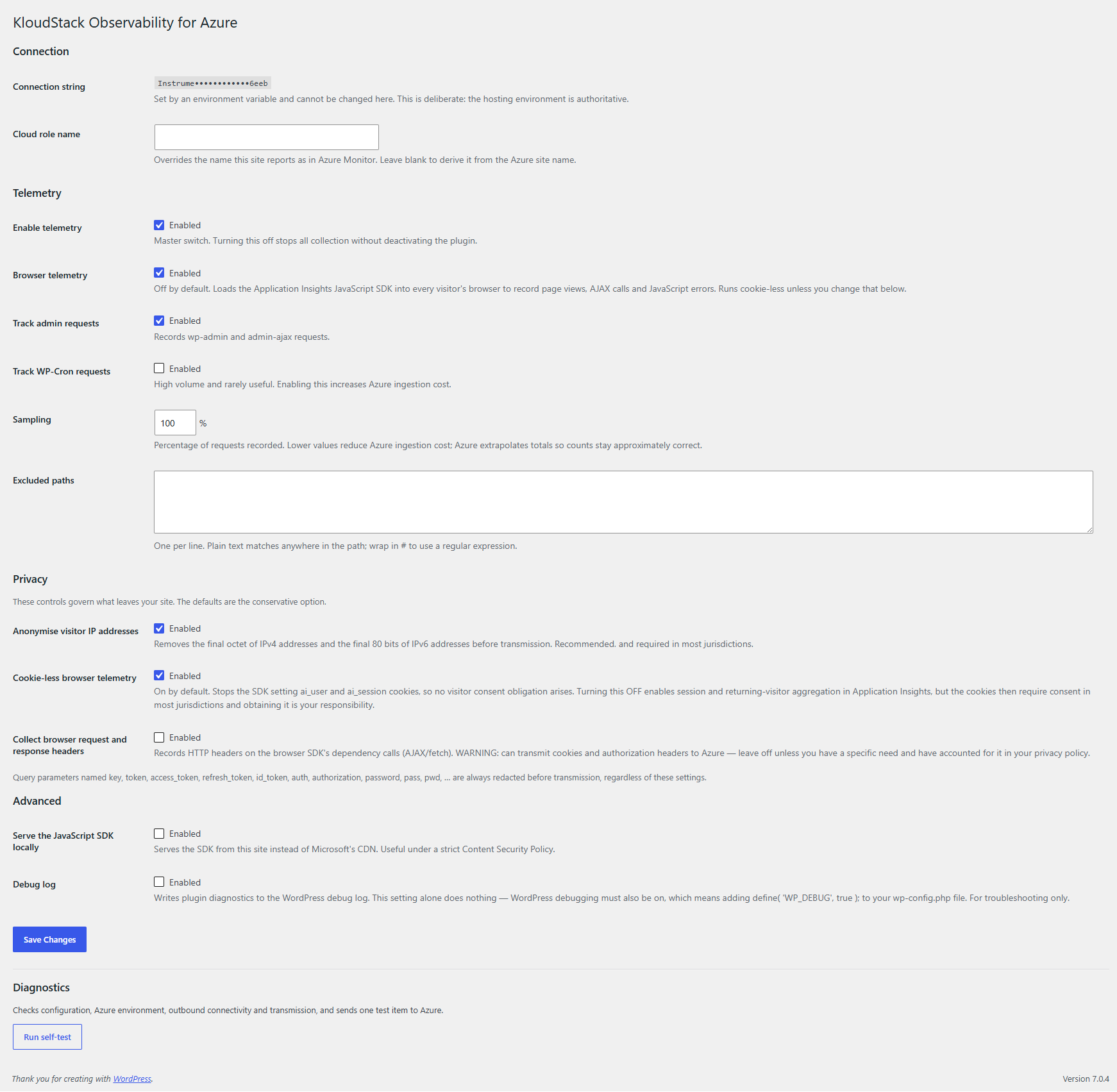
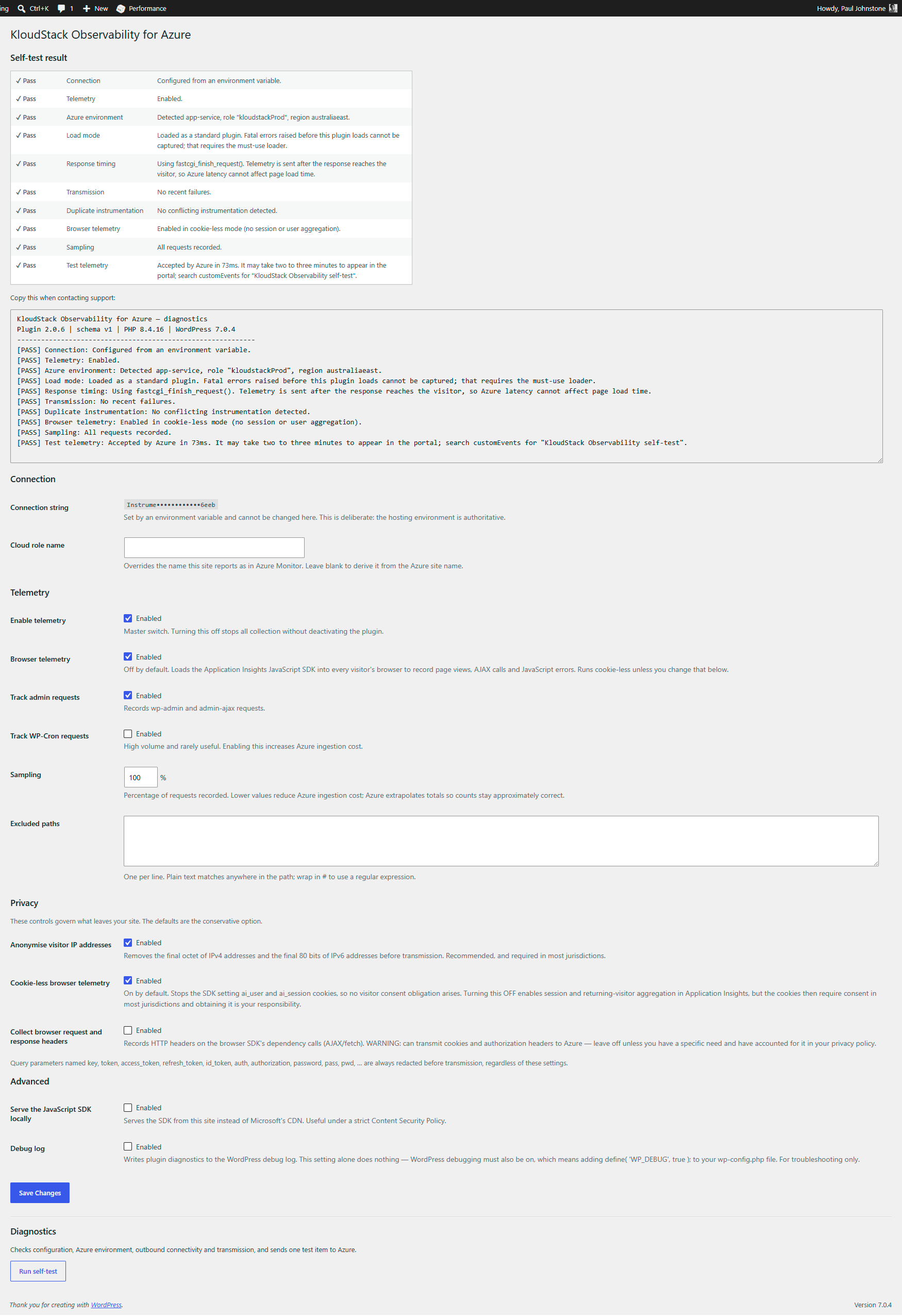
Screenshots
Für Entwickler
Ist das dein Plugin? Zeigen Sie die Zahlen.
Fügen Sie Ihrer Website, Docs oder GitHub Readme ein Live-Badge hinzu. Es wird von selbst aktualisiert - kein Konto erforderlich.
Best KloudStack Observability for… alternatives
All Application Insights plugins →Fragen und Antworten
KloudStack Observability for Azure: quick answers
Gerade Antworten, gezogen von Live WordPress.org Daten.
Quelle: WordPress.org
Is KloudStack Observability for Az… free?
Yes. KloudStack Observability for Az… is free to download and use from the official WordPress.org plugin directory.
Is KloudStack Observability for Az… safe to use in 2026?
KloudStack Observability for Az… is a solid plugin choice in 2026, with a few things worth checking first. It runs on 10+ sites and was last updated 2 months ago, and scores 62/100 on our health check.
How many websites use KloudStack Observability for Az…?
KloudStack Observability for Az… is active on 10+ WordPress websites and has been downloaded 540 times since it launched in August 2026. It was downloaded 130 times in the last 30 days.
Does KloudStack Observability for Az… work with WordPress 7.1?
Yes. The developer has tested KloudStack Observability for Az… up to WordPress 7.1.5, the latest release. It requires WordPress 6.0 or newer.
What PHP version does KloudStack Observability for Az… need?
KloudStack Observability for Az… requires PHP 7.4 or higher. Most hosts run PHP 8.x today, so it works on any modern WordPress hosting.
When was KloudStack Observability for Az… last updated?
The latest version, 2.0.10, was released on September 27, 2026 (2 months ago).
Who makes KloudStack Observability for Az…?
KloudStack Observability for Az… is developed and maintained by KloudStack.
What are the best alternatives to KloudStack Observability for Az…?
The most popular alternatives to KloudStack Observability for Az… are Application Insights (200+ installs), Application Insights Dashbo… (10+ installs) and Azure App Insights plugin (10+ installs).
Angetrieben von PageForge
Eine Vorlage und eine Tabelle. Eine echte Seite für jede Suche.
PageForge Verwandelt jede Zeile eines CSV in eine WordPress-Seite mit eigenem Titel, URL, SEO Felder und Schema entworfen. Kostenlos auf WordPress.org.
- CSV und XLSX, plus Google Sheets auf Beruf und Unternehmen
- seinen eigenen Titel, URL, SEO Felder und Schema für jede Seite
- Arbeitet mit dem Blockeditor, Elementor, Divi und Avada
- Kostenlos auf WordPress.org, keine Kreditkarte