


Kannada Comment
Let your fellow blog readers to write their comments in Kannada language.

Betrachten Sie eine Alternative
Kannada Comment shows warning signs in 2026 — compare the alternatives below before installing. It runs on 10+ sites, is rated 5/5 and was last updated 13 years ago, and scores 30/100 on our health check.
- Kleine Benutzerbasis (10+ aktive Installationen)
- Bisher sehr wenige Bewertungen
- No update in 13 years
- Only tested up to WordPress 3.6 (latest is 7.1)
Wie stapelt es sich?
Side-by-side bei Installationen, Updates, Bewertungen und Support


Tägliche Downloads
Download-Spitzen folgen normalerweise einer neuen Version - jede Website, die automatisch aktualisiert wird, gilt als Download.
Ranglisten
Where Kannada Comment stands todayWordPress.org Ranglisten suchen
Live-Position in der Plugin-Suche, Top 100| Stichwort | Position |
|---|---|
| Kommentar | >100 |
| google transliteration | #25 |
| Kannada | #49 |
| language | >100 |
| unicode | >100 |
Versionsübernahme
Anteil aktiver Sites pro Release.
Bewertungsaufschlüsselung
★★★★★★★★★★ 5 from 3 reviews
About Kannada Comment
Aus der offiziellen Readme · V2.2Beschreibung
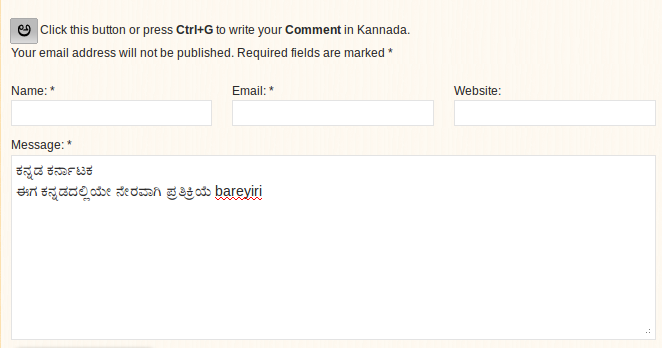
This plugin enables Google Transliteration in wordpress comment form. So your blog readers can leave comments in Kannada script without the need of any other input engines. This is a great step to encourage people to write comments in Kannada language in your Kannada blog. This plugin adds a transliteration controller at the top of comment form. You can change the place of Transliteration controller in plugin options page. Users can click on the transliterate switch or press Ctrl+G to toggle between English and Kannada input languages. Site admins can change default input language in WordPress Settings > Kannada Comment. You can see the live action of this plugin at vedasudhe.com.
Get in touch:
- Visit developer’s blog for news and updates.
- Follow my GitHub repositories for codes and goodies.
- Follow me on twitter!.
How can I get help?
Contact the developer using his contact form for help and support. Also, please leave him a message if you are interested in co-development of this plugin.
How to style the Transliterate controller?
Transliterate control switch is wrapped with kncomment div ID and description with kncomment-text class. Use them in your theme to style the controller.
Compatibility with themes
This plugin is tested and works well with default Twenty Eleven theme, Twenty Ten and Graphene themes. It will and should work with other themes as well. If you have any compatibility issues with the other themes, please leave the developer a message with all the information you have.
Installation
- Laden Sie den Ordner
kannada-commentin das/wp-content/plugins/-Verzeichnis hoch - Activate the Kannada Comment plugin through the ‘Plugins’ menu in WordPress
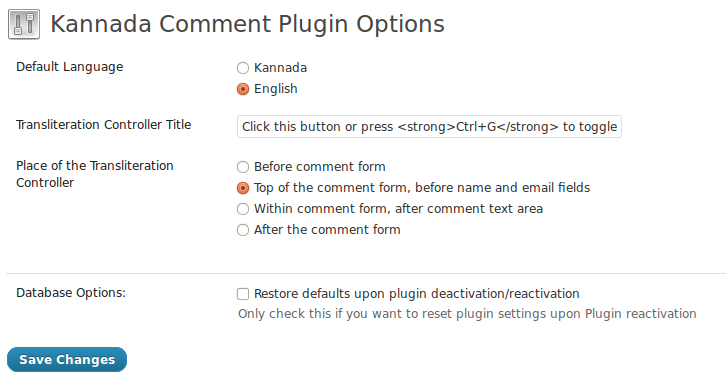
- Default input language will be Kannada. You can change default language on WP-Admin > Settings > Kannada Comment
- Transliterate controller will be automatically added at the top of wordpress comment form. You can change it’s place in plugin options
Änderungsprotokoll
This version requires WordPress version 3.5 or newer. If you're using an older version of WordPress, it is better to stick with Kannada Comment 2.1.
2.2
- Code optimizations. www.google.com/jsapi and kncm.js are now properly enqueued only on single posts/pages if the comments are opened.
- Moved inline JavaScript to kncm.js
- Using switch() instead of if .. elseif … else .. to show transliteration controller
2.1
- Fehlerbehebung
- The options stored in the database will be retained even after deactivating the plugin. This is to prevent the removal of plugin options upon plugin update/reactivation. If you want to clear the database entries upon plugin deactivation, select Restore defaults upon plugin deactivation/reactivation in plugin options.
2.0
- Added option to change the position of Transliteration Controller
- Added option to change the title of Transliteration Controller. You can now tell your blog readers how to use transliteration in Kannada script!
For devs,
Removed var Text_Area=document.getElementsByTagName("textarea")[0].id;. will be just using var ids = ["comment"]; to enable transliteration on comment form. Hope it doesn’t break on hard coded comment form!.
1.1
- Added an option to set default language.
If user has selected no default language, Kannada will be set as default language upon activation.
1.0
- Erste Veröffentlichung.
Screenshots

Für Entwickler
Ist das dein Plugin? Zeigen Sie die Zahlen.
Fügen Sie Ihrer Website, Docs oder GitHub Readme ein Live-Badge hinzu. Es wird von selbst aktualisiert - kein Konto erforderlich.
Best Kannada Comment alternatives
Alle Kommentar-Plugins →





Fragen und Antworten
Kannada Comment: quick answers
Gerade Antworten, gezogen von Live WordPress.org Daten.
Quelle: WordPress.org
Is Kannada Comment free?
Yes. Kannada Comment is free to download and use from the official WordPress.org plugin directory.
Is Kannada Comment safe to use in 2026?
Kannada Comment shows warning signs in 2026 — compare the alternatives below before installing. It runs on 10+ sites, is rated 5/5 and was last updated 13 years ago, and scores 30/100 on our health check.
How many websites use Kannada Comment?
Kannada Comment is active on 10+ WordPress websites and has been downloaded 3,202 times since it launched in June 2012. It was downloaded 41 times in the last 30 days.
Does Kannada Comment work with WordPress 7.1?
Kannada Comment is officially tested up to WordPress 3.6.1, while the latest release is 7.1.5. It may still work, but try it on a staging site first.
When was Kannada Comment last updated?
The latest version, 2.2, was released on July 27, 2013 (13 years ago).
Who makes Kannada Comment?
Kannada Comment is developed and maintained by Prasanna SP.
What are the best alternatives to Kannada Comment?
The most popular alternatives to Kannada Comment are Bulk Delete Comments (5K+ installs), DCO Comment Attachment (5K+ installs) and One Click Close Comments (5K+ installs).
Angetrieben von PageForge
Eine Vorlage und eine Tabelle. Eine echte Seite für jede Suche.
PageForge Verwandelt jede Zeile eines CSV in eine WordPress-Seite mit eigenem Titel, URL, SEO Felder und Schema entworfen. Kostenlos auf WordPress.org.
- CSV und XLSX, plus Google Sheets auf Beruf und Unternehmen
- seinen eigenen Titel, URL, SEO Felder und Schema für jede Seite
- Arbeitet mit dem Blockeditor, Elementor, Divi und Avada
- Kostenlos auf WordPress.org, keine Kreditkarte