


Module Control for Jetpack
Your Jetpack, Controlled.

Solide Wahl
Module Control for Jetpack is a solid plugin choice in 2026, with a few things worth checking first. It runs on 1K+ sites, is rated 4.8/5 and was last updated 2 months ago, and scores 77/100 on our health check.
- Getestet mit dem neuesten WordPress (7.1)
Tägliche Downloads
Download-Spitzen folgen normalerweise einer neuen Version - jede Website, die automatisch aktualisiert wird, gilt als Download.
Ranglisten
Where Module Control for Jetpack stands todayWordPress.org Ranglisten suchen
Live-Position in der Plugin-Suche, Top 100| Stichwort | Position |
|---|---|
| blacklist jetpack modules | #1 |
| jetpack | #9 |
| jetpack light | #2 |
| slim jetpack | #1 |
| unplug jetpack | #1 |
Versionsübernahme
Anteil aktiver Sites pro Release.
Bewertungsaufschlüsselung
★★★★★★★★★★ 4.8 from 11 reviews
About Module Control for Jetpack
From the official readme · v1.7.6Beschreibung
Jetpack adds powerful features, but sometimes we don’t want them all… This light-weigth but effective plugin brings additional control over Jetpack.
Merkmale
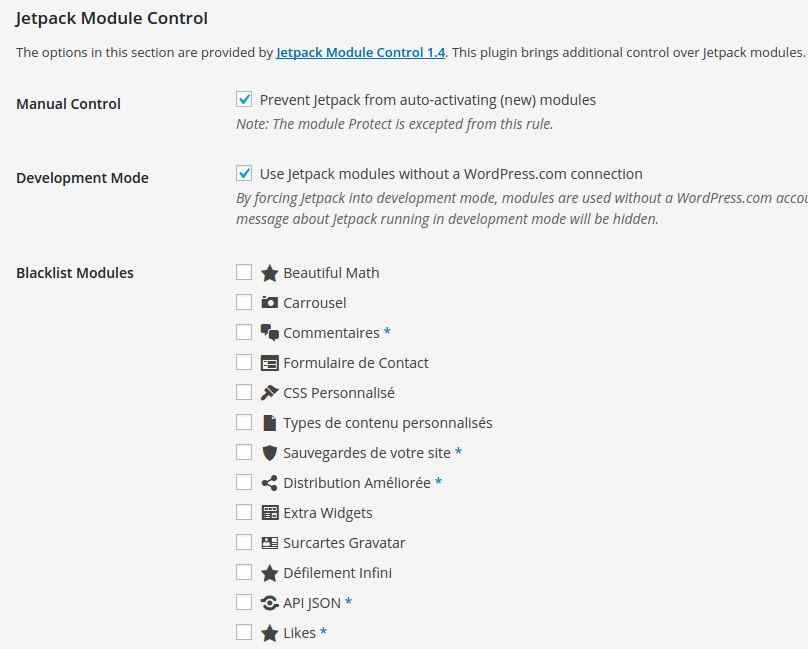
- Blacklist / disable Jetpack AI or any other Jetpack module.
- Optionally prevent module auto-activation on connection or after an upgrade.
- Optionally run Jetpack “unplugged”, in offline mode without a WordPress.com connection.
- Single site and Multisite compatible.
In most use cases, a carefully considered combination of Jetpack modules can be a really good thing. But not always is much consideration being done beforehand, impacting page speed or cause other issues.
Any one of Jetpack’s modules can bring overlapping or even conflicting functionality. In such cases, being able to prevent (accidental) activation is a good thing.
Beispiele
- Using Jetpack on a network? Then network incompatible WAF (Web Application Firewall) module should be blacklisted to prevent accidental activation!
- Do you already use a light box provided by your theme or another plugin? Then blacklist the Carousel module to prevent accidental activation.
- Or you’re running a Multisite and do not want any admins monitoring uptime with the Monitor module just to call you every time their site is briefly inaccessible?
- Offer your own backup service? Backlist VaultPress if you do not care for VaultPress competition.
- You’re running a school network and sites are managed by minors who are not allowed to sign up for an account at WordPress.com? Then use the Jetpack Offline Mode option to allow usage of modules that do not require a connection.
Single site and Multisite
Although the original idea arose on a multisite installation, Module Control for Jetpack is developed for both single and multisite installations.
On multisite, when network activated or activated on the main site, it allows global rules for Jetpack on all sites. You can also set it to allow per-site changes by site admins.
For single site installations, plugin settings can be locked down by adding define('JETPACK_MC_LOCKDOWN', true) to wp-config.php for complete security. This can be useful to prevent other admins being able to reactivate blacklisted modules.
Development
The project can be forked and or contributed to on Github.
All contributions — be it in the form of feature requests, bug reports, translations or code — are welcome!
Installation
- Install Module Control for Jetpack either via the WordPress.org plugin directory, or by uploading the files to your server.
- After activating the plugin, go to either Jetpack > Module Control (on single site) or Network Admin > Settings (on multisite) to find the new Module Control for Jetpack settings.
- Set your preferences for Sub-site override (on multisite), Manual Control, Offline Mode, select any module you wish to add to the Blacklist and Save Settings.
- If you are on a single site installation and you wish to prevent other admins from reactivating any blacklisted modules, add
define('JETPACK_MC_LOCKDOWN', true);to your wp-config.php to lock down settings. - That’s it.
Änderungsprotokoll
Bugfix and performance improvements.
1.7.6
Date: 20260923
* Improve option loading performance (Plugin::get_option)
* FIX: Call to undefined function is_plugin_active_for_network()
1.7.5
Date: 20260921
* Add AI and Podcasts to known modules
* Dedicated single site admin page
* NEW: Remove AI subpage when AI module disabled
1.7.4
Date: 20260525
* New known modules: WPcom Reader, Canonical URLs
* Disable AI when in offline mode
* Remove Newsletter submenu
* Small admin improvements
1.7.2
Date: 2025/06/25
* Remove Search and Social submenus when related module is blacklisted
* FIX: Manual control failing
1.7.1
Date: 2025/06/20
* FIX: Save empty blacklist as empty, not false (relevant for options cache)
* FIX: Allow autoload filter to return null
* Split up admin class
1.7
Date: 2025/06/16
* Updated fallback and icons list
* Namespace and autloading
* Coding standards
* Network settings nonce verification
* NEW: filter jmc_get_available_modules
* FIX: jetpack_offline_mode filter added too late, thanks @jqz
Screenshots
Für Entwickler
Ist das dein Plugin? Zeigen Sie die Zahlen.
Fügen Sie Ihrer Website, Docs oder GitHub Readme ein Live-Badge hinzu. Es wird von selbst aktualisiert - kein Konto erforderlich.
Fragen und Antworten
Module Control for Jetpack: quick answers
Gerade Antworten, gezogen von Live WordPress.org Daten.
Quelle: WordPress.org
Is Module Control for Jetpack free?
Yes. Module Control for Jetpack is free to download and use from the official WordPress.org plugin directory.
Is Module Control for Jetpack safe to use in 2026?
Module Control for Jetpack is a solid plugin choice in 2026, with a few things worth checking first. It runs on 1K+ sites, is rated 4.8/5 and was last updated 2 months ago, and scores 77/100 on our health check.
How many websites use Module Control for Jetpack?
Module Control for Jetpack is active on 1K+ WordPress websites and has been downloaded 57,555 times since it launched in May 2015. It was downloaded 800 times in the last 30 days.
Does Module Control for Jetpack work with WordPress 7.1?
Yes. The developer has tested Module Control for Jetpack up to WordPress 7.1.5, the latest release. It requires WordPress 4.6 or newer.
When was Module Control for Jetpack last updated?
The latest version, 1.7.6, was released on September 23, 2026 (2 months ago).
Who makes Module Control for Jetpack?
Module Control for Jetpack is developed and maintained by Rolf Allard van Hagen.
Angetrieben von PageForge
Eine Vorlage und eine Tabelle. Eine echte Seite für jede Suche.
PageForge Verwandelt jede Zeile eines CSV in eine WordPress-Seite mit eigenem Titel, URL, SEO Felder und Schema entworfen. Kostenlos auf WordPress.org.
- CSV und XLSX, plus Google Sheets auf Beruf und Unternehmen
- seinen eigenen Titel, URL, SEO Felder und Schema für jede Seite
- Arbeitet mit dem Blockeditor, Elementor, Divi und Avada
- Kostenlos auf WordPress.org, keine Kreditkarte