


Iris AI – AI Homepage, Chatbot & Site Assistant
Transform your WordPress site with AI-powered chat. Full-page interface or floating widget. Vector search with citations.

Solide Wahl
Iris AI is a solid plugin choice in 2026, with a few things worth checking first. It runs on 40+ sites, is rated 5/5 and was last updated 2 weeks ago, and scores 74/100 on our health check.
- Aktiv entwickelt — letztes Update vor 2 Wochen
- Getestet mit dem neuesten WordPress (7.1)
- Kleine Benutzerbasis (40+ aktive Installationen)
- Bisher sehr wenige Bewertungen
Wie stapelt es sich?
Side-by-side bei Installationen, Updates, Bewertungen und Support


Tägliche Downloads
Download-Spitzen folgen normalerweise einer neuen Version - jede Website, die automatisch aktualisiert wird, gilt als Download.
Ranglisten
Where Iris AI stands todayWordPress.org Ranglisten suchen
Live-Position in der Plugin-Suche, Top 100| Stichwort | Position |
|---|---|
| Ai | >100 |
| assistant | #89 |
| chatbot | #99 |
| gpt | #68 |
| openai | >100 |
Versionsübernahme
Anteil aktiver Sites pro Release.
Bewertungsaufschlüsselung
★★★★★★★★★★ 5 from 1 reviews
About Iris AI
From the official readme · v3.2.0Beschreibung
IrisAI brings powerful AI chat capabilities to your WordPress site with semantic vector search (RAG) and source citations. Choose between two flexible connection modes and deploy with either a beautiful full-page chat interface or a convenient floating widget.
Watch the full setup & demo video:
Hauptmerkmale
- Dual Interface Options – Full-page chat with hero section and wave animations, or floating chat widget with customizable positioning
- Vector Search (RAG) – Semantic search of your content using embeddings with automatic source citations
- Flexible Connection Modes – Proxy Mode (IrisAI hosted service) or BYO Mode (bring your own OpenAI API key)
- Complete Customization – Custom system prompts, configurable AI models, adjustable token limits, brand colors
- Privacy & Security – API keys never exposed to frontend, all requests server-side, GDPR compliance features
- Features – Multi-site support, chat history, auto-inject widget, rate limiting protection
Perfekt für
- Customer support automation
- Website FAQs and knowledge base
- E-commerce product assistance
- Educational content interaction
- Documentation search
- Internal company wikis
Wie es funktioniert
- Connect – Choose Proxy or BYO mode and enter credentials
- Index – Select content types and start vector indexing
- Deploy – Add shortcode or enable auto-inject widget
- Customize – Adjust colors, prompts, and behavior to match your brand
Privacy First
IrisAI respects user privacy and data protection. Keys stored securely in WordPress database, server-side API calls only, optional privacy mode disables query logging, user consent checkbox for AI processing, and GDPR-ready features included.
Dokumentation
Complete setup guide and documentation available in the plugin’s Usage tab. Get step-by-step instructions, troubleshooting tips, and best practices.
Frontend Dependencies
This plugin includes the following open-source libraries:
- sine-waves.min.js – MIT License – Wave animation effects (https://github.com/isuttell/sine-waves)
- three.min.js – MIT License – 3D graphics library (https://github.com/mrdoob/three.js)
Externe Dienste
This plugin connects to external APIs to provide AI-powered chat responses and semantic (vector-based) search functionality.
The plugin may communicate with the following third-party services, depending on how it is configured by the site administrator.
IrisAI Proxy Service (api.irisai.cloud)
When using Proxy Mode, this plugin sends requests to the IrisAI proxy service to process AI chat queries and vector search requests.
What the service is used for
• AI chat responses
• Semantic (vector-based) search over your site content
• Usage tracking, rate limiting, and billing management
What data is sent
• User chat messages
• Relevant indexed site content (for vector search)
• Website domain (for license verification)
• API authentication token
When data is sent
• When a user submits a chat query
• When content is indexed for vector search
Service provider
IrisAI
Website: https://irisai.cloud
Terms of Service
https://irisai.cloud/terms
Privacy Policy
https://irisai.cloud/privacy
OpenAI API (api.openai.com)
When using BYO (Bring Your Own API Key) Mode, or when the IrisAI proxy forwards requests, this plugin communicates directly or indirectly with OpenAI’s API.
What the service is used for
• Generating AI-powered chat responses
• Processing embeddings for semantic search
What data is sent
• User chat messages
• Relevant indexed site content (for vector search)
When data is sent
• When a user submits a chat query
• When content is indexed for semantic search
Service provider
OpenAI, L.L.C.
Website: https://openai.com
Terms of Service
https://openai.com/terms
Privacy Policy
https://openai.com/privacy
Anthropic Claude API (api.anthropic.com)
When administrators configure BYO mode with an Anthropic Claude API key, the plugin communicates with Anthropic’s API for chat completions and embeddings (when supported).
What the service is used for
• Generating AI-powered chat responses via Claude
• Processing semantic search/embedding data (where available)
What data is sent
• User chat messages
• Relevant indexed site content (for vector search)
When data is sent
• When a user submits a chat query
• When content is indexed for semantic search
Service provider
Anthropic PBC
Website: https://www.anthropic.com
Terms of Service
https://www.anthropic.com/legal/terms-of-service
Privacy Policy
https://www.anthropic.com/legal/privacy
Google Gemini API (generativelanguage.googleapis.com)
When administrators configure BYO mode with a Google Gemini API key (via Google AI Studio / Vertex AI), the plugin calls Google’s Generative Language API for chat completions or embeddings.
What the service is used for
• Generating AI-powered chat responses via Gemini
• Processing embeddings for semantic/Knowledge Index search
What data is sent
• User chat messages
• Relevant indexed site content (for vector search)
When data is sent
• When a user submits a chat query
• When content is indexed for semantic search
Service provider
Google LLC
Website: https://ai.google.dev
Terms of Service
https://ai.google.dev/terms
Privacy Policy
https://policies.google.com/privacy
Usage Examples
Shortcodes
Full-Page Chat:
[irisai_chat]
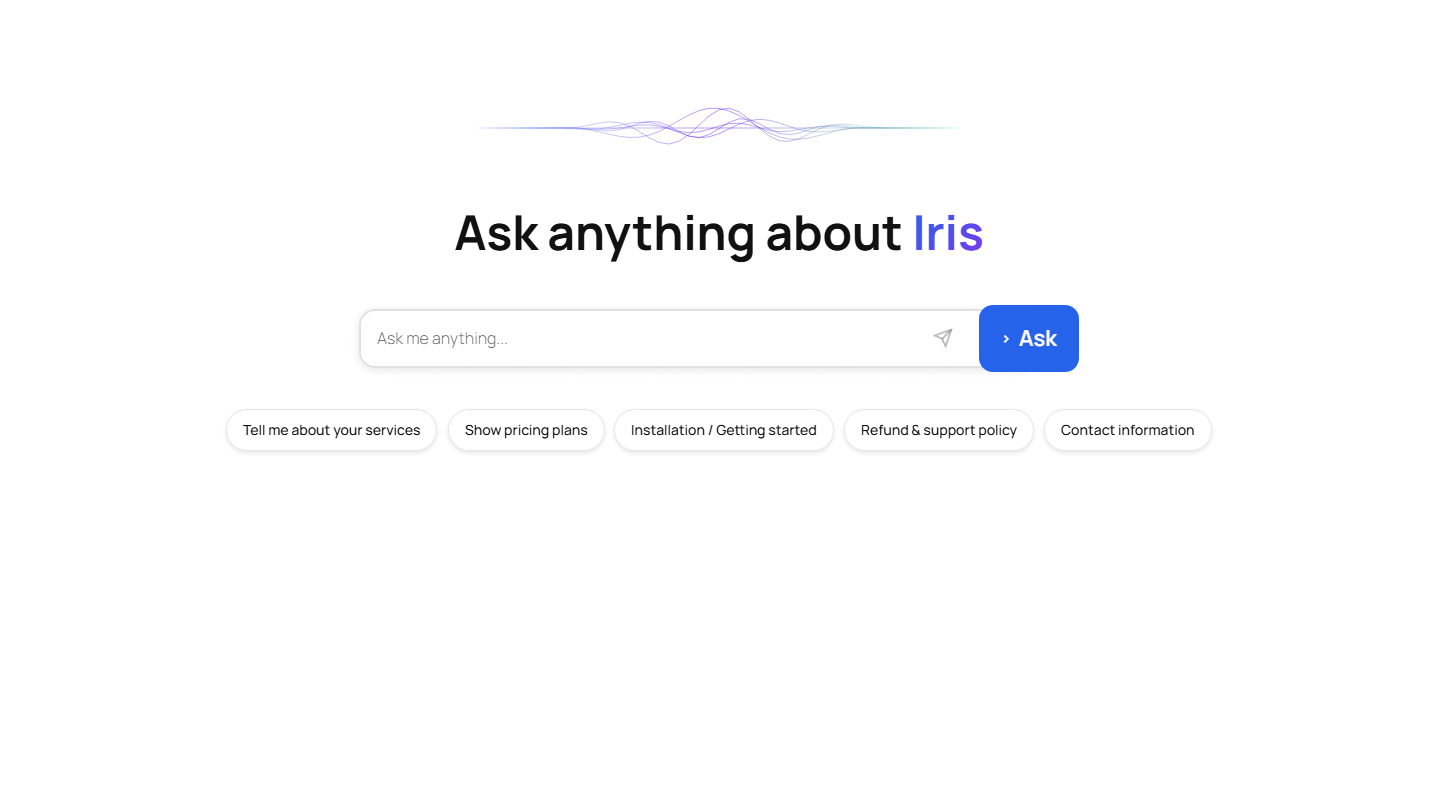
Creates a beautiful full-page AI chat interface with hero section, animated wave background, large search input, suggestion chips, real-time AI responses, and source citations.
Floating Widget:
[irisai_widget]
[irisai_widget position="bottom-right"]
[irisai_widget position="bottom-left"]
[irisai_widget position="top-right"]
[irisai_widget position="top-left"]
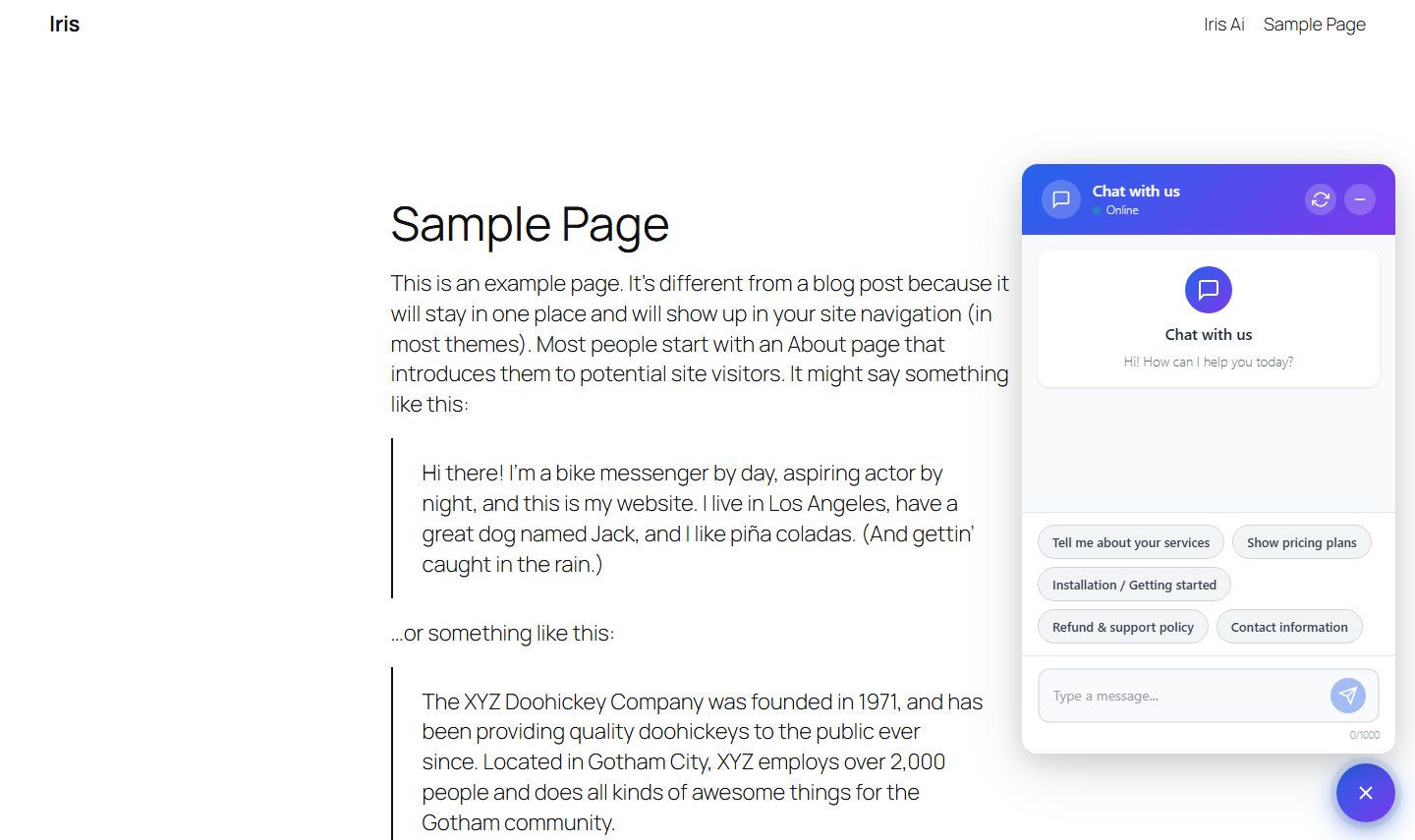
Creates a floating chat button that opens a popup window with compact chat interface, persistent chat history, and mobile-friendly fullscreen.
Knowledge Index Setup
- Go to Settings > IrisAI > Knowledge Index
- Select content types to index (Posts, Pages, Custom Post Types)
- Configure chunk size (200-2000 characters, default: 900)
- Configure chunk overlap (0-500 characters, default: 150)
- Click “Start Indexing” to begin background processing
- Enable “Auto Re-index” to automatically update on content changes
System Prompt Customization
Customize the AI’s behavior with system prompts using available variables:
{site}– Your website URL{lang}– User language preference
Example customizations by business type:
- E-commerce: “Always mention our 30-day return policy when asked about returns”
- Service Business: “For pricing questions, invite users to schedule a consultation”
- Restaurant: “For reservations, direct users to call (555) 123-4567”
Best Practices
For best results:
- Use full-width page template for [irisai_chat]
- Index your most important content first
- Add 5-8 relevant prompt suggestions
- Keep system prompt clear and concise
- Test on mobile devices before launch
- Enable privacy mode if handling sensitive data
Recommended setup:
- Use [irisai_chat] on dedicated page: “AI Assistant” or “Ask AI”
- Enable auto-inject widget for site-wide access
- This gives users both a destination and quick access
Token recommendations:
- 800-1000 tokens: Normal chat (balanced responses)
- 1500-2000 tokens: Developer mode or detailed explanations
- 3000-6000 tokens: Long-form content or article generation
Störungssuche
Chat not working?
- Verify API credentials in General tab
- Check domain is registered in proxy dashboard (Proxy Mode)
- Ensure sufficient credits (Proxy Mode)
- Confirm content is indexed (Knowledge Index tab)
- Check browser console for JavaScript errors
- Enable WP_DEBUG in wp-config.php for detailed logs
Vector search not finding content?
- Confirm indexing completed successfully
- Check selected content types are correct
- Try re-indexing content
- Clear Knowledge Index cache (General tab)
- Verify chunk size isn’t too large or small
Widget not appearing?
- Check auto-inject is enabled (Widget tab)
- Verify no JavaScript conflicts
- Clear browser and WordPress cache
- Check theme compatibility
- Try manual shortcode placement
Datenschutzerklärung
IrisAI is designed with privacy in mind:
- API Keys: Stored securely in WordPress database, never exposed to frontend
- Chat Queries: Optional logging (disabled in privacy mode)
- Chat History: Stored in user’s browser localStorage (client-side only)
- Vector Data: Your content chunks stored in WordPress database for search
- Usage Stats: Available only in Proxy Mode dashboard (irisai.cloud)
What data is sent to third parties:
- OpenAI: User queries and relevant content chunks (when BYO or Proxy mode is used)
- IrisAI Proxy: Only in Proxy Mode – queries, API authentication, usage tracking
- No other third parties receive data
User rights:
- Users can clear their chat history via “New Chat” button
- Site owners can disable query logging (Privacy Mode)
- Complete data removal via clean uninstall option
Recommendations:
If you use IrisAI on your site, we recommend adding AI data processing to your privacy policy, implementing user consent (checkbox available in Advanced settings), enabling privacy mode for GDPR compliance if needed, and informing users their questions are processed by AI.
Uninstall
When you delete IrisAI via the Plugins screen, you can optionally remove all plugin data including settings, Knowledge Index data, cached search results, and database tables.
To perform clean uninstall:
- Go to Settings > IrisAI > Advanced tab
- Enable “Remove data on uninstall” option
- Save changes
- Deactivate the plugin
- Delete the plugin from Plugins screen
- All data will be removed automatically
Credits
This plugin incorporates the following third-party library:
*Smalot PDF Parser**: Used for parsing and extracting text from PDF files. This library is developed by Smalot and distributed under the MIT License. For more details, visit the Smalot PDF Parser GitHub repository.
- sine-waves by Isaac Suttell
- three.js by three.js authors
- Plugin by IrisAI Team
- Website: https://irisai.cloud
Installation
Automatische Installation
- Log in to your WordPress admin panel
- Go to Plugins > Add New
- Search for “IrisAI”
- Click “Install Now” then “Activate”
- Go to Settings > IrisAI to configure
Manuelle Installation
- Download the plugin ZIP file
- Go to Plugins > Add New > Upload Plugin
- Choose the ZIP file and click “Install Now”
- Aktivieren Sie das Plugin
- Go to Settings > IrisAI to configure
Quick Start Configuration
For Proxy Mode:
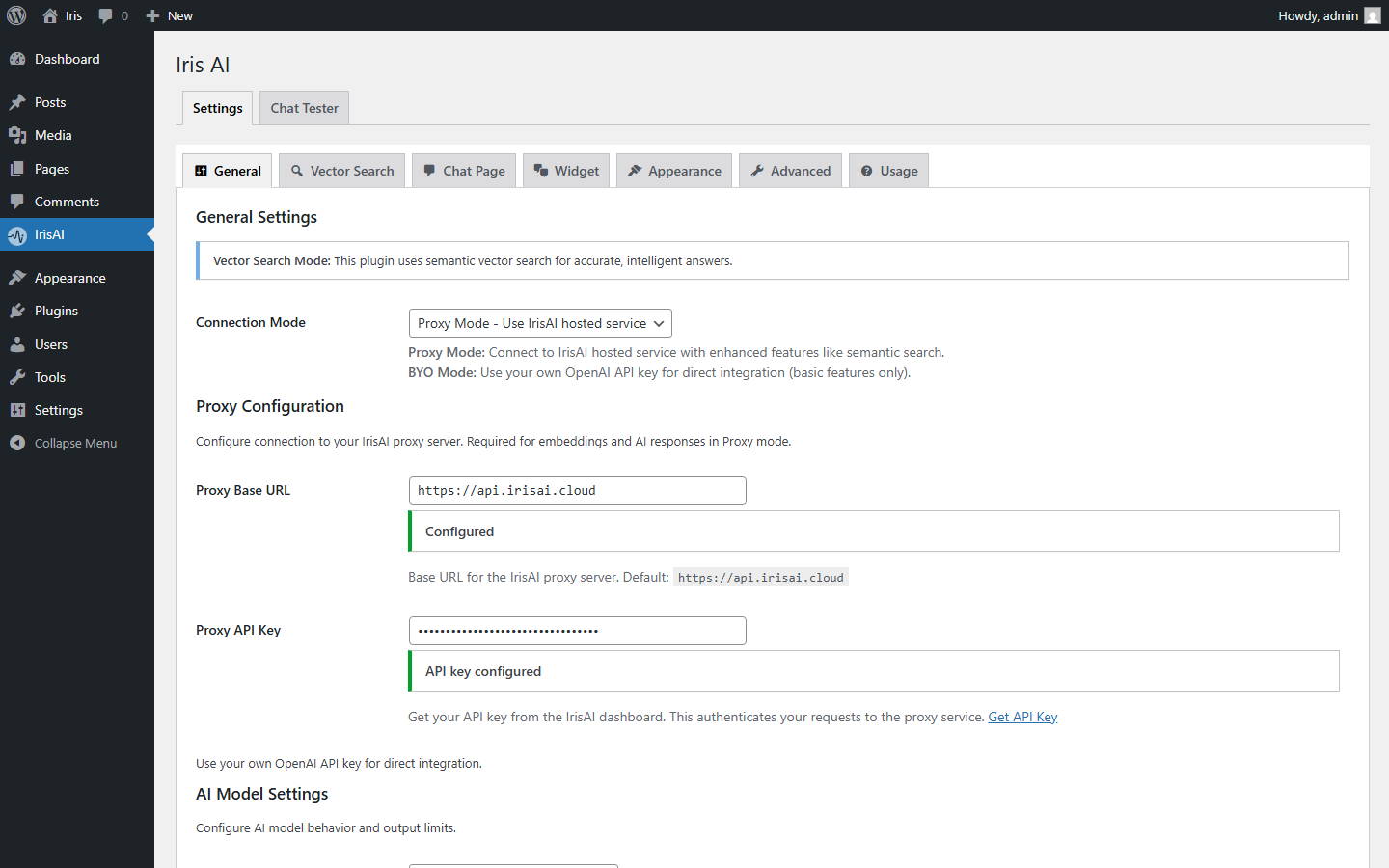
- Go to Settings > IrisAI > General tab
- Select “Proxy Mode”
- Enter Proxy Base URL:
https://api.irisai.cloud - Enter your Proxy API Key (from irisai.cloud dashboard)
- Select AI model (GPT-5.6 Terra recommended)
- Click “Save Changes”
For BYO Mode:
- Go to Settings > IrisAI > General tab
- Select “BYO Mode”
- Enter your OpenAI API key
- Enter model name (e.g.,
gpt-6.1-terra) - Click “Save Changes”
Index Your Content:
- Go to Knowledge Index tab
- Select content types to index (Posts, Pages, etc.)
- Click “Start Indexing”
- Wait for completion (background process)
Deploy Chat Interface:
Option A – Full Page:
- Create a new page (e.g., “AI Assistant”)
- Add shortcode:
[irisai_chat] - Use a full-width template for best results
- Publish and add to navigation
Option B – Floating Widget:
- Go to Widget tab
- Enable “Auto-inject Widget”
- Choose position (bottom-right, etc.)
- Save Changes
Or manually add [irisai_widget] to any page
Änderungsprotokoll
Adds the Phase 1 indexing foundation plus public-endpoint security hardening: index-health reporting, changed-content indexing, persistent job recovery controls, retries, trusted-proxy handling, bounded public writes, and non-public vector-result filtering. Run one full index after upgrading to establish freshness metadata for existing content.
3.2.0
Neu
- Added an index-health dashboard showing current, stale, unindexed, and orphaned content with an overall freshness score.
- Added incremental indexing that embeds only new or modified posts, alongside the existing full-index workflow.
- Incremental indexing also detects changed manual imports and PDFs using stable source checksums.
- Added persistent indexing job controls: pause, resume, cancel, and retry.
- Added automatic retry with exponential backoff for temporary embedding, provider, and storage failures.
- Added active-job restoration when the Knowledge Index screen is reopened.
Improved
- Index jobs now expose explicit queued, running, paused, retrying, completed, failed, and cancelled states.
- Concurrent indexing starts reconnect to the active job instead of creating competing workers.
- Action Scheduler is used as the persistent queue when available, with WP-Cron retained as a compatible fallback.
- Auto-indexed posts now record freshness metadata used by incremental indexing and health reporting.
- Recent indexing jobs are shown in the health panel and completed job records are automatically retained for 30 days.
- New queue and health controls are fully localizable through the plugin text domain.
- Fixed multisite workers switching blog context using the vector site hash instead of the numeric blog ID.
- Clearing or deleting vector content now also resets its freshness metadata.
Sicherheit
- Added rate limiting and payload validation to public feedback, saved-chat, and lead-capture endpoints.
- Forwarded client-IP headers are now accepted only from explicitly trusted reverse proxies, preventing header spoofing from bypassing request limits. Proxy addresses can be supplied with the
irisai_trusted_proxy_ipsfilter. - Anonymous requests can no longer force regeneration of cached summaries or author profiles.
- Public semantic-search results now exclude draft, private, deleted, and password-protected posts, including stale vector-index matches.
- Helpful votes are limited to one vote per post, IP, and UTC day; existing duplicate rows are safely consolidated during the schema upgrade.
Improved
- Saved transcripts are required to be structured arrays, recursively sanitized, and capped at 100 KB.
- Public data-writing endpoints now report database failures instead of returning false success responses.
- Lead, feedback-note, URL, and saved-chat title lengths are constrained to their storage limits.
3.1.0
Neu
- Instant Connect — “Start Free with IrisAI” connects your site to the hosted IrisAI service in one click from Settings or the setup wizard. Account, API key and free trial credits are provisioned automatically; no signup or copy-pasting keys.
- New Account tab showing your plan, remaining credits, Site ID, connected-since date, lifetime usage totals (requests, tokens, credits) and your most recent usage records.
- Editable account details (site name, admin email, owner email) that sync back to your IrisAI account.
- One-click “Buy credits / Manage billing” button that opens the IrisAI billing portal through a secure one-time login link, plus a Disconnect button that clears stored credentials.
- New Search Eval page — run a saved list of test questions against retrieval only (no AI calls) to see the top match, similarity score, keyword boost, final score and whether the assistant would answer or decline.
- Retrieval diagnostics in the admin chat debug panel: how many chunks cleared the similarity floor, the answerable decision, the top three matches with scores, and how much context was sent to the model.
- Chat placement choice in the setup wizard — floating widget site-wide, or manual shortcode placement.
Improved
- Setup wizard reduced from six steps to two (Connect → Index) with a new visual theme and step indicator; content-type selection and completion are folded into the indexing step with per-type item counts.
- Content is now chunked at heading boundaries instead of as one flat stream, with each chunk’s heading trail embedded alongside its text — far fewer mixed-topic chunks, better matches on mid-page passages, and fewer embedding calls.
- Retrieval now runs a semantic branch alongside the keyword prefilter, so paraphrases and synonyms (“staff” vs “our team”) can match a page that never uses the query’s exact words.
- New answerable gate — when nothing retrieved is strong enough, the assistant says it doesn’t have those details and points to your contact page instead of answering from general knowledge. Sources are no longer attached to “I don’t know” replies.
- Similarity thresholds raised and made filterable via
irisai_similarity_thresholdsandirisai_is_answerable. - Citations now list only the passages actually shown to the model.
- Default system prompt tightened: never state prices, dates, names, phone numbers, emails or addresses that aren’t in your site content, and reply in the visitor’s language.
- Larger context budget for GPT-5 models plus new model-family fallbacks, and token estimation that adapts to CJK, Cyrillic and Arabic text.
- Lower reasoning effort for site Q&A, cutting visitor wait time.
- Much lower memory use during chat on large sites — vector search now scores results in bounded pages instead of loading everything at once.
- Search-result cache key now includes the model, system prompt and index version, so changing the prompt, switching models, re-indexing or deleting a post retires stale answers immediately.
- Rate limiting extended beyond chat to the summarize, public search, reading path, author voice, quiz, fact-check, compare, translate and explain endpoints.
- The floating chat widget now defaults to on, matching what the setup wizard offers.
- BYO provider switching now updates the API Base URL to the new provider’s endpoint, and the Proxy Base URL field shows its default as a placeholder instead of appearing pre-configured.
Fixed
- Fixed chat failing with “Model not found” after OpenAI retired GPT-5.1. The model list is updated to the current OpenAI, Anthropic and Google line-ups, and sites saved on a retired model are moved to the closest current equivalent automatically — same provider, similar cost and speed.
- Fixed chat failing with a 502 on Claude Sonnet 5 and Opus 5, which reject the
temperatureparameter Anthropic has deprecated on those models. It is no longer sent to them; every other model keeps it. - Claude models that support it now run at low effort in BYO mode, which Anthropic recommends for chat — faster replies at lower cost than the default.
- Fixed the reasoning-effort hint being sent in the wrong shape to OpenAI in BYO mode, and being applied to only one model instead of the whole GPT-5 family.
- Fixed the context-window hint being pinned at 4096 tokens, below the amount of content actually being sent, which could silently truncate retrieved context.
- Fixed embeddings being stored against the wrong chunks — a single missing vector previously shifted every later embedding by one position.
- Fixed re-indexing never removing content, so a page that shrank kept stale, permanently retrievable chunks.
- Fixed deleting a post not removing its indexed chunks.
- Fixed only one passage per page ever reaching the model, and fixed the heading trail never being passed through.
- Fixed contact details being mangled in context — boilerplate stripping no longer chops text out of the middle of lines.
- Fixed page descriptions and keywords being copied onto every chunk of a post.
- Fixed blank replies on GPT-5 models, where reasoning tokens consumed the visible answer budget.
- Fixed chunking looping indefinitely when the chunk-size option was left blank.
- Fixed indexing reporting success when embeddings had actually failed, and fixed a repeated dimension-mismatch warning that wrote thousands of log lines per chat message.
- Fixed the import worker stalling and re-reading the same chunks when some had no embedding.
- Fixed anonymous access to draft, private and password-protected content through the quiz, translate, explain, related and summarize endpoints, and capped prompt input length on the fact-check, translate and explain endpoints.
- Fixed a missing nonce check and unescaped error output in the setup wizard, a redirect loop caused by a wrong page slug, and content-type cards toggling twice per click.
- Fixed saving an empty content-type list, which left nothing to index.
- Fixed the “Copy shortcode” button destroying its own icon.
- Fixed sites that were already using a manually entered Proxy API Key being shown as “not connected” and invited to click “Start Free with IrisAI”. They now show a “Manually configured” confirmation, and connecting anyway asks first, since it replaces the saved key.
- Fixed the Account tab reporting “Not connected” on working sites. Sites using a manually entered API key now see their real plan, credits and usage; BYO sites see figures qualified to the proxy-billed features the key actually covers.
- Your API key is only ever used to look up account data when your Proxy Base URL points at IrisAI. Point it at a self-hosted or third-party endpoint and the key stays with that endpoint, with the Account tab explaining why the lookup is unavailable.
- Fixed saving the settings page overwriting a freshly connected credential with the key the page happened to be rendered with — credential fields are now fingerprinted at render time so an untouched field can’t replay a stale value.
- Fixed Disconnect leaving the mirrored API key behind, which made a disconnected site look manually configured and kept a revoked credential in the database.
- Fixed API keys containing &, “, < or > being saved back double-escaped and corrupted.
- Fixed PDF/OCR indexing reporting chunk counts that included chunks never actually stored.
Note: This release requires PHP 8.0 or later, and a full re-index is recommended after upgrading because chunking and scoring have changed.
3.0.4
- Added the shared model-call layer used by Theme Kit features in both Proxy and BYO modes.
- Added configurable task prompts for summaries, reading paths, author voice, contact polishing, service briefs, and team voice.
- Added REST endpoints for post summaries, semantic search, curated reading paths, and author voice.
- Added editor-only tools for article outlines, rephrasing, attachment alt text, SEO metadata, and schema suggestions.
- Added Iris block-theme endpoints for helpful feedback, saved chats, smart subscribe, quizzes, fact checks, comparisons, translation, explanations, related posts, personalized picks, and smart 404 suggestions.
- Added database setup for saved chats, helpful feedback, and smart-subscribe leads.
- Preserved the stable 3.0.3 settings experience without adding experimental admin tabs or changing the existing chat workflow.
3.0.3
*Companion support for the upcoming Iris Theme Kit — auto-detects the theme and exposes shared hooks so the full-page chat and floating widget integrate cleanly with its Elementor widgets and hero blocks.
3.0.2
- Fix: chat-history table now auto-creates after upgrading existing installs, so admin chat logs work without re-activation.
- Fix: uninstall routine removes the
irisai_chat_historytable together with other plugin data. - Tweak: Knowledge Index naming and warnings updated across the UI for a more consistent setup experience.
3.0.0
- Added support for additional AI models, including more ChatGPT options and models from Anthropic (Claude) and Google Gemini
- PDF indexing support, enabling AI-powered search over uploaded documents
- New Knowledge Index tab with an in-dashboard knowledge base view, document stats, and indexing controls
- Added chat history storage plus an admin chat-history tab with filters, pagination, and a conversation viewer
- Added admin debug mode: logged-in admins can enable a debug panel in the chat widget showing request details, response times, and error info
- Performance and speed improvements for faster AI responses
Screenshots
Für Entwickler
Ist das dein Plugin? Zeigen Sie die Zahlen.
Fügen Sie Ihrer Website, Docs oder GitHub Readme ein Live-Badge hinzu. Es wird von selbst aktualisiert - kein Konto erforderlich.
Best Iris AI alternatives
Alle AI-Plugins →





Fragen und Antworten
Iris AI: quick answers
Gerade Antworten, gezogen von Live WordPress.org Daten.
Quelle: WordPress.org
Is Iris AI free?
Yes. Iris AI is free to download and use from the official WordPress.org plugin directory.
Is Iris AI safe to use in 2026?
Iris AI is a solid plugin choice in 2026, with a few things worth checking first. It runs on 40+ sites, is rated 5/5 and was last updated 2 weeks ago, and scores 74/100 on our health check.
How many websites use Iris AI?
Iris AI is active on 40+ WordPress websites and has been downloaded 4,404 times since it launched in December 2025. It was downloaded 757 times in the last 30 days.
Does Iris AI work with WordPress 7.1?
Yes. The developer has tested Iris AI up to WordPress 7.1.5, the latest release. It requires WordPress 5.0 or newer.
What PHP version does Iris AI need?
Iris AI requires PHP 7.4 or higher. Most hosts run PHP 8.x today, so it works on any modern WordPress hosting.
When was Iris AI last updated?
The latest version, 3.2.0, was released on November 19, 2026 (2 weeks ago).
Who makes Iris AI?
Iris AI is developed and maintained by Arun Benchamin.
What are the best alternatives to Iris AI?
The most popular alternatives to Iris AI are Elementor Agent Ready Websi… (10M+ installs), Jetpack (3M+ installs) and All in One SEO (2M+ installs).
Angetrieben von PageForge
Eine Vorlage und eine Tabelle. Eine echte Seite für jede Suche.
PageForge Verwandelt jede Zeile eines CSV in eine WordPress-Seite mit eigenem Titel, URL, SEO Felder und Schema entworfen. Kostenlos auf WordPress.org.
- CSV und XLSX, plus Google Sheets auf Beruf und Unternehmen
- seinen eigenen Titel, URL, SEO Felder und Schema für jede Seite
- Arbeitet mit dem Blockeditor, Elementor, Divi und Avada
- Kostenlos auf WordPress.org, keine Kreditkarte