


ThumbPress – Compress Images, Manage Thumbnails, Detect Image Issues, WebP/AVIF, Lazy Loading, Hotlinking & More
All-in-one WordPress image optimization: disable thumbnails, compress, convert to WebP & AVIF, clean your media library, and offload images to a CDN.

Sichere Auswahl
Yes — ThumbPress is a safe, well-maintained plugin to use in 2026. It runs on 20K+ sites, is rated 3.7/5 and was last updated 3 days ago, and scores 88/100 on our health check.
- Bewährt auf 20.000 aktiven Standorten
- Aktiv entwickelt – letztes Update vor 3 Tagen
- Getestet mit dem neuesten WordPress (7.1)
- Momentum — downloads up 32.4% vs the previous 30 days
Wie stapelt es sich?
Side-by-side bei Installationen, Updates, Bewertungen und Support



Tägliche Downloads
Download-Spitzen folgen normalerweise einer neuen Version - jede Website, die automatisch aktualisiert wird, gilt als Download.
Ranglisten
Where ThumbPress stands todayWordPress.org Ranglisten suchen
Live-Position in der Plugin-Suche, Top 100| Stichwort | Position |
|---|---|
| compress images | #10 |
| Image CDN | #9 |
| image optimization | #30 |
| thumbnail manager | #11 |
| webp converter | #15 |
Versionsübernahme
Anteil aktiver Sites pro Release.
Bewertungsaufschlüsselung
★★★★★★★★★★ 3.7 from 123 reviews
About ThumbPress
From the official readme · v6.11.0Beschreibung
🚀 Pro Version | 🔵 Facebook | 🐦 X | 👥 LinkedIn
WordPress image management is a mess. And most site owners don’t even know it.
Here’s what’s quietly happening on your site right now:
- Each upload creates 7+ thumbnails. Themes and plugins add more. Most stay unused and waste storage.
- Many images are still JPG or PNG. They’re heavier, slow down pages, and hurt Core Web Vitals and rankings.
- Unused, duplicate, and oversized images keep piling up. Updating them across pages takes extra time.
- Every image is served from your one server, in one location. Visitors on the other side of the world wait for every byte to cross the planet.
None of this is dramatic. It’s just the slow, invisible damage that builds up on every WordPress site without a proper image management system.
ThumbPress fixes it all with a single plugin.
ThumbPress is a complete WordPress image optimization and media management plugin built for site owners, developers, and agencies who want full control over their media library. Compress images, convert to WebP or AVIF, regenerate thumbnails, find duplicate images, detect unused files, and much more — all from your WordPress dashboard.
New in 6.7 – ThumbPress CDN. Offload your media library to a global edge network in one click and serve every image from the location nearest your visitor. Storage is included with ThumbPress Pro – up to 100 GB depending on your plan – no third-party CDN account, no API keys, no DNS changes.
👉 All ThumbPress Features
Free Modules
- 💥 Disable Thumbnails
- 💥 Regenerate Thumbnails
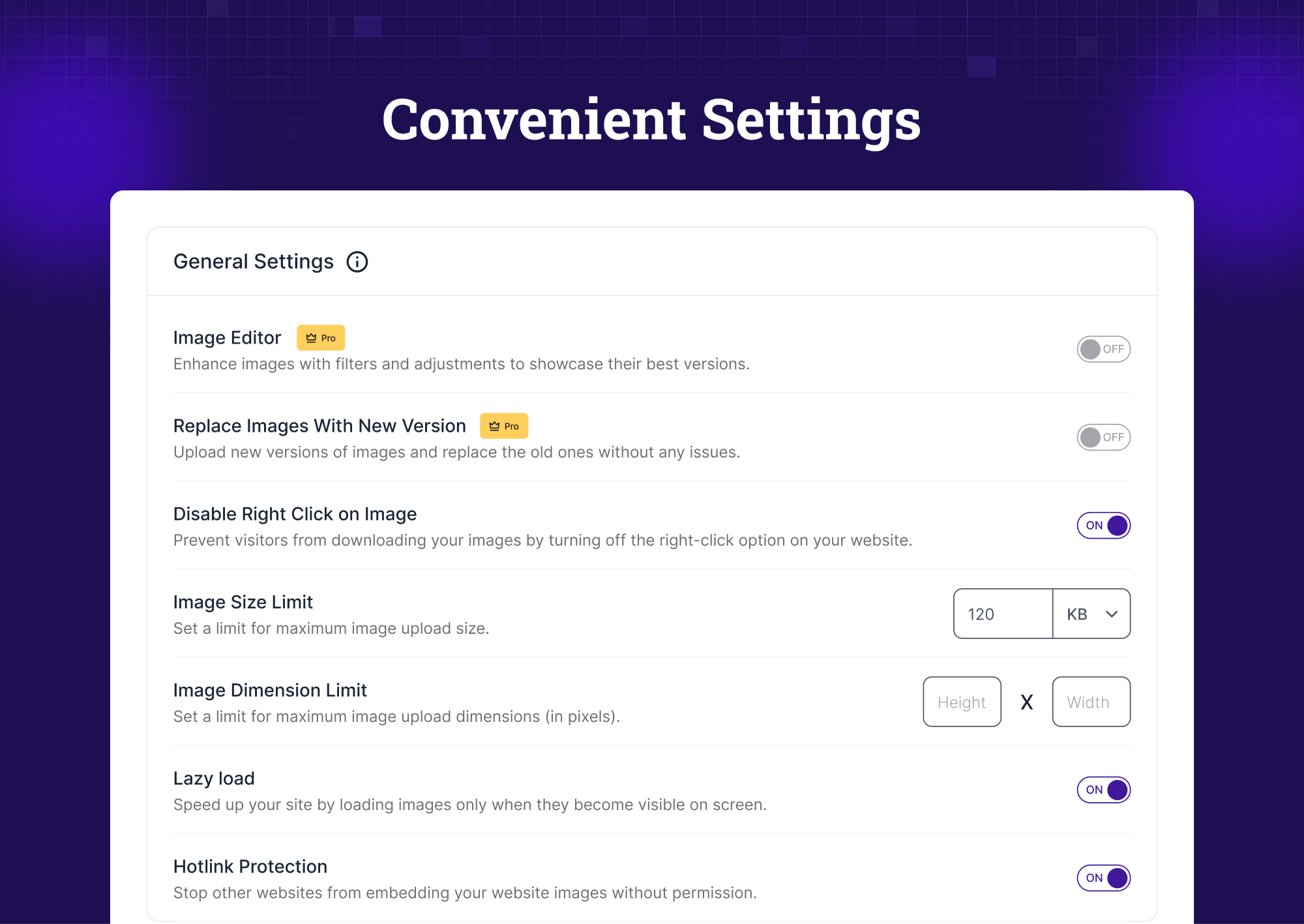
- 💥 Set Image Upload Limit
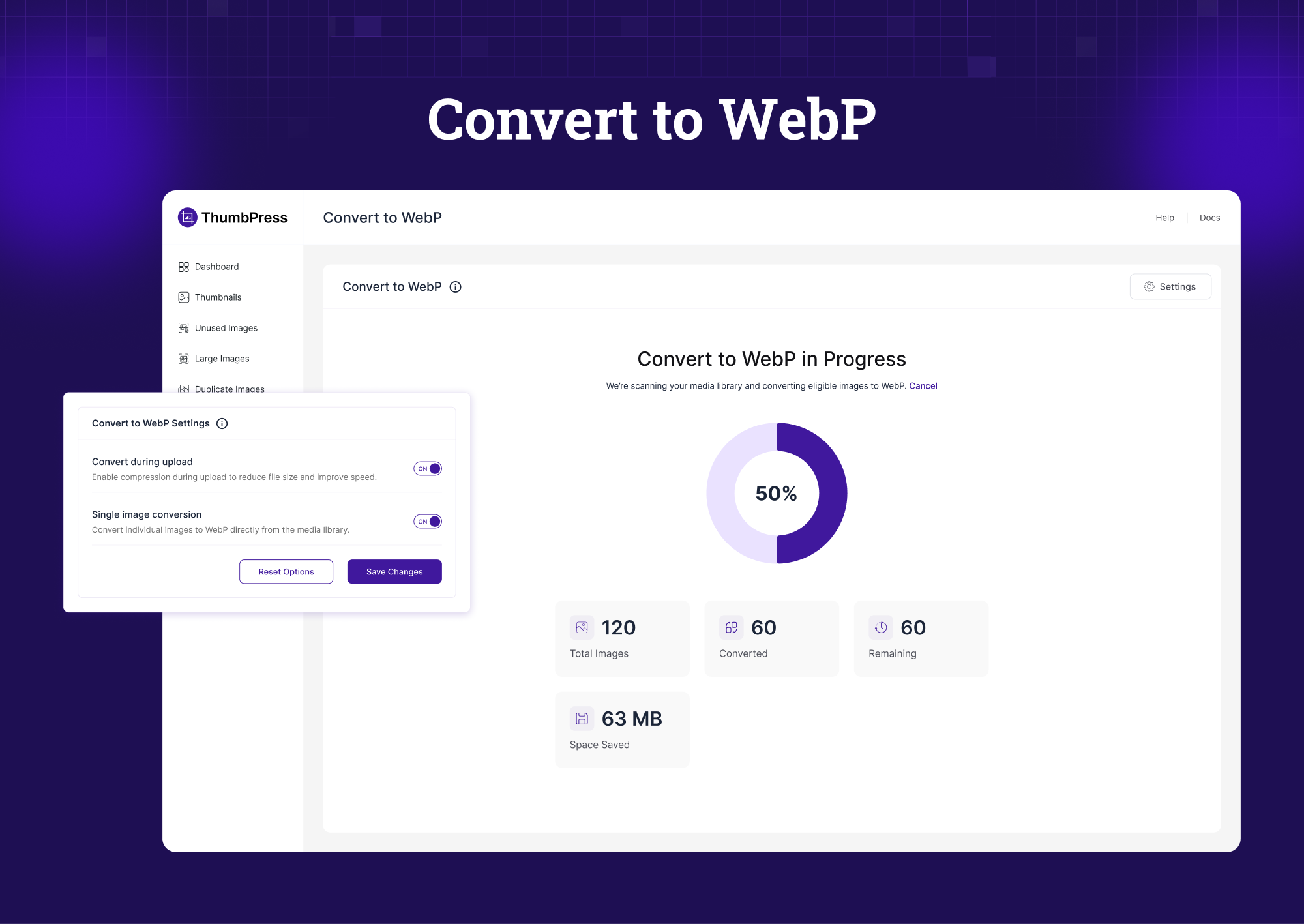
- 💥 Convert Images to WebP
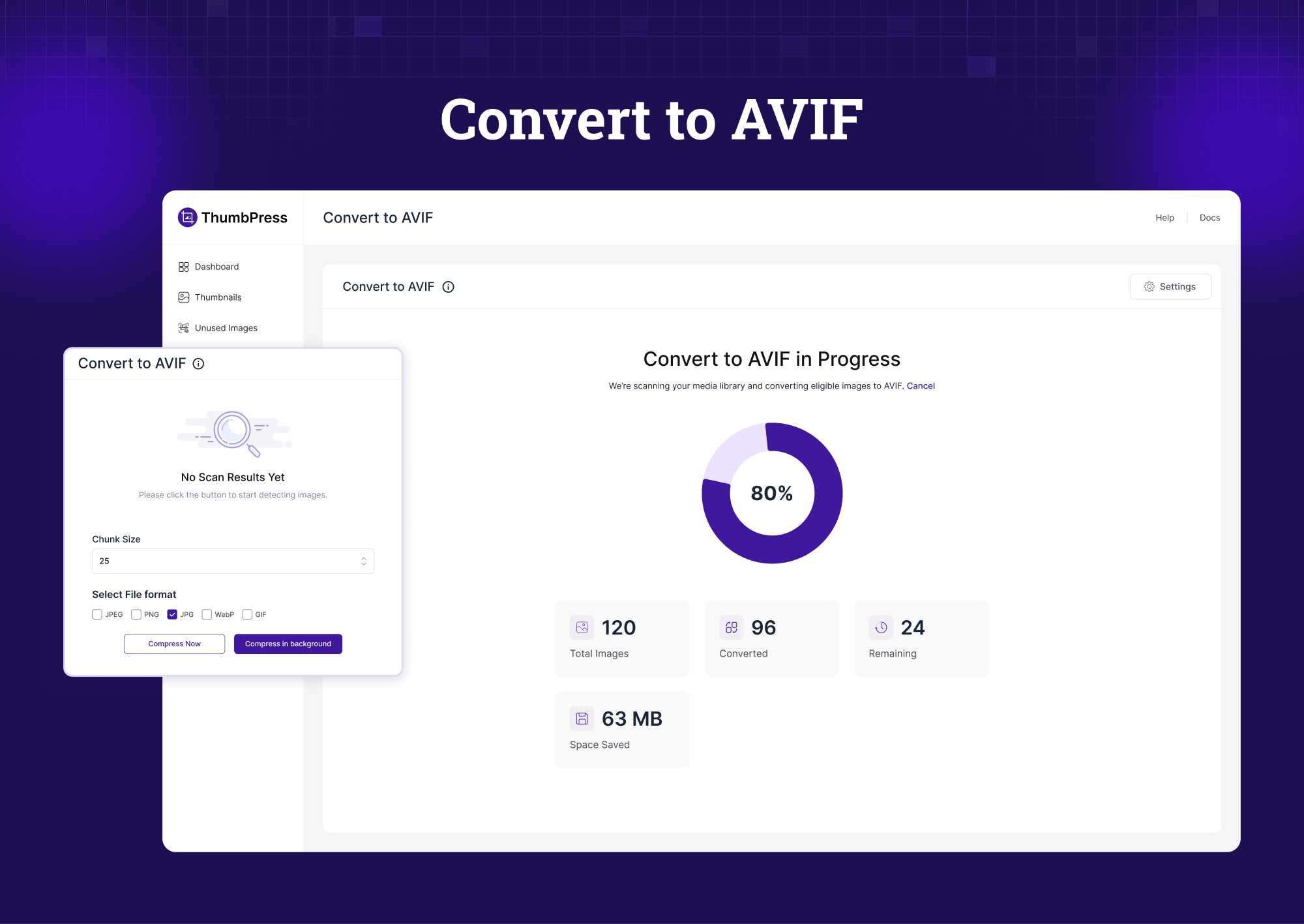
- 💥 Convert Images to AVIF (Bulk conversion is Pro)
- 💥 Set Social Media Thumbnails
- 💥 Lazy Load Images
- 💥 Hotlink Protection
- 💥 Disable Right Click on Images
Pro Modules
- 🔥 Find Unused Images
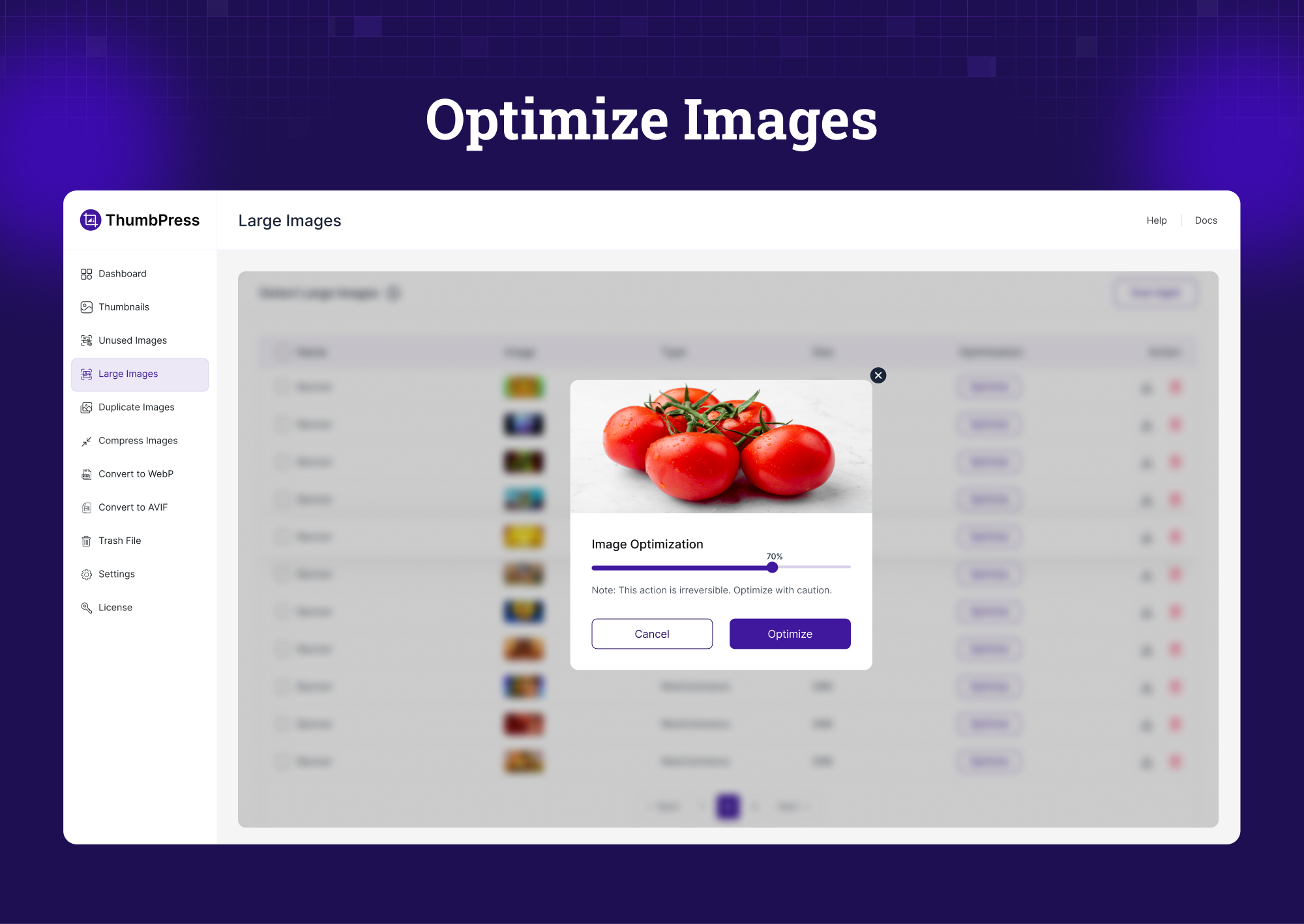
- 🔥 Detect Large Images
- 🔥 Compress Images
- 🔥 Replace Image with New Version
- 🔥 Image Editor
- 🔥 Watermark Images (New)
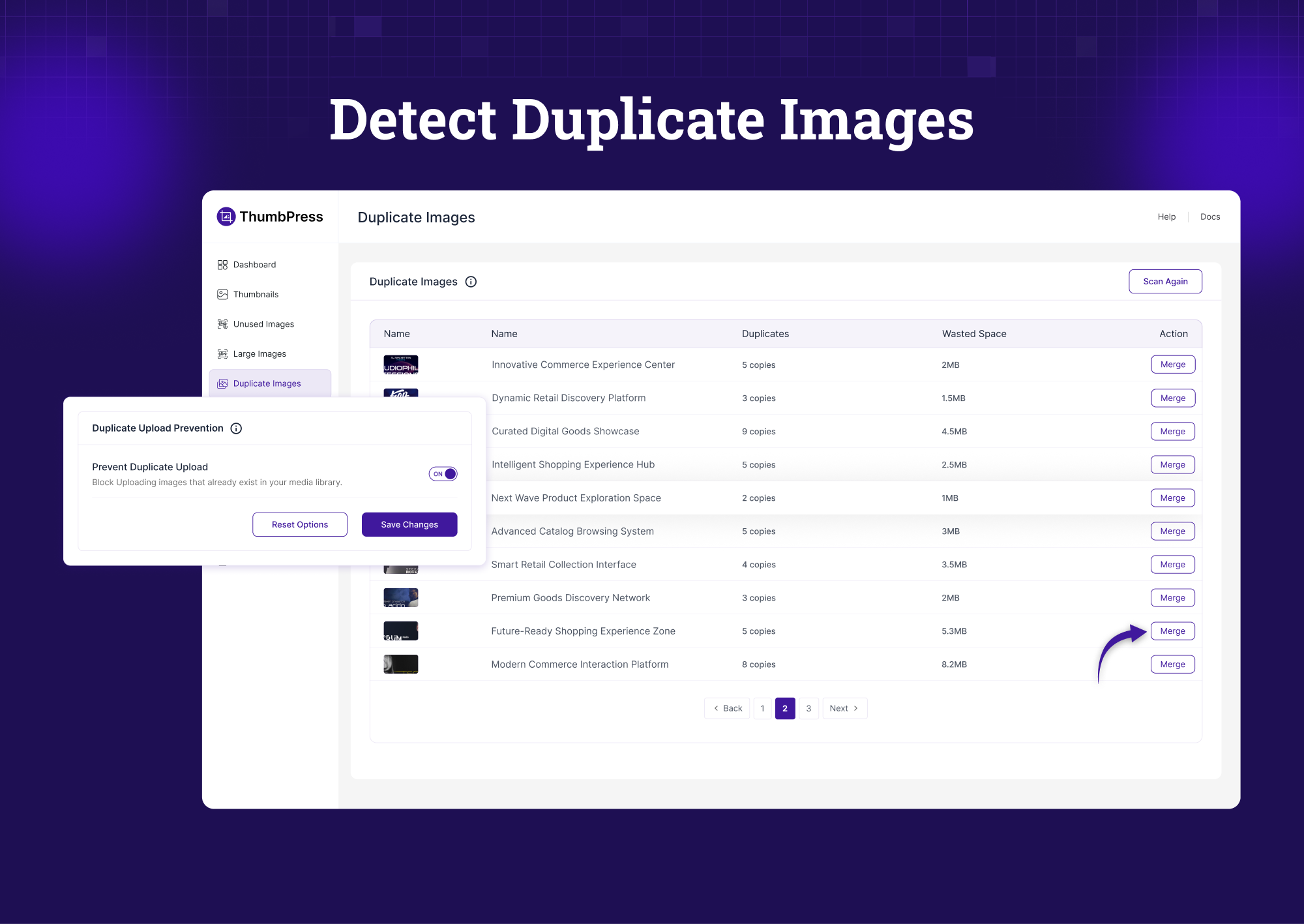
- 🔥 Detect Duplicate Images (New in 6.0)
- 🔥 Bulk AVIF Conversion (New in 6.0)
- 🔥 Image CDN Offloading (New in 6.7)
- 🔥 Trash Images (Not a module, but lets you recover deleted images)
🚀 Free Features – In Detail
Disable Thumbnails – Stop Wasting Server Storage
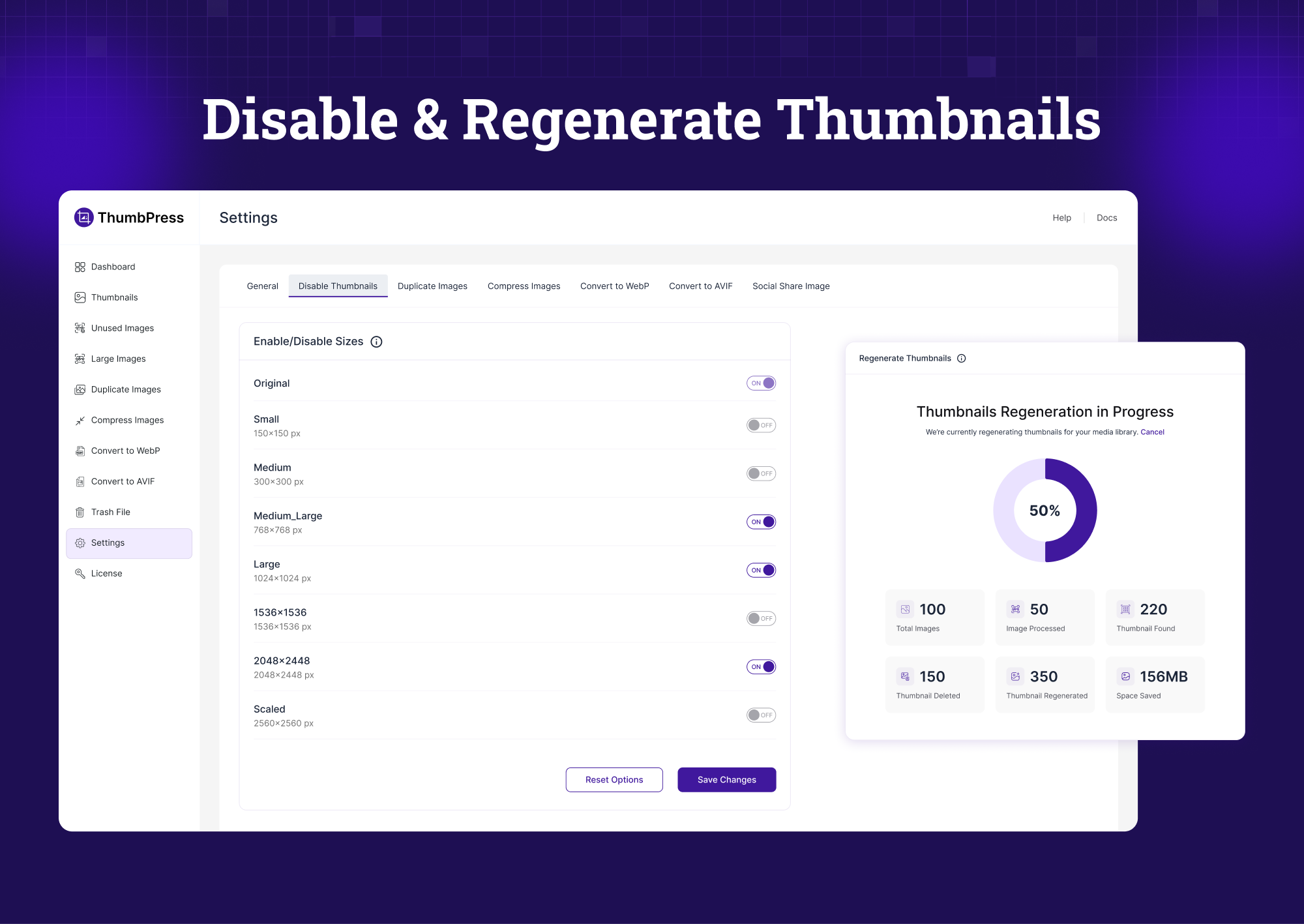
Every image upload triggers WordPress to create multiple resized copies – Thumbnail, Medium, Medium-Large, Large, Scaled — plus whatever your theme and plugins add on top. Most of these copies are never used anywhere on your site.
The Disable Thumbnails module lets you choose exactly which image sizes to block. Stop the copies before they’re created, save server storage from day one, and keep your WordPress media library clean and manageable.
Regenerate Thumbnails – Fix Broken Image Sizes Instantly
Switched themes? Changed your image size settings? Installed a new page builder? Your existing images now have the wrong dimensions – and broken layouts are the result.
The Regenerate Thumbnails module rebuilds all your image sizes on demand. Select specific sizes or regenerate everything at once. No manual work, no missing thumbnails. Your site stays consistent without touching a single image file.
Convert Images to WebP – Boost Site Speed and SEO Rankings
WebP images are 25–35% smaller than JPG and PNG without any visible quality loss. Google recommends WebP. Core Web Vitals reward it. Page speed tools flag JPG and PNG as a performance issue.
ThumbPress converts your existing WordPress images to WebP in bulk or one by one, right from your dashboard. No FTP, no separate tools. Just faster images and better SEO rankings.
Convert Images to AVIF – Next-Generation Image Format
AVIF is the successor to WebP. It compresses images even further while preserving quality, and browser support is now mainstream across Chrome, Firefox, and Safari.
ThumbPress lets you convert individual images to AVIF for free. Need to convert your entire media library at once? That’s a Pro feature available in the new 6.0 release.
Image Upload Limit – Protect Site Performance at the Source
One oversized image upload can slow down a page significantly. Without limits, editors and contributors regularly upload images straight from their phones or cameras – files that are 5MB, 10MB, sometimes larger.
Set a maximum file size and resolution for every image upload. Any file that exceeds your rules gets blocked before it ever hits the server. Clean media library, faster site – automatically enforced.
Social Media Thumbnails – Look Intentional Everywhere You’re Shared
When you share a page on Facebook, Twitter, or LinkedIn, each platform crops the image differently. Without customization, your carefully chosen image ends up poorly framed or cut off entirely.
ThumbPress lets you set distinct thumbnails for each social media platform. Upload one version for Facebook, another for Twitter, another for LinkedIn. Your content always looks deliberate when shared.
Lazy Load Images – Faster Pages Without Changing a Single Image
By default, WordPress loads every image on a page at once – including images that are way below the fold and won’t be seen until the user scrolls down. That’s wasted bandwidth, slower initial load times, and a worse experience for users on mobile or slower connections.
Lazy loading changes this. Images only load as users scroll toward them. The result is a noticeably faster page on first load, lower bandwidth usage, and a real improvement in Core Web Vitals scores – all without touching your images or content.
Hotlink Protection – Stop Other Sites From Stealing Your Bandwidth
Hotlinking happens when another website embeds your images directly using your image URLs. Your server serves the image, your bandwidth takes the hit – and you get nothing in return.
ThumbPress blocks external sites from loading images directly from your server. Your images stay on your site, your bandwidth stays yours, and your hosting costs don’t quietly inflate because someone else decided to use your media library as their CDN.
Disable Right Click – Protect Your Images from Theft
Right-click protection disables the ability to save, copy, or drag images directly from your site. It’s a practical barrier that stops casual image theft – especially useful for photographers, portfolio sites, and ecommerce stores.
Turn it on or off for the whole site from the settings. No code needed.
🔥 Pro Features — In Detail
Find and Delete Unused Images — Reclaim Your Server Space
As websites evolve, images get left behind. Old blog post headers, replaced product photos, outdated banners — they all stay in your media library indefinitely, taking up space and adding noise.
The Find Unused Images module scans your entire site and surfaces every image that isn’t linked to any post, page, or content. Review the list, then delete in bulk. Reclaim storage and clean up years of media clutter in minutes.
Detect Large Images — Find What’s Slowing Your Site Down
Large images are one of the top causes of slow WordPress page load times. And slow pages hurt conversions and search rankings alike.
ThumbPress scans your media library for oversized images and flags them for action. Then compress them directly from the dashboard — no image editing software, no re-uploading. A faster WordPress site without sacrificing visual quality.
Image Compression — Smaller Files, Same Visual Quality
ThumbPress includes a built-in WordPress image compression tool that reduces file size while keeping your images sharp. Compress in bulk across your entire media library or optimize new uploads automatically.
Smaller images mean faster pages, better Core Web Vitals scores, and stronger SEO — across your entire site.
Replace Image with New Version — Update Without Breaking Links
Need to update a product image, fix a low-quality photo, or refresh a visual after a rebrand? Normally, replacing an image in WordPress means deleting the old file and updating every page where it appears manually.
ThumbPress lets you replace an image with a newer version while keeping the same URL. Every page, post, or widget that uses that image updates automatically. No broken links. No manual edits.
Watermark Images — Keep Your Name on Your Photos 🆕
Photos get copied, re-uploaded and passed off as someone else’s. A watermark keeps your name or logo on every copy.
ThumbPress Pro stamps text or your logo on your images — as they are uploaded, or across your whole library in one run. Choose the position (or tile it across the image), size, opacity, margin and rotation, pick which image sizes carry the mark, and preview the result before you apply it. The untouched original is always kept, so you can remove the watermark or change it later without ever marking a photo twice.
Everything is drawn on your own server. No image is sent anywhere.
Detect Duplicate Images — New in 6.0 🆕
Duplicate images waste storage and create confusion in your media library. The same file uploaded twice, variations of the same photo, slightly different crops of one original — they all add up over time.
The new Duplicate Image Detection module identifies redundant files in your media library and helps you remove them safely. One of the most-requested features we’ve ever received — now available in ThumbPress 6.0.
ThumbPress CDN — Serve Every Image From a Global Edge Network 🆕
Every image on your site is served from one server in one location. A visitor on the other side of the world waits for every byte to cross the planet — and every one of those requests is bandwidth you pay for.
ThumbPress CDN offloads your media library to a global edge network, so each image is delivered from the location closest to the visitor. Pages get faster, your server does less work, and your hosting bandwidth bill goes down.
No third-party CDN account. No API keys. No DNS changes. CDN storage is included with your ThumbPress Pro license — up to 100 GB depending on your plan — connect from the dashboard and the nearest region is provisioned for you automatically.
What you get:
- 🌍 One-click connect — up to 100 GB of storage included with Pro, region auto-selected, nothing to configure
- 📦 Bulk offload — push your existing media library to the CDN in the background, with live progress, cancel and automatic resume
- ⚡ Auto-offload new uploads — every new image goes to the CDN on its own, without slowing the upload
- 💾 Reclaim disk space — optionally drop the local copy after upload and keep only the CDN version
- 🖼️ Responsive images covered —
srcsetURLs are rewritten too, so every size loads from the edge - 🛒 WooCommerce ready — product, variation, and gallery images served from the CDN
- 🛡️ Never breaks your site — if the CDN is unreachable, images automatically fall back to your own server
- 🎛️ Full control — exclude specific file types (SVG, PDF) or image sizes, and optionally lazy load CDN images
- 📊 Storage dashboard — see exactly how much of your included storage is used, and how many images are being served from the edge
- ↩️ Leave any time — disconnect and keep or delete the CDN copies; local files are restored so your images keep working either way
Image Editor — Edit Images Without Leaving WordPress
Sometimes an uploaded image just needs a small adjustment — a crop, a rotation, a brightness tweak. The ThumbPress Image Editor lets you make those changes without ever leaving your WordPress dashboard.
No Photoshop. No re-uploading. Edit, save, and publish right from your media library.
🆕 What’s New in ThumbPress 6.7
- ThumbPress CDN (Pro) — offload your media library to a global edge network with up to 100 GB of storage included in your Pro license
- Bulk offload with live progress, plus automatic offloading of every new upload
- Optional local-copy removal to free server disk space
srcsetand WooCommerce product, variation and gallery URLs rewritten to CDN URLs- Automatic fallback to your own server if the CDN is ever unreachable
- Faster Regenerate Thumbnails on large media libraries
🆕 What’s New in ThumbPress 6.0
- Redesigned interface — cleaner, faster, and easier to navigate
- AVIF Image Converter — next-gen format support, with bulk conversion via Pro
- Duplicate Image Detection — find and remove redundant files from your media library
- Improved performance across all existing modules
👉 Why ThumbPress Instead of Multiple Separate Plugins?
Most WordPress sites end up using 4–6 different plugins just to manage images:
- One for thumbnail control
- One for compression
- One for WebP conversion
- One for social media previews
- One for image cleanup
- One for CDN offloading
Each plugin adds overhead. Each one adds potential conflicts. And none of them talks to each other.
ThumbPress is one plugin that does everything. Thumbnail management, image compression, WebP and AVIF conversion, media library cleanup, duplicate detection, image protection — all in a single, unified interface. Install once, manage everything.
Source Code
This plugin includes a compiled JavaScript bundle (build/admin.js) built with webpack, React, and TypeScript. The full uncompiled, human-readable source is included inside this plugin, so it can be reviewed, studied, modified, and rebuilt with no external dependency:
- React/TypeScript source:
spa/admin/src/ - Plain JS/CSS:
assets/ - Build configuration:
package.json,webpack.config.js,tailwind.config.js,postcss.config.js,tsconfig.json
To rebuild the compiled bundle from the included source, run these from the plugin directory:
- Install dependencies:
npm install - Build:
npm run build
This regenerates build/admin.js and build/tailwind.css from spa/admin/src/.
Externe Dienste
Data is sent only after an explicit admin action, never automatically.
my.pluggable.io (the CRM): if you click “Submit & Deactivate” or “Send feedback” (the “Not really” prompt), your name, email, site URL, plugin slug, deactivation reason and feedback are sent to https://my.pluggable.io/. Terms: https://thumbpress.co/terms-of-service/ Privacy: https://thumbpress.co/privacy-policy/
api.wordpress.org: standard update checks.
thumbpress.co: links only, no data sent.
Installation
- Upload the
thumbpressfolder to the/wp-content/plugins/directory, or install directly through the WordPress plugin screen. - Aktivieren Sie das Plugin über den Bildschirm Plugins in WordPress.
- Go to ThumbPress in your WordPress admin menu to get started.
Änderungsprotokoll
ThumbPress 6.7 introduces ThumbPress CDN (Pro) — serve your media library from a global edge network with up to 100 GB of storage included in your Pro license — plus faster thumbnail regeneration on large libraries.
6.11.0 – 2026-11-26
- [security] Hotlink Protection no longer lets anyone read images from folders your server keeps closed, such as WooCommerce downloads or form uploads, by sending a made-up Referer header
- [security] Hotlink Protection no longer prints a PHP warning that reveals where the plugin is installed when it receives a malformed image request
- [compat] Version compatibility tested with 7.2
6.10.4 – 2026-11-24
- [imp] Converting images now asks for confirmation in the same popup everywhere, including single-image conversion in the Media Library and the convert-on-upload switches, and the popup says the original files will be replaced
- [fix] Large images with an uppercase file extension (such as IMG.JPG) are no longer reported as not found when converting to WebP or AVIF
- [perf] Hotlink Protection no longer sends every image on your pages through PHP when its .htaccess rules are in place, so image-heavy pages load faster and no longer overload busy hosting
- [security] Hotlink Protection no longer lets a site whose address merely starts with your domain (such as yoursite.com.example.net) load your images
- [fix] Turning Hotlink Protection on or off no longer fails on sites where WordPress saves files over FTP
- [fix] Deactivating or deleting ThumbPress no longer fails on sites where WordPress saves files over FTP
6.10.3 – 2026-11-19
- [fix] Lazy Load no longer lazy-loads the site logo, the hero image or anything else in the site header, or images WordPress itself keeps loading straight away, so the first images visitors see are no longer delayed. This now also works on themes that do not use a
<main>element, such as Divi, Enfold and The7 - [imp] Lazy Load gives images in header menus, such as a mega menu, a low download priority, so they no longer compete with the main image
- [imp] Lazy Load no longer overrides Image Prioritizer (Optimization Detective): images it measured in view stay eager. On WordPress 6.9 and newer it also uses WordPress’s own page buffer where available, so a page flushed partway through is still handled as one
- [fix] The library scan now runs on sites that block background tasks, such as sites behind Cloudflare bot protection, a firewall or password-protected staging. It used to sit at 0% forever; the open dashboard now runs the scan itself and asks you to keep the page open
- [fix] A scan that stops partway now says why and can be started again, instead of showing “Scanning” forever or going back to “Library not scanned yet”
- [fix] One image with damaged details can no longer stop the library scan
- [fix] Deleting and reinstalling ThumbPress no longer brings back a stuck scan
- [perf] The library scan uses far less memory on sites where plugins store a lot of image data, so it no longer runs out of memory on smaller hosting plans
6.10.2 – 2026-11-10
- [fix] Hotlink Protection no longer stops other rules for the uploads folder from working, such as WebP delivery set up by another image plugin. Sites that already have protection on get the fix the next time settings are saved
- [fix] Total Thumbnails no longer drops after a library scan when some image files cannot be read, such as offloaded media
- [fix] The Thumbnail Generation switch now shows ON while any image size is enabled, instead of OFF as soon as one size is turned off
- [imp] ThumbPress pages now show the ThumbPress version in the admin footer
- [perf] The Thumbnails page no longer recounts every image’s thumbnails on each visit before the library has been scanned
6.10.1 – 2026-11-02
- [fix] Hotlink Protection on multisite no longer lets one site’s setting block or unblock images on the other sites in the network. Each site now keeps its rules in its own uploads folder
- [fix] A background WebP conversion that is stopped midway no longer leaves an image pointing at files it never finished. The next run restores the image, so its thumbnails and srcset work again
- [fix] The deactivation survey now reports how long ThumbPress has been installed correctly, and asks for a reason before it submits
- [perf] Admin pages no longer queue a full duplicate-image recount after every compress, convert or replace, which kept the database busy on large libraries
- [perf] ThumbPress no longer writes to the database on every page load
- [perf] Front-end pages, REST and cron requests no longer read every installed plugin’s file just to check for ThumbPress Pro
6.10.0 – 2026-10-20
- [security] Stopped the image-address update that runs after converting, regenerating or replacing an image from rebuilding objects stored in post content, post meta or options
- [fix] Converting to WebP or AVIF no longer flattens animated GIF, PNG, WebP and AVIF files into a single frame. They are skipped and the original is kept, on upload, with the single-image buttons and in bulk runs
- [fix] Converting to WebP or AVIF now keeps the original when the converted file would not be smaller
- [fix] Converting an image no longer deletes files that a duplicate attachment still uses, such as the copies WPML and Polylang make for each language
- [fix] “Space Saved” now reports the real net saving instead of ignoring files that came out bigger
- [fix] Regenerate Thumbnails no longer wipes an image’s thumbnails when no image editor can open the file. The image is reported as Failed with a reason, and every file is left untouched. The same goes for a JPEG that was cut off mid-upload
- [fix] Regenerate Thumbnails now keeps the edit when regenerating a large image you edited in Media > Edit Image, and no longer treats a restored image as edited
- [fix] Turning off the “scaled” image size and regenerating no longer leaves Full Size images and other stored image addresses returning 404
- [fix] Lazy load no longer adds attributes to image markup inside inline scripts and JSON, which caused JavaScript errors, and no longer cuts off images whose attributes contain a “>” character
- [fix] Hotlink Protection now only rewrites image addresses, so CSS, PDF, font and video files in your uploads folder load again (Elementor styling no longer disappears)
- [fix] Hotlink Protection now works on sites installed in a subfolder and on subfolder multisite
- [fix] Deactivating or deleting ThumbPress now removes the Hotlink Protection rules from .htaccess, so images stop returning 403 to other sites
- [fix] The dashboard now counts images that are in neither WebP nor AVIF exactly, which also corrects the health score
- [fix] After Fix everything, the settings it just switched on now read “Turned on now” instead of “Already on”. On-upload WebP is no longer pre-selected in the one-click fixes, and the confirmation says it only turns the switch on
- [fix] Site Image Checkup: Start checkup now works every time, not only the first time
- [fix] Images whose original file was deleted are now included in duplicate and large-image detection
- [fix] The Pro upgrade windows in Settings now name the control you clicked instead of a different feature
- [fix] The Pro page no longer shows a countdown that restarts every session, no longer opens a popup when you click a WordPress menu item, and no longer makes claims the plugin does not back
- [fix] Removed the dashboard’s “Autofix coming to Pro” notes on alt text and file names
- [imp] A confirmation now warns before WebP or AVIF conversion deletes your original files, and a note sits under the on-upload conversion switches
- [imp] When ThumbPress Pro is installed but not active, the button and badge now say “Activate License” instead of “Upgrade to Pro”
Screenshots



Für Entwickler
Ist das dein Plugin? Zeigen Sie die Zahlen.
Fügen Sie Ihrer Website, Docs oder GitHub Readme ein Live-Badge hinzu. Es wird von selbst aktualisiert - kein Konto erforderlich.
Best ThumbPress alternatives
All compress images plugins →





Fragen und Antworten
ThumbPress: quick answers
Gerade Antworten, gezogen von Live WordPress.org Daten.
Quelle: WordPress.org
Is ThumbPress free?
Yes. ThumbPress is free to download and use from the official WordPress.org plugin directory.
Is ThumbPress safe to use in 2026?
Yes — ThumbPress is a safe, well-maintained plugin to use in 2026. It runs on 20K+ sites, is rated 3.7/5 and was last updated 3 days ago, and scores 88/100 on our health check.
How many websites use ThumbPress?
ThumbPress is active on 20K+ WordPress websites and has been downloaded 1,489,933 times since it launched in August 2016. It was downloaded 43,597 times in the last 30 days.
Does ThumbPress work with WordPress 7.1?
Yes. The developer has tested ThumbPress up to WordPress 7.2, the latest release. It requires WordPress 6.0 or newer.
What PHP version does ThumbPress need?
ThumbPress requires PHP 7.4 or higher. Most hosts run PHP 8.x today, so it works on any modern WordPress hosting.
When was ThumbPress last updated?
The latest version, 6.11.0, was released on November 26, 2026 (3 days ago).
Who makes ThumbPress?
ThumbPress is developed and maintained by Codexpert, Inc.
What are the best alternatives to ThumbPress?
The most popular alternatives to ThumbPress are Smush (1M+ installs), Imagify Image Optimization:… (900K+ installs) and Converter for Media (500K+ installs).
Angetrieben von PageForge
Eine Vorlage und eine Tabelle. Eine echte Seite für jede Suche.
PageForge Verwandelt jede Zeile eines CSV in eine WordPress-Seite mit eigenem Titel, URL, SEO Felder und Schema entworfen. Kostenlos auf WordPress.org.
- CSV und XLSX, plus Google Sheets auf Beruf und Unternehmen
- seinen eigenen Titel, URL, SEO Felder und Schema für jede Seite
- Arbeitet mit dem Blockeditor, Elementor, Divi und Avada
- Kostenlos auf WordPress.org, keine Kreditkarte