


HourGate – Store Hours for WooCommerce
HourGate lets your WooCommerce store take orders only while you are open. Set your opening hours, close for holidays, and pause orders in one click when the kitchen is busy. Shoppers see when you’re open and when you…

Solide Wahl
HourGate is a solid plugin choice in 2026, with a few things worth checking first. Was last updated 1 day ago, and scores 64/100 on our health check.
- Aktiv entwickelt - letztes Update vor 1 Tag
- Getestet mit dem neuesten WordPress (7.1)
- Kleine Benutzerbasis (<10 aktive Installationen)
- Bisher sehr wenige Bewertungen
Tägliche Downloads
Download-Spitzen folgen normalerweise einer neuen Version - jede Website, die automatisch aktualisiert wird, gilt als Download.
Ranglisten
Where HourGate stands todayWordPress.org Ranglisten suchen
Live-Position in der Plugin-Suche, Top 100| Stichwort | Position |
|---|---|
| closed store | >100 |
| Opening Hours | >100 |
| pause orders | >100 |
| store hours | >100 |
| vacation mode | #49 |
About HourGate – Store Hours for WooCommerce
Aus der offiziellen Readme · V1.0.1Beschreibung
HourGate lets your WooCommerce store take orders only while you are open. Set your opening hours, close for holidays, and pause orders in one click when the kitchen is busy. Shoppers see when you’re open and when you open next, and the store refuses orders it shouldn’t take. It works on the Checkout block, the classic checkout and the Store API.
It’s made for bakeries, cafés, restaurants, florists, grocers and any shop that can only fulfil orders at certain times.
Opening hours that fit real shops
- Weekly hours: as many time ranges per day as you need, ranges past midnight (6 pm – 2 am), days closed all day, or open 24 hours.
- Holiday closures: close your store for a date or a range of dates (vacation mode), with a label such as “Christmas” and an optional yearly repeat.
- Special hours: different hours on one date, such as a short day before a holiday.
- Preview: the next 14 days exactly as shoppers will see them, and whether you’re open now and why not.
- Time zone: uses the time zone from Settings → General, and warns you when a fixed UTC offset means your hours won’t follow daylight saving changes.
Pause orders in one click
Pause ordering from the admin bar or the Ordering tab: for 30 minutes, 1 or 2 hours, the rest of today, until the next opening, until a date and time you choose, or until you resume. It ends on its own.
What happens while you’re closed
Pick one:
- Block checkout: shoppers can browse and fill their cart, but can’t place an order until you open.
- Accept orders for the next opening: orders still come in, marked with the time they’re scheduled for. The scheduled time shows on the order screen, in the order e-mails, on the thank-you page and in My Account.
- Catalogue mode: add-to-cart buttons show “Closed” and are disabled while you’re closed.
The rules are checked on the server, not only on the page. They hold on the Checkout block, the classic checkout, direct Store API requests, add-to-cart (AJAX, Store API and add-to-cart links), “Order again” and express payment buttons.
Orders your staff create are never blocked: orders made in the admin, through the WooCommerce REST API, by other plugins and by subscription renewals go through at any hour. A customer can always pay for an order they already placed.
Products that can always be ordered
Mark products or whole categories as “always orderable”, for things like gift cards and vouchers. They can be bought while the store is closed, in every closed mode and on every checkout. A cart that mixes always-orderable and normal products is treated like any other cart while you’re closed: the normal products still block the order.
Delivery and pickup dates
Let shoppers choose a date, and optionally a time window, for delivery or pickup. It’s off after you install or update the plugin; turn on “Offer an order date” on the Ordering tab, under Order date and time.
- Built from your store hours: the dates and windows come from the same schedule as everything else, so closures, special hours and hours past midnight apply on their own. You set the time-window length (for example 2 hours), or choose dates only.
- Minimum notice and how far ahead: for example “at least 1 day’s notice, up to 14 days ahead”. Optionally make the date required.
- Delivery or pickup: WooCommerce’s Local Pickup is recognised automatically; map your other shipping methods to delivery, pickup or “no date needed”. The labels follow (“Delivery date”, “Pickup date”).
- Checkout block and classic checkout: both, and the choice is checked again on the server when the order is placed, including express payment buttons.
- Shown everywhere: on the order screen, in the order e-mails, on the thank-you page and in My Account.
- Staff can change it: shop managers can change or remove an order’s date and window on the order screen, or add one to a phone order. Nothing is sent to the customer.
The date picker does not limit how many orders a day or window can take. Limits per slot are part of HourGate Pro.
Tell shoppers when you’re open
- A closed message with tokens:
{next_open}(when you open next) and{closures_label}(the holiday’s label). - A notice bar at the top of WooCommerce pages or every page, which shoppers can dismiss.
- Cart and checkout notices explaining why they can’t order now, or when their order is scheduled for.
- “Store status” and “Opening hours” blocks, and the shortcodes
[hourgate_status]and[hourgate_hours].
What shoppers see stays correct behind page caches, because the status is fetched after the page loads.
Safe to try
Enforcement is off when you first install the plugin. Set your hours, check the preview, then turn on “Enforce opening hours” on the Ordering tab when you’re ready.
Shop managers can use HourGate, not only administrators.
Other Plugins By Us
- Pastmark – Activity Log, User Activity & Audit Trail: Activity log & audit trail for WordPress. Track user activity, logins, content changes, WooCommerce orders and site settings in real time.
- BugTrace – Debug Log Tool: A minimalist debugging companion for WordPress. View and download your debug log, toggle
WP_DEBUG,WP_DEBUG_LOG,WP_DEBUG_DISPLAY, andSCRIPT_DEBUGwithout editingwp-config.php, and inspect server info,wp-config.php,.htaccess, and PHP info — all from your dashboard.
Beitragen
HourGate is an open-source project. You can view the full sources (unminified JS) and contribute to the project on GitHub: Click here
Externe Dienste
This plugin does not connect to any external services. It sends no data off your site; the storefront status badge only calls your own site’s REST API (/wp-json/hourgate/v1/status). The delivery and pickup date picker asks your own site’s REST API (/wp-json/hourgate/v1/availability) for the available dates; nothing leaves your site.
Installation
- Make sure WooCommerce is installed and active.
- In Plugins → Add New, search for “HourGate”, then install and activate it. Or upload the zip in Plugins → Add New → Upload Plugin.
- Open HourGate in the admin menu. On the Store hours tab, set your weekly hours, closures and special hours.
- Check the Preview under Store hours.
- On the Ordering tab, choose what happens while you’re closed, edit the closed message if you like, and turn on “Enforce opening hours”.
Änderungsprotokoll
New features, all off after you update: always-orderable products and a delivery or pickup date picker. Your settings are kept.
1.0.1 (28 November 2026)
- New: “Always orderable” products and categories can be bought while the store is closed.
- New: delivery and pickup date and time-window picker on the Checkout block and the classic checkout, built from your store hours, with minimum notice and a maximum number of days ahead.
- New: the choice is shown on the order screen, in e-mails, on the thank-you page and in My Account; staff can change it on the order screen.
- New: public availability route
GET /hourgate/v1/availability, and hooks for developers.
1.0.0 (05 November 2026)
- Erste Veröffentlichung.
Screenshots

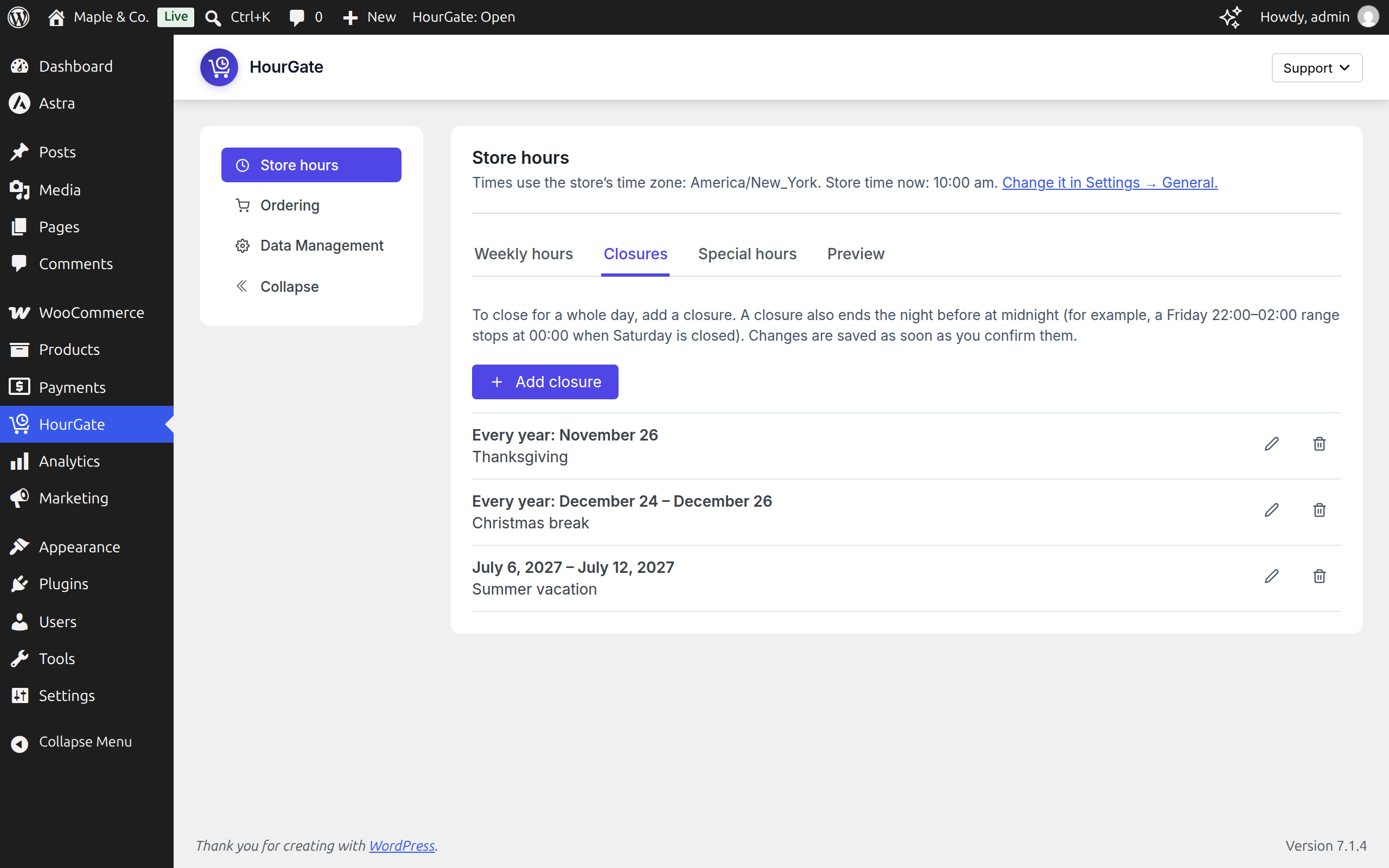


Für Entwickler
Ist das dein Plugin? Zeigen Sie die Zahlen.
Fügen Sie Ihrer Website, Docs oder GitHub Readme ein Live-Badge hinzu. Es wird von selbst aktualisiert - kein Konto erforderlich.
Fragen und Antworten
HourGate: quick answers
Gerade Antworten, gezogen von Live WordPress.org Daten.
Quelle: WordPress.org
Is HourGate free?
Yes. HourGate is free to download and use from the official WordPress.org plugin directory.
Is HourGate safe to use in 2026?
HourGate is a solid plugin choice in 2026, with a few things worth checking first. Was last updated 1 day ago, and scores 64/100 on our health check.
How many websites use HourGate?
HourGate is active on <10 WordPress websites and has been downloaded 418 times since it launched in November 2026. It was downloaded 422 times in the last 30 days.
Does HourGate work with WordPress 7.1?
Yes. The developer has tested HourGate up to WordPress 7.1.5, the latest release. It requires WordPress 6.7 or newer.
What PHP version does HourGate need?
HourGate requires PHP 7.4 or higher. Most hosts run PHP 8.x today, so it works on any modern WordPress hosting.
When was HourGate last updated?
The latest version, 1.0.1, was released on November 28, 2026 (1 day ago).
Who makes HourGate?
HourGate is developed and maintained by Nikhil G.
Angetrieben von PageForge
Eine Vorlage und eine Tabelle. Eine echte Seite für jede Suche.
PageForge Verwandelt jede Zeile eines CSV in eine WordPress-Seite mit eigenem Titel, URL, SEO Felder und Schema entworfen. Kostenlos auf WordPress.org.
- CSV und XLSX, plus Google Sheets auf Beruf und Unternehmen
- seinen eigenen Titel, URL, SEO Felder und Schema für jede Seite
- Arbeitet mit dem Blockeditor, Elementor, Divi und Avada
- Kostenlos auf WordPress.org, keine Kreditkarte