


Hotel Booking for WooCommerce
Adds a reservation system for a hotel, B&B, villa, apartments, hostel, or any similar accommodation into your WooCommerce website easily!

Solide Wahl
Hotel Booking for WooCommerce is a solid plugin choice in 2026, with a few things worth checking first. It runs on 100+ sites, is rated 4.7/5 and was last updated 4 weeks ago, and scores 63/100 on our health check.
- Aktiv entwickelt — letztes Update vor 4 Wochen
- Getestet mit dem neuesten WordPress (7.1)
- Momentum — downloads up 24.7% vs the previous 30 days
- Kleine Benutzerbasis (100+ aktive Installationen)
- Bisher sehr wenige Bewertungen
- Benötigt PHP 8.2 oder neuer
Wie stapelt es sich?
Side-by-side bei Installationen, Updates, Bewertungen und Support


Tägliche Downloads
Download-Spitzen folgen normalerweise einer neuen Version - jede Website, die automatisch aktualisiert wird, gilt als Download.
Ranglisten
Where Hotel Booking for WooCommer… stands todayWordPress.org Ranglisten suchen
Live-Position in der Plugin-Suche, Top 100| Stichwort | Position |
|---|---|
| accommodation | #26 |
| booking | #75 |
| Hotel Booking | #10 |
| reservation | >100 |
| WooCommerce | >100 |
Versionsübernahme
Anteil aktiver Sites pro Release.
Bewertungsaufschlüsselung
★★★★★★★★★★ 4.7 from 3 reviews
About Hotel Booking for WooCommerce
From the official readme · v1.1.44Beschreibung
Looking to add a professional hotel booking system to your WooCommerce website? The Hotel Booking for WooCommerce plugin is the perfect solution for easily managing bookings at your hotel, B&B, villa, apartment, hostel, or any similar accommodation. If you’re already comfortable with WooCommerce, this plugin will seamlessly integrate into your site, allowing you to manage your accommodations like a pro.
Start with the free version and unlock a range of essential features. You can create custom rate plans for your accommodation, set room allotments to prevent overbooking, and apply minimum stay rules for each room. The plugin also lets you offer a simple yet effective availability check, where customers can search for rooms based on their desired check-in and check-out dates, number of guests, and — optionally — the number of rooms they need. This enables direct bookings based on real-time availability, making the booking process smooth and hassle-free. You can even place the availability search form on any page via shortcode, and customize the room amenities with icons or custom SVGs for a unique touch.
The free version also offers flexible payment options by supporting any payment gateway available through WooCommerce. Additionally, you can set custom prices for specific dates within the default rate plan, and quickly make bulk edits to rate plans and availability. Also, the Booking Add-on feature allows you to include optional extras (such as breakfast, airport pickup, or late checkout) as part of the booking process.
While the free version offers plenty of features to get started, upgrading to the Pro version will unlock even more advanced tools. You can set custom prices and open/close rates per date for any rate plan, not just the default one. Bulk editing is expanded to include all rate plans, giving you the flexibility to manage your pricing strategy more efficiently.
The Pro version also enhances the Booking Add-on feature, allowing pricing per booking, per guest, or per night. On top of that, you can sync your availability with external OTA calendars like Booking.com or Airbnb using iCal — ensuring you never get double-booked.
Get started today with the free version, explore its powerful features, and when you’re ready to take your hotel booking system to the next level, upgrading to the Pro version will give you all the tools you need for a fully optimized booking experience. Download the plugin now and start managing your bookings with ease!
Features included in free version
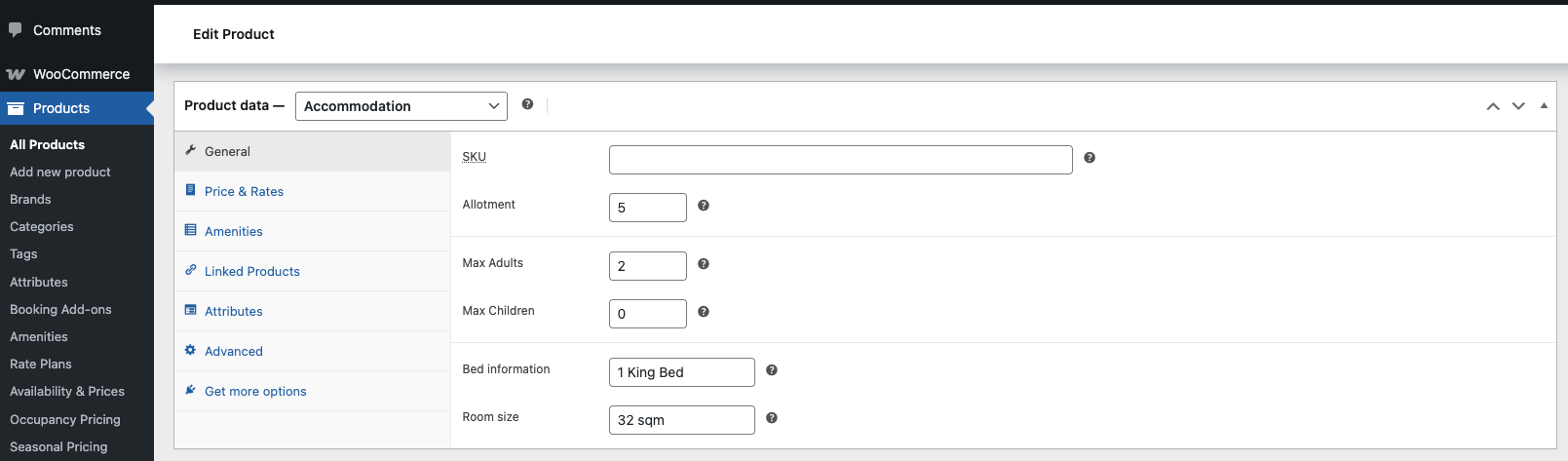
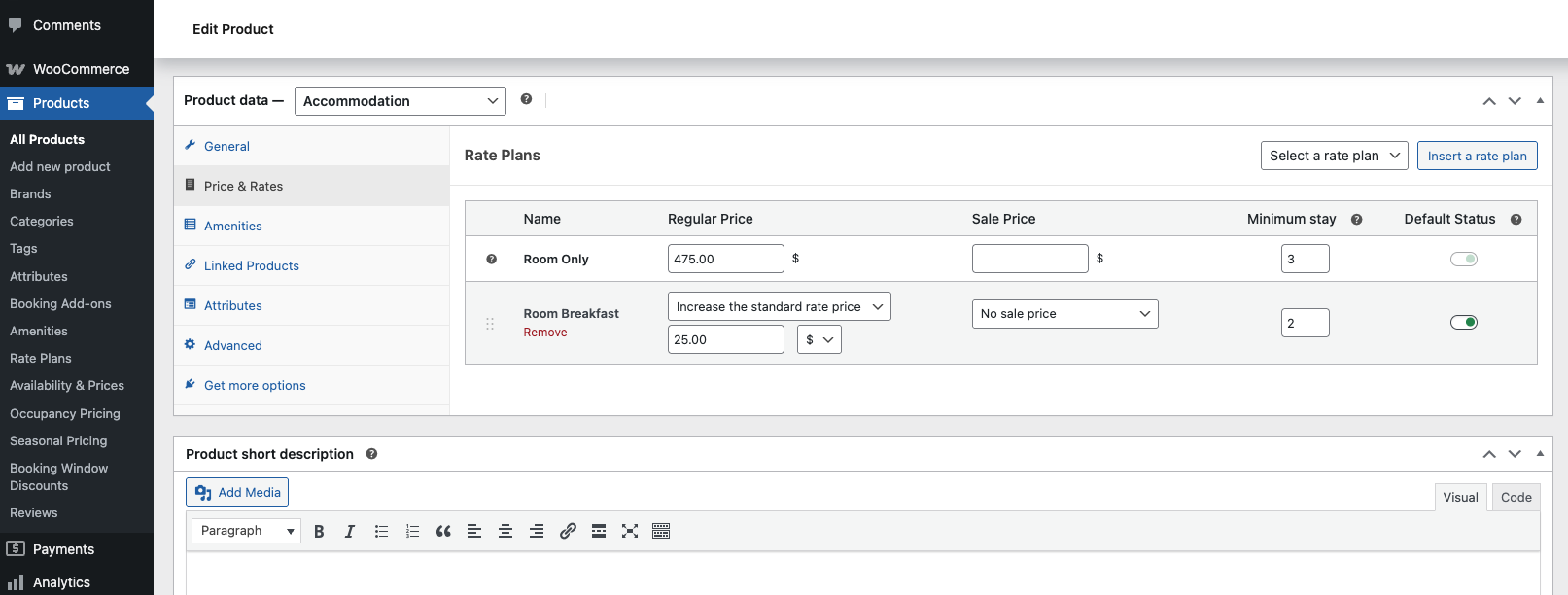
- Create custom rate plans for your accommodation.
- Set room allotments to avoid overbooking.
- Recommended: Exclude accommodation from your shop page.
- Availability check: Allow customers to search available rooms based on check-in, check-out, and guest count, and make direct bookings from the results page.
- Multi-room search (optional): Enable a “Rooms” field in the search form so customers searching for multiple rooms (e.g. a group needing 3 rooms) get accurate results. Capacity and availability checks automatically account for the total number of rooms requested.
- Display the availability search form on any page using a shortcode, or with the included Room search and Availability results blocks.
- Flexible payment gateway. Use any payment method supported by WooCommerce.
- Set custom prices per date for the default rate plan.
- Open/close rates per date for the default rate plan.
- Bulk edit pricing and availability for the default rate plan.
- Add room amenities with icons or custom SVGs.
- Booking Add-on feature.
- Define minimum stay rules for the default rate plan.
- Optional manual approval. Hold incoming bookings for your confirmation instead of letting every reservation through automatically.
- Dedicated booking emails. Booking orders are sent through their own email templates rather than the stock WooCommerce order emails, so the wording reads like a reservation instead of a purchase.
- Same-day booking: choose whether guests are allowed to book for today.
- Set the maximum age that still counts as a child.
- Control how rooms appear in availability results, pick the guest-facing date format, and relabel the add to cart button.
Features included in PRO version
- All features from the free version.
- Set custom prices per date for any rate plan.
- Open or close availability per date for each rate plan.
- Bulk edit pricing and availability across all rate plans.
- Sync your rooms with external OTA calendars like Booking.com or Airbnb.
- More flexible Booking Add-on (per booking, per guest, per night, apply add-ons only for specific room).
- Define minimum stay rules for any rate plan.
- Occupancy Pricing Rules
- Seasonal Pricing
- Booking Window Discount Rules
- Booking approval workflow. Guests complete checkout but submit a booking request instead of paying. Approve or reject from the order screen, and a payment link is emailed the moment you approve. Rooms are only held, not reserved, while a request is waiting, so pending requests never eat into your allotment.
- Approval and payment time limits. A request nobody answers is auto-approved or cancelled when the limit runs out, and an approved booking left unpaid is cancelled and its rooms released.
- Deposit payments. Take a percentage up front and collect the balance later, with its own “Deposit Paid” order status, a deposit received email, automatic payment reminders, and separate allowed payment methods for the deposit and the final payment.
- Room Number Manager. Assign individual room numbers (e.g. “101”, “Suite A”), each tracking its own availability so a specific room cannot be double-booked. Guests pick their room number while booking, and it follows the reservation through cart, checkout, and the order.
- Per-room iCal export URLs, plus block or unblock a single room number for any date straight from the availability calendar.
- Same-day booking cut-off. Set a time of day after which today stops being bookable, enforced both in the date picker and again on add to cart.
Installation
Installation from within WordPress
- Make sure you have install and activate WooCommerce plugin.
- Visit Plugins > Add New.
- Search for Hotel Booking for WooCommerce.
- Install and activate the Hotel Booking for WooCommerce plugin.
Manuelle Installation
- Make sure you have install and activate WooCommerce plugin.
- Upload the entire
hotel-booking-for-woocommercefolder to the/wp-content/plugins/directory. - Visit Plugins.
- Activate the Hotel Booking for WooCommerce plugin.
Änderungsprotokoll
1.1.44
- New: Booking orders now offer “Send booking details to customer” and “Send new booking notification” in the order actions, so a booking email can be re-sent by hand. They replace WooCommerce’s own “Send order details to customer” and “Resend new order notification” on booking orders, which only triggered the stock order emails that are switched off for them. Each action only appears while its email is enabled in WooCommerce > Settings > Emails.
- Fix: Opening an order that contains an item whose product has been deleted no longer fails with a fatal error. The accommodation check now skips missing products.
- Fix: Booking emails no longer break on narrow screens, most visibly in the Gmail app. The room image and the booking details now stack into a single column, so the layout holds even in clients that ignore media queries or scale the message to fit the screen.
- Fix: Each booking email now carries one size-capped product image instead of two copies (a 1024px and a 285px variant), so a client that ignores max-width can no longer stretch the email past its container.
- Enhancement: Email tables now carry explicit width=”100%” attributes, keeping the booking summary, the add-on rows and the totals full width even when a client drops the embedded stylesheet.
- Compatibility: The plugin now requires PHP 8.2.
1.1.42
- New: Full WPML compatibility. Rate plans and rooms can now be translated without breaking bookings — a translated page resolves back to the original rate and room, so prices, availability and booking validation agree in every language, and a room booked in one language becomes unavailable in all of them.
- New: Added a wpml-config.xml so WPML registers everything automatically: booking add-ons as translatable, the Rate Plans and Amenities taxonomies as translatable while keeping untranslated terms visible, the add-on unit and description plus the room bed and room size fields as translatable, and the booking and rate configuration as copied rather than translated.
- New: Booking settings and the text of every booking email (subject, heading, intro content and additional content) now appear in WPML’s String Translation, so what you type on those screens can be translated per language.
- Enhancement: Front-end AJAX requests — availability search, room selection and cart updates — now carry the language the guest is browsing, so they answer in that language instead of falling back to the default one.
- Enhancement: Booking add-ons are listed once per language rather than once for every active language, and an add-on you have not translated yet still shows using its original text.
- Fix: Adding to cart could fail on both booking forms, because they post dates in different formats — the product page sends a readable date such as “10/04/2026” while the availability listing sends the timestamp its date picker already holds. Only one of the two was understood, so a product-page booking could end in a fatal error and a listing booking could be dropped from the cart as “expired”. Both are now handled the same way.
- Fix: A room whose dates could not be checked was reported as unavailable on no date at all, so the message read “The room is not available on .” (empty date). The date is now always named, or the request is reported as incomplete instead.
- Fix: A stay you had chosen could be thrown away before the page finished loading. A timestamp in the check-in parameter was read as 1970, taken for a date in the past, and redirected to the plain page address with the dates stripped — which is why the availability page kept falling back to its default dates. Booking dates are now read the same way everywhere, whether they arrive as a readable date or as a timestamp.
- Fix: Opening a room with a timestamp in the address (for example a link from the availability listing) could take the page down with a fatal error, because the timestamp was handed straight to PHP’s date parser, which accepts a readable date but rejects a bare number.
- Fix: Booking dates are now plain calendar dates at your property everywhere in the plugin. Pick 3 December and the stay covers 3 December, whatever timezone your site runs on and wherever the guest is booking from. Your site timezone is now used for one thing only: working out what “today” is. Previously a site set west of UTC shifted every stay back by a day.
- Fix: In the date picker, blocked nights were checked against a date shifted by the guest’s own device timezone, so a guest west of UTC could see the wrong nights marked unavailable.
- Fix: Several strings could never be translated — the “Get PRO Version” button and the calendar-sync banner on the availability screen, the default rate plan description and features, and the expired licence notice. They are now translatable.
- Improvement: The translation template (.pot) has been regenerated, so the added and changed strings are available to translators.
1.1.41
- Fix: Editing quantity, status or price in the admin availability calendar saved against the previous night on sites west of UTC (negative UTC offsets).
- Fix: The admin availability calendar range no longer depends on the browser’s timezone matching the site’s, so picking a range from a laptop in another timezone stays on the day you picked.
- Fix: Availability dates, cart quantity checks and the availability search now use pure calendar-date arithmetic, fixing an infinite loop during add-to-cart and availability results that were shifted by one day on sites west of UTC (negative UTC offsets).
- Fix: The default check-in date and the earliest selectable day in every date picker now resolve “today”/”tomorrow” in the site timezone instead of UTC, so they no longer point at the previous day on negative UTC offsets.
- Fix: The availability search no longer redirects guests away when they pick today’s date on sites with a negative UTC offset.
- Improvement: Admin availability calendar day labels now render exactly as stored for every timezone.
1.1.40
- Tested up to WordPress 7.1
- Tested up to WooCommerce 11.0.1
- New: Added a dedicated booking email suite that replaces the default WooCommerce order emails for reservations — New, Cancelled and Failed Booking for the admin, plus On-hold, Processing, Completed, Cancelled, Failed and Refunded Booking for the customer.
- New: Added a “Features” sub-tab under WooCommerce > Hotel Booking where optional plugin features can be switched on or off individually.
- New: Added an optional manual approval workflow with a dedicated “Pending approval” order status and a matching Pending approval booking email.
- New: Booking add-ons now appear as their own line in emails, with quantity, unit and price, and the rate plan is shown as a badge under the room name.
- Enhancement: Rebuilt the settings screen on WooCommerce’s native settings page API, grouping options into General & Search Bar, Booking & Catalog Rules, and Display & Localization sections.
- Enhancement: Email previews now reflect the correct order status for each email type, using a sample accommodation order.
- Enhancement: Added a filter on the earliest bookable check-in date, so add-ons can apply their own booking cut-off rules.
- Fix: Booking notification emails no longer fire for non-booking orders; they now only send for orders containing accommodation (including mixed orders), preventing incorrect reservation emails on stores that also sell regular products.
- Fix: Prices now keep their bidirectional isolation, so currency amounts render correctly in right-to-left languages and are no longer rewritten by browser translation.
- Fix: Several booking email strings used the wrong text domain and could never be translated.
- Fix: Removed a typed class constant that required PHP 8.3, restoring the documented PHP 8.0 minimum.
- Security: Escaped previously unescaped output across the booking add-on, rate plan and email templates.
- Security: Replaced obsolete WPCS 1.x suppression comments that had silently stopped applying, and hardened request method and settings group handling in the add-on and feature save handlers.
- Improvement: The codebase now passes the WordPress Coding Standards in full, with a shared phpcs ruleset, Composer lint scripts and a GitHub Actions check to keep it that way.
- Improvement: Moved the custom post type, taxonomy and shortcode loop classes into a consistent autoloaded structure.
- Improvement: Removed the legacy
HBFWC_WC_Settings_Tabclass, replaced by the new settings page.
1.1.31
- Fix: Corrected mini-cart subtotal pricing.
- Improvement: Refined mini-cart room/add-on meta layout.
- Improvement: Improved booking add-on display in cart, checkout, emails, and order metadata.
- Refactor: Improved accommodation cart item key generation by using MD5 instead of concatenating parts with a separator.
- New: Added a template hook after the product name in the availability loop to support upcoming features.
1.1.30
- Tested up to WordPress 7.0
- Tested up to WooCommerce 10.8.1
- Enhancement: Added extension hooks for Hotel Booking settings sections and section fields to support add-on subtabs.
- Enhancement: Added extensibility hooks around Price & Rates table columns and a pre-table hook for product-level controls.
- Fix: Updated rate table rendering structure to support aligned custom columns for default and custom rate rows.
- Fix: Used
array_key_last()instead ofend(array_keys())in settings tab section separator logic for correctness. - Improvement: Removed backward-compatibility shim for pre-1.0.10 PRO add-on versions; settings integration now always uses the dedicated WC settings tab.
- Improvement: Deleted legacy
HBFWC_WC_Settings(WC_Integration) class, deprecated since 1.0.10. - Improvement: Rate plan table admin CSS — corrected vertical alignment for extra columns and extended centre-alignment rule to the 7th column.
- Improvement: Mini-cart item meta opacity refined for better visual hierarchy.
Screenshots



Für Entwickler
Ist das dein Plugin? Zeigen Sie die Zahlen.
Fügen Sie Ihrer Website, Docs oder GitHub Readme ein Live-Badge hinzu. Es wird von selbst aktualisiert - kein Konto erforderlich.
Best Hotel Booking for WooCommerce alternatives
All accommodation plugins →





Fragen und Antworten
Hotel Booking for WooCommerce: quick answers
Gerade Antworten, gezogen von Live WordPress.org Daten.
Quelle: WordPress.org
Is Hotel Booking for WooCommerce free?
Yes. Hotel Booking for WooCommerce is free to download and use from the official WordPress.org plugin directory.
Is Hotel Booking for WooCommerce safe to use in 2026?
Hotel Booking for WooCommerce is a solid plugin choice in 2026, with a few things worth checking first. It runs on 100+ sites, is rated 4.7/5 and was last updated 4 weeks ago, and scores 63/100 on our health check.
How many websites use Hotel Booking for WooCommerce?
Hotel Booking for WooCommerce is active on 100+ WordPress websites and has been downloaded 6,496 times since it launched in January 2025. It was downloaded 596 times in the last 30 days.
Does Hotel Booking for WooCommerce work with WordPress 7.1?
Yes. The developer has tested Hotel Booking for WooCommerce up to WordPress 7.1.5, the latest release. It requires WordPress 6.0 or newer.
What PHP version does Hotel Booking for WooCommerce need?
Hotel Booking for WooCommerce requires PHP 8.2 or higher. Most hosts run PHP 8.x today, so it works on any modern WordPress hosting.
When was Hotel Booking for WooCommerce last updated?
The latest version, 1.1.44, was released on October 30, 2026 (4 weeks ago).
Who makes Hotel Booking for WooCommerce?
Hotel Booking for WooCommerce is developed and maintained by Uptonines.
What are the best alternatives to Hotel Booking for WooCommerce?
The most popular alternatives to Hotel Booking for WooCommerce are WP Tripadvisor Review Widge… (20K+ installs), WP Hotel Booking (7K+ installs) and Booking.com Official Search… (2K+ installs).
Angetrieben von PageForge
Eine Vorlage und eine Tabelle. Eine echte Seite für jede Suche.
PageForge Verwandelt jede Zeile eines CSV in eine WordPress-Seite mit eigenem Titel, URL, SEO Felder und Schema entworfen. Kostenlos auf WordPress.org.
- CSV und XLSX, plus Google Sheets auf Beruf und Unternehmen
- seinen eigenen Titel, URL, SEO Felder und Schema für jede Seite
- Arbeitet mit dem Blockeditor, Elementor, Divi und Avada
- Kostenlos auf WordPress.org, keine Kreditkarte