

Hide WP Toolbar
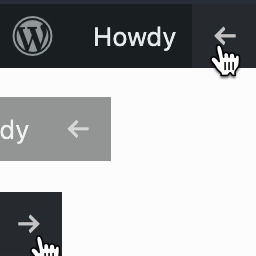
Easily hide or show the front-end WordPress Admin Toolbar with a click of a button. The plugin adds a special button to the right side of the WordPress Admin Toolbar that only displays when you are outside the admin…

Mit Vorsicht verwenden
Hide WP Toolbar works, but test it on a staging site before relying on it in 2026. It runs on 900+ sites, is rated 4.9/5 and was last updated 2 years ago, and scores 48/100 on our health check.
- Kleine Benutzerbasis (900+ aktive Installationen)
- Kein Update in über einem Jahr
- Nur getestet bis WordPress 6.8 (letzt ist 7.1)
Wie stapelt es sich?
Side-by-side bei Installationen, Updates, Bewertungen und Support


Tägliche Downloads
Download-Spitzen folgen normalerweise einer neuen Version - jede Website, die automatisch aktualisiert wird, gilt als Download.
Ranglisten
Where Hide WP Toolbar stands todayWordPress.org Ranglisten suchen
Live-Position in der Plugin-Suche, Top 100| Stichwort | Position |
|---|---|
| adminbar | #14 |
| hide | #98 |
| minimize | #31 |
| toggle | >100 |
| toolbar | #21 |
Versionsübernahme
Anteil aktiver Sites pro Release.
Bewertungsaufschlüsselung
★★★★★★★★★★ 4.9 from 13 reviews
About Hide WP Toolbar
From the official readme · v2.7Beschreibung
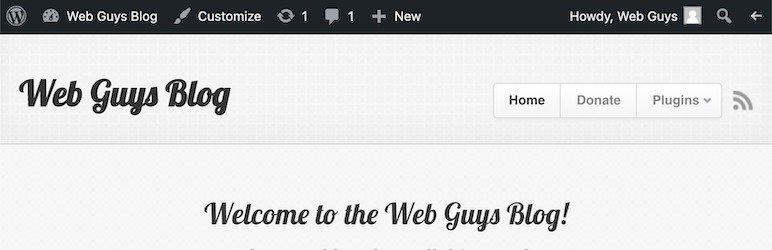
Easily hide or show the front-end WordPress Admin Toolbar with a click of a button. The plugin adds a special button to the right side of the WordPress Admin Toolbar that only displays when you are outside the admin area of WordPress on the front-end. Clicking it will make the admin bar slide off the page to the top left corner, leaving only the hide/show button visible. Clicking the button again will restore the Toolbar to its original position. The shown/hidden position is remembered between page visits so that it can be kept hidden away until you are ready to bring it back.
There are no options or configuration. Just install and activate the plugin. When you exit the admin area, you will see the button to the far right of the Toolbar.
I actually like the WordPress Toolbar. It’s a convenient way to go back and forth from the admin area to the public website. However, when I’m doing design modifications for a theme, the Toolbar can be visually distracting. I wanted a quick way to hide the WordPress Toolbar when needed, but otherwise keep it around. I tried several plugins but they didn’t work as I wanted or didn’t even work at all in some cases. So I decided to build my own.
Contributions Welcome
This plugin is on Github. Submit a pull request if you’d like to contribute.
Installation
- Upload entire
hide-wp-toolbardirectory to the/wp-content/plugins/directory - Aktivieren Sie das Plugin über das „Plugins“-Menü in WordPress
- Navigate to the public area of the site and click the right side button to hide/show the WP Toolbar
Änderungsprotokoll
All users of WordPress 6.6 or higher must upgrade for plugins to work properly. Version 2.7 fixes arrow button position in WordPress 6.6+.
2.7
- Fix arrow button position in WordPress 6.6+
2.6.1
- Updated plugin assets (icon/screenshots) for compatibility with plugin repo
2.6
- Cleaned up outdated CSS prefixes (Github issue #8)
- Removed font size CSS declaration to accept default font size (maintains icon position when rotating)
- Created plugin icon for plugin repository (Github issue #4)
- Created animated gif screenshot to see plugin behavior (Github issue #5)
2.5.6
- Updated readme details and version number after additional testing
2.5.5
- Fixed toolbar state not saving between page loads (Github issue #7)
2.5.4
- Stopped loading CSS/JS for non-logged in users that don’t have the toolbar (Github issue #6)
Screenshots

Für Entwickler
Ist das dein Plugin? Zeigen Sie die Zahlen.
Fügen Sie Ihrer Website, Docs oder GitHub Readme ein Live-Badge hinzu. Es wird von selbst aktualisiert - kein Konto erforderlich.
Best Hide WP Toolbar alternatives
All adminbar plugins →


Fragen und Antworten
Hide WP Toolbar: quick answers
Gerade Antworten, gezogen von Live WordPress.org Daten.
Quelle: WordPress.org
Is Hide WP Toolbar free?
Yes. Hide WP Toolbar is free to download and use from the official WordPress.org plugin directory.
Is Hide WP Toolbar safe to use in 2026?
Hide WP Toolbar works, but test it on a staging site before relying on it in 2026. It runs on 900+ sites, is rated 4.9/5 and was last updated 2 years ago, and scores 48/100 on our health check.
How many websites use Hide WP Toolbar?
Hide WP Toolbar is active on 900+ WordPress websites and has been downloaded 57,522 times since it launched in September 2012. It was downloaded 476 times in the last 30 days.
Does Hide WP Toolbar work with WordPress 7.1?
Hide WP Toolbar is officially tested up to WordPress 6.8.13, while the latest release is 7.1.5. It may still work, but try it on a staging site first.
When was Hide WP Toolbar last updated?
The latest version, 2.7, was released on April 11, 2025 (2 years ago).
Who makes Hide WP Toolbar?
Hide WP Toolbar is developed and maintained by Jeremy Saxey.
What are the best alternatives to Hide WP Toolbar?
The most popular alternatives to Hide WP Toolbar are Hide Admin Bar from Non-Adm… (10K+ installs), which template file (3K+ installs) and Bottom Admin Toolbar (1K+ installs).
Angetrieben von PageForge
Eine Vorlage und eine Tabelle. Eine echte Seite für jede Suche.
PageForge Verwandelt jede Zeile eines CSV in eine WordPress-Seite mit eigenem Titel, URL, SEO Felder und Schema entworfen. Kostenlos auf WordPress.org.
- CSV und XLSX, plus Google Sheets auf Beruf und Unternehmen
- seinen eigenen Titel, URL, SEO Felder und Schema für jede Seite
- Arbeitet mit dem Blockeditor, Elementor, Divi und Avada
- Kostenlos auf WordPress.org, keine Kreditkarte