


Gmail SMTP
Connect to Gmail SMTP server to automatically send email from your WordPress site. Configure wp_mail() to use SMTP with OAuth 2.0 authentication.

Sichere Auswahl
Yes — Gmail SMTP is a safe, well-maintained plugin to use in 2026. It runs on 10K+ sites, is rated 4.1/5 and was last updated 3 weeks ago, and scores 83/100 on our health check.
- Bewährt im Maßstab auf 10k + aktiven Standorten
- Aktiv entwickelt – letztes Update vor 3 Wochen
- Getestet mit dem neuesten WordPress (7.1)
- Momentum — downloads up 374.9% vs the previous 30 days
- Benötigt PHP 8.1 oder neuer
Wie stapelt es sich?
Side-by-side bei Installationen, Updates, Bewertungen und Support



Tägliche Downloads
Download-Spitzen folgen normalerweise einer neuen Version - jede Website, die automatisch aktualisiert wird, gilt als Download.
Ranglisten
Where Gmail SMTP stands todayWordPress.org Ranglisten suchen
Live-Position in der Plugin-Suche, Top 100| Stichwort | Position |
|---|---|
| >100 | |
| Google Mail | #3 |
| versenden | #61 |
| oauth | #10 |
| SMTP | #7 |
Versionsübernahme
Anteil aktiver Sites pro Release.
Bewertungsaufschlüsselung
★★★★★★★★★★ 4.1 from 104 reviews
About Gmail SMTP
From the official readme · v1.2.3.24Beschreibung
Gmail SMTP plugin allows you to authenticate with your Gmail account to send email via Gmail SMTP server.
Most shared hosting servers have restrictions when it comes to email. Usually email will get blocked or missing for no reason. Sometimes it will get blocked when your website reaches the daily limit of outgoing email. This plugin can bypass this issue by routing the email through Gmail’s SMTP server.
Gmail SMTP Add-ons
Gmail SMTP Benefits
- Gmail SMTP plugin is not like most SMTP plugins. It uses the OAuth 2.0 protocol to authorize access to the Gmail API – which means a more secure login system and users won’t have to enter any username or password.
- Gmail SMTP plugin uses PHPMailer – a very popular library used for sending email through PHP’s mail function. This libary is also used in the core WordPress to send email.
- Gmail SMTP plugin utilizes “wp_mail” (A function used by WordPress to send email) instead of completely overriding it. This way you still get all the benefits of the default mail function.
- You no longer need to enable Allow less secure apps on your gmail account to fix SMTP connection issue.
How OAuth 2.0 Authorization Works
- You register an application in the Google Developers Console.
- The application is launched and it requests that you give it access to data in your Google account.
- If you consent, the application receives credentials to access the Gmail API.
Gmail SMTP Features
- Configure your website to send email using Gmail SMTP server
- Authenticate using OAuth 2.0 protocol
- Authenticate with encryption when sending an email (TLS/SSL)
Gmail SMTP Basic Setup
- Create a new project in Google Developers Console.
- Enable Gmail API in it.
- Create credentials (OAuth client ID) to access this API.
- Configure the consent screen for the web application.
- Enter a Product Name and a Privacy policy URL.
- Once the consent screen is configured, create a web application.
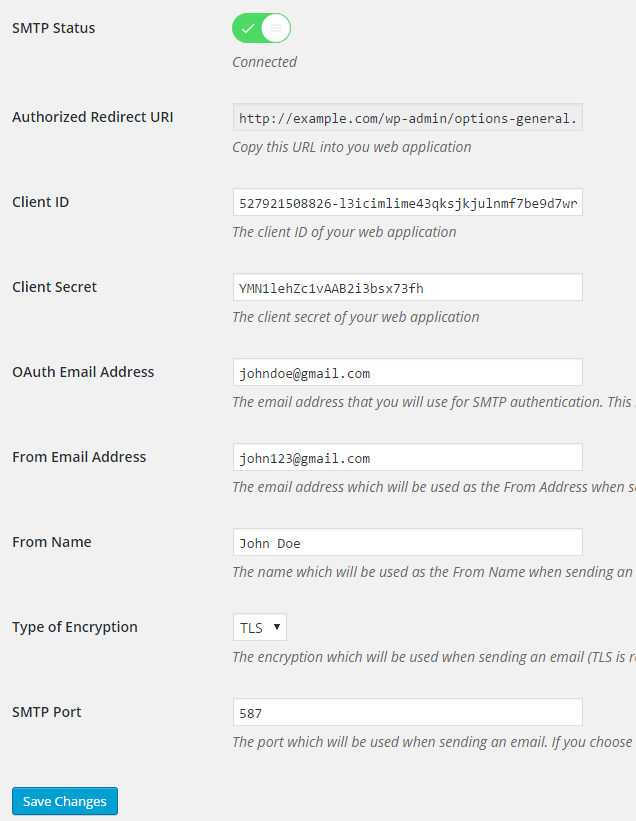
- Go to the plugin settings (
Settings->Gmail SMTP). - Set the Authorized Redirect URL of the application as the one shown in the settings.
- Finish creating the web app.
- Copy the newly created Client ID and Client secret and paste into the settings area.
- Enter your OAuth Email, From Email and From name.
- Select an encryption.
- Enter a port number.
- Save the settings.
- Now you can authorize your application to access the Gmail API by clicking on the Grant Permission button.
- Once the application has been authorized Gmail SMTP plugin will be able to take control of all outgoing email.
Gmail SMTP Settings
- Authorized Redirect URI: Authorized redirect URL for your website. You need to copy this URL into your web application.
- Client ID: The client ID of your web application.
- Client secret: The client secret of your web application.
- OAuth Email Address: The email address that you will use for SMTP authentication. This should be the same email used in the Google Developers Console.
- From Email Address: The email address which will be used as the From Address when sending an email.
- From Name: The name which will be used as the From Name when sending an email.
- Type of Encryption: The encryption which will be used when sending an email (TLS/SSL. TLS is recommended).
- SMTP Port: The port which will be used when sending an email. If you choose TLS it should be set to 587. For SSL use port 465 instead.
- Disable SSL Certificate Verification: As of PHP 5.6 a warning/error will be displayed if the SSL certificate on the server is not properly configured. You can check this option to disable that default behaviour.
Gmail SMTP Test Email
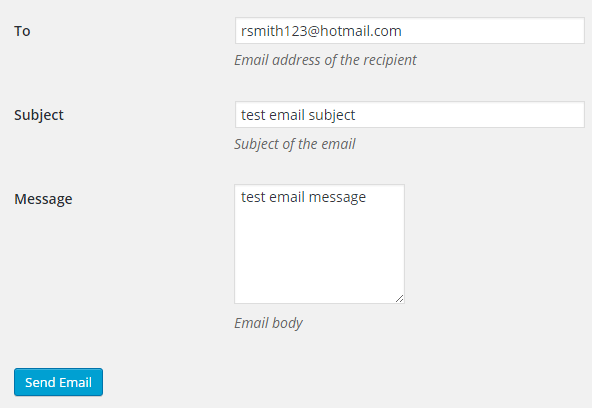
Once you have configured the settings you can send a test email to check the functionality of the plugin.
- To: Email address of the recipient.
- Subject: Subject of the email.
- Message: Email body.
For detailed setup instructions please visit the Gmail SMTP plugin page.
Installation
- Go to the Add New plugins screen in your WordPress Dashboard
- Click the upload tab
- Browse for the plugin file (gmail-smtp.zip) on your computer
- Click “Install Now” and then hit the activate button
Änderungsprotokoll
none
1.2.3.24
- Updated authentication code and URL.
1.2.3.23
- Fixed some warning notices related to PHP 8.5.
1.2.3.22
- Fixed an issue which caused empty XOAUTH2 bearer.
1.2.3.21
- Updated Google API Client library to v2.19.4.
1.2.3.20
- Fixed an issue with sending a test email.
1.2.3.19
- Compatibility update for WordPress 7.0.
Screenshots
Für Entwickler
Ist das dein Plugin? Zeigen Sie die Zahlen.
Fügen Sie Ihrer Website, Docs oder GitHub Readme ein Live-Badge hinzu. Es wird von selbst aktualisiert - kein Konto erforderlich.
Best Gmail SMTP alternatives
Alle E-Mail-Plugins →





Fragen und Antworten
Gmail SMTP: quick answers
Gerade Antworten, gezogen von Live WordPress.org Daten.
Quelle: WordPress.org
Is Gmail SMTP free?
Yes. Gmail SMTP is free to download and use from the official WordPress.org plugin directory.
Is Gmail SMTP safe to use in 2026?
Yes — Gmail SMTP is a safe, well-maintained plugin to use in 2026. It runs on 10K+ sites, is rated 4.1/5 and was last updated 3 weeks ago, and scores 83/100 on our health check.
How many websites use Gmail SMTP?
Gmail SMTP is active on 10K+ WordPress websites and has been downloaded 772,511 times since it launched in November 2015. It was downloaded 13,260 times in the last 30 days.
Does Gmail SMTP work with WordPress 7.1?
Yes. The developer has tested Gmail SMTP up to WordPress 7.1.5, the latest release. It requires WordPress 7.0 or newer.
What PHP version does Gmail SMTP need?
Gmail SMTP requires PHP 8.1 or higher. Most hosts run PHP 8.x today, so it works on any modern WordPress hosting.
When was Gmail SMTP last updated?
The latest version, 1.2.3.24, was released on November 8, 2026 (3 weeks ago).
Who makes Gmail SMTP?
Gmail SMTP is developed and maintained by Noor Alam.
What are the best alternatives to Gmail SMTP?
The most popular alternatives to Gmail SMTP are WP Mail SMTP by WPForms (4M+ installs), MC4WP: Mailchimp for WordPr… (1M+ installs) and Easy WP SMTP (500K+ installs).
Angetrieben von PageForge
Eine Vorlage und eine Tabelle. Eine echte Seite für jede Suche.
PageForge Verwandelt jede Zeile eines CSV in eine WordPress-Seite mit eigenem Titel, URL, SEO Felder und Schema entworfen. Kostenlos auf WordPress.org.
- CSV und XLSX, plus Google Sheets auf Beruf und Unternehmen
- seinen eigenen Titel, URL, SEO Felder und Schema für jede Seite
- Arbeitet mit dem Blockeditor, Elementor, Divi und Avada
- Kostenlos auf WordPress.org, keine Kreditkarte