


Form Plant
A WordPress contact form plugin with confirmation screen, submission storage, layered spam protection, and Japanese postal code auto-fill.

Solide Wahl
Form Plant is a solid plugin choice in 2026, with a few things worth checking first. It runs on 60+ sites and was last updated 2 days ago, and scores 68/100 on our health check.
- Aktiv entwickelt — Letztes Update vor 2 Tagen
- Getestet mit dem neuesten WordPress (7.1)
- Small user base (60+ active installs)
- Bisher sehr wenige Bewertungen
Wie stapelt es sich?
Side-by-side bei Installationen, Updates, Bewertungen und Support



Tägliche Downloads
Download-Spitzen folgen normalerweise einer neuen Version - jede Website, die automatisch aktualisiert wird, gilt als Download.
Ranglisten
Where Form Plant stands todayWordPress.org Ranglisten suchen
Live-Position in der Plugin-Suche, Top 100| Stichwort | Position |
|---|---|
| confirmation | >100 |
| Kontaktformular | >100 |
| csv export | >100 |
| MW WP-Form | #5 |
| recaptcha | >100 |
Versionsübernahme
Anteil aktiver Sites pro Release.
About Form Plant
Aus der offiziellen Readme · V1.5.3Beschreibung
Form Plant is a WordPress contact form plugin built around three pillars: practical defaults, layered spam protection, and strong Japanese-locale support.
Ready out of the box — Confirmation screen, submission storage, and CSV export are standard features, not paid add-ons. Publish a working form in minutes.
Spam protection in depth — Combine honeypot, time-based validation, IP rate limiting, disposable email blocking, Google reCAPTCHA (v2/v3), and Cloudflare Turnstile. Start with the lightweight defaults that work without any account setup; add reCAPTCHA or Turnstile only when you need them.
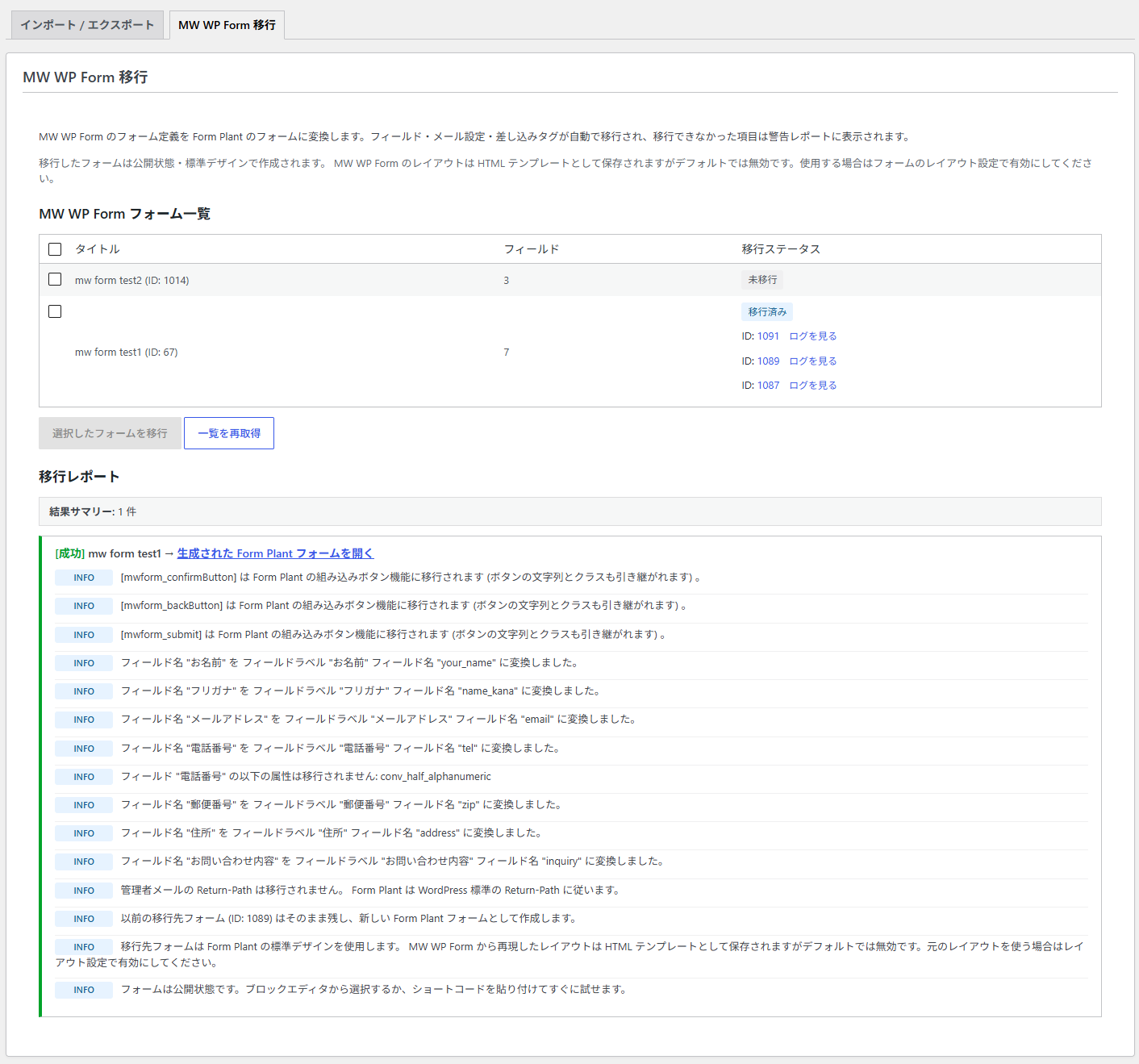
Built for Japanese sites — Postal code lookup with address auto-fill, per-part name/kana validation, and Japan-specific address templates. Moving from MW WP Form? A built-in migration tool imports your existing forms — fields, validation rules, and mail settings — so you can switch without rebuilding from scratch.
Many form plugins require extra extensions for confirmation pages or data management. Form Plant includes these essentials from the start.
Why Form Plant?
- Confirmation screen included — Let users review their input before submitting. No extra plugin needed.
- Submission data storage — All form entries are saved in the database and manageable from the admin panel.
- CSV export — Download submission data anytime for reporting or backup.
- Embed on external sites — Display your forms on any website via iframe or JavaScript snippet, not just within WordPress.
- Webhooks — Send submissions to Zapier, Make, or your own API as signed JSON, with delivery logging and automatic retry.
- Quick setup — An intuitive ACF-style accordion editor lets you build forms without touching code.
- Flexible customization — Custom HTML templates, validation messages, and post-submission actions give you full control when you need it.
Merkmale
- Intuitive ACF-style accordion UI for field configuration
- Block editor (Gutenberg) integration — pick a form from a dropdown using the dedicated “Form Plant” block
- MW WP Form migration tool — convert existing MW WP Form forms (fields, validation rules, admin and auto-reply mail settings, and merge tags) into Form Plant forms, with a warning report for items that need manual review (shown when MW WP Form is active)
- Email notifications (admin notification and auto-reply)
- Webhooks — send each submission as signed JSON (HMAC-SHA256) to external URLs, with automatic retry and per-submission delivery log
- Acceptance (consent) field with a linked label for privacy policy / terms agreement
- Custom HTML template support
- Confirmation screen before submission
- Custom validation messages
- Post-submission actions (message / custom HTML / redirect)
- Two types of date input (calendar / dropdown)
- Postal code lookup that auto-fills address fields (Japan)
- Multiple spam protection options: honeypot, time-based check, IP rate limit, disposable email blocking, Google reCAPTCHA v2/v3, Cloudflare Turnstile
- External site embedding via iframe / JavaScript
- Multiple custom CSS file uploads and design presets
- Submission data storage and management
- CSV export of submission data
- File upload support
Supported Field Types
- Text
- Textarea
- Telefon
- Anzahl
- URL
- Name (parts)
- Name (Kana)
- Postal Code (with address auto-fill)
- Address (Japan / international)
- Prefecture
- Date (Calendar)
- Date (Dropdown)
- Zeit
- Password (with optional strength meter)
- Wählen
- Checkbox
- Radio
- Acceptance (consent checkbox with a linked label, e.g. privacy policy)
- File Upload
- Hidden
- HTML
Externe Dienste
This plugin optionally integrates with Google reCAPTCHA (v2 Checkbox and v3 Score-based) for spam protection:
- Service: Google reCAPTCHA
- API Documentation (v2): https://developers.google.com/recaptcha/docs/display
- API Documentation (v3): https://developers.google.com/recaptcha/docs/v3
- Terms of Use: https://policies.google.com/terms
- Privacy Policy: https://policies.google.com/privacy
When reCAPTCHA is enabled in form settings, this plugin will:
– Load the reCAPTCHA JavaScript library from Google’s servers (https://www.google.com/recaptcha/api.js)
– Send form submission data to Google for spam analysis
– Include user’s IP address and browser information in the request
reCAPTCHA is disabled by default and requires explicit activation by the site administrator.
This plugin also optionally integrates with Cloudflare Turnstile for spam protection:
- Service: Cloudflare Turnstile
- API Documentation: https://developers.cloudflare.com/turnstile/
- Terms of Use: https://www.cloudflare.com/terms/
- Privacy Policy: https://www.cloudflare.com/privacy/
When Turnstile is enabled in form settings, this plugin will:
– Load the Turnstile JavaScript library from Cloudflare’s servers
– Send form submission tokens to Cloudflare for verification
– Include user’s IP address and browser information in the request
Turnstile is disabled by default and requires explicit activation by the site administrator.
This plugin also uses the zipcloud postal code lookup API to auto-fill Japanese addresses when a user enters a postal code in a Postal Code or Address (Japan) field:
- Service: zipcloud (郵便番号検索API)
- API Endpoint: https://zipcloud.ibsnet.co.jp/api/search
- Service Information: https://zipcloud.ibsnet.co.jp/doc/api
- Terms of Use: https://zipcloud.ibsnet.co.jp/rule/api
When the user types a 7-digit postal code, the form’s JavaScript sends a request from the visitor’s browser to the zipcloud API to retrieve the corresponding prefecture / city / town information and populate the address fields. Only the postal code is sent — no personal information is transmitted. The lookup runs only when a Postal Code or Address (Japan) field is present in the form, and runs in the visitor’s browser, not from the server.
Third Party Resources
This plugin includes a list of disposable email domains for spam protection:
- Source: disposable-email-domains
- License: CC0 1.0 Universal (Public Domain)
- Usage: Emails from disposable/temporary email services are automatically blocked during form submission
The list is bundled with the plugin and does not make any external requests.
Installation
- Upload the plugin folder to the
/wp-content/plugins/directory - Aktivieren Sie das Plugin über das „Plugins“-Menü in WordPress
- Create a form from the ‘Form Plant’ menu
Änderungsprotokoll
Fixes percent-encoded characters (e.g. a URL with Japanese text) being removed on save, clicks lost while a validation message appears, and uploaded files left behind after a submission is deleted. Re-enter any redirect URL that lost part of its address.
1.5.3
- Fixed: Percent-encoded characters were removed when a form or a submission was saved. A redirect URL such as
https://example.com/%e3%83%96%e3%83%ad%e3%82%b0/(a page with a non-ASCII name) was stored ashttps://example.com//, and a URL pasted into a text or textarea field lost the same part. Password fields were affected too: a password containing%followed by two hexadecimal characters was stored and sent altered. Values that were already saved without those characters cannot be restored — please re-enter the redirect URL, the[fplant_complete]fallback URL and webhook URLs that contain such characters. - Fixed: A click could be lost when a validation message appeared or disappeared at that moment — for example pressing the submit button while a required field above it was still empty, or right after correcting a field that showed an error. The message is now updated after the click has been delivered.
- Fixed: Deleting a submission left its uploaded files on the server. They are now deleted together with the submission. Use the
fplant_delete_submission_filesfilter to keep them. - Fixed: With “Mask value when saving data” enabled on a password field, the first webhook delivery still carried the password as typed, while the automatic retry sent the masked value. Both now send the masked value.
- Fixed: A form using an HTML template could not be saved when the tag of a required field carried another attribute, such as
[fplant_field name="email" class="my-input"]— the editor recognized only the bare[fplant_field name="email"]and reported the field as missing. Attributes in any order, single quotes and unquoted values are now recognized. - Fixed: When a postal code field filled a prefecture shown as radio buttons, no option was selected and the value of the first option was overwritten with the looked-up prefecture, so choosing that option afterwards submitted the wrong prefecture.
- Security: The folder that stores uploaded files now gets a 32-character random name (previously 6). Existing folders and files stay where they are; new uploads go to a new folder. On servers that do not read
.htaccess(nginx), this name is what keeps the files private. - Security: New Site Health test “Form Plant upload protection”. It requests a test file and reports when uploaded files can be opened directly by URL, with the nginx rule that blocks it.
- Security: The
.htaccessfile protecting upload folders now uses both the Apache 2.4 and 2.2 syntax, and the download link in the submission screen checks the stored file path more strictly. - Developer: New
fplant_submission_deletedaction (after a submission and its files are deleted) andfplant_delete_submission_filesfilter. Newfplant_form_list_columnsandfplant_form_list_column_contentfilters add a column to the form list. - Developer: New front-end helpers
window.fplant.afterPress( callback )— runs the callback right after the click in progress, for validation that changes the layout on blur — andwindow.fplant.lookupAddress( postalCode ), the address lookup the postal code field uses, returning a Promise.
1.5.2
- Fixed: HTML fields were not rendered in iframe and JavaScript embeds. With the default layout they appeared only when the form was placed with the shortcode or the block.
- Fixed: Hidden fields were not output at all with the default layout. They worked only when placed with
[fplant_field]in an HTML template. - Fixed: The
allow_htmloption of a setting registered throughfplant_custom_settings_fieldshad no effect when the form was saved from the editor — the tags were stripped before the setting was stored. The built-in HTML settings were not affected. - Developer: New
fplant_form_outputfilter (replace the rendered form HTML or add to it;$contextisshortcode,iframeorrest),fplant_form_unavailable_messagefilter (the text shown when a form does not accept submissions), andfplant_submission_gatefilter (reject a submission with aWP_Errorafter validation and right before it is saved — for capacity limits, duplicate entries, or a check against an external service). - Developer: New
fplant_layout_field_typesfilter withFPLANT_Field_Manager::get_layout_field_types()/is_layout_type(). A field type registered as a layout type holds no value, so it is skipped by validation, CSV export, emails,{all_fields}, webhooks and the email tag list, and is rendered without a label or error area — the treatment the built-in HTML field already had. - Developer: New
fplant_html_setting_keysfilter withFPLANT_Form_Manager::get_html_setting_keys()— the form settings whose value may contain HTML.fplant_form_is_submittablenow receives a third$is_previewargument, true for a validation-only submission from the form preview. - Developer: New front-end API
window.fplant.validateField( formId, fieldName )(validate a single field and show its error), and a newfplant:validationErrorevent (detail.sourceisclientorserver) that fires even when the HTML template contains no[fplant_errors]element. - Developer: New style-only class
fplant-submit-button-style. A button carrying it gets the same appearance as the submit button, including the design presets and the Design adjustments settings. It adds no behavior.
1.5.1
- Security: Fixed an issue where a crafted submission to a form with an optional file upload field could attach an arbitrary server-side file to the admin notification email. File information is now produced only by the upload handler, and outgoing attachments are restricted to the plugin’s own upload directory (
wp-content/uploads/fplant_uploads/). Sites using a file upload field should update. - Fixed: Date (dropdown) fields lost their value. The three selects never combined into the submitted value, so a required date dropdown could not be submitted at all and an optional one was saved empty. Existing forms work again after updating; no settings change is needed.
- Fixed: The file size limit checked in the browser was always 2MB regardless of the field’s setting, so a file larger than 2MB was rejected before upload even when a larger limit was configured.
- Fixed: A file chosen in a disabled file field (for example one hidden by an add-on) is no longer uploaded.
- Fixed: Postal code fields with no address auto-fill configured no longer call the external postal code lookup service — the result was being discarded.
- Developer: Form output now keeps
data-*and the commonaria-*attributes on form controls, allows the<template>tag, and can be extended with the newfplant_allowed_form_htmlfilter. The two Fixed items above were caused by these attributes being stripped. - Developer: New
fplant_submission_detail_value_htmlfilter (replace one value cell in the submission detail) andfplant_admin_email_attachmentsfilter (attach extra files, restricted to the plugin’s upload directory). The submission file download endpoint accepts optionalrow/subparameters for files inside structured values.fplant_format_submission_valuenow also receives the submission ID, and the all-forms CSV export passes field definitions. - Developer: A field whose type is not registered — for example when the add-on that provided it is deactivated — is now skipped by validation and not saved, instead of blocking submissions, and the field editor keeps its type instead of clearing it.
FPLANT_Template_Loader::get_allowed_field_types()returns the effective list. - Developer:
FPLANT_Validator::validate_field_type()/validate_file()andFPLANT_Submission_Manager::upload_file_entry()are now public so add-ons can reuse the built-in validation and upload handling for their own sub-fields.
1.5.0
- New: Completion screens now expand the same tags as emails —
{submission_id}(use it as a reference number),{field:field_name},{all_fields},{form_title}and the other system tags work in the success message and the completion page HTML. Password values are always masked there. - New:
[fplant_complete id="123"]shortcode. Redirect to a thank-you page and still show the completion screen (reference number, submitted values) there. Enable “Use the completion shortcode on the redirect page” in the form’s redirect settings. The completion screen appears only right after a submission (once; not on reload), and visitors who open the page directly are sent back to the page that contains the form (or a URL you specify), so conversion tags on the thank-you page fire only after a real submission. The Form Plant block offers it as “Form name (Completion)”. - New: The success message and completion page HTML settings now list the value tags of the form’s own fields.
- Fixed: iframe and JavaScript embeds now render the same completion screen as the shortcode / block (template values, tags, and extension filters were skipped on the embed API).
- Fixed: The
{field_name}shorthand tag now masks password values when “mask in emails” is enabled, the same as{field:field_name}. - Developer:
fplant_submission_resultfilter (switch the completion action based on the submitted data) andfplant_display_fieldsfilter (drop fields from the confirmation screen and{all_fields}for a submission), both required by Form Plant Pro.FPLANT_Email_Handler::replace_tags()is now public static. Newfplant_complete_shortcode_htmlandfplant_complete_token_ttlfilters.
1.4.1
- New: WordPress shortcodes are now expanded in the confirmation screen HTML template, the same as in the input screen HTML template. Shortcodes typed into form fields by visitors are shown as plain text and never executed.
- New: The
fplant_template_valuesfilter ({{key}}placeholders) now also works in iframe and JavaScript embeds — previously it only worked for forms placed with the shortcode or block. - New: Prefill fields from a post via URL. With “Allow initial values from URL parameters” enabled, open the form page with
?post_id=123and a field whose default value is{post_title},{post_name},{post_date},{post_excerpt},{post_content},{ID}or{your_custom_field}is prefilled from that post (equivalent of MW WP Form’s querystring feature). Only publicly viewable posts are read, and protected meta (_-prefixed keys) is never exposed. - Fixed: With “Allow initial values from URL parameters” enabled, an unresolved
{placeholder}default value is no longer rendered as-is into the field. - Fixed: Removed stray whitespace inside the submit / back / confirm button tags. On themes that style buttons with
white-space: pre-wrap(or similar), it could shift the button label. If you have copiedtemplates/confirmation.phportemplates/form-fields/submit.phpinto your theme, update your copies as well.
1.4.0
- New: Webhooks. Send each submission as JSON to external services (Zapier, Make, Google Apps Script, or your own API) from the new Integrations tab. Up to 3 HTTPS URLs per form, an HMAC-SHA256 signature header (
X-FPlant-Signature) for verification, one automatic retry on failure, delivery results shown with the saved submission, and a test-send button. - New: Acceptance field — a consent checkbox with a linked label for privacy policy / terms agreement. Always required to submit; showing it on the confirmation screen, in emails, and in saved submissions is configurable (all off by default). When saved, the submission records the exact consent wording the user agreed to.
- Developer: Webhook customization filters —
fplant_webhook_should_send,fplant_webhook_payload,fplant_webhook_request_args, andfplant_webhook_allow_http. - Developer: Extension APIs for add-ons — new
fplant_sanitize_field_valuefilter (custom field types keep array values; previously they were flattened on save), form configuration passed tofplant_complete_message/fplant_redirect_url/fplant_success_html, submission data passed tofplant_admin_email_subject/fplant_user_email_subject, a new front-endfplant:fieldChangeevent with publicwindow.fplant.getFieldValue()/getFormData()accessors, andfplant:successnow bubbles like other events. - Developer: Structured field values for add-ons — bracket-style input names (
field[0][sub]) are now collected as nested values on the front end (also returned bygetFormData()), stored as JSON with the submission, and rendered as plain text through the newfplant_format_submission_valuefilter in confirmation screens, emails, CSV export, and the admin detail view.
Screenshots




Für Entwickler
Ist das dein Plugin? Zeigen Sie die Zahlen.
Fügen Sie Ihrer Website, Docs oder GitHub Readme ein Live-Badge hinzu. Es wird von selbst aktualisiert - kein Konto erforderlich.
Best Form Plant alternatives
All confirmation plugins →




Fragen und Antworten
Form Plant: quick answers
Gerade Antworten, gezogen von Live WordPress.org Daten.
Quelle: WordPress.org
Is Form Plant free?
Yes. Form Plant is free to download and use from the official WordPress.org plugin directory.
Is Form Plant safe to use in 2026?
Form Plant is a solid plugin choice in 2026, with a few things worth checking first. It runs on 60+ sites and was last updated 2 days ago, and scores 68/100 on our health check.
How many websites use Form Plant?
Form Plant is active on 60+ WordPress websites and has been downloaded 1,690 times since it launched in March 2026. It was downloaded 385 times in the last 30 days.
Does Form Plant work with WordPress 7.1?
Yes. The developer has tested Form Plant up to WordPress 7.1.5, the latest release. It requires WordPress 6.0 or newer.
What PHP version does Form Plant need?
Form Plant requires PHP 8.0 or higher. Most hosts run PHP 8.x today, so it works on any modern WordPress hosting.
When was Form Plant last updated?
The latest version, 1.5.3, was released on November 28, 2026 (2 days ago).
Who makes Form Plant?
Form Plant is developed and maintained by Reiji Sato.
What are the best alternatives to Form Plant?
The most popular alternatives to Form Plant are CPS | Age Verification (800+ installs), Gravity Pre-submission Conf… (800+ installs) and Publish Confirm Message (100+ installs).
Angetrieben von PageForge
Eine Vorlage und eine Tabelle. Eine echte Seite für jede Suche.
PageForge Verwandelt jede Zeile eines CSV in eine WordPress-Seite mit eigenem Titel, URL, SEO Felder und Schema entworfen. Kostenlos auf WordPress.org.
- CSV und XLSX, plus Google Sheets auf Beruf und Unternehmen
- seinen eigenen Titel, URL, SEO Felder und Schema für jede Seite
- Arbeitet mit dem Blockeditor, Elementor, Divi und Avada
- Kostenlos auf WordPress.org, keine Kreditkarte