


Focalio – Focal Point Cropping, WebP & AVIF Images
Keep the subject in frame in every crop. Pick a focal point; Focalio serves WebP/AVIF on demand without filling your uploads folder.

Solide Wahl
Focalio is a solid plugin choice in 2026, with a few things worth checking first. It runs on 200+ sites and was last updated 4 weeks ago, and scores 69/100 on our health check.
- Aktiv entwickelt — letztes Update vor 4 Wochen
- Getestet mit dem neuesten WordPress (7.1)
- Kleine Benutzerbasis (über 200 aktive Installationen)
- Bisher sehr wenige Bewertungen
- Benötigt PHP 8.3 oder neuer
Wie stapelt es sich?
Side-by-side bei Installationen, Updates, Bewertungen und Support


Tägliche Downloads
Download-Spitzen folgen normalerweise einer neuen Version - jede Website, die automatisch aktualisiert wird, gilt als Download.
Ranglisten
Where Focalio stands todayWordPress.org Ranglisten suchen
Live-Position in der Plugin-Suche, Top 100| Stichwort | Position |
|---|---|
| focal-point | #3 |
| image optimization | >100 |
| images | >100 |
| Lazy Loading | >100 |
| webp | >100 |
Versionsübernahme
Anteil aktiver Sites pro Release.
About Focalio
From the official readme · v1.0.41Beschreibung
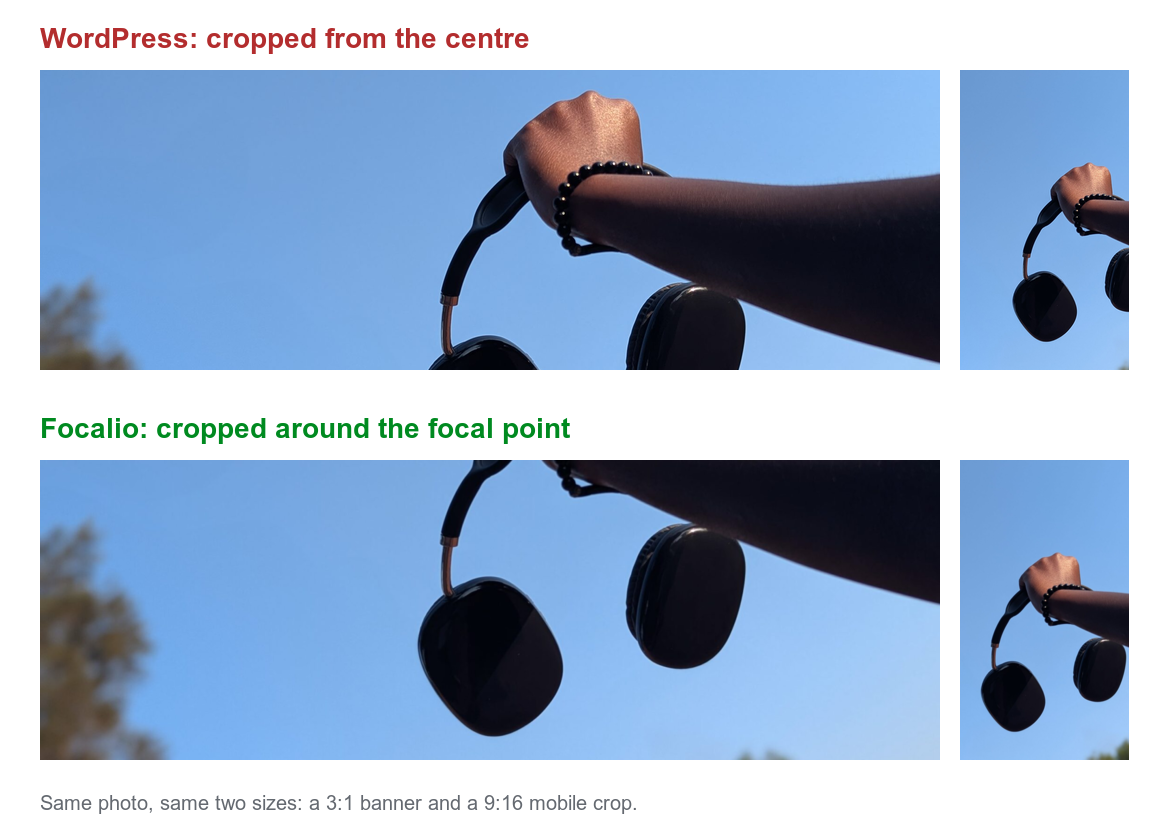
Focalio serves cropped, format-converted image variants on demand via signed URLs — no more pre-generated intermediate sizes filling up your uploads directory. Editors pick a focal point per image so crops always keep the subject in frame.
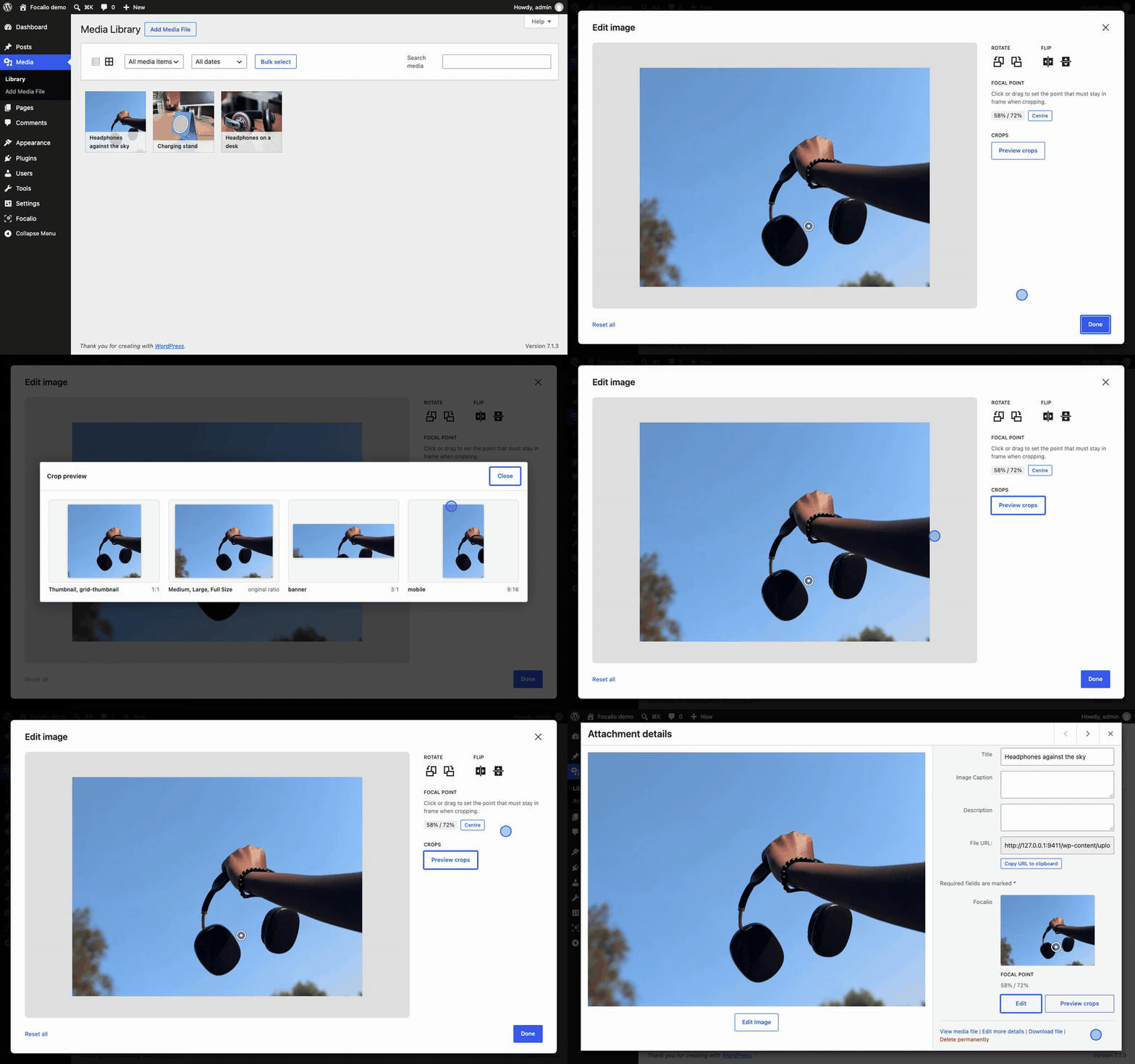
Try it without installing: click Live Preview for a demo page with three photos at three crops. Move a focal point and reload the page: every crop follows.
Eigenschaften:
- On-demand image cropping via signed URLs
- WebP or AVIF output for all uploads
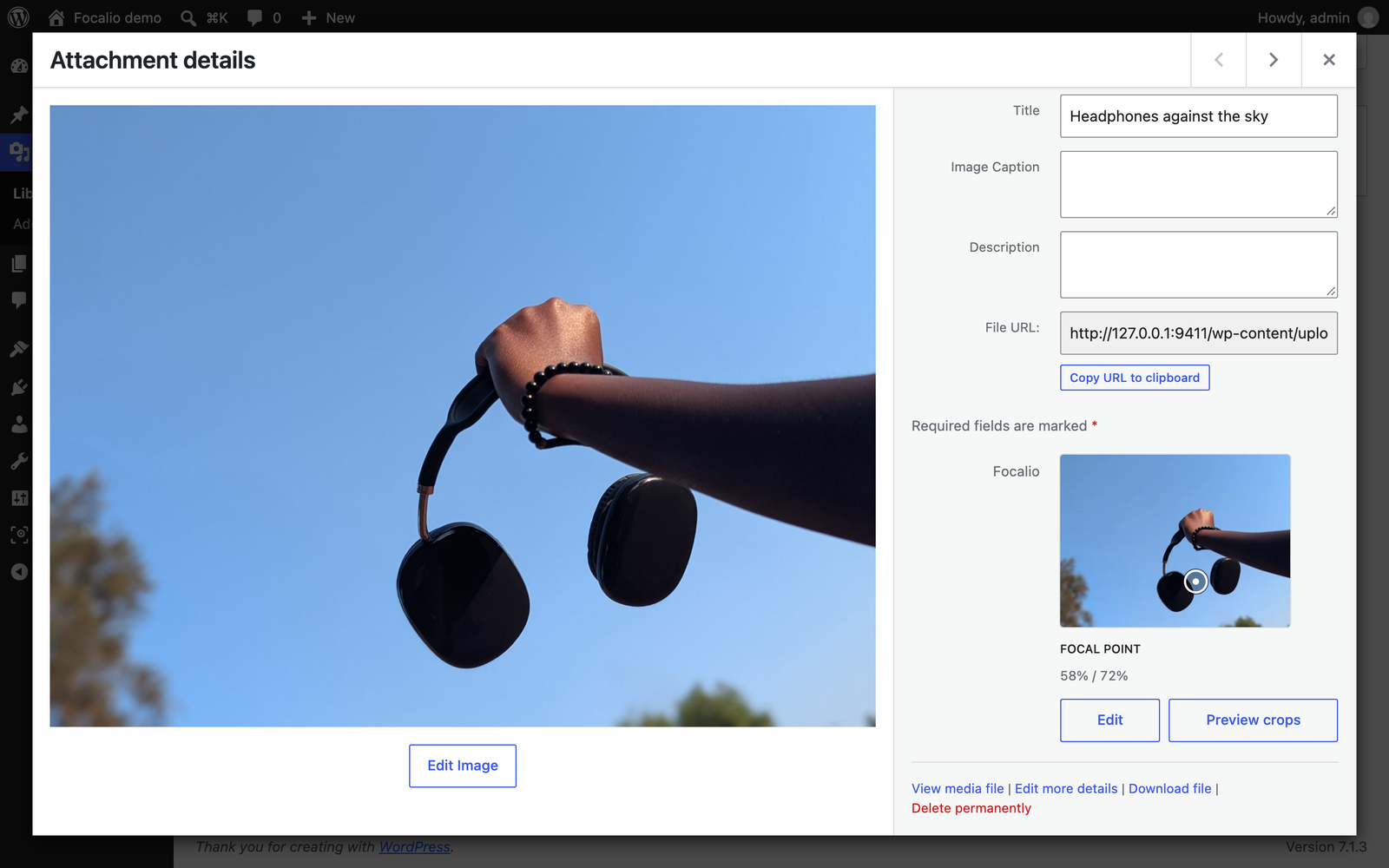
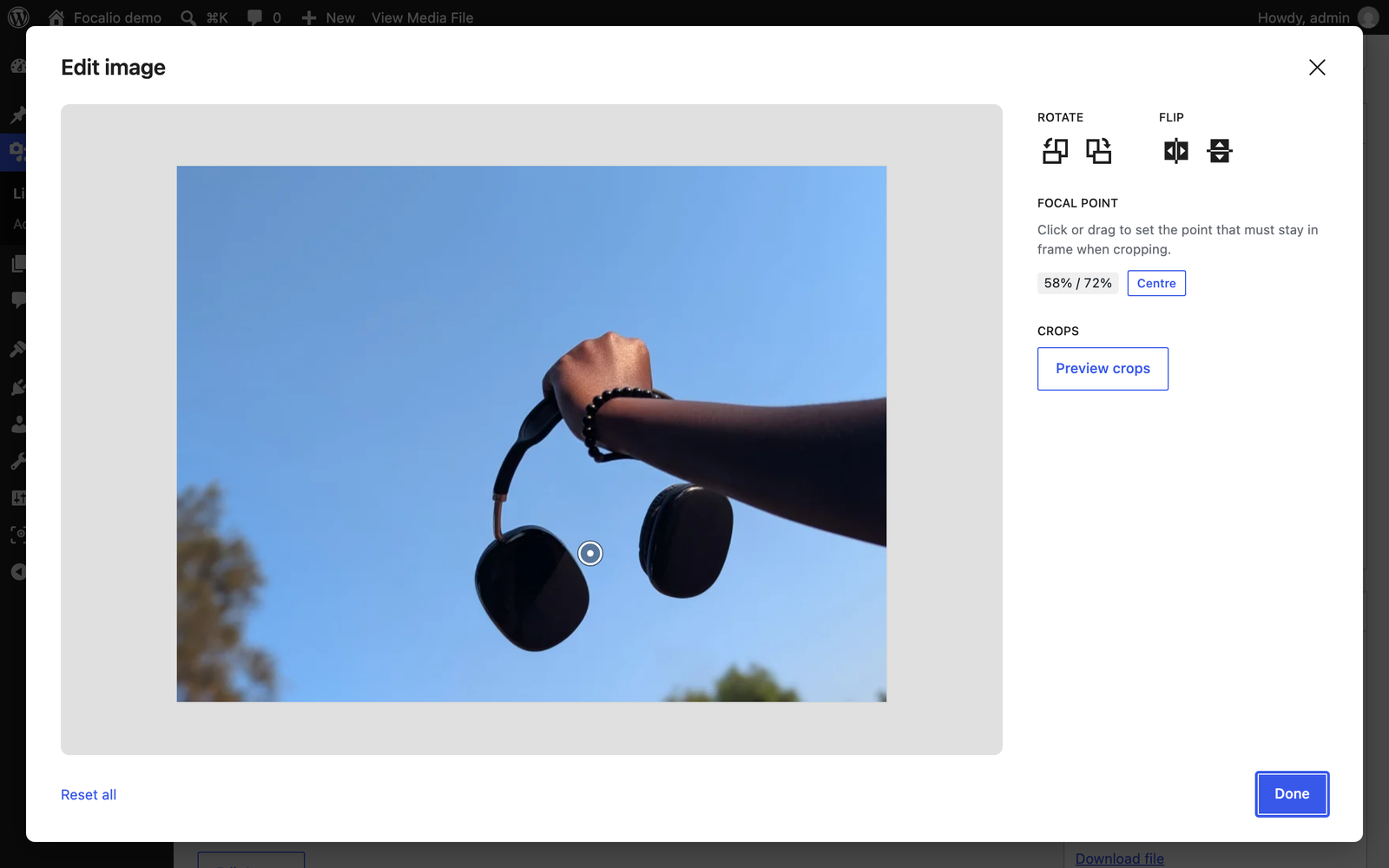
- Focal-point picker in the media library and the block editor
- Non-destructive rotate and flip, applied to every rendition
- LQIP (Low Quality Image Placeholder) support
- Settings for image quality, output format and maximum width
- Presets, as many as you need: edited on the Presets tab, each with its own quality and LQIP, or registered in code with glide_register_preset()
- Attention / entropy / center crop fallback for images without a manual focal point
- Cached images are served before the rest of WordPress loads
- Presets also appear as image sizes, so the media library, Advanced Custom Fields, widgets and page builders can pick them by name
- Optional: skip writing intermediate image sizes to disk on upload
- Turn off the WordPress image sizes your site does not use
- A Cache tab: how big the image cache is, and a button to clear it. A weekly cleanup drops renders that are no longer used
- WP-CLI commands for the cache and the crop fallback
- WooCommerce product images go through Focalio too, and its cropped sizes follow the focal point
- Multisite: activate it for the whole network; deleting it cleans up every site
Focalio Pro is a separate add-on for agencies and editorial teams, not included in this plugin. It adds:
- Control: focal-point zoom, a straighten ruler that levels a tilted photo by up to 45°, a live crop preview, a hand-made crop per ratio where the focal point is not enough, a watermark, and a version history per image to go back to an earlier focal point or crop, like undo and redo
- Performance: AVIF with a WebP fallback in a picture element, and a cache warm-up that renders images before the first visitor asks for them
- Workflow: face detection that puts the focal point on the people in a photo, bulk actions in the media library, import and export of the settings to set up one site and give others the same, and tools to manage every site of a multisite network
- WooCommerce: the shop grid of a block theme cut on the focal point at the store’s ratio, and one ratio for every photo on a product page
Externe Dienste
Focalio includes the Freemius SDK (https://freemius.com), which handles the opt-in to share usage data and the licenses of the Focalio Pro add-on. Nothing is sent to Freemius unless you opt in; images are always processed on your own server.
What is sent, and when:
- When you opt in (on the screen shown after activation): your WordPress user’s first and last name and email address; the site’s homepage URL and title, WordPress and PHP versions and site language; the Focalio and SDK versions, and whether Focalio is active. The list of plugins and themes (names, slugs, versions, active or not) only when you leave that option on.
- After opting in: changes to that information, and when Focalio is activated, deactivated or uninstalled. If you fill in the optional form on deactivation, the reason you give.
- You can opt out at any time with the “Opt Out” link under Focalio on the Plugins screen. Focalio works the same either way.
Freemius terms of service: https://freemius.com/terms/
Freemius privacy policy: https://freemius.com/privacy/
Installation
- Upload the plugin files to
/wp-content/plugins/focalio/, or install via the WordPress plugin repository. - Aktivieren Sie das Plugin über das Plugin-Menü in WordPress.
- Configure via Focalio in the admin menu.
Änderungsprotokoll
1.0.41
- The media REST API no longer fails on an image without metadata, such as an imported or synced upload: listing the media library through
/wp/v2/mediastopped with “Cannot use object of type stdClass as array”.
1.0.40
- Uploads whose file name holds a format character, such as the invisible soft hyphen macOS puts in Dutch screenshot names, are now served: every crop of them answered 404 although the file was there.
1.0.39
glide_image()andglide_source()no longer make an image taller than its original: a landscape photo on a portrait or squarer ratio is now bounded by its height (1200×896 on 3:4 gave 1200×1600). A preset’s size in Advanced Custom Fields’sizesarray follows the same rule.- Images without metadata, such as imported or synced uploads, are measured from the file, so they are never enlarged either.
1.0.38
- Images are no longer broken when PHP notices are displayed (development,
WP_DEBUG_DISPLAY): output another plugin or theme printed earlier in the request is discarded before the image is sent, and errors during the image response go to the log only. - The Plugins screen shows the same name as the WordPress.org listing: Focalio – Focal Point Cropping, WebP & AVIF Images.
1.0.37
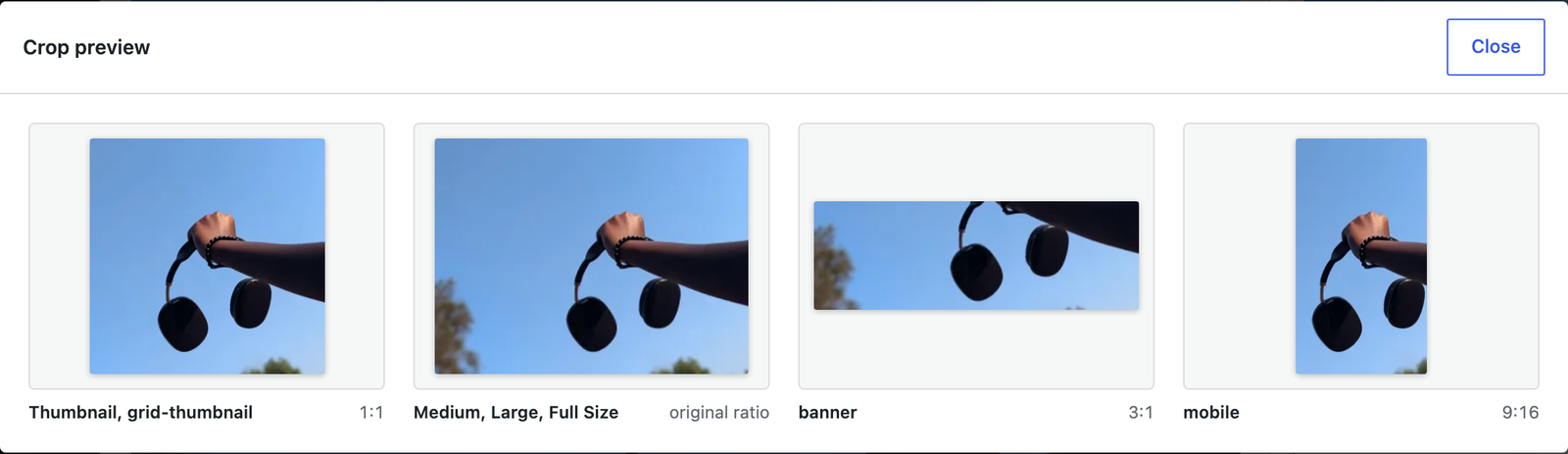
- Crop preview: a preset’s tile shows its ratio as the preset gives it (21:9, as on the Presets tab), no longer reduced to 7:3. Sizes with the same ratio still share one tile.
- Cache tab: right after the image cache is cleared it says when, instead of “Not measured yet”; the next cleanup counts what was rendered since.
1.0.36
- A preset without a quality of its own renders at the quality on the Settings tab instead of 85, and a quality passed to
glide_image()orglide_source()together with a preset wins over the preset’s. Preset images are rendered again once, at the right quality. - Presets added through the
wp_glide/register_presetsfilter read LQIP likeglide_register_preset()does:'off','no','false'and0turn it off. - Info tab: the URL signing key row says the key is auto-generated and stored, instead of “Falling back to wp_salt”.
- Cache tab: before the first cleanup it points to
wp focalio cache cleanup, which records the numbers. - Security tab: the
define()line for wp-config.php is folded away until you click “Show the line to paste”.
Screenshots
Für Entwickler
Ist das dein Plugin? Zeigen Sie die Zahlen.
Fügen Sie Ihrer Website, Docs oder GitHub Readme ein Live-Badge hinzu. Es wird von selbst aktualisiert - kein Konto erforderlich.
Best Focalio alternatives
All focal-point plugins →Fragen und Antworten
Focalio: quick answers
Gerade Antworten, gezogen von Live WordPress.org Daten.
Quelle: WordPress.org
Is Focalio free?
Yes. Focalio is free to download and use from the official WordPress.org plugin directory.
Is Focalio safe to use in 2026?
Focalio is a solid plugin choice in 2026, with a few things worth checking first. It runs on 200+ sites and was last updated 4 weeks ago, and scores 69/100 on our health check.
How many websites use Focalio?
Focalio is active on 200+ WordPress websites and has been downloaded 1,182 times since it launched in October 2026. It was downloaded 710 times in the last 30 days.
Does Focalio work with WordPress 7.1?
Yes. The developer has tested Focalio up to WordPress 7.1.5, the latest release. It requires WordPress 6.2 or newer.
What PHP version does Focalio need?
Focalio requires PHP 8.3 or higher. Most hosts run PHP 8.x today, so it works on any modern WordPress hosting.
When was Focalio last updated?
The latest version, 1.0.41, was released on November 4, 2026 (4 weeks ago).
Who makes Focalio?
Focalio is developed and maintained by bigfatinternet.
What are the best alternatives to Focalio?
The most popular alternatives to Focalio are ACF: Focal Point (400+ installs), Presswell Art Direction (90+ installs) and Media on Autopilot (<10 installs).
Angetrieben von PageForge
Eine Vorlage und eine Tabelle. Eine echte Seite für jede Suche.
PageForge Verwandelt jede Zeile eines CSV in eine WordPress-Seite mit eigenem Titel, URL, SEO Felder und Schema entworfen. Kostenlos auf WordPress.org.
- CSV und XLSX, plus Google Sheets auf Beruf und Unternehmen
- seinen eigenen Titel, URL, SEO Felder und Schema für jede Seite
- Arbeitet mit dem Blockeditor, Elementor, Divi und Avada
- Kostenlos auf WordPress.org, keine Kreditkarte