


Datei-Upload-Typen von wpforms
Easily allow WordPress to accept and upload any file type extension or MIME type, including custom file types.

Sichere Auswahl
Yes — File Upload Types by WPForms is a safe, well-maintained plugin to use in 2026. It runs on 40K+ sites, is rated 4/5 and was last updated 2 months ago, and scores 81/100 on our health check.
- Bewährt auf 40.000 aktiven Standorten
Wie stapelt es sich?
Side-by-side bei Installationen, Updates, Bewertungen und Support



Tägliche Downloads
Download-Spitzen folgen normalerweise einer neuen Version - jede Website, die automatisch aktualisiert wird, gilt als Download.
Ranglisten
Where File Upload Types by WPForms stands todayWordPress.org Ranglisten suchen
Live-Position in der Plugin-Suche, Top 100| Stichwort | Position |
|---|---|
| attachments | #31 |
| file upload | #1 |
| files | #19 |
| mime | #7 |
| upload | #1 |
Versionsübernahme
Anteil aktiver Sites pro Release.
Bewertungsaufschlüsselung
★★★★★★★★★★ 4 from 20 reviews
About File Upload Types by WPForms
Aus der offiziellen Readme · V1.5.0Beschreibung
WordPress File Upload Types Plugin
Do you want to let your WordPress website accept uploads from your users for more file types and to freely upload files? We created the File Upload Types plugin to make it simple for anyone to easily add support for any file types with any extension or MIME type.
How WordPress File Uploads Work
By default, WordPress only allows certain file types to be uploaded to your website’s media library.
If someone tries to upload a file type outside of these whitelisted WordPress file extensions, this can be the cause of the common WordPress error Sorry, this file type is not permitted for security reasons message.
It can be frustrating if you’ve created a file upload form in WordPress but the file type you want to accept is a file extension that’s not allowed.
This plugin lets your website upload more file types beyond the limited file extension types that WordPress allows by default.
How does the File Upload Types plugin work?
The File Upload Types plugin works by letting you adjust the internal file whitelist, letting you manually control which types of file extensions your WordPress website can upload.
This way, you can accept any file type through your website and/or any contact form plugin like WPForms.
What file types can I upload to WordPress with this plugin?
The File Upload Types plugin lets you allow uploads of any file extension, including custom file types.
Some common file extension types this plugin lets you add that WordPress doesn’t support natively include:
.ai
.zip
.xml
.svg
.csv
.mobi
.cad
.dwg
.dxf
…and any other file extensions that exist, including custom file types.
We hope that you find the File Upload Types plugin helpful!
Credits
This plugin was created by the team behind WPForms – the best drag & drop form builder for WordPress.
Was kommt als nächstes
If you like this plugin, then consider checking out our other projects:
- WPForms – The best WordPress Contact Form Plugin.
- OptinMonster – Get more email subscribers with the most popular conversion optimization plugin for WordPress.
- MonsterInsights – See the stats that matter and grow your business with confidence. Best Google Analytics plugin for WordPress.
- SeedProd – Jumpstart your website with the #1 Coming Soon & Maintenance Mode plugin for WordPress.
- WP Mail SMTP – Verbessern Sie die Zustellbarkeit der E-Mail für Ihr Kontaktformular mit dem beliebtesten SMTP-Plugin für WordPress.
- RafflePress – The Best WordPress giveaway and contest plugin.
Visit WPBeginner to learn from our WordPress tutorials and find out about other best WordPress plugins.
Installation
- Install File Upload Types by WPForms either via the WordPress.org plugin repository or by uploading the files to your server. (See instructions on how to install a WordPress plugin)
- Activate File Upload Types by WPForms.
- Navigate to the Settings area of the File Upload Types plugin in your WordPress admin menu to add file types and MIME types.
Änderungsprotokoll
1.5.0 – 2024-10-23
- “Add your custom file types” link did not work before clicking on “Add file types manually” link.
- Implemented sanitizing of SVG & HTML files.
- Added message about allowing risky file types.
- Some file types, even enabled, were not possible to upload using the Gutenberg editor.
1.4.0 – 2024-07-17
- New functionality to define file extension and MIME type with sample file.
- The minimum required PHP version is now 7.0.
- The minimum required WordPress version is now 5.5.
- Updated styles and icons.
1.3.0 – 2023-02-15
- IMPORTANT – Support for WordPress 5.1 has been discontinued. If you are running WordPress 5.1, you MUST upgrade WordPress before installing File Upload Types 1.3.0. Failure to do that will disable File Upload Types core functionality.
- Enhancement – Add
.worldand.heifextensions to the default list. - Enhancement – The list of mime types was extended with
.json,.otf, and.ttffile extensions. - Enhancement – Do not load the plugin textdomain locally, since it is not needed starting from WP 4.6.
- Fix – Microsoft Office MIME type wasn’t properly supported.
1.2.2 – 2021-06-17
- Fix – PHP notices when invalid files are uploaded.
- Enhancement – Replace jquery.ready with recommended syntax.
1.2.1 – 2021-02-24
- Fix – Correctly load composer autoload.
- Enhancement – Add .eps extension to the default list.
- Enhancement – Add ‘application/pdf’ mime type to .ai extension.
1.2.0 – 2020-09-15
- Feature – Multiple MIME types support for a single extension.
- Fix – WordPress 5.5 not clearing values for reptetitive fields.
- Enhancement – Remove already allowed jpg,jpeg extension from the list.
- Enhancement – Improve ‘add your custom file types’ link’.
- Dev – Deprecate ‘file_upload_types_strict_check’ filter without any alternative.
- Dev – Increase priority of ‘wp_check_filetype_and_ext’ filter to 999.
Screenshots
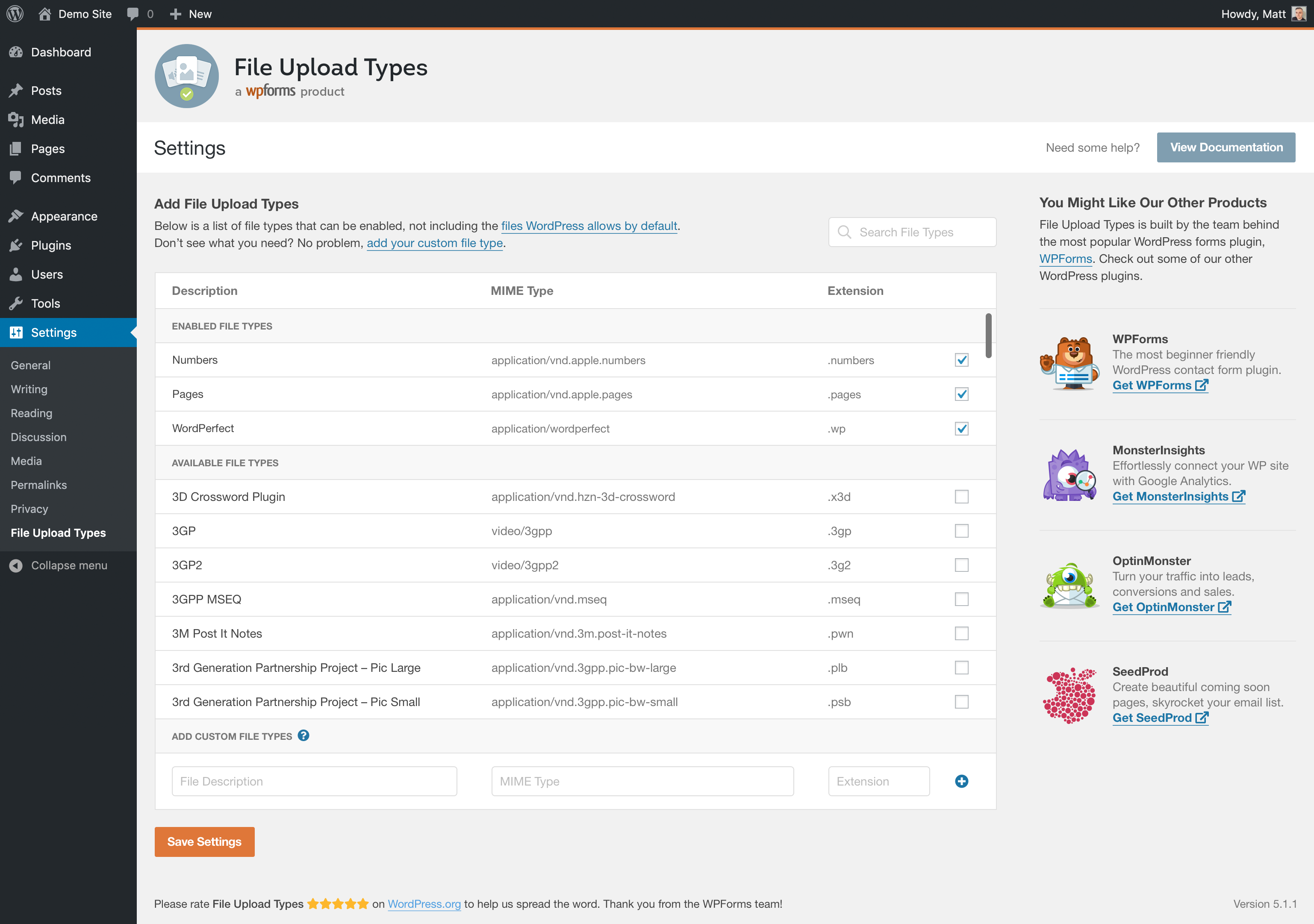
Für Entwickler
Ist das dein Plugin? Zeigen Sie die Zahlen.
Fügen Sie Ihrer Website, Docs oder GitHub Readme ein Live-Badge hinzu. Es wird von selbst aktualisiert - kein Konto erforderlich.
Best File Upload Types by WPForms alternatives
All attachments plugins →



Fragen und Antworten
File Upload Types by WPForms: quick answers
Gerade Antworten, gezogen von Live WordPress.org Daten.
Quelle: WordPress.org
Is File Upload Types by WPForms free?
Yes. File Upload Types by WPForms is free to download and use from the official WordPress.org plugin directory.
Is File Upload Types by WPForms safe to use in 2026?
Yes — File Upload Types by WPForms is a safe, well-maintained plugin to use in 2026. It runs on 40K+ sites, is rated 4/5 and was last updated 2 months ago, and scores 81/100 on our health check.
How many websites use File Upload Types by WPForms?
File Upload Types by WPForms is active on 40K+ WordPress websites and has been downloaded 268,445 times since it launched in February 2020. It was downloaded 4,469 times in the last 30 days.
Does File Upload Types by WPForms work with WordPress 7.1?
File Upload Types by WPForms is officially tested up to WordPress 7.0.9, while the latest release is 7.1.5. It may still work, but try it on a staging site first.
What PHP version does File Upload Types by WPForms need?
File Upload Types by WPForms requires PHP 7.0 or higher. Most hosts run PHP 8.x today, so it works on any modern WordPress hosting.
When was File Upload Types by WPForms last updated?
The latest version, 1.5.0, was released on September 22, 2026 (2 months ago).
Who makes File Upload Types by WPForms?
File Upload Types by WPForms is developed and maintained by Syed Balkhi.
What are the best alternatives to File Upload Types by WPForms?
The most popular alternatives to File Upload Types by WPForms are Export media with selected… (40K+ installs), Lightbox with PhotoSwipe (20K+ installs) and Unique Headers (10K+ installs).
Angetrieben von PageForge
Eine Vorlage und eine Tabelle. Eine echte Seite für jede Suche.
PageForge Verwandelt jede Zeile eines CSV in eine WordPress-Seite mit eigenem Titel, URL, SEO Felder und Schema entworfen. Kostenlos auf WordPress.org.
- CSV und XLSX, plus Google Sheets auf Beruf und Unternehmen
- seinen eigenen Titel, URL, SEO Felder und Schema für jede Seite
- Arbeitet mit dem Blockeditor, Elementor, Divi und Avada
- Kostenlos auf WordPress.org, keine Kreditkarte