


Feature Request System – Feedback Board, Voting & Roadmap
Feature Request System adds a feature request board to your WordPress site. People suggest features and vote for the ones they want. You give each request a status, such as Planned, In Progress or Shipped, and everyone…

Solide Wahl
Feature Request System is a solid plugin choice in 2026, with a few things worth checking first. Is rated 5/5 and was last updated 1 week ago, and scores 71/100 on our health check.
- Aktiv entwickelt — letztes Update vor 1 Woche
- Getestet mit dem neuesten WordPress (7.1)
- Kleine Benutzerbasis (<10 aktive Installationen)
- Bisher sehr wenige Bewertungen
Wie stapelt es sich?
Side-by-side bei Installationen, Updates, Bewertungen und Support


Tägliche Downloads
Download-Spitzen folgen normalerweise einer neuen Version - jede Website, die automatisch aktualisiert wird, gilt als Download.
Ranglisten
Where Feature Request System stands todayWordPress.org Ranglisten suchen
Live-Position in der Plugin-Suche, Top 100| Stichwort | Position |
|---|---|
| customer feedback | >100 |
| Feature Request | #38 |
| feature requests | #70 |
| roadmap | >100 |
| user feedback | >100 |
Bewertungsaufschlüsselung
★★★★★★★★★★ 5 from 1 reviews
About Feature Request System
Aus der offiziellen Readme · V1.1.1Beschreibung
Feature Request System adds a feature request board to your WordPress site. People suggest features and vote for the ones they want. You give each request a status, such as Planned, In Progress or Shipped, and everyone who voted for a request gets an email when its status changes.
- A board that visitors can search, filter and sort, with one-click voting. Filters apply as they change, without reloading the page.
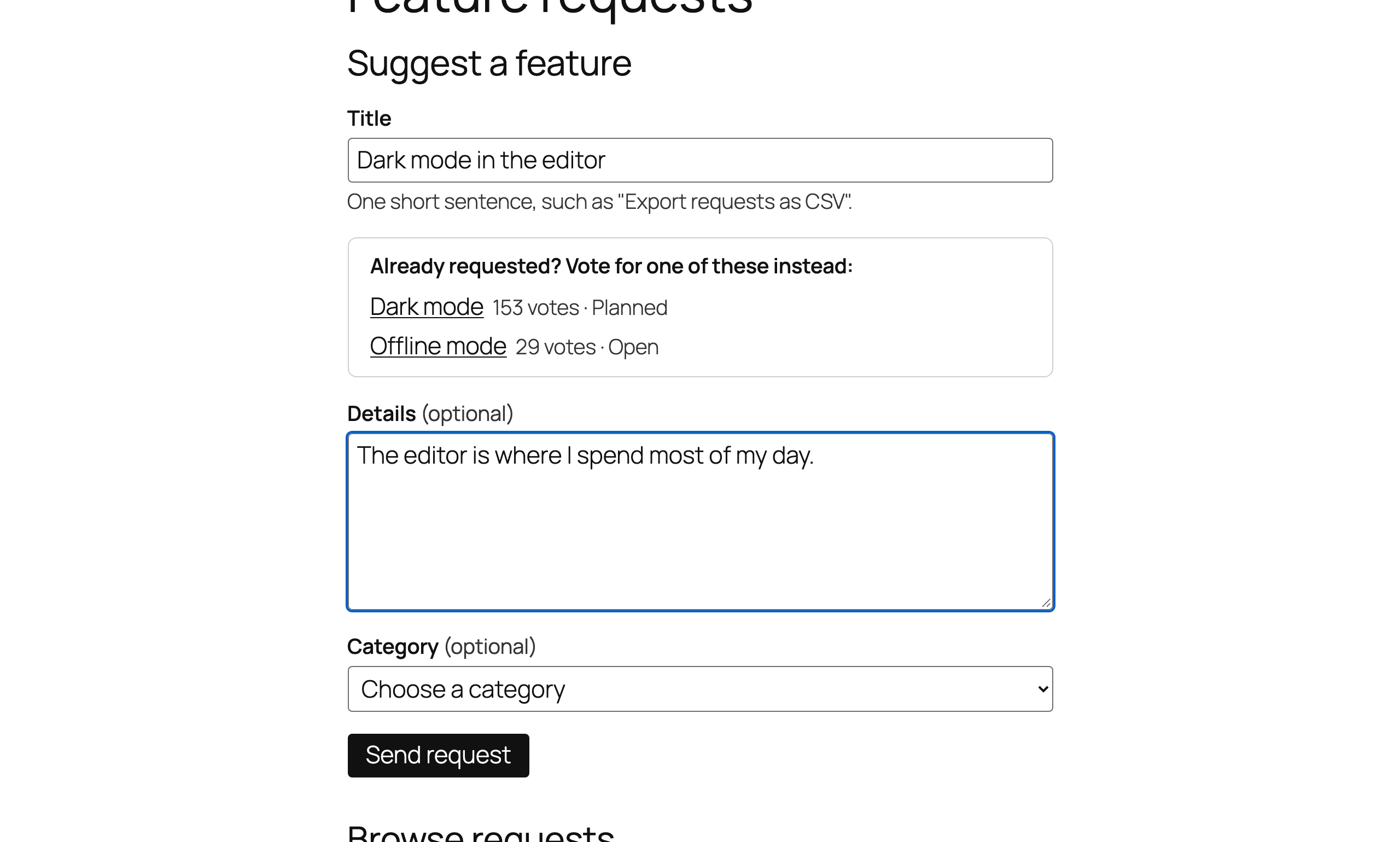
- A form that shows similar requests while someone types, so they vote instead of posting a duplicate. You choose its texts.
- A roadmap with a column for each status, such as Planned, In Progress and Shipped.
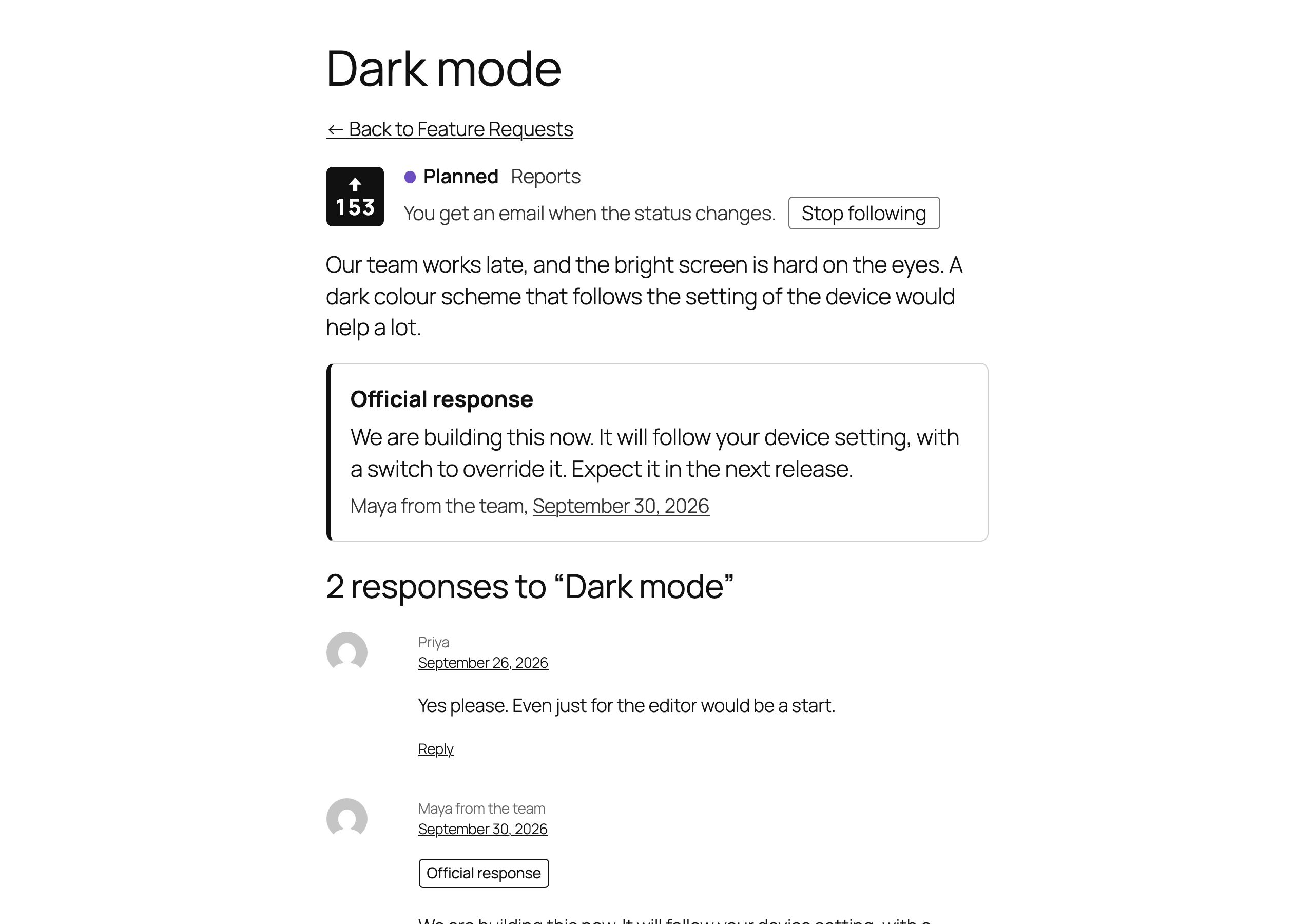
- A page for every request, with comments and your team’s official response.
- A short list and a card, to show the most wanted requests on your home page and one request in a post, each with a working vote button.
- Emails that close the loop: voters follow a request and hear about every status change, in the background and with a link to stop.
- Tools for moderators: merge duplicates with their votes and followers, limit how many votes each person gives, move a request on when it reaches a number of votes, export to CSV, and a dashboard widget.
- Visitors who confirm their email can vote and suggest features without an account.
- Blocks and shortcodes that take their look from your theme, and work without JavaScript and behind a page cache.
- Privacy built in: no IP addresses stored, export and erasure through WordPress’s privacy tools, and no outside service unless you use Akismet or Cloudflare Turnstile, or choose to tell us why you deactivate the plugin.
Adding the board
Add the Feature Request Board block to any page, or use the shortcode:
[feature_requests board="board-slug"]
Leave out the board to show the default board. Visitors can search, filter by status and category, and sort by votes, by date, or by Trending, which puts first the requests with the most votes in the last 30 days. Filters apply as soon as they change, and a search shortly after typing stops, without reloading the page; the Back button brings the previous list back. Voting works without reloading the page too. With JavaScript off, the board still works, with a Show requests button.
Each of the four controls can be turned off, in the block’s Filters panel or in the shortcode, for example [feature_requests search="no" category_filter="no"]. The shortcode takes search, status_filter, category_filter and sort_filter. With all four off, the board shows no filters at all. Links with filters in them, such as ?fr-status=planned, still work.
Collecting requests
Add the Feature Request Form block where people should suggest features, or use the shortcode:
[feature_request_form board="board-slug"]
While someone types a title, the form lists existing requests with similar titles, so they can vote for one instead of posting a duplicate. The form also works when JavaScript is off.
For a complete page, insert the Feature request page pattern. It has the form, then the board.
The form’s texts can be changed in the block’s Texts panel: its heading, the title field and the help under it, the details field, the button, and the messages shown when a request waits for approval or is published. Leave a text empty for the default, which is translated. The shortcode takes heading, title_label, title_help, details_label, submit_label, pending_message and published_message:
[feature_request_form heading="Tell us what to build" submit_label="Send idea"]
The texts are plain text: HTML in them is shown as typed.
By default, only logged-in users can suggest features, and new requests wait for your approval under Feature Requests, marked Pending. Requests from editors and administrators are published straight away. Each board can change who may suggest features and whether requests wait for approval.
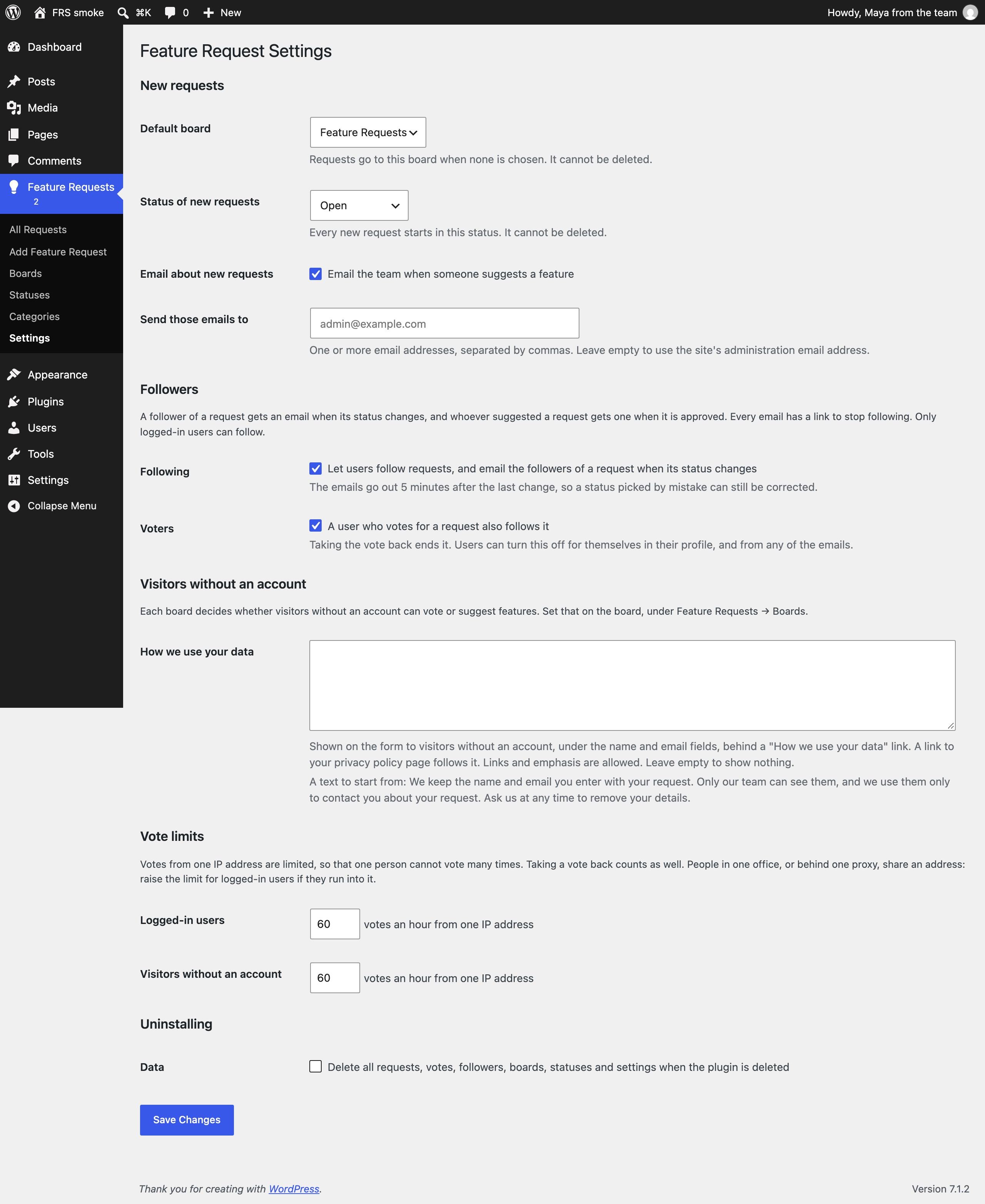
Each new request is emailed to the site’s administration email address, with a link to review it. Under Feature Requests → Settings, the “Send those emails to” field starts with that address. Change it or add others, or turn the email off.
Visitors who confirm their email
A board can let visitors without an account vote and suggest features once they confirm their email address. Choose “Visitors who confirm their email” for who can vote or who can suggest features. A visitor who votes gives their address next to the vote button, and the plugin emails them a link that works for 24 hours. The link’s page has a button: pressing it confirms the address, and the vote counts or the request is sent. The browser is then remembered for a year, so the next votes count at once.
Showing requests on other pages
The board is on one page. Two more blocks bring requests, and votes, to the rest of your site.
The Feature Request List block is a short list of the requests with the most votes, or of the newest ones, with their vote buttons and a link to the board. It suits a home page, a sidebar or the end of a post. In the block, choose how many requests it shows, their order, one status and one board. It has no search and no filters. As a shortcode:
[feature_request_list count="5" sort="new" status="planned" board="board-slug"]
Leave them all out for the five requests with the most votes among those still open for voting, from every board.
The Feature Request Card block shows one request with its vote button, in a post or a page that talks about it, such as an announcement or a help article. In the block, find the request by typing a few letters of its title. The shortcode takes the request’s ID, which is the number in the address of its edit screen:
[feature_request id="123"]
Three patterns put the blocks on a page for you: Feature request form beside the board, in two columns; Most wanted feature requests, a heading above the list; and Suggest a feature, a few words with a button that leads to the board.
The roadmap
The Feature Request Roadmap block shows a column for each status on your roadmap, in the order of your statuses, with the most voted requests first. Each column shows 10 requests, and Show more adds 10 at a time. People can vote on the roadmap too. It covers every board, or the one you choose. As a shortcode:
[feature_roadmap board="board-slug"]
By default Planned, In Progress and Shipped are on the roadmap. Under Feature Requests → Statuses, tick or untick “Show on roadmap” for each status. The Feature request roadmap pattern puts a heading above the block.
Managing requests
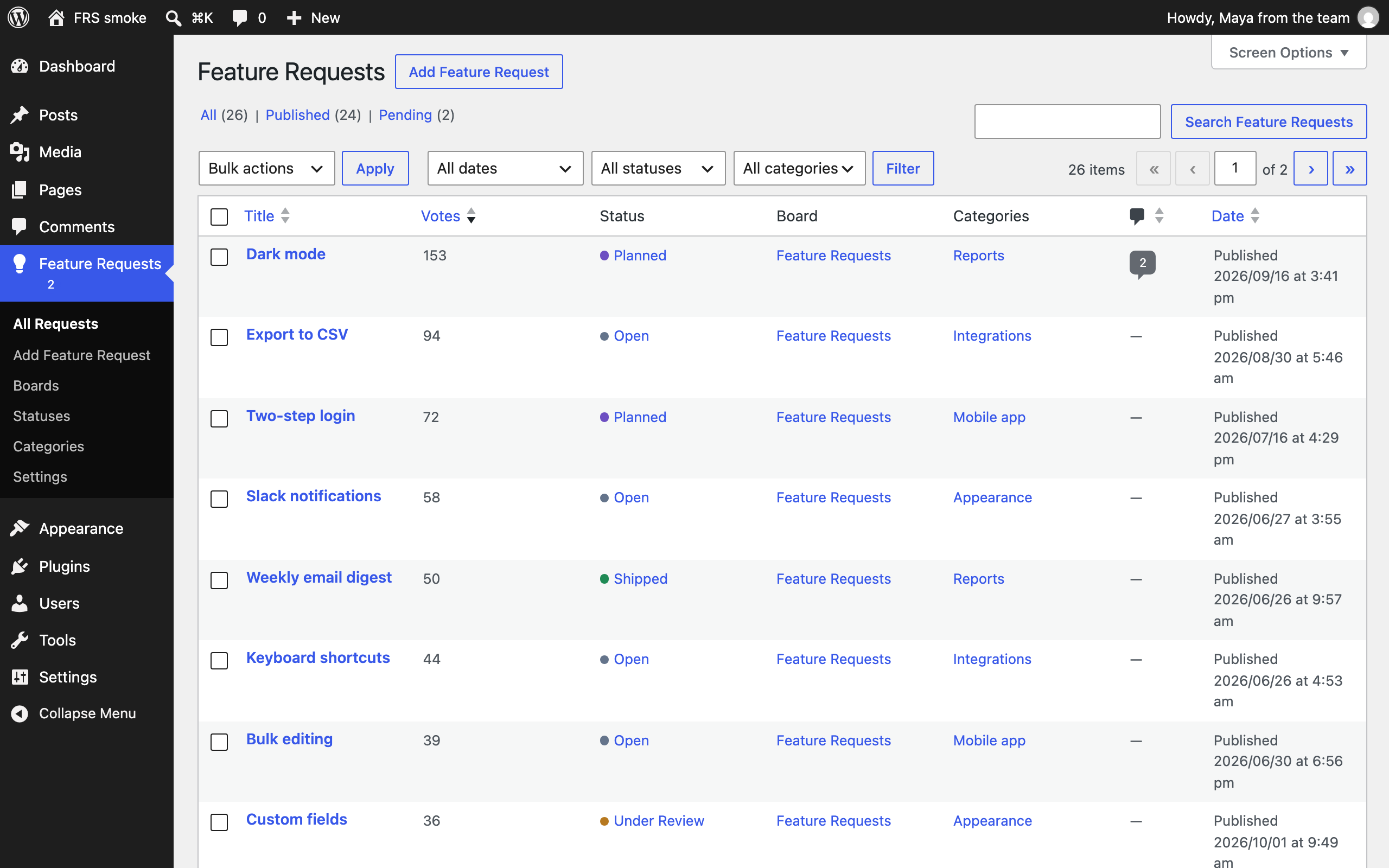
Feature Requests in the admin lists every request with its votes, status, board and categories. Sort by votes to see what people want most, and filter by status, board or category. The menu shows how many requests wait for approval.
Change a request’s status from its edit screen, from Quick Edit, or for many requests at once with Bulk Edit. The edit screen also shows who voted for the request, how many users follow it and who submitted it.
To merge a duplicate, open it and use the “Merge into…” box. Its votes and followers move to the other request, and its address leads there. You choose who is emailed about it.
“Export to CSV” and “Export voters to CSV” above the list download the requests the list shows, or their votes, as files for Excel, Numbers or LibreOffice.
The Feature Requests widget on the dashboard shows the five requests that have waited longest for approval, and the requests with the most votes this week.
Boards and statuses
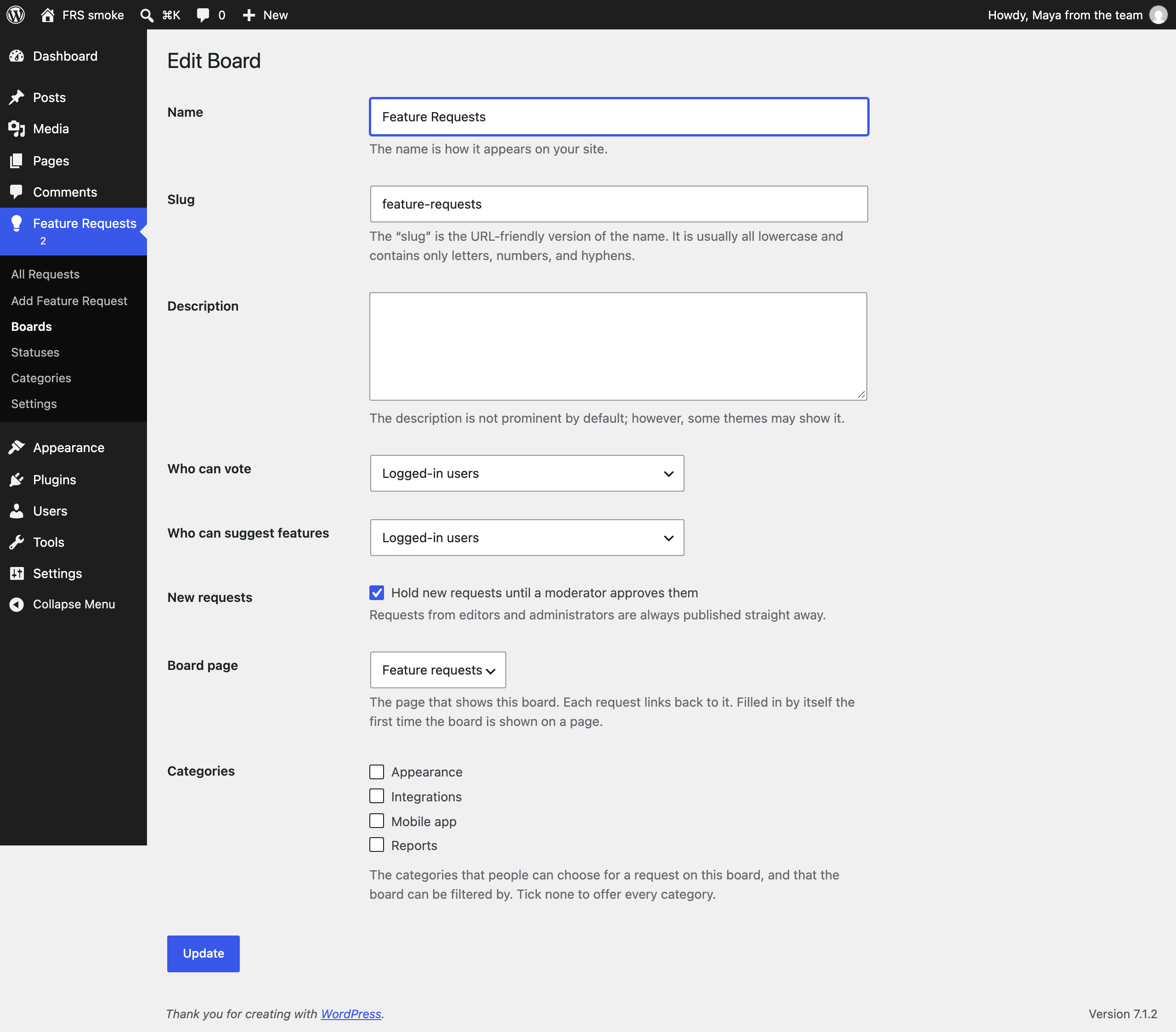
Under Feature Requests → Boards, each board has its own settings: who can vote, who can suggest features (everyone, visitors who confirm their email, logged-in users, or nobody), whether new requests wait for approval, and the page that shows the board. Each request links back to that page. The board fills the page in by itself the first time it is shown on one.
“Votes each person can give” limits how many requests each person can vote for on the board. Only votes for requests still open for voting count, so a vote comes back when its request is shipped or declined, or when the person takes it back. The board says how many votes each person has left.
“Vote threshold” moves a request to another status when it reaches a number of votes, for example from Under Review to Planned at 50 votes. It moves each request once, so a request you move back stays where you put it. Followers get the usual email about the new status.
A board can also be limited to some of your categories. Its form then offers only those, and so does its category filter. Categories themselves are under Feature Requests → Categories.
Under Feature Requests → Statuses, add, rename and reorder statuses. Each has a colour and a position, and can be closed for voting: requests in a closed status keep their votes, and nobody can add or remove one.
Request pages and official responses
Every request has its own page with its vote button, status, categories, description and comments. Comments are WordPress comments, so your discussion settings, comment moderation and your theme’s comment design apply.
To answer a request on behalf of your team, write a comment on its page and tick “Post as the official response” before sending it. The newest official response is pinned below the request’s description, and each one is labelled in the comments.
Following requests and emails
Logged-in users can follow a request with the Follow button on its page. A user who votes for a request follows it too, and so does a user who suggests one. Followers get an email when the request’s status changes, and the user who suggested a request gets one when you approve it.
The emails are plain text. They go out in the background, 50 at a time, so saving a request never waits for mail. A status email goes out five minutes after the change: if you pick the wrong status, correct it within that time and nobody hears about it, and several changes in a row become one email.
Every email ends with a link that stops the emails about that request, without logging in. The page behind the link can also stop all of them at once. On their profile, users see the requests they follow, can stop following any of them, and choose whether voting makes them follow.
To change a status without an email, untick “Email followers when the status changes” next to the status, on the edit screen, in Quick Edit or in Bulk Edit. Under Feature Requests → Settings you can turn following off altogether, or only for votes.
Visitors without an account cannot follow and are not emailed, except visitors who confirmed their email on a board that asks for it.
Spamschutz
The form stops most spam without a captcha:
- A hidden field that people never see and bots tend to fill in.
- Forms sent within 3 seconds of loading the page are refused, as bots send them.
- Each visitor can send 5 requests an hour, and each IP address 10.
- Votes are limited too: 30 an hour for each visitor, and 60 an hour from one IP address. Logged-in users and visitors without an account are counted apart, and you can change both numbers under Feature Requests → Settings.
- If the Akismet plugin is active and connected, it checks every new request. Requests it flags wait for your review instead of being deleted.
For a check against bots that people barely notice, the plugin supports Cloudflare Turnstile. Add a widget for your site in your Cloudflare account, and enter its site key and secret key under Feature Requests → Settings → Spam check. Visitors without an account then pass the check before they send a request or ask for a link to confirm their email; tick “Check logged-in users too” to check everyone. While Turnstile is on, these forms need JavaScript. The secret key is never shown again once it is saved.
Developers can add another captcha through the mwtfrs_verify_captcha filter, or another spam service through the mwtfrs_is_spam filter.
Accessibility
The board, the list, the card, the form and the request page aim for WCAG 2.2 level AA. Everything works with a keyboard and without JavaScript, changes are announced to screen readers, and the automated checks of axe pass in block themes and classic themes. Colours come from your theme, so the contrast of your theme’s own text and background still matters.
Privatsphäre
Everything is stored in your own WordPress database, and the plugin stores no IP addresses. People who suggest a feature are not post authors, and the names and email addresses that visitors give are shown only to moderators. The plugin works with WordPress’s tools to export and erase personal data, and offers a text for your privacy policy. Under Feature Requests → Settings you can write a “How we use your data” note that visitors see on the form. The FAQ says what is stored, and which cookies the plugin sets.
Externe Dienste
When the Akismet plugin is active and connected to an Akismet account, this plugin sends each new feature request to Akismet to check whether it is spam. It sends the request’s title and details, the name and email a visitor gave, and their IP address, browser user agent and referring page. Nothing is sent when Akismet is not active. Akismet is a service by Automattic: terms of service, privacy policy.
When you save a site key and a secret key for Cloudflare Turnstile under Feature Requests → Settings → Spam check, pages with the form, and boards where visitors confirm their email, load Cloudflare’s script from https://challenges.cloudflare.com/turnstile/v0/api.js for visitors without an account (and for logged-in users if you tick “Check logged-in users too”). While the page is open, Cloudflare receives the visitor’s IP address and details about their browser and device, to tell people from bots. When the form is sent, your site sends the widget’s answer and your secret key to https://challenges.cloudflare.com/turnstile/v0/siteverify, without the visitor’s IP address. Nothing loads from Cloudflare while either key is empty. Turnstile is a service by Cloudflare: terms, privacy policy, Turnstile privacy addendum.
Deactivating the plugin asks why. Only if you pick an answer and click “Send & Deactivate” does your site send it, with any text you typed, the plugin, WordPress and PHP versions and the site language, to https://www.master-webtools.com/api/v1/feedback, run by the plugin’s author. Your site address and email are not sent, and answers are kept for 12 months. Master WebTools: terms, privacy policy.
Änderungsprotokoll
Security update, recommended for all sites. In a request's description, [embed] is now the only shortcode that runs.
1.1.1
- Security: text from visitors always stays plain text on your pages. This update is recommended for all sites.
- Changed:
[embed]is now the only shortcode that runs in a request’s description. Others, such as[caption]and[gallery], show as text.
1.1.0
- New: the Feature Request Roadmap block, its shortcode and a pattern. Choose which statuses are on the roadmap under Feature Requests → Statuses.
- New: the board’s filters apply as they change, without reloading the page. Each of its four controls can be turned off.
- New: Trending, an order for the board and the list by the votes of the last 30 days.
- New: merge duplicate requests, with their votes and followers. Choose who is emailed about it, for the site and for each board.
- New: boards can let visitors vote and suggest features once they confirm their email.
- New: a limit on the votes each person can give on a board, and a threshold that moves a request to another status at a number of votes.
- New: Cloudflare Turnstile as a spam check for the form.
- New: change the form’s heading, labels, button and messages.
- New: export requests and voters to CSV, from the requests list or with
wp mwtfrs export. - New: a dashboard widget with the requests waiting for approval and this week’s top requests.
- New: the
mwtfrs_can_voteandmwtfrs_can_submitfilters, to decide who may vote and suggest features. - New: deactivating the plugin asks why, in a short optional form. Nothing is sent unless you click “Send & Deactivate”, and the answers about the plugin not working link to the support forum. See External services for what is sent.
- Changed: behind Cloudflare, the limits per IP address and Akismet use the visitor’s own address, without any setup. The new
mwtfrs_trust_cloudflarefilter turns this off. - Changed: the “Send those emails to” field starts with the site’s administration email.
- Changed: the board’s template,
board.php, for live filtering. Copies in themes made from 1.0 keep working without it. - Changed: the form’s template,
submit-form.php, for its texts, Turnstile and visitors who confirm their email. A copy in your theme made from 1.0 shows none of them, and with Turnstile on its requests are refused: copy the new file again. - Fixed: on Shipped and Declined requests, the vote count no longer runs into the gap beside the title.
1.0.0
- Erste Veröffentlichung.
Screenshots


Für Entwickler
Ist das dein Plugin? Zeigen Sie die Zahlen.
Fügen Sie Ihrer Website, Docs oder GitHub Readme ein Live-Badge hinzu. Es wird von selbst aktualisiert - kein Konto erforderlich.
Best Feature Request System alternatives
All customer feedback plugins →





Fragen und Antworten
Feature Request System: quick answers
Gerade Antworten, gezogen von Live WordPress.org Daten.
Quelle: WordPress.org
Is Feature Request System free?
Yes. Feature Request System is free to download and use from the official WordPress.org plugin directory.
Is Feature Request System safe to use in 2026?
Feature Request System is a solid plugin choice in 2026, with a few things worth checking first. Is rated 5/5 and was last updated 1 week ago, and scores 71/100 on our health check.
How many websites use Feature Request System?
Feature Request System is active on <10 WordPress websites and has been downloaded 602 times since it launched in October 2026. It was downloaded 242 times in the last 30 days.
Does Feature Request System work with WordPress 7.1?
Yes. The developer has tested Feature Request System up to WordPress 7.1.5, the latest release. It requires WordPress 6.6 or newer.
What PHP version does Feature Request System need?
Feature Request System requires PHP 7.4 or higher. Most hosts run PHP 8.x today, so it works on any modern WordPress hosting.
When was Feature Request System last updated?
The latest version, 1.1.1, was released on November 21, 2026 (1 week ago).
Who makes Feature Request System?
Feature Request System is developed and maintained by Cornel Raiu.
What are the best alternatives to Feature Request System?
The most popular alternatives to Feature Request System are Star Rating Field For Conta… (800+ installs), Mopinion Feedback Form (100+ installs) and Simple Feature Requests Free (100+ installs).
Angetrieben von PageForge
Eine Vorlage und eine Tabelle. Eine echte Seite für jede Suche.
PageForge Verwandelt jede Zeile eines CSV in eine WordPress-Seite mit eigenem Titel, URL, SEO Felder und Schema entworfen. Kostenlos auf WordPress.org.
- CSV und XLSX, plus Google Sheets auf Beruf und Unternehmen
- seinen eigenen Titel, URL, SEO Felder und Schema für jede Seite
- Arbeitet mit dem Blockeditor, Elementor, Divi und Avada
- Kostenlos auf WordPress.org, keine Kreditkarte