


Event Genius – Event Calendar, Event Registration, and Attendee Management
Event management plugin for WordPress with registration, attendee management, recurring events, tickets, and calendars. Reliable and complete.

Sichere Auswahl
Yes — Event Genius is a safe, well-maintained plugin to use in 2026. It runs on 700+ sites, is rated 4.8/5 and was last updated 3 weeks ago, and scores 84/100 on our health check.
- Aktiv entwickelt – letztes Update vor 3 Wochen
- Getestet mit dem neuesten WordPress (7.1)
- Responsive support — 93% of recent threads resolved
- Kleine Benutzerbasis (700+ aktive Installationen)
Wie stapelt es sich?
Side-by-side bei Installationen, Updates, Bewertungen und Support


Tägliche Downloads
Download-Spitzen folgen normalerweise einer neuen Version - jede Website, die automatisch aktualisiert wird, gilt als Download.
Ranglisten
Where Event Genius stands todayWordPress.org Ranglisten suchen
Live-Position in der Plugin-Suche, Top 100| Stichwort | Position |
|---|---|
| attendee management | #1 |
| Veranstaltungskalender | #4 |
| event management | #1 |
| event registration | #2 |
| recurring events | #5 |
Versionsübernahme
Anteil aktiver Sites pro Release.
Bewertungsaufschlüsselung
★★★★★★★★★★ 4.8 from 17 reviews
About Event Genius
From the official readme · v1.20Beschreibung
Complete WordPress Event Management & Registration Solution
Event Genius is a powerful yet easy-to-use free event registration plugin designed for schools, sports organizations, pickleball clubs, membership sites, fitness classes, conferences, and any business needing comprehensive event registration capabilities. Whether you need a simple RSVP form, virtual event registration, hybrid event management, or a full-featured event registration system, Event Genius makes event planning effortless.
Event Genius is a modern WordPress event management plugin built by an experienced team with a deep understanding of what event organizers need. It offers a streamlined alternative to plugins like The Events Calendar and Events Manager, with a focus on flexibility, performance, and ease of use.
Our goal is to provide a robust and intuitive event management experience that works out of the box while still offering the flexibility to grow with your needs. If you need help, our team is here to support you.
Migrate from The Events Calendar in minutes
Automatically import events, recurring events, registrations, venues, organizers, categories, tags, and more from supported versions of The Events Calendar ecosystem. Your existing calendar remains active while you review imported events before switching.
Event Management Features
Unlimited Events & Event Registrations
No limits on how many events you can create or attendees you can manage through our event registration and ticketing system. Perfect for creating event lists or an interactive calendar where your visitors can register for events.
Built-In Migration Wizard
Import events, recurring events, registrations, venues, organizers, Event Tickets attendees, categories, tags, and settings from supported versions of The Events Calendar while keeping your existing calendar active.
Event Details Control
Set custom start and end dates, assign venues and organizers to an event, set a cost, set a registration capacity, add images and descriptions for each event.
Virtual & Hybrid Events
Create in-person, virtual, or hybrid events from the same event editor. Add Zoom, Google Meet, Microsoft Teams, Webex, or other meeting links, include virtual instructions, and automatically protect join links until attendees register. Confirmation emails and calendar downloads include virtual event details for registered attendees.
Multiple Event Calendar Views
Choose from list, month, and grid views for displaying your events in an organized event calendar format. Allow visitors to toggle between the views and filter based on venue, category, and search terms.
Google Calendar & iCal Event Sync
Allow users to add your events to their personal calendars with a few clicks, which will significantly increase your event attendance.
Dedicated Venue and Organizer Pages
Create individual pages for venues and organizers with detailed information and lists of related events. Show social proof that the venues and organizers of your events will create meaningful experiences.
Event Registration Form Builder
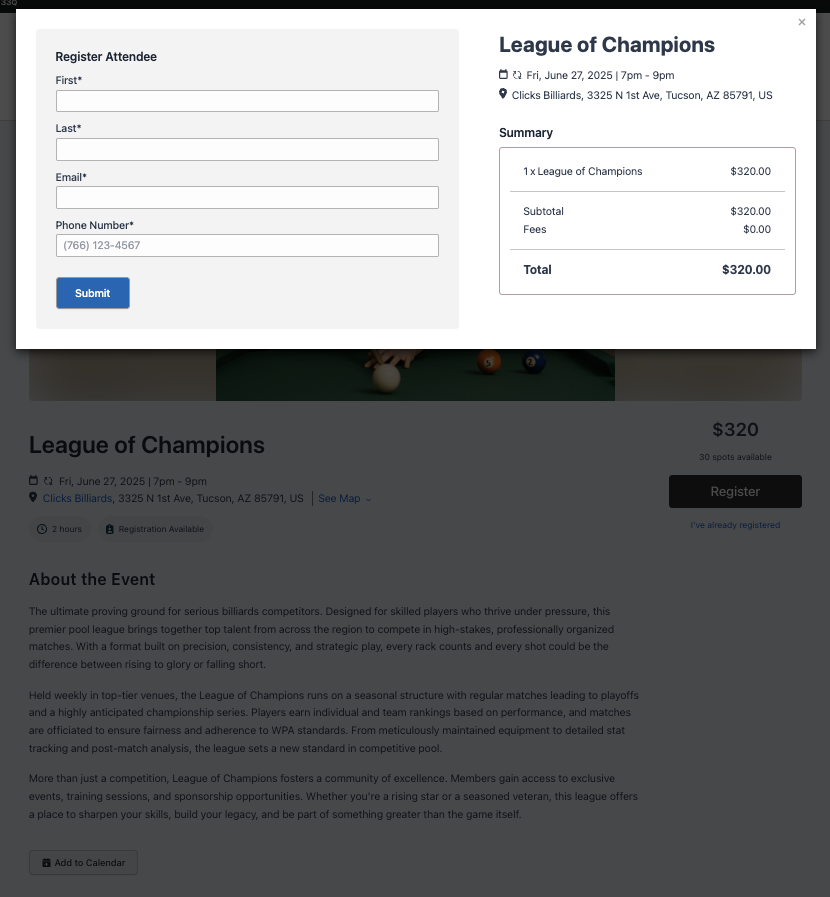
Create custom event registration form solutions with drag-and-drop ease, adding fields like text inputs, dropdowns, and checkboxes. For dropdowns, checkboxes, and radio buttons, set a label, value, and default for each option and drag to reorder. Make fields required, add a terms and conditions acknowledgement, and prevent duplicate registrations. Create event registration forms exactly as you need them. Accept RSVP submissions and allow users to access tickets.
Flexible Registration Display
Registration forms automatically appear on event pages, or use blocks and shortcodes to place them anywhere on your website.
Attendee Management
View, edit, add, and manage attendees for your events with our intuitive and powerful dashboard.
Attendee Lists
Display attendee lists on event pages or use dedicated blocks and shortcodes for flexible placement.
Automated Event Emails
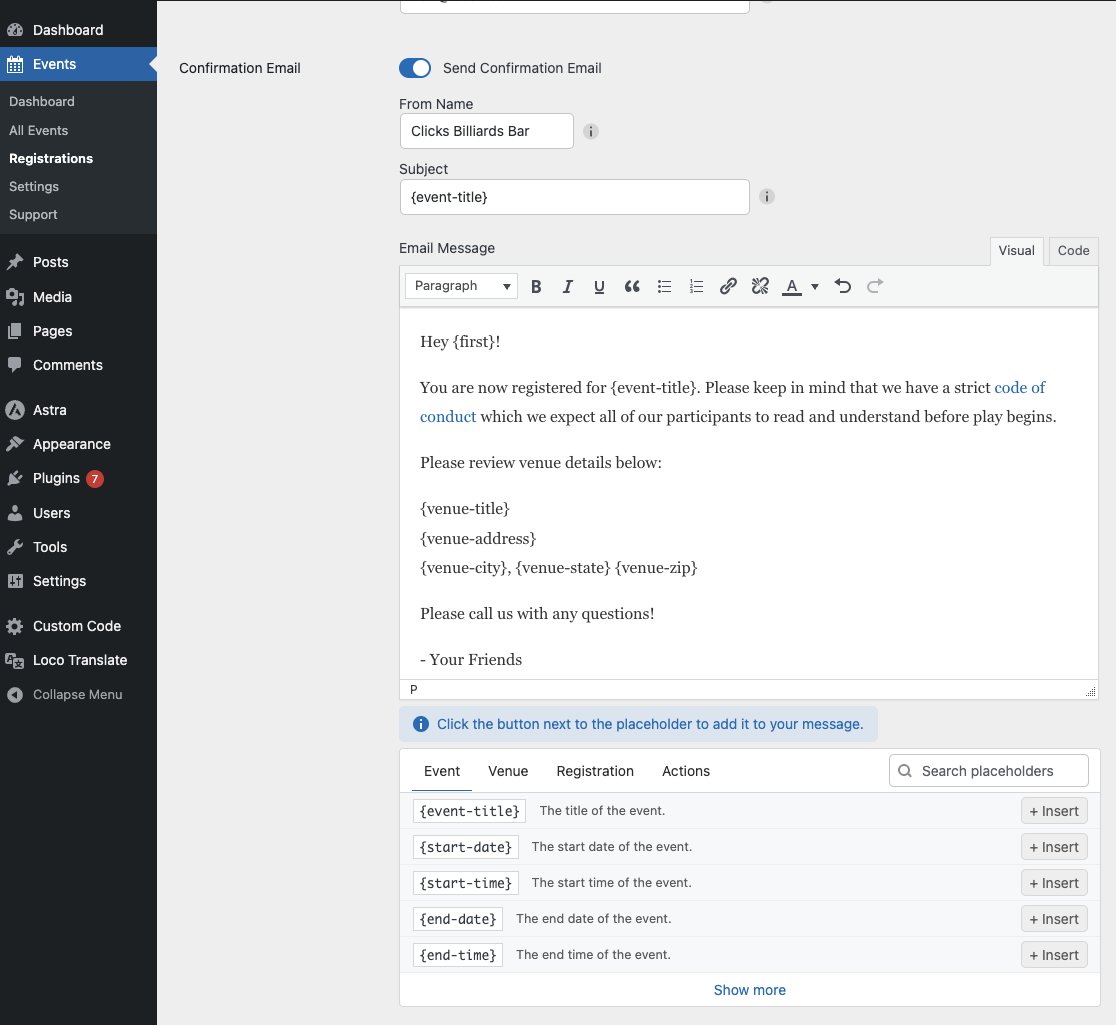
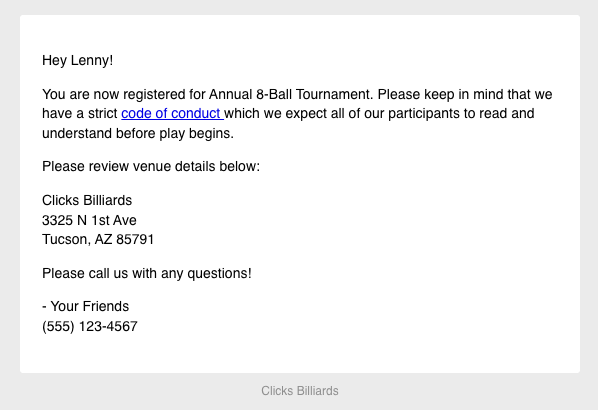
Send confirmation emails to attendees and notifications to event organizers automatically.
Customizable Email Templates
Customize both attendee confirmation emails and organizer notification emails with your own branding and messaging.
Event Registration Controls
Set registration start/end times, event capacity limits, or disable registration entirely while keeping event information visible.
Self-Cancellation System
Attendees can cancel their registration or RSVP through secure email links for better event management.
Event Management Admin Tools
Add, edit, delete events, export event reports, and manage event attendees from your WordPress dashboard.
CSV Export Functionality
Export all event registrations to CSV format for easy data analysis and management.
Free Recurring Events Support
Create daily, weekly, or monthly repeating events for ongoing event management needs. Free recurring events support is included in Event Genius.
Advanced SEO for Recurring Events
Prevent duplicate content penalties with automatic canonical URLs, smart sitemap filtering, and 301 redirects for invalid instances. Each recurring event instance gets its own unique URL optimized for search engines. Learn more about recurring events SEO.
Why Choose Our WordPress Event Management Plugin?
Fast & Lightweight Event Calendar – Optimized for performance, even on high-traffic websites.
Mobile-Friendly Event Registration – Fully responsive event forms and event calendar for seamless experience on all devices.
Block Theme & Full Site Editing Support – Complete compatibility with WordPress block themes and full site editing (FSE). Design custom event pages, organizer pages, and venue pages using the Site Editor without any custom code. Perfect for block themes like Twenty Twenty-Four.
Free recurring events – Manage repeating events and series in the free version.
Virtual Event Ready – Easily manage webinars, online classes, hybrid conferences, virtual meetings, and live training sessions with protected meeting links and built-in registration.
SEO-Optimized Event Pages – Advanced SEO features for recurring events including unique canonical URLs, automatic redirects for invalid instances, and smart sitemap filtering. Compatible with Yoast SEO, Rank Math, and other popular SEO plugins.
WordPress Caching Plugin Compatible – Built-in support for WP Super Cache, W3 Total Cache, WP Rocket, and LiteSpeed Cache. Automatically clears cache and refreshes dynamic content to ensure accurate registration information on cached pages.
Flexible Registration Confirmation – Choose when registrations are confirmed and when the confirmation email is sent: automatically after registration or manual review only, with a one-click Send Confirmation Email from the registration in the admin.
Regular Event Management Updates & Dedicated Support – We want to provide the best possible experience for our users. Please reach out if we can help.
Perfect For Event Management Needs:
Event Planners – Comprehensive event management tools for professional event planning
Event Organizers – Streamlined event registration, RSVPs, and attendee management
Event Websites – Complete event calendar and event management solution
Event Businesses – Professional event registration, tickets, and event management capabilities
Sports Clubs – Perfect for sports registration and pickleball registration needs
Schools & Organizations – Ideal for managing event list displays and RSVP form requirements
Upgrade to Event Genius Pro
Unlock powerful advanced features to help you manage events more efficiently:
Accept Payments & Sell Tickets – Accept payments through Stripe and PayPal, or track offline payments manually.
Multiple Registration Forms – Create unique forms for different event types with customized confirmations and notifications.
Multiple Registration Types – Define separate registration options on one event (for example General, VIP, or early bird), each with its own name, price, and optional capacity, so attendees pick the tier that fits them.
Event Waiting Lists – Let visitors join a waiting list when events fill up, then automatically or manually promote attendees when spots become available.
Check-in & Attendance Tracking – Streamline check-in and track attendance status with automated follow-up emails.
Event Series Management – Group related events into series with flexible registration options for full series or individual dates.
Scheduled Event Reminders – Automatically send reminder emails before events and follow-up messages after to improve engagement.
Multiple Email Templates – Create different templates for various event types and maintain consistent branding.
Register Multiple Guests – Allow attendees to register additional guests during the registration process.
List Events Registered For – Help attendees see all their registered events in one place.
Manually Email Registrants – Send targeted emails to specific registrants or groups.
Advanced Form Fields – File uploads, date pickers, attendee number fields, and hidden admin fields.
Multiple Event Registration – Allow attendees to register for multiple events at once.
Offline Payment Tracking – Track and manage offline or manual payments with complete control.
Upgrade to Event Genius Pro to unlock all these features and more!
Installation
- Go to Plugins > Add New in your WordPress dashboard.
- Search for Event Genius or “event management”.
- Klicken Sie auf Jetzt installieren und dann Aktivieren.
- Go to Events in the admin menu to start creating and managing your events.
Änderungsprotokoll
1.20
- New: Weekly email report of recent registrations and upcoming events. Set the recipient or turn the report off under Events > Settings > General, in the Education section.
- New: Education notices on the dashboard, events list, registrations, and the event editor. Turn them off in that same Education section.
- New: Choose individual About Details for single events and event listings under Events > Settings > Event Display. Single events include duration, registration status, and attendees. Listings include duration, registration status, and event type.
- Tweak: When viewing the Registrations page, the event link now goes to the registration management page for that link.
- Tweak: Improved WPML support. Form field defaults and choice labels can be translated. Later emails use the language saved with the registration, so events stay in one language and capacity stays shared.
1.19.1
- Fix: Password-protected events, venues, and organizers now require a password before displaying content, registration forms, or attendee lists.
- Fix: Corrected date handling in recurring event permalinks.
- Fix: Made timezone handling more robust so that the correct time is displayed even when other code changes PHP’s default timezone.
- Fix: Event settings pages now load correctly when new-registration notifications appear in the Events menu.
- Fix: Event RSS feeds, including /events/feed/, now show the event title, description, date, location, and featured image, and list upcoming events instead of past ones.
1.19
- New: New registration indicators in the admin. A count badge appears on Events and Registrations for registrations since you last checked, with subtle markers on the Registrations list and All Events grid view. Visiting either view clears the indicator. Click a registrant name to open the manage modal.
- Tweak: Improved the experience when managing a single registration in the admin.
- Tweak: Improved recurring event management to be more reliable and user-friendly.
- Tweak: New calendars and the default archive calendar now use list view by default instead of month. Existing saved calendars are not affected. To change a calendar’s view, go to Events > All Events > Calendars, open the calendar, and set View Type.
- Tweak: The compact calendar list now appears only at narrower widths, so list and month layouts stay usable longer on small screens.
- Fix: Improved the modal resizing transition to work smoothly.
- Fix: Cancel registration by email now shows the same confirmation for any valid email address, and limits how often cancel requests can be submitted.
1.18
- New: Connect WordPress users to registrations by email when adding or editing registrations in the admin. Matching accounts appear in the Connected user field, with exact email matches selected automatically.
- Tweak: Added Wide, Narrow, and Compact preview widths to the Calendar Builder.
- Tweak: Improved the narrow compact calendar list with a scrollable event area and automatic loading as you reach the bottom.
- Fix: Pagination now displays when viewing canceled registrations.
- Fix: Fixed PHP warnings in the TranslatePress integration when formatting event dates on multilingual sites.
1.17
- New: Basic WPML support for translating Text & Translation settings, form strings, emails, and CTAs. Includes a Translation Source setting and correct language context for registration and email flows.
- New: Choose which details appear in event listings (image, date, location, cost, summary, and more) under Events > Settings > Event Display.
- New: Organizer shortcodes for page builders support
part="phone"andpart="email"for plain text output. - Tweak: Recurring events show a clearer schedule summary, with upcoming dates on single event pages. All-day event dates follow your normal date formats.
- Tweak: Choice fields (dropdown, checkbox, and radio) now use a row editor in the form builder. Set a label, value, and default for each option, drag to reorder, and get a warning if two options share the same value.
- Tweak: Month calendar layout breakpoints can be customized with a code snippet.
- Fix: Fixed a fatal error on the Events dashboard when displaying payment gateway fees.
- Fix: Month calendar day and mobile event lists now sort by event start time.
- Fix: Event duration decimals now follow the WordPress site language (for example, 3,5 hours instead of 3.5 hours).
- Fix: Events that span more than one day show the correct start and end dates.
- Fix: Attendee lists stay hidden from visitors when limited to logged-in users, including the block and shortcode.
- Fix: Registration email fields clear errors as you type and no longer keep a stale duplicate-email warning.
- Fix: Calendar empty states only offer Clear Filters when filters have actually been changed.
- Fix: After requesting cancellation by email, the follow-up cancel button no longer asks for a second confirmation.
1.16.1
- Translation: Added Dutch (Nederlands) translation thanks to Ben.
- Fix: Custom template overrides now apply correctly for email templates and other screens that previously always used the plugin’s bundled files.
Screenshots
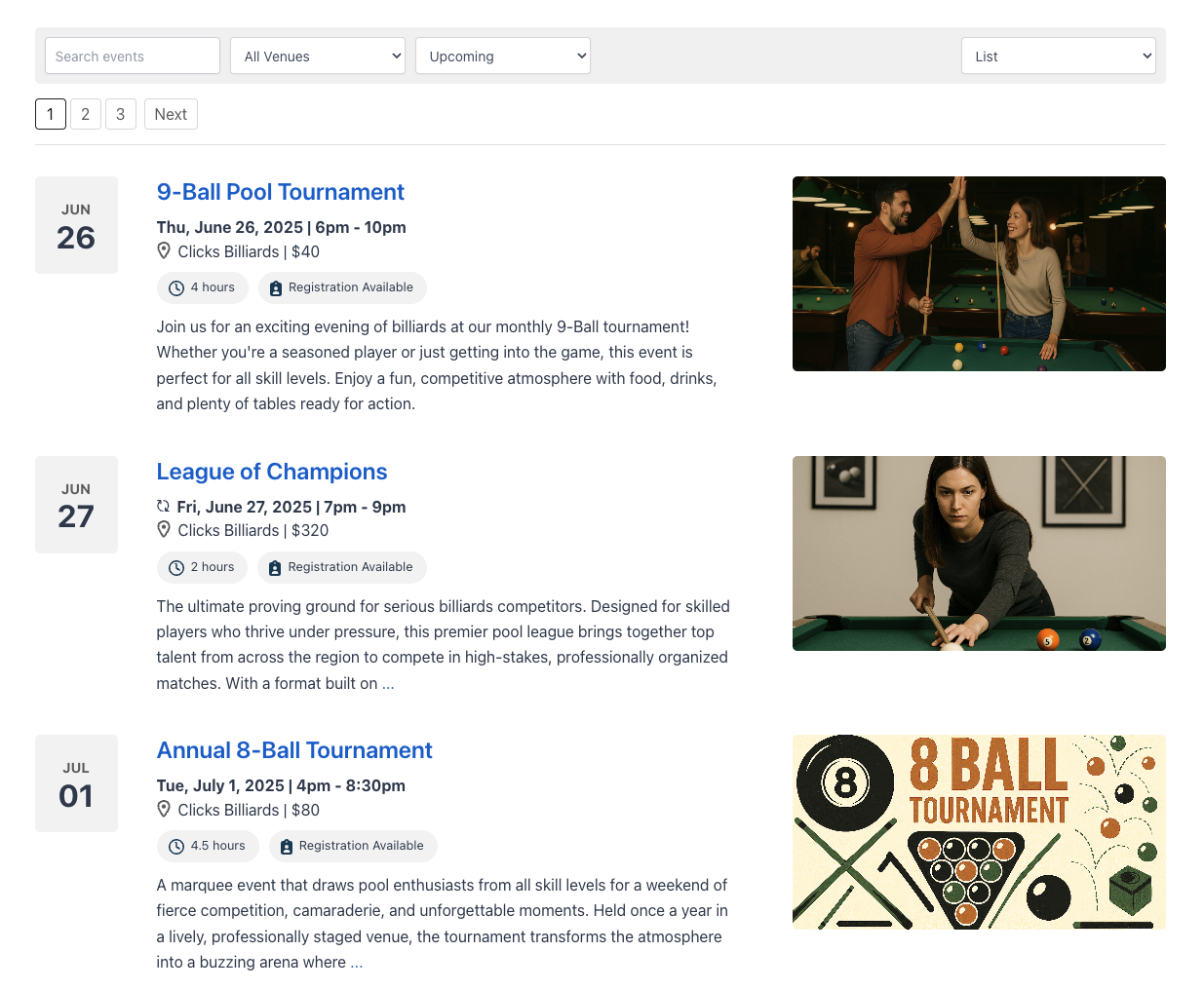
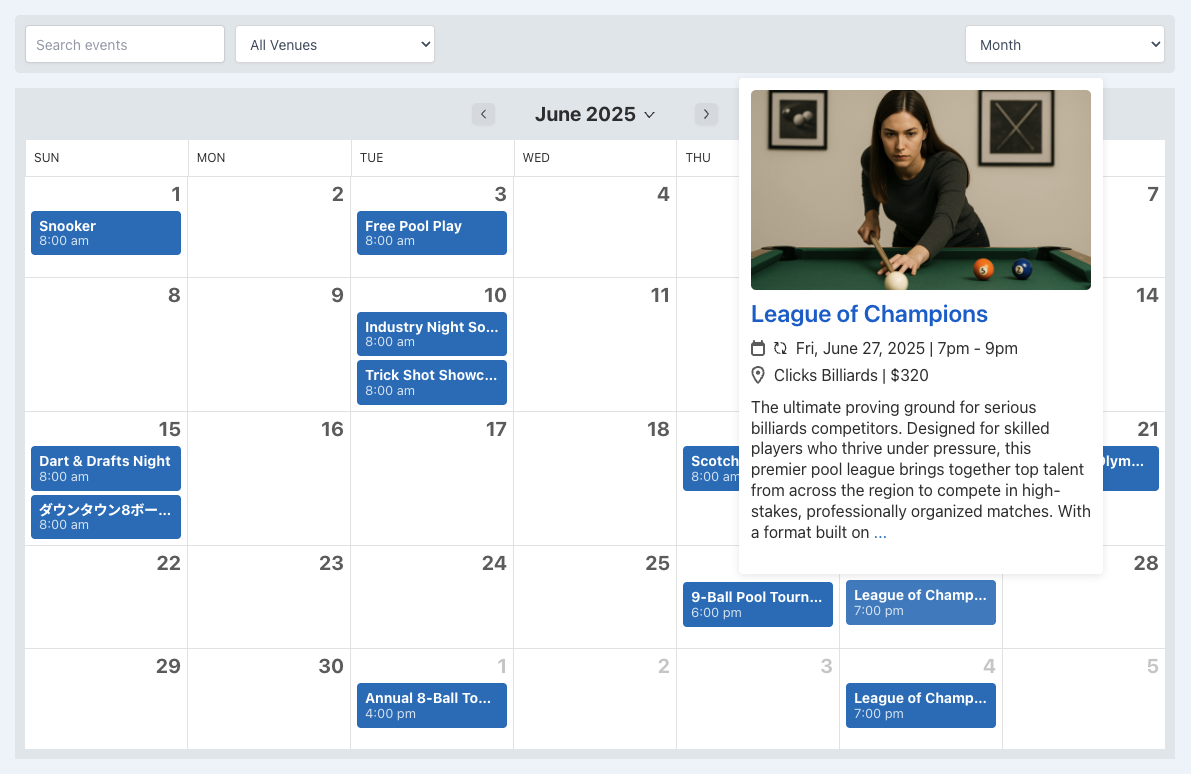


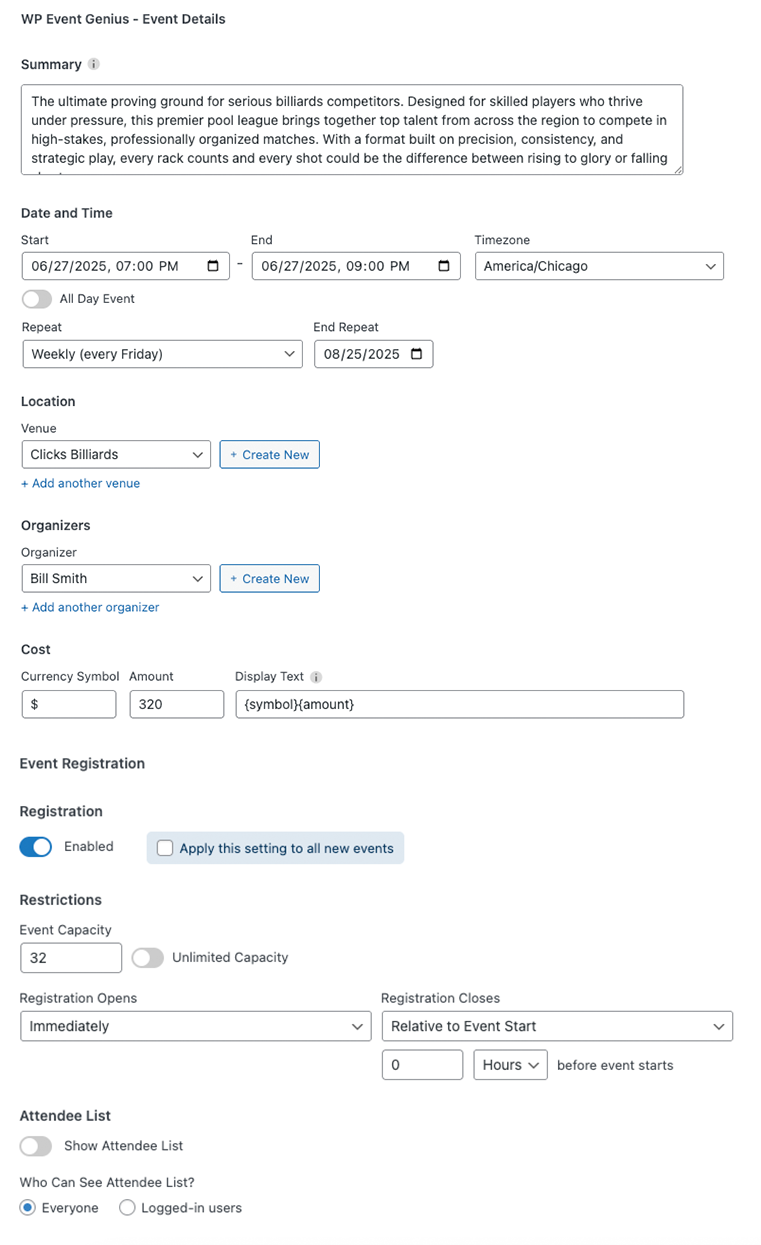
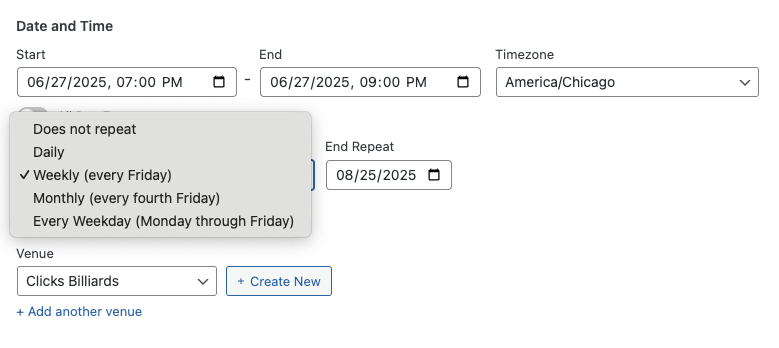
Für Entwickler
Ist das dein Plugin? Zeigen Sie die Zahlen.
Fügen Sie Ihrer Website, Docs oder GitHub Readme ein Live-Badge hinzu. Es wird von selbst aktualisiert - kein Konto erforderlich.
Best Event Genius alternatives
All attendee management plugins →Fragen und Antworten
Event Genius: quick answers
Gerade Antworten, gezogen von Live WordPress.org Daten.
Quelle: WordPress.org
Is Event Genius free?
Yes. Event Genius is free to download and use from the official WordPress.org plugin directory.
Is Event Genius safe to use in 2026?
Yes — Event Genius is a safe, well-maintained plugin to use in 2026. It runs on 700+ sites, is rated 4.8/5 and was last updated 3 weeks ago, and scores 84/100 on our health check.
How many websites use Event Genius?
Event Genius is active on 700+ WordPress websites and has been downloaded 15,687 times since it launched in June 2025. It was downloaded 1,585 times in the last 30 days.
Does Event Genius work with WordPress 7.1?
Yes. The developer has tested Event Genius up to WordPress 7.1.5, the latest release. It requires WordPress 6.0 or newer.
What PHP version does Event Genius need?
Event Genius requires PHP 7.4 or higher. Most hosts run PHP 8.x today, so it works on any modern WordPress hosting.
When was Event Genius last updated?
The latest version, 1.20, was released on November 9, 2026 (3 weeks ago).
Who makes Event Genius?
Event Genius is developed and maintained by Event Genius.
What are the best alternatives to Event Genius?
The most popular alternatives to Event Genius are Event Tickets and Registrat… (90K+ installs), Registrations for the Event… (6K+ installs) and Heelyo Tickets (<10 installs).
Angetrieben von PageForge
Eine Vorlage und eine Tabelle. Eine echte Seite für jede Suche.
PageForge Verwandelt jede Zeile eines CSV in eine WordPress-Seite mit eigenem Titel, URL, SEO Felder und Schema entworfen. Kostenlos auf WordPress.org.
- CSV und XLSX, plus Google Sheets auf Beruf und Unternehmen
- seinen eigenen Titel, URL, SEO Felder und Schema für jede Seite
- Arbeitet mit dem Blockeditor, Elementor, Divi und Avada
- Kostenlos auf WordPress.org, keine Kreditkarte