


ErrorWatcher
Real-time PHP error, warning, notice, and deprecation monitor with a dedicated admin dashboard, smart deduplication, and automated email digests.

Mit Vorsicht verwenden
ErrorWatcher works, but test it on a staging site before relying on it in 2026. Was last updated 2 months ago, and scores 60/100 on our health check.
- Getestet mit dem neuesten WordPress (7.1)
- Kleine Benutzerbasis (<10 aktive Installationen)
- Bisher sehr wenige Bewertungen
Wie stapelt es sich?
Side-by-side bei Installationen, Updates, Bewertungen und Support


Tägliche Downloads
Download-Spitzen folgen normalerweise einer neuen Version - jede Website, die automatisch aktualisiert wird, gilt als Download.
Ranglisten
Where ErrorWatcher stands todayWordPress.org Ranglisten suchen
Live-Position in der Plugin-Suche, Top 100| Stichwort | Position |
|---|---|
| debug | >100 |
| debugging | >100 |
| error log | >100 |
| log | >100 |
| Überwachung | >100 |
About ErrorWatcher
From the official readme · v1.0.7Beschreibung
ErrorWatcher provides real-time monitoring of PHP errors, warnings, notices, and deprecated function calls with a clean, native dashboard to inspect and troubleshoot them without creating database bloat.
Unlike manually inspecting large debug.log files on your server or modifying wp-config.php, ErrorWatcher captures runtime errors safely, stores them in a lightweight runtime file, and sends twice-daily summary email digests with .txt log attachments.
Zero Front-End Error Exposure: ErrorWatcher will not show any errors on the front side to site visitors. All errors, warnings, notices, and deprecations are intercepted silently in the background and listed exclusively in the WordPress back-end on a separate dashboard page.
Hauptmerkmale
- WordPress-Native Admin Interface: View summary metric cards (Total, Fatal, Errors, Warnings, Notices, Deprecated) and real-time logs table.
- No Front-End Errors Displayed: Does not show any errors on the front side. All issues are securely captured in the background and listed exclusively in the back-end on a separate dashboard page.
- Admin Bar Quick-Status Badge: Real-time color-coded health badge and diagnostics dropdown in the WordPress admin bar for administrators.
- Granular Error Capturing: Captures PHP Fatal Errors, Catchable Errors, Warnings, Notices, Deprecated warnings, User Errors, and Uncaught Exceptions.
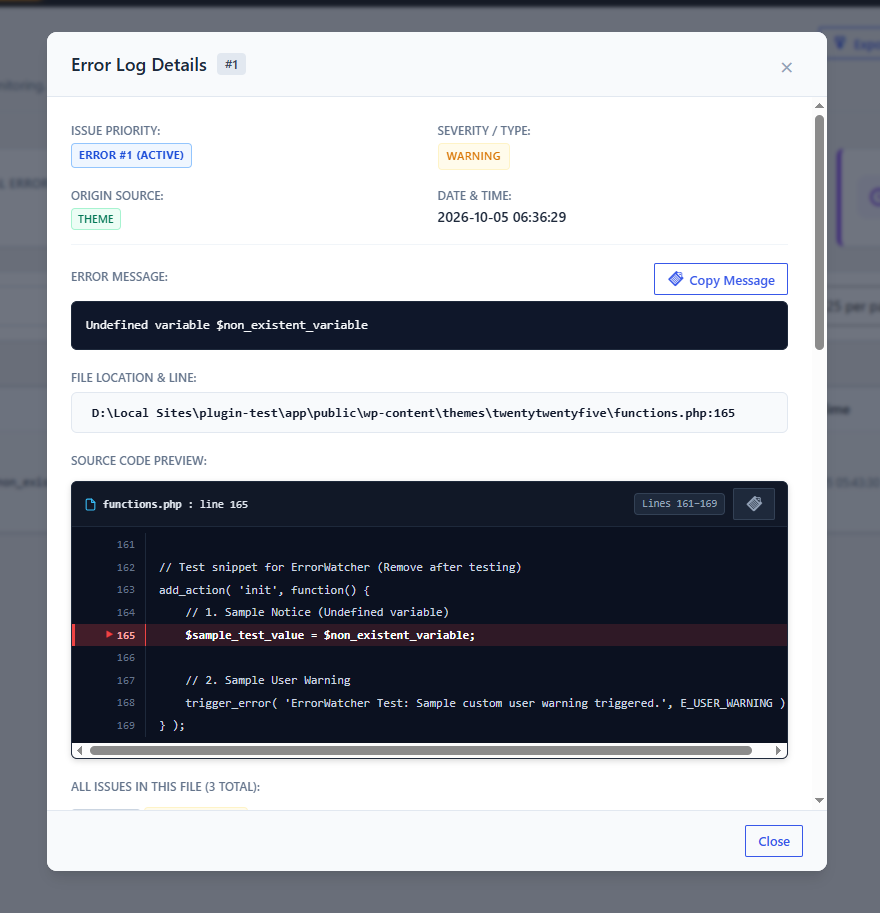
- Detailed Diagnostics Drawer: Inspect full error messages, stack traces, HTTP request method/URL, user account context, client IP, and grouped sibling issues.
- Source Code Preview in Drawer: Displays a syntax-formatted 7–10 line code preview surrounding the exact error line with visual highlighting and one-click copy.
- Smart File Clustering: Automatically groups multiple issues originating from the same file to prevent table clutter and streamline debugging.
- Advanced Filtering & Search: Filter by error severity/type, search messages/files/URLs, or filter by custom date ranges (Today, 7 days, 30 days, or custom calendar dates).
- Twice-Daily Email Reports: Automatically dispatches scheduled digests at custom morning and evening hours using WP-Cron with formatted HTML summary and attached
.txtlog file. - Automated Retention & Pruning: Automatically prunes resolved errors when source files are modified and clears inactive logs older than 30 days via daily WP-Cron.
- Export Capability: Export filtered error logs directly to CSV or formatted Text (.txt) files.
- Minimal Overhead & Performance-First: Uses server-side pagination, request-level error deduplication to prevent floods in loops, and zero frontend performance penalty.
- Safe & Non-Intrusive: Does not modify
wp-config.phpand does not turn on frontend error display.
Technical & PHP Limitations Notice
- Runtime Error Handling: Captures runtime errors, warnings, notices, deprecations, and fatal shutdown errors during WordPress request execution.
- Pre-Boot Compile/Parse Errors: Fatal compile-time or syntax errors that occur before WordPress or the plugin loads (such as syntax errors inside
wp-config.phpor earlymu-plugins) cannot be intercepted by PHP runtime error handlers. - Memory Limits: An emergency memory buffer is pre-allocated and released on shutdown to capture Out-of-Memory fatals when possible.
Installation
- Upload the
errorwatcherfolder to the/wp-content/plugins/directory, or install the ZIP file via Plugins > Add New > Upload Plugin. - Aktivieren Sie das Plugin über den Bildschirm Plugins in WordPress.
- Navigate to ErrorWatcher in the WordPress admin menu to view logs and customize settings.
Änderungsprotokoll
Added in-drawer Source Code Preview with active line highlighting and one-click snippet copy.
1.0.7
- Added in-drawer Source Code Preview with line-by-line gutter numbers, active error line highlighting, and one-click snippet copy.
1.0.6
- Added real-time Admin Bar Quick-Status Badge with diagnostics dropdown for administrators.
- Updated documentation to clearly highlight that errors will not show on the front side and are listed strictly in the back-end on a separate dashboard page.
1.0.5
- Standardized all functions, classes, constants, hooks, options, and assets with unique errorwatcher_ prefix.
- Fixed log aggregation and export flattening so all grouped sibling errors appear accurately in CSV/TXT exports and scheduled email attachments.
- Synchronized scheduled email digest metrics with the active reporting timeframe.
1.0.0
- Initial release of ErrorWatcher.
Screenshots


Für Entwickler
Ist das dein Plugin? Zeigen Sie die Zahlen.
Fügen Sie Ihrer Website, Docs oder GitHub Readme ein Live-Badge hinzu. Es wird von selbst aktualisiert - kein Konto erforderlich.
Best ErrorWatcher alternatives
All debug plugins →




Fragen und Antworten
ErrorWatcher: quick answers
Gerade Antworten, gezogen von Live WordPress.org Daten.
Quelle: WordPress.org
Is ErrorWatcher free?
Yes. ErrorWatcher is free to download and use from the official WordPress.org plugin directory.
Is ErrorWatcher safe to use in 2026?
ErrorWatcher works, but test it on a staging site before relying on it in 2026. Was last updated 2 months ago, and scores 60/100 on our health check.
How many websites use ErrorWatcher?
ErrorWatcher is active on <10 WordPress websites and has been downloaded 352 times since it launched in September 2026. It was downloaded 87 times in the last 30 days.
Does ErrorWatcher work with WordPress 7.1?
Yes. The developer has tested ErrorWatcher up to WordPress 7.1.5, the latest release. It requires WordPress 6.0 or newer.
What PHP version does ErrorWatcher need?
ErrorWatcher requires PHP 7.4 or higher. Most hosts run PHP 8.x today, so it works on any modern WordPress hosting.
When was ErrorWatcher last updated?
The latest version, 1.0.7, was released on October 5, 2026 (2 months ago).
Who makes ErrorWatcher?
ErrorWatcher is developed and maintained by IT Path Solutions.
What are the best alternatives to ErrorWatcher?
The most popular alternatives to ErrorWatcher are WP Crontrol (300K+ installs), Query Monitor (200K+ installs) and Debug Bar (20K+ installs).
Angetrieben von PageForge
Eine Vorlage und eine Tabelle. Eine echte Seite für jede Suche.
PageForge Verwandelt jede Zeile eines CSV in eine WordPress-Seite mit eigenem Titel, URL, SEO Felder und Schema entworfen. Kostenlos auf WordPress.org.
- CSV und XLSX, plus Google Sheets auf Beruf und Unternehmen
- seinen eigenen Titel, URL, SEO Felder und Schema für jede Seite
- Arbeitet mit dem Blockeditor, Elementor, Divi und Avada
- Kostenlos auf WordPress.org, keine Kreditkarte