


ePayVista Payments: High-Risk Crypto and Card Payment Gateway for WooCommerce
Accept crypto and card payments on WooCommerce at a ~1% fee. Instant approval, no KYC, high-risk friendly. USDC, USDT, Visa, Apple Pay, Google Pay.

Solide Wahl
ePayVista Payments: High-Risk C… is a solid plugin choice in 2026, with a few things worth checking first. It runs on 40+ sites, is rated 5/5 and was last updated 1 week ago, and scores 74/100 on our health check.
- Aktiv entwickelt — letztes Update vor 1 Woche
- Getestet mit dem neuesten WordPress (7.1)
- Momentum — downloads up 27% vs the previous 30 days
- Kleine Benutzerbasis (40+ aktive Installationen)
- Bisher sehr wenige Bewertungen
Wie stapelt es sich?
Side-by-side bei Installationen, Updates, Bewertungen und Support



Tägliche Downloads
Download-Spitzen folgen normalerweise einer neuen Version - jede Website, die automatisch aktualisiert wird, gilt als Download.
Ranglisten
Where ePayVista Payments: High-Ri… stands todayWordPress.org Ranglisten suchen
Live-Position in der Plugin-Suche, Top 100| Stichwort | Position |
|---|---|
| crypto payment gateway | #28 |
| cryptocurrency | #71 |
| high risk | #1 |
| payment gateway | >100 |
| usdc | #17 |
Versionsübernahme
Anteil aktiver Sites pro Release.
Bewertungsaufschlüsselung
★★★★★★★★★★ 5 from 1 reviews
About ePayVista Payments: High-Risk Crypto an…
From the official readme · v2.9.50Beschreibung
ePayVista Payments is a crypto and card payment gateway for WooCommerce, built for any ecommerce business, at a flat ~1% fee (volume tiers available) that is among the lowest anywhere. Onboarding is instant with no KYC and no underwriting, and ePayVista specializes in approving high-risk verticals that mainstream payment processors decline, including vape, CBD, adult, forex and trading, gambling, supplements, subscriptions, and info products.
Your customers pay with cryptocurrency (USDC, USDT, and other stablecoins) or with a card, Apple Pay, or Google Pay on a secure, PCI-compliant hosted checkout, with no chargebacks. Funds settle as stablecoins directly to a wallet you control.
Setup is 100% self-serve. Enter the wallet address where you want to be paid, click Connect, and your payment processor account is provisioned automatically, with no business paperwork and no waiting on underwriting. Customers pay on ePayVista’s hosted checkout and are returned to your store, and signed webhook callbacks confirm each payment and update the order.
Why merchants choose ePayVista
- A true high-risk payment gateway: approved for verticals that Stripe, PayPal, and traditional processors routinely decline.
- Accept crypto payments (USDC, USDT, stablecoins) plus card, Apple Pay, and Google Pay from one plugin.
- A flat ~1% processing fee, with no monthly fees, no rolling reserves, and no chargebacks.
- Instant approval and no KYC: connect and start taking payments the same day.
- Non-custodial settlement: crypto settles straight to a wallet you control.
Live payment tracking
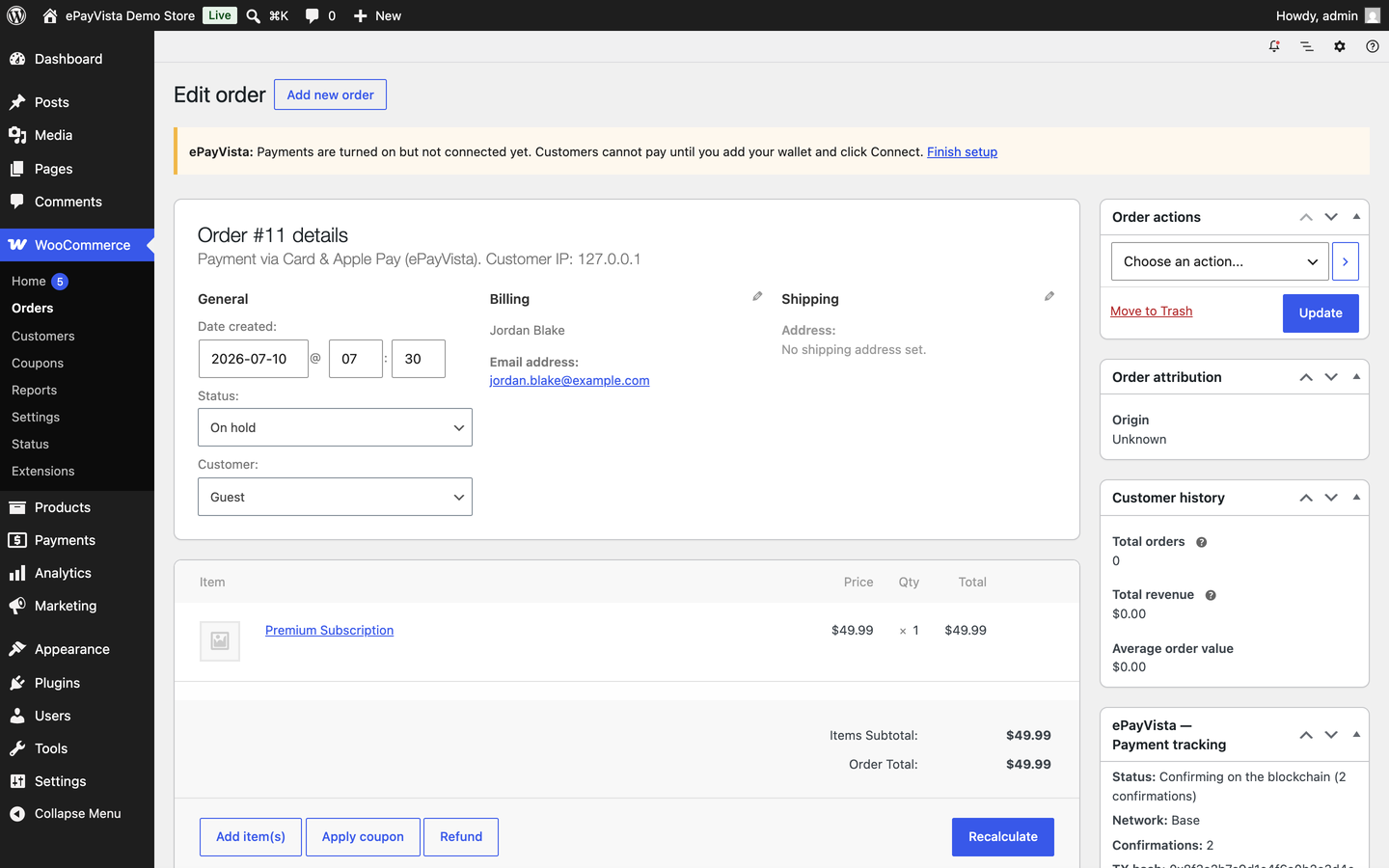
- A Payment tracking panel on every order in your dashboard: status, amount, network, on-chain confirmations, transaction hash, and a one-click block-explorer link.
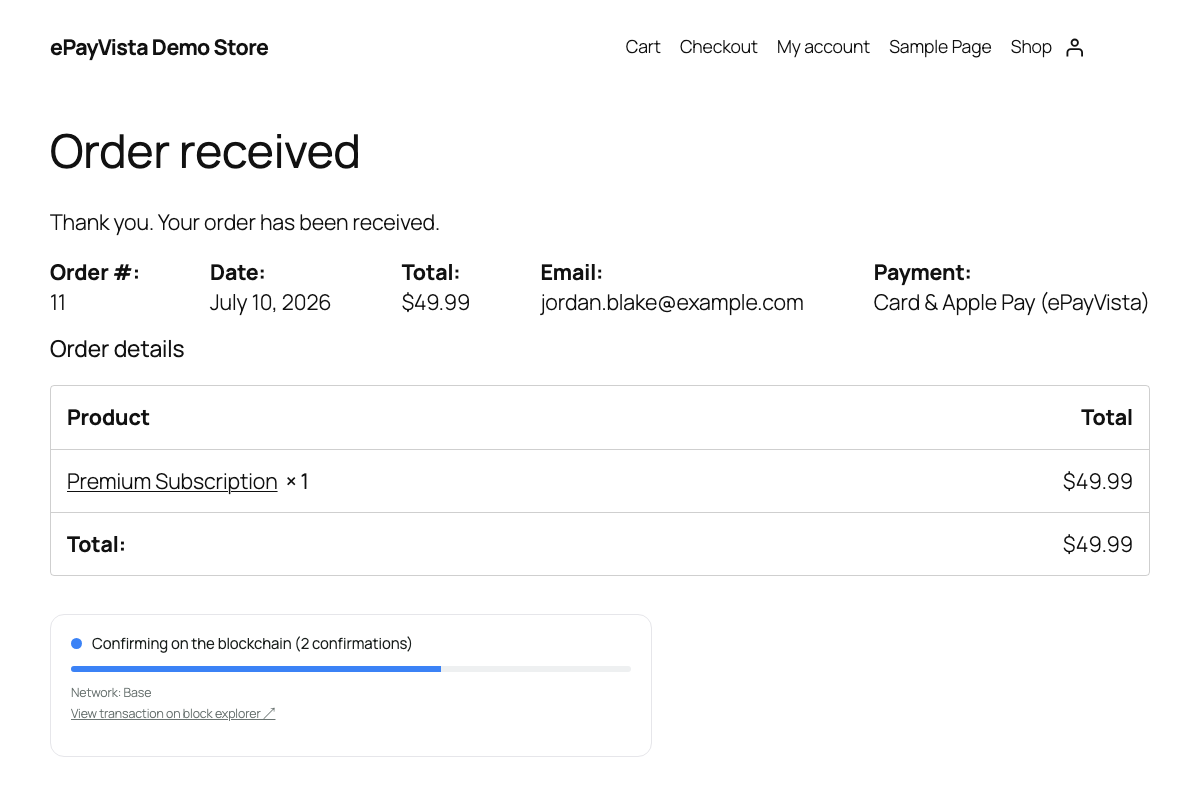
- A live status widget on the customer’s order-received page that updates in real time as the payment confirms (Detected, Confirming, Confirmed).
- A “Track your payment” link added to order emails, plus a
[epayvista_track]shortcode for a standalone tracking page.
Merkmale
- Instant approval, no KYC, and 100% self-serve onboarding, with no underwriting and no business paperwork to wait on.
- Crypto payments (USDC, USDT, and other stablecoins) accepted natively, settled to your own wallet.
- Card, Apple Pay, and Google Pay checkout at a flat ~1% fee, approved for high-risk verticals many processors decline.
- Per-method payment modules: offer each hosted option (card, Pay with Coinbase, Pay by card with Banxa, exchange, crypto wallet) as its own payment method at checkout, or the all-in-one hosted page, or both.
- Hosted, PCI-compliant payment page, so no card data touches your server.
- HMAC-signed webhook confirmations, so no order is marked paid without a verified signature.
- Underpayments are placed on-hold for review instead of auto-completing.
- HPOS (High-Performance Order Storage) and Cart/Checkout Blocks compatible.
- Tested with WordPress 7.1 and WooCommerce 11.1.
This plugin requires a free ePayVista account, which you create directly from the plugin settings, with no separate signup and no API-key copying.
Externe Dienste
This plugin connects to ePayVista, a third-party payment processor, to provision your account, create payments, and confirm them. This connection is required for the plugin to function. When you connect your store, your store details and payout address are sent to ePayVista. When a customer checks out, the order total and their email are sent to create a hosted payment and confirm it. No customer card data is ever sent to or stored by your site, because it is handled entirely on ePayVista’s hosted checkout.
When an admin uses “Resync with ePayVista” on an order, the order’s ePayVista payment reference is sent to ePayVista with your store’s API key to read that payment’s current status.
If you enter a partner code on the Connect screen, the code is sent to ePayVista to read the partner’s name and fee, and after you agree and connect, the code, the fee you agreed to and your store’s API key are sent to ePayVista to join that partner. If you leave the field empty, none of this is sent.
Once a day the plugin downloads a small public file, https://epayvista.com/plugin/latest.json, to find out whether a newer version of the plugin is available. No information about your store or your customers is sent with that request.
Service provider: ePayVista, https://epayvista.com/ | Terms | Privacy Policy
Installation
- Install and activate WooCommerce.
- Upload and activate ePayVista Payments (Plugins, then Add New, then Upload, or install from the directory).
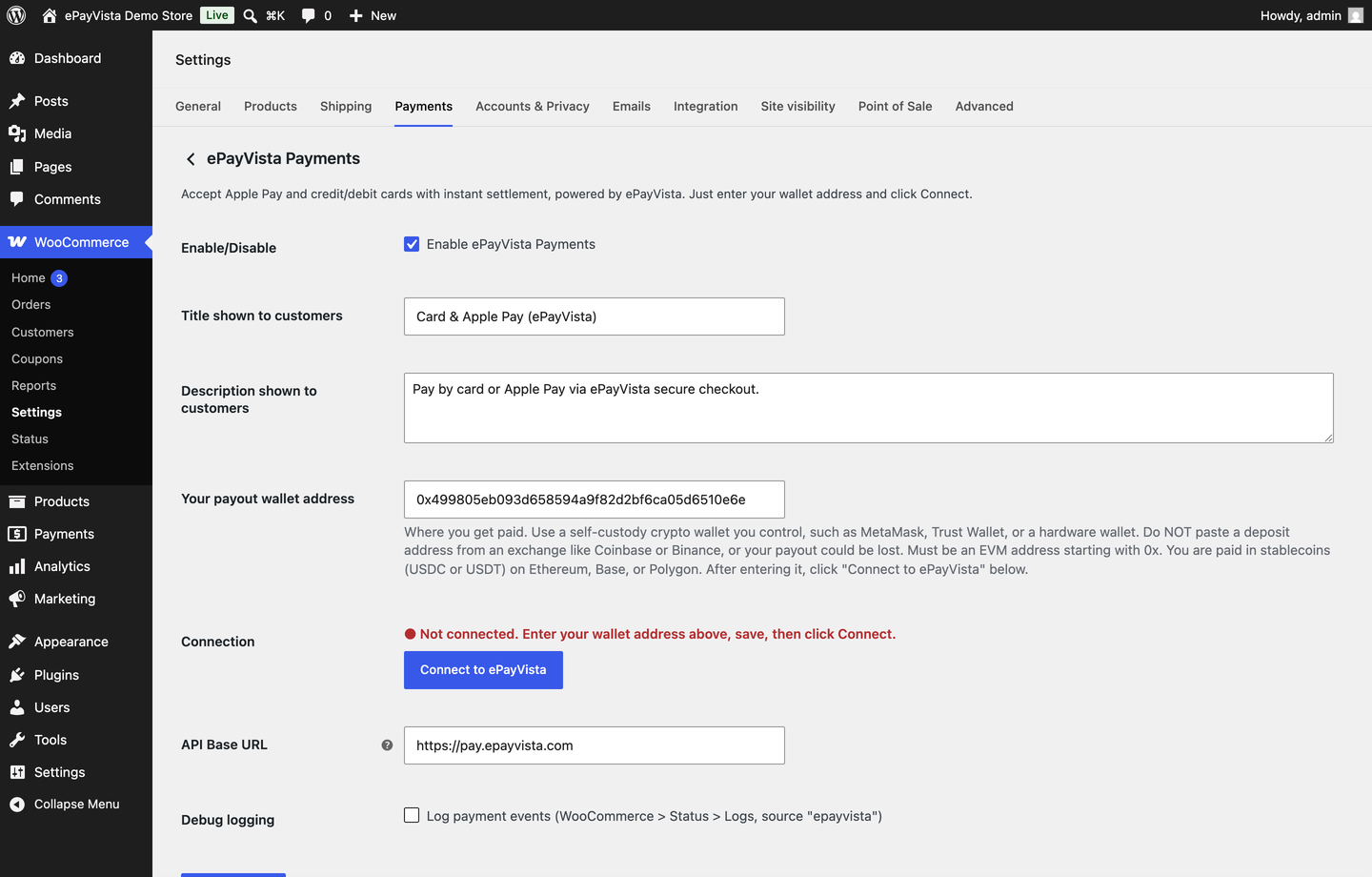
- Go to WooCommerce, then ePayVista, enter the wallet address where you want to receive funds, click Save changes, then click Connect to ePayVista.
- Go to WooCommerce, then Settings, then Payments and enable the ePayVista payment methods you want. You are ready to take payments.
Änderungsprotokoll
Adds Pay by card with Banxa to the optional Card processing fee setting. Nothing changes until you change it. Safe to update.
2.9.50
- The Card processing fee setting now also covers Pay by card with Banxa, so you can choose who pays the Banxa card fee the same way as for Pay by card and Pay with Coinbase.
- When ePayVista refuses a card processing fee change, the settings page shows the reason it gave.
- The plugin header no longer repeats Tested up to; WordPress.org reads it from readme.txt.
2.9.49
- New “Card processing fee” setting on the ePayVista settings page, one for Pay by card and one for Pay with Coinbase. Choose who pays the card provider’s fee: charged to the buyer (the default, unchanged), taken from your payout, or split by a percent you choose. It applies to card payments started after you save.
- When you chose to pay the card fee, the order no longer shows the payment as short and gets a note with the card fee you paid.
2.9.48
- The all-in-one ePayVista Payments gateway now has a “Pay by card (Banxa)” box next to the other payment method boxes. It is ticked by default. Untick it to hide Banxa on your hosted payment page.
2.9.47
- Added Banxa card payments as a payment method you can turn on. Find “ePayVista – Pay by Card (Banxa)” under WooCommerce, Settings, Payments. It is off until you enable it. Banxa processes the card payment, the customer pays Banxa’s card fee on top, and you receive the full order amount. Orders of $10 and above.
2.9.46
- Recover missed funds now says your processing fee, which is the fee on your own account.
2.9.45
- New: an optional Partner code field on the Connect screen. If a white-label partner gave you a code, enter it, see the partner’s name and processing fee, tick to agree, then press Connect. Leave it empty and nothing changes: you connect at the standard 1% fee. If joining the partner does not work, your store stays connected at its current fee and the screen tells you why.
Screenshots
Für Entwickler
Ist das dein Plugin? Zeigen Sie die Zahlen.
Fügen Sie Ihrer Website, Docs oder GitHub Readme ein Live-Badge hinzu. Es wird von selbst aktualisiert - kein Konto erforderlich.
Best ePayVista Payments: High-Risk… alternatives
All crypto payment gateway plugins →





Fragen und Antworten
ePayVista Payments: High-Risk Crypt…: quick answers
Gerade Antworten, gezogen von Live WordPress.org Daten.
Quelle: WordPress.org
Is ePayVista Payments: High-Risk C… free?
Yes. ePayVista Payments: High-Risk C… is free to download and use from the official WordPress.org plugin directory.
Is ePayVista Payments: High-Risk C… safe to use in 2026?
ePayVista Payments: High-Risk C… is a solid plugin choice in 2026, with a few things worth checking first. It runs on 40+ sites, is rated 5/5 and was last updated 1 week ago, and scores 74/100 on our health check.
How many websites use ePayVista Payments: High-Risk C…?
ePayVista Payments: High-Risk C… is active on 40+ WordPress websites and has been downloaded 4,138 times since it launched in July 2026. It was downloaded 1,370 times in the last 30 days.
Does ePayVista Payments: High-Risk C… work with WordPress 7.1?
Yes. The developer has tested ePayVista Payments: High-Risk C… up to WordPress 7.1.5, the latest release. It requires WordPress 5.8 or newer.
What PHP version does ePayVista Payments: High-Risk C… need?
ePayVista Payments: High-Risk C… requires PHP 7.4 or higher. Most hosts run PHP 8.x today, so it works on any modern WordPress hosting.
When was ePayVista Payments: High-Risk C… last updated?
The latest version, 2.9.50, was released on November 14, 2026 (1 week ago).
Who makes ePayVista Payments: High-Risk C…?
ePayVista Payments: High-Risk C… is developed and maintained by ePayVista.
What are the best alternatives to ePayVista Payments: High-Risk C…?
The most popular alternatives to ePayVista Payments: High-Risk C… are Cryptocurrency Payment Gate… (200+ installs), OxaPay Crypto Payment Gatew… (200+ installs) and Speed Bitcoin and Stablecoi… (60+ installs).
Angetrieben von PageForge
Eine Vorlage und eine Tabelle. Eine echte Seite für jede Suche.
PageForge Verwandelt jede Zeile eines CSV in eine WordPress-Seite mit eigenem Titel, URL, SEO Felder und Schema entworfen. Kostenlos auf WordPress.org.
- CSV und XLSX, plus Google Sheets auf Beruf und Unternehmen
- seinen eigenen Titel, URL, SEO Felder und Schema für jede Seite
- Arbeitet mit dem Blockeditor, Elementor, Divi und Avada
- Kostenlos auf WordPress.org, keine Kreditkarte