


Easy Notification Bar
A simple plugin for displaying a notice at the top of your website that can be closed by the visitor. Completely free and minimal without any upsells.

Mit Vorsicht verwenden
Easy Notification Bar works, but test it on a staging site before relying on it in 2026. It runs on 9K+ sites, is rated 4.6/5 and was last updated 9 months ago, and scores 54/100 on our health check.
- Momentum — downloads up 25.7% vs the previous 30 days
- Nur getestet bis WordPress 6.9 (letzt ist 7.1)
Wie stapelt es sich?
Side-by-side bei Installationen, Updates, Bewertungen und Support


Tägliche Downloads
Download-Spitzen folgen normalerweise einer neuen Version - jede Website, die automatisch aktualisiert wird, gilt als Download.
Ranglisten
Where Easy Notification Bar stands todayWordPress.org Ranglisten suchen
Live-Position in der Plugin-Suche, Top 100| Stichwort | Position |
|---|---|
| banner | >100 |
| notice | >100 |
| notification | #15 |
| notification bar | #5 |
| top bar | #11 |
Versionsübernahme
Anteil aktiver Sites pro Release.
Bewertungsaufschlüsselung
★★★★★★★★★★ 4.6 from 16 reviews
About Easy Notification Bar
From the official readme · v1.7Beschreibung
Easily add a custom top bar notification message to on your site with live customization options via the WordPress customizer. The plugin allows you to enter your notification bar text as well as an optional button to display next to your text. Perfect for notifying visitors of a current sale, hot product, warnings or other important messages.
The Easy Notification Bar plugin makes use of the newer “wp_body_open” action hook introduced in WordPress 5.2.0 which allows the plugin to work better with any theme that has been updated to support the tag. Contrary to other notice bar solutions which rely on absolute positioning, this plugin inserts the notice bar right after the body tag so it should display perfectly without any conflicts on any well-coded theme.
By default, the notification bar is “static” which means it displays at the top of your site so when you scroll down the page it will become “hidden”. This is generally better for usability and SEO. However, in version 1.4 we added a new sticky option which you can enable in the Customizer so that the notification bar remains visible as you scroll down the page. The sticky functionality makes use of the CSS sticky property (not javascript).
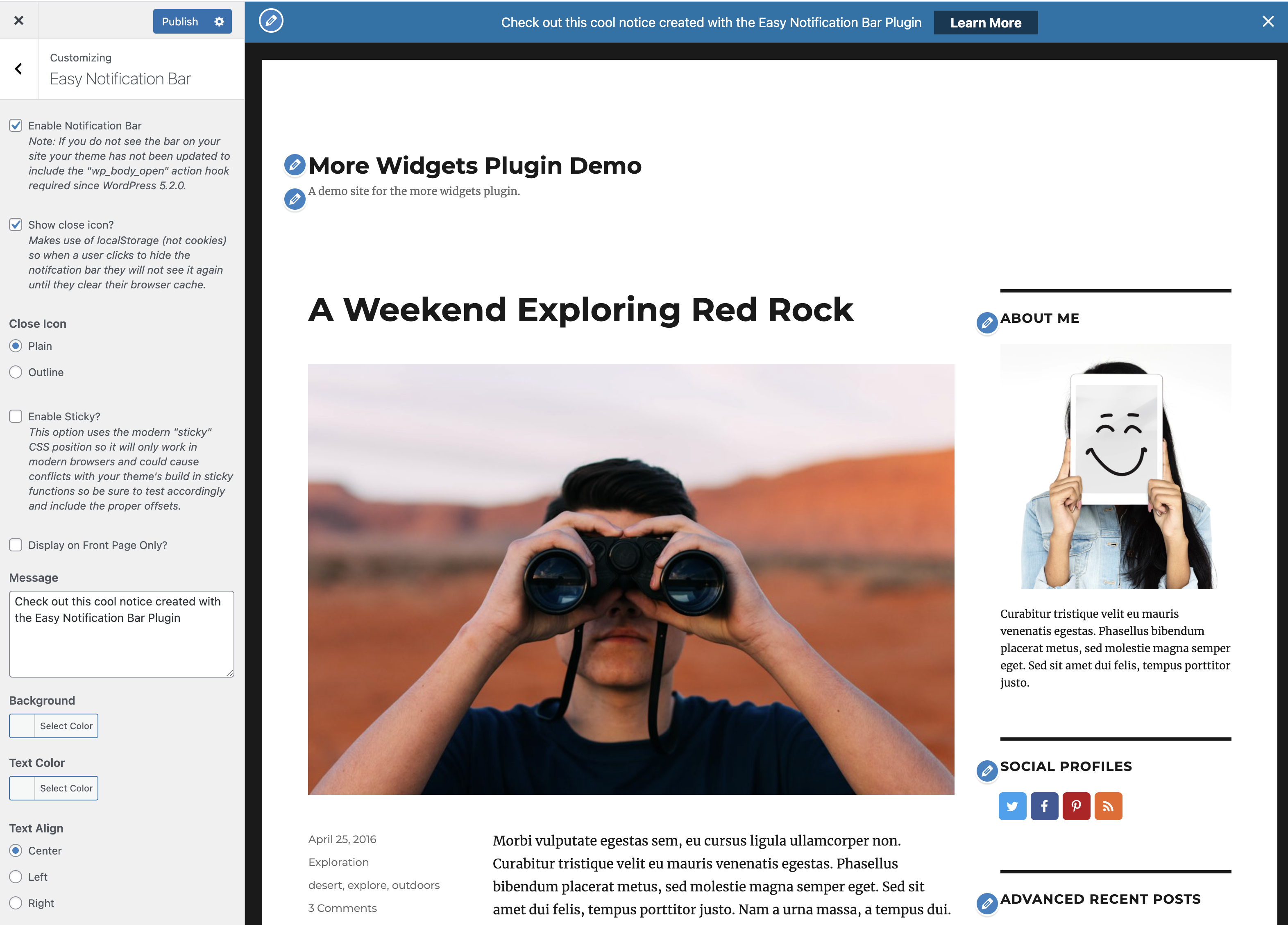
Although disabled by default, you can enable a close icon for your notice. When enabled, your visitors will see an “x” icon over the top bar which they can click to hide the message for their current and future sessions. This functionality makes use of localStorage (not cookies). You can also select to hide the notification bar when clicking the call to action button.
Merkmale
- Sitewide (or homepage only) top notification bar.
- Easy setup via the WordPress customizer.
- Optional close icon.
- Optional sticky display.
- Custom background, color, text alignment and font size settings.
- Optional callout button.
- Responsive design so it looks good on mobile.
- Minimal code.
- Vanilla Javascript used for close icon (jQuery not needed).
Installation
- Go to your WordPress website admin panel
- Select Plugins > Add New
- Search for “Easy Notification Bar”
- Click Install
- Aktivieren Sie das Plugin
- A default notification should now appear on your site. If it does not then you need to update your theme to work properly (see FAQ).
- Go Appearance > Customize > Easy Notification Bar to customize your notification
Änderungsprotokoll
1.7
- Updated the tested up to version number to version 6.9.
- Added Support for the Total theme color picker.
- Added Support for gradient background when using Total version 6.6 or greater.
1.6.1
- Updated the tested up to version number to version 6.8.
- Added missing License from the plugin header.
1.6
- Optimized the way the notice is displayed on load to prevent CLS issues. The plugin now adds an inline script in the header before the notice which checks the localStorage to see if the notice is disabled and if so it will add a classname to the HTML tag to hide it via inline CSS. This allows you to also defer the front.js and front.css scripts without issues. If the notice is disabled the plugin will now also remove the scripts and HTML from the DOM as they are not needed.
- Updated The “has-easy-notification-bar” classname is now added to the HTML tag instead of the body tag.
1.5
- Added options: Close Action, Displace Button, Vertical Padding, Horizontal Padding, Button Placement, Button Font Weight and Button Border Radius.
- Added custom JavaScript event “easy-notification-bar:close” in case you want to perform any actions when the notification bar is closed.
- Updated the frontend CSS which has been optimized to use modern flex styles and CSS variables. Please check any custom CSS you were using to modify the design!
- Updated the button so it now displays as an inline-block to ensure padding works properly and prevents overflow issues.
- Updated the button so it can be set to hide the notification as well.
- Fixed the message now passes through wp_kses_post when displaying on the frontend to strip out unwanted characters.
1.4.8
- Fixed issue in the Customizer that could cause the rest of the page to not render when making edits to the notification bar.
- Updated the tested up to version number.
1.4.7
- Fixed issue where renamed CSS files were not committed correctly causing the layout to break. Sorry!!
Screenshots
Für Entwickler
Ist das dein Plugin? Zeigen Sie die Zahlen.
Fügen Sie Ihrer Website, Docs oder GitHub Readme ein Live-Badge hinzu. Es wird von selbst aktualisiert - kein Konto erforderlich.
Best Easy Notification Bar alternatives
All banner plugins →





Fragen und Antworten
Easy Notification Bar: quick answers
Gerade Antworten, gezogen von Live WordPress.org Daten.
Quelle: WordPress.org
Is Easy Notification Bar free?
Yes. Easy Notification Bar is free to download and use from the official WordPress.org plugin directory.
Is Easy Notification Bar safe to use in 2026?
Easy Notification Bar works, but test it on a staging site before relying on it in 2026. It runs on 9K+ sites, is rated 4.6/5 and was last updated 9 months ago, and scores 54/100 on our health check.
How many websites use Easy Notification Bar?
Easy Notification Bar is active on 9K+ WordPress websites and has been downloaded 147,642 times since it launched in June 2019. It was downloaded 1,286 times in the last 30 days.
Does Easy Notification Bar work with WordPress 7.1?
Easy Notification Bar is officially tested up to WordPress 6.9.12, while the latest release is 7.1.5. It may still work, but try it on a staging site first.
What PHP version does Easy Notification Bar need?
Easy Notification Bar requires PHP 7.4 or higher. Most hosts run PHP 8.x today, so it works on any modern WordPress hosting.
When was Easy Notification Bar last updated?
The latest version, 1.7, was released on March 10, 2026 (9 months ago).
Who makes Easy Notification Bar?
Easy Notification Bar is developed and maintained by WPExplorer.
What are the best alternatives to Easy Notification Bar?
The most popular alternatives to Easy Notification Bar are CookieAdmin (400K+ installs), Image Widget (100K+ installs) and Simple Banner (50K+ installs).
Angetrieben von PageForge
Eine Vorlage und eine Tabelle. Eine echte Seite für jede Suche.
PageForge Verwandelt jede Zeile eines CSV in eine WordPress-Seite mit eigenem Titel, URL, SEO Felder und Schema entworfen. Kostenlos auf WordPress.org.
- CSV und XLSX, plus Google Sheets auf Beruf und Unternehmen
- seinen eigenen Titel, URL, SEO Felder und Schema für jede Seite
- Arbeitet mit dem Blockeditor, Elementor, Divi und Avada
- Kostenlos auf WordPress.org, keine Kreditkarte