


Dropdown Multisite Selector
Build a configurable dropdown whose options redirect visitors to the URLs you choose: network sites, or your own custom links.

Solide Wahl
Dropdown Multisite Selector is a solid plugin choice in 2026, with a few things worth checking first. It runs on 900+ sites, is rated 5/5 and was last updated 2 months ago, and scores 67/100 on our health check.
- Getestet mit dem neuesten WordPress (7.1)
- Kleine Benutzerbasis (900+ aktive Installationen)
- Benötigt PHP 8.3 oder neuer
Wie stapelt es sich?
Side-by-side bei Installationen, Updates, Bewertungen und Support


Tägliche Downloads
Download-Spitzen folgen normalerweise einer neuen Version - jede Website, die automatisch aktualisiert wird, gilt als Download.
Ranglisten
Where Dropdown Multisite Selector stands todayWordPress.org Ranglisten suchen
Live-Position in der Plugin-Suche, Top 100| Stichwort | Position |
|---|---|
| dropdown | #4 |
| multisite | #6 |
| network | #97 |
| umleiten | >100 |
| select | #13 |
Versionsübernahme
Anteil aktiver Sites pro Release.
Bewertungsaufschlüsselung
★★★★★★★★★★ 5 from 19 reviews
About Dropdown Multisite Selector
Aus der offiziellen Readme · V1.0.0Beschreibung
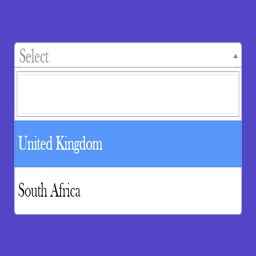
This plugin lets you build a fully configurable dropdown field whose options act as links: when a visitor picks one, they are redirected to the matching URL. It was originally built for multisite networks to make navigation between subsites faster, but it now supports custom links as dropdown options too.
Ways to populate the dropdown
- Manual list – define each option yourself: enter a name and the URL the visitor is redirected to when they choose it.
- All network sites – automatically list every site in your WordPress Multisite Network as an option.
- The user’s sites only – list only the network sites where the current logged-in user is registered.
What you can customize
- Label – set a label for the dropdown, or leave it empty for no label.
- Placeholder – the first, non-clickable option (for example “Select branch”, “Select country”, “Choose side”).
- Sorting – order your manual list alphabetically, or reverse it so your most recent entries appear first.
- Behaviour – send the visitor to the selected URL, or treat the URLs as images and load the chosen one into the
[dms_target]container on the same page, without leaving it.
Once your settings are saved, display the dropdown with the [dms] shortcode or the bundled widget.
Shortcodes
[dms] – Renders the dropdown exactly as configured on the admin settings page.
[dms_manual name=”” placeholder=”” target=”” options=””] – Renders a standalone dropdown that is independent of your saved settings. Accepts these attributes:
name– the dropdown label (leave empty for no label).placeholder– the first option shown in the menu (for example “– Select –“).target– “default” to open links in the same tab, or “blank” to open them in a new tab.options– comma-separated URL/name pairs in the form “url1|name1, url2|name2, url3|name3”. The order within each pair is detected automatically, so “name|url” works too. Option names cannot contain a comma or a vertical bar, as both are used to separate the values.
Beispiel:
[dms_manual name="Label" placeholder="--Select--" target="blank" options="https://duckduckgo.com|Trusted search engine, https://google.bg|Tracking search engine"]
[dms_target] – Marks the spot where the selected image is loaded. Place it anywhere on the same page as [dms] and set the behaviour to “Open in target section” on the settings page: choosing an option then swaps the image in this container instead of redirecting the visitor. If the behaviour is set to images but this shortcode is missing from the page, the dropdown shows a warning. Developers can also replace the container markup through the dms_target_filter filter.
Need extra functionality? Open an issue on GitHub or ask in the support forum, and I’ll see whether it can be added. Thanks to everyone who has shared ideas for improving this plugin.
Filters
Here are the filters you can use to modify the plugin’s output:
dms_sites_arguments– control the attributes passed toget_sites()when the “Show all sites in the WordPress Multisite Network” option is selected.dms_multisite_pairs– filter the results returned fromget_sites().dms_users_sites– control the sites when the “Show only the sites where the user is registered” option is selected.dms_target_filter– replace the markup returned by the[dms_target]shortcode.
Installation
Aus Ihrem WordPress-Dashboard
- Visit ‘Plugins > Add New’.
- Search for ‘Dropdown Multisite Selector’.
- Activate Dropdown Multisite Selector from your Plugins page. To start building your dropdown, go to Settings -> Dropdown Multisite.
Von WordPress.org
- Download ‘Dropdown Multisite Selector’.
- Upload the ‘dropdown-multisite-selector’ directory to your ‘/wp-content/plugins/’ directory, using your favorite method (ftp, sftp, scp, etc…).
- Activate it from your Plugins page.
Änderungsprotokoll
Security fixes. This version requires PHP 8.3 or newer - sites running older PHP will not be offered the update.
1.0.0
- Date: 12 September 2026
- Security patch
- Admin face lift
- [Added] Image behaviour: the dropdown can load the selected URL as an image into the new
[dms_target]container instead of redirecting - [Added]
dms_target_filterfilter, to replace the markup of the[dms_target]container - Minimum required PHP raised to 8.3
0.9.5
- Date: 26 March 2025
- Security patch
0.9.4
- Date: 26 March 2025
- Maintenance: fixes to the automated WordPress.org deployment
0.9.3
- Date: 25 March 2025
- Maintenance: added automated deployment to the WordPress.org repository
0.9.2.1
- Date: 20 January 2024
- Security patch
0.9.2
- Date: 03 April 2023
- [Fix] PHP 8 deprecation notice
- [Fix] PHP 8 fatal error when saving content containing the [dms] shortcode (solved by @zodiac1978)
Screenshots

Für Entwickler
Ist das dein Plugin? Zeigen Sie die Zahlen.
Fügen Sie Ihrer Website, Docs oder GitHub Readme ein Live-Badge hinzu. Es wird von selbst aktualisiert - kein Konto erforderlich.
Best Dropdown Multisite Selector alternatives
All dropdown plugins →





Fragen und Antworten
Dropdown Multisite Selector: quick answers
Gerade Antworten, gezogen von Live WordPress.org Daten.
Quelle: WordPress.org
Is Dropdown Multisite Selector free?
Yes. Dropdown Multisite Selector is free to download and use from the official WordPress.org plugin directory.
Is Dropdown Multisite Selector safe to use in 2026?
Dropdown Multisite Selector is a solid plugin choice in 2026, with a few things worth checking first. It runs on 900+ sites, is rated 5/5 and was last updated 2 months ago, and scores 67/100 on our health check.
How many websites use Dropdown Multisite Selector?
Dropdown Multisite Selector is active on 900+ WordPress websites and has been downloaded 33,947 times since it launched in January 2014. It was downloaded 408 times in the last 30 days.
Does Dropdown Multisite Selector work with WordPress 7.1?
Yes. The developer has tested Dropdown Multisite Selector up to WordPress 7.1.5, the latest release. It requires WordPress 6.0 or newer.
What PHP version does Dropdown Multisite Selector need?
Dropdown Multisite Selector requires PHP 8.3 or higher. Most hosts run PHP 8.x today, so it works on any modern WordPress hosting.
When was Dropdown Multisite Selector last updated?
The latest version, 1.0.0, was released on September 12, 2026 (2 months ago).
Who makes Dropdown Multisite Selector?
Dropdown Multisite Selector is developed and maintained by alordiel.
What are the best alternatives to Dropdown Multisite Selector?
The most popular alternatives to Dropdown Multisite Selector are Cities Shipping Zones for W… (4K+ installs), Min Max Step Quantity Limit… (3K+ installs) and Navigation menu as Dropdown… (2K+ installs).
Angetrieben von PageForge
Eine Vorlage und eine Tabelle. Eine echte Seite für jede Suche.
PageForge Verwandelt jede Zeile eines CSV in eine WordPress-Seite mit eigenem Titel, URL, SEO Felder und Schema entworfen. Kostenlos auf WordPress.org.
- CSV und XLSX, plus Google Sheets auf Beruf und Unternehmen
- seinen eigenen Titel, URL, SEO Felder und Schema für jede Seite
- Arbeitet mit dem Blockeditor, Elementor, Divi und Avada
- Kostenlos auf WordPress.org, keine Kreditkarte