


DomainWarn Monitoring
Monitors availability, certificate, DNS and email of your site – and reports what is invisible from outside: outdated plugins, a stalled WP-Cron.

Solide Wahl
DomainWarn Monitoring is a solid plugin choice in 2026, with a few things worth checking first. Was last updated 3 days ago, and scores 64/100 on our health check.
- Aktiv entwickelt – letztes Update vor 3 Tagen
- Getestet mit dem neuesten WordPress (7.1)
- Kleine Benutzerbasis (<10 aktive Installationen)
- Bisher sehr wenige Bewertungen
- Benötigt PHP 8.2 oder neuer
Wie stapelt es sich?
Side-by-side bei Installationen, Updates, Bewertungen und Support



Tägliche Downloads
Download-Spitzen folgen normalerweise einer neuen Version - jede Website, die automatisch aktualisiert wird, gilt als Download.
Ranglisten
Where DomainWarn Monitoring stands todayWordPress.org Ranglisten suchen
Live-Position in der Plugin-Suche, Top 100| Stichwort | Position |
|---|---|
| dns | >100 |
| email deliverability | >100 |
| Überwachung | >100 |
| ssl | >100 |
| uptime | >100 |
About DomainWarn Monitoring
From the official readme · v1.6.0Beschreibung
A site is not only broken when the page stays white. It is also broken when no order confirmation has gone out for
three days because WP-Cron has stalled. Or when the certificate expires in two weeks and nobody read the issuer’s
email. Or when a plugin has been carrying a known vulnerability for months.
DomainWarn monitors your domains from the outside – availability, redirects, TLS
certificate, DNS, SPF, DKIM, DMARC, blacklists, domain expiry. This plugin adds the inside view that nobody can see
from outside.
What the plugin does
- Adds the addresses of this site to monitoring. In a network, every site.
- Reports what is invisible from outside: the exact WordPress and PHP version, plugins and themes with a pending
update, the mail setup – sender address and server. Together with the DNS records this yields the finding “your
site sends through a server that is not in the SPF record”, which neither the site nor an outside check can reach
on its own. - Notices when WP-Cron stalls. A scheduled run reports in every 15 minutes. If it stops, WP-Cron has stalled:
the site still answers, but no mail goes out and nothing is processed. DomainWarn then opens an alert and sends
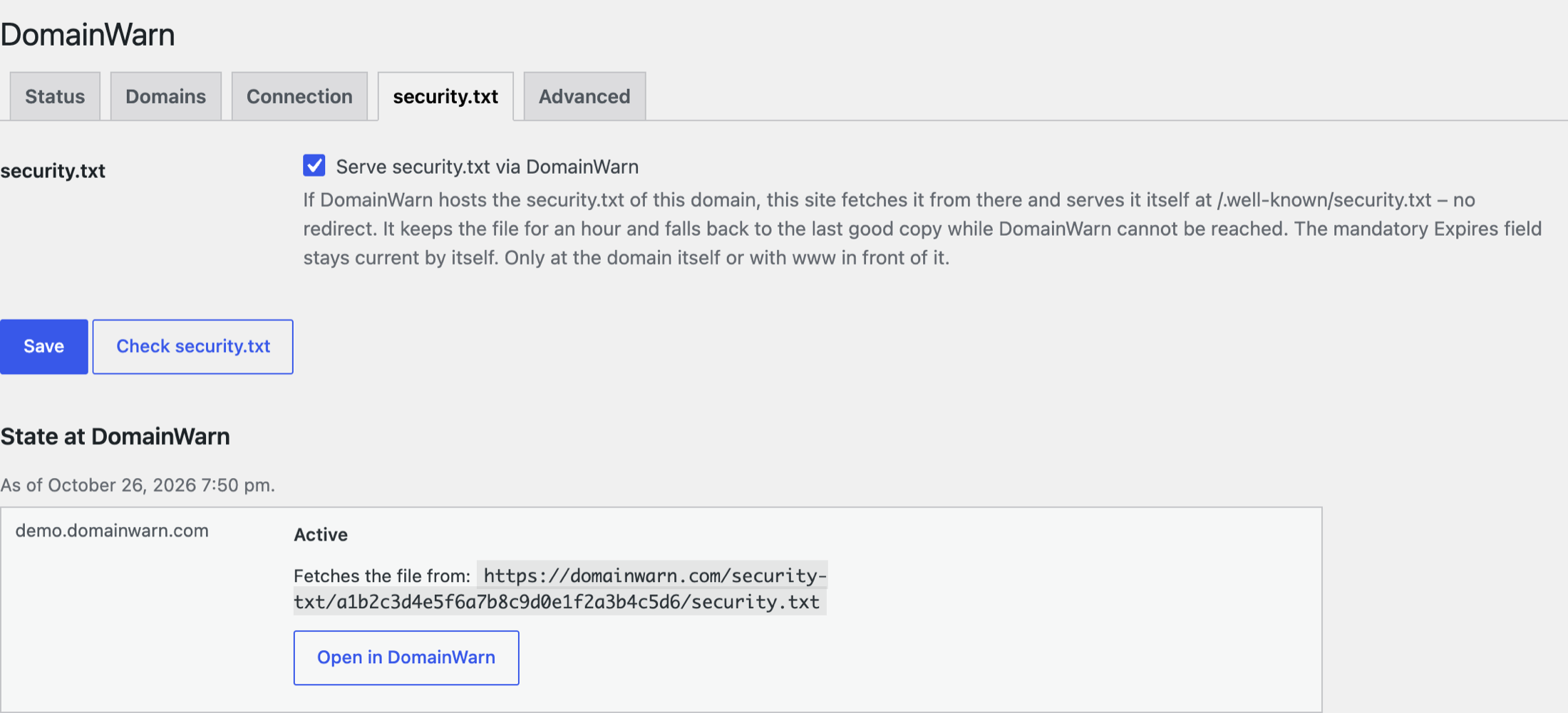
it to your channels – email, Slack, Teams or webhook. - Serves security.txt via DomainWarn (optional, off by default). If DomainWarn hosts the security.txt of your
domain, the site fetches it from there and serves it itself at /.well-known/security.txt – no redirect – and the
mandatory Expires field stays current by itself. The file is kept for an hour; while DomainWarn cannot be reached,
the site serves the last good copy as long as it has not expired. Only at the domain itself or with www in front
of it, only from DomainWarn, and never over a security.txt that is already there: a file in the web root or
another plugin is shown as a conflict instead of being overridden. - Shows the state of the site on the dashboard: a “DomainWarn” widget with availability over 30 days, the
response time of the last 7 days as a small chart, certificate and domain expiry and open alerts – for every
domain of the site, with a link to it in DomainWarn. The figures are refreshed by the scheduled run at most once
an hour. - Lists the open alerts: a second widget “DomainWarn – Open alerts” and the Domains tab name each open alert –
domain, title in the language of the site, severity and since when, with a link to DomainWarn. The Domains tab
also shows every domain with its state, last check, open alerts and certificate and domain expiry. - Works from the command line as well:
wp domainwarn test,wp domainwarn sync,wp domainwarn report.
Which data is transmitted
The plugin sends to DomainWarn: the addresses of the site, the WordPress and PHP version, the names and versions of
installed plugins and themes, the sender address and mail server, whether maintenance mode is on, and the environment
(PHP settings such as memory limit and OPcache, loaded PHP extensions, database and web server version, and switches
such as error display, automatic updates, XML-RPC and WP-Cron) – only versions, sizes and on/off values. The
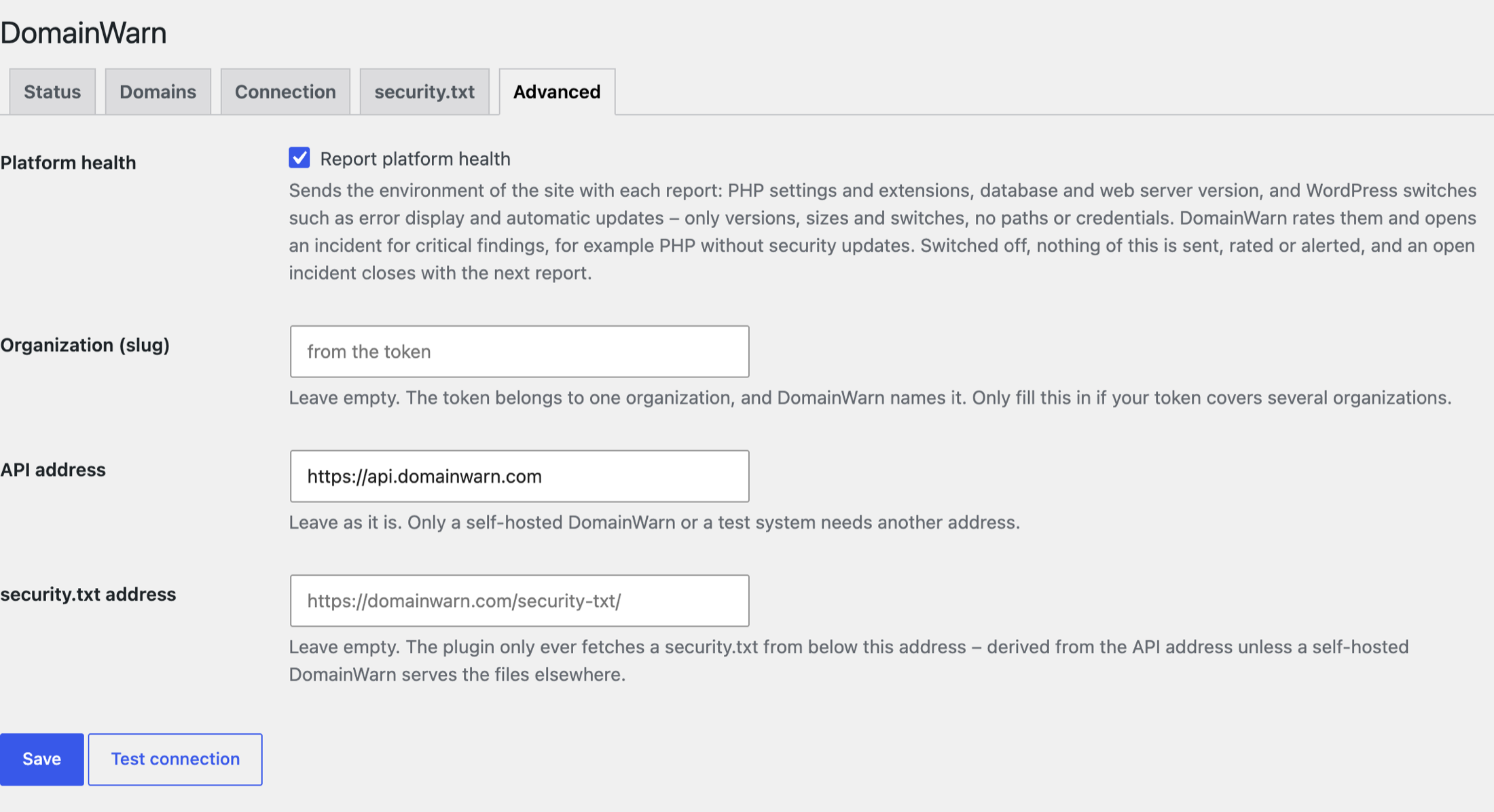
environment can be switched off with “Report platform health” on the settings page.
Not transmitted are users, posts, comments, orders or any content of the site. The API token is stored on the
site only and never reaches the browser. The plugin works with a DomainWarn account only; the processing is
described in DomainWarn’s privacy policy.
External service
This plugin connects to the DomainWarn API at https://api.domainwarn.com (operated by Wigandt Technology,
Germany). Without an API token that you create yourself, the plugin stays idle and contacts nothing. In the backend,
the “Open alerts” widget, the Domains tab and the Connection tab ask the API for the current alerts and the state
of the token – at most every few minutes, the answers are kept briefly on the site.
If you switch on “Serve security.txt via DomainWarn”, the site fetches the file from
https://domainwarn.com/security-txt/… when someone requests /.well-known/security.txt – at most once an hour – and
serves it itself. Normal page views never contact DomainWarn: the address of the file is stored on the site and
refreshed by the scheduled run.
Installation
- Installieren und aktivieren Sie das Plugin.
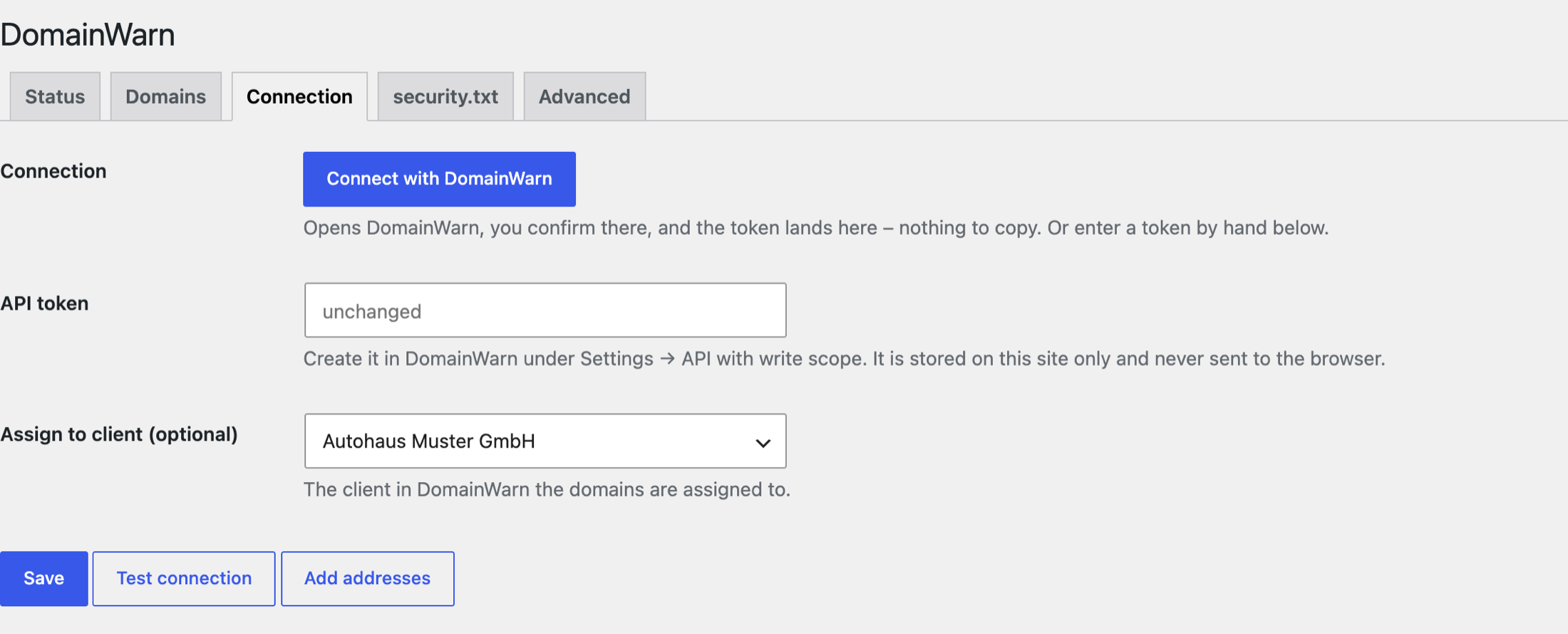
- Under Settings → DomainWarn, click “Connect with DomainWarn”. You confirm in DomainWarn, and the token lands
here by itself. A free account is enough to start. - “Add addresses”. Done.
Prefer to do it by hand? Create a token in DomainWarn under Settings → Integrations → API tokens with write scope and
paste it into the token field instead.
For the heartbeat, WP-Cron must run – which is exactly what it checks.
Änderungsprotokoll
Open alerts by name, a domain overview, the state of the connection with "Disconnect", and the organization from a list. Tested with WordPress 7.2.
1.6.0
- New widget “DomainWarn – Open alerts”: which alerts are open, not only how many – domain, title, severity, since when.
- The Domains tab shows every domain with its state, last check, open alerts and certificate and domain expiry, and lists the open alerts.
- The Connection tab shows whether the connection works – connected, token revoked or DomainWarn unreachable – with the matching buttons, including “Disconnect”.
- Choose the organization from a list of the organizations your token can see.
- The API address and the security.txt address are gone from the Advanced tab; the plugin always talks to DomainWarn.
- With DISABLE_WP_CRON and a working cron job on the server, the status no longer warns; any interval up to 15 minutes is enough.
- German texts are included in the plugin, so new texts are no longer shown in English on German sites.
- Tested with WordPress 7.2 and PHP 8.6; follows the Plugin Check rules.
1.5.2
- The hints for the API token name the new place in the DomainWarn dashboard: Settings → Integrations → API tokens.
- Open alerts instead of open incidents: the dashboard widget and the settings use the words of the DomainWarn dashboard.
1.5.1
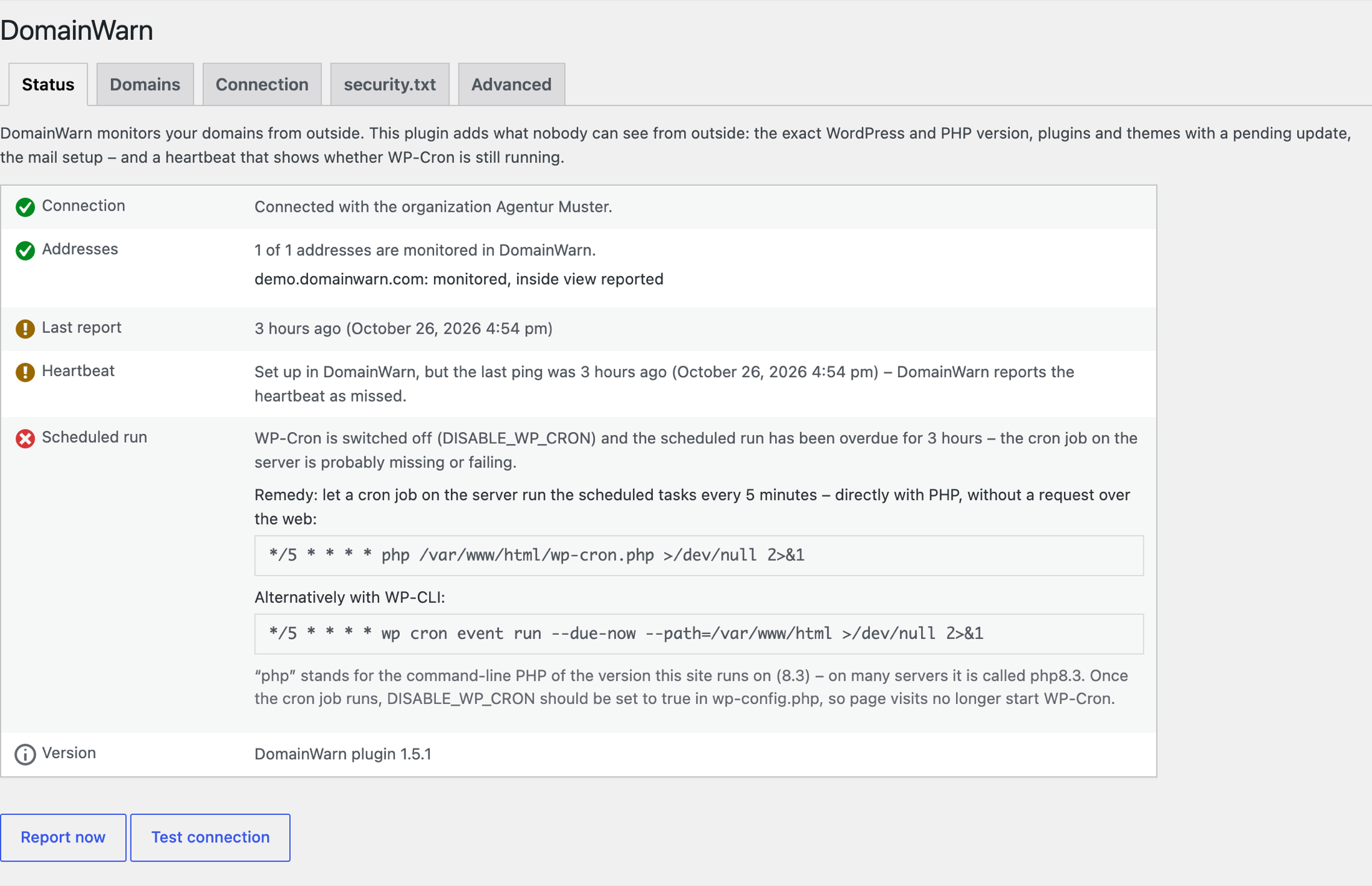
- The settings page has tabs: Status, Domains, Connection, security.txt and Advanced – the same names and order as in
the Shopware extension. Each tab saves only its own fields. - The hint for a stalled WP-Cron names cron jobs that run PHP directly – php …/wp-cron.php or WP-CLI – instead of
calling the site over the web, with the path of this installation and as a block to copy. - BIMI and MTA-STS are no longer shown in the plugin – they are managed in DomainWarn.
- The status names the organization by its name instead of its short code.
- The heartbeat row turns yellow or red once the last ping is older than the heartbeat interval allows – then
DomainWarn already reports the heartbeat as missed.
1.5.0
- Status on the settings page: connected or not, which addresses DomainWarn monitors, the last report and the last
error with its reason, the heartbeat with its last ping, the next scheduled run – and a hint with the cron job to
set up when WP-Cron is switched off or stands still.
1.4.1
- New setting “Report platform health” (on by default): switched off, the environment is not sent, not rated and
opens no incident.
1.4.0
- Platform health: the report now also contains the site’s environment – PHP settings (memory limit, execution time,
upload size, OPcache, loaded extensions), database and web server version, and WordPress switches modelled on Site
Health (error display, file editor, automatic core updates, XML-RPC, HTTPS, WP-Cron, object cache). DomainWarn rates
them against the WordPress requirements and the support periods of PHP, MySQL and MariaDB and shows steps to fix
them. Only versions, sizes and switches are sent – no paths, no credentials.
Screenshots


Für Entwickler
Ist das dein Plugin? Zeigen Sie die Zahlen.
Fügen Sie Ihrer Website, Docs oder GitHub Readme ein Live-Badge hinzu. Es wird von selbst aktualisiert - kein Konto erforderlich.
Best DomainWarn Monitoring alternatives
All dns plugins →




Fragen und Antworten
DomainWarn Monitoring: quick answers
Gerade Antworten, gezogen von Live WordPress.org Daten.
Quelle: WordPress.org
Is DomainWarn Monitoring free?
Yes. DomainWarn Monitoring is free to download and use from the official WordPress.org plugin directory.
Is DomainWarn Monitoring safe to use in 2026?
DomainWarn Monitoring is a solid plugin choice in 2026, with a few things worth checking first. Was last updated 3 days ago, and scores 64/100 on our health check.
How many websites use DomainWarn Monitoring?
DomainWarn Monitoring is active on <10 WordPress websites and has been downloaded 619 times since it launched in September 2026. It was downloaded 204 times in the last 30 days.
Does DomainWarn Monitoring work with WordPress 7.1?
Yes. The developer has tested DomainWarn Monitoring up to WordPress 7.2, the latest release. It requires WordPress 6.3 or newer.
What PHP version does DomainWarn Monitoring need?
DomainWarn Monitoring requires PHP 8.2 or higher. Most hosts run PHP 8.x today, so it works on any modern WordPress hosting.
When was DomainWarn Monitoring last updated?
The latest version, 1.6.0, was released on November 26, 2026 (3 days ago).
Who makes DomainWarn Monitoring?
DomainWarn Monitoring is developed and maintained by Wigandt Technology.
What are the best alternatives to DomainWarn Monitoring?
The most popular alternatives to DomainWarn Monitoring are Simple DNS Prefetch (200+ installs), CCPA Opt-Out by CookiePro (100+ installs) and ES Football Bypass for Clou… (100+ installs).
Angetrieben von PageForge
Eine Vorlage und eine Tabelle. Eine echte Seite für jede Suche.
PageForge Verwandelt jede Zeile eines CSV in eine WordPress-Seite mit eigenem Titel, URL, SEO Felder und Schema entworfen. Kostenlos auf WordPress.org.
- CSV und XLSX, plus Google Sheets auf Beruf und Unternehmen
- seinen eigenen Titel, URL, SEO Felder und Schema für jede Seite
- Arbeitet mit dem Blockeditor, Elementor, Divi und Avada
- Kostenlos auf WordPress.org, keine Kreditkarte