


Docswrite – Export Google Docs to Your Site ✨
Effortlessly publish Google Docs to WordPress, preserving formatting and structure for a streamlined content workflow

Mit Vorsicht verwenden
Docswrite works, but test it on a staging site before relying on it in 2026. It runs on 100+ sites, is rated 5/5 and was last updated 3 months ago, and scores 53/100 on our health check.
- Kleine Benutzerbasis (100+ aktive Installationen)
- Bisher sehr wenige Bewertungen
- Nur getestet bis WordPress 6.7 (letzt ist 7.1)
Wie stapelt es sich?
Side-by-side bei Installationen, Updates, Bewertungen und Support


Tägliche Downloads
Download-Spitzen folgen normalerweise einer neuen Version - jede Website, die automatisch aktualisiert wird, gilt als Download.
Ranglisten
Where Docswrite stands todayWordPress.org Ranglisten suchen
Live-Position in der Plugin-Suche, Top 100| Stichwort | Position |
|---|---|
| Ai | >100 |
| automated publishing | #14 |
| content management | >100 |
| google docs | #29 |
| SEO | >100 |
Versionsübernahme
Anteil aktiver Sites pro Release.
Bewertungsaufschlüsselung
★★★★★★★★★★ 5 from 4 reviews
About Docswrite
From the official readme · v1.2.29Beschreibung
Docswrite is a powerful tool for editorial and content teams. It automates and optimizes content publication, making it easier for teams to manage and publish content consistently. Whether you’re editing blog posts, articles, or any other type of content, Docswrite integrates seamlessly with your WordPress site to enhance your content management workflow.
This plugin allows you to connect your WordPress website to Docswrite, a platform offering seamless content transformation from Google Docs to WordPress. With this integration, website owners can save hundreds of hours per month by simplifying the content distribution process.
Join hundreds of content teams that use Docswrite! Interested to know the difference between us and our competitors? Check out the full details and insights from each challenge on our blog:
🏆 Docswrite vs. Competitors: In-Depth Comparisons
Discover how Docswrite stacks up against other solutions:
Want to see these comparisons in action? Check out our YouTube channel for visual breakdowns:
🌟 Features
- Bulk Publish: Import multiple documents at once for efficient content management.
- Content Workflow Management: Create and manage content workflows with collaborative features, allowing multiple users to work together efficiently.
- Programmatic SEO: Create and optimize a large number of unique, high-quality web pages at scale.
- AI-Powered Content Generation Automation: Generate and publish automatically high-quality, SEO-optimized content, ensuring your posts are optimized for search engines without extra effort.
- Enhanced Security: Protect your content with advanced security features and user management controls by securely keeping your website ID.
- Free Trial: Get 5 free exports to try out all features without any commitment.
- ACF Support: Update ACF fields for posts created by Docswrite.
- Rankmath and Yoast SEO Support: Update Rankmath and Yoast SEO fields for posts created by Docswrite.
- Newspack SEO Support: Update Newspack SEO fields for posts created by Docswrite.
📦 Installation
-
Activate the plugin from the Plugins menu in your WordPress admin panel.
-
Have an account at Docswrite.
🛠️ How Does it Work?
-
After Docswrite is activated, click on “Connect” and you will be redirected to Docswrite.
-
If you have an account with Docswrite, your website will be automatically registered. If not, you will be redirected to the signup page.
-
Once connected, go to the Docswrite dashboard and start your publishing journey.
-
Happy publishing!
💬 Support
For support or inquiries, please visit Docswrite Support or contact us at team@docswrite.com
Wie es funktioniert
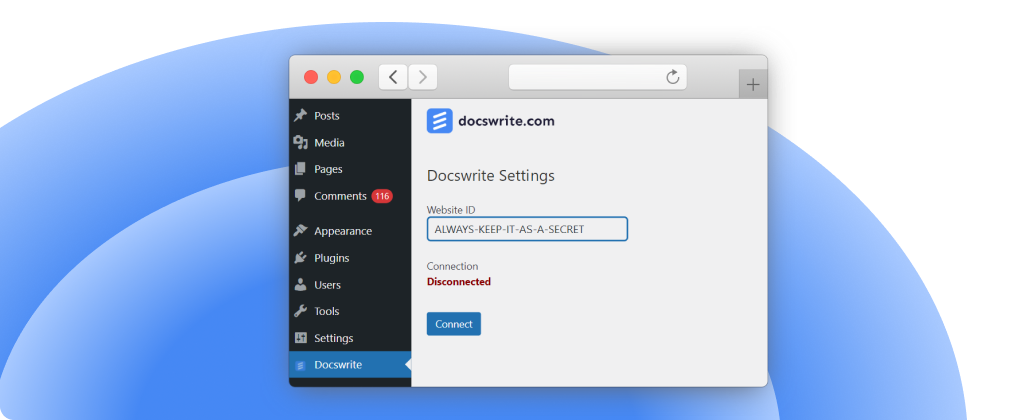
- After installation and activation of the plugin, this is the screen you see. The Website ID represents a secret that will be used to connect with Docswrite
- After clicking on ‘Connect’ you will be redirected to Docswrite – you need to be logged in to Docswrite
- If you don’t have an account with Docswrite, you will be redirected to the sign up page
- Your site will be added to Docswrite dashboard
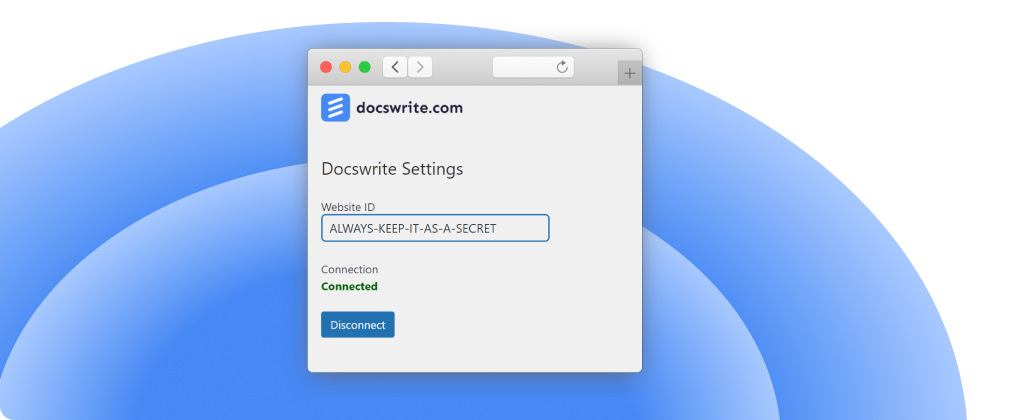
- You are successfully connected
- Now, you can publish content using Docswrite ✨
Screenshots




Für Entwickler
Ist das dein Plugin? Zeigen Sie die Zahlen.
Fügen Sie Ihrer Website, Docs oder GitHub Readme ein Live-Badge hinzu. Es wird von selbst aktualisiert - kein Konto erforderlich.
Best Docswrite alternatives
Alle AI-Plugins →





Fragen und Antworten
Docswrite: quick answers
Gerade Antworten, gezogen von Live WordPress.org Daten.
Quelle: WordPress.org
Is Docswrite free?
Yes. Docswrite is free to download and use from the official WordPress.org plugin directory.
Is Docswrite safe to use in 2026?
Docswrite works, but test it on a staging site before relying on it in 2026. It runs on 100+ sites, is rated 5/5 and was last updated 3 months ago, and scores 53/100 on our health check.
How many websites use Docswrite?
Docswrite is active on 100+ WordPress websites and has been downloaded 4,744 times since it launched in October 2024. It was downloaded 338 times in the last 30 days.
Does Docswrite work with WordPress 7.1?
Docswrite is officially tested up to WordPress 6.7.12, while the latest release is 7.1.5. It may still work, but try it on a staging site first.
What PHP version does Docswrite need?
Docswrite requires PHP 5.3 or higher. Most hosts run PHP 8.x today, so it works on any modern WordPress hosting.
When was Docswrite last updated?
The latest version, 1.2.29, was released on August 31, 2026 (3 months ago).
Who makes Docswrite?
Docswrite is developed and maintained by docswrite.
What are the best alternatives to Docswrite?
The most popular alternatives to Docswrite are Elementor Agent Ready Websi… (10M+ installs), Jetpack (3M+ installs) and All in One SEO (2M+ installs).
Angetrieben von PageForge
Eine Vorlage und eine Tabelle. Eine echte Seite für jede Suche.
PageForge Verwandelt jede Zeile eines CSV in eine WordPress-Seite mit eigenem Titel, URL, SEO Felder und Schema entworfen. Kostenlos auf WordPress.org.
- CSV und XLSX, plus Google Sheets auf Beruf und Unternehmen
- seinen eigenen Titel, URL, SEO Felder und Schema für jede Seite
- Arbeitet mit dem Blockeditor, Elementor, Divi und Avada
- Kostenlos auf WordPress.org, keine Kreditkarte