


Custom Permalinks
A powerful WordPress plugin for full URL control. Set custom permalinks, auto-redirects, and use dynamic tags for ideal site structure and SEO.

Sichere Auswahl
Yes — Custom Permalinks is a safe, well-maintained plugin to use in 2026. It runs on 100K+ sites, is rated 4.1/5 and was last updated 1 month ago, and scores 84/100 on our health check.
- Bewährt im Maßstab auf 100k+ aktiven Standorten
- Getestet mit dem neuesten WordPress (7.1)
Wie stapelt es sich?
Side-by-side bei Installationen, Updates, Bewertungen und Support



Tägliche Downloads
Download-Spitzen folgen normalerweise einer neuen Version - jede Website, die automatisch aktualisiert wird, gilt als Download.
Ranglisten
Where Custom Permalinks stands todayWordPress.org Ranglisten suchen
Live-Position in der Plugin-Suche, Top 100| Stichwort | Position |
|---|---|
| custom url | #2 |
| Permalink | #2 |
| umleiten | #57 |
| SEO | >100 |
| Schnecke | #13 |
Versionsübernahme
Anteil aktiver Sites pro Release.
Bewertungsaufschlüsselung
★★★★★★★★★★ 4.1 from 116 reviews
About Custom Permalinks
From the official readme · v3.3.3Beschreibung
You want to take control of your WordPress site’s URLs? The Custom Permalinks plugin gives you the power to set unique, custom URLs for any post, page, tag, or category. This means you can design your site’s structure exactly how you envision it, rather than being limited by WordPress’s default settings. When you set a custom permalink, the original post URL will be automatically redirected to your new, customized URL.
Hauptmerkmale
- A custom URL for any content: Set a unique permalink for any post, page, public custom post type (e.g. WooCommerce products), category, tag, or custom taxonomy term.
- Permalink structures per post type: Define a structure for each public post type from tags like
%year%,%category%, or your custom taxonomies. New content gets its permalink automatically, and you can still edit any permalink by hand. - Automatic redirects: The original URL redirects to the custom permalink, so existing links, bookmarks, and search rankings keep working.
- Multilingual: Works with WPML and Polylang, with a separate custom permalink for each translation.
- URLs in any language: Permalinks in non-Latin scripts, such as Arabic, Thai, or Cyrillic, work as you type them.
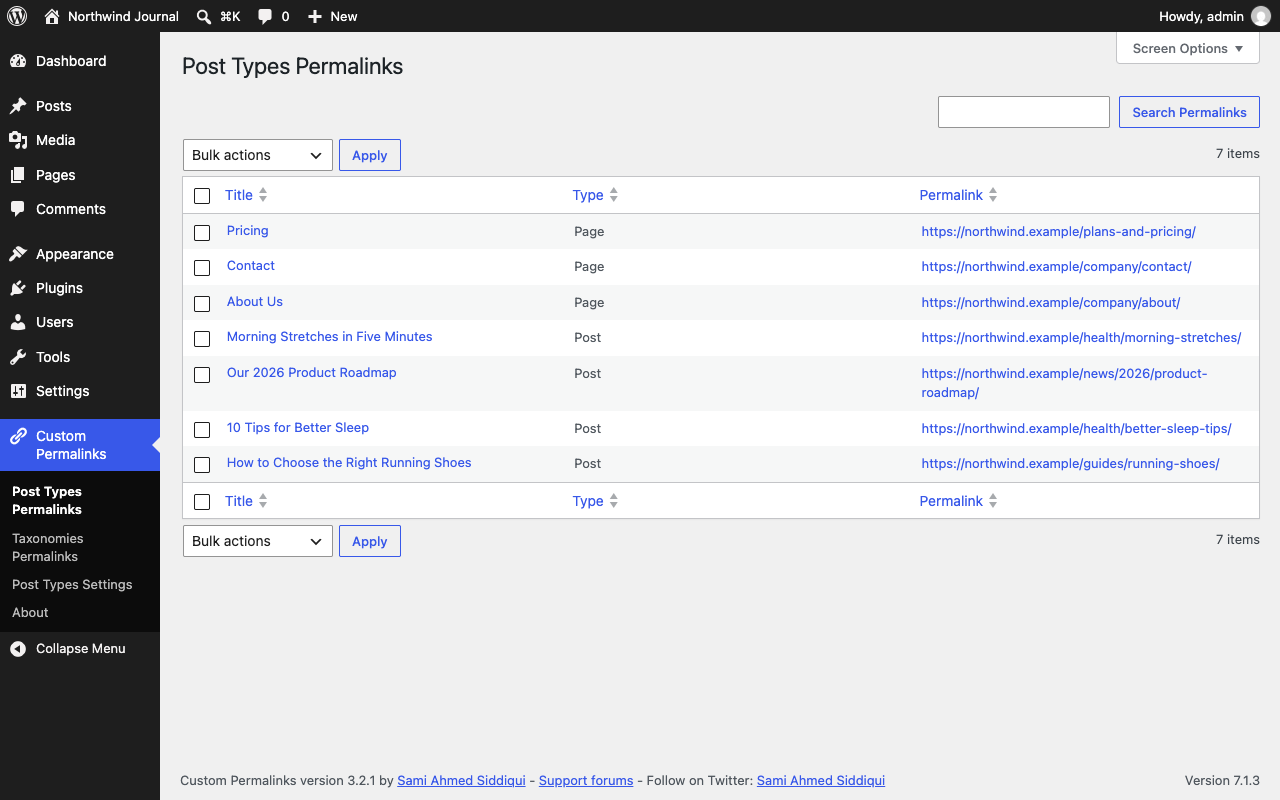
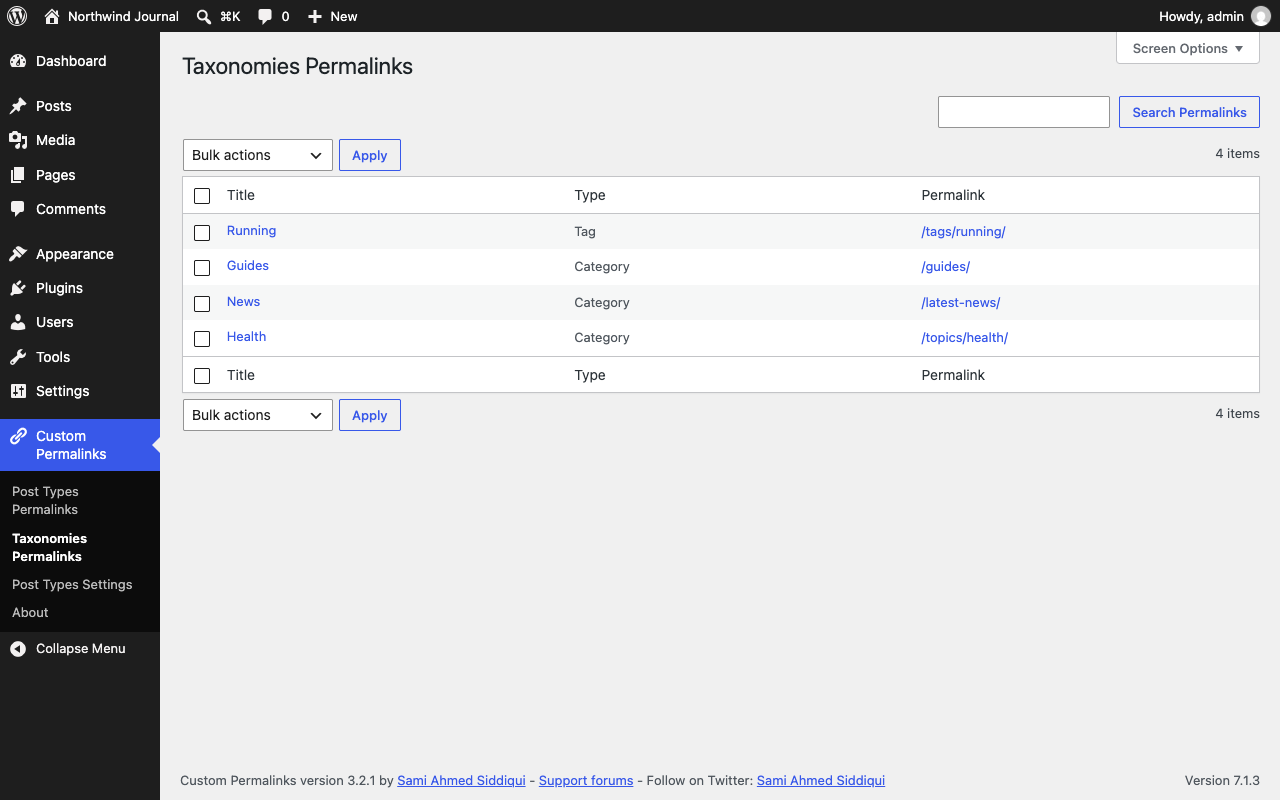
- All permalinks in one place: The Post Types Permalinks and Taxonomies Permalinks screens list every custom permalink, with search and bulk delete.
- A role for permalink managers: The Custom Permalinks Manager role lets non-administrators view and edit permalinks.
- Developer friendly: Filters and actions to add your own tags, generate permalinks in code, and control sanitizing and redirects.
Getting Started: Plugin Settings
Custom Permalinks adds a Custom Permalinks menu to your WordPress dashboard:
- Post Types Permalinks and Taxonomies Permalinks: Every custom permalink on your site, with search and bulk delete.
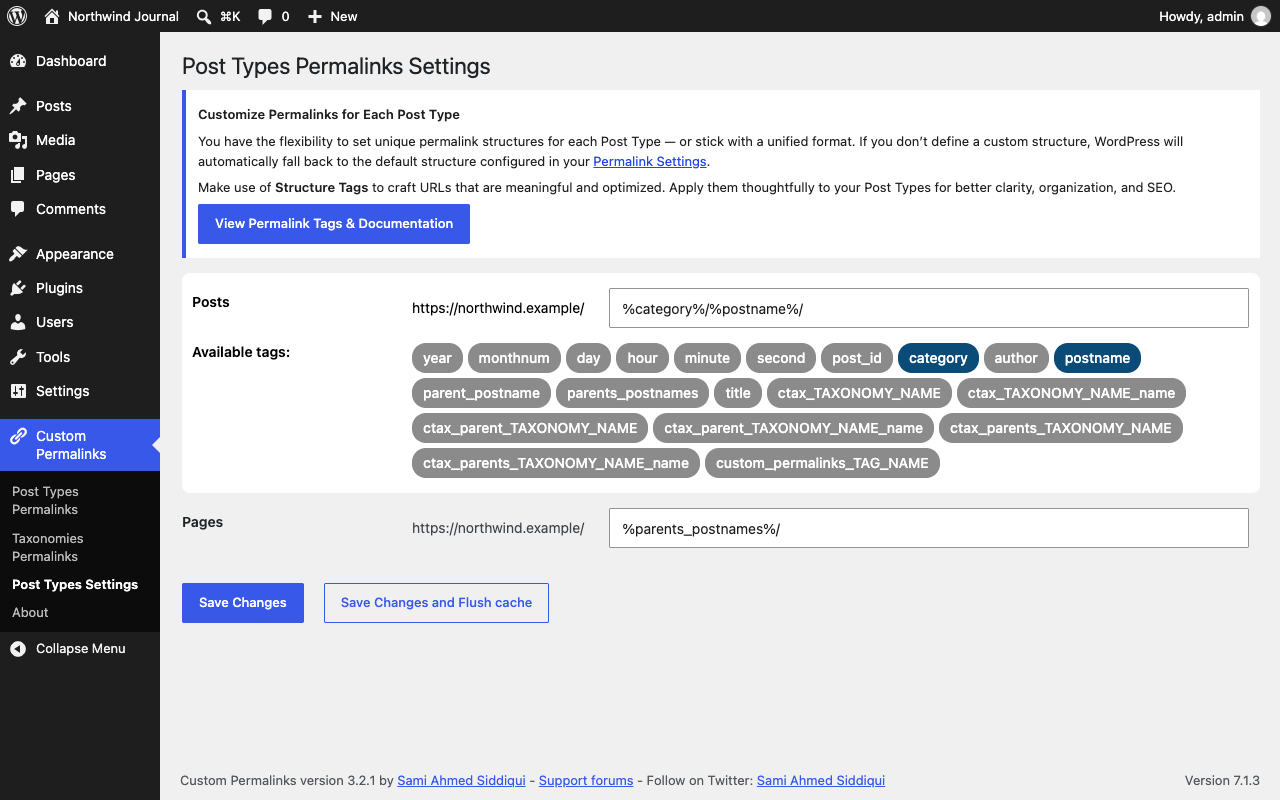
- Post Types Settings: A permalink structure for each public post type, built from the tags below. Leave a structure empty to keep WordPress’s default for that post type.
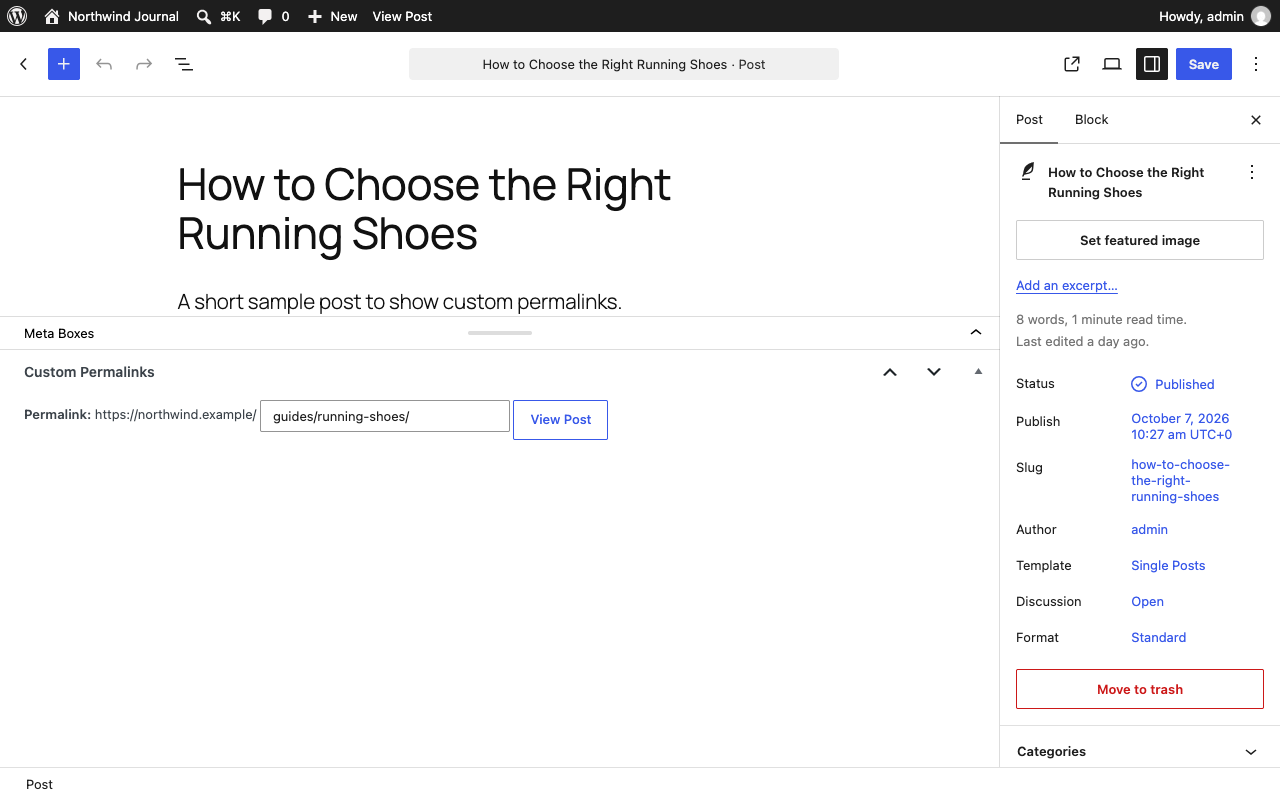
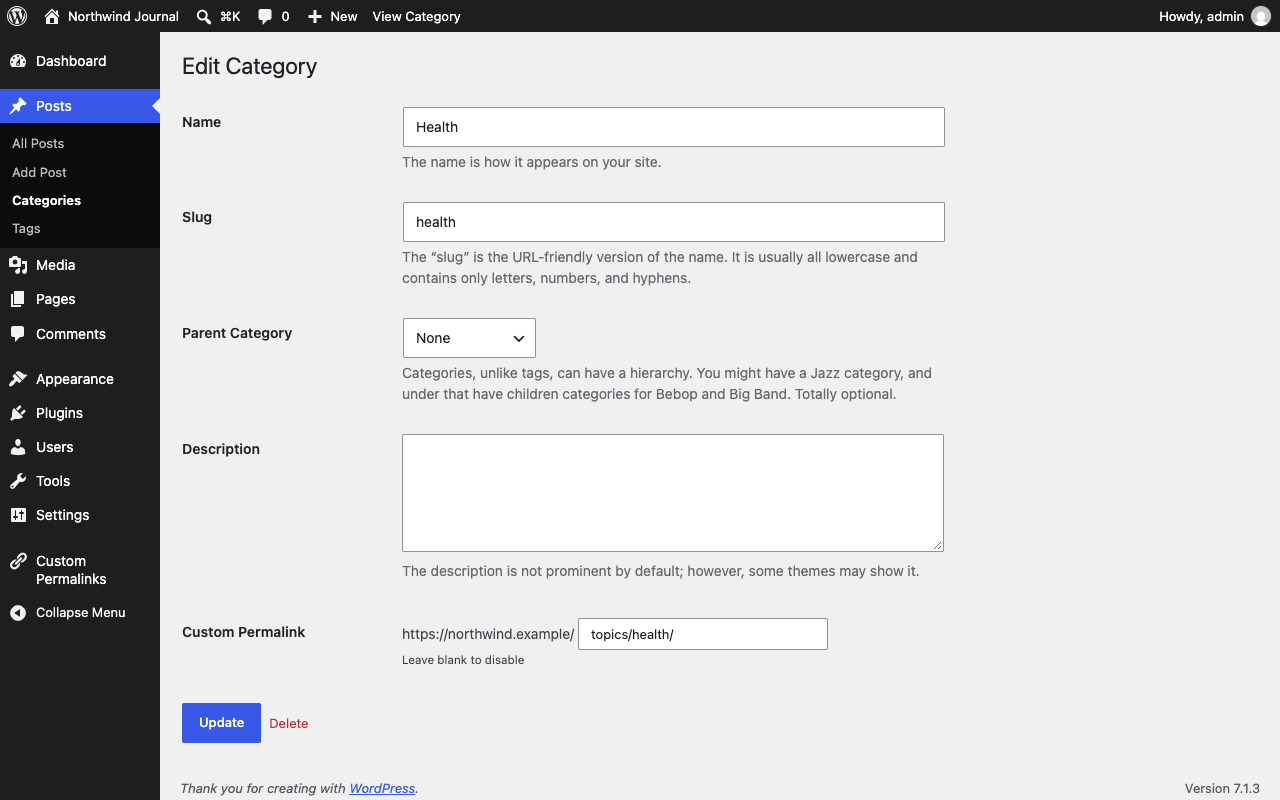
To set a permalink for an individual post, page, category, or tag, edit that item and look for the Custom Permalink field near the top (or in the sidebar) of the editor screen — enter the URL path you want and save.
Available Tags for Permalink Structures
When setting up your custom permalink structures, you can use a variety of tags that will dynamically populate the URL. Here’s a breakdown of what’s available:
- %year%: The year of the post in four digits, eg: 2025
- %monthnum%: Month the post was published, in two digits, eg: 01
- %day%: Day the post was published in two digits, eg: 02
- %hour%: Hour of the day, the post was published, eg: 15
- %minute%: Minute of the hour, the post was published, eg: 43
- %second%: Second of the minute, the post was published, eg: 33
- %post_id%: The unique ID of the post, eg: 123
- %category%: A clean version of the category name (its slug). Nested sub-categories will appear as nested directories in the URL.
- %author%: The post author’s username (login name). Note that this makes usernames visible in your URLs.
- %postname%: A clean version of the post or page title (its slug). For example, “This Is A Great Post!” becomes
this-is-a-great-postin the URL. - %parent_postname%: Similar to
%postname%, but uses the immediate parent page’s slug if a parent is selected. - %parents_postnames%: Similar to
%postname%, but includes all parent page slugs if parents are selected. - %title%: The title of the post, converted to a slug. For example, “This Is A Great Post!” becomes
this-is-a-great-post. Unlike%postname%which is set once,%title%automatically updates in the permalink if the post title changes (unless the post is published or the permalink is manually edited). - %ctax_TAXONOMY_NAME%: A clean version of a custom taxonomy’s name. Replace
TAXONOMY_NAMEwith the actual taxonomy name. - %ctax_TAXONOMY_NAME_name%: The custom taxonomy term’s name (instead of its slug). Replace
TAXONOMY_NAMEwith the actual taxonomy name. - %ctax_parent_TAXONOMY_NAME%: Similar to
%ctax_TAXONOMY_NAME%, but includes the immediate parent category/tag slug in the URL if a parent is selected. - %ctax_parent_TAXONOMY_NAME_name%: Similar to
%ctax_TAXONOMY_NAME_name%, but includes the immediate parent term’s name if a parent is selected. - %ctax_parents_TAXONOMY_NAME%: Similar to
%ctax_TAXONOMY_NAME%, but includes all parent category/tag slugs in the URL if parents are selected. - %ctax_parents_TAXONOMY_NAME_name%: Similar to
%ctax_TAXONOMY_NAME_name%, but includes all parent term names if parents are selected. - %custom_permalinks_TAG_NAME%: Developers have the flexibility to define their own custom tags (replace
_TAG_NAMEwith your desired name). To ensure these tags resolve to the correct permalinks, simply apply thecustom_permalinks_post_permalink_tagfilter.
Important Note: For new posts, Custom Permalinks will keep updating the permalink while the post is in draft mode, assuming a structure is defined in the plugin settings. Once the post is published or its permalink is manually updated, the plugin will stop automatic updates for that specific post.
Custom Permalinks: Fine-Tuning with Filters
Custom Permalinks offers a range of filters that empower developers to precisely control its behavior. You can explore all available filters, complete with example code snippets, in our GitHub repository.
For Assistance:
- Premium Users: If you need assistance implementing these filters, please don’t hesitate to reach out to us via our Premium contact support.
- Other Users: You can also directly reach out to the plugin author via LinkedIn.
Need Help or Found a Bug?
- Support: For one-on-one email support, consider purchasing Custom Permalinks Premium. While some basic support may be provided on the WordPress.org forums, email support is prioritized for premium users.
- Bug Reports: If you encounter a bug, please report it on GitHub. Make sure to provide complete information to reproduce the issue. GitHub is for bug reports, not general support questions.
If you experience any site-breaking issues after upgrading, please report them on the WordPress Forum or GitHub with detailed information. You can always revert to an older version by downloading it from https://wordpress.org/plugins/custom-permalinks/advanced/.
Installation
You have two ways to install Custom Permalinks:
From within WordPress
- Go to Plugins > Add New in your WordPress dashboard.
- Search for “Custom Permalinks”.
- Click “Install Now” and then “Activate” the plugin from your Plugins page.
Manually via FTP
- Download the
custom-permalinksfolder. - Upload the
custom-permalinksfolder to your/wp-content/plugins/directory. - Activate Custom Permalinks through the “Plugins” menu in your WordPress dashboard.
Änderungsprotokoll
Recommended update: fixes custom permalinks in non-Latin scripts (e.g. Persian) returning a 404 since 3.3.0 when a shorter custom permalink matched the start of the URL, and with an endpoint such as /feed/ appended.
3.3.3 – Oct 13, 2026
- Bug:
- Fixed an infinite redirect loop on percent-encoded custom permalinks without a trailing slash (e.g. Japanese), a regression in 3.3.0.
3.3.2 – Oct 11, 2026
- Bug:
- Fixed custom permalinks in non-Latin scripts returning a 404 (e.g. Persian) when a shorter custom permalink matched the start of the URL (e.g. a
product/page forproduct/سلام/), a regression in 3.3.0. - Fixed custom permalinks in non-Latin scripts not loading with an endpoint appended (e.g.
/سلام/feed/).
- Fixed custom permalinks in non-Latin scripts returning a 404 (e.g. Persian) when a shorter custom permalink matched the start of the URL (e.g. a
3.3.1 – Oct 8, 2026
- Bug:
- Fixed the editor’s View Post and preview links not updating, or the wrong links being updated, after saving a custom permalink when the post’s previous URL contained characters such as
?,+or((e.g.?p=123for drafts). - Hardened the editor script to only update links with an http(s) URL on the site’s own domain.
- Fixed the editor’s View Post and preview links not updating, or the wrong links being updated, after saving a custom permalink when the post’s previous URL contained characters such as
- Accessibility:
- Added labels for screen readers to the checkboxes in Post Types Permalinks and Taxonomies Permalinks, the structure fields in Post Types Settings, and the Custom Permalink field on category, tag, and term screens.
- Raised the text contrast of the structure tags in Post Types Settings and of the plugin descriptions on the About screen, and underlined links in its text.
3.3.0 – Oct 8, 2026
- Changes to be aware of:
- Requires WordPress 5.9 and PHP 7.4 or later, the oldest versions the plugin is now tested on. Sites on older versions keep 3.2.1.
- Translations now come from translate.wordpress.org instead of files bundled with the plugin. It covers every bundled language and adds Serbian. Sites that installed the plugin outside wordpress.org, or turned off automatic translation updates, show English until the language pack is installed from Dashboard → Updates.
- WPML translations now always resolve to their own custom permalink. Previously they returned another language’s custom permalink depending on the active (admin) language, which listed wrong URLs in Post Types Permalinks and in SEO plugins’ indexables and XML sitemaps (e.g. Yoast SEO).
%ctax_parents_TAXONOMY_NAME_name%now uses the parent terms’ names, as documented, instead of their slugs. Permalinks generated from now on change where a parent term’s name differs from its slug; saved permalinks are not changed.
- Redirects and URLs:
- Fixed custom permalinks in non-Latin scripts (e.g. Thai, Arabic, Cyrillic) returning a 404 or redirecting in an infinite loop, as the browser requests them percent-encoded while they are saved unencoded (or vice versa, depending on the site language).
- Fixed the trailing-slash redirect and the redirect to the custom permalink dropping the page number (e.g.
/news/page/2redirected to/news/instead of/news/page/2/). - Added the
custom_permalinks_disable_remove_page_numberfilter to keep the/page/{number}segment in the requested URL, for custom archive pages whose pagination doesn’t advance. - Fixed the query string being corrupted (e.g.
foo=barbecamehttp://foo=bar) after a custom permalink was resolved. - Fixed comment links on paginated comments (e.g.
/my-post/comment-page-2/) not following the custom permalink’s trailing slash, so a custom permalink without a trailing slash no longer gets comment URLs with one, and vice versa.
- WPML and Polylang:
- Fixed the WPML language switcher linking back to the current language instead of the translation when languages are in directories (e.g.
/en/,/de/) and the translation uses the same custom permalink. - Fixed WPML language directories that differ from the language code (e.g.
/de-de/forde, as in WPML 5.0) not being repaired when duplicated, and the default language getting its directory added to a permalink when “hide the default language directory” is on. - Fixed English custom permalinks not being lowercased and cleaned of special characters with WPML 5.0’s region-based language codes (e.g.
en-us). - Fixed Polylang translations sharing the same custom permalink (e.g.
/en/technologyand/zh/technology) redirecting to the other language when the translation’s stored language was missing or out of date.
- Fixed the WPML language switcher linking back to the current language instead of the translation when languages are in directories (e.g.
- Admin screens:
- Fixed Post Types and Taxonomies Permalinks pagination showing the first page’s results on every page, ignoring sorting and search, when a persistent object cache (e.g. Redis or Memcached) is enabled. The lists now also refresh right after a permalink is added, changed or deleted.
- Fixed bulk delete and search in Post Types and Taxonomies Permalinks failing with a “headers already sent” warning instead of redirecting.
- Fixed short titles and permalinks being padded with leading spaces in the Post Types and Taxonomies Permalinks lists.
- Fixed every post of a type showing and saving the same custom permalink when a theme or plugin runs a custom loop in the admin without resetting the global post.
- Fixed the original permalink showing as the custom permalink in the edit screen’s permalink box and in the block editor, and being compared against when saving a post or term.
- Fixed a fatal error on WordPress 5.9 and 6.0 when saving the Post Types Permalinks settings with the cache flush option, as
wp_cache_flush_group()needs WordPress 6.1. Object caches that can’t flush a single group now get a full cache flush. - Fixed the “Custom Permalinks Manager” role name not being translatable.
- Fixed Post Types Settings showing the WordPress address instead of the site address before each structure, which is wrong when WordPress is installed in a subdirectory.
- Compatibility:
- Fixed WooCommerce notices about accessing order data directly on order screens, as the permalink form read post fields from the
WC_Orderobject. - Fixed posts updated by WP All Import being handled as new posts, which turned permalink regeneration back on and could replace their custom permalink with the post type’s structure.
- Fixed the
seems_utf8()deprecation notice on WordPress 6.9 and later.
- Fixed WooCommerce notices about accessing order data directly on order screens, as the permalink form read post fields from the
Earlier versions
- For the changelog of earlier versions, please refer to the separate changelog.txt file.
Screenshots
Für Entwickler
Ist das dein Plugin? Zeigen Sie die Zahlen.
Fügen Sie Ihrer Website, Docs oder GitHub Readme ein Live-Badge hinzu. Es wird von selbst aktualisiert - kein Konto erforderlich.
Best Custom Permalinks alternatives
All custom url plugins →




Fragen und Antworten
Custom Permalinks: quick answers
Gerade Antworten, gezogen von Live WordPress.org Daten.
Quelle: WordPress.org
Is Custom Permalinks free?
Yes. Custom Permalinks is free to download and use from the official WordPress.org plugin directory.
Is Custom Permalinks safe to use in 2026?
Yes — Custom Permalinks is a safe, well-maintained plugin to use in 2026. It runs on 100K+ sites, is rated 4.1/5 and was last updated 1 month ago, and scores 84/100 on our health check.
How many websites use Custom Permalinks?
Custom Permalinks is active on 100K+ WordPress websites and has been downloaded 2,736,747 times since it launched in November 2008. It was downloaded 24,492 times in the last 30 days.
Does Custom Permalinks work with WordPress 7.1?
Yes. The developer has tested Custom Permalinks up to WordPress 7.1.5, the latest release. It requires WordPress 5.9 or newer.
What PHP version does Custom Permalinks need?
Custom Permalinks requires PHP 7.4 or higher. Most hosts run PHP 8.x today, so it works on any modern WordPress hosting.
When was Custom Permalinks last updated?
The latest version, 3.3.3, was released on October 13, 2026 (1 month ago).
Who makes Custom Permalinks?
Custom Permalinks is developed and maintained by Sami Ahmed Siddiqui.
What are the best alternatives to Custom Permalinks?
The most popular alternatives to Custom Permalinks are WP Custom Author URL (5K+ installs), Custom Permalink Editor (4K+ installs) and YOURLS Link Creator (500+ installs).
Angetrieben von PageForge
Eine Vorlage und eine Tabelle. Eine echte Seite für jede Suche.
PageForge Verwandelt jede Zeile eines CSV in eine WordPress-Seite mit eigenem Titel, URL, SEO Felder und Schema entworfen. Kostenlos auf WordPress.org.
- CSV und XLSX, plus Google Sheets auf Beruf und Unternehmen
- seinen eigenen Titel, URL, SEO Felder und Schema für jede Seite
- Arbeitet mit dem Blockeditor, Elementor, Divi und Avada
- Kostenlos auf WordPress.org, keine Kreditkarte