


Custom Field Template
The Custom Field Template plugin extends the functionality of custom fields.

Mit Vorsicht verwenden
Custom Field Template works, but test it on a staging site before relying on it in 2026. It runs on 30K+ sites, is rated 4/5 and was last updated 3 months ago, and scores 60/100 on our health check.
- Bewährt auf 30.000 aktiven Standorten
- Momentum — downloads up 128.7% vs the previous 30 days
Tägliche Downloads
Download-Spitzen folgen normalerweise einer neuen Version - jede Website, die automatisch aktualisiert wird, gilt als Download.
Ranglisten
Where Custom Field Template stands todayWordPress.org Ranglisten suchen
Live-Position in der Plugin-Suche, Top 100| Stichwort | Position |
|---|---|
| cft | #1 |
| custom fields | #14 |
| fields | #38 |
| meta | >100 |
| template | #10 |
Versionsübernahme
Anteil aktiver Sites pro Release.
Bewertungsaufschlüsselung
★★★★★★★★★★ 4 from 24 reviews
About Custom Field Template
From the official readme · v2.8.1Beschreibung
The Custom Field Template plugin adds the default custom fields on the Write Post/Page. The template format is almost same as the one of the rc:custom_field_gui plugin. The difference is following.
We have finally published a manual site for the custom field template plugin. You can also use the custom field refinement search for posts in the admin panel. Please check here.
- You can set any number of the custom field templates and switch the templates when you write/edit the post/page.
- This plugin does not use the ini file for the template but set it in the option page of the plugin.
- Support for TinyMCE in the textarea.
- Support for media buttons in the textarea. – requires at least 2.5.
- Support for multiple fields with the same key.
- Support for hideKey and label options.
- You can see the full option list in the setting page of the plugin.
- You can customize the design of custom field template with css.
- You can replace custom keys by labels.
- You can use wpautop function.
- You can use PHP codes in order to set values. (experimental,
code = 0) - You can set an access user level in each field. (
level = 1) - Supprt for inserting custom field values into tags automatically. (
insertTag = true) - Adds [cft] Shortcode to display the custom field template. (only shows the attributes which have
output = true) - Adds template instruction sections.
- Adds the value label option for the case that values are diffrent from viewed values. (
valueLabel = apples # oranges # bananas) - Adds the blank option. (
blank = true) - Adds the break type. Set CSS of ‘#cft div’. (
type = break) - Adds [cft] Shortcode Format.
- Adds the sort option. (
sort = asc,sort = desc,sort = order) - Support for Quick Edit of custom fields. (tinyMCE and mediaButton are not supported yet)
- Support for the custom field search. (only shows the attributes which have
search = true.) - Adds [cftsearch] Shortcode Format. (under development)
- Adds PHP codes for the output value. (
outputCode = 0) - Adds PHP codes before saving the values. (
editCode = 0) - Adds the save functionality.
- Adds the class option. (
class = text) - Adds the auto hook of
the_content(). (experimental) - You can use the HTML Editor in the textarea. (
htmlEditor = true) - Adds the box title replacement option.
- Adds the select option of the post type.
- Adds the value count option.
- Adds the option to use the shortcode in the widhet.
- Adds the attributes of JavaScript Event Handlers. (
onclick = alert('ok');) - Adds the Initialize button.
- Adds the attributes of before and after text. (
before = blah,after = blah) - Adds the export and import functionality.
- Adds the style attribute. (
style = color:#FF0000;) - Adds the maxlength attribute. (
maxlength = 10) - Adds the attributes of multiple fields. (
multiple = true,startNum = 5,endNum = 10,multipleButton = true) - Adds the attributes of the date picker in
texttype. (date = true,dateFirstDayOfWeek = 0,dateFormat = yyyy/mm/dd) - Adds the filter of page template file names (Thanks, Joel Pittet).
- Adds the attribute of
shortCodein order to output the shortcode filtered values. (shortCode = true) - Adds the attribute of
outputNonein case there is no data to output. (outputNone = No Data) - Adds the attribute of
singleListattribute in order to output with<ul><li>if the value is single. ex)singleList = true - Adds the file upload type. (
type = file) - Adds the fieldset type. (
type = fieldset_open,type = fieldset_close) - Adds the option to deploy the box in each template.
Localization
- Belorussian (by_BY) – Marcis Gasuns
- Catalan (ca) – Andreu Llos
- Czech (cs_CZ) – Jakub
- German (de_DE) – F J Kaiser
- Spanish (es_ES) – Dario Ferrer
- Farsi (fa_IR) – Mehdi Zare
- French (fr_FR) – Nicolas Lemoine
- Hungarian (hu_HU) – Balazs Kovacs
- Indonesian (id_ID) – Masino Sinaga
- Italian (it_IT) – Gianni Diurno
- Japanese (ja) – Hiroaki Miyashita
- Dutch (nl_NL) – Rene
- Polish (pl_PL) – Difreo
- Brazilian Portuguese (pt_BR) – Caciano Gabriel
- Russian (ru_RU) – Sonika
- Swedish (sv_SE) – Pontus Carlsson
- Turkish (tr_TR) – Omer Faruk
- Ukranian (uk_UA) – Andrew Kovalev
- Uzbek (uz_UZ) – Alexandra Bolshova
- Chinese (zh_CN) – hurri zhu
If you have translated into your language, please let me know.
Are you interested in other plugins? See the following site CMS x WP.
Known Issues / Bugs
Uninstall
- Deactivate the plugin
- That’s it! 🙂
Installation
- Copy the
custom-field-templatedirectory into yourwp-content/pluginsdirectory - Activate the plugin through the
Pluginsmenu in WordPress - Edit the options in
Settings>Custom Field Template - That’s it! 🙂
Änderungsprotokoll
2.8.1
- Bugfix: security fix.
2.8
- Bugfix: security fix.
2.7.8
- Bugfix: security fix.
2.7.7
- Bugfix: security fix.
2.7.6
- Bugfix: security fix.
2.7.5
- Bugfix: security fix.
Screenshots
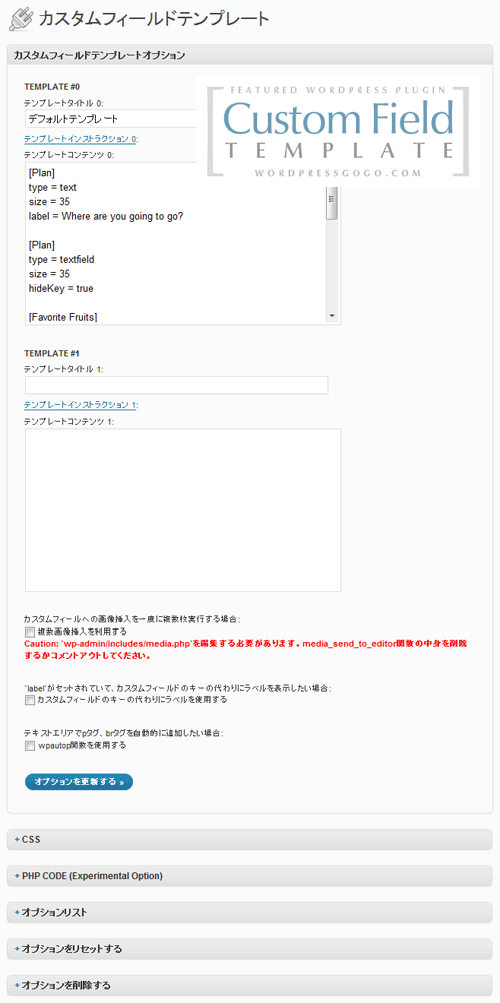
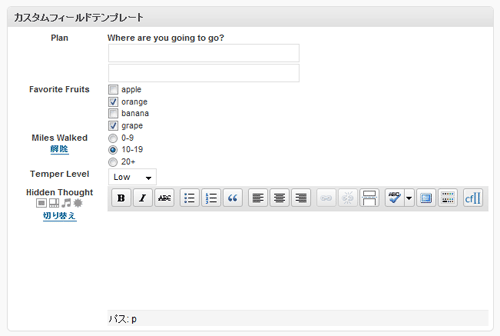
Für Entwickler
Ist das dein Plugin? Zeigen Sie die Zahlen.
Fügen Sie Ihrer Website, Docs oder GitHub Readme ein Live-Badge hinzu. Es wird von selbst aktualisiert - kein Konto erforderlich.
Fragen und Antworten
Custom Field Template: quick answers
Gerade Antworten, gezogen von Live WordPress.org Daten.
Quelle: WordPress.org
Is Custom Field Template free?
Yes. Custom Field Template is free to download and use from the official WordPress.org plugin directory.
Is Custom Field Template safe to use in 2026?
Custom Field Template works, but test it on a staging site before relying on it in 2026. It runs on 30K+ sites, is rated 4/5 and was last updated 3 months ago, and scores 60/100 on our health check.
How many websites use Custom Field Template?
Custom Field Template is active on 30K+ WordPress websites and has been downloaded 1,248,207 times since it launched in September 2008. It was downloaded 7,415 times in the last 30 days.
Does Custom Field Template work with WordPress 7.1?
Custom Field Template is officially tested up to WordPress 7.0.9, while the latest release is 7.1.5. It may still work, but try it on a staging site first.
When was Custom Field Template last updated?
The latest version, 2.8.1, was released on August 11, 2026 (3 months ago).
Who makes Custom Field Template?
Custom Field Template is developed and maintained by Hiroaki Miyashita.
Angetrieben von PageForge
Eine Vorlage und eine Tabelle. Eine echte Seite für jede Suche.
PageForge Verwandelt jede Zeile eines CSV in eine WordPress-Seite mit eigenem Titel, URL, SEO Felder und Schema entworfen. Kostenlos auf WordPress.org.
- CSV und XLSX, plus Google Sheets auf Beruf und Unternehmen
- seinen eigenen Titel, URL, SEO Felder und Schema für jede Seite
- Arbeitet mit dem Blockeditor, Elementor, Divi und Avada
- Kostenlos auf WordPress.org, keine Kreditkarte