


CoreSeal
Checks WordPress core files against official checksums, scans themes and plugins for malware, and repairs or quarantines suspicious files.

Solide Wahl
CoreSeal is a solid plugin choice in 2026, with a few things worth checking first. Was last updated 2 weeks ago, and scores 64/100 on our health check.
- Aktiv entwickelt — letztes Update vor 2 Wochen
- Getestet mit dem neuesten WordPress (7.1)
- Kleine Benutzerbasis (<10 aktive Installationen)
- Bisher sehr wenige Bewertungen
Wie stapelt es sich?
Side-by-side bei Installationen, Updates, Bewertungen und Support



Tägliche Downloads
Download-Spitzen folgen normalerweise einer neuen Version - jede Website, die automatisch aktualisiert wird, gilt als Download.
Ranglisten
Where CoreSeal stands todayWordPress.org Ranglisten suchen
Live-Position in der Plugin-Suche, Top 100| Stichwort | Position |
|---|---|
| checksums | >100 |
| File Integrity | >100 |
| hack | >100 |
| malware | >100 |
| Sicherheit | >100 |
About CoreSeal
From the official readme · v1.2.2Beschreibung
CoreSeal tells you whether your WordPress site has been tampered with, and helps you clean it.
Core file integrity
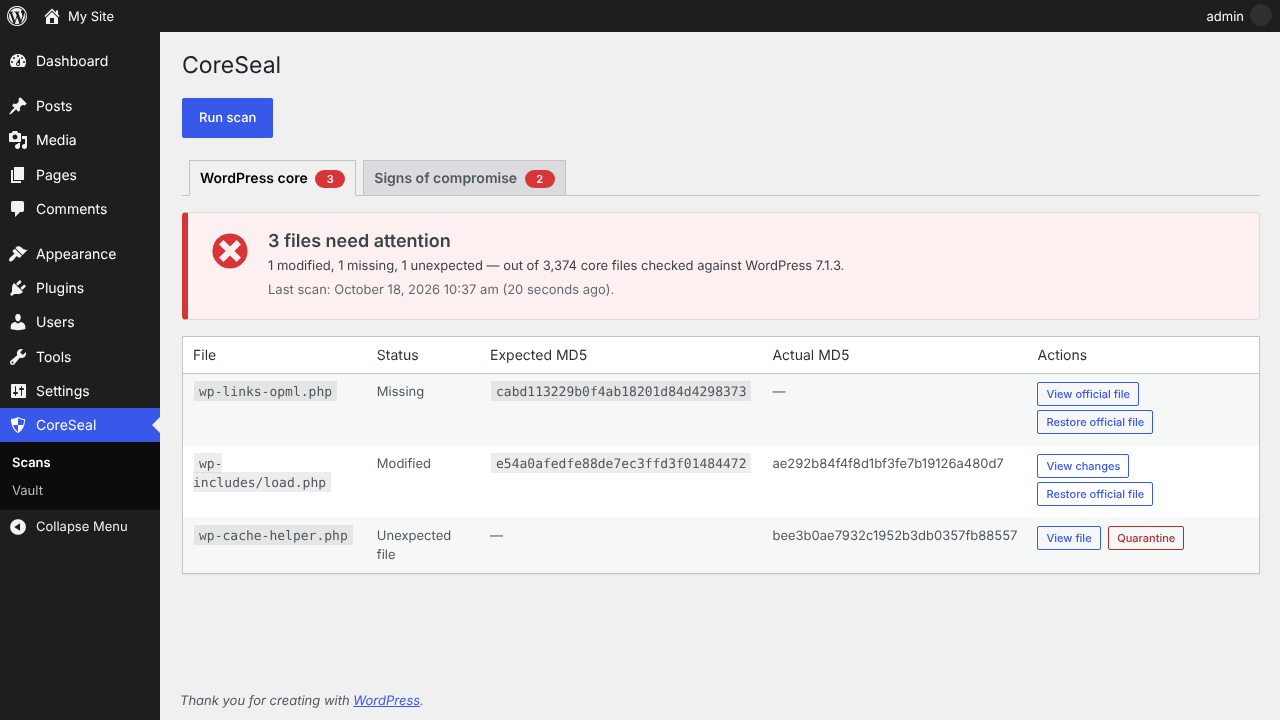
Every WordPress core file is compared with the official checksums published by WordPress.org, using the language of your installed WordPress package. CoreSeal reports:
- modified core files,
- missing core files,
- unexpected files at the root of your site and in wp-admin and wp-includes, a frequent hiding place for backdoors.
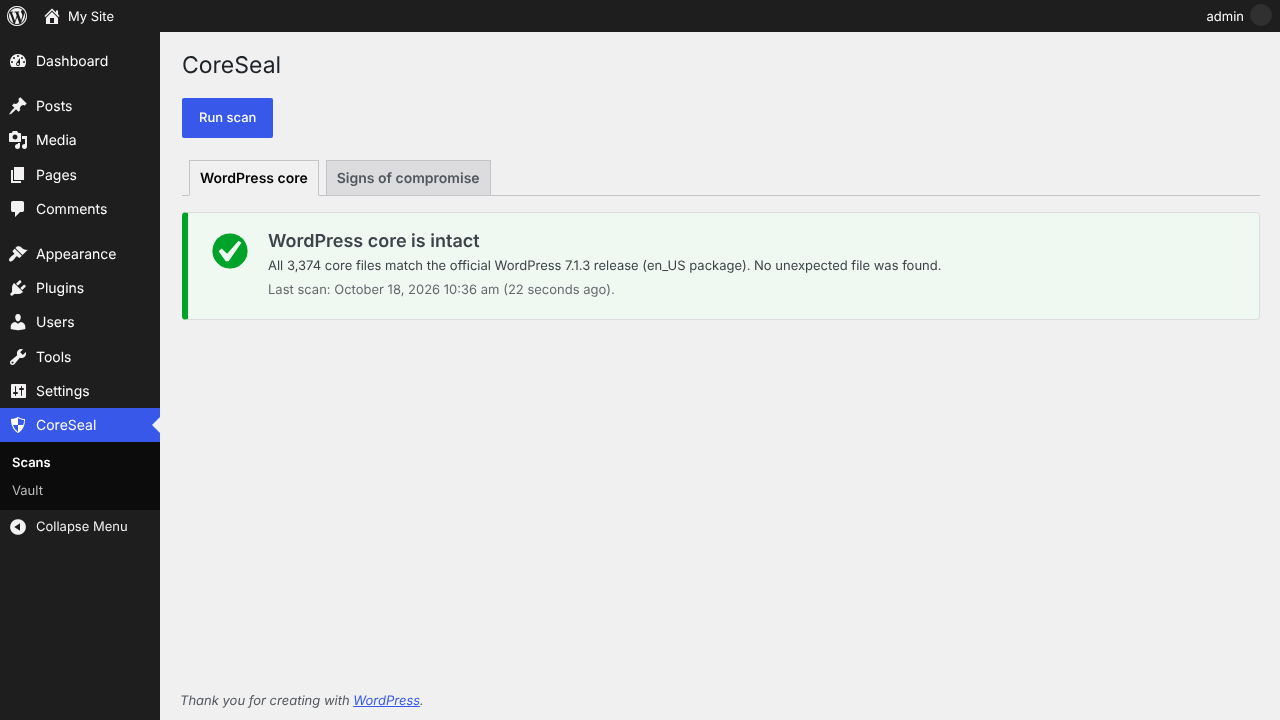
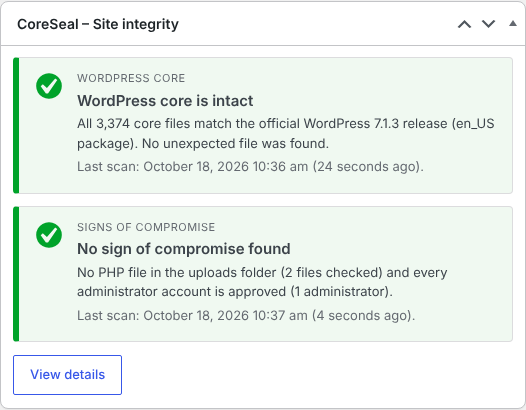
When everything matches, a clear green status confirms that your core is intact. The same status is shown in a Dashboard widget.
Signs of compromise
CoreSeal also looks for the traces an intruder usually leaves:
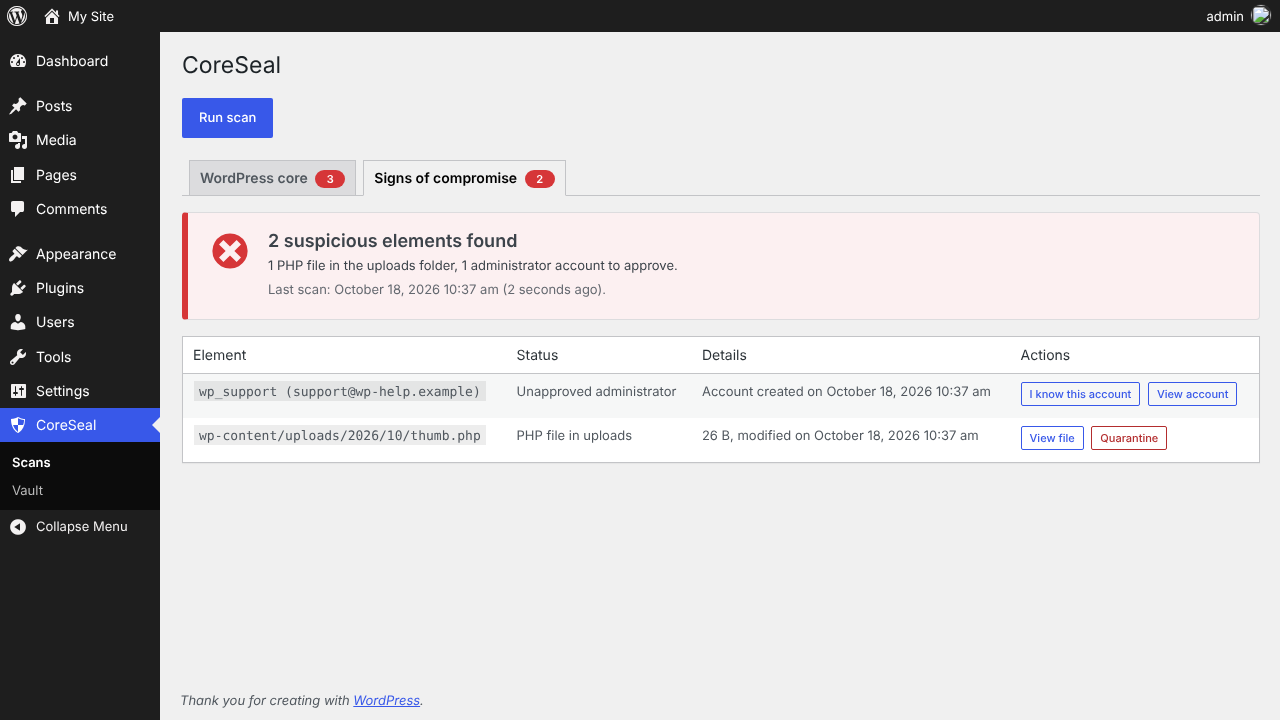
- PHP files in the uploads folder, a classic location for webshells (empty “Silence is golden” index.php files are ignored),
- administrator accounts you have not approved. Any new administrator stays flagged until you confirm you know the account.
Malware scan
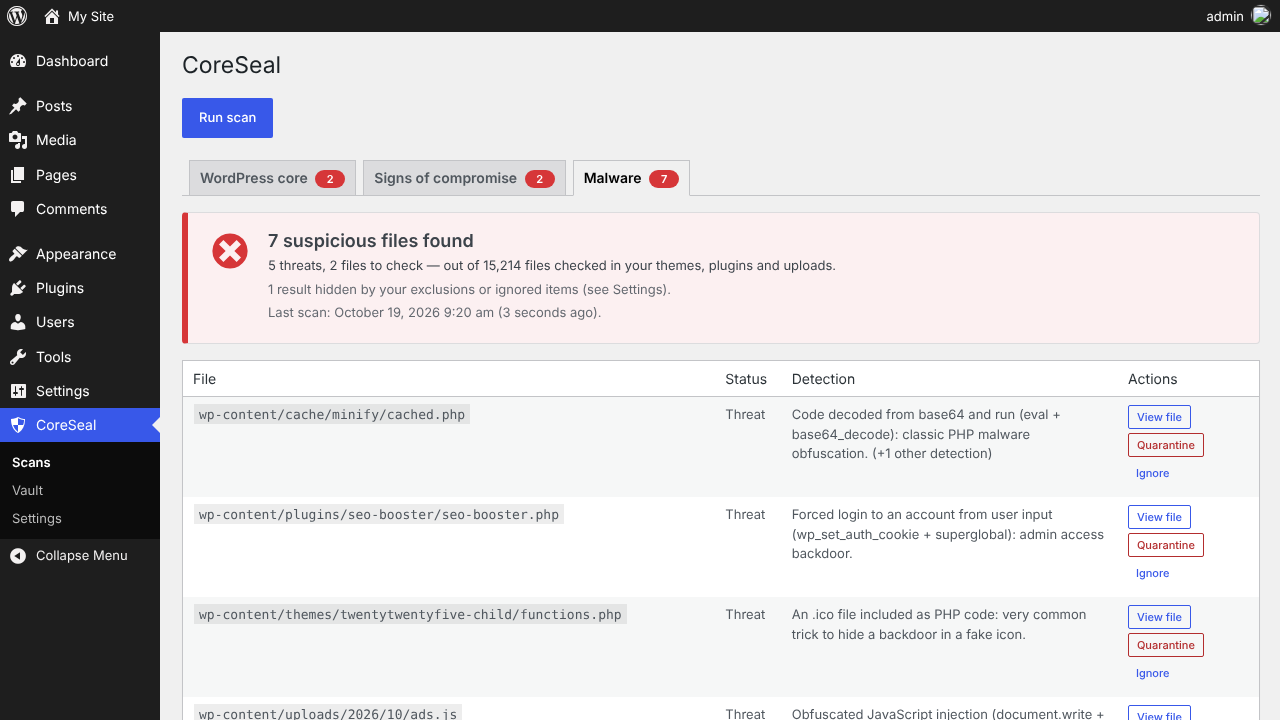
CoreSeal looks for known malicious code in your themes, plugins and uploads, with 65 signatures in ten families: webshells, backdoors, obfuscated code, JavaScript injections, downloaders, file uploaders, spam mailers, cryptocurrency miners, phishing kits and SEO spam. WordPress-specific traces are covered too, such as forced logins, hidden administrator accounts and fake .ico files included as PHP.
- The scan runs in short steps with a progress bar, so it works on large sites and shared hosting.
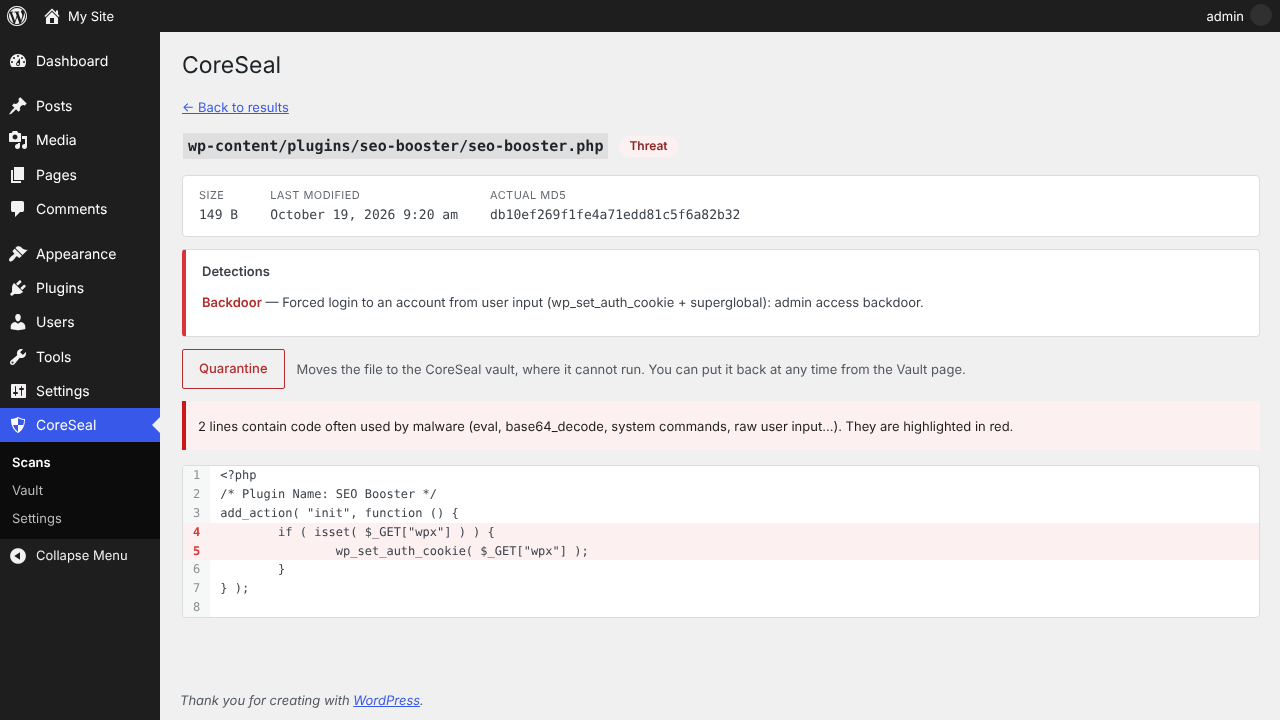
- Each result says what was found and highlights the matching lines in the file.
- CoreSeal checks its own files against the fingerprints of its release: its signature file is never reported, but any change in its folder is.
Exclusions
- Skip a folder, a file or a pattern of files from the Settings page. Rules always start at the root of the site, so “cache/” never skips “wp-content/cache/” by mistake.
- “Ignore” a single result: it stays hidden only while the file is unchanged.
- A modified WordPress core file can never be hidden by a folder rule.
Inspect, repair, quarantine
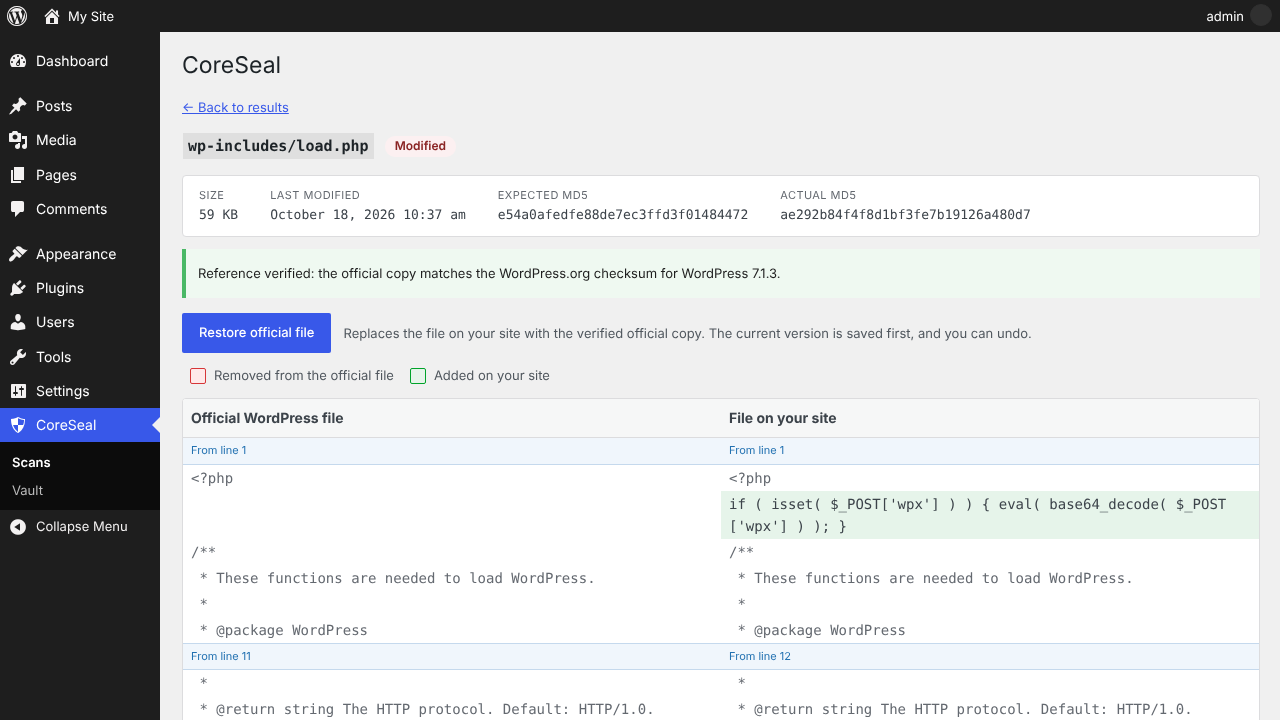
- View changes: a modified core file is compared line by line with the official copy. Only the changed parts are shown, with added code highlighted.
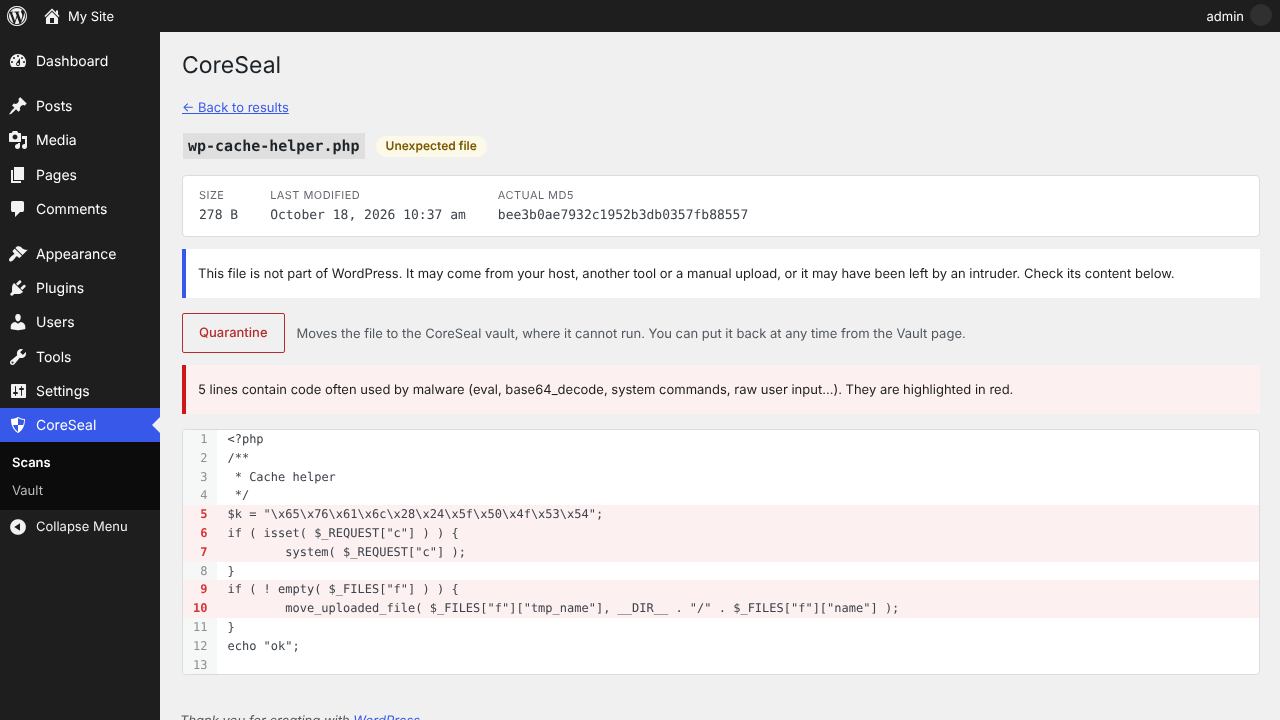
- View file: any other flagged file is displayed read-only, with lines that look like malware (eval, base64_decode, system commands, raw user input…) highlighted.
- Restore official file: a modified or missing core file is replaced by the official copy. The copy is checked against the WordPress.org checksum before it is written, the current file is saved first, and you can undo.
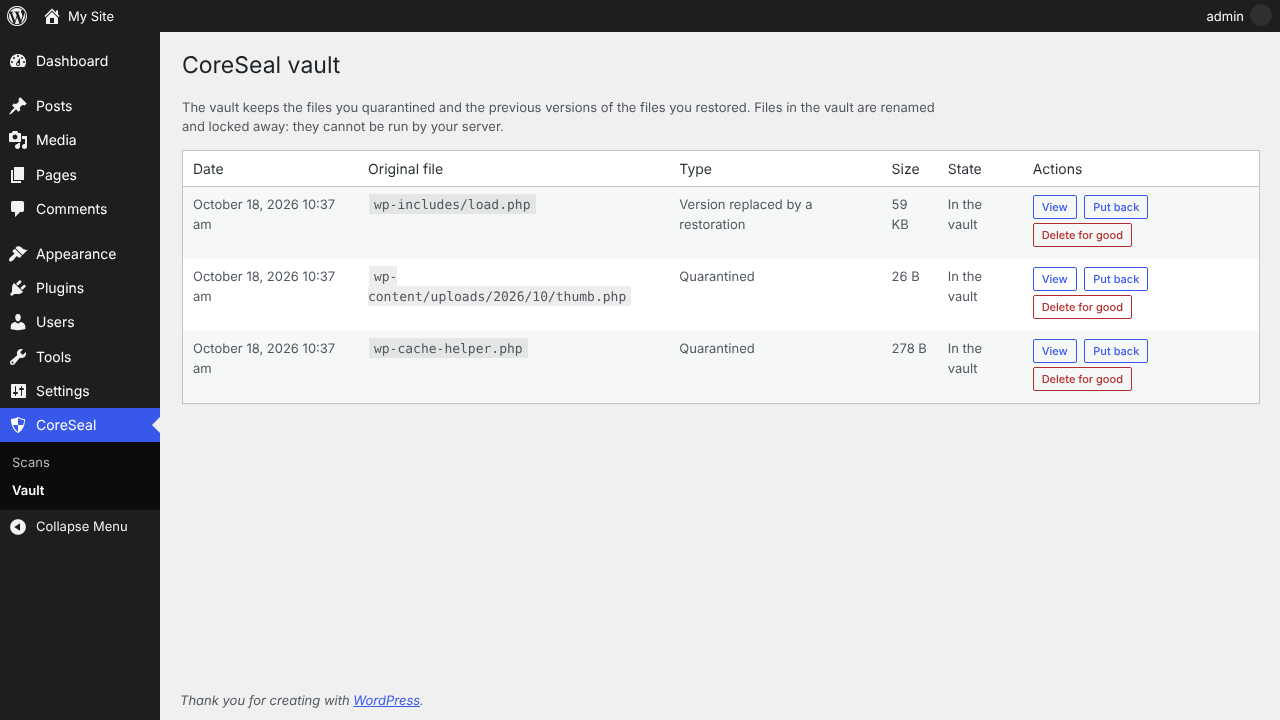
- Quarantine: an unexpected file, a PHP file in uploads or a file with malicious code is moved to a locked vault where it cannot run. You can put it back or delete it for good from the Vault page.
CoreSeal works alongside your firewall, not instead of it: a firewall tries to stop intrusions, CoreSeal tells you whether one happened.
What CoreSeal does not do
- It does not edit files freely. Repairs are limited to restoring verified official files and moving suspicious files to the vault.
- It does not run in the background: scans are started from the CoreSeal screen.
Externe Dienste
CoreSeal contacts the following services. It sends no personal data. Requests contain only the WordPress version (and, for checksums, the package language) needed to get the right files, plus the information included in any web request, such as your server’s IP address.
- WordPress.org checksums API (api.wordpress.org): called by every core scan to get the official checksums of your WordPress version, through WordPress’ own
get_core_checksums()function. WordPress.org privacy policy. - WordPress.org plugin checksums (downloads.wordpress.org): called by every malware scan, once per installed plugin and version (cached for one week), to get the official checksums of the plugins hosted on WordPress.org. Only the plugin slug and version are sent. Plugin files identical to their official version are not scanned. WordPress.org privacy policy.
- WordPress.org Subversion repository (core.svn.wordpress.org): called only when you view the changes of a core file or restore it, to download the official copy of that one file. WordPress.org privacy policy.
Installation
- Install CoreSeal from Plugins > Add New, or upload the
coresealfolder to/wp-content/plugins/. - Activate it.
- Go to CoreSeal > Scans and click “Run scan”.
Änderungsprotokoll
Fewer false alarms in the core scan: deleted readme and license files, and files left over by older WordPress versions.
1.2.2
- Improved: readme.html, license.txt and wp-config-sample.php are no longer reported when you deleted them on purpose.
- Improved: in wp-admin and wp-includes, only executable unexpected files are reported. Styles, scripts and images left over by older WordPress versions cannot run on the server and are ignored.
1.2.1
- Improved: PHP files in uploads are checked against the malware signatures. Without known malicious code, they are shown as “to check”, with the plugin that usually creates their folder (Redux Framework, Visual Composer…).
- Improved: small index.php files that only block directory browsing (404 or 403 status, fixed message) are no longer reported.
1.2.0
- Improved: far fewer false positives. Plugin files identical to their official WordPress.org version are no longer scanned.
- Improved: data files of firewalls such as Wordfence (PHP files that stop at their first line) are no longer reported.
- Improved: six overly broad signatures removed, two others refined (65 signatures).
- Improved: only executable files at the site root are reported as unexpected; wordfence-waf.php is expected.
- Improved: clearer results, with the folders where results were found and an explanation of “To check”.
1.1.1
- Fix: confirmations now appear inside the page. Browsers that offer to block repeated dialogs no longer silently cancel the following actions (for example several “Ignore” in a row).
1.1.0
- New: malware scan of themes, plugins and uploads, with 71 signatures, run step by step with a progress bar.
- New: exclusions (folders, files and patterns, anchored to the site root) and “Ignore” for single results, bound to the file fingerprint.
- New: CoreSeal checks the integrity of its own files.
- New: Settings page.
1.0.0
- First public release.
- Core file integrity check against the official WordPress.org checksums, using the language of the installed package.
- Detection of unexpected files at the site root and in wp-admin and wp-includes.
- Signs of compromise: PHP files in uploads, unapproved administrator accounts.
- Read-only file viewer with comparison to the official copy and highlighting of suspicious code.
- Verified restoration of core files, with backup and undo.
- Quarantine with a locked vault, put back and permanent deletion.
- Dashboard widget.
Screenshots
Für Entwickler
Ist das dein Plugin? Zeigen Sie die Zahlen.
Fügen Sie Ihrer Website, Docs oder GitHub Readme ein Live-Badge hinzu. Es wird von selbst aktualisiert - kein Konto erforderlich.
Best CoreSeal alternatives
All checksums plugins →

Fragen und Antworten
CoreSeal: quick answers
Gerade Antworten, gezogen von Live WordPress.org Daten.
Quelle: WordPress.org
Is CoreSeal free?
Yes. CoreSeal is free to download and use from the official WordPress.org plugin directory.
Is CoreSeal safe to use in 2026?
CoreSeal is a solid plugin choice in 2026, with a few things worth checking first. Was last updated 2 weeks ago, and scores 64/100 on our health check.
How many websites use CoreSeal?
CoreSeal is active on <10 WordPress websites and has been downloaded 371 times since it launched in October 2026. It was downloaded 299 times in the last 30 days.
Does CoreSeal work with WordPress 7.1?
Yes. The developer has tested CoreSeal up to WordPress 7.1.5, the latest release. It requires WordPress 6.0 or newer.
What PHP version does CoreSeal need?
CoreSeal requires PHP 7.4 or higher. Most hosts run PHP 8.x today, so it works on any modern WordPress hosting.
When was CoreSeal last updated?
The latest version, 1.2.2, was released on November 13, 2026 (2 weeks ago).
Who makes CoreSeal?
CoreSeal is developed and maintained by applidata56.
What are the best alternatives to CoreSeal?
The most popular alternatives to CoreSeal are WP Fingerprint (9K+ installs), IntegriFix (10+ installs) and Quick Integrity Scanner (10+ installs).
Angetrieben von PageForge
Eine Vorlage und eine Tabelle. Eine echte Seite für jede Suche.
PageForge Verwandelt jede Zeile eines CSV in eine WordPress-Seite mit eigenem Titel, URL, SEO Felder und Schema entworfen. Kostenlos auf WordPress.org.
- CSV und XLSX, plus Google Sheets auf Beruf und Unternehmen
- seinen eigenen Titel, URL, SEO Felder und Schema für jede Seite
- Arbeitet mit dem Blockeditor, Elementor, Divi und Avada
- Kostenlos auf WordPress.org, keine Kreditkarte