


Convertlyft
Add the Convertlyft analytics tag to your site: funnels, visit recordings (session replays), rage and dead clicks, stuck forms, errors, speed and SEO.

Solide Wahl
Convertlyft is a solid plugin choice in 2026, with a few things worth checking first. Was last updated 2 weeks ago, and scores 64/100 on our health check.
- Aktiv entwickelt — letztes Update vor 2 Wochen
- Getestet mit dem neuesten WordPress (7.1)
- Kleine Benutzerbasis (<10 aktive Installationen)
- Bisher sehr wenige Bewertungen
Wie stapelt es sich?
Side-by-side bei Installationen, Updates, Bewertungen und Support



Tägliche Downloads
Download-Spitzen folgen normalerweise einer neuen Version - jede Website, die automatisch aktualisiert wird, gilt als Download.
Ranglisten
Where Convertlyft stands todayWordPress.org Ranglisten suchen
Live-Position in der Plugin-Suche, Top 100| Stichwort | Position |
|---|---|
| analytics | >100 |
| conversion | >100 |
| funnel | >100 |
| SEO | >100 |
| session replay | #58 |
About Convertlyft
Aus der offiziellen Readme · V1.1.1Beschreibung
Convertlyft is web analytics that shows why visitors don’t buy and what to change. It finds where people leave your funnels, records their visits (session replays), and points out rage clicks, dead clicks, forms people get stuck on, JavaScript errors, slow pages and SEO problems. Each to-do comes with the change to make and the numbers behind it.
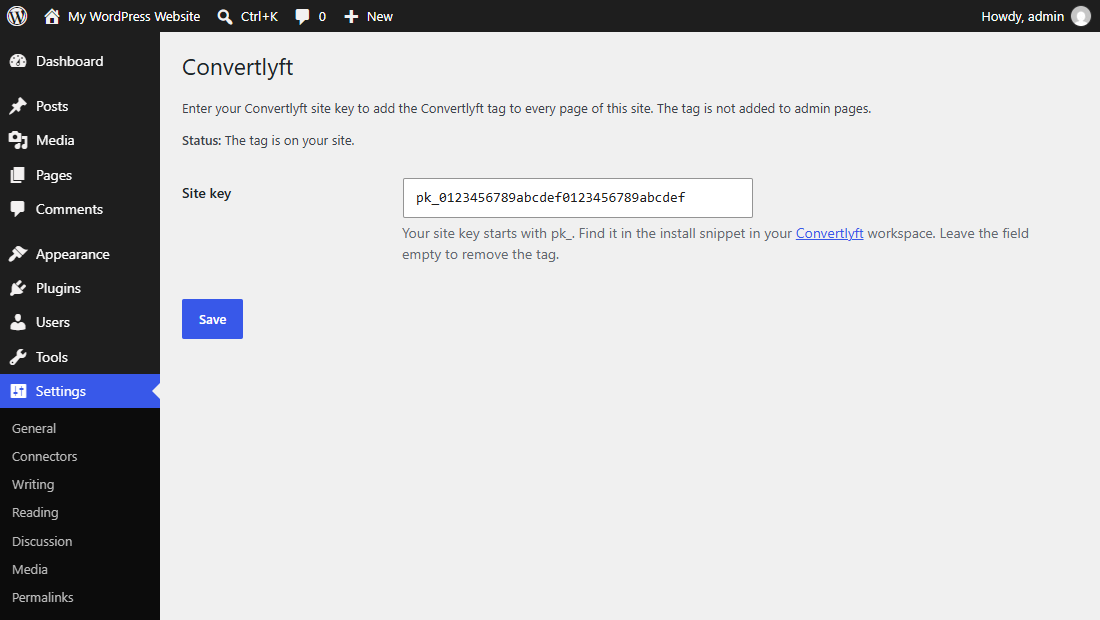
This plugin does one thing: it adds the Convertlyft tag to the pages of your site, so you do not have to paste a script into your theme.
- One setting: your Convertlyft site key.
- The tag loads on the front end of your site only, never on admin pages.
- No key, no tag. Clear the field and the tag is gone.
- The plugin itself adds no other scripts, styles or requests.
You need a Convertlyft account to get a site key. You can start free at convertlyft.com, no card needed.
Not ready to add a tag? The free SEO audit crawls your site without an account.
Externe Dienste
This plugin connects your site to Convertlyft, a web analytics service run by Convertlyft LLC. It is needed to measure your site in Convertlyft.
When you save a site key, every public page of your site includes a script tag that loads https://convertlyft.com/tracker.js in your visitors’ browsers, with your site key as the data-workspace-key attribute. Nothing is loaded or sent while no key is saved, and nothing is loaded on admin pages.
Once loaded, the tag sends data about each visit to Convertlyft as people use your site. The Convertlyft Privacy Policy lists what it collects, including:
- Page data: URLs visited, page titles, referrer, and UTM and other query parameters.
- Behaviour data: clicks, scroll depth, form field interactions, and rage-click and dead-click signals.
- Technical data: browser and device type, operating system, screen size, page load and performance timings, and JavaScript errors.
- Visit data: session identifiers, timestamps, and entry and exit pages.
- Conversion data: purchase or lead events.
- IP addresses, processed for bot filtering and coarse location.
This service is provided by Convertlyft LLC: Terms of Service, Privacy Policy.
Installation
- In your WordPress admin, go to Plugins → Add New, search for “Convertlyft”, then install and activate it. Or upload the
convertlyftfolder to/wp-content/plugins/and activate it on the Plugins screen. - Sign in at convertlyft.com. In setup, under Add the tag, press the button that opens your WordPress admin: Settings → Convertlyft opens with your site key filled in.
- Press Save. If the key is not filled in, copy it from the install snippet (it starts with
pk_), paste it under Settings → Convertlyft and press Save. - Visit your site. Convertlyft starts receiving data as soon as a page with the tag loads.
Änderungsprotokoll
The settings page now says when Save would replace the site key you have.
1.1.1
- When the setup screen’s link brings a different site key than the one saved, the settings page now says that Save replaces it.
1.1.0
- The setup screen in Convertlyft can open Settings → Convertlyft with your site key filled in, so there is nothing to copy. Nothing is saved until you press Save.
1.0.0
- First release: a settings page for the site key, and the Convertlyft tag on the front end once a key is saved.
Screenshots
Für Entwickler
Ist das dein Plugin? Zeigen Sie die Zahlen.
Fügen Sie Ihrer Website, Docs oder GitHub Readme ein Live-Badge hinzu. Es wird von selbst aktualisiert - kein Konto erforderlich.
Best Convertlyft alternatives
All analytics plugins →





Fragen und Antworten
Convertlyft: quick answers
Gerade Antworten, gezogen von Live WordPress.org Daten.
Quelle: WordPress.org
Is Convertlyft free?
Yes. Convertlyft is free to download and use from the official WordPress.org plugin directory.
Is Convertlyft safe to use in 2026?
Convertlyft is a solid plugin choice in 2026, with a few things worth checking first. Was last updated 2 weeks ago, and scores 64/100 on our health check.
How many websites use Convertlyft?
Convertlyft is active on <10 WordPress websites and has been downloaded 326 times since it launched in October 2026. It was downloaded 218 times in the last 30 days.
Does Convertlyft work with WordPress 7.1?
Yes. The developer has tested Convertlyft up to WordPress 7.1.5, the latest release. It requires WordPress 6.0 or newer.
What PHP version does Convertlyft need?
Convertlyft requires PHP 7.4 or higher. Most hosts run PHP 8.x today, so it works on any modern WordPress hosting.
When was Convertlyft last updated?
The latest version, 1.1.1, was released on November 17, 2026 (2 weeks ago).
Who makes Convertlyft?
Convertlyft is developed and maintained by convertlyft.
What are the best alternatives to Convertlyft?
The most popular alternatives to Convertlyft are Site Kit by Google (5M+ installs), MonsterInsights (2M+ installs) and WP Statistics (500K+ installs).
Angetrieben von PageForge
Eine Vorlage und eine Tabelle. Eine echte Seite für jede Suche.
PageForge Verwandelt jede Zeile eines CSV in eine WordPress-Seite mit eigenem Titel, URL, SEO Felder und Schema entworfen. Kostenlos auf WordPress.org.
- CSV und XLSX, plus Google Sheets auf Beruf und Unternehmen
- seinen eigenen Titel, URL, SEO Felder und Schema für jede Seite
- Arbeitet mit dem Blockeditor, Elementor, Divi und Avada
- Kostenlos auf WordPress.org, keine Kreditkarte