


Conditional Fields for Elementor Form – Apply Conditional Logic
Add conditional fields to Elementor forms and apply if-else conditional logic to show or hide Elementor form widget fields via dynamic rules.

Sichere Auswahl
Yes — Conditional Fields for Elemento… is a safe, well-maintained plugin to use in 2026. It runs on 10K+ sites, is rated 4.7/5 and was last updated 5 days ago, and scores 93/100 on our health check.
- Bewährt im Maßstab auf 10k + aktiven Standorten
- Loved by users — 4.7/5 from 32 reviews
- Aktiv entwickelt – letztes Update vor 5 Tagen
- Getestet mit dem neuesten WordPress (7.1)
- Momentum — downloads up 470.9% vs the previous 30 days
Wie stapelt es sich?
Side-by-side bei Installationen, Updates, Bewertungen und Support



Tägliche Downloads
Download-Spitzen folgen normalerweise einer neuen Version - jede Website, die automatisch aktualisiert wird, gilt als Download.
Ranglisten
Where Conditional Fields for Elem… stands todayWordPress.org Ranglisten suchen
Live-Position in der Plugin-Suche, Top 100| Stichwort | Position |
|---|---|
| conditional fields | #3 |
| conditional logic | #1 |
| elementor | #44 |
| elementor form | #10 |
| elementor form builder | #18 |
Versionsübernahme
Anteil aktiver Sites pro Release.
Bewertungsaufschlüsselung
★★★★★★★★★★ 4.7 from 32 reviews
About Conditional Fields for Elementor Form
From the official readme · v1.7.8Beschreibung
Using Elementor forms but unable to apply conditional logic on form fields?
The Conditional Fields for Elementor Form plugin helps you apply conditional logic to Elementor form fields. You can hide, show, enable, or disable fields dynamically based on input values from other form fields.
Basically, it uses “If condition” logic. For example, if condition A is true, then field XYZ will be visible; otherwise, it remains hidden within the Elementor form.
👉 CHECK FREE DEMO – FORMS WITH CONDITIONAL LOGIC
Upgrade to Conditional Fields Pro for advanced features like conditional redirects, conditional emails, and conditional Mailchimp. Or supercharge your Elementor forms with Cool FormKit (aka coolformkit) — the all-in-one form builder addon for Elementor. With coolformkit, you can add powerful fields such as a range slider, signature field, Select2 field, and more to build smarter, feature-rich forms.
Compatibility: You can use this ultimate addon to apply visibility logic on Elementor Pro and Hello Plus form widget fields.
Conditional Fields Free Features
-
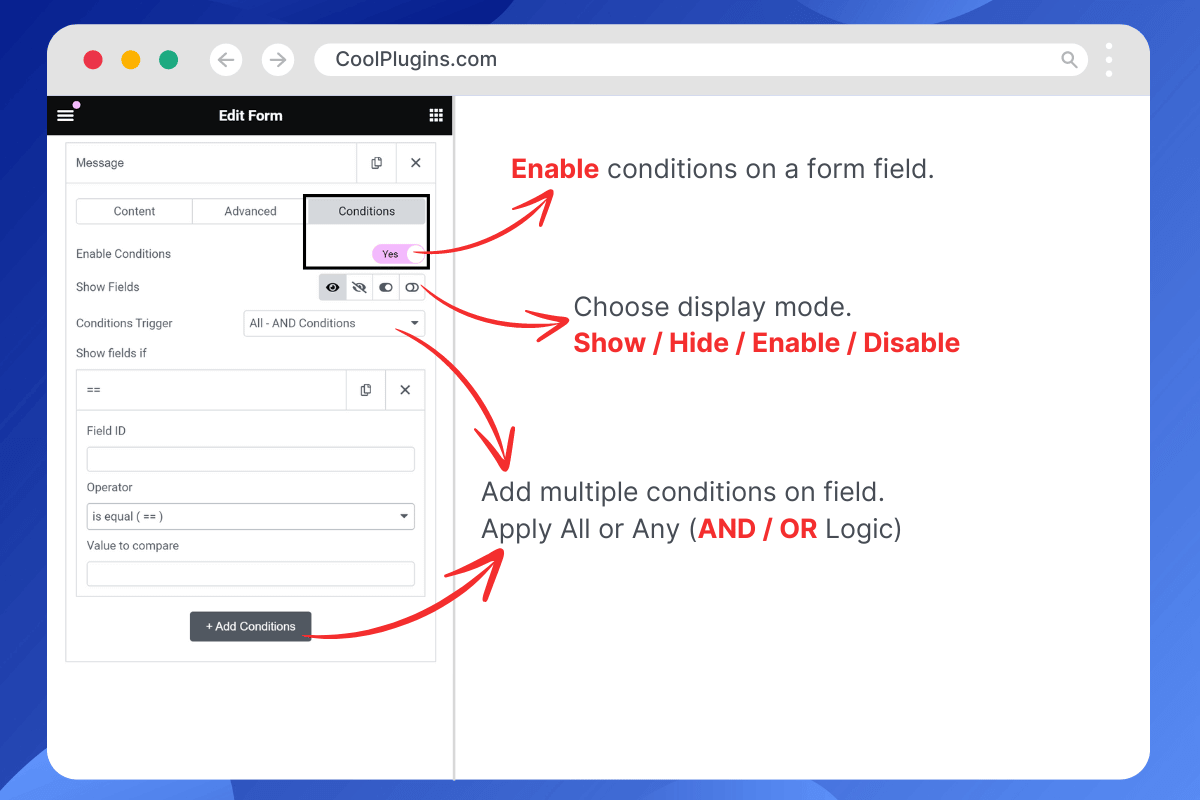
Show / Hide Fields Conditionally: Easily add conditional logic to show or hide any field within an Elementor form based on values from other fields. You can currently add conditions to these field types: text, textarea, email, telephone, URL, radio, select, file upload, HTML, number, and checkbox.
-
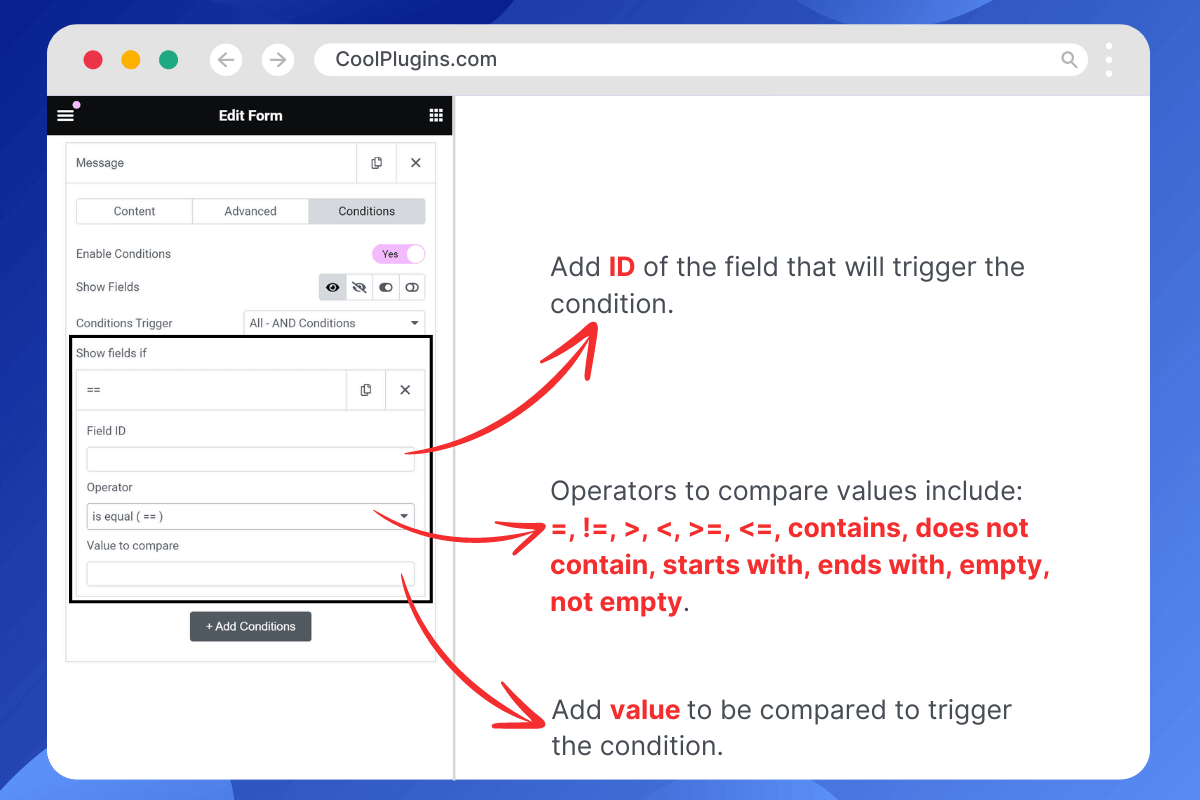
If / Else Logic Without Code: Apply if/else logic to form fields without writing any code. Simply add the ID of the field on which you want to base the condition. For example, if the “Query Type” field ID is “query_type,” you can set it to show the “Enter Order ID” field if
query_type == check-order-statusand hide it otherwise. -
Apply Multiple Conditions: Apply multiple conditions to a form field, with actions triggered only if all conditions are met (using AND logic).
-
No Validation Errors: Avoid validation errors when a required field is hidden due to a condition.
-
Compatibility with Hello Plus: The Conditional Fields for Elementor Form plugin is fully compatible with the Hello Plus plugin’s Form Lite widget, which you can use inside Elementor Free.
Get Conditional Fields Pro for More Features
-
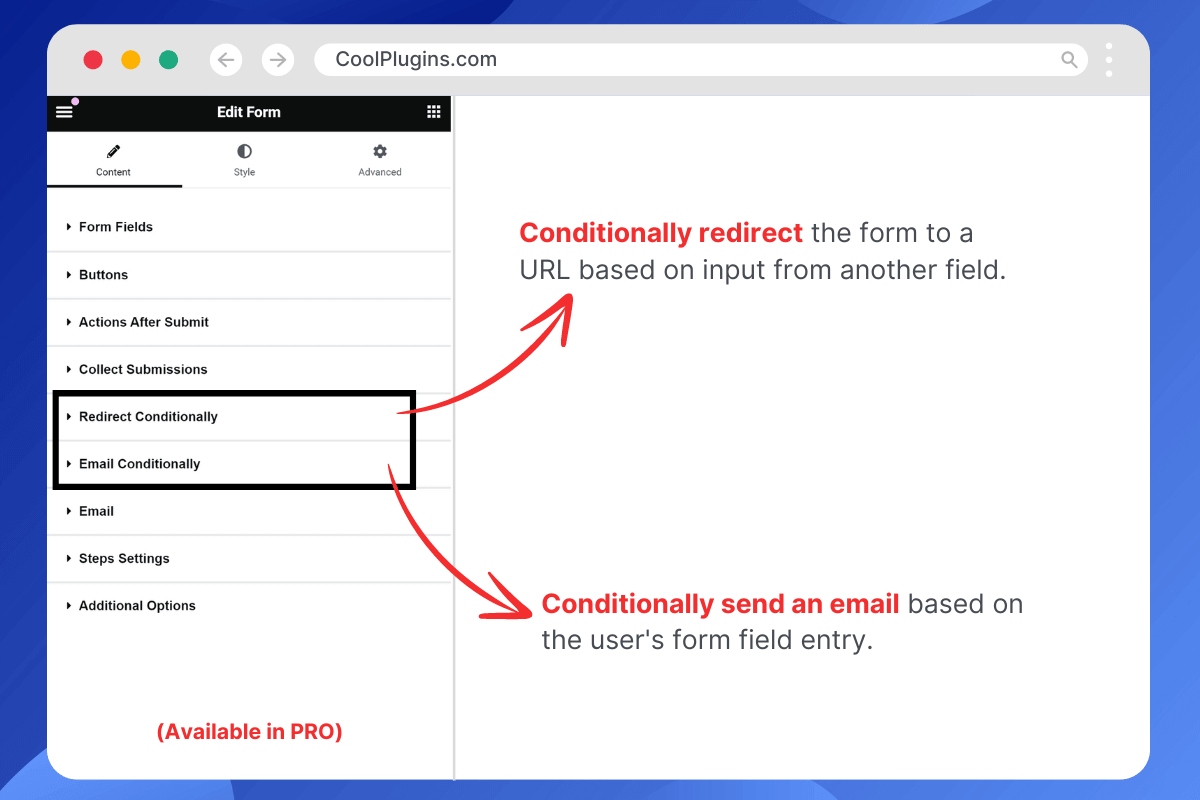
Conditionally Redirect After Submission
Redirect your Elementor form to a specific URL after submission based on set conditions. For example, redirect to URL-1 if condition-1 is true; otherwise, send users to URL-2. -
Apply Condition on Submit Button
Apply conditional logic to the Elementor form submit button to enable/disable or hide/show it based on user input values. This feature can be used to block contact form spam, such as disabling the submit button if illegal words are entered in a textarea. -
Send Email Conditionally
Send different emails to various user types based on their form inputs. You can design multiple email templates and send them according to matched conditions. -
Apply Multiple Conditions (AND / OR Logic)
Apply multiple conditions to form fields using AND/OR logic. Actions are triggered when ANY or ALL specified conditions are met. -
Condition Triggers / Compare Operators
Compare field values using various operators such as equals (==), not equals (!=), greater than (>), less than (<), greater than or equal to (>=), less than or equal to (<=), contains, does not contain, starts with, ends with, is empty, and is not empty. -
Premium Support
Need help or have a question? Reach out to Cool Plugins premium support anytime — we usually respond within 24–48 hours.
More Elementor Form Addons
Explore a powerpack of Elementor form addons developed by the Cool Plugins team. Use them to extend your Hello Plus or Elementor Pro form widgets with advanced features, or create forms in Elementor Free if you are not using Pro.
-
Cool FormKit for Elementor
An advanced form builder for Elementor Free users. It also extends Elementor Pro and Hello Plus form widgets with features like conditional logic, country code, WhatsApp redirect, input masks, and more. Upgrade your form-building experience with Cool FormKit. -
Country Code for Elementor Form Telephone Field
Adds a country code dropdown to phone fields, guiding your visitors to select their country code while entering their mobile number to ensure accurate and properly formatted data submissions. -
Form Input Masks for Elementor Forms
Apply input masks to form fields so your users can enter correctly formatted data, such as phone numbers, dates, credit card numbers, and more.
Some Other Essential Addons for Elementor
Upgrade your website-building experience in Elementor by using these ultimate addons for Elementor developed by Cool Plugins.
-
Timeline Widget for Elementor
Showcase your history, events, or milestones in a stylish vertical or horizontal timeline layout on Elementor pages. -
Events Widgets for Elementor
Adds The Events Calendar plugin widgets for Elementor, allowing you to display events in grid, list, or carousel layouts on your Elementor pages. -
AutoPoly – AI Translation for Polylang
An addon for the Polylang plugin that automatically translates Elementor pages using AI-powered translation services — making multilingual site creation fast and simple. -
Loop Grid Extender for Elementor Pro
Use ACF Repeater fields in Elementor Pro loop grids or add advanced taxonomy filters to your Elementor loop templates with this plugin. -
LocoAI – Auto Translate for Loco Translate
Automatically translate any WordPress plugin or theme strings in one click — powered by AI.
Check Users Feedback About This Plugin
People love this plugin because it delivers a much-needed feature for Elementor forms – applying conditions to form fields, something not available by default 🤩
Finally! Easy Conditional Fields — Yay!!! ⭐⭐⭐⭐⭐
The intuitive setup means I can now implement conditional logic with ease, vastly improving our form functionality without compromising aesthetics. Highly recommended! — @sambadee
Long Overdue ⭐⭐⭐⭐⭐
This plugin is so long overdue. Over the years I’ve seen many others that are overcomplicated and difficult to use. This is lightweight, powerful, and easy for anyone to use. Thank you. — @maxbyer
Great Support ⭐⭐⭐⭐⭐
Simple and efficient! Support is ready to solve issues and committed to improving and implementing new features! Thank you for your help. — @xxkiefxx
At Last ⭐⭐⭐⭐⭐
Finally, a free plugin that adds conditional logic to Elementor forms in a simple and intuitive way. It does what it says — and does it well. Thank you! — @mrprainx
Great Plugin! ⭐⭐⭐⭐⭐
I searched the whole internet for this. Most Elementor add-ons you have to pay for don’t have it, but Cool Plugins did it. It’s super easy and directly integrated into the Elementor interface and form. Thanks a lot! Great job, guys! — @huks
Get Conditional Fields for Elementor Form [PREMIUM]
Use of 3rd Party Services: This plugin connects to the Cool Plugins feedback server only for optional usage data sharing and voluntary feedback submission (for example, during plugin deactivation). Data is transmitted solely after explicit user consent. No hidden tracking is performed, and no frontend visitor or site user data is collected. For more details, please review our Data Usage Policy, TOS, and Privacy Policy.
Installation
Quick Installation
- Go to “wp-admin >> Plugins >> Add New” in your WordPress dashboard, search for “Conditional Fields for Elementor Form”, and install and activate the plugin developed by Cool Plugins.
- Install Elementor Pro to access this plugin’s features, since the Elementor Pro form widget is required.
– If you are only using Elementor Free, you can still apply conditional logic by using the Hello Plus Form Lite widget. - Edit a page with Elementor and create a form. In the Elementor form widget, you’ll find a Conditions tab where you can add rules to hide, show, enable, or disable fields. For step-by-step instructions, check the getting started guide.
How to Add Conditional Logic to Elementor Form Fields?
Step 1:
First, install Elementor Pro (or Hello Plus for Elementor Free), then install Conditional Fields for Elementor Form.
Since this is an addon for Elementor forms, Elementor Pro or Hello Plus must be installed first.
Step 2:
After installation, edit a page with Elementor where you want to add a form. Create the form using the Elementor form widget and add your desired fields.
Step 3:
Select the field you want to show, hide, enable, or disable based on conditions.
- Example: In a contact form, show the “Order ID” field only if the user selects “Order Status” in the dropdown, and hide it if “General Query” is selected.
- Enable conditions via the Conditions tab in the field settings.
- Choose a display mode — Show or Hide.
– The Pro version adds two more modes: Enable/Disable, letting you control input availability conditionally. - Add a condition by entering the Field ID to compare values. Example: show the “Order ID” field if
query-type = order-status. - Apply multiple conditions using the AND operator (all conditions must match).
– The Pro version also supports OR operator logic. Learn more in the AND/OR conditions guide. - Use comparison operators like equals (==), not equals (!=), greater than (>), less than (<).
– The Pro version adds advanced operators: >=, <=, contains, does not contain, starts with, ends with, empty, not empty. See the full list of supported operators.
Step 4:
Save or update the page and preview the form to see the conditions in action.
👉 For full documentation, visit the Conditional Fields for Elementor Form Docs.
Get the Pro version of Conditional Fields for Elementor Form
Änderungsprotokoll
Integrated new plugin dashboard.
1.7.8 | Nov 16, 2026
- Fixed: Step field conditional logic info text.
1.7.7 | Nov 10, 2026
- Fixed: Unstyled Theme Builder Header/Footer in the Elementor editor.
- Tested up to: Elementor 4.4.0 and Elementor Pro 4.4.0.
1.7.6 | Jul 29, 2026
- Fixed: Resolved the issue where the Elementor Form widget panel failed to load in Elementor 4.2.0.
1.7.5 | Jul 27, 2026
- Fixed: Editor loading issue with Elementor v4.2.0.
- Tested up to: Elementor 4.2.0 and Elementor Pro 4.2.0.
1.7.4 | Jul 08, 2026
- Improved: Code improvements.
1.7.3 | Jul 02, 2026
- Fixed: Atomic Forms compatibility issue with older versions of Elementor Pro (v4.0.2).
Screenshots


Für Entwickler
Ist das dein Plugin? Zeigen Sie die Zahlen.
Fügen Sie Ihrer Website, Docs oder GitHub Readme ein Live-Badge hinzu. Es wird von selbst aktualisiert - kein Konto erforderlich.
Best Conditional Fields for Elemen… alternatives
All conditional fields plugins →


Fragen und Antworten
Conditional Fields for Elementor Fo…: quick answers
Gerade Antworten, gezogen von Live WordPress.org Daten.
Quelle: WordPress.org
Is Conditional Fields for Elemento… free?
Yes. Conditional Fields for Elemento… is free to download and use from the official WordPress.org plugin directory.
Is Conditional Fields for Elemento… safe to use in 2026?
Yes — Conditional Fields for Elemento… is a safe, well-maintained plugin to use in 2026. It runs on 10K+ sites, is rated 4.7/5 and was last updated 5 days ago, and scores 93/100 on our health check.
How many websites use Conditional Fields for Elemento…?
Conditional Fields for Elemento… is active on 10K+ WordPress websites and has been downloaded 275,155 times since it launched in January 2024. It was downloaded 16,175 times in the last 30 days.
Does Conditional Fields for Elemento… work with WordPress 7.1?
Yes. The developer has tested Conditional Fields for Elemento… up to WordPress 7.1.5, the latest release. It requires WordPress 5.0 or newer.
What PHP version does Conditional Fields for Elemento… need?
Conditional Fields for Elemento… requires PHP 7.2 or higher. Most hosts run PHP 8.x today, so it works on any modern WordPress hosting.
When was Conditional Fields for Elemento… last updated?
The latest version, 1.7.8, was released on November 16, 2026 (5 days ago).
Who makes Conditional Fields for Elemento…?
Conditional Fields for Elemento… is developed and maintained by Cool Plugins.
What are the best alternatives to Conditional Fields for Elemento…?
The most popular alternatives to Conditional Fields for Elemento… are Conditional Fields for Cont… (100K+ installs), CF7 Mate (20K+ installs) and CubeWP Forms (3K+ installs).
Angetrieben von PageForge
Eine Vorlage und eine Tabelle. Eine echte Seite für jede Suche.
PageForge Verwandelt jede Zeile eines CSV in eine WordPress-Seite mit eigenem Titel, URL, SEO Felder und Schema entworfen. Kostenlos auf WordPress.org.
- CSV und XLSX, plus Google Sheets auf Beruf und Unternehmen
- seinen eigenen Titel, URL, SEO Felder und Schema für jede Seite
- Arbeitet mit dem Blockeditor, Elementor, Divi und Avada
- Kostenlos auf WordPress.org, keine Kreditkarte