


CompressX — AVIF & WebP Converter, Media Replacement
AVIF & WebP converter with built-in media replacement for local image optimization.

Sichere Auswahl
Yes — CompressX is a safe, well-maintained plugin to use in 2026. It runs on 40K+ sites, is rated 5/5 and was last updated 1 month ago, and scores 86/100 on our health check.
- Bewährt auf 40.000 aktiven Standorten
- Loved by users — 5/5 from 200 reviews
- Getestet mit dem neuesten WordPress (7.1)
Wie stapelt es sich?
Side-by-side bei Installationen, Updates, Bewertungen und Support



Tägliche Downloads
Download-Spitzen folgen normalerweise einer neuen Version - jede Website, die automatisch aktualisiert wird, gilt als Download.
Ranglisten
Where CompressX stands todayWordPress.org Ranglisten suchen
Live-Position in der Plugin-Suche, Top 100| Stichwort | Position |
|---|---|
| AVIF | #4 |
| convert AVIF | #4 |
| convert webp | #9 |
| Optimierung | #46 |
| webp | #6 |
Versionsübernahme
Anteil aktiver Sites pro Release.
Bewertungsaufschlüsselung
★★★★★★★★★★ 5 from 200 reviews
About CompressX
From the official readme · v0.9.40Beschreibung
CompressX is a free, lightweight WebP & AVIF conversion and media replacement plugin for WordPress. It allows you to easily convert JPG and PNG images to WebP and AVIF formats, compress WebP and AVIF images, and replace media files without changing their URLs or attachment IDs. All AVIF and WebP conversions are performed locally on your web server.
Kernfunktionen
1. Convert AVIF & Compress AVIF
Convert jpg, png, and WebP images on your WordPress website to AVIF format, and compress AVIF images according to the compression level you set.
If the original image is already in AVIF format which is supported since WordPress 6.5, the original AVIF image will only be compressed.
2. Convert WebP & Compress WebP
Convert jpg, png images on your WordPress website to WebP format, and compress WebP images according to the compression level you set.
If the original image is already in WebP format which is supported since WordPress 5.8, the original WebP image will only be compressed.
3. Media Replacement & Auto Re-Optimization
Safely replace an existing media file without changing its URL or attachment ID. When a new image is uploaded as a replacement, the system automatically regenerates thumbnails, applies your configured format conversion and compression rules, resizes where needed, and re-optimizes the file.
4. Exclude Folders
Select specific folders in your media library and prevent images inside them from being processed.
5. Custom Folders
Select folders that are in the wp-content folder but outside the Uploads (media library) and process images inside them.
6. Auto-Process New Images
Automatically convert new images uploaded to a WordPress website to WebP/AVIF format and compress WebP/AVIF images upon upload.
7. Auto-Remove Large Images
Automatically remove converted AVIF/WebP images when they are larger than original images.
8. Restore Original Images
Your images will be reverted to their original state and all AVIF/WebP images and data in the database generated by CompressX will be removed when CompressX is uninstalled.
Minimum Requirements to use CompressX
- Character Encoding UTF-8
- PHP version 7.0
- MySQL version 4.1
- WordPress 5.8
Externe Dienste
This plugin optionally connects to the Cloudflare API to purge your CDN cache. It sends the Cloudflare Zone ID, account email, and Global API Key whenever the “Purge Cloudflare Cache” button is clicked or automatically upon optimization completion (if enabled in settings). This service is provided by Cloudflare, Inc: Terms of Service, Privacy Policy.
Installation
Install CompressX
1.Go to your sites admin dashboard.
2.Navigate to Plugins Menu and search for CompressX.
3.Find CompressX and click Install Now.
4. Click Activate.
Änderungsprotokoll
Latest version 0.9.40:
0.9.40
- Added the ‘Maximum images per scan request’ option to improve scanning performance.
0.9.39
- Added an option to control the number of images processed in each scan batch.
- Improved scan efficiency for websites with a large number of images.
0.9.38
- Successfully tested with WordPress 7.0.
0.9.37
- Improved localization support to align with the updated plugin interface.
0.9.36
- Fixed some bugs in the plugin code.
- Optimized the plugin code.
- Refined the plugin readme file.
0.9.35
- Added a feature of replacing an image in your media library by uploading a new image.
- Fixed some bugs in the plugin code.
- Optimized plugin UI.
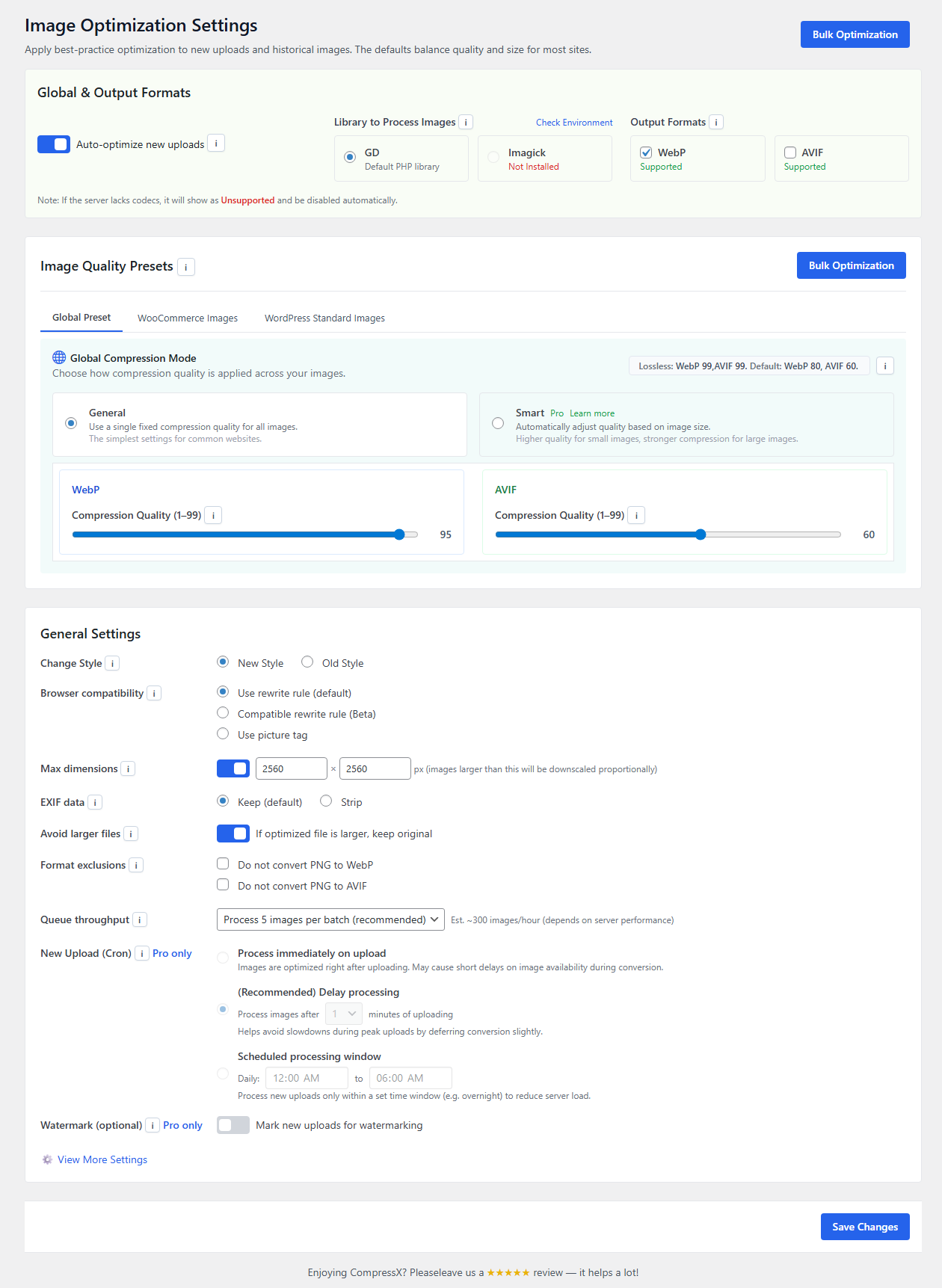
Screenshots
Für Entwickler
Ist das dein Plugin? Zeigen Sie die Zahlen.
Fügen Sie Ihrer Website, Docs oder GitHub Readme ein Live-Badge hinzu. Es wird von selbst aktualisiert - kein Konto erforderlich.
Best CompressX alternatives
All AVIF plugins →





Fragen und Antworten
CompressX: quick answers
Gerade Antworten, gezogen von Live WordPress.org Daten.
Quelle: WordPress.org
Is CompressX free?
Yes. CompressX is free to download and use from the official WordPress.org plugin directory.
Is CompressX safe to use in 2026?
Yes — CompressX is a safe, well-maintained plugin to use in 2026. It runs on 40K+ sites, is rated 5/5 and was last updated 1 month ago, and scores 86/100 on our health check.
How many websites use CompressX?
CompressX is active on 40K+ WordPress websites and has been downloaded 377,672 times since it launched in June 2024. It was downloaded 12,632 times in the last 30 days.
Does CompressX work with WordPress 7.1?
Yes. The developer has tested CompressX up to WordPress 7.1.5, the latest release. It requires WordPress 5.8 or newer.
What PHP version does CompressX need?
CompressX requires PHP 7.0 or higher. Most hosts run PHP 8.x today, so it works on any modern WordPress hosting.
When was CompressX last updated?
The latest version, 0.9.40, was released on October 7, 2026 (1 month ago).
Who makes CompressX?
CompressX is developed and maintained by CompressX.
What are the best alternatives to CompressX?
The most popular alternatives to CompressX are Optimole (200K+ installs), Modern Image Formats (100K+ installs) and Robin Image Optimizer (100K+ installs).
Angetrieben von PageForge
Eine Vorlage und eine Tabelle. Eine echte Seite für jede Suche.
PageForge Verwandelt jede Zeile eines CSV in eine WordPress-Seite mit eigenem Titel, URL, SEO Felder und Schema entworfen. Kostenlos auf WordPress.org.
- CSV und XLSX, plus Google Sheets auf Beruf und Unternehmen
- seinen eigenen Titel, URL, SEO Felder und Schema für jede Seite
- Arbeitet mit dem Blockeditor, Elementor, Divi und Avada
- Kostenlos auf WordPress.org, keine Kreditkarte