


Soziale Kommentare von wpdevart
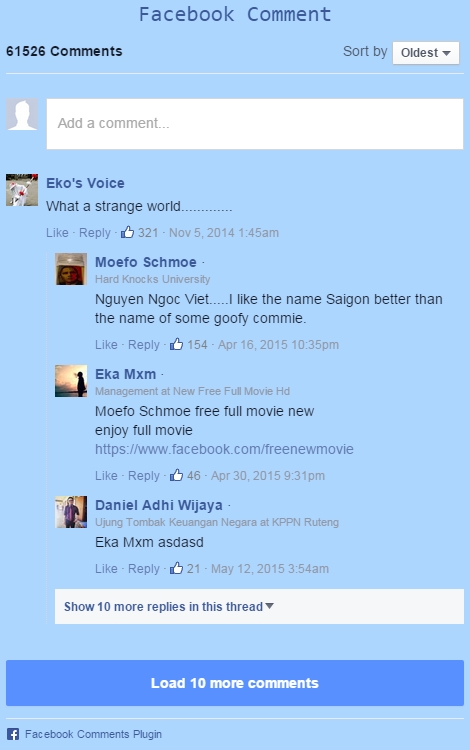
This plugin will help you display Facebook Comments on your website. You can use it on your pages/posts.

Mit Vorsicht verwenden
Social comments by WpDevArt works, but test it on a staging site before relying on it in 2026. It runs on 7K+ sites, is rated 4.3/5 and was last updated 10 months ago, and scores 58/100 on our health check.
- Momentum — downloads up 20.6% vs the previous 30 days
- Nur getestet bis WordPress 6.9 (letzt ist 7.1)
Wie stapelt es sich?
Side-by-side bei Installationen, Updates, Bewertungen und Support



Tägliche Downloads
Download-Spitzen folgen normalerweise einer neuen Version - jede Website, die automatisch aktualisiert wird, gilt als Download.
Ranglisten
Where Social comments by WpDevArt stands todayWordPress.org Ranglisten suchen
Live-Position in der Plugin-Suche, Top 100| Stichwort | Position |
|---|---|
| Bemerkungen | #22 |
| #41 | |
| facebook comments | #7 |
| social comments | #7 |
| wordpress comments | #28 |
Versionsübernahme
Anteil aktiver Sites pro Release.
Bewertungsaufschlüsselung
★★★★★★★★★★ 4.3 from 42 reviews
About Social comments by WpDevArt
From the official readme · v2.6.9Beschreibung
Social (Facebook) comments plugin is a great tool that will allow you to show your visitors Fb comments on your website. At the same time this plugin is very useful for improving your website traffic from Facebook. This plugin is important part of social optimization as well, that’s why most of websites use it on their websites.
This plugin is easy to use, you just need to create Fb App ID and use it on your website.
You can disable it on any page/post you need. There are some useful features that you can find only in our plugin.
View our plugin Demo page:
Features of free version
- User friendly and easy to use
- Tested with other popular plugins
- Ability to set the box Title
- Ability to set the Title text color, font-size, font family and position
- Ability to select where to display it
- Ability to set the width
- Ability to set ordering and number to display
- Ability to set the language
You can upgrade the plugin to Facebook Comments Pro to add more features.
Features of Pro version
- Ability to set the color scheme
- Ability to set the Background color
- Ability to set position
- 39 awesome animation effects
- Premium Support
If you found any bug in our plugin or have a question contact us at support@wpdevart.com.
Step by step guide
Main options
- APP ID – Type here your Fb App ID
- Title – Type here the title
- Color scheme – Select the Color scheme
- Title text color – Select the title text color
- Title font-size – Type the title font-size(px)
- Title font family – Select the title font family
- Title position – Select the title position
- Display comment on – Select where to display Fb box
- Width – Type here the width(px)
- Number – Type here the number of remarks to display
- Animation effect – Select animation effect
- Background color – Select the background color
- Position -Select the position
- Language – Type here the language code(en_US,de_DE…)
Adding the plugin shortcode into pages, posts and in Php code
Here is an example of using the shortcode in posts/pages:
[wpdevart_facebook_comment facebook_app_id=”1638418549774901″ curent_url=”http://developers.facebook.com/docs/plugins/comments/” title_text=”Title” title_text_color=”#000000″ title_text_font_size=”22″ title_text_font_famely=”monospace” title_text_position=”left” width=”100%” bg_color=”#CCCCCC” animation_effect=”random” locale=”en_US” count_of_comments=”2″ ]
Here’s an example of using the shortcode in PHP code:
Here are explanation of shortcode attributes.
curent_url – Type the URL of the page from where you need to show the content
title_text – Type here the title
title_text_color – Select the title color
title_text_font_size – Type the title font-size
title_text_font_famely – Select the title font family
title_text_position – Select the title position
width – Type here the width
count_of_comments – Type here the number of remarks to display
bg_color – Select the background color
animation_effect – Choose animation effect
Installation
It’s very simple:
- Laden Sie das Plugin herunter.
- Upload the plugin from your admin panel.
- Then install and activate the plugin.
- After that type the Fb App ID.
- Then configure the plugin settings and that’s all.
Änderungsprotokoll
2.6.9
=
- admin UI changes.
2.6.8
=
- code improved.
2.6.7
=
- tested.
2.6.6
=
- bug fixed.
2.6.5
=
- code improved.
2.6.4
=
- bug fixed.
Screenshots


Für Entwickler
Ist das dein Plugin? Zeigen Sie die Zahlen.
Fügen Sie Ihrer Website, Docs oder GitHub Readme ein Live-Badge hinzu. Es wird von selbst aktualisiert - kein Konto erforderlich.
Best Social comments by WpDevArt alternatives
Alle Kommentare Plugins →



Fragen und Antworten
Social comments by WpDevArt: quick answers
Gerade Antworten, gezogen von Live WordPress.org Daten.
Quelle: WordPress.org
Is Social comments by WpDevArt free?
Yes. Social comments by WpDevArt is free to download and use from the official WordPress.org plugin directory.
Is Social comments by WpDevArt safe to use in 2026?
Social comments by WpDevArt works, but test it on a staging site before relying on it in 2026. It runs on 7K+ sites, is rated 4.3/5 and was last updated 10 months ago, and scores 58/100 on our health check.
How many websites use Social comments by WpDevArt?
Social comments by WpDevArt is active on 7K+ WordPress websites and has been downloaded 1,350,750 times since it launched in August 2015. It was downloaded 1,529 times in the last 30 days.
Does Social comments by WpDevArt work with WordPress 7.1?
Social comments by WpDevArt is officially tested up to WordPress 6.9.12, while the latest release is 7.1.5. It may still work, but try it on a staging site first.
When was Social comments by WpDevArt last updated?
The latest version, 2.6.9, was released on February 2, 2026 (10 months ago).
Who makes Social comments by WpDevArt?
Social comments by WpDevArt is developed and maintained by wpdevart.
What are the best alternatives to Social comments by WpDevArt?
The most popular alternatives to Social comments by WpDevArt are Akismet Anti-spam: Spam Pro… (5M+ installs), Disable Comments (1M+ installs) and Antispam Bee (700K+ installs).
Angetrieben von PageForge
Eine Vorlage und eine Tabelle. Eine echte Seite für jede Suche.
PageForge Verwandelt jede Zeile eines CSV in eine WordPress-Seite mit eigenem Titel, URL, SEO Felder und Schema entworfen. Kostenlos auf WordPress.org.
- CSV und XLSX, plus Google Sheets auf Beruf und Unternehmen
- seinen eigenen Titel, URL, SEO Felder und Schema für jede Seite
- Arbeitet mit dem Blockeditor, Elementor, Divi und Avada
- Kostenlos auf WordPress.org, keine Kreditkarte