


Collapsing Archives
Create collapsible archives by year or month. Features include: link to archive pages, display of individual posts and support for custom post-types.

Mit Vorsicht verwenden
Collapsing Archives works, but test it on a staging site before relying on it in 2026. It runs on 3K+ sites, is rated 4.1/5 and was last updated 9 months ago, and scores 45/100 on our health check.
- Momentum – Downloads um 67,7% gegenüber den letzten 30 Tagen
- Nur getestet bis WordPress 6.9 (letzt ist 7.1)
Wie stapelt es sich?
Side-by-side bei Installationen, Updates, Bewertungen und Support



Tägliche Downloads
Download-Spitzen folgen normalerweise einer neuen Version - jede Website, die automatisch aktualisiert wird, gilt als Download.
Ranglisten
Where Collapsing Archives stands todayWordPress.org Ranglisten suchen
Live-Position in der Plugin-Suche, Top 100| Stichwort | Position |
|---|---|
| Accordion | >100 |
| archives | #6 |
| collapse | #22 |
| sidebar | >100 |
| widget | >100 |
Versionsübernahme
Anteil aktiver Sites pro Release.
Bewertungsaufschlüsselung
★★★★★★★★★★ 4.1 from 21 reviews
About Collapsing Archives
From the official readme · v3.0.8Beschreibung
Create collapsible archives by year or month. Features include: link to archive pages, display of individual posts and support for custom post-types.
Demo
I use this plugin in my blog at http://blog.robfelty.com
Installation
WIDGET INSTALLATION
The easiest way to use this plugin is as a widget.
After you have installed the Collapsing Archives plugin, then simply go the Appearance > Widgets section in wp-admin and add the Collapsing Archives Widget to whatever sidebar or widget section you like, and then configure to your heart’s content.
Manuelle Installation
It is also possible to use the plugin on any page you like with a little bit of PHP code. Simply change the following here appropriate (most likely sidebar.php):
Change From:
<ul>
     <?php wp_get_archives(); ?>
</ul>
To something of the following:
    <?php
     if( function_exists('collapsArch') ) {
      collapsArch();
     } else {
      echo "<ul>\n";
      wp_get_archives();
      echo "</ul>\n";
     }
    ?>
OPTIONS AND CONFIGURATIONS
$defaults=array(
  'noTitle' => '',
  'inExcludeCat' => 'exclude',
  'inExcludeCats' => '',
  'inExcludeYear' => 'exclude',
  'inExcludeYears' => '',
  'sort' => 'DESC',
  'showPages' => false,
  'linkToArch' => true,
  'showYearCount' => true,
  'expandCurrentYear' => true,
  'expandMonths' => true,
  'expandYears' => true,
  'expandCurrentMonth' => true,
  'showMonthCount' => true,
  'showPostTitle' => true,
  'expand' => '0',
  'showPostDate' => false,
  'postDateFormat' => 'm/d',
  'postDateAppenc' => 'after',
  'accordion' => 0,
  'postTitleLength' => '',
  'post_type' => 'post',
  'debug' => '0',
  );
- noTitle
- If your posts don’t have title, specify a string to show in place of the
title
- If your posts don’t have title, specify a string to show in place of the
- inExcludeCat
- Whether to include or exclude certain categories
- ‘exclude’ (default)
- ‘include’
- Whether to include or exclude certain categories
- inExcludeCats
- The categories which should be included or excluded
- inExcludeYear
- Whether to include or exclude certain years
- ‘exclude’ (default)
- ‘include’
- Whether to include or exclude certain years
- inExcludeYears
- The years which should be included or excluded
- showPages
- Whether or not to include pages as well as posts. Default if false
- showYearCount
- When true, the number of posts in the year will be shown in parentheses
- showMonthCount
- When true, the number of posts in the month will be shown in parentheses
- linkToArch
- 1 (true), clicking on a the month or year will link to the archive (default)
- 0 (false), clicking on a month or year expands and collapses
- sort
- Whether posts should be sorted in chronological or reverse
chronological order. Possible values:- ‘DESC’ reverse chronological order (default)
- ‘ASC’ chronological order
- Whether posts should be sorted in chronological or reverse
- expand
- The symbols to be used to mark expanding and collapsing. Possible values:
- ‘0’ Triangles (default)
- ‘1’ + –
- ‘2’ [+] [-]
- ‘3’ images (you can upload your own if you wish)
- ‘4’ custom symbols
- The symbols to be used to mark expanding and collapsing. Possible values:
- customExpand
- If you have selected ‘4’ for the expand option, this character will be
used to mark expandable link categories
- If you have selected ‘4’ for the expand option, this character will be
-
customCollapse
- If you have selected ‘4’ for the expand option, this character will be
used to mark collapsible link categories
- If you have selected ‘4’ for the expand option, this character will be
-
expandYears
- 1 (true): Years collapse and expand to show months (default)
- 0 (false): Only links to yearly archives are shown
- expandMonths
- 1 (true): Months collapse and expand to show posts (default)
- 0 (false): Only links to yearly and monthly archives are shown
- expandCurrentMonth
- When true, the current month will be expanded by default
- expandCurrentYear
- When true, the current year will be expanded by default
- showPostTitle
- 1 (true): The title of each post is shown (default)
- showPostDate
- 1 (true): Show the date of each post
- postDateFormat
- The format in which the date should be shown (default: ‘m/d’)
- postDateAppend
- after: The post date comes after the title (default)
- before: The post date comes before the title
- postTitleLength
- Truncate post titles to this number of characters (default: 0 = don’t
truncate)
- Truncate post titles to this number of characters (default: 0 = don’t
- post_type
- post (default)
- Seite
- all (includes regular post types plus any custom post types – excludes
pages, revisions, wp_nav_items, and attachments) - custom post type that you have registered (e.g. recipe)
- accordion
- When set to true, expanding one year will collapse all other years.
Expanding one month will collapse all other months in that year
- When set to true, expanding one year will collapse all other years.
- number
- If using manually with more than one instance on a page, you can give
unique ids to each instance with this option. For example, if you had
one instance with number 1 and another with number 2, the ul for March
2004 for number 1 would have an id of ‘collapsArch-2004-3:1’, while the
id for number 2 would be ‘collapsArch-2004-3:2’
- If using manually with more than one instance on a page, you can give
- debug
- When set to true, extra debugging information will be displayed in the
underlying code of your page (but not visible from the browser). Use
this option if you are having problems
- When set to true, extra debugging information will be displayed in the
Beispiele
collapsArch('accordion=1&sort=ASC&expand=3&inExcludeCat=exclude&inExcludeCats=general,uncategorized')
This will produce a list with:
* accordion style expanding and collapsing
* shown in chronological order
* using images to mark collapsing and expanding
* exclude posts from the categories general and uncategorized
collapsArch('post_type=recipe')
This will produce a list with:
* only posts of type ‘recipe’
* shown in chronological order
* using images to mark collapsing and expanding
* exclude posts from the categories general and uncategorized
CAVEAT
This plugin relies on Javascript, but does degrade
gracefully if it is not present/enabled to show all of the
archive links as usual.
Änderungsprotokoll
3.0.8 (2026.02.11)
- Improved SQL queries to avoid possible SQL injection
3.0.7 (2024.05.05)
- Fixed some PHP warnings and removed deprecated code
3.0.6 (2024.08.05)
- Sanitizing input for block.
- Verified works with WP 6.6
- Updated Readme a bit
3.0.5 (2023.12.07)
- accidentally messed up tagging version 3.0.4. Calling it 3.0.5 now
3.0.4 (2023.12.01)
- Got rid of deprecated __experimentalGroup
- Tested with WP 6.4.1
3.0.3 (2023.09.11)
- Fixed PHP warning about undefined key when changing style
Screenshots
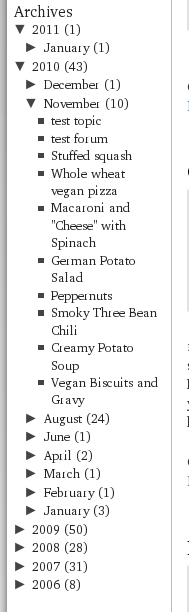
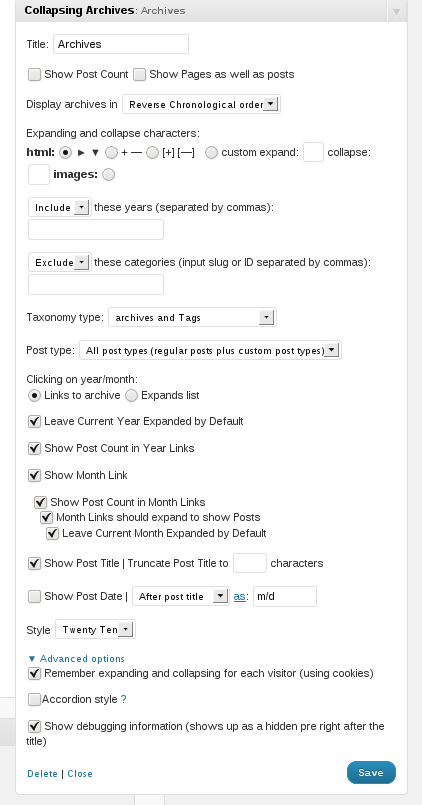
Für Entwickler
Ist das dein Plugin? Zeigen Sie die Zahlen.
Fügen Sie Ihrer Website, Docs oder GitHub Readme ein Live-Badge hinzu. Es wird von selbst aktualisiert - kein Konto erforderlich.
Best Collapsing Archives alternatives
All Accordion plugins →





Fragen und Antworten
Collapsing Archives: quick answers
Gerade Antworten, gezogen von Live WordPress.org Daten.
Quelle: WordPress.org
Is Collapsing Archives free?
Yes. Collapsing Archives is free to download and use from the official WordPress.org plugin directory.
Is Collapsing Archives safe to use in 2026?
Collapsing Archives works, but test it on a staging site before relying on it in 2026. It runs on 3K+ sites, is rated 4.1/5 and was last updated 9 months ago, and scores 45/100 on our health check.
How many websites use Collapsing Archives?
Collapsing Archives is active on 3K+ WordPress websites and has been downloaded 151,302 times since it launched in January 2008. It was downloaded 934 times in the last 30 days.
Does Collapsing Archives work with WordPress 7.1?
Collapsing Archives is officially tested up to WordPress 6.9.12, while the latest release is 7.1.5. It may still work, but try it on a staging site first.
When was Collapsing Archives last updated?
The latest version, 3.0.8, was released on February 12, 2026 (9 months ago).
Who makes Collapsing Archives?
Collapsing Archives is developed and maintained by robfelty.
What are the best alternatives to Collapsing Archives?
The most popular alternatives to Collapsing Archives are Accordion FAQ (30K+ installs), Ultimate FAQ Accordion Plug… (30K+ installs) and Read More Without Refresh (20K+ installs).
Angetrieben von PageForge
Eine Vorlage und eine Tabelle. Eine echte Seite für jede Suche.
PageForge Verwandelt jede Zeile eines CSV in eine WordPress-Seite mit eigenem Titel, URL, SEO Felder und Schema entworfen. Kostenlos auf WordPress.org.
- CSV und XLSX, plus Google Sheets auf Beruf und Unternehmen
- seinen eigenen Titel, URL, SEO Felder und Schema für jede Seite
- Arbeitet mit dem Blockeditor, Elementor, Divi und Avada
- Kostenlos auf WordPress.org, keine Kreditkarte