


Colciudades – Ciudades de Colombia para WooCommerce
City dropdown by department for the WooCommerce block and classic checkout, plus per-city shipping. Built for Colombia.

Solide Wahl
Colciudades is a solid plugin choice in 2026, with a few things worth checking first. It runs on 40+ sites, is rated 5/5 and was last updated 2 months ago, and scores 74/100 on our health check.
- Getestet mit dem neuesten WordPress (7.1)
- Kleine Benutzerbasis (40+ aktive Installationen)
- Bisher sehr wenige Bewertungen
Wie stapelt es sich?
Side-by-side bei Installationen, Updates, Bewertungen und Support



Tägliche Downloads
Download-Spitzen folgen normalerweise einer neuen Version - jede Website, die automatisch aktualisiert wird, gilt als Download.
Ranglisten
Where Colciudades stands todayWordPress.org Ranglisten suchen
Live-Position in der Plugin-Suche, Top 100| Stichwort | Position |
|---|---|
| block checkout | >100 |
| cities | #66 |
| colombia | #5 |
| Versand | >100 |
Versionsübernahme
Anteil aktiver Sites pro Release.
Bewertungsaufschlüsselung
★★★★★★★★★★ 5 from 1 reviews
About Colciudades
Aus der offiziellen Readme · V1.1.1Beschreibung
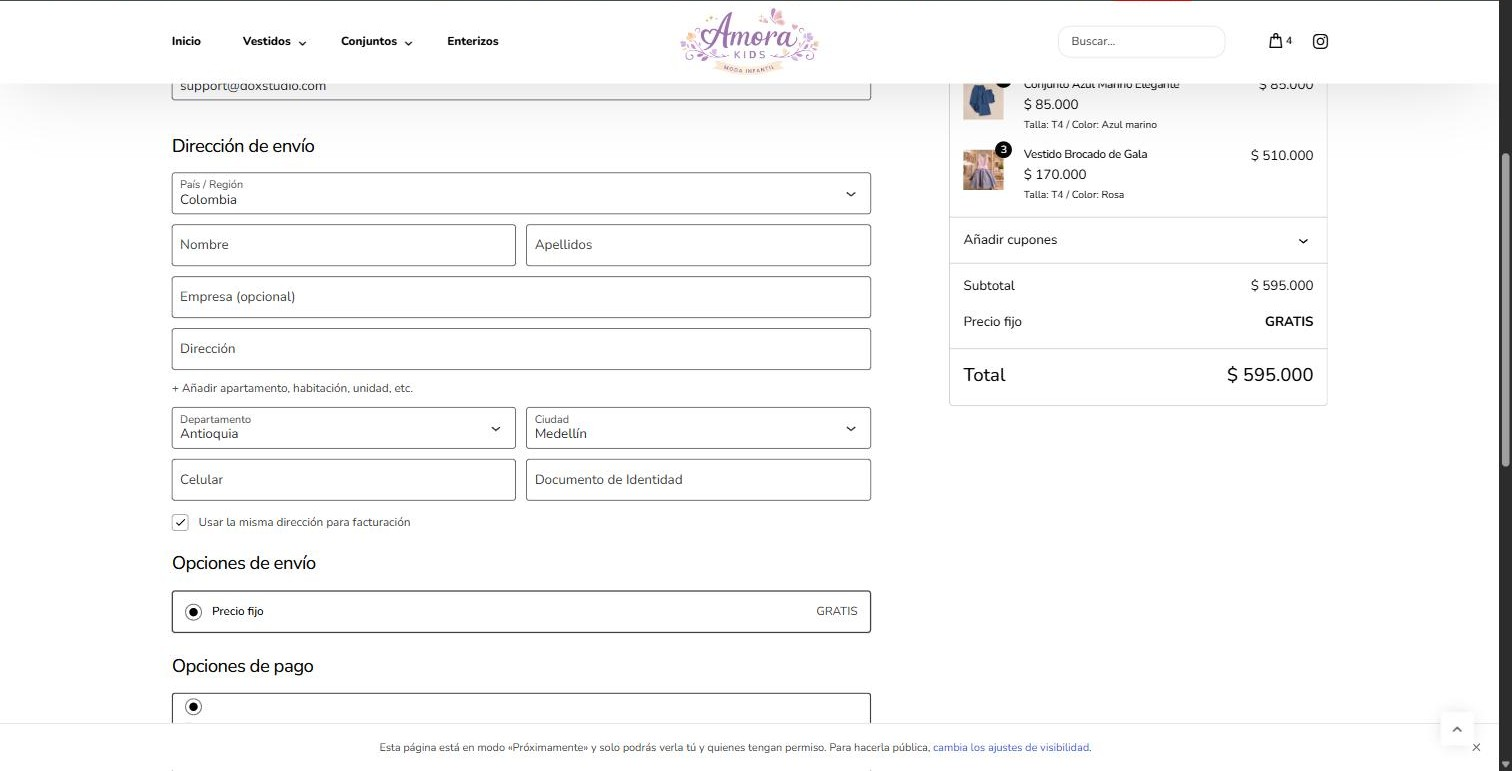
Works in the block checkout and in the classic one. WooCommerce shows Colombia’s 33 departments at checkout, but the City field is left as free text. Most plugins only turn it into a dependent dropdown in the classic checkout; this one also does it in the new block checkout (the React based one), and it adds per-city shipping.
- City dropdown that depends on the selected department, in the WooCommerce block checkout and the classic checkout (shipping and billing addresses).
- In classic stores it also works in My Account > Addresses and in the cart shipping calculator, with a search box.
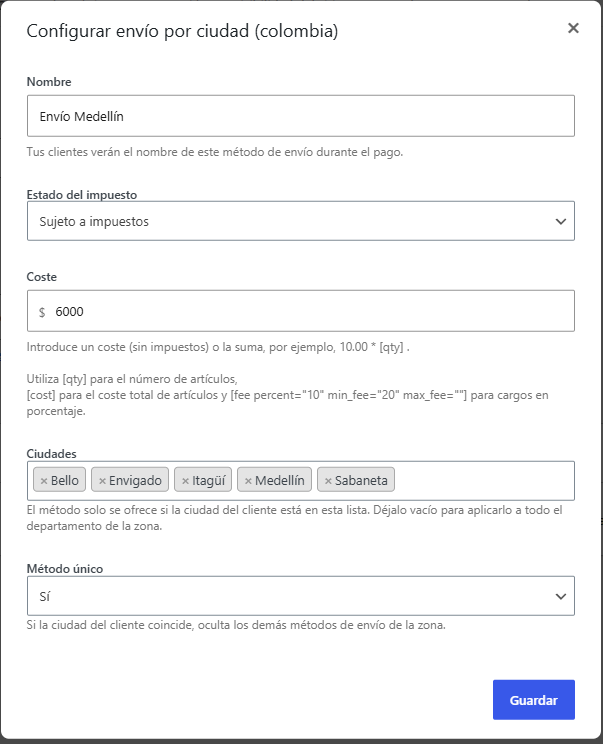
- Adds a per-city shipping method (based on flat rate): pick the cities and a cost inside a zone, with an option to hide the other methods when it applies. The city selector is a search box.
- “Rest of the zone” rates: a general rate that is only offered to cities without a special rate of their own, so a customer in a city with its own price never sees the cheaper general one too.
- Bundles Colombia’s 1,104 official municipalities (DANE), with correct accents.
- Uses WooCommerce’s native departments (ISO 3166-2). No other plugin required.
- Saves the value in the standard
cityfield, so shipping, taxes and the invoice get it unchanged. - Compatible with HPOS and the cart/checkout blocks. Translation ready, with Spanish included.
Credits
The municipality list is built from the open-source “colombia-json” dataset by Marco Vega (https://github.com/marcovega/colombia-json), available under the MIT license, based on official DANE (public domain) data.
Installation
Upload the colciudades folder to /wp-content/plugins/ (or install the ZIP from Plugins > Add New > Upload Plugin), then activate it. Make sure WooCommerce is active. It works with the block Checkout and with the classic one. For per-city shipping, go to WooCommerce > Settings > Shipping, add the “Shipping by city (Colombia)” method to a zone, and pick the cities and the cost.
Änderungsprotokoll
Fixes the "Rest of the zone" rate showing before the customer picks a city, and per-city rates matching a town with the same name in another department.
1.1.1
- Fix: a “Rest of the zone” rate was offered while the customer had picked a department but no city yet, so the cart could show the general rate to a customer whose city has another price (or free shipping). It now waits until there is a city. A rate with an empty list without “Rest of the zone” (the whole department) still works with just the department.
- Fix: per-city rates compared only the city name, so a rate for Palestina (Huila) also applied to Palestina (Caldas) in zones covering several departments. The city must now belong to the customer’s department, and names repeated across the zone’s departments are offered with their department in the city selector. Existing lists keep working.
1.1.0
- New: “Rest of the zone” option in the per-city shipping method. A rate with this option is only offered when the customer’s city is not covered by another per-city rate with its own city list, so the general rate and the special city rate are never shown together. Free shipping, local pickup and other methods are left alone.
1.0.4
- Hardening after a security review: the city list for the shipping method is only built for users who can manage WooCommerce, and the city data printed on the checkout is encoded so that no name can ever close the script tag.
- Fix: a shipping cost typed with a backslash lost it, because the value was unslashed once more than WooCommerce does.
1.0.3
- Renamed to “Colciudades – Ciudades de Colombia para WooCommerce”.
- New: the city dropdown now also works in the classic checkout, My Account > Addresses and the classic cart shipping calculator, as a search box like the Department field.
- For Colombia, Department now comes before City in the address forms (classic and block), so the city list matches the chosen department.
- Per-city shipping now matches cities ignoring accents and case, so a city typed as “medellin” (block cart shipping calculator, addresses saved before the plugin) matches “Medellín”.
- Saved addresses whose city lacks accents are now recognised in the dropdown instead of being cleared.
- “Single method” also works when the city list is empty (whole department), and it only hides other methods in the package where this method applies.
- The hidden original City input no longer takes keyboard focus.
- The checkout script stops looking for the block checkout after 30 seconds on pages that do not use it.
1.0.2
- Fix: on stores whose thousand separator is a dot (e.g. COP), the per-city shipping cost could lose its thousands when saved (50.000 became 50). WooCommerce 11 shows the localised value in the settings modal but only de-localises its own flat rate fields on save; the cost is now interpreted using the store’s separators. Cost formulas keep working as before.
1.0.1
- City label position fix on some themes.
- Per-city shipping method with a searchable city selector, and support for country-level zones.
- Translation ready, with Spanish included.
Screenshots
Für Entwickler
Ist das dein Plugin? Zeigen Sie die Zahlen.
Fügen Sie Ihrer Website, Docs oder GitHub Readme ein Live-Badge hinzu. Es wird von selbst aktualisiert - kein Konto erforderlich.
Best Colciudades alternatives
All block checkout plugins →




Fragen und Antworten
Colciudades: quick answers
Gerade Antworten, gezogen von Live WordPress.org Daten.
Quelle: WordPress.org
Is Colciudades free?
Yes. Colciudades is free to download and use from the official WordPress.org plugin directory.
Is Colciudades safe to use in 2026?
Colciudades is a solid plugin choice in 2026, with a few things worth checking first. It runs on 40+ sites, is rated 5/5 and was last updated 2 months ago, and scores 74/100 on our health check.
How many websites use Colciudades?
Colciudades is active on 40+ WordPress websites and has been downloaded 788 times since it launched in July 2026. It was downloaded 195 times in the last 30 days.
Does Colciudades work with WordPress 7.1?
Yes. The developer has tested Colciudades up to WordPress 7.1.5, the latest release. It requires WordPress 6.5 or newer.
What PHP version does Colciudades need?
Colciudades requires PHP 7.4 or higher. Most hosts run PHP 8.x today, so it works on any modern WordPress hosting.
When was Colciudades last updated?
The latest version, 1.1.1, was released on October 13, 2026 (2 months ago).
Who makes Colciudades?
Colciudades is developed and maintained by David Zoque.
What are the best alternatives to Colciudades?
The most popular alternatives to Colciudades are Checkout Field Editor (Chec… (400K+ installs), Checkout Field Editor for W… (2K+ installs) and Custom WooCommerce Checkout… (2K+ installs).
Angetrieben von PageForge
Eine Vorlage und eine Tabelle. Eine echte Seite für jede Suche.
PageForge Verwandelt jede Zeile eines CSV in eine WordPress-Seite mit eigenem Titel, URL, SEO Felder und Schema entworfen. Kostenlos auf WordPress.org.
- CSV und XLSX, plus Google Sheets auf Beruf und Unternehmen
- seinen eigenen Titel, URL, SEO Felder und Schema für jede Seite
- Arbeitet mit dem Blockeditor, Elementor, Divi und Avada
- Kostenlos auf WordPress.org, keine Kreditkarte