

CLUEVO LMS, E-Learning Platform
Welcome to the CLUEVO Learning Management System for WordPress. Our LMS allows you to add SCORM e-learning modules, video tutorials, podcasts and other media to your WordPress site. That Content can be organized into…

Betrachten Sie eine Alternative
CLUEVO LMS, E-Learning Platform shows warning signs in 2026 — compare the alternatives below before installing. It runs on 400+ sites, is rated 5/5 and was last updated 2 years ago, and scores 31/100 on our health check.
- Kleine Benutzerbasis (400+ aktive Installationen)
- Kein Update in über einem Jahr
- Nur getestet bis WordPress 6.7 (letzt ist 7.1)
Wie stapelt es sich?
Side-by-side bei Installationen, Updates, Bewertungen und Support


Tägliche Downloads
Download-Spitzen folgen normalerweise einer neuen Version - jede Website, die automatisch aktualisiert wird, gilt als Download.
Ranglisten
Where CLUEVO LMS, E-Learning Plat… stands todayWordPress.org Ranglisten suchen
Live-Position in der Plugin-Suche, Top 100| Stichwort | Position |
|---|---|
| e-learning | #26 |
| lms | #83 |
| >100 | |
| quiz | >100 |
| scorm | #11 |
Versionsübernahme
Anteil aktiver Sites pro Release.
Bewertungsaufschlüsselung
★★★★★★★★★★ 5 from 17 reviews
About CLUEVO LMS, E-Learning Platform
From the official readme · v1.13.3Beschreibung
Introduction
Welcome to the CLUEVO Learning Management System for WordPress. Our LMS allows you to add SCORM e-learning modules, video tutorials, podcasts and other media to your WordPress site. That Content can be organized into courses, chapters and modules and you can easily manage the permissions for different users and groups.
⭐ Video Tutorials
⭐ CLUEVO LMS Bundles
⭐ Create interactive E-learning Scorm Courses
Setup the CLUEVO Learning Tree Structure
SCORM
We currently support SCORM 2004 4th edition and SCORM 1.2. Other 2004 editions may work but are not officially supported. We are hard at work to provide better support for more versions of the standard. If you have any suggestions on what standards to support please don’t hesitate to get in touch with us via the support Forum.
Video/Audio
Currently many File Formats like mp3, wav, mp4 and webm are supported. With our free oEmbed extension you can also add and organize videos from Youtube, twitch and other Streaming services.
CLUEVO LMS allows you to use your PDF files as learning modules. Upload a PDF file and use it as a module in your learning tree. Your users place in the document is stored and you can see each student’s location in the document.
Learning Structure
The LMS consists of different courses that in turn contain chapters that contain modules. The first thing you’ll want to do is upload a SCORM module. To do this use the uploader on the Learning Management page in the modules tab. Once you have uploaded one (or more!) modules you can start creating your learning structure. Create some courses and add chapters and modules.
User Management
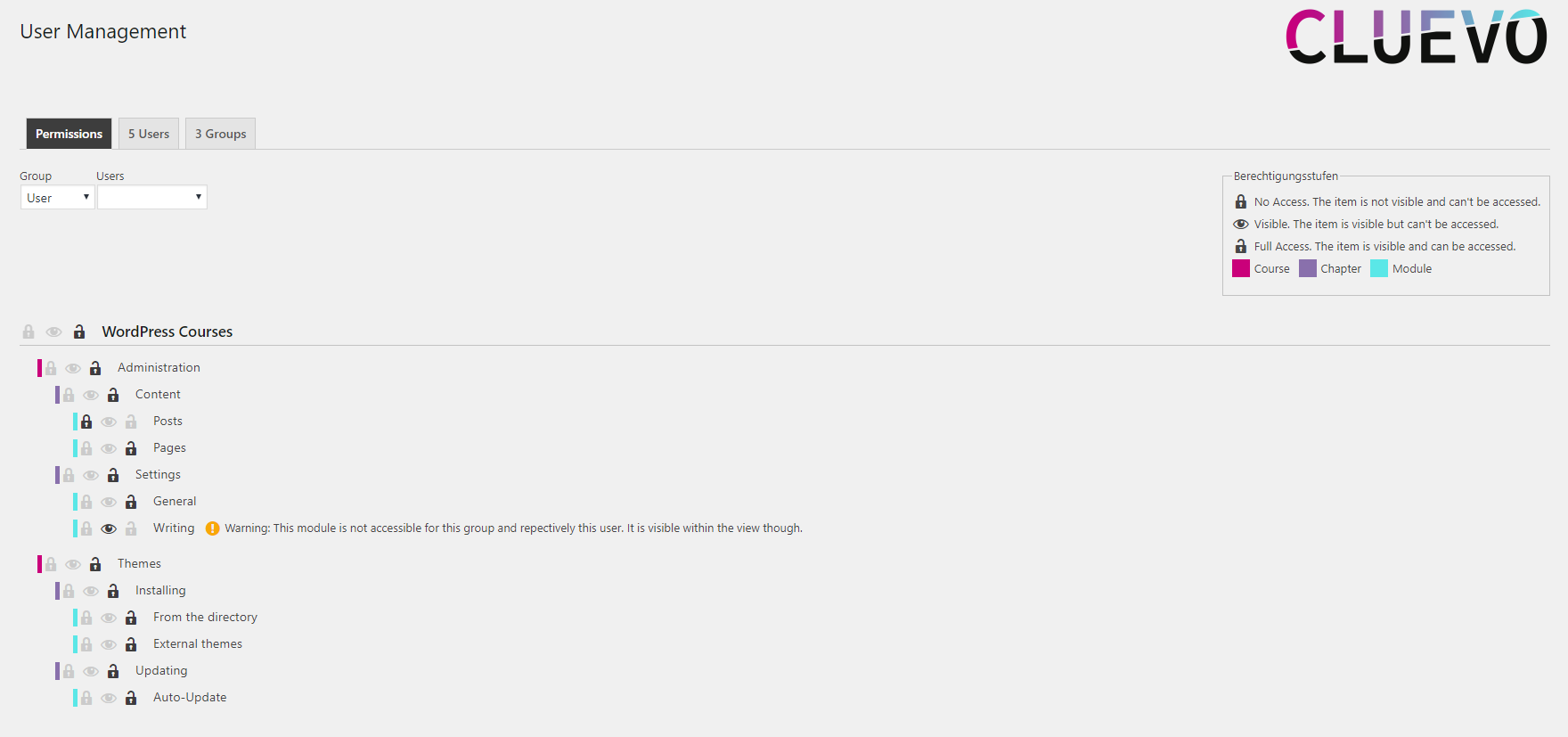
CLUEVO LMS gives you the ability to set permissions for each level of the learning tree. You can assign users to groups and set permissions for groups or just individual users. Each element of the learning tree can have one of three access levels:
0: No access. Items won’t show up anyware for this user/group
1: Visible. Items will be visible for a user/group but cannot otherwise be accessed
2: Open. The user/group has full access to this element.
It is also possible to have permissions expire at a certain date/time.
Hint: As a user with administrative capabilities you have full access to all elements by default.
Reports
The reports page gives you an overview on the progress your users have made. You can also view the different SCORM parameters.
Progress records and SCORM parameters can also be exported to csv files.
Competence
The competence system allows you to define competence areas that consist of different competences. You can then set which modules teach which competences and how much of a competence a module covers.
An example could be that you have a competence area named Backoffice that consists of the following competences:
- Übertreffen
- Word
- Ausblick
Competences are a great alternative way to organize your courses. They enable your users to directly browse modules that teach certain competences.
Einstellungen
CLUEVO LMS provides an in-depth settings page to customize the LMS to your liking. You can customize the way your modules are displayed, protect your modules from external access, allow your students to rate your content and much more.
Extensions
We offer a suite of extension to add functionality to your LMS. Whether it’s support for more types of modules, certificates or reporting, we have it all.
Our Extension include:
Free Extensions
- oEmbed Modules: Allows you to use content like YouTube videos as modules
- Google Documents: Let’s you use your Google Docs as modules. With this you can just whip up a quick presentation and use it as a module
Premium Extensions
- AI Quiz Maker: Transform your Posts into multiple choice quizzes with the push of a button
- Certificates: Design and issue certificates for when your users complete courses
- Multiple Trees: Create and manage more than one learning tree
- User Learning Progress: Adds new user focused reporting for trainers
- User Import: Import users with group memberships
- wooCommerce Integration: Let’s you sell course access via wooCommerce products
Your very own extension
We are always looking to improve on our LMS and also offer our services to implement extensions to your specifications. Feel free to inquire at info@cluevo.at for details.
Now Available: AI Quiz Maker
We’ve recently released our AI Quiz Maker as a premium extension. This extensions allows you to create multiple-choice quizzes from your existint posts and pages or from copy and pasted text. We analyze your content generate quiz questions for you. You can then use these questions to compose your very own quiz modules.
Unterstützen
If you encounter any issues we recommend to submit a ticket via our support system found at cluevo.at -> produkte und dienstleistungen -> support. You can also use the WordPress support forums but response times via tickets are generally faster and we can offer more in depth help via ticket.
Feedback
If you have any feedback or feature requests please do not hesitate to contact us via the support Forum (https://wordpress.org/support/plugin/cluevo-lms/).
Installation
- Laden Sie die Plugin-Dateien in das
/wp-content/plugins/cluevo-lms-Verzeichnis hoch oder installieren Sie das Plugin über den WordPress-Plugin-Bildschirm direkt. - Aktivieren Sie das Plugin über den Bildschirm „Plugins“ in WordPress
- Upload your SCORM modules and create a learning structure through the CLUEVO settings pages
- Optionally set some permissions
- Start learning (or teaching 😉 )!
Änderungsprotokoll
Sicherheitskorrekturen
1.13.3
- Fixed security issue when deleting modules
1.13.1
- Fixed limited attempts
1.13.0
- Reworked and optimized the reporting system
- Reworked and optimized tree system
- Settings page now uses vertical tabs
- Optimized loading of tree pages
- Added a database upgrade tool
- Optimized database by adding indexes where necessary
- Updated styling of admin pages to be more in line with the WordPress default styling
1.12.4
- Added a setting to automatically commit scorm parameters / progress when a module is completed
- Clear orphan permissions when deleting tree items
- Added missing translations
1.12.3
- Added options to select how to handle exising page content on CLUEVO assigned pages
1.12.2
- Use index page from settings for breadcrumbs index
- Respect permissions when displaying toc items
Screenshots


Für Entwickler
Ist das dein Plugin? Zeigen Sie die Zahlen.
Fügen Sie Ihrer Website, Docs oder GitHub Readme ein Live-Badge hinzu. Es wird von selbst aktualisiert - kein Konto erforderlich.
Best CLUEVO LMS, E-Learning Platfo… alternatives
All e-learning plugins →




Fragen und Antworten
CLUEVO LMS, E-Learning Platform: quick answers
Gerade Antworten, gezogen von Live WordPress.org Daten.
Quelle: WordPress.org
Is CLUEVO LMS, E-Learning Platform free?
Yes. CLUEVO LMS, E-Learning Platform is free to download and use from the official WordPress.org plugin directory.
Is CLUEVO LMS, E-Learning Platform safe to use in 2026?
CLUEVO LMS, E-Learning Platform shows warning signs in 2026 — compare the alternatives below before installing. It runs on 400+ sites, is rated 5/5 and was last updated 2 years ago, and scores 31/100 on our health check.
How many websites use CLUEVO LMS, E-Learning Platform?
CLUEVO LMS, E-Learning Platform is active on 400+ WordPress websites and has been downloaded 31,528 times since it launched in February 2019. It was downloaded 355 times in the last 30 days.
Does CLUEVO LMS, E-Learning Platform work with WordPress 7.1?
CLUEVO LMS, E-Learning Platform is officially tested up to WordPress 6.7.12, while the latest release is 7.1.5. It may still work, but try it on a staging site first.
What PHP version does CLUEVO LMS, E-Learning Platform need?
CLUEVO LMS, E-Learning Platform requires PHP 5.6 or higher. Most hosts run PHP 8.x today, so it works on any modern WordPress hosting.
When was CLUEVO LMS, E-Learning Platform last updated?
The latest version, 1.13.3, was released on January 12, 2025 (2 years ago).
Who makes CLUEVO LMS, E-Learning Platform?
CLUEVO LMS, E-Learning Platform is developed and maintained by CLUEVO.
What are the best alternatives to CLUEVO LMS, E-Learning Platform?
The most popular alternatives to CLUEVO LMS, E-Learning Platform are LearnPress – Course Review (20K+ installs), LearnPress – Course Wishlist (10K+ installs) and LearnPress (5K+ installs).
Angetrieben von PageForge
Eine Vorlage und eine Tabelle. Eine echte Seite für jede Suche.
PageForge Verwandelt jede Zeile eines CSV in eine WordPress-Seite mit eigenem Titel, URL, SEO Felder und Schema entworfen. Kostenlos auf WordPress.org.
- CSV und XLSX, plus Google Sheets auf Beruf und Unternehmen
- seinen eigenen Titel, URL, SEO Felder und Schema für jede Seite
- Arbeitet mit dem Blockeditor, Elementor, Divi und Avada
- Kostenlos auf WordPress.org, keine Kreditkarte