


Clear Cache for Me
Purges cache on WPEngine, W3TC, WP Super Cache, WP Fastest Cache when widgets, menus, settings update. Forces browsers to reload CSS and JS files.

Solide Wahl
Clear Cache for Me is a solid plugin choice in 2026, with a few things worth checking first. It runs on 40K+ sites, is rated 4.8/5 and was last updated 5 months ago, and scores 75/100 on our health check.
- Bewährt auf 40.000 aktiven Standorten
- Von Benutzern geliebt — 4,8/5 aus 29 Bewertungen
Wie stapelt es sich?
Side-by-side bei Installationen, Updates, Bewertungen und Support



Tägliche Downloads
Download-Spitzen folgen normalerweise einer neuen Version - jede Website, die automatisch aktualisiert wird, gilt als Download.
Ranglisten
Where Clear Cache for Me stands todayWordPress.org Ranglisten suchen
Live-Position in der Plugin-Suche, Top 100| Stichwort | Position |
|---|---|
| Zwischenspeicher | #15 |
| clear | #1 |
| css | #75 |
| JS | #24 |
| Purge | #16 |
Versionsübernahme
Anteil aktiver Sites pro Release.
Bewertungsaufschlüsselung
★★★★★★★★★★ 4.8 from 29 reviews
About Clear Cache for Me
From the official readme · v2.5Beschreibung
W3 Total Cache and WP Super Cache are great caching plugins, but they do not know when a widget is updated. WPEngine is the best place to host your WordPress installation, but their caching system is no smarter when it comes to updating widgets and menus. I created this plugin because my website did not see any changes when saving widgets or menus using these caching systems. Clear Cache For Me will purge ALL your cache each time you do a save without having to press an additional button. It may be overkill, which may be why it’s not built in, but some people need simplicity.
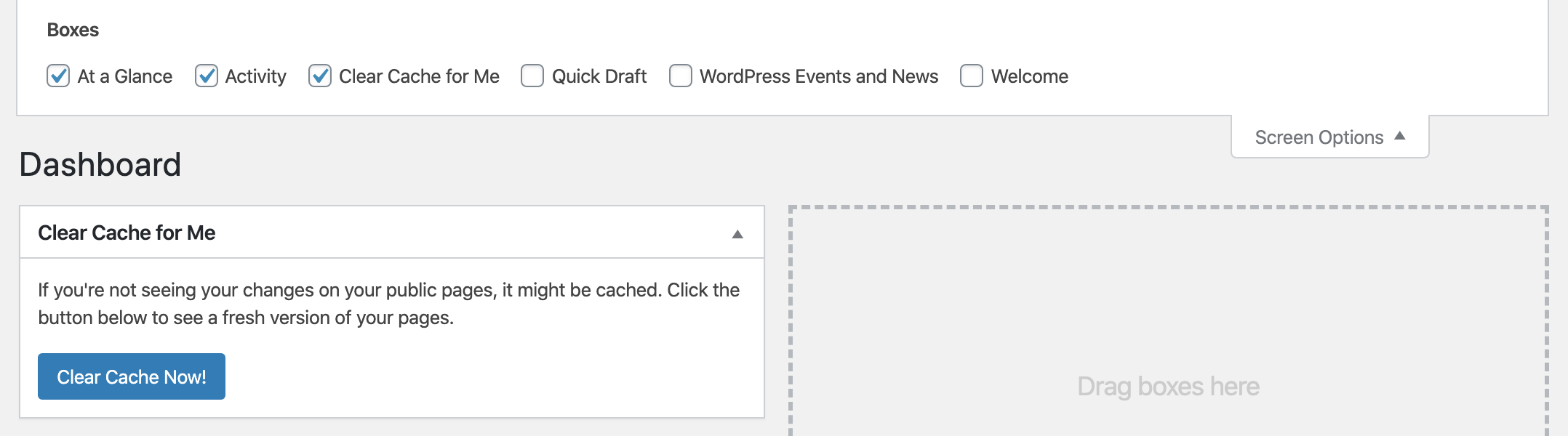
In addition to clearing those pesky caching engines, Clear Cache for Me can force your browser to reload your current theme’s CSS and JS files. I modify my theme’s CSS and JS files every so often and always have trouble with the browser not getting the latest version. So now after clicking on the “Clear Cache Now!” button on the dashboard the browser will be forced to reload the current theme’s CSS and JS files. If you do not click the “Clear Cache Now!” button, the browser will cache the CSS and JS files like it normally does.
The popular Qode themes has a options to set your own custom CSS and JS. Sometimes you may not see your changes for a long while because your browser is trying to get the cached file. Whenever you save your Qode’s options, the CSS and JS files will be forced to reload in the browser on the public side.
Works with the following caching plugins:
- Autooptimieren
- Brise-Cache
- Cache-Enabler
- Cloudflare
- GoDaddy Cache
- Kinsta Cache
- LiteSpeed-Cache
- Elementor (CSS cache)
- Premium-Addons für Elementor
- SiteGround SuperCacher
- Super Seiten-Cache
- WP schnellster Cache
- WP Optimize Cache
- WP Rocket
- WP Super Cache
- W3 Gesamtcache
- WPEngine Cache
Clears all cache for following actions (requires a caching system above to be active):
- When Widgets are saved.
- When Customizer is saved.
- When Menus are saved.
- When a fields in Advanced Custom Fields are saved.
- When a Contact Form 7 form is saved.
- When a Formidable Form form is saved.
- When WooThemes settings are saved.
- When NextGen Gallery albums and galleries are updated (beta – may not clear cache on all actions).
- When Qode options are saved this plugin forces browsers to reload the custom css and custom js.
- When a WP Forms forms or settings are saved.
- When WooCommerce settings are saved. (Cache should already be clearing when products are saved.)
- When settings from the Insert Headers and Footers plugin by WPBeginner are saved.
- When Settings from a settings page is saved. This includes settings from WordPress core, Yoast SEO, and most other plugins using the Settings API.
- When WordPress is updated.
- When plugins are updated, activated, and deactivated.
- When WordPress, plugins, and themes are automaticallly updated.
See the plugin’s homepage for more details.
Note: Since some caching systems run in the shutdown hook, this plugin also runs in that hook. This means if PHP does not have enough time, some code including any hooks within the ccfm_clear_cache_for_all() function are not guaranteed to run. If you need code to run, consider using the ccfm_clear_cache_for_me_setup hook.
Some plugins may have “auto purge” (like Cloudflare), but it doesn’t cover all the items this plugin covers.
Developer Options
ccfm_supported_caching_exists
Use this filter to determine if this plugin should do anything including showing the button on the dashboard. Return true if a caching system is supported.
Default: True if any of the supported caching systems is active.
See Example 1 below.
ccfm_admin_init or ccfm_init_actions
Use this action to add hooks when cache is to be cleared. Or do any other setup activity.
ccfm_clear_cache_for_me_before
Use this action to clear cache from an unsupported caching system before the default caching systems clear their cache.
ccfm_clear_cache_for_me
Use this action to clear cache from an unsupported caching system after the default caching systems clear their cache.
Beispiel
If you were using an unsupported caching system you’ll need to identify the caching plugin’s class or function which clears the cache. As an example, if the unsupported caching system called the MyOtherCache::clear_all() function, you would use the following code to get this plugin to clear the cache.
<?php
function my_other_cache_enable( $return = false ) {
    if ( class_exists( 'MyOtherCache' ) )
        return true;
    return $return;
}
add_filter('ccfm_supported_caching_exists', 'my_other_cache_enable');

function my_other_cache_clear() {
    if ( my_other_cache_enable() )
        MyOtherCache::clear_all();
}
add_action('ccfm_clear_cache_for_me', 'my_other_cache_clear');
Änderungsprotokoll
2.4.2
Updated cache clearing function call for WPEngine.
2.4.1
Redeploying.
2.4
Added cache clearing for Super Page Cache.
2.3
Updated Clear Cache for Me on dashboard.
Added option to exclude cache clearing for theme’s CSS and JS assets.
2.2
Added cache clearing when automatic updates complete.
2.1.1
Fixed “Edit with Elementor” in toolbar not working.
Fixed settings page so “WP Optimize” shows correctly when being used.
Screenshots
Für Entwickler
Ist das dein Plugin? Zeigen Sie die Zahlen.
Fügen Sie Ihrer Website, Docs oder GitHub Readme ein Live-Badge hinzu. Es wird von selbst aktualisiert - kein Konto erforderlich.
Best Clear Cache for Me alternatives
Alle Cache-Plugins →



Fragen und Antworten
Clear Cache for Me: quick answers
Gerade Antworten, gezogen von Live WordPress.org Daten.
Quelle: WordPress.org
Is Clear Cache for Me free?
Yes. Clear Cache for Me is free to download and use from the official WordPress.org plugin directory.
Is Clear Cache for Me safe to use in 2026?
Clear Cache for Me is a solid plugin choice in 2026, with a few things worth checking first. It runs on 40K+ sites, is rated 4.8/5 and was last updated 5 months ago, and scores 75/100 on our health check.
How many websites use Clear Cache for Me?
Clear Cache for Me is active on 40K+ WordPress websites and has been downloaded 788,795 times since it launched in January 2014. It was downloaded 4,641 times in the last 30 days.
Does Clear Cache for Me work with WordPress 7.1?
Clear Cache for Me is officially tested up to WordPress 7.0.9, while the latest release is 7.1.5. It may still work, but try it on a staging site first.
When was Clear Cache for Me last updated?
The latest version, 2.5, was released on June 18, 2026 (5 months ago).
Who makes Clear Cache for Me?
Clear Cache for Me is developed and maintained by webheadcoder.
What are the best alternatives to Clear Cache for Me?
The most popular alternatives to Clear Cache for Me are WP Super Cache (1M+ installs), WP Fastest Cache (1M+ installs) and WP-Optimize (1M+ installs).
Angetrieben von PageForge
Eine Vorlage und eine Tabelle. Eine echte Seite für jede Suche.
PageForge Verwandelt jede Zeile eines CSV in eine WordPress-Seite mit eigenem Titel, URL, SEO Felder und Schema entworfen. Kostenlos auf WordPress.org.
- CSV und XLSX, plus Google Sheets auf Beruf und Unternehmen
- seinen eigenen Titel, URL, SEO Felder und Schema für jede Seite
- Arbeitet mit dem Blockeditor, Elementor, Divi und Avada
- Kostenlos auf WordPress.org, keine Kreditkarte