


SilentShield – Captcha & Anti-Spam for WordPress (CF7, WPForms, Elementor, WooCommerce)
SilentShield – the invisible shield against spam. Spam is the weed of the internet. It clogs your forms, steals your time, and corrupts your data.

Sichere Auswahl
Yes — SilentShield is a safe, well-maintained plugin to use in 2026. It runs on 10K+ sites, is rated 4.7/5 and was last updated 1 month ago, and scores 87/100 on our health check.
- Bewährt im Maßstab auf 10k + aktiven Standorten
- Loved by users — 4.7/5 from 24 reviews
- Getestet mit dem neuesten WordPress (7.1)
- Responsive Support – 83 % der aktuellen Threads wurden behoben
Wie stapelt es sich?
Side-by-side bei Installationen, Updates, Bewertungen und Support



Tägliche Downloads
Download-Spitzen folgen normalerweise einer neuen Version - jede Website, die automatisch aktualisiert wird, gilt als Download.
Ranglisten
Where SilentShield stands todayWordPress.org Ranglisten suchen
Live-Position in der Plugin-Suche, Top 100| Stichwort | Position |
|---|---|
| Captcha | #7 |
| Kontaktformular 7 | #20 |
| fluentform | #2 |
| honeypot | #11 |
| Spamschutz | #19 |
Versionsübernahme
Anteil aktiver Sites pro Release.
Bewertungsaufschlüsselung
★★★★★★★★★★ 4.7 from 24 reviews
About SilentShield
From the official readme · v2.15.16Beschreibung
SilentShield is a unified captcha and anti-spam plugin for WordPress.
It works with the most popular form builders and protects login, registration, and comment forms – without slowing your site.
Why choose SilentShield?
– Invisible defense – Captcha, honeypot, and blacklists working silently.
– Instant results – Install, activate, and stop spam.
– Universal support – Works with Contact Form 7, WPForms, Elementor, Formidable, Ninja Forms, Forminator, Kadence, WooCommerce, and more.
– Privacy-first – No cookies, no tracking, built for GDPR / DSGVO-compliant use.
SilentShield doesn’t just protect forms.
It protects your time, your customers, your business.
Kernfunktionen
- Invisible Captcha (Arithmetic, Honeypot, Image)
- Smart IP Blocking & Blacklists
- Spam filters for links, code & keywords
- Whitelisting for admins & customers
- GDPR-ready, no cookies, no tracking
Supported Form Plugins & Integrations
SilentShield protects forms from all major WordPress form builders and core features:
Form Builders:
– Contact Form 7 (CF7)
– WPForms / WPForms Lite
– Elementor Pro Forms (classic widget and v4 “atomic” forms)
– Gravity Forms
– Fluent Forms
– Formidable Forms
– Ninja Forms
– Forminator
– JetFormBuilder
– Kadence Blocks (Advanced Form)
– Jetpack Forms (contact form block and shortcode)
– Avada (Fusion Builder) Forms
Newsletter:
– MC4WP – Mailchimp for WordPress (signup forms)
WooCommerce:
– Checkout – block (the default for new shops since WooCommerce 8.3)
– Checkout – classic (incl. PayPal Payments)
– Login
– Registration
– Lost password
– Account details
– Works with Germanized for WooCommerce (order button, legal checkboxes, EU withdrawal form)
WordPress Core:
– Login form (wp-login.php)
– Registration form
– Lost password form
– Comment forms (including WooCommerce product reviews)
Communities & Forums:
– bbPress (new topics and replies)
– BuddyPress (member registration)
Donations:
– GiveWP (classic donation form; the visual-builder form is not yet covered)
Other:
– Ultimate Member (Login & Registration)
– WP Job Manager (Job Applications)
Each integration can be enabled or disabled individually under Settings > Extended.
Protection Layers
SilentShield uses 10+ protection mechanisms working together:
- Captcha – Arithmetic math, honeypot, or image-based captcha
- JavaScript Protection – Detects submissions from bots without JS support
- Browser Detection – Validates User-Agent strings
- Timer Protection – Blocks submissions faster than a human can type
- Multiple Submission Protection – Prevents rapid duplicate submissions
- IP Rate Limiting – Limits requests per IP and time window
- IP Blacklist – Block known bad IPs
- Content Rules – Limit URLs, block BBCode, keyword blacklist
- Gibberish Detection – Recognises submissions filled with random characters, the kind a bot writes when it only needs the form to go through. Unlike every other check it does not depend on the sender’s browser, so a bot driving a real browser cannot pass it by playing along. Starts in observation mode and blocks nothing until you switch it on.
- Whitelist – Skip validation for admins, logged-in users, or specific emails/IPs
- SilentShield API – Cloud-based spam detection (silentshield.io)
The Promise
SilentShield is not “just another plugin.”
It’s an invisible wall against the background noise of the internet.
Activate once – and your forms are human again.
Want more? SilentShield API
Everything above is free and stays free. No feature is held back, no submission limit, no account needed.
What the free plugin cannot do is recognise a bot that behaves like a person — one driving a real browser, solving the captcha, typing at human speed. Rules can only catch what looks wrong, and those do not.
The SilentShield API answers that with behaviour analysis and browser fingerprinting, scored in the cloud, and it usually decides without showing anyone a captcha at all. Switch it on and the local protections stay exactly where they are as a fallback — if the API is ever unreachable, your forms are still protected.
There is a free plan and a trial, and you can see what it would have caught before you pay for anything: turn on Comparison Mode and the plugin logs what the API would have decided, alongside what your local rules actually did.
👉 Plans and free trial at silentshield.io
Privacy & Telemetry
- No cookies, no user tracking.
- Encrypted IP storage (max. 2 months, only for spam defense).
- Every transmission described below is optional and can be switched off in the plugin settings.
- The plugin’s built-in Privacy page shows which of these are active on your site, what that means, and gives you ready-made privacy-policy snippets in 25 languages.
1. Plugin statistics (setting “Telemetry”)
Anonymous, no personal data, sent at most once a day:
– plugin_slug, plugin_version
– snapshot_date
– settings_json (anonymized config – only boolean/integer flags, no free-text)
– features_json (enabled features)
– created_at, first_seen, last_seen
– counters_json (spam events)
– wp_version, php_version, locale
2. AI-crawler observation (setting “Observe AI crawlers”, on by default; SILENTSHIELD_OBSERVER to force off)
Sent only for requests identified as an AI crawler — never for your human visitors. Delivered after the page has already been sent to the visitor:
– ua (the crawler’s User-Agent), ip, path (without query string), method
– The IP address is pseudonymised on the server (daily keyed hash) and never stored in the clear.
3. Blocked-request reports (only with “Block AI crawlers (enforce)” on; follows the observation setting above)
Same fields as (2), plus the outcome (deny / throttle), for every request enforcement turned away. Note that a block rule which is not restricted to a specific crawler can also catch a human visitor — that request is then reported in the same way.
4. Form assessment (only with the SilentShield API enabled)
See the API snippet on the plugin’s Privacy page for the full description.
Installation
- Upload to
/wp-content/plugins/. - Activate via WordPress “Plugins” menu.
- Configure protection settings under Settings > SilentShield.
For detailed setup instructions, see docs/installation.md.
Änderungsprotokoll
2.15.16
- Fix [Formidable Forms]: The captcha now appears above the submit button. Current Formidable versions print the submit button as a form field, so the captcha was added underneath it. It is now placed directly in front of the button.
2.15.15
- Fix [Protection]: Logging in with a password manager’s autofill no longer fails with the honeypot method. Bitwarden ignores
autocomplete="off"and filled the invisible honeypot field together with the login form, so the plugin took the login for a bot and refused it. The field now carries Bitwarden’s opt-out attribute and is left alone.
2.15.14
- Fix [Protection]: IP protection no longer turns away people who log in again shortly after. The waiting period between two submissions is meant to slow down form floods, but it also applied to the login form: anyone who logged out and straight back in, or who mistyped a password and tried again, was refused for the whole period and saw only “IP check”. Login forms are now exempt from the waiting period. Repeated failed attempts still count towards the temporary block, so brute-force protection is unchanged.
- Improvement [Protection]: When the IP protection does refuse a submission, the visitor now reads what to do — “Too many attempts in a short time. Please wait a moment and try again.” — instead of the bare label “IP check”. The text is translated in all 26 languages.
- Improvement [Admin]: SilentChat is live: the “Coming soon” label on the API page is now a link to silentchat.de.
2.15.13
- Fix [WooCommerce]: Block checkout: orders are no longer refused when the SilentShield API protection is switched on. The block checkout hands its form data to the plugin separately instead of through the regular form submission, so the API protection never saw the behaviour token the page had produced and rejected every order. The token is now read from the data the checkout provides.
- Fix [WPForms]: WPForms forms could fail to send a second time right after a submission attempt. The form was stopped before the plugin had decided whether to let it through, so a resubmit within the protection window was swallowed. The check now runs first, and if anything is unclear the form is released.
- Improvement [Admin]: The API page and the Analytics screen no longer show detection-rate figures (such as 99 %) that could not be backed up. The dashboard now tells apart “active”, “key present but protection off” and “key missing”.
- Improvement [Admin]: When the API protection is on and the site is served over plain http, an admin notice explains that the protection needs a secure connection (localhost is exempt).
2.15.12
- Fix [Protection]: Jetpack and WPForms: with gibberish detection set to block, genuine messages are no longer turned away. Both form plugins send an encoded status value along with every form — Jetpack a long security token, WPForms a block of usage data. Gibberish detection read these values as text and scored them as dozens of random words, which on its own was enough to reject the submission. For Jetpack forms this was the case since gibberish detection was introduced in version 2.13.0; for WPForms it started with 2.15.11, when the detection began reading the fields WPForms nests inside its form. Only sites that had switched gibberish detection from observing to blocking were affected — in the default observation mode nothing was ever rejected. Values like these are now recognised and ignored, whatever a form plugin calls them, while what your visitors type is checked as before.
- Fix [Protection]: In the WordPress comment form, gibberish detection checks the commenter’s name again. Version 2.15.11 had stopped reading it.
- Improvement [Compatibility]: Tested with Germanized for WooCommerce 4.1 — classic and block checkout with its order button and terms checkbox, the EU withdrawal form, and account login and registration. Every order placed in these tests is also checked in WooCommerce itself: accepted orders are stored exactly once, refused ones not at all.
2.15.11
- Fix [Protection]: Gibberish detection now works in Elementor, WPForms and Formidable forms — until now it could never block anything there. These form plugins send their fields as a nested group (Elementor as
form_fields[…], WPForms aswpforms[fields][…], Formidable asitem_meta[…]), and the detection only read the top level of a submission. It therefore scored the form’s own housekeeping, such as the page title, and never saw a single word a visitor had typed: a message made of nothing but random strings went through even with the detection set to block. The same applied to Elementor’s new atomic forms and to the name field of Fluent Forms. All of them are read completely now. If you switched gibberish detection to blocking because of spam in one of these forms, it takes effect with this update. - Fix [Protection]: Gravity Forms: gibberish detection no longer counts one of the form’s hidden fields against every submission. Gravity Forms sends an encoded status field with each form, and the detection read it as text and scored it as random characters — one “suspicious” field in every submission before a visitor had typed anything. With the lowest threshold of two fields, one unusual real entry, such as a foreign company name, was enough to turn a genuine enquiry away. The field is ignored now.
- New [Forms]: The Forms screen now shows whether the plugin can read your forms. Next to each integration a badge says whether the fields your visitors fill in are recognised, and selecting the integration shows the details: a self-test with a sample submission in that form plugin’s format, the names of the fields found in your last real submission (never their content), and whether gibberish detection blocks or only observes there. If your last test submission came from a whitelisted visitor — usually you, testing while logged in as an administrator — it says so, because such submissions are never checked.
- Improvement [Compatibility]: Tested with WordPress 7.1 and PHP 8.5. On PHP 8.5, every image captcha shown to a visitor wrote a deprecation notice to the PHP error log; on sites that log notices, that could fill the log quickly. It no longer does, and neither does the one notice the plugin caused on PHP 8.4 and later. Nothing changes for visitors, and the plugin still runs on PHP 7.4.
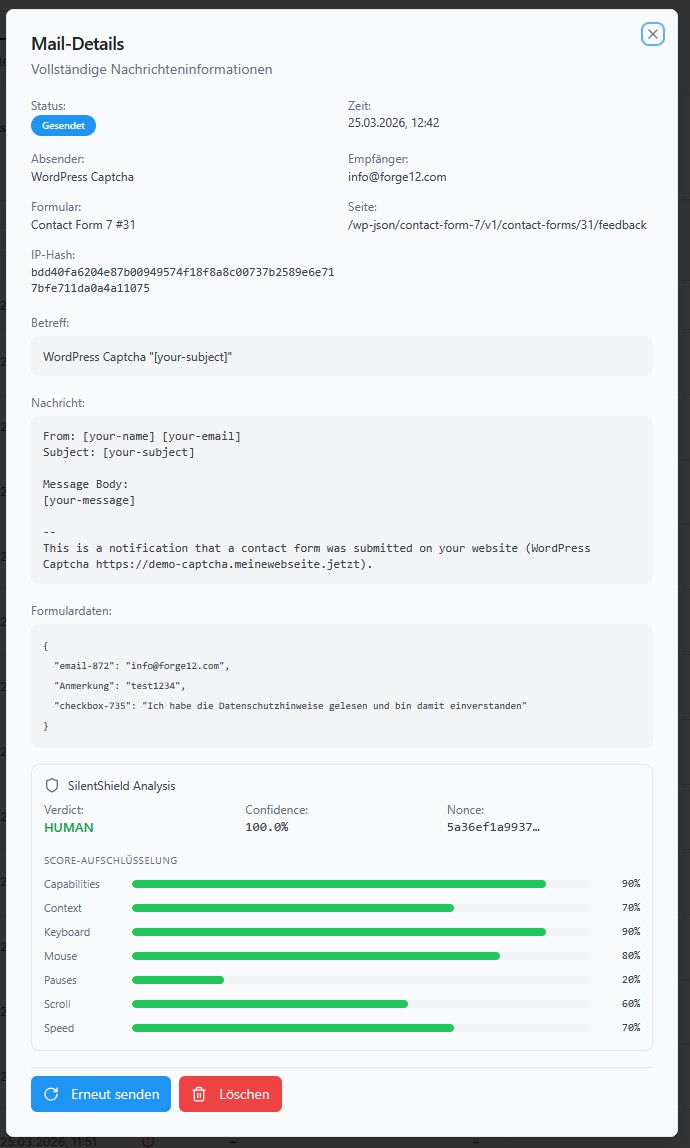
Screenshots
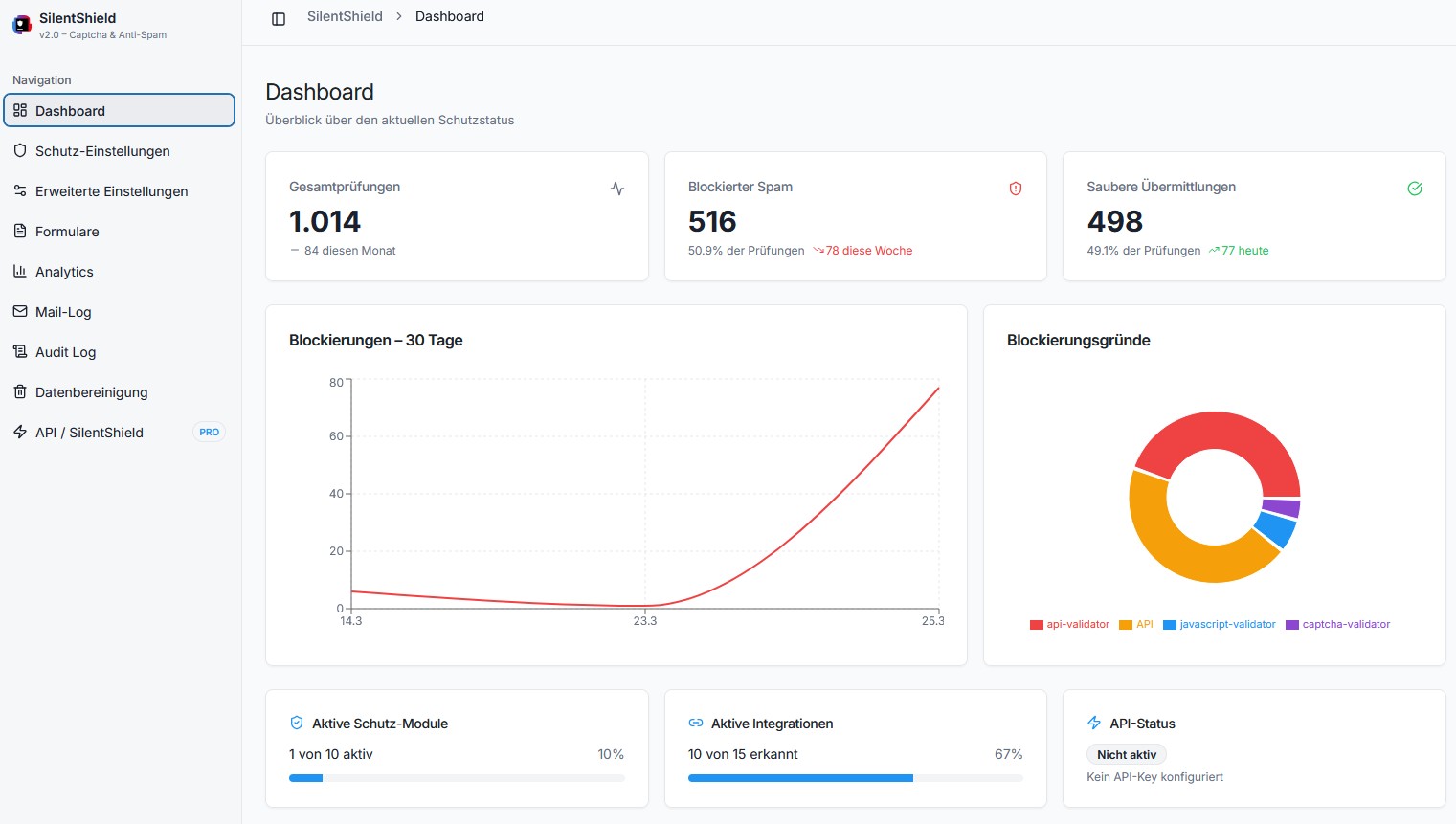
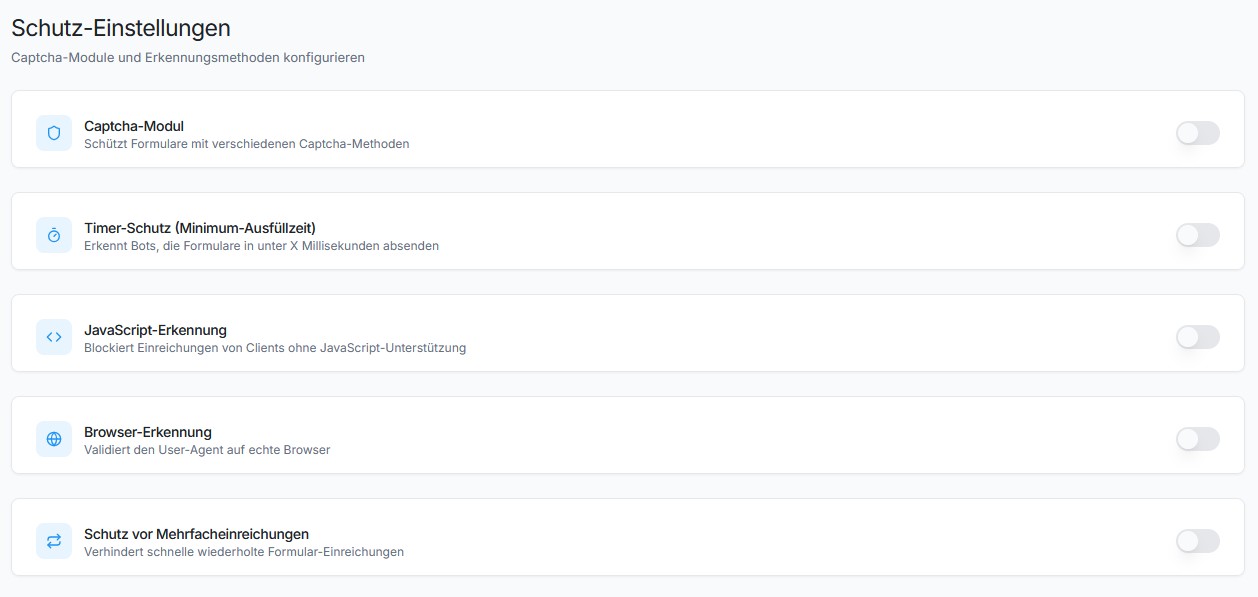
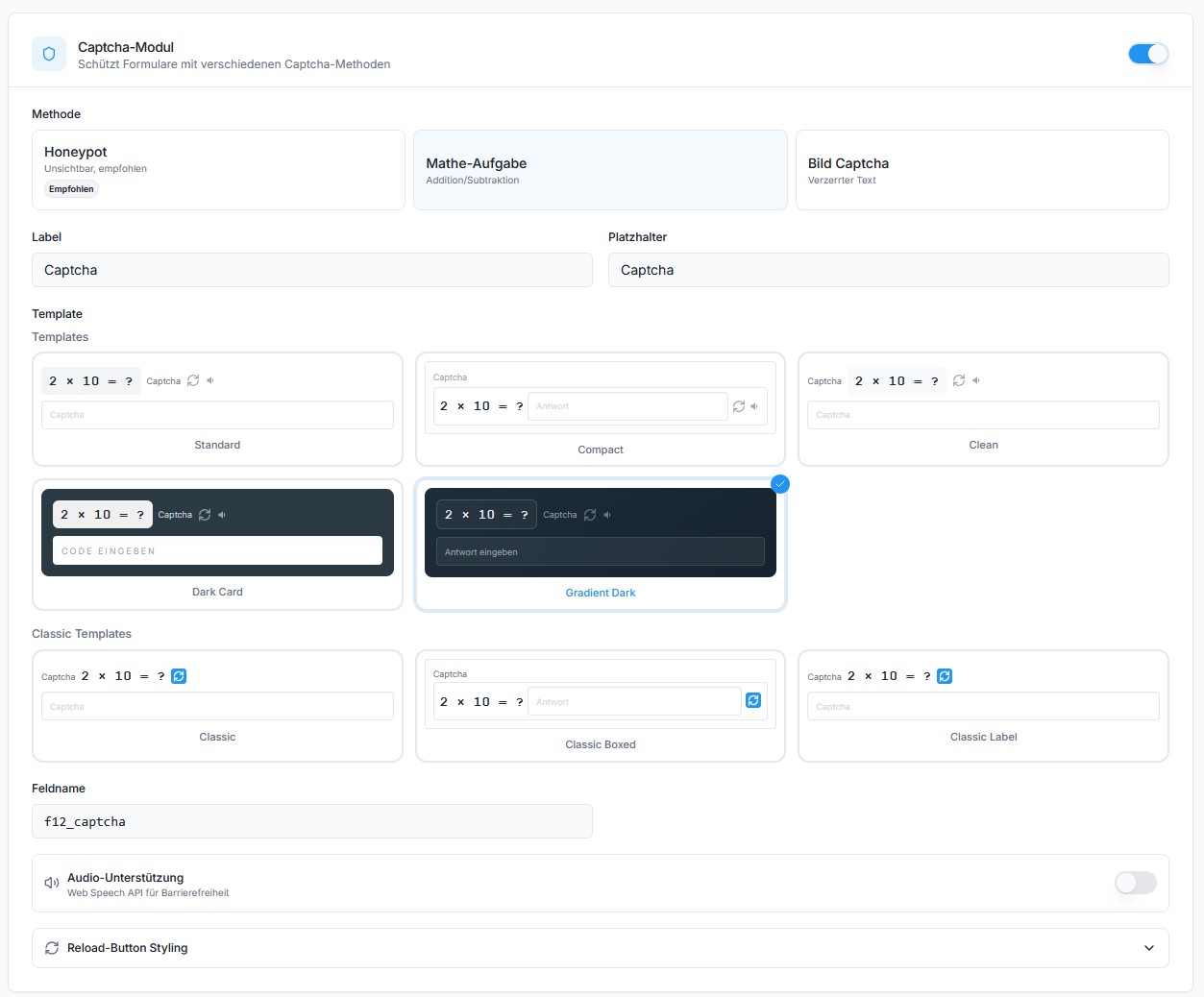
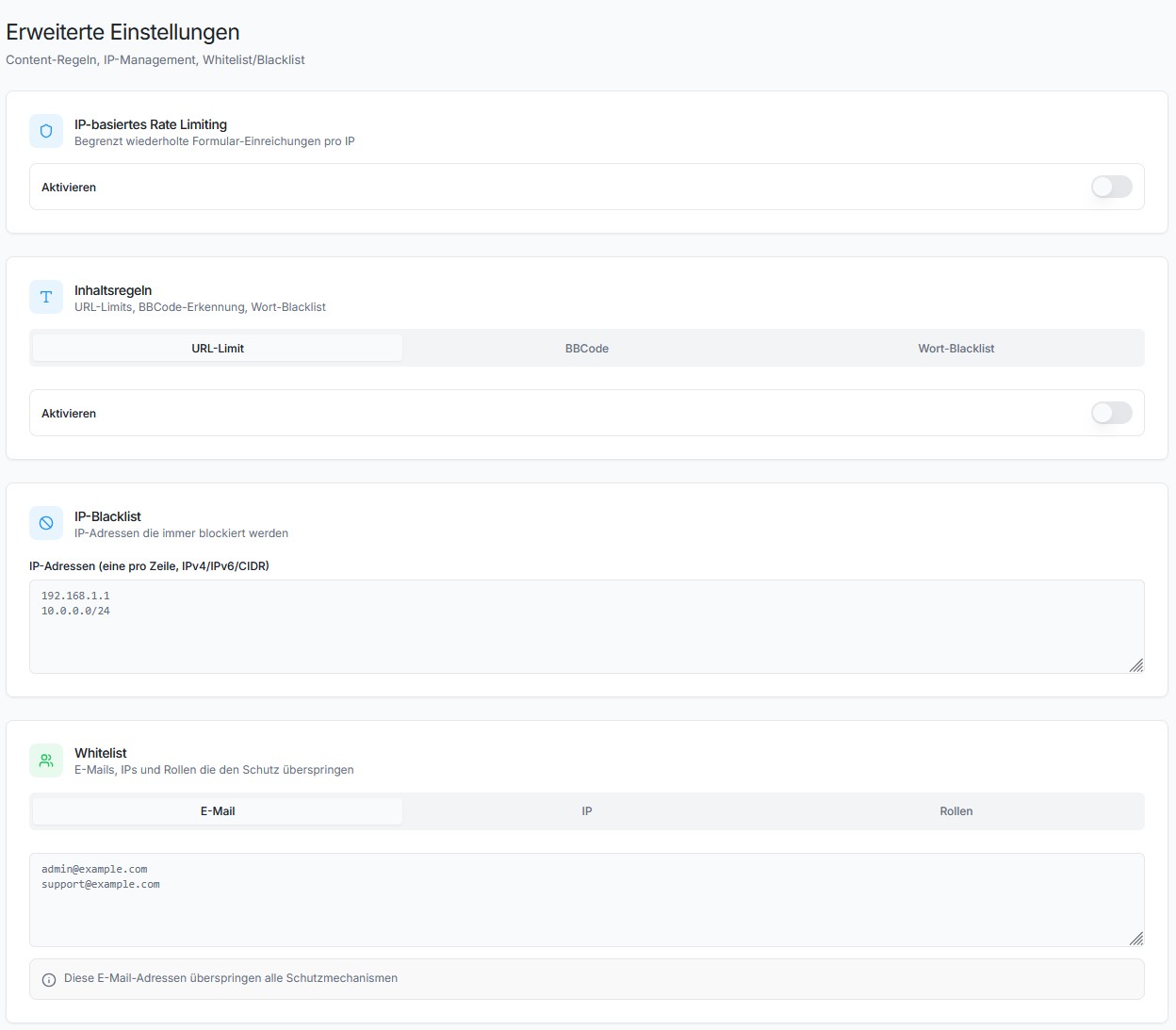
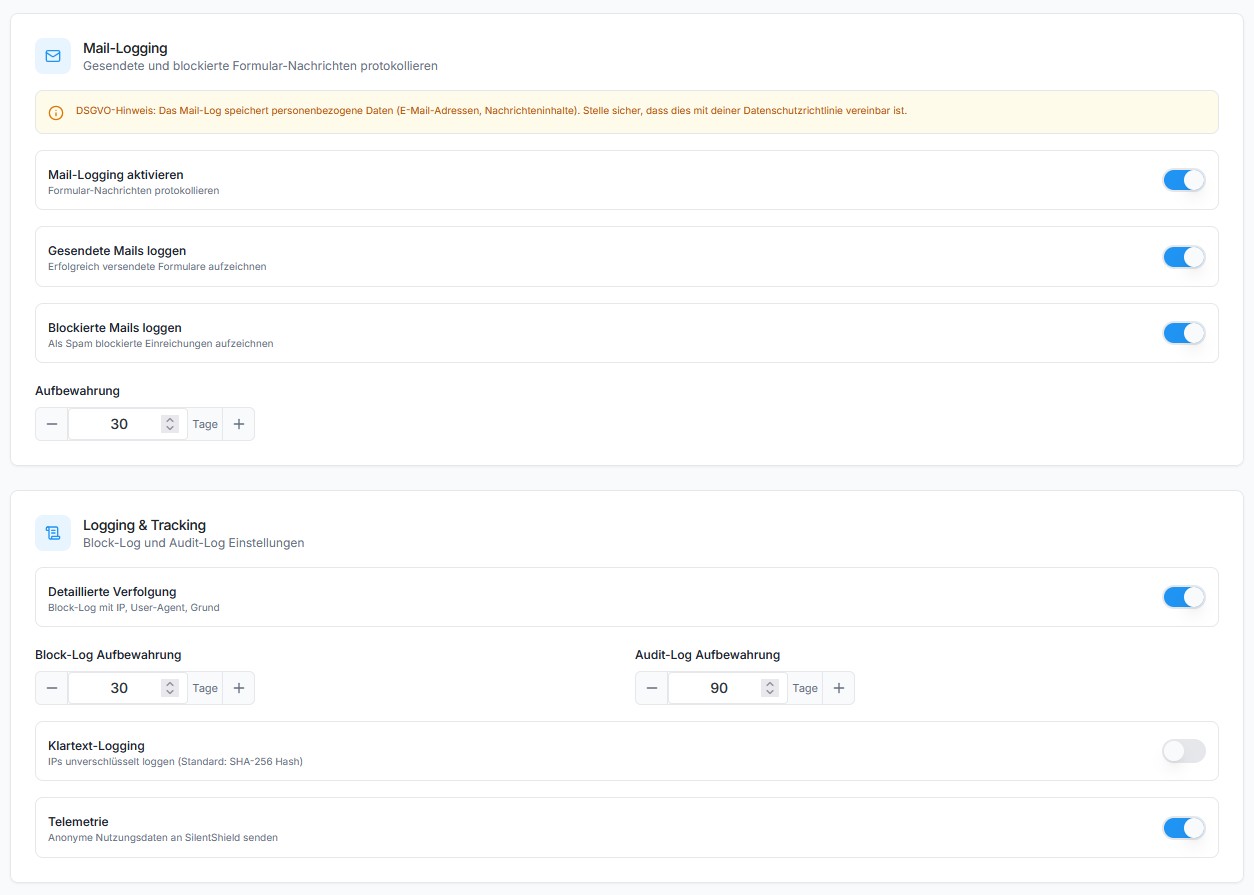
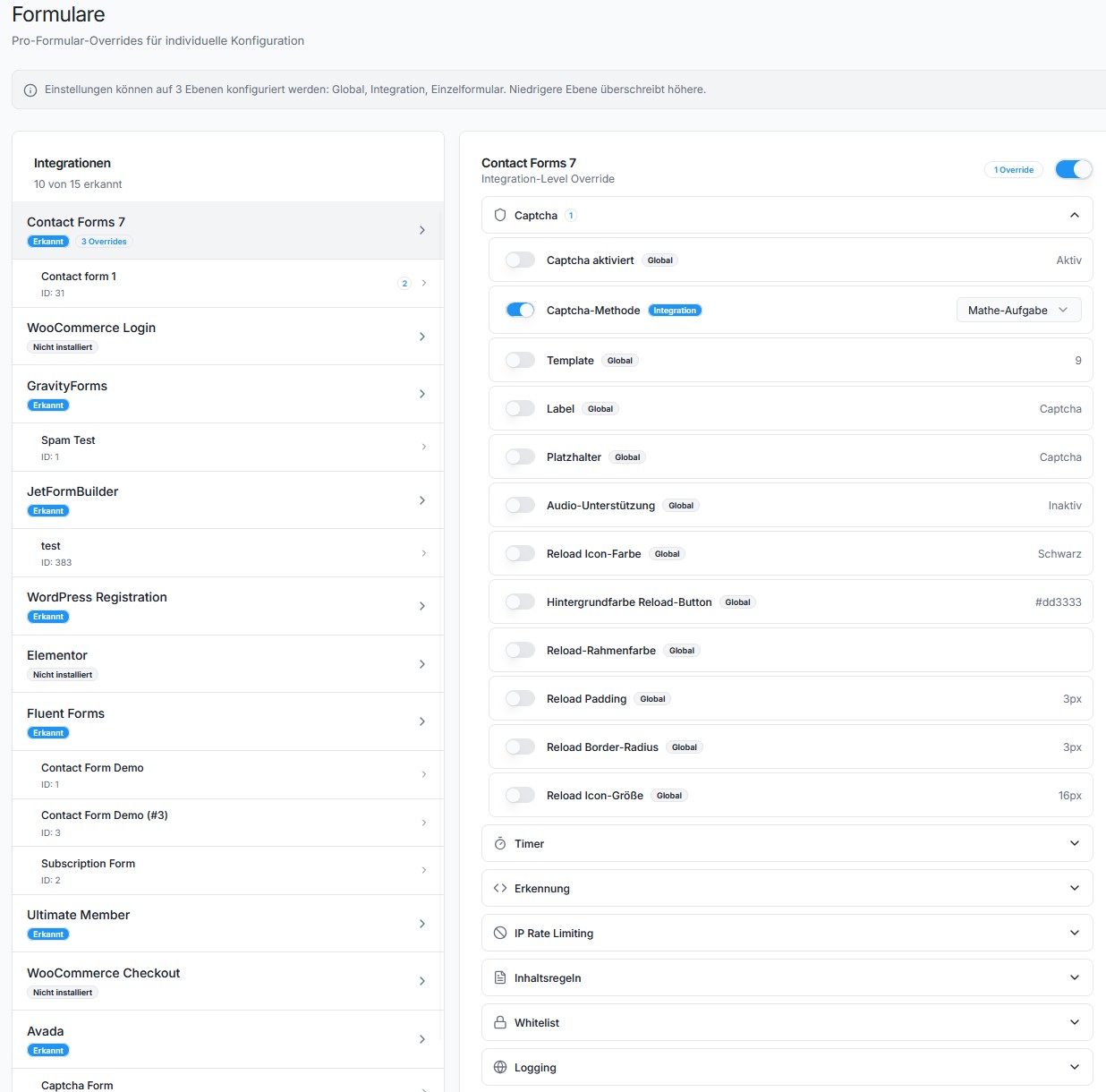
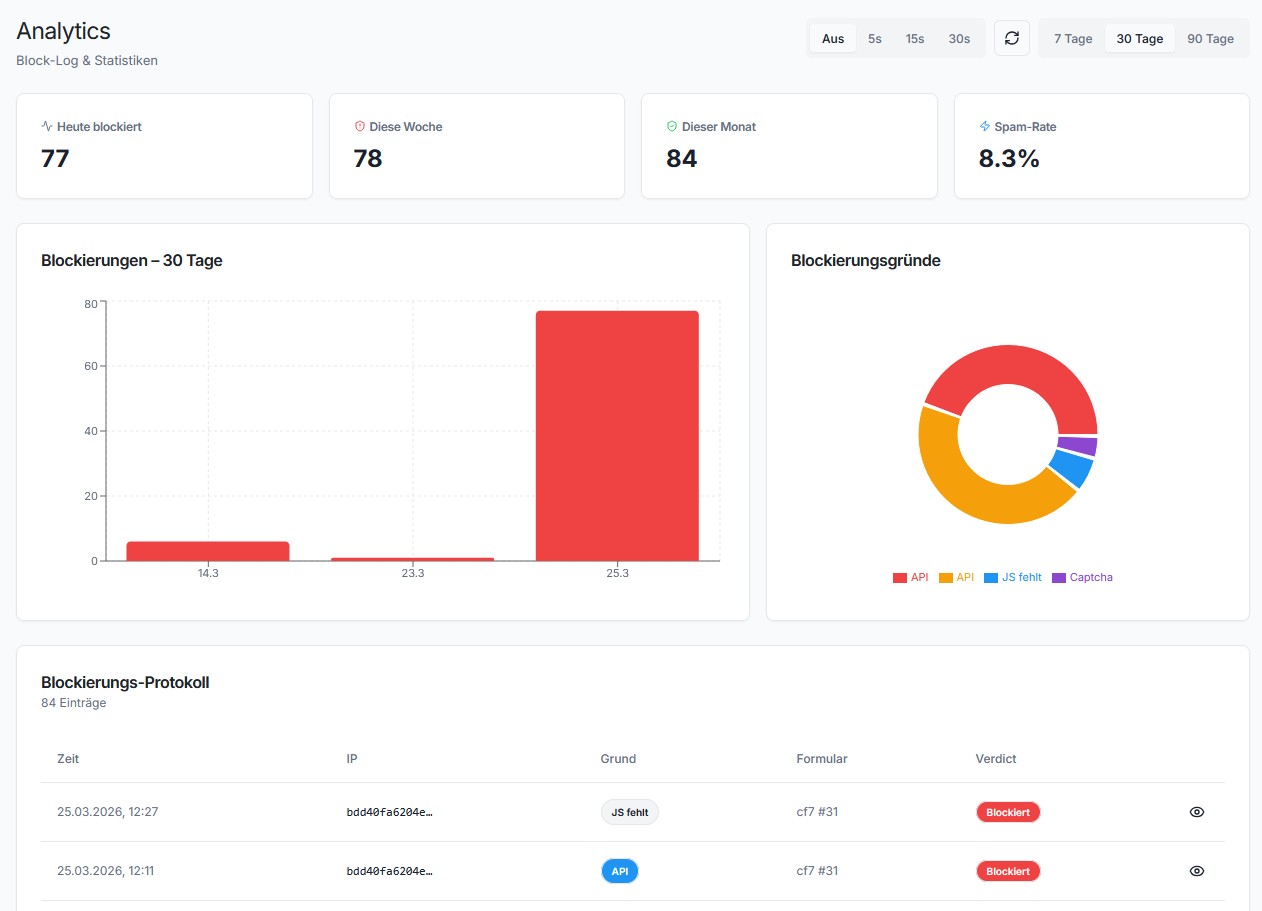
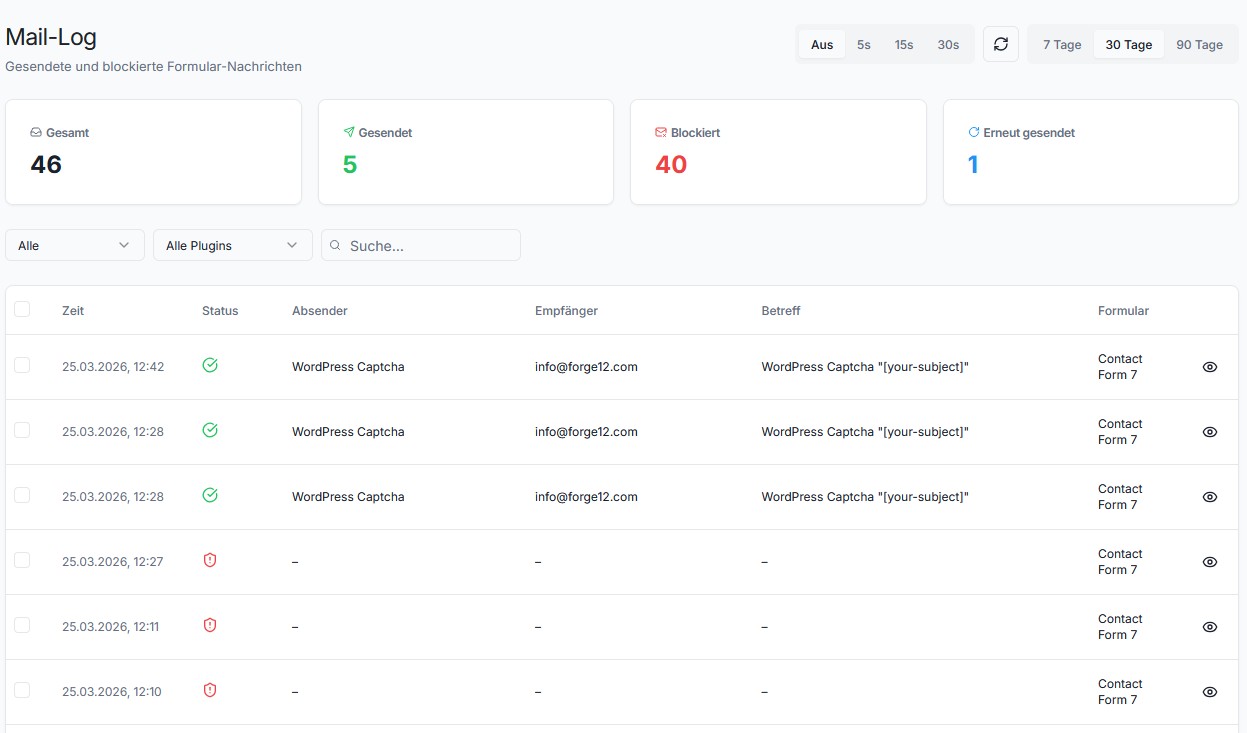
Für Entwickler
Ist das dein Plugin? Zeigen Sie die Zahlen.
Fügen Sie Ihrer Website, Docs oder GitHub Readme ein Live-Badge hinzu. Es wird von selbst aktualisiert - kein Konto erforderlich.
Best SilentShield alternatives
Alle Captcha-Plugins →




Fragen und Antworten
SilentShield: quick answers
Gerade Antworten, gezogen von Live WordPress.org Daten.
Quelle: WordPress.org
Is SilentShield free?
Yes. SilentShield is free to download and use from the official WordPress.org plugin directory.
Is SilentShield safe to use in 2026?
Yes — SilentShield is a safe, well-maintained plugin to use in 2026. It runs on 10K+ sites, is rated 4.7/5 and was last updated 1 month ago, and scores 87/100 on our health check.
How many websites use SilentShield?
SilentShield is active on 10K+ WordPress websites and has been downloaded 315,328 times since it launched in October 2021. It was downloaded 4,617 times in the last 30 days.
Does SilentShield work with WordPress 7.1?
Yes. The developer has tested SilentShield up to WordPress 7.1.5, the latest release. It requires WordPress 5.2 or newer.
What PHP version does SilentShield need?
SilentShield requires PHP 7.4 or higher. Most hosts run PHP 8.x today, so it works on any modern WordPress hosting.
When was SilentShield last updated?
The latest version, 2.15.16, was released on October 8, 2026 (1 month ago).
Who makes SilentShield?
SilentShield is developed and maintained by Forge12 Interactive GmbH.
What are the best alternatives to SilentShield?
The most popular alternatives to SilentShield are SiteGuard WP Plugin (600K+ installs), CF7 Apps (300K+ installs) and Really Simple CAPTCHA (300K+ installs).
Angetrieben von PageForge
Eine Vorlage und eine Tabelle. Eine echte Seite für jede Suche.
PageForge Verwandelt jede Zeile eines CSV in eine WordPress-Seite mit eigenem Titel, URL, SEO Felder und Schema entworfen. Kostenlos auf WordPress.org.
- CSV und XLSX, plus Google Sheets auf Beruf und Unternehmen
- seinen eigenen Titel, URL, SEO Felder und Schema für jede Seite
- Arbeitet mit dem Blockeditor, Elementor, Divi und Avada
- Kostenlos auf WordPress.org, keine Kreditkarte