


Calendar Plus
A simple but effective Calendar plugin for WordPress that allows you to manage your events and appointments and display them to the world on your website. The Plus is that Two seperate calendars may be used. Also a…

Betrachten Sie eine Alternative
Calendar Plus shows warning signs in 2026 — compare the alternatives below before installing. It runs on 100+ sites and was last updated 16 years ago, and scores 25/100 on our health check.
- Kleine Benutzerbasis (100+ aktive Installationen)
- Bisher sehr wenige Bewertungen
- No update in 16 years
- Nur getestet bis WordPress 3.0 (letzt ist 7.1)
Wie stapelt es sich?
Side-by-side bei Installationen, Updates, Bewertungen und Support



Tägliche Downloads
Download-Spitzen folgen normalerweise einer neuen Version - jede Website, die automatisch aktualisiert wird, gilt als Download.
Ranglisten
Where Calendar Plus stands todayWordPress.org Ranglisten suchen
Live-Position in der Plugin-Suche, Top 100| Stichwort | Position |
|---|---|
| calendar | >100 |
| dates | >100 |
| Veranstaltungen | >100 |
| times | >100 |
Versionsübernahme
Anteil aktiver Sites pro Release.
About Calendar Plus
Aus der offiziellen Readme · V1.2.4Beschreibung
A simple but effective Calendar plugin for WordPress that allows you to manage your events and appointments and display them to the world on your website. The Plus is that Two seperate calendars may be used. Also a smaller displayed version of the Calendar to better fit into page or post content.
This can be used as a drop-in replacement for the original Calendar plguin.
Eigenschaften:
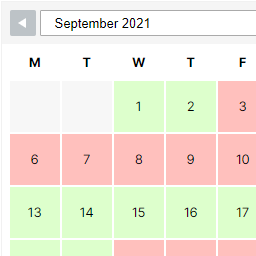
- Monthly view of events
- Mouse-over details for each event
- Events can have a timestamp (optional)
- Events can display their author (optional)
- Events can span more than one day
- Multiple events per day possible
- Events can repeat on a weekly, monthly (set numerical day), monthly (set textual day) or yearly basis
- Repeats can occur indefinitely or a limited number of times
- Easy to use events manager in admin dashboard
- Sidebar function/Widget to show todays events
- Sidebar function/Widget to show upcoming events
- Lists of todays events can be displayed in posts or pages
- Lists of upcoming events can be displayed in posts or pages
- Comprehensive options panel for admin
- Modifiable CSS using the options panel
- Optional drop down boxes to quickly change month and year
- User groups other than admin can be permitted to manage events
- Events can be placed into categories
- A calendar of events for just one of more categories can be displayed
- Categories system can be switched on or off
- Pop up javascript calendars help the choosing of dates
- Events can be links pointing to a location of your choice
- Full internationalisation is possible
- Comaptible with WordPress MU
- Two seperate Calendars can be setup and used
- Calendar can be full-size or small size to fit into page or post content
- Drop in replacement for original Calendar plugin
Installation
The installation is extremely simple and straightforward. It only takes a second.
Installing:
-
Upload the whole calendar directory into your WordPress plugins directory.
-
Activate the plugin on your WordPress plugins page
-
Configure Calendar using the following pages in the admin panel:
Calendar -> Manage Events
Calendar -> Manage Categories
Calendar -> Calendar Options
- Edit or create a page on your blog which includes the text {CALENDAR ID} with the calendar ID you want posted and visit the page you have edited or created. You should see your calendar in action. If you want multiple calendar categories (as example categories 1-4) in the Calendar use the shortcode {CALENDAR 1,2,3,4} and if only a single category as example:
{CALENDAR 2}
Please do not confuse Calendar categories with Post categories. They are different.
Uninstalling:
-
Deactivate the plugin on the plugins page of your blog dashboard
-
Delete the uploaded files for the plugin
-
Remove the text {CALENDAR ID} from the page you were using to show calendar, or delete that page
Änderungsprotokoll
If you want a second seperate Calendar you will need this version.
1.2.4
- Allows two seperate calendars based on Calendar category
- A smaller version of calendar can be dislayed without affecting regular calendar
Screenshots


Für Entwickler
Ist das dein Plugin? Zeigen Sie die Zahlen.
Fügen Sie Ihrer Website, Docs oder GitHub Readme ein Live-Badge hinzu. Es wird von selbst aktualisiert - kein Konto erforderlich.
Best Calendar Plus alternatives
All calendar plugins →




Fragen und Antworten
Calendar Plus: quick answers
Gerade Antworten, gezogen von Live WordPress.org Daten.
Quelle: WordPress.org
Is Calendar Plus free?
Yes. Calendar Plus is free to download and use from the official WordPress.org plugin directory.
Is Calendar Plus safe to use in 2026?
Calendar Plus shows warning signs in 2026 — compare the alternatives below before installing. It runs on 100+ sites and was last updated 16 years ago, and scores 25/100 on our health check.
How many websites use Calendar Plus?
Calendar Plus is active on 100+ WordPress websites and has been downloaded 27,808 times since it launched in October 2010. It was downloaded 168 times in the last 30 days.
Does Calendar Plus work with WordPress 7.1?
Calendar Plus is officially tested up to WordPress 3.0.5, while the latest release is 7.1.5. It may still work, but try it on a staging site first.
When was Calendar Plus last updated?
The latest version, 1.2.4, was released on November 10, 2010 (16 years ago).
Who makes Calendar Plus?
Calendar Plus is developed and maintained by webjunk.
What are the best alternatives to Calendar Plus?
The most popular alternatives to Calendar Plus are The Events Calendar (600K+ installs), Events Manager (60K+ installs) and SimplyBook.me (30K+ installs).
Angetrieben von PageForge
Eine Vorlage und eine Tabelle. Eine echte Seite für jede Suche.
PageForge Verwandelt jede Zeile eines CSV in eine WordPress-Seite mit eigenem Titel, URL, SEO Felder und Schema entworfen. Kostenlos auf WordPress.org.
- CSV und XLSX, plus Google Sheets auf Beruf und Unternehmen
- seinen eigenen Titel, URL, SEO Felder und Schema für jede Seite
- Arbeitet mit dem Blockeditor, Elementor, Divi und Avada
- Kostenlos auf WordPress.org, keine Kreditkarte