


UseStrict’s Calendly Embedder
Simple but powerful embedding for Calendly.

Sichere Auswahl
Yes — UseStrict’s Calendly Embedder is a safe, well-maintained plugin to use in 2026. It runs on 2K+ sites, is rated 5/5 and was last updated 2 weeks ago, and scores 82/100 on our health check.
- Aktiv entwickelt — letztes Update vor 2 Wochen
- Getestet mit dem neuesten WordPress (7.1)
- Momentum — downloads up 254.7% vs the previous 30 days
- Bisher sehr wenige Bewertungen
Wie stapelt es sich?
Side-by-side bei Installationen, Updates, Bewertungen und Support



Tägliche Downloads
Download-Spitzen folgen normalerweise einer neuen Version - jede Website, die automatisch aktualisiert wird, gilt als Download.
Ranglisten
Where UseStrict’s Calendly Embedd… stands todayWordPress.org Ranglisten suchen
Live-Position in der Plugin-Suche, Top 100| Stichwort | Position |
|---|---|
| calendar | >100 |
| Calendly | #3 |
| embed | #60 |
Versionsübernahme
Anteil aktiver Sites pro Release.
Bewertungsaufschlüsselung
★★★★★★★★★★ 5 from 3 reviews
About UseStrict’s Calendly Embedder
Aus der offiziellen Readme · V1.2.4Beschreibung
Embed Calendly on any WordPress page with a shortcode you build by pointing and clicking, instead of hand-writing Calendly’s embed code.
What the free plugin does
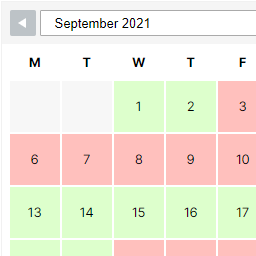
- Three embed types. Inline calendar, pop-up text link, or the floating pop-up widget (badge), each with its own options.
- Connect your Calendly account with a Personal Access Token and pick your profile page or any event type from a dropdown. No copying URLs around. Without a token, paste the Calendly URL instead.
- Caching-safe prefill. Fill the booking form with the logged-in user’s name and email, or with values from the query string. The prefill runs in the browser through AJAX after the page loads, so it keeps working behind full-page caches and CDNs, where server-side prefill can serve one visitor’s details to the next.
- Up to ten custom answers, prefilled the same way.
- Match your site. Background, text and button colours, minimum width and height, extra CSS classes and inline styles.
- Hide what you do not need. The GDPR cookie banner, landing page details and event type details.
- Shortcode builder under Settings. Choose the options, copy the generated shortcode, paste it into any page, post, widget or page builder that runs shortcodes.
The builder generates a shortcode; it does not store it. To change an embed later, edit the shortcode where you pasted it, or build a new one.
Going further: Calendly Embedder Pro
Pro picks up where the free plugin stops, and your existing embeds come with you: Pro finds the shortcodes already in your posts and pages and pulls them into a library, so upgrading is not a rebuild.
- A shortcode library. Save each embed once, reuse it anywhere, edit it in one place and every page updates. Place it with a shortcode, the Calendly Embed block, or the Elementor widget.
- Booking analytics on your own site. The funnel from profile view to completed booking, plus kept, no-show and cancelled outcomes by month.
- Ask your AI assistant. A read-only MCP server lets Claude, ChatGPT or Cursor query your booking data live. No extra API key; it uses the Calendly connection you already have. “What was my no-show rate in September?” is one question.
- Campaign tagging. Tag any embed with UTM parameters — source, medium, campaign, content and term — globally or per embed. These are standard UTM tags, so whichever analytics you run reads them, and Calendly records them against the booking as well.
- Conversion tracking. GA4 and Meta Pixel events on every completed booking, through the tags already on your site.
- Lead capture. Posts each new booking to any webhook URL: Zapier, Make, n8n, or a HubSpot workflow.
- More ways to book. Multi-event tabs, live availability next to the embed, email reminders, a bookings screen in wp-admin, WooCommerce integration, a redirect after booking, and a CSV export of your tracking data.
Pro runs alongside the free plugin, and your existing shortcodes keep working.
Installation
From the Admin
- Go to Admin > Plugins > Add New and search for UseStrict’s Calendly Embedder.
- Click Install.
- Click Activate.
- Find the settings under Settings > UseStrict’s Calendly Embedder.
Via FTP
- Download and unpack the plugin zip file.
- Upload the entire folder to your plugins directory.
- Aktivieren Sie das Plugin über das „Plugins“-Menü in WordPress.
- Find the settings under Settings > UseStrict’s Calendly Embedder.
Änderungsprotokoll
No upgrade required at this time.
1.2.4
- Update the link that sends you to Calendly to create a Personal Access Token. Calendly has moved its developer tools into the main app, under Profile → Developer, so the old link pointed at a page being retired. If your Calendly account has not been moved across yet, you can still manage tokens from Calendly’s Integrations page.
- Tested against WordPress 7.1.4.
1.2.3
- Settings screen: refresh the Calendly Embedder Pro section. It now leads with the shortcode importer, which brings the shortcodes already on your site into Pro’s library, and drops a stale feature list.
- Correct a long-standing description: the five campaign settings emit standard UTM parameters, so any analytics tool reads them. They were previously described as Google Analytics variables.
- Add a phpcs ruleset for the plugin and fix a missing translator comment.
1.2.2
- Security: the Calendly Personal Access Token is no longer displayed in the settings page and is stored in a non-autoloaded option.
- Reliability: guard against malformed/failed Calendly API responses (no more PHP warnings or empty dropdowns on a transient outage).
- Add a direct-access guard to the settings template; fix the Pro-detection hook name and the API request Content-Type header.
1.2.1
- Fix version number.
- Update tested up to.
1.2
- Patch XSS vulnerability.
- Update tested up to.
1.1.7.2
- Fix typo, reported by @ovassolutions.
- Update tested up to.
Screenshots


Für Entwickler
Ist das dein Plugin? Zeigen Sie die Zahlen.
Fügen Sie Ihrer Website, Docs oder GitHub Readme ein Live-Badge hinzu. Es wird von selbst aktualisiert - kein Konto erforderlich.
Best UseStrict’s Calendly Embedder alternatives
All calendar plugins →




Fragen und Antworten
UseStrict’s Calendly Embedder: quick answers
Gerade Antworten, gezogen von Live WordPress.org Daten.
Quelle: WordPress.org
Is UseStrict’s Calendly Embedder free?
Yes. UseStrict’s Calendly Embedder is free to download and use from the official WordPress.org plugin directory.
Is UseStrict’s Calendly Embedder safe to use in 2026?
Yes — UseStrict’s Calendly Embedder is a safe, well-maintained plugin to use in 2026. It runs on 2K+ sites, is rated 5/5 and was last updated 2 weeks ago, and scores 82/100 on our health check.
How many websites use UseStrict’s Calendly Embedder?
UseStrict’s Calendly Embedder is active on 2K+ WordPress websites and has been downloaded 34,871 times since it launched in August 2021. It was downloaded 4,033 times in the last 30 days.
Does UseStrict’s Calendly Embedder work with WordPress 7.1?
Yes. The developer has tested UseStrict’s Calendly Embedder up to WordPress 7.1.5, the latest release. It requires WordPress 4.5 or newer.
What PHP version does UseStrict’s Calendly Embedder need?
UseStrict’s Calendly Embedder requires PHP 7.4 or higher. Most hosts run PHP 8.x today, so it works on any modern WordPress hosting.
When was UseStrict’s Calendly Embedder last updated?
The latest version, 1.2.4, was released on November 3, 2026 (2 weeks ago).
Who makes UseStrict’s Calendly Embedder?
UseStrict’s Calendly Embedder is developed and maintained by Vinny.
What are the best alternatives to UseStrict’s Calendly Embedder?
The most popular alternatives to UseStrict’s Calendly Embedder are The Events Calendar (600K+ installs), Events Manager (60K+ installs) and SimplyBook.me (30K+ installs).
Angetrieben von PageForge
Eine Vorlage und eine Tabelle. Eine echte Seite für jede Suche.
PageForge Verwandelt jede Zeile eines CSV in eine WordPress-Seite mit eigenem Titel, URL, SEO Felder und Schema entworfen. Kostenlos auf WordPress.org.
- CSV und XLSX, plus Google Sheets auf Beruf und Unternehmen
- seinen eigenen Titel, URL, SEO Felder und Schema für jede Seite
- Arbeitet mit dem Blockeditor, Elementor, Divi und Avada
- Kostenlos auf WordPress.org, keine Kreditkarte