


BPOTech Confirm Step for Contact Form 7
Adds a confirmation step so visitors can review Contact Form 7 input before the message is sent.

Solide Wahl
BPOTech Confirm Step for Contac… is a solid plugin choice in 2026, with a few things worth checking first. Is rated 5/5 and was last updated 3 months ago, and scores 62/100 on our health check.
- Kleine Benutzerbasis (<10 aktive Installationen)
- Bisher sehr wenige Bewertungen
Wie stapelt es sich?
Side-by-side bei Installationen, Updates, Bewertungen und Support


Tägliche Downloads
Download-Spitzen folgen normalerweise einer neuen Version - jede Website, die automatisch aktualisiert wird, gilt als Download.
Ranglisten
Where BPOTech Confirm Step for Co… stands todayWordPress.org Ranglisten suchen
Live-Position in der Plugin-Suche, Top 100| Stichwort | Position |
|---|---|
| CF7 | >100 |
| confirm | #57 |
| Kontaktformular 7 | >100 |
| review | >100 |
| two step | #98 |
Bewertungsaufschlüsselung
★★★★★★★★★★ 5 from 1 reviews
About BPOTech Confirm Step for Contact Form 7
From the official readme · v1.1.4Beschreibung
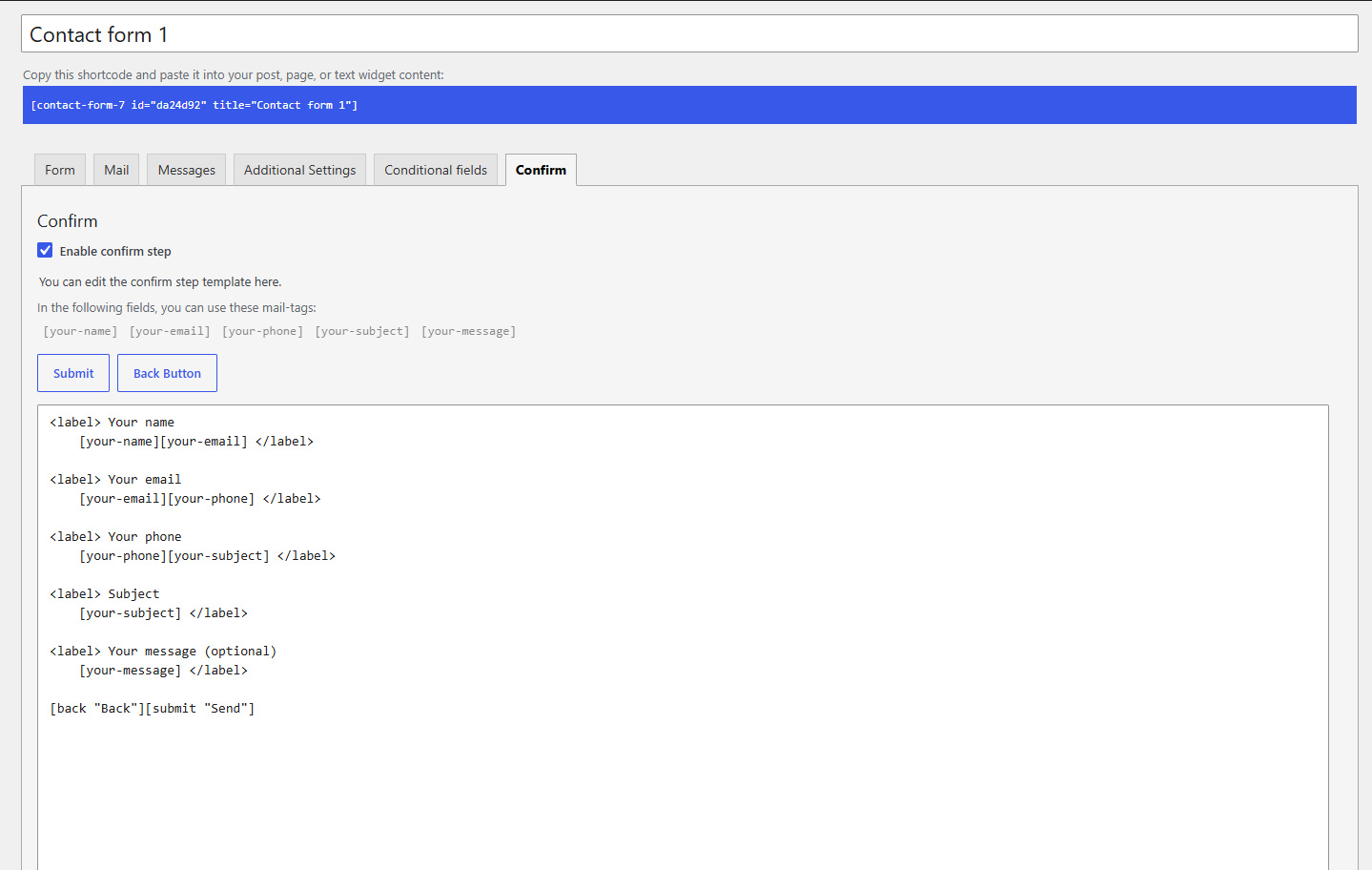
Confirm Step for Contact Form 7 adds a review step between filling in a form and sending it. Visitors see a confirmation screen with their answers (using the same mail-tags as your emails), can go back to edit, or submit for real.
All options are managed inside each Contact Form 7 form (a Confirm tab in the form editor). There is no separate settings page in WordPress admin.
Requires Contact Form 7 to be installed and active. If CF7 is missing, this plugin deactivates itself and shows an admin notice.
How it works (front end)
- The visitor completes the input step (your normal Form tab template) and clicks the Confirm button (
[confirm]). - Contact Form 7 validates the input. The plugin does not send mail yet; the response switches to the confirm step.
- The confirm template (Confirm tab) is shown with values filled in via mail-tags.
- The visitor clicks Submit (
[submit]) to send, or Back ([back]) to return to the input step without reloading the page. - After a successful send, the form returns to the input step.
Merkmale
- Per-form enable — Checkbox “Enable confirm step” on the Confirm tab; disabled forms behave like plain CF7 forms.
- Confirm tab — Dedicated template textarea, mail-tag helper, and tag generator buttons for Submit and Back.
- Form tags —
[confirm](step 1, Form tab generator),[submit](CF7 core, insert from Confirm tab),[back](step 2, Confirm tab generator). Labels and classes follow CF7 conventions. - Step status markers — Add
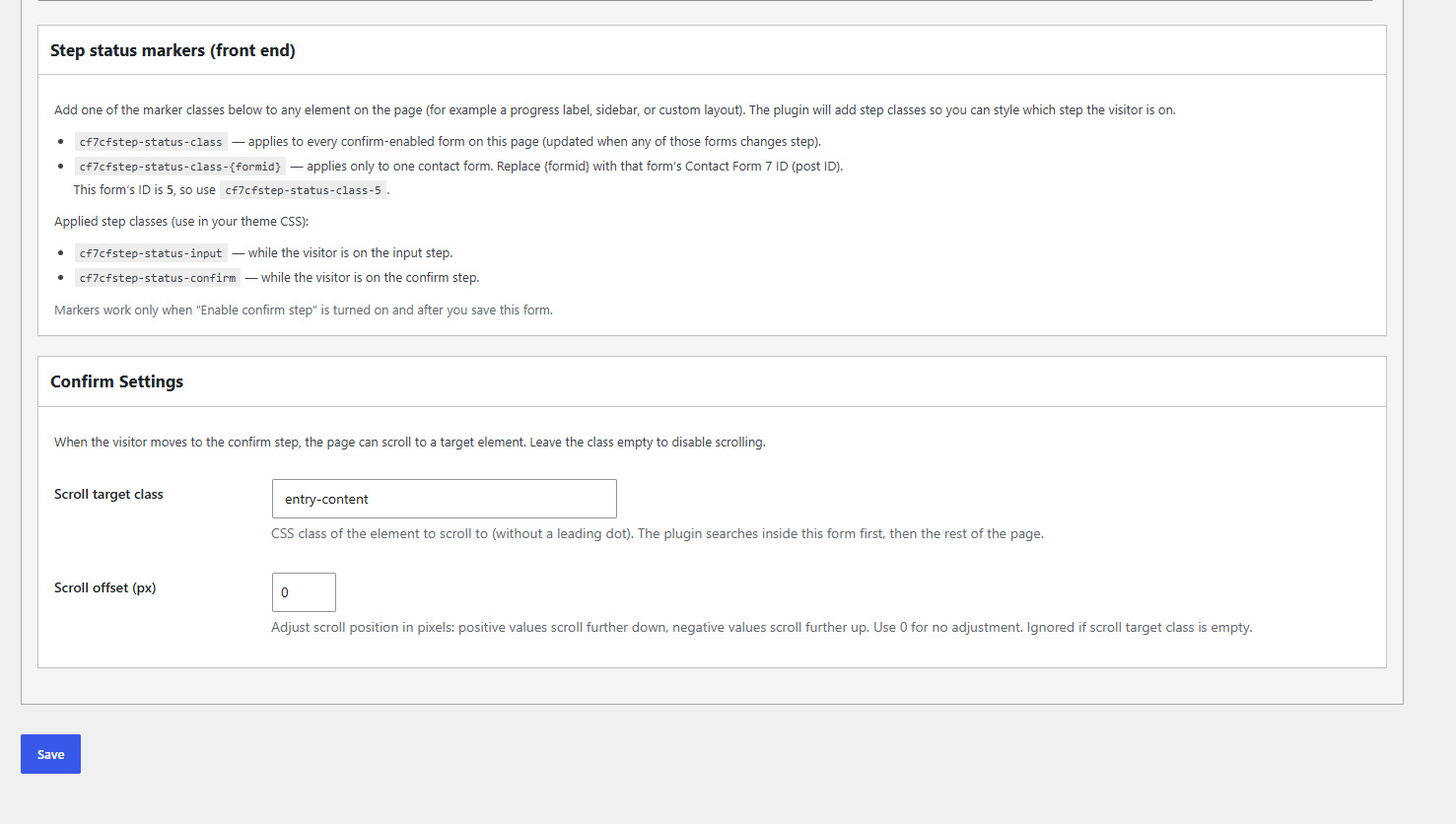
cf7cfstep-status-classorcf7cfstep-status-class-{formid}to any page element; the plugin togglescf7cfstep-status-input/cf7cfstep-status-confirmfor theme CSS (progress text, sidebars, etc.). - Confirm Settings — Optional scroll target class and offset (px) when entering the confirm step only (positive offset scrolls further down, negative scrolls further up; leave class empty to disable).
- Editor UX — Confirm tab panel hides when disabled; admin styles and collapsible help/settings boxes on the Confirm tab.
- Legacy-compatible storage — Confirm body and options use the same meta keys as the earlier function-based plugin where applicable.
Für Entwickler
- PHP 8.0+, namespaced class architecture (
CF7ConfirmStep\), no Composer dependency. - Front-end script is vanilla JavaScript (no jQuery on the public site).
- Form-specific scroll options are passed via
window.cf7csFormSettings[formId]when a scroll class is configured.
Hooks & Filters
cf7cs_custom_confirm_tags (filter) — Register custom tags for the confirm template. Each tag appears as a clickable mail-tag in the Confirm tab editor and is replaced by its content on the front end.
Parameters:
$tags(array) — Array of tag definitions. Each item has keys:tag(string, tag name without brackets),content(string, HTML replacement on front end).$contact_form(WPCF7_ContactForm) — The current contact form instance.
Beispiel:
add_filter( 'cf7cs_custom_confirm_tags', function ( $tags, $form ) {
    $tags[] = array(
        'tag'     => 'privacy-notice',
        'content' => '<p class="privacy">Your data is safe.</p>',
    );
    return $tags;
}, 10, 2 );
In the Confirm tab, [privacy-notice] appears alongside other mail-tags. Click it to insert into the template.
cf7cs_before_confirm_step (filter) — Add HTML before the confirm step content on the front end.
Parameters:
$html(string) — HTML to prepend (default empty).$contact_form(WPCF7_ContactForm) — The current contact form.
Beispiel:
add_filter( 'cf7cs_before_confirm_step', function ( $html, $form ) {
    return '<div class="confirm-header">Please review your data</div>';
}, 10, 2 );
cf7cs_after_confirm_step (filter) — Add HTML after the confirm step content on the front end.
Parameters:
$html(string) — HTML to append (default empty).$contact_form(WPCF7_ContactForm) — The current contact form.
Beispiel:
add_filter( 'cf7cs_after_confirm_step', function ( $html, $form ) {
    return '<p class="confirm-footer">Click Submit to send or Back to edit.</p>';
}, 10, 2 );
cf7cs_confirm_template (filter) — Filter the confirm template HTML after all built-in processing (mail-tag placeholders, control tags, and custom tags have been replaced).
Parameters:
$template(string) — Processed confirm template HTML.$contact_form(WPCF7_ContactForm) — The current contact form.
cf7cs_confirm_tag_buttons (action) — Fires after the default and custom tag generator buttons on the Confirm tab. Use this to output fully custom button HTML.
Verwendung
- Confirm tab — Enable confirm step, write the review template with mail-tags, add
[submit]and[back], save. - Form tab — Add your fields and a
[confirm]button (tag generator: Confirm Button). Use[submit]only on the confirm step if you want a single send action. - Confirm Settings (optional) — Scroll target class + offset when entering the confirm step; leave class empty to skip scrolling.
- Step status markers (optional) — Add
cf7cfstep-status-classorcf7cfstep-status-class-{formid}on page elements; style withcf7cfstep-status-input/cf7cfstep-status-confirm.
Installation
- Install and activate Contact Form 7.
- Upload the
bpotech-confirm-step-for-contact-form-7folder to/wp-content/plugins/(or install from the WordPress plugin directory when available). - Activate Confirm Step for Contact Form 7 under Plugins.
- Edit a contact form, open the Confirm tab, enable the confirm step, and configure the template and settings.
- On the Form tab, add a
[confirm]button (use the Confirm Button tag generator). Save the form.
Änderungsprotokoll
New developer hooks for custom confirm tags and template customisation. Requires Contact Form 7.
1.1.4
- Developer hooks:
cf7cs_custom_confirm_tagsfilter for registering custom tags (tag/label/content) with auto admin buttons. - Developer hooks:
cf7cs_before_confirm_stepandcf7cs_after_confirm_stepfilters for injecting HTML around the confirm step. - Developer hooks:
cf7cs_confirm_templatefilter andcf7cs_confirm_tag_buttonsaction for advanced customisation.
1.1.3
- Hot fix.
1.1.1
- i18n: use plugin text domain consistently in the CF7 editor.
- Front-end: scope mail error response handling to the submitting form only.
- Readme: PHP 8.0, WordPress 7.0 tested, tag limit compliance.
1.1.0
- First release on WordPress.org.
- Two-step confirm flow for Contact Form 7 (
[confirm], review template,[submit]/[back]). - Confirm tab settings: per-form enable, step status markers, optional scroll on confirm step.
Screenshots

Für Entwickler
Ist das dein Plugin? Zeigen Sie die Zahlen.
Fügen Sie Ihrer Website, Docs oder GitHub Readme ein Live-Badge hinzu. Es wird von selbst aktualisiert - kein Konto erforderlich.
Best BPOTech Confirm Step for Cont… alternatives
Alle CF7-Plugins →





Fragen und Antworten
BPOTech Confirm Step for Contact Fo…: quick answers
Gerade Antworten, gezogen von Live WordPress.org Daten.
Quelle: WordPress.org
Is BPOTech Confirm Step for Contac… free?
Yes. BPOTech Confirm Step for Contac… is free to download and use from the official WordPress.org plugin directory.
Is BPOTech Confirm Step for Contac… safe to use in 2026?
BPOTech Confirm Step for Contac… is a solid plugin choice in 2026, with a few things worth checking first. Is rated 5/5 and was last updated 3 months ago, and scores 62/100 on our health check.
How many websites use BPOTech Confirm Step for Contac…?
BPOTech Confirm Step for Contac… is active on <10 WordPress websites and has been downloaded 383 times since it launched in July 2026. It was downloaded 79 times in the last 30 days.
Does BPOTech Confirm Step for Contac… work with WordPress 7.1?
BPOTech Confirm Step for Contac… is officially tested up to WordPress 7.0.9, while the latest release is 7.1.5. It may still work, but try it on a staging site first.
What PHP version does BPOTech Confirm Step for Contac… need?
BPOTech Confirm Step for Contac… requires PHP 8.0 or higher. Most hosts run PHP 8.x today, so it works on any modern WordPress hosting.
When was BPOTech Confirm Step for Contac… last updated?
The latest version, 1.1.4, was released on September 3, 2026 (3 months ago).
Who makes BPOTech Confirm Step for Contac…?
BPOTech Confirm Step for Contac… is developed and maintained by BPOTechHue.
What are the best alternatives to BPOTech Confirm Step for Contac…?
The most popular alternatives to BPOTech Confirm Step for Contac… are Database Addon for Contact… (600K+ installs), GSheetConnector (40K+ installs) and CF7 to Webhook (30K+ installs).
Angetrieben von PageForge
Eine Vorlage und eine Tabelle. Eine echte Seite für jede Suche.
PageForge Verwandelt jede Zeile eines CSV in eine WordPress-Seite mit eigenem Titel, URL, SEO Felder und Schema entworfen. Kostenlos auf WordPress.org.
- CSV und XLSX, plus Google Sheets auf Beruf und Unternehmen
- seinen eigenen Titel, URL, SEO Felder und Schema für jede Seite
- Arbeitet mit dem Blockeditor, Elementor, Divi und Avada
- Kostenlos auf WordPress.org, keine Kreditkarte