


Boxzilla – WordPress Popup Builder
Create WordPress popup and slide-in boxes for forms, offers, notices, and calls to action

Solide Wahl
Boxzilla is a solid plugin choice in 2026, with a few things worth checking first. It runs on 20K+ sites, is rated 4.8/5 and was last updated 3 months ago, and scores 68/100 on our health check.
- Bewährt auf 20.000 aktiven Standorten
- Loved by users — 4.8/5 from 133 reviews
- Getestet mit dem neuesten WordPress (7.1)
Wie stapelt es sich?
Side-by-side bei Installationen, Updates, Bewertungen und Support



Tägliche Downloads
Download-Spitzen folgen normalerweise einer neuen Version - jede Website, die automatisch aktualisiert wird, gilt als Download.
Ranglisten
Where Boxzilla stands todayWordPress.org Ranglisten suchen
Live-Position in der Plugin-Suche, Top 100| Stichwort | Position |
|---|---|
| call to action | #11 |
| modal | #48 |
| popup builder | #16 |
| popups | #31 |
| slide-in | #10 |
Versionsübernahme
Anteil aktiver Sites pro Release.
Bewertungsaufschlüsselung
★★★★★★★★★★ 4.8 from 133 reviews
About Boxzilla – WordPress Popup Builder
From the official readme · v3.4.11Beschreibung
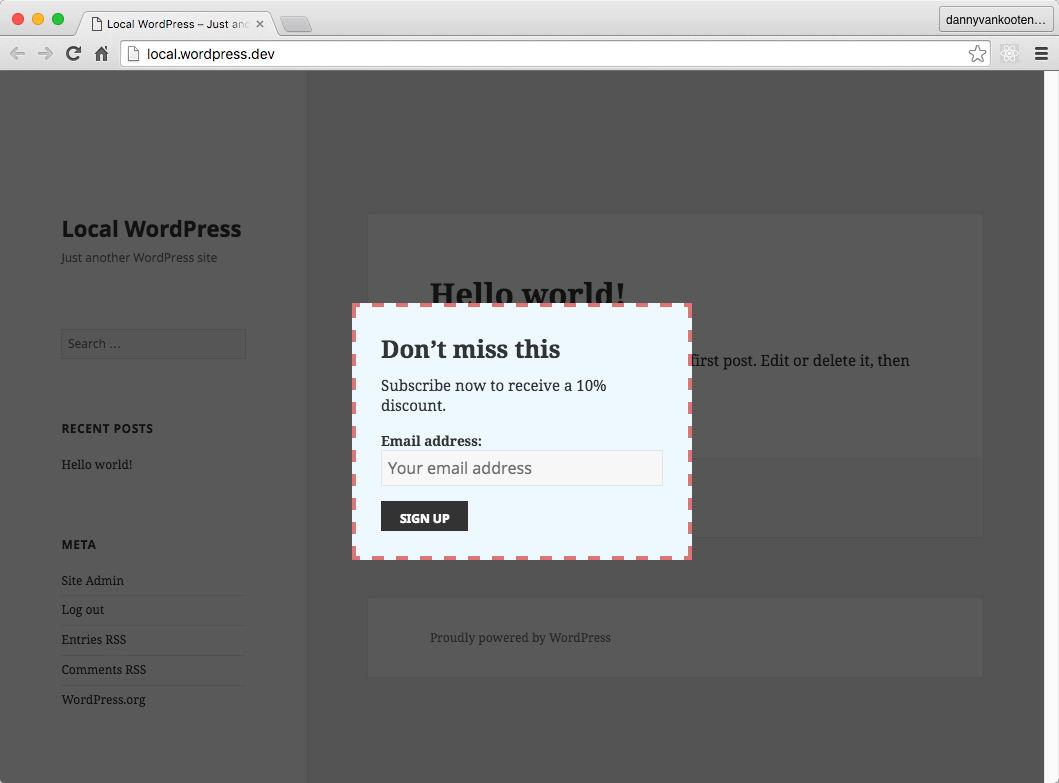
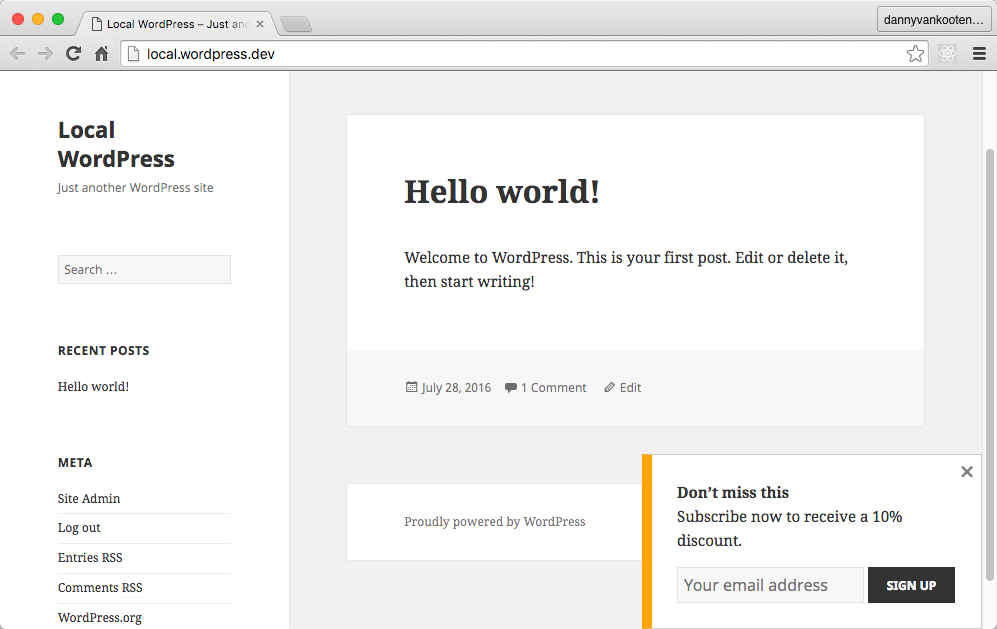
Boxzilla is a WordPress popup builder for adding targeted popups, slide-ins, and call-to-action boxes to your site. Show a box after a visitor scrolls, waits on the page, views multiple pages, clicks a link, or reaches a specific page element. Each box can contain any WordPress content, including shortcodes from form plugins.
Use Boxzilla for newsletter sign-up forms, content upgrades, product offers, important notices, surveys, or any other message that should appear at the right moment without taking over the whole page.
What you can build with Boxzilla
- Targeted WordPress popups – show boxes only on the posts, pages, or conditions you choose.
- Scroll-triggered slide-ins – open a box after a visitor scrolls past a percentage of the page or reaches a specific element.
- Timed call-to-action boxes – show a message after a set number of seconds on the page.
- Pageview-based prompts – wait until a visitor has viewed several pages before showing a box.
- Click-triggered modals – open a box from a link, button, or URL hash such as
#boxzilla-94. - Flexible content – add text, images, forms, shortcodes, embeds, or custom HTML to any box.
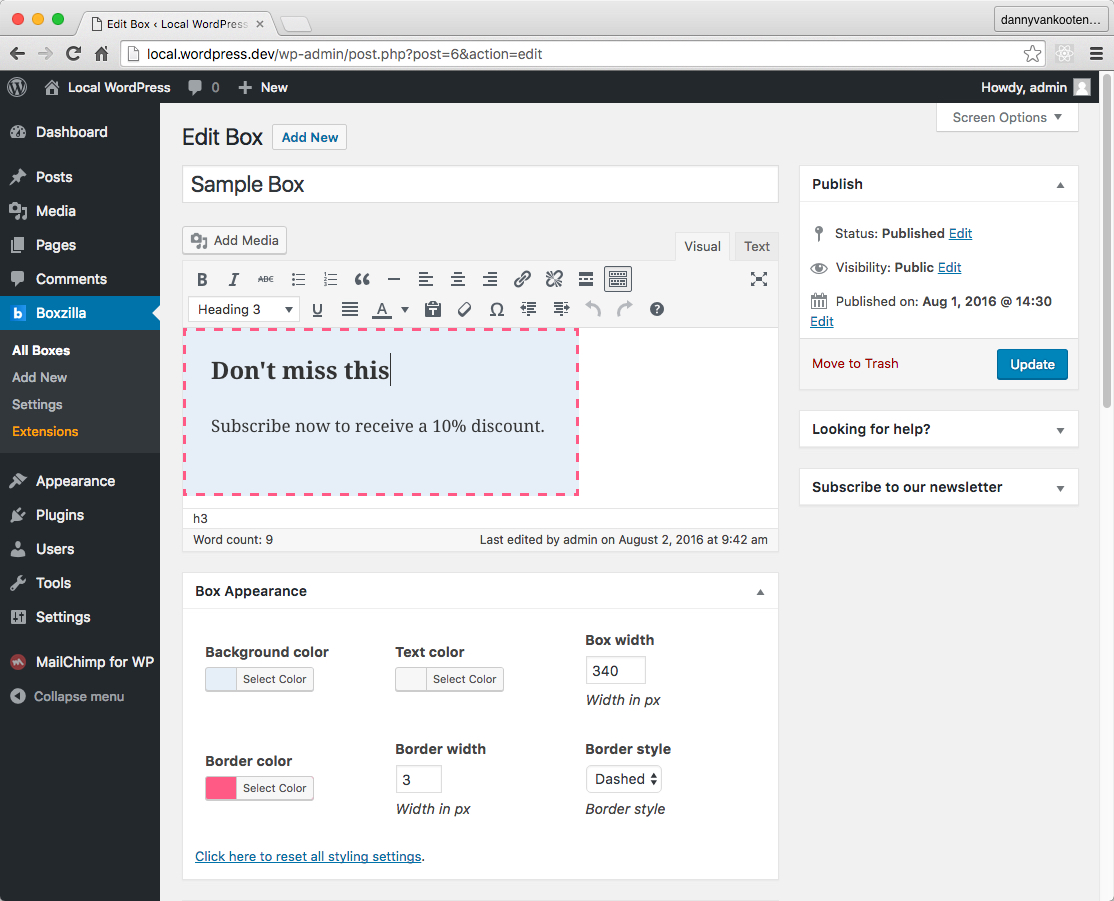
- Visual appearance controls – choose the position, animation, colors, and box style from the WordPress admin.
- Dismissal control – decide how long a box should stay hidden after a visitor closes it.
- Small front-end script – Boxzilla adds only 6 kB of JavaScript to your website.
Works with your forms and content
Boxzilla works with plugins that output shortcodes, including Mailchimp for WordPress. Add the shortcode to your box content, choose when the box should appear, and publish it.
Premium add-ons
The core Boxzilla plugin is free. Paid add-ons are available for advanced triggers and integrations, including exit-intent popups and time-on-site targeting.
Helpful links
- Read more about Boxzilla
- View the Boxzilla demo site
- Read the Boxzilla Knowledge Base
- Get community support on WordPress.org
If you are a Boxzilla Premium customer, use the premium support email for a faster reply.
Installation
- In your WordPress dashboard, go to Plugins > Add New.
- Search for “Boxzilla”.
- Click Install Now, then Activate.
- Go to Boxzilla > Add New to create your first popup or slide-in box.
- Add your content, choose display rules, adjust the appearance settings, and publish the box.
To install manually:
- Download the Boxzilla ZIP file from WordPress.org.
- Go to Plugins > Add New > Upload Plugin.
- Upload the ZIP file and click Install Now.
- Aktivieren Sie das Plugin.
- Go to Boxzilla > Add New to create your first box.
Optional: install Boxzilla add-on plugins for advanced triggers and integrations.
Änderungsprotokoll
3.4.11
Release date: Jun 22, 2026
- Prevent a JavaScript error when Boxzilla loads before the page body is available.
- Support opening boxes from links with deeply nested content.
- Add instructions for securely reporting plugin vulnerabilities through Patchstack.
3.4.10
Release date: Jun 01, 2026
- Add Shake animation option for boxes.
- Bundle add-on images instead of fetching extension metadata remotely.
- Prevent notices on new installations when plugin settings do not exist yet.
3.4.9
Release date: May 20, 2026
- Fix URL matching when expected URL is just a single slash.
- Fix script contents showing up as text in box content.
3.4.8
Release date: Apr 21, 2026
- Ensure nav links has href attribute before filtering.
- Normalize request URL’s for URL matching. Ensures consistent trailing slash and strips tracking query parameters.
- Set cookie with expiration time matching the one for dismissing the box whenever a form inside a box is submitted.
- Remove
Boxzilla.offfrom the JS API as it was a no-op and no one is using it.
3.4.7
Release date: Mar 9, 2026
- Add uninstall script to clean up all database entries from the plugin
- Fix missing closing element in box rule settings
- Fix duplicate class attribute on wrapper element on settings page
- Fix duplicate id attribute on box width input field
- Fix deprecation in call to get_terms()
- Various other type fixes, PHPDoc improvements or removal of unused code.
Screenshots
Für Entwickler
Ist das dein Plugin? Zeigen Sie die Zahlen.
Fügen Sie Ihrer Website, Docs oder GitHub Readme ein Live-Badge hinzu. Es wird von selbst aktualisiert - kein Konto erforderlich.
Best Boxzilla alternatives
All call to action plugins →





Fragen und Antworten
Boxzilla – WordPress Popup Builder: quick answers
Gerade Antworten, gezogen von Live WordPress.org Daten.
Quelle: WordPress.org
Is Boxzilla free?
Yes. Boxzilla is free to download and use from the official WordPress.org plugin directory.
Is Boxzilla safe to use in 2026?
Boxzilla is a solid plugin choice in 2026, with a few things worth checking first. It runs on 20K+ sites, is rated 4.8/5 and was last updated 3 months ago, and scores 68/100 on our health check.
How many websites use Boxzilla?
Boxzilla is active on 20K+ WordPress websites and has been downloaded 904,075 times since it launched in May 2016. It was downloaded 3,711 times in the last 30 days.
Does Boxzilla work with WordPress 7.1?
Yes. The developer has tested Boxzilla up to WordPress 7.1.5, the latest release. It requires WordPress 4.6 or newer.
What PHP version does Boxzilla need?
Boxzilla requires PHP 7.4 or higher. Most hosts run PHP 8.x today, so it works on any modern WordPress hosting.
When was Boxzilla last updated?
The latest version, 3.4.11, was released on August 20, 2026 (3 months ago).
Who makes Boxzilla?
Boxzilla is developed and maintained by Danny van Kooten.
What are the best alternatives to Boxzilla?
The most popular alternatives to Boxzilla are Simple Side Tab (10K+ installs), Mobile Contact Bar (9K+ installs) and Magic Content & CTA Box Bui… (5K+ installs).
Angetrieben von PageForge
Eine Vorlage und eine Tabelle. Eine echte Seite für jede Suche.
PageForge Verwandelt jede Zeile eines CSV in eine WordPress-Seite mit eigenem Titel, URL, SEO Felder und Schema entworfen. Kostenlos auf WordPress.org.
- CSV und XLSX, plus Google Sheets auf Beruf und Unternehmen
- seinen eigenen Titel, URL, SEO Felder und Schema für jede Seite
- Arbeitet mit dem Blockeditor, Elementor, Divi und Avada
- Kostenlos auf WordPress.org, keine Kreditkarte