


BEW – Elementor Addons, Templates & AI Builder
Shop-first Elementor addon with WooCommerce widgets, 3,000+ templates, site modules & AI Builder — for your store or any website.

Sichere Auswahl
Yes — BEW is a safe, well-maintained plugin to use in 2026. It runs on 20K+ sites, is rated 4.5/5 and was last updated 1 month ago, and scores 84/100 on our health check.
- Bewährt auf 20.000 aktiven Standorten
- Von Benutzern geliebt — 4,5/5 aus 28 Bewertungen
- Getestet mit dem neuesten WordPress (7.1)
Wie stapelt es sich?
Side-by-side bei Installationen, Updates, Bewertungen und SupportTägliche Downloads
Download-Spitzen folgen normalerweise einer neuen Version - jede Website, die automatisch aktualisiert wird, gilt als Download.
Ranglisten
Where BEW stands todayWordPress.org Ranglisten suchen
Live-Position in der Plugin-Suche, Top 100| Stichwort | Position |
|---|---|
| ai-builder | #39 |
| Elementor-Addons | #24 |
| Elementor-Widgets | #49 |
| template library | #21 |
| WooCommerce widgets | #49 |
Versionsübernahme
Anteil aktiver Sites pro Release.
Bewertungsaufschlüsselung
★★★★★★★★★★ 4.5 from 28 reviews
About BEW
From the official readme · v2.1.3Beschreibung
Built for Shop, Ready for Every Website. BEW gives Elementor the widgets, templates, and AI tools to launch and grow your online store — or any website — faster.
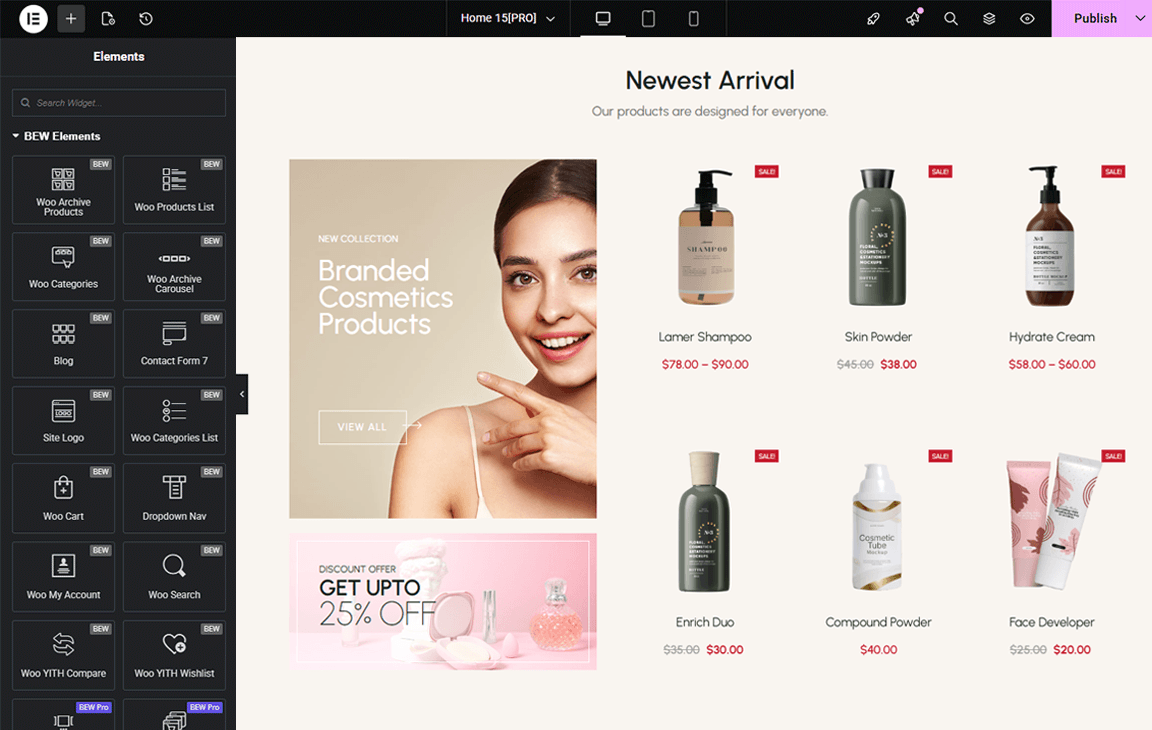
WooCommerce is at its core, with 16 widgets built for stores, from product grids and carousels to cart, search, wishlist, and compare. Alongside them, you get essential site widgets, site modules, a 3,000+ template library, and AI-powered content generation right inside the Elementor editor.
For more information, visit the official BEW website.
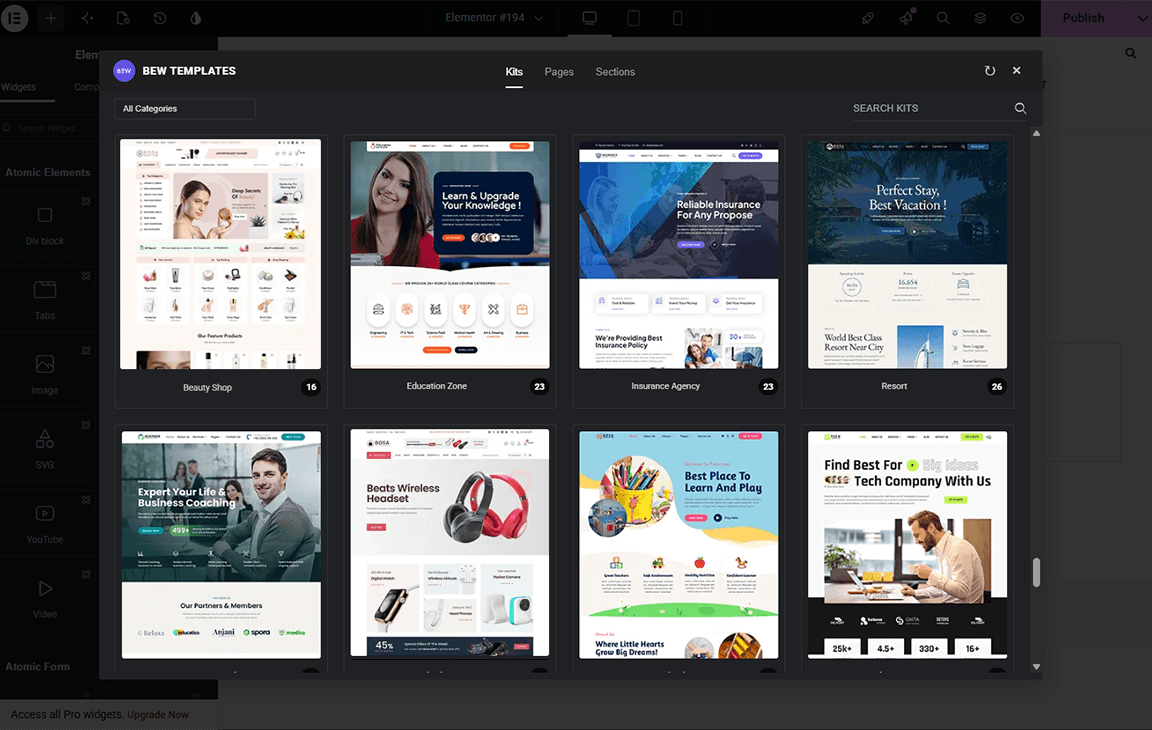
🚀 3,000+ Ready-to-use Elementor Kits, Pages & Sections (Free & Pro)
Pre-built Template Library: Access a collection of Elementor kits, pages, and sections templates to build your site quickly and effortlessly.
Store-Ready Templates: Launch a WooCommerce store quickly with dedicated shop layouts, product pages, and sections.
Every Niche Covered: Beyond eCommerce, find templates for business, portfolio, blog, and many other industries.
Quick Template Insertion: Choose and insert templates right inside the Elementor editor for fast and hassle-free customization.
Browse the full collection of available Kits, Pages & Sections in the Template Library.
🌟 Widget Collection
Elementor widgets built for WooCommerce stores, plus essentials for every site.
🛒 WooCommerce Widgets
Woo Grid Product: Display products in a grid layout. [VIEW DEMO]
Woo Archive Products: Display product archives in a structured layout. [VIEW DEMO]
Woo Archive Carousel: Showcase products in a carousel format. [VIEW DEMO]
Woo Products List: Present products in a clean, navigable list format. [VIEW DEMO]
Woo Categories: Display product categories for easier navigation. [VIEW DEMO]
Woo Categories List: Display product categories in a structured list layout. [VIEW DEMO]
Woo Search: Add a product-focused search box with category filtering. [VIEW DEMO]
Woo Cart: Display a fully functional WooCommerce cart with live totals. [VIEW DEMO]
Woo My Account: Display the WooCommerce My Account page with custom styling. [VIEW DEMO]
Woo YITH Wishlist: Let customers save favorite products to a wishlist. [VIEW DEMO]
Woo YITH Compare: Let customers compare products side by side. [VIEW DEMO]
🧩 General Widgets
Site Logo: Customize and display your site branding. [VIEW DEMO]
Dropdown Nav: Build multi-level dropdown navigation menus. [VIEW DEMO]
Blog Grid: Display blog posts in a clean grid layout. [VIEW DEMO]
Contact Form 7: Integrate contact forms with flexible field options. [VIEW DEMO]
✅ Pro Widgets
Woo Hot Deals: Highlight promotional offers and discounts. [VIEW DEMO]
Woo Product Slider: Showcase products in a sliding format. [VIEW DEMO]
Woo Product Tabs: Organize products in a clean tab layout for improved navigation. [VIEW DEMO]
Woo Grid Carousel: Combine grid and carousel layouts for dynamic display. [VIEW DEMO]
Woo Product Accordion: Organize product information in collapsible accordion panels. [VIEW DEMO]
Image Carousel: Display images in an interactive carousel format for better visual engagement. [VIEW DEMO]
Testimonial Slider: Showcase customer reviews in a rotating slider format to build trust. [VIEW DEMO]
✨ BEW AI Builder
AI-Powered Content Generators
The BEW AI Generators are BEW AI’s core content-generation tools, built directly into the Elementor editor. Instead of switching to a separate AI tool and copy-pasting content back into your page, you can generate content directly within the widget field you’re editing and apply the results with one click.
Text Generator: Generate on-brand headlines, descriptions, and any text field right inside the Elementor editor. Describe what you need, preview the result, and apply it with one click.
Products Generator [PRO]: Generate titles, descriptions, and images for your WooCommerce products and categories directly from the page you’re designing — no switching to the products admin screen.
Image Generator [PRO]: Create original images for any image field in your widgets without leaving the editor. Describe the image, generate, and apply it directly to your design.
Bulk Text & Image Generator [PRO]: Generate every text and image field inside a widget in one pass. Pick which fields to include, generate once, and apply them all together instead of field by field.
Repeater Generator [PRO]: Generate content across every item in a repeater-based widget — like the slides in an Image Carousel — in one pass instead of editing each one by hand.
Blog Generator [PRO]: Generate blog post titles, content, excerpts, and featured images from inside the editor — write and design in the same place.
✅ BEW AI – Core Features
Generation History: Every AI generation is automatically saved per field, so you can browse past results and restore an earlier version instantly — no need to regenerate something you already liked.
Saved Presets: Save your go-to instructions as a named preset and reuse them across fields and projects, so you get consistent tone and style without retyping the same prompt every time.
AI Provider Integration: Connect AI providers using your own API keys. Bring the account you already use with your AI provider — no separate subscription, no markup. Pay the provider directly and choose the model that best fits your needs and budget. Supported Providers: Google, OpenAI, Anthropic (Claude), Replicate, OpenRouter, Mistral, xAI (Grok), Perplexity, Groq
Learn more about the BEW AI Builder workflow in the documentation.
🤝 Compatibility
BEW works with any theme that supports Elementor. These are the ones we recommend.
Themes BEW works great with:
Plugins BEW integrates with:
Import Templates
- After activation, you may be prompted to install required plugins such as Elementor (if not already installed).
- Open the page and click Edit with Elementor.
- Click the BEW Templates Library icon to open the template modal, then browse and import the available templates.
Elementor Widgets
All widgets are available in Elementor under the “BEW Elements” section.
API Key Setup
Connect your preferred AI provider under BEW → Settings → AI Builder and enter the required API Key to enable AI-powered features.
Externe Dienste
This plugin connects to the Bosa Themes template service at https://demo.bosathemes.com/bosa/ to retrieve template listings, preview data, and template content for the Template Library functionality. This connection is required to display and import templates into your website.
These requests include your site’s URL (sent as part of the request headers) so the service can identify which site is connecting. No personal data, user information, or site content is transmitted — only read-only requests for template metadata and content are made.
If a template requires a third-party plugin that isn’t already installed, and you choose to install it directly from the template import screen, that installation request is sent to the WordPress.org plugin repository, not to our servers.
Service URL: https://demo.bosathemes.com/bosa/
Privacy Policy: https://bosathemes.com/privacy-policy/
This plugin’s AI Content Generator feature is entirely optional and only activates once you enter your own API key for one of the following third-party AI providers. When you use the feature, the field’s current text (and, if provided, your own instruction/prompt) is sent directly from your server to whichever provider you have connected, using your own API key and account, in order to generate replacement text. No content is sent unless you have connected a provider and actively trigger a generation.
- Google (Gemini) — https://ai.google.dev/gemini-api/terms — Privacy: https://policies.google.com/privacy
- OpenAI — https://openai.com/policies/row-terms-of-use/ — Privacy: https://openai.com/policies/row-privacy-policy/
- Anthropic (Claude) — https://www.anthropic.com/legal/consumer-terms — Privacy: https://www.anthropic.com/legal/privacy
- Replicate — https://replicate.com/terms — Privacy: https://replicate.com/privacy
- OpenRouter — https://openrouter.ai/terms — Privacy: https://openrouter.ai/privacy
- Mistral — https://mistral.ai/terms/ — Privacy: https://mistral.ai/terms/#privacy-policy
- xAI (Grok) — https://x.ai/legal/terms-of-service — Privacy: https://x.ai/legal/privacy-policy
- Perplexity — https://www.perplexity.ai/hub/legal/terms-of-service — Privacy: https://www.perplexity.ai/hub/legal/privacy-policy
- Groq — https://groq.com/terms-of-use/ — Privacy: https://groq.com/privacy-policy/
Installation
BEW – Elementor Addons, Templates & AI Builder plugin can be installed in two ways.
Direct Install
- Go to WordPress Dashboard → Plugins → Add New.
- Search for “BEW – Elementor Addons, Templates & AI Builder”.
- Installieren und aktivieren Sie das Plugin.
Zip Install
- Upload the
bosa-elementor-for-woocommercefolder to/wp-content/plugins/. - Activate the plugin via the Plugins menu.
Änderungsprotokoll
BEW v2: new widgets, modules, AI content generation, and a 3,000+ template library (full access with Pro). Update to get the latest features.
2.1.3
Zusätzlich
- System Status tab in BEW > Settings: server and plugin checks plus a copyable report for support requests.
- Changelog in BEW > Settings > Version Control, listing every release.
- Bosa theme recommendation notice on Dashboard, Plugins and Themes when no Bosa theme is active. “Maybe later” hides it for 7 days, the X for 30.
Aktualisierten
- Settings now opens on the Widgets tab. The General tab is renamed Version Control and moved to the end.
- With BEW Pro installed, the BEW Pro Info, Our Products and Settings pages show Activate License or Renew License to match the license, and the Upgrade menu is removed.
Fixed
- BEW is now reactivated after a WP Reset when “Reactivate all currently active plugins” is ticked.
2.1.2
Zusätzlich
- Woo Grid Product widget is now available in the free version.
Screenshots

Für Entwickler
Ist das dein Plugin? Zeigen Sie die Zahlen.
Fügen Sie Ihrer Website, Docs oder GitHub Readme ein Live-Badge hinzu. Es wird von selbst aktualisiert - kein Konto erforderlich.
Best BEW alternatives
All ai-builder plugins →| Rang | Plugin | Aktive Installationen |
|---|---|---|
| 2 |
 AI website builder for the block editor and Elementor
AI website builder, animations and custom css for the block editor and Elementor |
600+ |
Fragen und Antworten
BEW: quick answers
Gerade Antworten, gezogen von Live WordPress.org Daten.
Quelle: WordPress.org
Is BEW free?
Yes. BEW is free to download and use from the official WordPress.org plugin directory.
Is BEW safe to use in 2026?
Yes — BEW is a safe, well-maintained plugin to use in 2026. It runs on 20K+ sites, is rated 4.5/5 and was last updated 1 month ago, and scores 84/100 on our health check.
How many websites use BEW?
BEW is active on 20K+ WordPress websites and has been downloaded 530,915 times since it launched in May 2022. It was downloaded 5,944 times in the last 30 days.
Does BEW work with WordPress 7.1?
Yes. The developer has tested BEW up to WordPress 7.1.5, the latest release. It requires WordPress 6.9 or newer.
What PHP version does BEW need?
BEW requires PHP 7.4 or higher. Most hosts run PHP 8.x today, so it works on any modern WordPress hosting.
When was BEW last updated?
The latest version, 2.1.3, was released on October 12, 2026 (1 month ago).
Who makes BEW?
BEW is developed and maintained by Bosa Themes.
What are the best alternatives to BEW?
The most popular alternatives to BEW are AI website builder for the… (600+ installs).
Angetrieben von PageForge
Eine Vorlage und eine Tabelle. Eine echte Seite für jede Suche.
PageForge Verwandelt jede Zeile eines CSV in eine WordPress-Seite mit eigenem Titel, URL, SEO Felder und Schema entworfen. Kostenlos auf WordPress.org.
- CSV und XLSX, plus Google Sheets auf Beruf und Unternehmen
- seinen eigenen Titel, URL, SEO Felder und Schema für jede Seite
- Arbeitet mit dem Blockeditor, Elementor, Divi und Avada
- Kostenlos auf WordPress.org, keine Kreditkarte