


Beaver Builder Page Builder – Drag and Drop Website Builder
The Professional's Choice for Drag & Drop WordPress Page Building. Fast, Reliable, and Trusted since 2014.

Sichere Auswahl
Yes — Beaver Builder Page Builder is a safe, well-maintained plugin to use in 2026. It runs on 100K+ sites, is rated 4.7/5 and was last updated 3 days ago, and scores 90/100 on our health check.
- Bewährt im Maßstab auf 100k+ aktiven Standorten
- Loved by users — 4.7/5 from 394 reviews
- Aktiv entwickelt – letztes Update vor 3 Tagen
- Getestet mit dem neuesten WordPress (7.1)
Wie stapelt es sich?
Side-by-side bei Installationen, Updates, Bewertungen und Support



Tägliche Downloads
Download-Spitzen folgen normalerweise einer neuen Version - jede Website, die automatisch aktualisiert wird, gilt als Download.
Ranglisten
Where Beaver Builder Page Builder stands todayWordPress.org Ranglisten suchen
Live-Position in der Plugin-Suche, Top 100| Stichwort | Position |
|---|---|
| beaver builder | #1 |
| Drag And Drop editor | #4 |
| front-end builder | #1 |
| Landing-Seite | #19 |
| page builder | #4 |
Versionsübernahme
Anteil aktiver Sites pro Release.
Bewertungsaufschlüsselung
★★★★★★★★★★ 4.7 from 394 reviews
About Beaver Builder Page Builder
From the official readme · v2.11.2.2Beschreibung
The Professional’s Choice for Drag & Drop WordPress Page Building. Fast, Reliable, and Trusted since 2014
Beaver Builder is the page builder and website builder that agencies and developers rely on. Create pixel-perfect websites with our visual editor – no coding required. Front-end editing, flexible templates, and enterprise-grade performance. Try Beaver Builder Pro for unlimited sites and premium features.
What Is The Beaver Builder Page Builder?
Beaver Builder is a flexible drag and drop page builder that works on the front end of your WordPress website. Whether you’re a beginner or a professional, you’re going to love taking control of your website. Stop writing HTML or wrestling with confusing shortcodes. With Beaver Builder, building beautiful, professional WordPress pages is as easy as dragging and dropping.
Watch the video below or try out the demo to see it in action!
Premium Support
The Beaver Builder team provides very limited support on the WordPress.org forums. Please feel free to post questions or bug reports, but for timely support, we recommend purchasing a Beaver Builder license.
Along with access to our expert support team, there are many time-saving features in the premium versions which make it a great value for any serious WordPress user. Get a license today.
You can also reference our Knowledge Base, or try asking the Beaver Builder community for help in either Facebook or Slack. Keep in mind, these are all folks just like you who are volunteering their time.
Join our Growing Community
There is a huge colony (yeah, that’s the term for a group of beavers) of “Beaver Builders” that would love to get to know you! If you have questions, a project to show off, or you would like to meet and network with other Beaver Builder users, you’ll feel right at home in the Beaver Builders Facebook Group or the Beaver Builders Slack Channel. Come on by and say hello.
Page Builder Features
- Content Modules: Box, Photo, Button, Button Group, Callout, Call to Action, Heading, Icon, Menu, Number Counter, Text Editor, HTML, Audio, Video, & Sidebar.
- Full-width, column-based layouts.
- Create flexbox and CSS grid layouts with the Box Module. Also included are some Box module presets to get you going faster!
- Lightweight and semantic markup for maximum performance.
- Photo, color, and video row backgrounds.
- Mobile-friendly, responsive layouts.
- Add your own CSS classes and IDs.
- Use WordPress Widgets and shortcodes.
- Works with Pages, Posts, and Custom Post Types.
- A friendly and supportive community.
- Build your own custom modules.
Premium-Funktionen
- Additional modules: Contact Form, Tabs, Slider, Pricing Table, Map, Blog Posts, Subscribe Form and many more.
- Beaver Themer Theme Builder.
- Beaver Builder Theme.
- Expert support from our world-class support team.
- Beautiful pre-made layout templates.
- Save, export, and reuse full-page layouts, rows, and modules.
- Save a Global Color palette.
- Create styles that apply globally throughout your Beaver Builder layouts.
- Beaver Builder AI.
Come by the Beaver Builder Homepage to learn more about what our premium features can do for you!
People REALLY LOVE Beaver Builder
Don’t just take our word for it, here are a few testimonials from happy users and customers.
“Simply put, it is the best page builder in the WordPress ecosystem. There is no close second.” – WP Crafter
“Complete design freedom with no coding and it is all fully responsive as well.” – skyboro
“Easy to use, fast to get started, real product depth, great support.” – David Bressler
Modules And Widgets
We’ve loaded Beaver Builder up with a flexible set of content modules to aid you in building stunning layouts and landing pages within an intuitive drag and drop system. Beaver Builder also supports core and third party WordPress widgets and shortcodes, so you can use Beaver Builder with all your other favorite plugins!
A WordPress Page Builder That Works With Your Theme
Yep, that’s right! Beaver Builder was designed to work with almost any WordPress theme. Try Beaver Builder on your existing website today, or consider upgrading and using Beaver Builder’s outstanding framework theme (available in Pro and Agency packages) for your next project.
A WordPress Page Builder That’s 100% Mobile Friendly
Every part of a Beaver Builder layout or landing page is fully responsive and looks gorgeous on any screen size. Responsive web design has never been easier.
A WordPress Page Builder That’s Optimized For Performance
We’ve designed Beaver Builder to create layouts and landing pages that load quickly. Many page builders load in an ungodly number of scripts and stylesheets to every page on your site. Not Beaver Builder! It only loads the assets needed for a given layout or landing page.
Installation
-
Install Beaver Builder either via the WordPress plugin directory or by uploading the files to your server at wp-content/plugins.
-
After activating Beaver Builder, navigate to the settings page at Settings > Beaver Builder to configure the post types you would like it to work with.
-
A Beaver Builder button will appear on the Edit Page/Post area. Also, a Beaver Builder option will appear in the WordPress Admin Bar on the front end of your website.
For more information, please visit our Knowledge Base. Keep in mind that not all features described in the knowledge base are available in this version of the Beaver Builder plugin.
Änderungsprotokoll
Visit our [changelog page](https://www.wpbeaverbuilder.com/change-logs/?utm_medium=bb-lite&utm_source=repo-readme&utm_campaign=repo-changelog-page "Beaver Builder Changelog") for up-to-date information on what has been going on with the development of Beaver Builder.
Visit our changelog page for up-to-date information on what has been going on with the development of Beaver Builder.
Screenshots
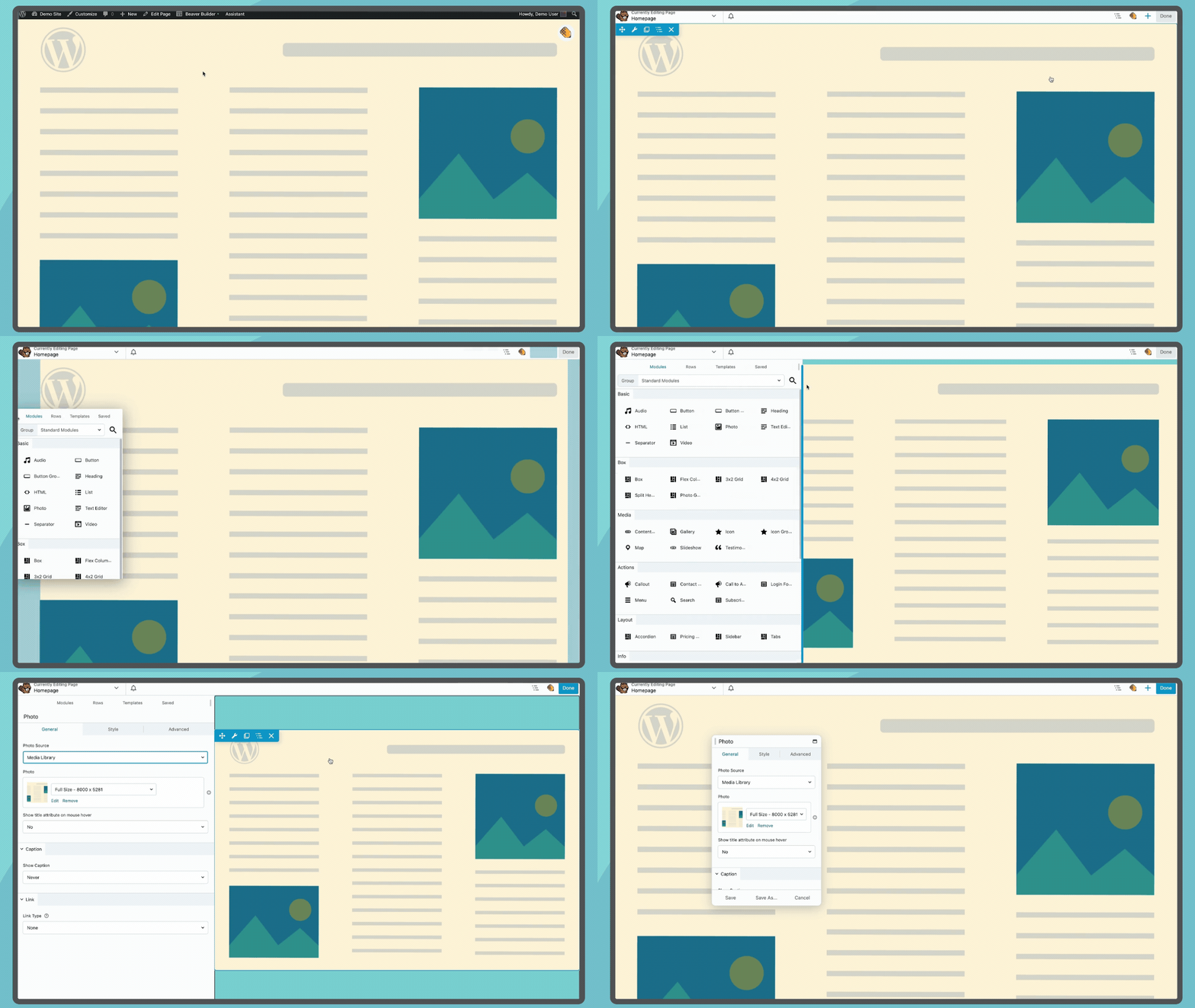

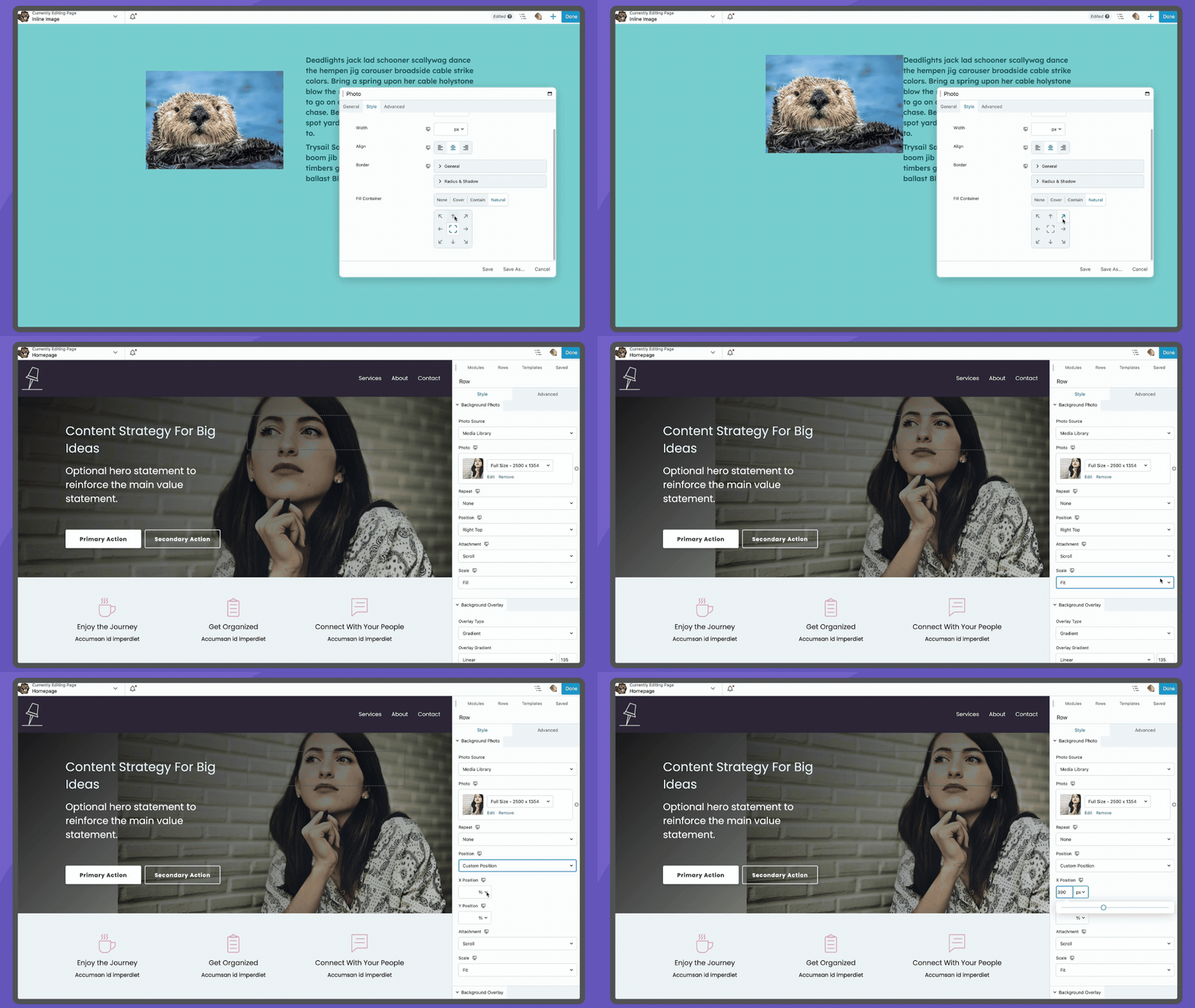
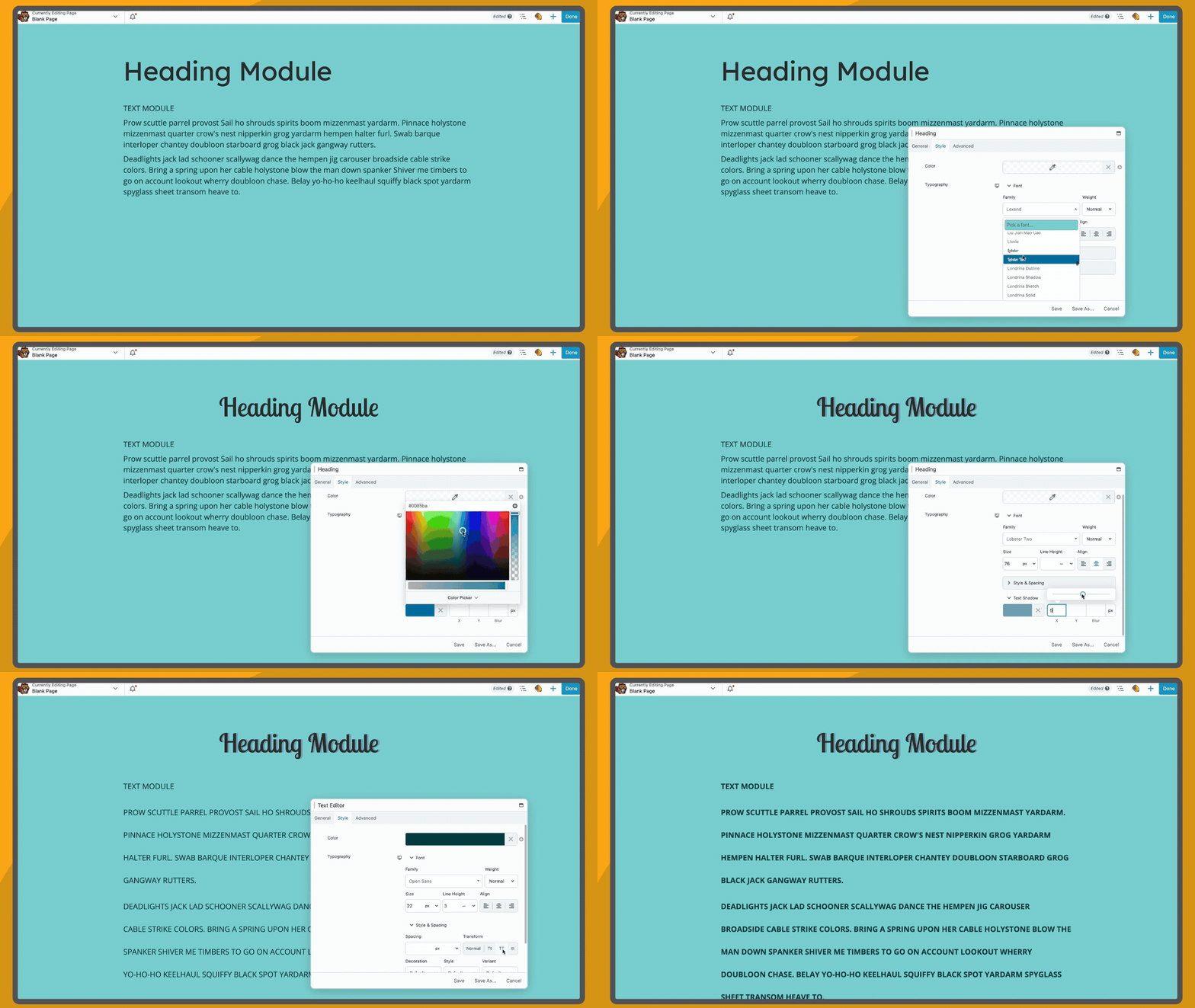

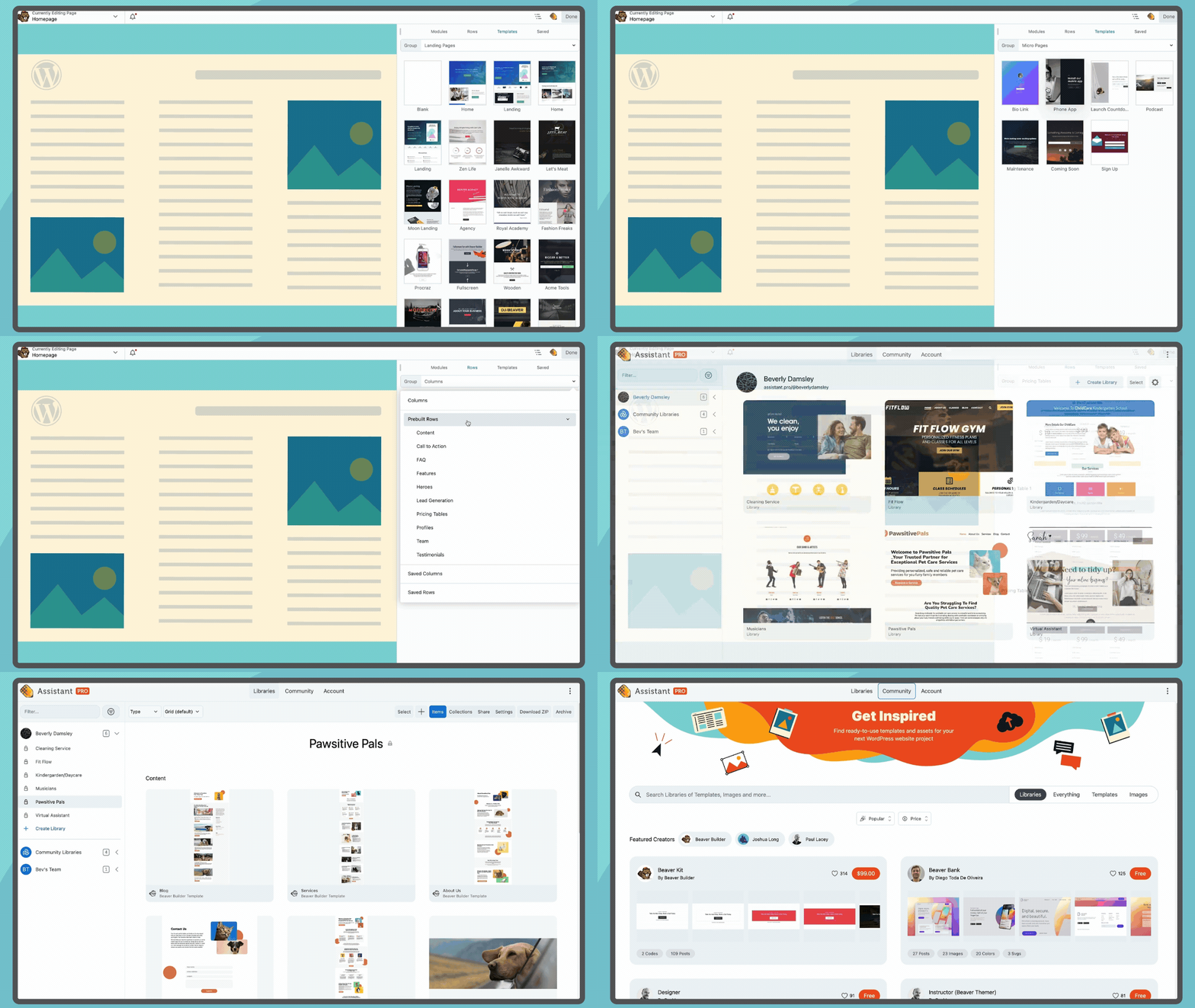
Für Entwickler
Ist das dein Plugin? Zeigen Sie die Zahlen.
Fügen Sie Ihrer Website, Docs oder GitHub Readme ein Live-Badge hinzu. Es wird von selbst aktualisiert - kein Konto erforderlich.
Best Beaver Builder Page Builder alternatives
All beaver builder plugins →





Fragen und Antworten
Beaver Builder Page Builder: quick answers
Gerade Antworten, gezogen von Live WordPress.org Daten.
Quelle: WordPress.org
Is Beaver Builder Page Builder free?
Yes. Beaver Builder Page Builder is free to download and use from the official WordPress.org plugin directory.
Is Beaver Builder Page Builder safe to use in 2026?
Yes — Beaver Builder Page Builder is a safe, well-maintained plugin to use in 2026. It runs on 100K+ sites, is rated 4.7/5 and was last updated 3 days ago, and scores 90/100 on our health check.
How many websites use Beaver Builder Page Builder?
Beaver Builder Page Builder is active on 100K+ WordPress websites and has been downloaded 13,818,895 times since it launched in November 2014. It was downloaded 117,634 times in the last 30 days.
Does Beaver Builder Page Builder work with WordPress 7.1?
Yes. The developer has tested Beaver Builder Page Builder up to WordPress 7.1.5, the latest release. It requires WordPress 6.8 or newer.
What PHP version does Beaver Builder Page Builder need?
Beaver Builder Page Builder requires PHP 7.4 or higher. Most hosts run PHP 8.x today, so it works on any modern WordPress hosting.
When was Beaver Builder Page Builder last updated?
The latest version, 2.11.2.2, was released on November 16, 2026 (3 days ago).
Who makes Beaver Builder Page Builder?
Beaver Builder Page Builder is developed and maintained by Beaver Builder.
What are the best alternatives to Beaver Builder Page Builder?
The most popular alternatives to Beaver Builder Page Builder are Fullwidth Templates for Any… (20K+ installs), Material Design Icons for P… (20K+ installs) and Ultimate Addons for Beaver… (20K+ installs).
Angetrieben von PageForge
Eine Vorlage und eine Tabelle. Eine echte Seite für jede Suche.
PageForge Verwandelt jede Zeile eines CSV in eine WordPress-Seite mit eigenem Titel, URL, SEO Felder und Schema entworfen. Kostenlos auf WordPress.org.
- CSV und XLSX, plus Google Sheets auf Beruf und Unternehmen
- seinen eigenen Titel, URL, SEO Felder und Schema für jede Seite
- Arbeitet mit dem Blockeditor, Elementor, Divi und Avada
- Kostenlos auf WordPress.org, keine Kreditkarte