


BackupRidge
Backups that finish — even on slow shared hosting. Resumable WordPress backup, restore, and migration to S3, R2, FTP, SFTP, and more.

Solide Wahl
BackupRidge is a solid plugin choice in 2026, with a few things worth checking first. It runs on 20+ sites, is rated 5/5 and was last updated 6 days ago, and scores 74/100 on our health check.
- Aktiv entwickelt – letztes Update vor 6 Tagen
- Getestet mit dem neuesten WordPress (7.1)
- Momentum — downloads up 89% vs the previous 30 days
- Kleine Benutzerbasis (20+ aktive Installationen)
- Bisher sehr wenige Bewertungen
Wie stapelt es sich?
Side-by-side bei Installationen, Updates, Bewertungen und Support



Tägliche Downloads
Download-Spitzen folgen normalerweise einer neuen Version - jede Website, die automatisch aktualisiert wird, gilt als Download.
Ranglisten
Where BackupRidge stands todayWordPress.org Ranglisten suchen
Live-Position in der Plugin-Suche, Top 100| Stichwort | Position |
|---|---|
| Sicherungskopie | >100 |
| cloud backup | #83 |
| database backup | >100 |
| Migration | >100 |
| restore | >100 |
Versionsübernahme
Anteil aktiver Sites pro Release.
Bewertungsaufschlüsselung
★★★★★★★★★★ 5 from 1 reviews
About BackupRidge
From the official readme · v1.48.0Beschreibung
BackupRidge is the WordPress backup plugin engineered to finish — even on cheap shared hosting. Most backup plugins assume a fast server, then quietly die when a 30-second PHP limit or a missed WP-Cron event cuts them off. BackupRidge saves a checkpoint at every step and resumes across requests, a watchdog revives stalled jobs, and pacing adapts to your host’s measured speed — so a full-site backup completes on hosting where other plugins give up.
Back up your database and files on a schedule, send the archives off-site, restore the whole site or only the pieces you need, and migrate a site to a new domain or host — from a dashboard that reports what actually happened, per destination, with real logs.
Back up to storage you control
Every backup can upload to one or more destinations:
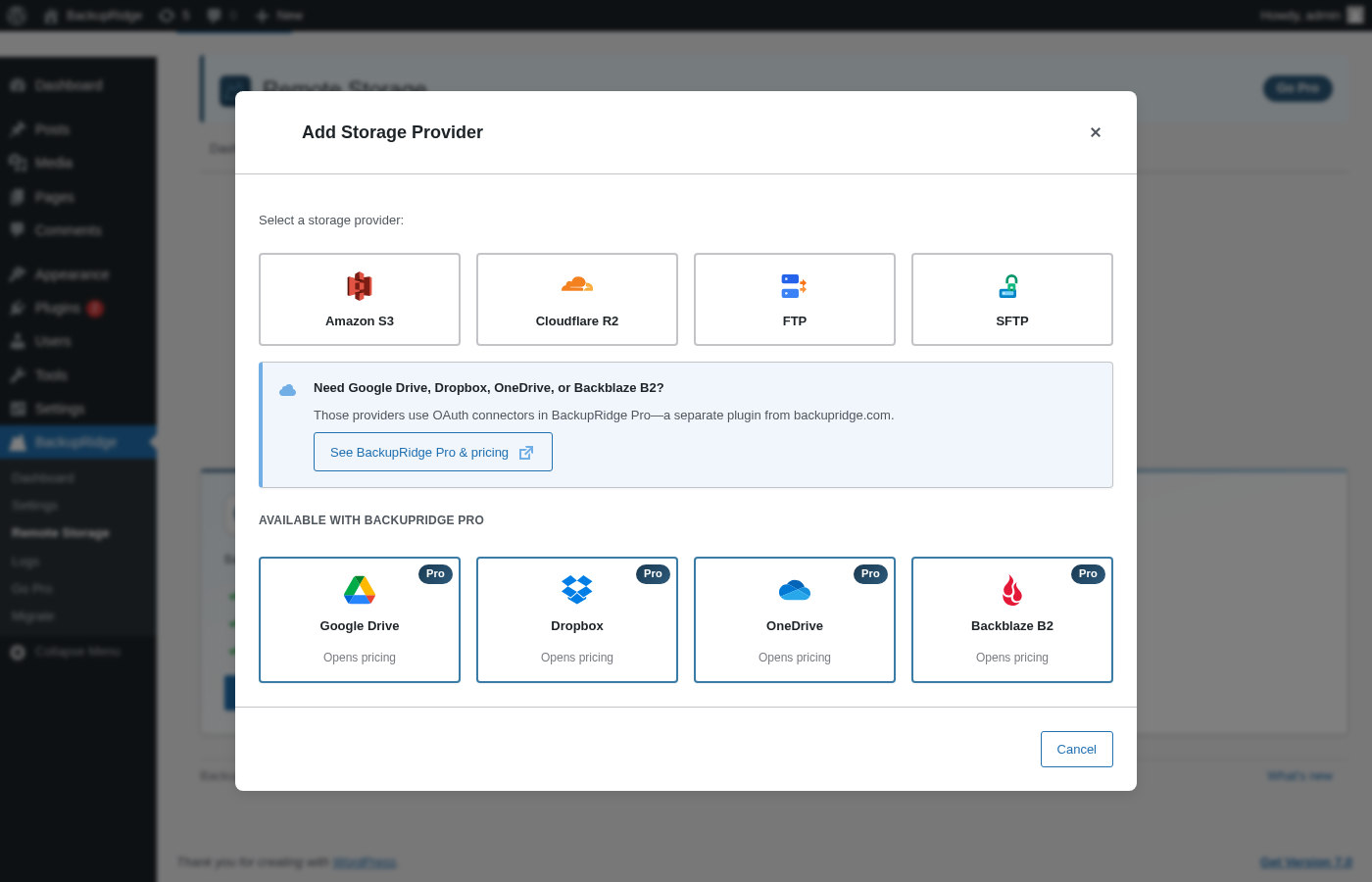
- Amazon S3 backup — including any S3-compatible service
- Cloudflare R2 backup
- FTP backup and SFTP backup to your own server
- Local backup on the web server, protected from direct web access
- Google Drive backup, Dropbox backup, OneDrive backup, and Backblaze B2 backup with BackupRidge Pro
Your archives live in accounts you own. There is no vendor cloud in the middle, and nothing about restore depends on our servers.
Built for hosts that kill long requests
- Resumable everything — database export, file archiving, and uploads all checkpoint and continue across requests, so strict execution limits pause a backup instead of killing it.
- Backup watchdog — a cron-based watchdog detects stalled jobs (missed cron, loopback failures, hard process kills) and resumes them automatically.
- Host-aware tuning — the plugin measures your server’s real disk and upload throughput and sizes its work slices, archive parts, and pacing to match.
- Backup intensity control — pace backup I/O so a running backup doesn’t slow down your live visitors.
- Split archives — large sites are split into right-sized numbered parts that upload reliably and download individually.
Honest by design
- Restore is not a paywall. Restore, including component selection and migration receive, ships in this plugin at no cost — and archives are self-describing, so they restore on a brand-new install too.
- Per-destination truth. If a backup reaches two destinations and fails a third, the job says exactly that — no false green checkmarks.
- Real logs. Every job writes a readable log you can view and download, plus a one-click diagnostics bundle for support.
- We publish our restore tests. Every release goes through an automated backup → wipe → restore drill; results are public at backupridge.com/restore-log.
Kostenlose Funktionen
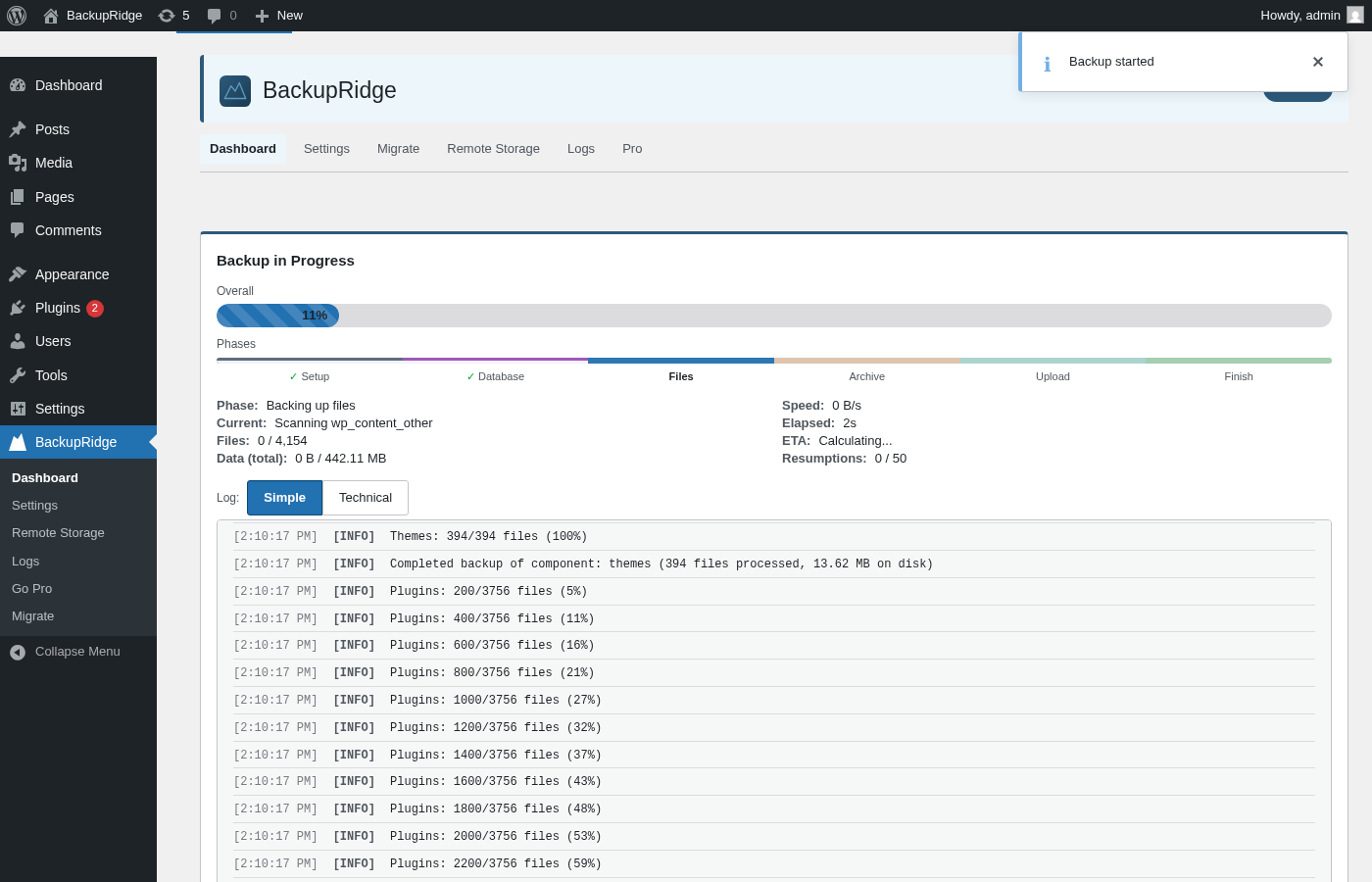
- Resumable backups — Long-running backups save progress and resume from the last checkpoint so they finish on any host, including shared hosting with 30-second limits.
- Database backup — MySQL/MariaDB export via mysqldump (when available) or native PHP streaming with optional table filtering and row-level resumption.
- File backup — Back up wp-content (and optionally the full WordPress root) with exclusion patterns, compression, and optional archive splitting for large sites.
- Local storage — Store completed backups on the server filesystem. Optional subfolder under uploads (base:
wp-content/uploads/backupridge). - Remote storage — Add multiple destinations and upload completed backups to Amazon S3, Cloudflare R2, FTP, or SFTP.
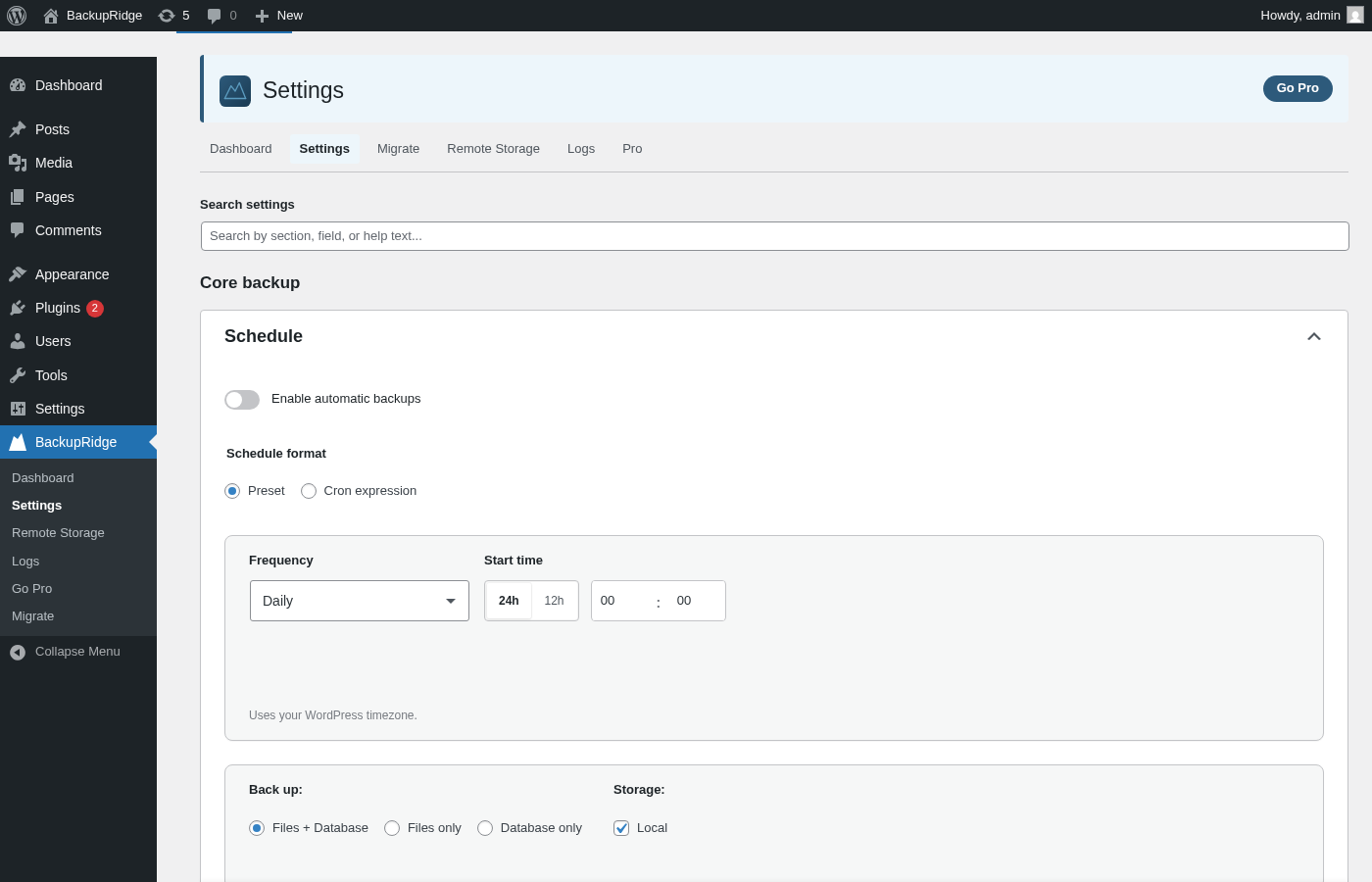
- Scheduled backups — Run backups automatically on a daily, weekly, or custom schedule via WP-Cron, with a REST endpoint available for triggering from an external system cron.
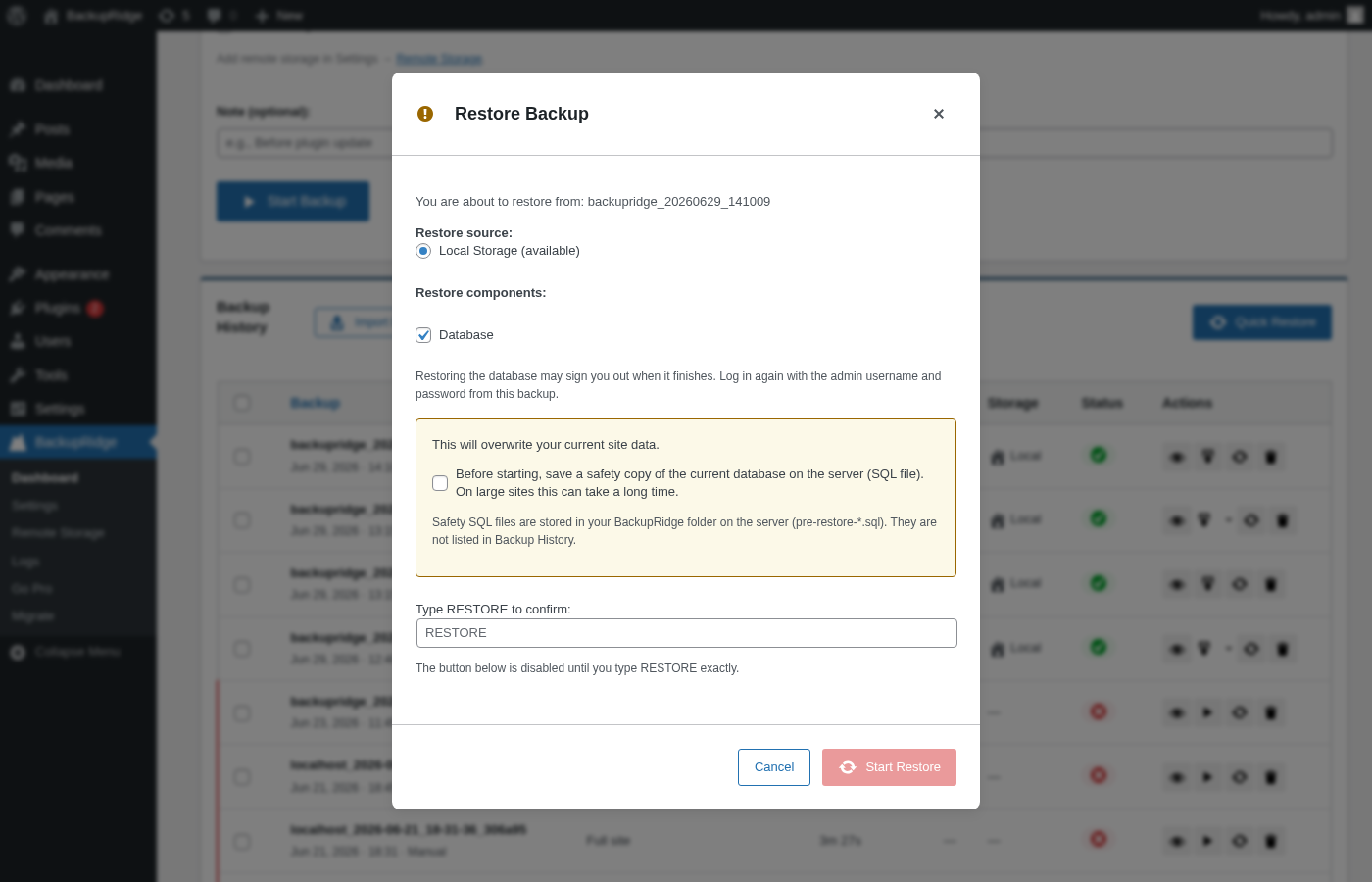
- Restore — Restore from a local backup, remote storage, or an uploaded archive, with component-level selection (database, themes, plugins, uploads, core) so you only restore what you need.
- Site migration (receive) — Bring another WordPress site into this one: upload its backup archive via Import Backup on the Dashboard (split/multi-part archives supported) and restore it — old domain URLs are replaced with this site’s URL automatically. The Migrate admin page handles live site-to-site transfer (receiving a push sent from BackupRidge Pro, plus history).
- Import All-in-One WP Migration (
.wpress) archives — Upload an existing AIOWM export via Import Backup (orwp backupridge import) and restore it directly, with no size limit — unlike AIOWM’s own free-tier 512 MB import cap. Database table prefixes and site URLs are remapped automatically during restore. - WP-CLI discover/import —
wp backupridge discoverscans for archives already placed underwp-content/uploads/backupridge/backups/(e.g. copied over viascp) and registers them in Backup History;wp backupridge import <path>does the same for a single archive file anywhere on disk. Both are the scriptable equivalent of the Dashboard’s “Discover local backups” / “Import Backup” buttons — useful for disaster-recovery runbooks that rebuild a site entirely from the command line. - WP-CLI remote orphan scan/delete —
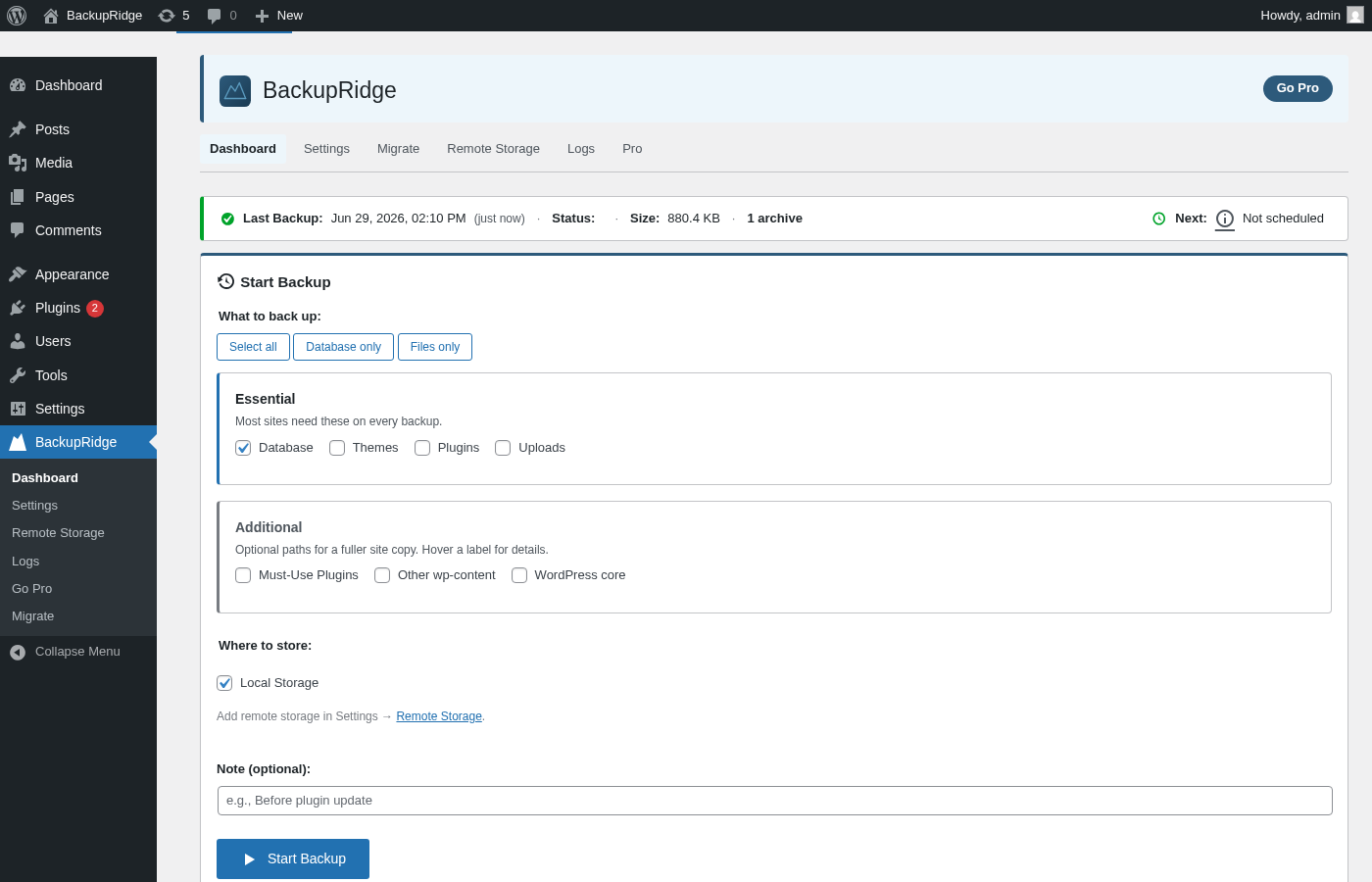
wp backupridge remote-orphans scan <provider-id>lists archives on a remote storage destination that this site’s Backup History no longer tracks, classified by likely cause;wp backupridge remote-orphans delete <provider-id> <group-key>removes one such group after confirmation (--yesto skip). The scriptable equivalent of the Dashboard’s remote orphan scan, for agencies managing storage across many sites from the command line. - Dashboard — View backup status, history, progress, and logs. Start, stop, continue, or retry backups from the admin UI.
- Backup watchdog — A cron-based watchdog recovers backups that stall due to missed cron events or loopback failures.
- Custom backup filenames — Choose a filename prefix (BackupRidge, site URL, or site name) with automatic date/time stamping.
- Multi-part downloads — Download each archive part from the dashboard, or use Download All to queue sequential direct downloads (reliable on shared hosting).
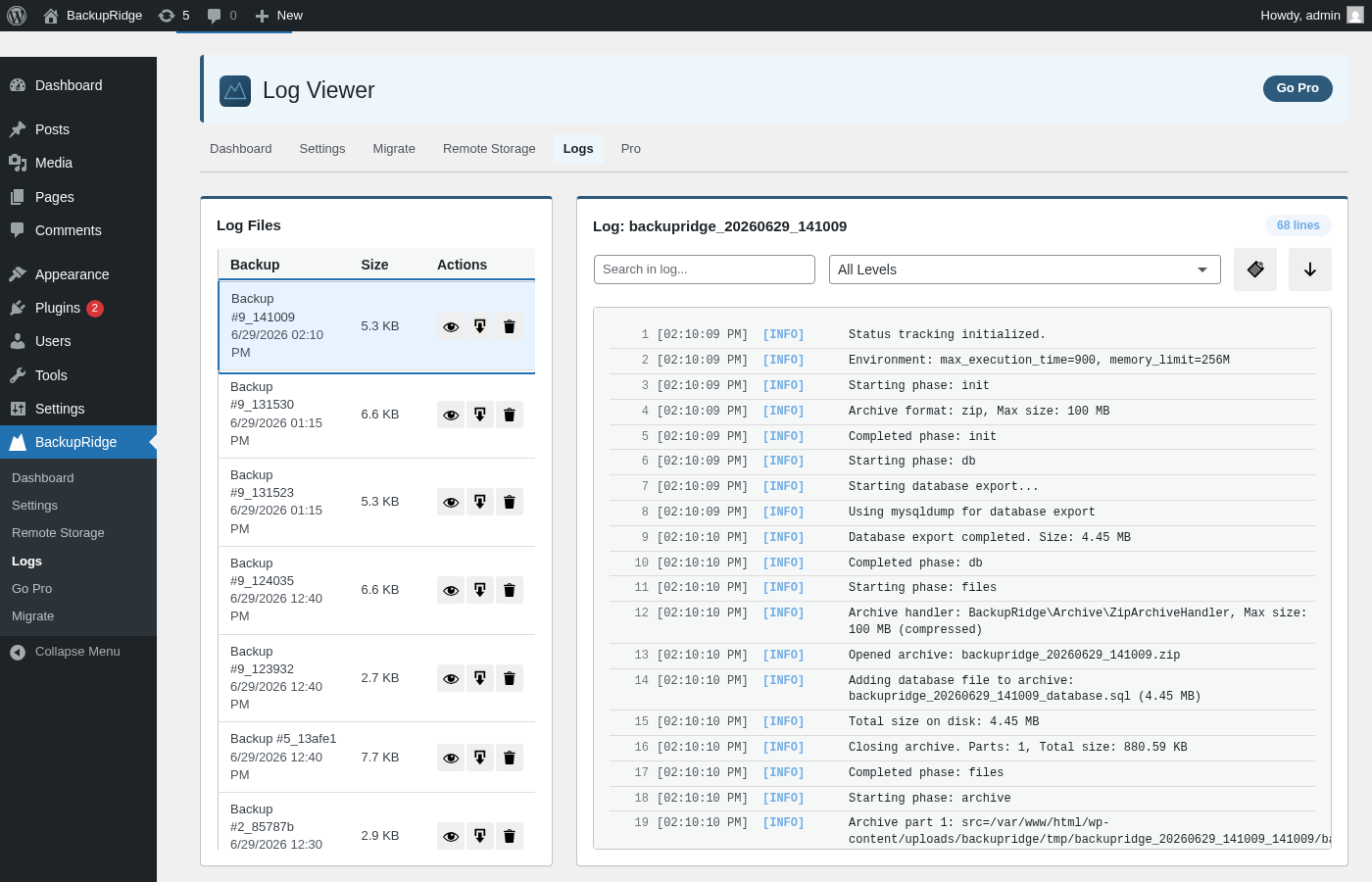
- Log viewer — Browse and download per-job log files directly from the admin UI.
- Email notifications — Optional email after a successful and/or failed backup (you choose), sent to a configurable address that defaults to the site admin email if left blank; the address and which outcomes to notify are in Settings → Notifications.
- Webhook notifications — Optional HTTP POST after a successful and/or failed backup (you choose): generic JSON, Slack incoming webhook, or Discord webhook format; URL, format, and which outcomes to notify are in Settings.
- Update-screen warning — See a notice on WordPress update screens when no backup has been created in the last 24 hours.
Pro-Funktionen
- More cloud providers + OAuth — Connect Google Drive, Dropbox, OneDrive, and Backblaze B2 with easy OAuth sign-in—no manual API keys required.
- Incremental backups — Only back up files that changed since the last run, reducing time and storage.
- Archive encryption — AES-256-GCM authenticated encryption for backup archives before upload (legacy AES-256-CBC archives are still decryptable for restore). The encryption key can be downloaded from Settings → Encryption and imported on another site — save a copy before you need it, since the key lives only on this site and encrypted backups cannot be recovered without it.
- Advanced scheduling — Multiple independent schedules with time-of-day, day-of-week, 5-field cron expression support, and per-schedule settings overrides.
- Backup verification — SHA-256 integrity checks on every archive part after backup completes.
- System cron integration — Managed system cron setup and WP-CLI commands for triggering and automating backups, instead of relying on WP-Cron.
- Custom filename templates — Build filenames from placeholders (
{type},{seq}, and more) instead of a fixed prefix. - Tiered (GFS) retention — Grandfather-Father-Son backup retention: keep a shrinking set of daily, weekly, monthly, and yearly backups instead of only the most recent N, with per-schedule overrides and a live preview of exactly what a policy would keep and delete before you save it.
- Advanced webhooks — Multiple webhook endpoints, each with its own URL, custom JSON/text payload templates, optional HMAC-SHA256 request signing and custom headers, automatic retries, and a phase-transition event fired as a job moves through the backup pipeline.
- Concurrent backups — Run more than one backup job at a time instead of queueing them one after another.
Bedarf
PHP 8.0 or higher, WordPress 6.7 or higher. The backup directory (default wp-content/uploads/backupridge) must be writable by the web server.
Unterstützen
Without a license: please open a thread in BackupRidge’s support forum — the Support tab on this plugin’s directory page. We read every thread.
Pro license holders get a priority support channel: use the Support link in the plugin footer (Dashboard, Settings, Log Viewer, etc.) or go directly to backupridge.com/contact. When your license is active, the in-plugin link automatically carries your license key and plan so your ticket is prioritised at intake.
Whichever channel you use, attaching diagnostics up front avoids back-and-forth over “what PHP version / what host / is cron working?”:
- Log Viewer (BackupRidge → Logs) — copy or download the log for a specific backup job as plain text.
- Support Bundle (also in the Log Viewer) — a one-click report combining your host environment, host capabilities, WP-Cron status, and a redacted summary of your settings. Copy it to your clipboard or download it as a
.txtfile and attach it to your ticket.
Externe Dienste
BackupRidge can upload backup archives to third-party cloud storage services configured by the user. No data is sent to any external service unless the user explicitly configures a storage provider.
Links to backupridge.com and stavatech.no are informational website links and do not receive backup data from the plugin.
Amazon S3
Used to store backup archives via the S3 API. Signed requests with user-provided credentials and backup files are transmitted when the user configures S3 storage.
* AWS Customer Agreement
* AWS Privacy Notice
Cloudflare R2
Used to store backup archives via S3-compatible API calls. Signed requests with user-provided credentials and backup files are transmitted when the user configures R2 storage.
* Cloudflare Terms
* Cloudflare Privacy Policy
FTP
Used to upload backup archives to a host, port, and credentials supplied by the site administrator. Data is transmitted only when the user configures FTP storage.
This connection targets a user-selected server endpoint (self-hosted or third-party chosen by the site owner), so no single provider Terms or Privacy policy applies.
SFTP
Used to upload backup archives over SSH file transfer to a host, port, and credentials (or key) supplied by the site administrator. Data is transmitted only when the user configures SFTP storage.
This connection targets a user-selected server endpoint (self-hosted or third-party chosen by the site owner), so no single provider Terms or Privacy policy applies.
Google Drive (BackupRidge Pro only)
Not included in the WordPress.org download. When installed separately, BackupRidge Pro can upload backups via the Google Drive API using OAuth and user-granted access. Backup file data and metadata needed for the upload are sent to Google when the user configures this provider and runs a backup. Setup requires enabling the Google Drive API on your Google Cloud project (not only OAuth credentials). See https://backupridge.com/docs/cloud-storage#google-drive
Dropbox (BackupRidge Pro only)
Not included in the WordPress.org download. When installed separately, BackupRidge Pro can upload backups via the Dropbox API using OAuth. Backup file data is sent to Dropbox when the user configures this provider and runs a backup. Setup requires enabling file permissions on your Dropbox app and clicking Submit in the Permissions tab before OAuth. See https://backupridge.com/docs/cloud-storage#dropbox
Microsoft OneDrive (BackupRidge Pro only)
Not included in the WordPress.org download. When installed separately, BackupRidge Pro can upload backups via Microsoft Graph / OneDrive using OAuth. Backup file data is sent to Microsoft when the user configures this provider and runs a backup. Setup requires an Azure app registration with a redirect URI of wp-admin/admin.php (no query string) and account types matching your Microsoft sign-in. See https://backupridge.com/docs/cloud-storage#onedrive
Backblaze B2 (BackupRidge Pro only)
Not included in the WordPress.org download. When installed separately, BackupRidge Pro can upload backups to Backblaze B2 via the Backblaze B2 Native API. It calls https://api.backblazeb2.com to authorize the session with the user-provided Key ID and Application Key, then uploads the backup archive parts. Backup file data is sent to Backblaze only when the user configures this provider and runs a backup.
HTTP webhooks (backup status)
When webhooks are enabled in Settings, the plugin can send an HTTP POST to the URL you provide after a backup succeeds and/or after it fails, depending on the checkboxes you set. Choices: generic JSON (job id, status, size, duration, timestamp), Slack incoming webhook (JSON with a text field), or Discord webhook (JSON with a content field). Data is sent only to your URL; the receiving service’s terms apply if you use Slack or Discord.
REST / cron trigger (this plugin)
Optional: a REST URL with a secret key can be called by system cron so the site can run backup segments without WP-Cron or loopback. Requests go only to the same WordPress site; no third party receives data unless the site owner configures something else.
Preferred authentication: send the key in the X-BackupRidge-Cron-Key request header. Legacy ?key= query authentication remains supported for compatibility, but query strings can be logged by proxies and web servers.
Source Code
This plugin ships its full, human-readable source. Every minified script in assets/js/dist/ has its un-minified source in assets/js/src/, and the minified stylesheet assets/css/admin.min.css has its source in assets/css/admin.css, inside the same plugin package, so each compiled file can be reviewed and rebuilt. No source is removed during packaging.
Build tools and steps to regenerate the compiled assets:
- Requirements: Node.js 18+ and npm.
- Install dependencies:
npm install - Build JS and CSS (terser minifies each
assets/js/src/*.jsintoassets/js/dist/, and PostCSS/cssnano minifiesassets/css/admin.cssintoassets/css/admin.min.css):npm run build
PHP dependencies are managed with Composer (composer install). No third-party JavaScript libraries are bundled in a minified-only form; all shipped scripts are first-party and their sources are included as described above.
Installation
- Upload the plugin zip via Plugins → Add New → Upload, or install it from the WordPress plugin directory.
- Activate the plugin through the Plugins screen.
- Go to BackupRidge in the admin menu to configure settings, storage, and schedules.
- Use the Dashboard to start a manual backup or view history and logs.
For first-time setup, ensure the backup directory (Settings → Backup directory) is writable. The plugin creates wp-content/uploads/backupridge by default for backups, logs, and temporary files.
Änderungsprotokoll
1.48.0
Push migrations you can undo, and backups named after your site.
- New (Pro): A push migration saves a restore point on the destination first, so you can roll it back under Restore points. Update BackupRidge on the destination before pushing.
- Fix (Pro): Push migrations work when the destination uses Plain permalinks, and an unreachable destination now gets a clear message instead of “Request failed.”
- Fix (Pro): Push migrations no longer stop at the restore step with “Another operation is currently active”.
- Fix (Pro): Migration History shows real dates and sites instead of “January 1, 1970”.
- Change: New backups are named after your site’s address by default. Leftover backups under an earlier prefix can still be cleaned up.
- Fix: The import windows say they accept
.wpressfiles. - Fix: A backup started twice at once (for example Backup Now just as WP-Cron runs) no longer fails with “Archive is not open” or gets marked failed while it is still running.
1.47.2
Fixes a false “verification failed” error on hosts that cut long backups short.
- Fix: On hosts that stop long-running requests, a complete backup could fail at the end with “Archive verification failed: … not present in the finished archive by name”. Files re-added after the host stopped the backup were counted twice. Each file is now counted once, so these backups finish normally.
1.47.1
Small fixes: warnings that clear themselves, clearer messages, and the founder offer closing on time.
- Fix: The “retention cleanup failed” warning now clears by itself once that destination prunes successfully again.
- Fix: Backup History shows the size of backups kept only at a remote destination, instead of “No files”.
- Fix: On the free version, a leftover Pro-only destination is reported as needing Pro, not as an unknown storage type.
- Fix: After the founder offer closes on 2 November 2026, Go Pro links go to the regular pricing page, even on sites that cannot reach backupridge.com.
- Changed: The review link no longer pre-selects a star rating.
1.47.0
Pro can no longer be swapped for the free version by an auto-update, plus schedule and Backup Now fixes.
- Fix: BackupRidge Pro now tells WordPress its updates come from backupridge.com, so the free WordPress.org version is never offered in its place, even when a host tool runs the update. An expired license still moves to Free.
- Fix: The Pro schedule editor saves again and keeps your remote destinations. An unavailable destination can be removed from a schedule directly.
- Fix: Backup Now explains why a backup did not start, and a stuck backup record no longer blocks new backups.
- Fix: Moving a Pro license to a new site works in one step.
- Fix: After switching back to Pro, destinations the free version marked unavailable are re-tested automatically.
- Changed: New sites no longer get a success email for every scheduled backup. Existing sites keep their current behaviour.
1.46.0
Clean up leftover remote backups, clearer notices, and smoother Pro-to-Free downgrades.
- New: “Delete all leftover backups” under Storage clears backups a destination still holds that BackupRidge no longer tracks, showing how many and how much space first. Pinned and ignored backups are never touched.
- New: After a Pro-to-Free downgrade, notices explain which Pro settings are inactive and flag a leftover Pro license. Encrypted backups are labelled, with a clear message and key download on Free.
- Improved: Admin notices share one compact layout with details behind a toggle.
- Fix: An update started while you switched tabs during the pre-update restore point now resumes on the next admin page load.
- Fix: Backups whose remote copies could not be deleted are retried instead of being left behind.
- Fix: Pro-only destinations no longer block Backup Now or Settings on Free, and several misleading warnings were quietened.
Screenshots
Für Entwickler
Ist das dein Plugin? Zeigen Sie die Zahlen.
Fügen Sie Ihrer Website, Docs oder GitHub Readme ein Live-Badge hinzu. Es wird von selbst aktualisiert - kein Konto erforderlich.
Best BackupRidge alternatives
Alle Backup-Plugins →





Fragen und Antworten
BackupRidge: quick answers
Gerade Antworten, gezogen von Live WordPress.org Daten.
Quelle: WordPress.org
Is BackupRidge free?
Yes. BackupRidge is free to download and use from the official WordPress.org plugin directory.
Is BackupRidge safe to use in 2026?
BackupRidge is a solid plugin choice in 2026, with a few things worth checking first. It runs on 20+ sites, is rated 5/5 and was last updated 6 days ago, and scores 74/100 on our health check.
How many websites use BackupRidge?
BackupRidge is active on 20+ WordPress websites and has been downloaded 2,414 times since it launched in July 2026. It was downloaded 705 times in the last 30 days.
Does BackupRidge work with WordPress 7.1?
Yes. The developer has tested BackupRidge up to WordPress 7.1.5, the latest release. It requires WordPress 6.7 or newer.
What PHP version does BackupRidge need?
BackupRidge requires PHP 8.0 or higher. Most hosts run PHP 8.x today, so it works on any modern WordPress hosting.
When was BackupRidge last updated?
The latest version, 1.48.0, was released on November 15, 2026 (6 days ago).
Who makes BackupRidge?
BackupRidge is developed and maintained by Stava Tech.
What are the best alternatives to BackupRidge?
The most popular alternatives to BackupRidge are All-in-One WP Migration and… (5M+ installs), UpdraftPlus: WP Backup & Mi… (4M+ installs) and Jetpack (3M+ installs).
Angetrieben von PageForge
Eine Vorlage und eine Tabelle. Eine echte Seite für jede Suche.
PageForge Verwandelt jede Zeile eines CSV in eine WordPress-Seite mit eigenem Titel, URL, SEO Felder und Schema entworfen. Kostenlos auf WordPress.org.
- CSV und XLSX, plus Google Sheets auf Beruf und Unternehmen
- seinen eigenen Titel, URL, SEO Felder und Schema für jede Seite
- Arbeitet mit dem Blockeditor, Elementor, Divi und Avada
- Kostenlos auf WordPress.org, keine Kreditkarte