


AFB – Auto Form Builder: Drag & Drop Contact Forms, Multi-Step Forms, Conditional Logic & AI
Auto Form Builder (AFB) is the free WordPress form builder that gives you what other plugins charge for. Build contact forms, multi-step forms, surveys, file-upload forms, product order forms and payment forms with drag…

Solide Wahl
AFB is a solid plugin choice in 2026, with a few things worth checking first. It runs on 200+ sites, is rated 5/5 and was last updated 1 day ago, and scores 76/100 on our health check.
- Aktiv entwickelt - letztes Update vor 1 Tag
- Getestet mit dem neuesten WordPress (7.1)
- Momentum — downloads up 49.4% vs the previous 30 days
- Kleine Benutzerbasis (über 200 aktive Installationen)
- Bisher sehr wenige Bewertungen
Wie stapelt es sich?
Side-by-side bei Installationen, Updates, Bewertungen und Support



Tägliche Downloads
Download-Spitzen folgen normalerweise einer neuen Version - jede Website, die automatisch aktualisiert wird, gilt als Download.
Ranglisten
Where AFB stands todayWordPress.org Ranglisten suchen
Live-Position in der Plugin-Suche, Top 100| Stichwort | Position |
|---|---|
| AI form builder | #43 |
| conditional logic | #35 |
| Kontaktformular | >100 |
| form builder | #61 |
| payment form | #81 |
Versionsübernahme
Anteil aktiver Sites pro Release.
Bewertungsaufschlüsselung
★★★★★★★★★★ 5 from 1 reviews
About AFB
From the official readme · v1.6.12Beschreibung
Auto Form Builder (AFB) is the free WordPress form builder that gives you what other plugins charge for. Build contact forms, multi-step forms, surveys, file-upload forms, product order forms and payment forms with drag and drop, no code and no monthly fees. Build a form by hand or let AI build it for you, and embed your forms, or their AI chat version, on any website, WordPress or not.
Free forever, with no paid add-ons. The “Add-Ons” screen is simply optional free modules you switch on in one click. Stripe Payments adds no fee of its own: you pay only Stripe’s standard processing fees. The AI features are optional, and the only thing you can ever pay for is AIDA credits for them, once the free trial credits are used up.
Privacy-first by design: your submissions stay on your own site, and the plugin contacts no external service unless you enable a feature that needs one.
Watch the full overview video · See all features · Support
Quiz & Lead Funnels
Turn on Funnel mode for a multi-step form and each screen shows one question on large, touch-friendly cards. Answers can move on to the next screen by themselves (auto-advance, on or off per question), and radio and checkbox options can show pictures as answer cards, in landscape, square, portrait or the image’s own shape. “One question per screen” splits an existing form into screens in one click. Give options points for quiz scoring, then show a different result message or redirect for each score range or answer. With Form Analytics on, you see how many visitors reached each screen and where they left. Start from one of four ready-made funnel templates.
Drag & Drop Builder
The visual drag-and-drop builder lets you add and reorder fields, undo and redo, and preview on desktop, tablet and mobile. Start from one of 32 ready-made forms in the searchable template gallery (contact, quote, booking, order, survey, job application, funnels and more), a blank canvas, or Build with AI right in the gallery: describe the form and AI builds it. Style your forms with theme presets, saved themes, a header image, colors, fonts and layout, with a live preview.
20+ Field Types
Text, Textarea, Email, Phone, Number, Date, Time, Month & Year, Checkbox, Radio, Dropdown, Name, Address, File Upload, Signature, Color Picker, Calculation, Products, an HTML content block and Page Break, plus four survey fields: Tabular Survey (Likert grid), Star Rating, NPS and Opinion Scale. Fields support validation, help text, icons, URL prefill and conditional logic. Text fields offer ready-made formats such as German, Dutch and UK postcodes and IBAN (checked with its checksum), and the Address field checks the postcode for the country the visitor picks. See the full field reference.
Products Field (free)
List what you sell with a price, optional description and image, shown as checkboxes, a single choice, quantity steppers or cards. Visitors pick quantities within your limits and see a live order total. Products work with conditional logic and calculations, a link can preselect products and quantities, and with Stripe Payments visitors pay through an itemized Stripe Checkout. Prices are one-time; recurring billing is not available yet.
Logic, Calculations & More
- Conditional logic — show or hide fields with AND/OR conditions, and change the success message, redirect or notification emails.
- Calculations — live totals, quotes and scores, recalculated on your server so visitors cannot change them.
- Live field values — show a visitor’s answers in labels, help text, HTML blocks, step titles and the submit button as they type, for example “Thanks, {first_name}”, with fallback text while a field is empty, for example {first_name|default:there}. The same tags work in success messages, notification emails, the Stripe product name and the AI chat’s completion message.
- Review step — an optional “Review your answers” step shows everything the visitor entered, with an Edit button per step, before the form is sent.
- Passwords — an eye button inside password fields shows or hides what was typed. Passwords are never stored in entries or sent in emails or webhooks.
- Multi-step forms — steps, a progress bar (or none) and branching that skips steps that don’t apply.
- Surveys — Likert grids, star ratings, NPS and opinion scales, with charts and an NPS trend.
- Signature — visitors sign with a mouse, finger or stylus.
- Partial entries — unfinished answers are saved and removed after the retention period you choose.
Submissions & Notifications
An inbox with Unread, Starred, Spam and Trash tabs, search, filters, bulk actions and CSV or JSON export. Quick view opens any entry over the list, and each entry page shows the answers first, with the details, tags and payment beside them. On a submission page, Previous, Next and “Next unread” move through your list, keyboard shortcuts save clicks, and “Reply by email” opens your email app. Admin and confirmation emails use your own recipients, subject and placeholders, in HTML or plain text, and can link to uploaded files with a login link or an expiring secure link. See submission management.
Embed Anywhere & Pass Answers On
Every form has an embed code for any site, including non-WordPress sites and page builders, plus a Gutenberg block. Prefill fields from the URL, and pass answers on through {field} tags in a redirect URL, for example to a booking page or CRM.
Free Add-Ons
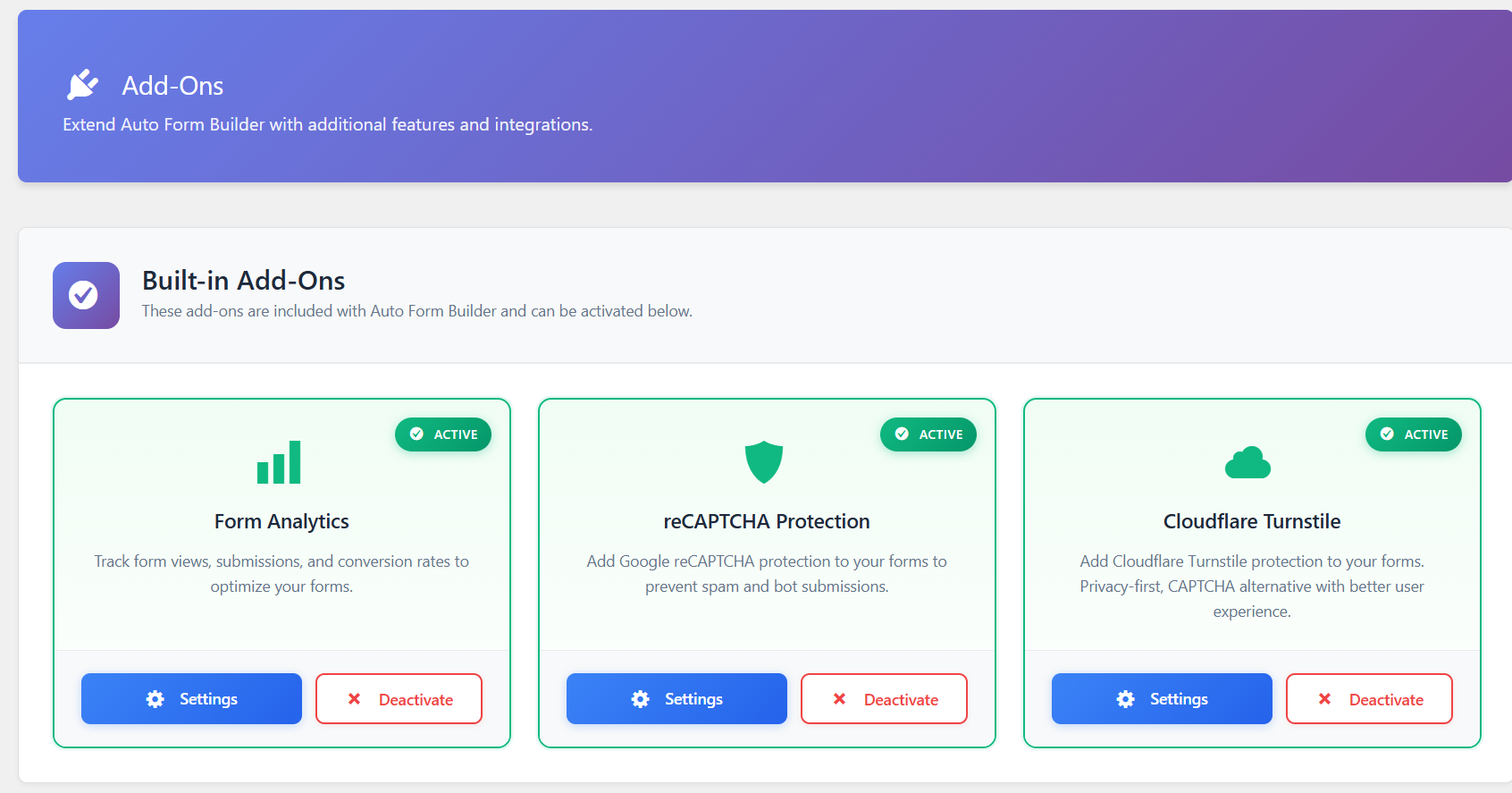
Switch these on under Auto Form Builder → Add-Ons:
- Stripe Payments — Stripe Checkout with your own Stripe account, for a fixed price, an amount the visitor enters, a Calculation result or a Products order. No added fee: you pay only Stripe’s standard processing fees.
- Popup Forms — modal, slide-in, sticky bar, full-screen, welcome mat or floating button.
- Form Analytics — views, submissions and conversion rates per form, and drop-off per screen for funnels.
- Spam Protection — Google reCAPTCHA and Cloudflare Turnstile.
- User Registration & Login — create accounts from any form and add a login form.
- Slack Notifications, Entry Tags and Google Sheets.
- Ad Tracking — remembers ad click IDs (gclid, fbclid and others) and UTM parameters in one first-party cookie, only for visitors who arrive from an ad or a tagged link, so webhooks can tell your ad platform or CRM which ad brought each lead.
Webhooks and import/export of forms and entries are built in. Send each submission to several webhooks (Zapier, Make, a CRM or any endpoint), as the standard data or as your own JSON template (for example for the Meta Conversions API), optionally signed with a secret (HMAC-SHA256), in the background with automatic retries. Templates use answer and submission tags with modifiers such as |e164 and |sha256, and any field can be set to “Never send to webhooks”.
AI Features (optional)
- AI Assistant — build a form from a description or document, generate logic, summarize submissions and draft replies.
- AI Conversation — turn any form into a friendly chat, with optional appointment booking, on your own pages or embedded on any website. Its Appearance tab styles each chat with presets (Light, Dark, Transparent or “Match my form”), your colors, Google fonts, a header and avatar, and an optional floating chat button.
They are switched on by default but send nothing until you connect an AIDA account, and you can switch them off under Auto Form Builder → Add-Ons. A free AIDA account at autoformcrm.com includes trial credits; after that, AI usage needs one-time credit packs. See “External Services” for exactly what is sent.
Externe Dienste
By default the plugin contacts no external service. Each service below is used only after you set up the feature that needs it.
AIDA — AI Assistant & AI Conversation (optional)
- Provider: AIDA by Auto Form CRM (https://autoformcrm.com/); requests are processed by Anthropic.
- When: only after an administrator connects an AIDA account, and then each time an AI feature is used. The AI modules are on by default, but nothing is sent until an account is connected. The core builder never contacts AIDA.
- Account & cost: a free AIDA account with trial credits; after that, one-time credit packs bought on autoformcrm.com in a new tab (no payment inside the plugin). All non-AI features stay free.
- Data sent (only for the action you trigger): on connect, your site address and a one-time code; the form description or document when building a form; submission content when you ask for a summary, reply or answer about submissions; messages typed into the admin assistant; and, if AI Conversation is on for a public form, the visitor’s chat messages. The AIDA token is sent server-side only and stored encrypted.
- Not sent: anything for AI features you do not use, and never WordPress passwords.
- Terms / privacy: https://autoformcrm.com/terms, https://autoformcrm.com/privacy, https://www.anthropic.com/legal/commercial-terms, https://www.anthropic.com/legal/privacy
Deactivation feedback (opt-in, one-time)
- Provider: Auto Form CRM, https://autoformcrm.com/api/v1/plugin-feedback
- When: only when an administrator clicks “Submit & Deactivate” in the deactivation dialog. Skipping or closing it sends nothing.
- Data sent: the chosen reason, an optional comment (up to 1000 characters), WordPress, PHP and plugin versions, and site locale. The exact payload is shown before sending.
- Not sent: site URL, admin name or email, user ID, IP address or form data.
- Terms / privacy: https://autoformcrm.com/terms and https://autoformcrm.com/privacy
Anonymous usage data (opt-in, off by default)
- Provider: Auto Form CRM, https://autoformcrm.com/api/v1/plugin-telemetry
- When: only if you turn on “Help improve Auto Form Builder by sending anonymous usage data” (onboarding or Settings → General): one “install” event on opt-in and one “uninstall” event on deletion.
- Data sent: a random site ID, plugin, WordPress, PHP and MySQL versions, install version, locale, multisite flag, days since install, form and submission counts as ranges, active modules and onboarding status. The full list is shown next to the checkbox.
- Not sent: site URL, admin name or email, user ID, IP address or form content.
- Terms / privacy: https://autoformcrm.com/terms and https://autoformcrm.com/privacy
Slack Notifications (off by default)
- Provider: Slack Technologies, LLC (https://slack.com/). Only hooks.slack.com webhook URLs are accepted.
- When: only after you add your own Slack webhook URL and enable it for a form: on each submission of that form and on “Send Test”.
- Data sent: the form title and site name, plus the submitted answers only if “Include answers” is on. Passwords, CAPTCHA values and file contents are never sent; files appear by name only.
- Terms / privacy: https://slack.com/terms-of-service and https://slack.com/trust/privacy/privacy-policy
Stripe Payments (add-on, off by default)
- Provider: Stripe, Inc. (https://stripe.com/). Only https://api.stripe.com is contacted, from your server, with your own Stripe API key.
- When: only after you enable the add-on and connect a key: to verify the key; to create or delete a webhook endpoint in your Stripe account; about every six hours while the settings page is open, to re-check the key; when a visitor submits a payment form (to create a Checkout session) and returns from it; when Stripe notifies your site of a payment event (signature-verified); and every ten minutes through WP-Cron while payments are still pending.
- Data sent: your API key (server-side only, stored encrypted); your webhook URL and site name; for payments, the amount, currency, product name (for a Products field, each product’s name, quantity and price), return page addresses, submission and form IDs, and the payer’s email only if you map an email field. Card details are entered on Stripe’s page and never touch your site.
- Fees: the plugin adds no fee. Payments go straight to your Stripe account; you pay only Stripe’s fees.
- Terms / privacy: https://stripe.com/legal/ssa and https://stripe.com/privacy
Google Sheets (add-on, off by default)
- Provider: Google LLC. Your server contacts oauth2.googleapis.com, sheets.googleapis.com and www.googleapis.com using a service account you create.
- When: only after you enable the add-on and save the service-account credentials: when you test the connection or pick a spreadsheet or worksheet, and after each submission of a connected form (sent in the background through WP-Cron, with retries).
- Data sent: a sign-in request signed with your service-account key (the key stays on your site, encrypted); the chosen spreadsheet and worksheet; and the mapped field values with their column names. Picking a spreadsheet lists those shared with the service account.
- Not sent: fields you have not mapped.
- Terms / privacy: https://developers.google.com/terms and https://policies.google.com/privacy
Google reCAPTCHA (add-on, off by default)
- Provider: Google LLC (https://www.google.com/recaptcha/).
- When: only after you enable the add-on, enter your keys and turn it on for a form. Pages with that form load https://www.google.com/recaptcha/api.js, and your server checks each submission with https://www.google.com/recaptcha/api/siteverify.
- Data sent: Google’s script collects what it needs to detect bots (such as IP address, browser details and page interaction). Your server sends your secret key and the response token. No form answers are sent.
- Terms / privacy: https://policies.google.com/terms and https://policies.google.com/privacy
Cloudflare Turnstile (add-on, off by default)
- Provider: Cloudflare, Inc. (https://www.cloudflare.com/).
- When: only after you enable the add-on, enter your keys and turn it on for a form. Pages with that form load https://challenges.cloudflare.com/turnstile/v0/api.js, and your server checks each submission with https://challenges.cloudflare.com/turnstile/v0/siteverify.
- Data sent: the Turnstile script collects what it needs to detect bots (such as IP address and browser details). Your server sends your secret key and the response token. No form answers are sent.
- Terms / privacy: https://www.cloudflare.com/website-terms/ and https://www.cloudflare.com/turnstile-privacy-policy/
Webhooks (off by default)
- Provider: the endpoints you enter, one per webhook (for example Zapier, Make, a CRM, Meta through your own server, or any URL). Private and local network addresses are refused, also after redirects.
- When: only after you add a webhook and turn it on: after each submission of a form the webhook covers (sent in the background after the page has loaded, or through WP-Cron, with up to 5 retries over about 8 hours), and when you send a test.
- Data sent: with the standard data, your site address, submission time, form and submission IDs, the answers (signatures as embedded images) and the form’s field settings. With a custom JSON template, only what the template contains, which can include the visitor’s IP address, browser, page address and referrer, and (with the Ad Tracking add-on) ad click IDs, UTM parameters and the Meta _fbp/_fbc values. Fields marked “Never send to webhooks” are never sent. Every request has an X-AFB-Delivery-ID header, and an X-AFB-Signature header (HMAC-SHA256) if you set a secret. A test sends only the site address and time, or the template filled with sample values.
- Terms / privacy: those of the receiving service.
Google Fonts (only for forms using a Google font)
- Provider: Google LLC (https://fonts.google.com/).
- When: only on pages showing a form styled with one of the Google fonts offered under Customize (some theme presets use one), or a Conversational Forms chat set to a Google font on its Appearance tab (also loaded in that tab’s preview). …
Installation
- Go to Plugins > Add New in your WordPress admin.
- Search for “Auto Form Builder”.
- Click Install Now, then Activate.
- Open Auto Form Builder in your admin menu.
- Click Create New Form to build your first form.
- Copy the shortcode and paste it into any page or post.
Änderungsprotokoll
Important: a "Hide this field if" rule now hides the field (before, it acted as Show), so check forms that use it. Forms switched OFF in Google Sheets now stop syncing. Adds postcode and IBAN formats and image card shapes.
1.6.12
- Changed: Conditional logic: a rule set to “Hide this field if” now hides the field. Before, it acted as “Show this field if”. When a field has both, Hide wins. Please check forms that use Hide rules.
- Changed: Google Sheets: forms switched OFF now stop syncing, even if they were set up with “Configure Mapping”. Make sure every form you want to sync is switched ON. Saving a form’s sheet switches it ON.
- New: Text field formats: German postcode (5 digits), Dutch postcode (1234 AB), UK postcode and IBAN (country, length and check digits are checked). They are accepted in small or capital letters, with or without spaces, and saved in their standard form, for example “SW1A 1AA” or “DE89 3704 0044 0532 0130 00”. Each shows an example as placeholder unless you set your own.
- New: Every format shows its own error message, in the browser and from the server, and Custom Pattern has an optional “Error message” box. “Numbers only” and German postcode open the number keypad on phones.
- New: Image cards: an “Image shape” setting: Landscape 4:3 (default), Square 1:1, Portrait 3:4 or Original (the whole image, not cropped). Cards in a row keep the same height. Existing forms keep 4:3.
- New: Submissions: bulk delete on the Partial tab. A dialog says how many partial entries will be permanently deleted. Completed submissions are never touched.
- Tweak: “Letters only” and “Letters and numbers” accept accented letters such as ä, ß and é.
- Fix: Address field: the postcode check follows the country the visitor picks, with that country’s message and example. Postcodes are accepted in small letters, with or without their space (Iran: with or without the dash), and the message is translatable.
- Fix: Address field: part labels show only when you set one, and the Customize preview matches the form.
- Fix: Phone fields: UK Format checks for a UK landline number, “Format as you type” keeps numbers typed with +44, and UK Format and UK Mobile show their own messages.
- Fix: The server checks every pattern the browser checks, including Email and URL, and a Custom Pattern must match the whole answer on multi-step forms too. The browser shows only the format’s own message.
- Fix: Conditions, conditional confirmations and conditional emails match the same text typed in another Unicode form, and capital accented letters match small ones.
- Fix: Fields placed side by side line up at the top, also next to a Dropdown.
- Fix: A form with a whole-order summary shows it only once.
- Fix: A required field without a label no longer shows a lone “*”.
- Fix: Google Sheets: Connection Status, the setup checklist and Integration Status show the same state, and “Forms Configured” counts only forms switched ON.
- Fix: Submissions and Entry Tags: notices show one close icon, the tag filter bar updates after “Add tag…” or “Remove tag…” without a reload, and Data Preview adds no colon after a label ending in “?”.
- Fix: Webhooks: each form’s ID shows beside its name in “Selected forms only”.
1.6.11
- Fix: Conditions on Multiple Choice, Checkboxes and Dropdown fields match the option’s label as well as its value, so a condition such as “Payment contains SEPA” works again for an option renamed after it was added. This covers show/hide, auto-fill, step skipping, confirmations, redirects and emails. Forms whose option values were made from their labels behave as before.
- New: Address fields: every shown part, including Address Line 1, Address Line 2 and City, has its own label and placeholder under “Address Part Labels”, for every address type. Leave a box empty to keep the default.
- Fix: Phone, Text and Number fields are checked on the server exactly as in the browser (custom patterns, the UK Mobile format, lengths, limits and steps), with the same messages. Every answer the browser accepts is still accepted.
- Fix: A pattern that browsers ignore or the server cannot read is skipped, and saving the form shows a warning naming the field. The phone field’s custom format setting now says it takes a pattern (regular expression), with an example.
- Fix: Apostrophes, quotes and backslashes in answers no longer get an extra backslash in Google Sheets, Slack, webhooks, emails and other integrations.
- Fix: Customize no longer saves the Corporate theme into a form without a saved design, so the form and its copies keep their plain look.
- Fix: Duplicate also copies the Google Sheets sync switch.
- Fix: A form with several Products fields shows one whole-order summary with the combined total.
- New: Submissions bulk actions “Add tag…” and “Remove tag…” tag or untag every selected entry at once.
- Fix: Admin screens: Webhooks show each form’s ID beside its name, “Clear All Tags” is readable, and each Default Tag Colors remove button sits next to its color and is named for screen readers.
1.6.10
- Fix: Duplicate: tags with options such as {name|upper} or “If empty, show”, calculation formulas, Products totals and “Other” conditions in the copy now use the copy’s own fields instead of the original form’s.
- Fix: Forms duplicated before this fix are repaired when opened in the builder, and a notice says how many fields were fixed. Tags of the original’s fields that an earlier update turned into plain text ({…}) work again; your own {text} stays as typed.
- Tweak: Duplicate copies the form’s Google Sheets spreadsheet and mapping, Slack settings and AI chat settings (on/off, appearance, instructions). The copy is also added to every webhook limited to selected forms that includes the original, so it sends to the same webhooks.
- Fix: Radio, Checkbox and Dropdown options: renaming an option no longer changes its value, so entries, conditional logic, quiz scores, image cards and default selections keep matching. Only editing the value itself changes it.
- Fix: New Radio, Checkbox and Dropdown fields start with three options: “Option 1”, “Option 2” and “Option 3”.
- Fix: Form Analytics no longer counts views, reviews, screens or submissions by users who can edit forms, such as previews from the builder.
- Fix: The Cloudflare Turnstile and reCAPTCHA fields have their own icons in the field list.
- Fix: Turnstile and reCAPTCHA field settings point to Auto Form Builder → Turnstile and Auto Form Builder → reCAPTCHA.
- Fix: Entry Tags: the Preview in Create New Tag and Edit Tag shows only the tag, as it looks on entries, without a colored bar behind it.
- Tweak: Two forms placed one after another on a page have a 48px gap between them.
- Fix: Multi-step forms: “Progress bar style” has a “None (hide progress bar)” option, so the bar and step counter can be turned off again. It is the same setting as Funnel mode’s “Show progress bar” switch.
1.6.9
- Fix: Image choice cards: each option now keeps its own picture. Choosing or removing an image on one option no longer changes every option of the question.
- Fix: Radio, Checkbox and Dropdown options: editing, moving or removing one option no longer changes the others on forms made from templates or older versions; every option now gets its own ID when the form is saved.
- Fix: Form Analytics counted views and submissions twice; each now records one event, and the drop-off report counts a submission once per page view.
- Fix: Funnel keyboard: Space and Enter on a focused card select it and move on, even when it is already selected.
- Fix: Funnel label-only cards: the radio or checkbox sits beside the label instead of covering it, in LTR and RTL.
- Fix: Funnel: the first card in each group lines up with the others.
- Fix: Funnel last screen: the captcha stays inside the card and Back and Submit sit side by side.
- Fix: Two funnels on one page look the same; the outer form panel no longer shows around a funnel.
- Fix: Funnel: the back button reads “Back” on every screen, including the review.
- Fix: Funnel radio questions always show “Auto-advance” and “Score per option” in the builder after a page refresh.
- New: “Show progress bar” switch for Funnel mode; off by default for new funnels and the funnel templates. Other multi-step forms are unchanged.
- Tweak: “One question per screen” is available for every multi-step form, not only in Funnel mode.
- Fix: Submissions list Data Preview shows the country name instead of the code.
- Fix: CSV export no longer includes columns for layout fields or captchas.
- Fix: A new Dropdown field shows the same default options as a new Radio field.
1.6.8
- New: Funnel mode for multi-step forms (Settings → Multi-Step Form): visitors answer one question at a time on large, touch-friendly screens, and Turnstile or reCAPTCHA appears only on the final screen (or in the review step). Off by default; forms without it work and look exactly as before.
- New: Auto-advance in Funnel mode: a screen with one radio, star rating, NPS or opinion scale question moves on as soon as it is answered (you can turn this off per question). Works with the keyboard and screen readers, skips hidden screens, Back returns to the screen the visitor last saw, and animations respect reduced motion.
- New: Image choice cards: radio and multiple-choice checkbox options can show pictures from your Media Library, 2–4 per row, with or without captions. Images load lazily in the right size, use the option label as alt text, show in the builder preview, and appear as small thumbnails beside the answer on the entry page, Quick view, print and HTML emails. Plain-text emails, CSV, webhooks, Google Sheets and CRMs still receive the option value.
- New: Quiz scoring: give radio and checkbox options points and the total is worked out on your server when the form is sent (hidden questions don’t count). Use it as {quiz_score} in messages, emails, redirects and webhooks and as “Quiz score” in conditional confirmations; it shows on the entry page and can update live in the form.
- New: Results: in Funnel mode, show a different message or redirect for each answer combination or score range through conditional confirmations, with answers passed in the URL.
- New: Funnel drop-off in Form Analytics: how many visitors reached each screen in the last 30 days and where they left without submitting; screens skipped by branching are not counted as drop-off. Only the form, the screen number and a random ID held in the page’s memory are sent: no answers, IP address, browser details, cookies or storage, with a limit on events per visitor.
- New: Four funnel templates in the new “Funnels” gallery category: Consultation (beauty or clinic), Home Services Quote, Plan Finder (scored, with two results) and Real Estate Buyer & Seller, each with image card questions, contact details, a consent checkbox, an admin email and result messages. No pictures are included; the cards show their labels until you pick your own images.
- New: “One question per screen” button in Funnel mode adds a page break between questions that share a step, keeping your page breaks, branching and conditional logic (Undo reverts it).
- Fix: Dropdowns (multi-select and single) close on a click or tap outside, a click on the field, Esc (focus stays on the field) or Tab (focus moves to the next field). Picked options stay selected, and scrolling the page on a phone no longer counts as a tap.
- Fix: Printing an entry no longer adds a blank second page.
1.6.7
- Fix: Address field: Company/Organization is now saved with the entry and shown on the entry page, in Quick view, print and the CSV export, as it already was in emails. Entries saved before this update did not keep it and cannot show it.
- Fix: Address field: the entry page, Quick view, print, emails ({submission_data} and the field tag) and the CSV export show the country by name (“United Kingdom”) instead of its code, as the review step does. Webhooks still send the code.
- Fix: In the compact form builder (narrower than 1200px) Field Properties opens beside the admin menu, folded or not, instead of under it.
- Fix: Popups on phones keep room for the scrollbar, so it no longer covers the right edge of the fields.
- Fix: The Forms list on phones shows each form’s name with a toggle for its ID, shortcode, date and actions, as WordPress lists do, instead of a table header broken over three lines.
- Fix: Password fields ask the browser for a new password, so it no longer fills in the saved password of the signed-in admin.
- Fix: User Registration: after an account is created, the form says “Your account has been created. You can now log in.” unless you wrote your own success message.
- Developer: New filters auto_form_builder_success_message (the success message shown after a submission) and auto_form_builder_success_url_args (extra query arguments of the success page).
Screenshots

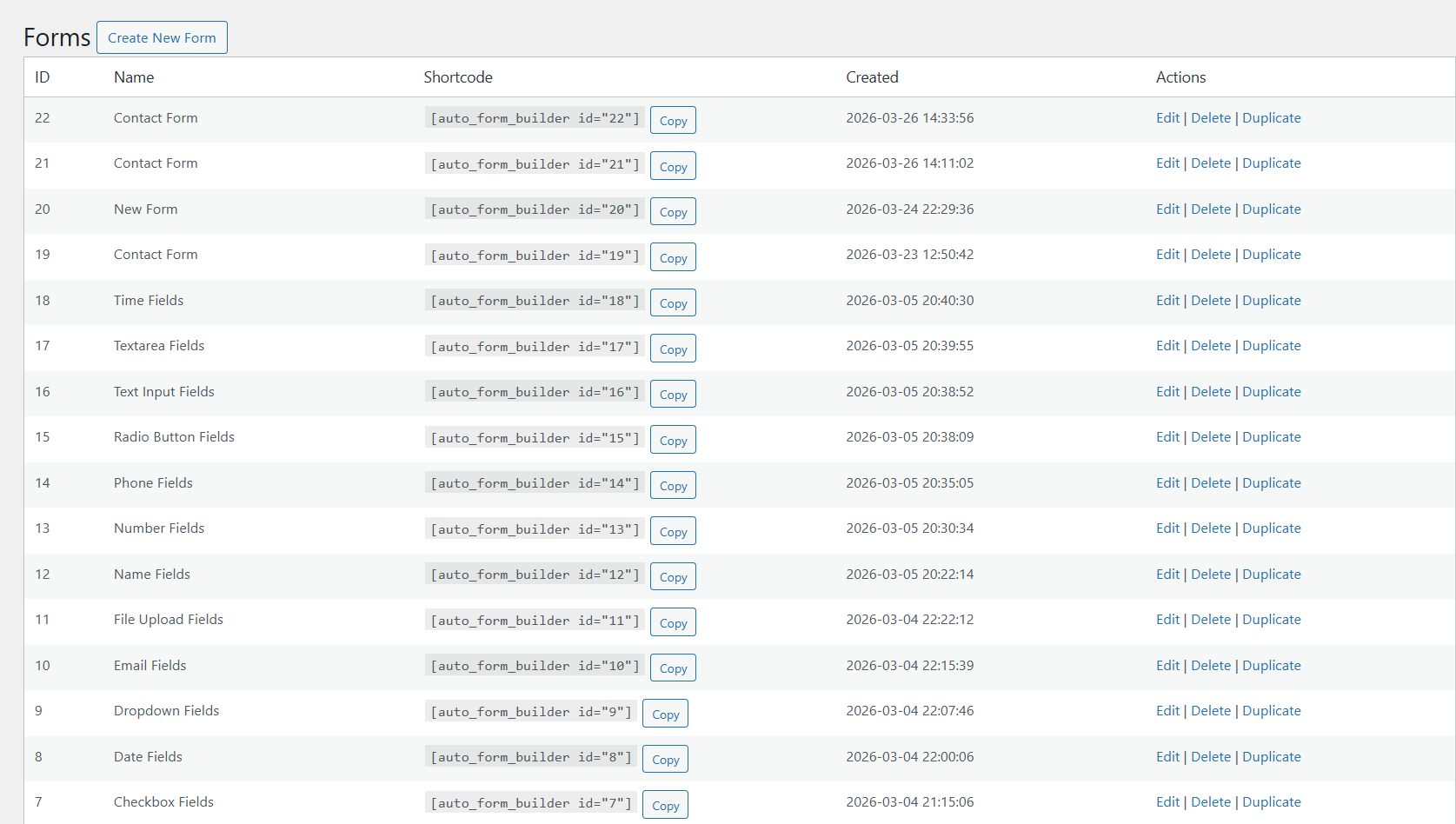
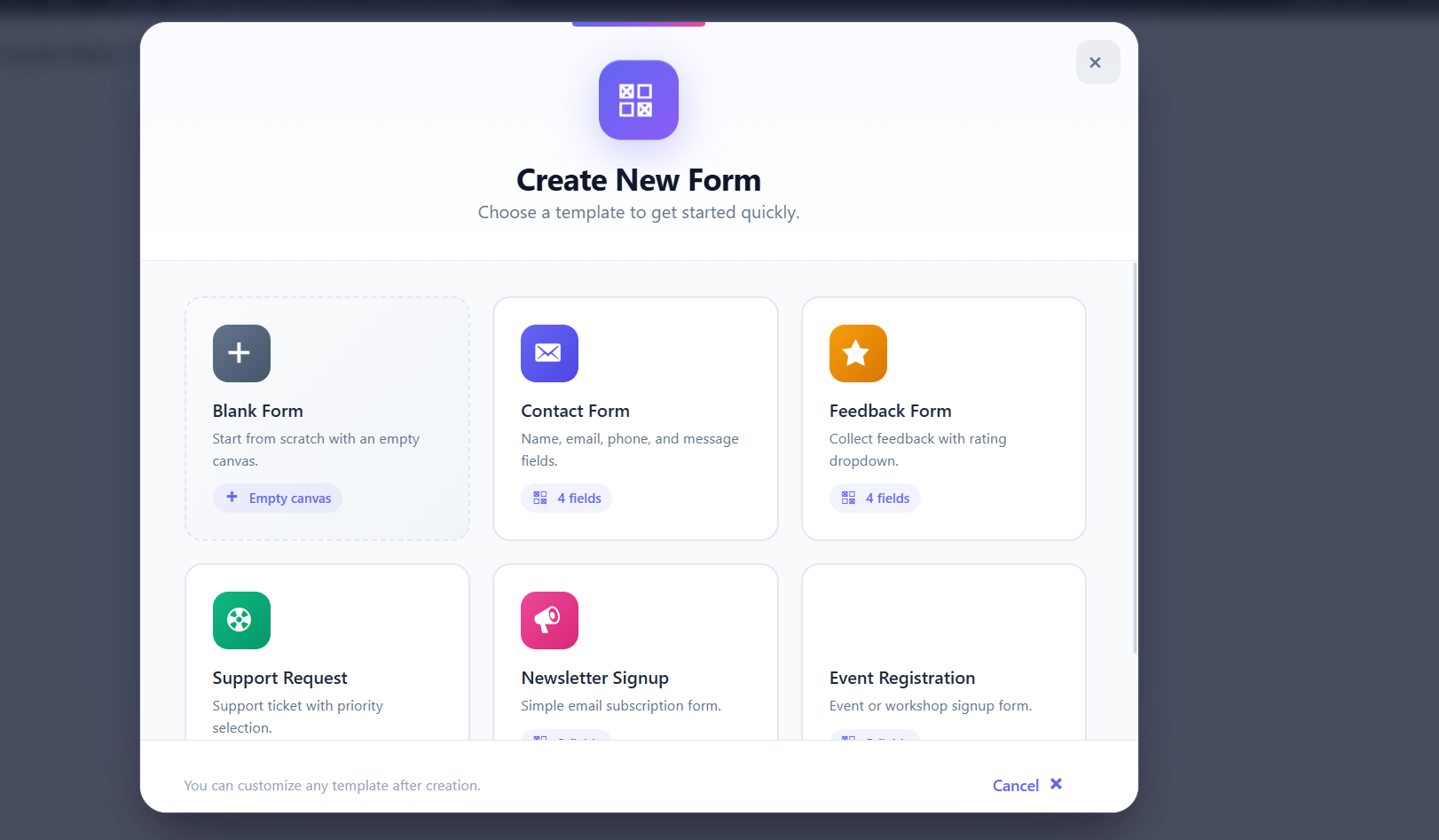
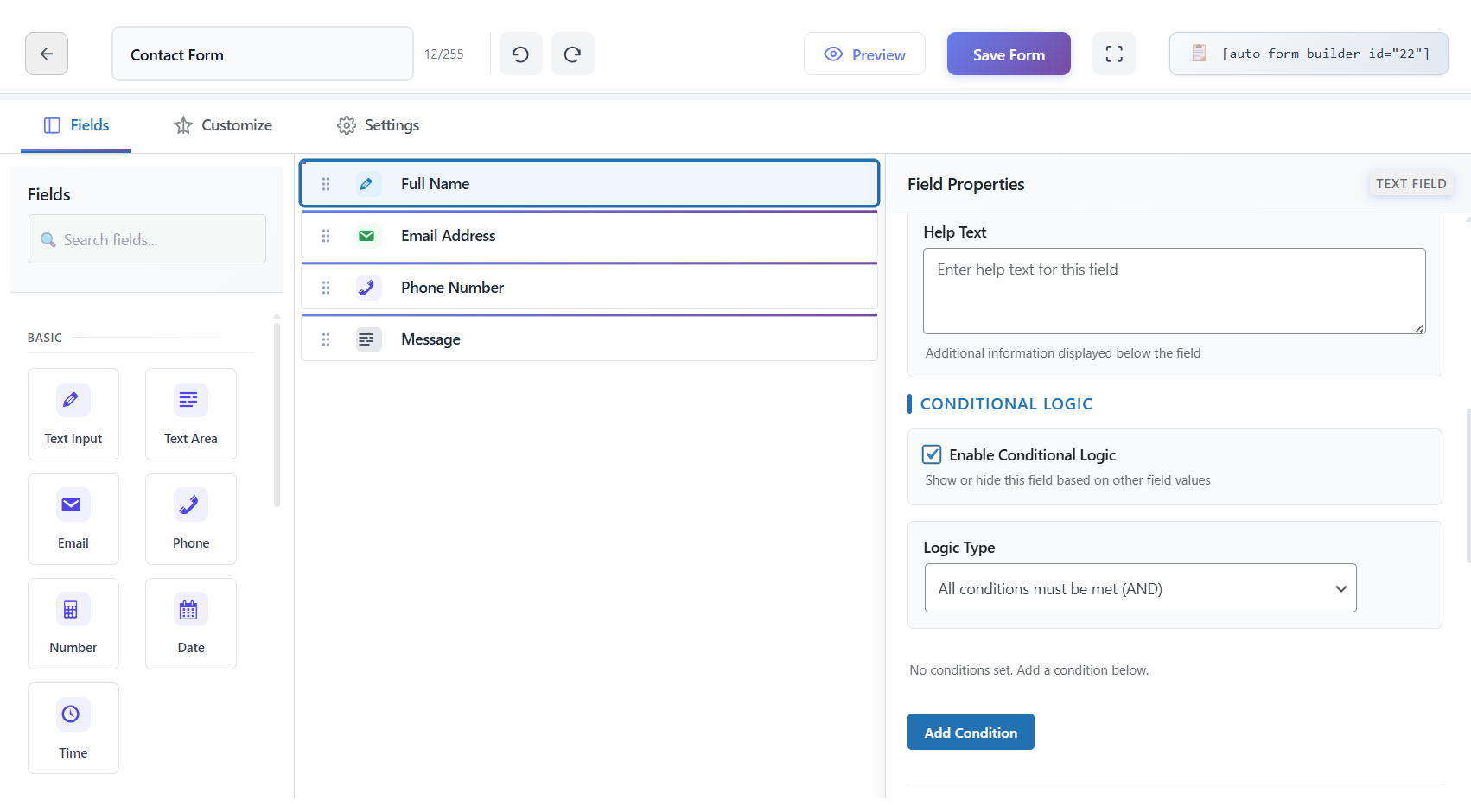


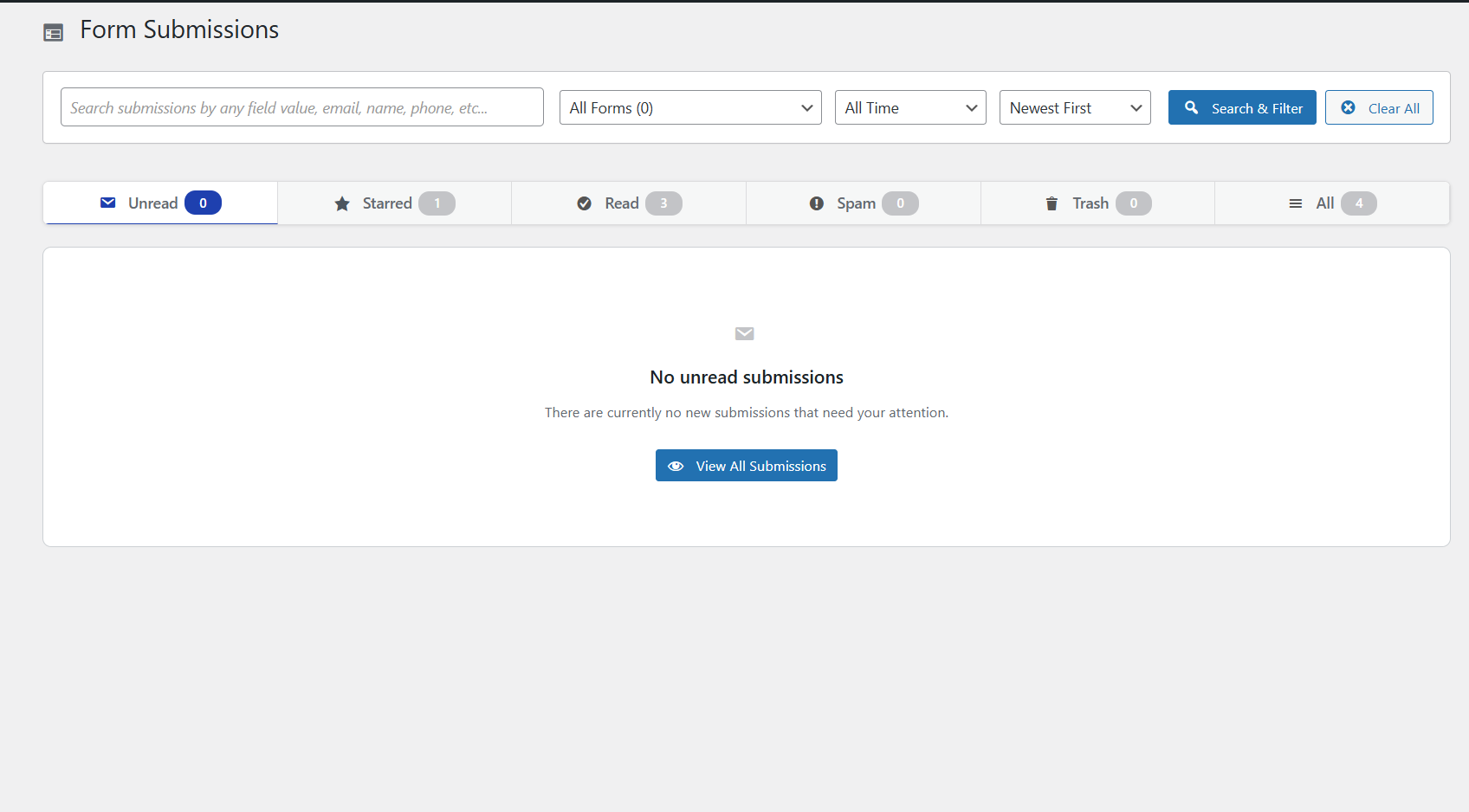

Für Entwickler
Ist das dein Plugin? Zeigen Sie die Zahlen.
Fügen Sie Ihrer Website, Docs oder GitHub Readme ein Live-Badge hinzu. Es wird von selbst aktualisiert - kein Konto erforderlich.
Best AFB alternatives
All AI form builder plugins →


Fragen und Antworten
AFB: quick answers
Gerade Antworten, gezogen von Live WordPress.org Daten.
Quelle: WordPress.org
Is AFB free?
Yes. AFB is free to download and use from the official WordPress.org plugin directory.
Is AFB safe to use in 2026?
AFB is a solid plugin choice in 2026, with a few things worth checking first. It runs on 200+ sites, is rated 5/5 and was last updated 1 day ago, and scores 76/100 on our health check.
How many websites use AFB?
AFB is active on 200+ WordPress websites and has been downloaded 18,203 times since it launched in December 2025. It was downloaded 4,585 times in the last 30 days.
Does AFB work with WordPress 7.1?
Yes. The developer has tested AFB up to WordPress 7.1.5, the latest release. It requires WordPress 6.0 or newer.
What PHP version does AFB need?
AFB requires PHP 7.4 or higher. Most hosts run PHP 8.x today, so it works on any modern WordPress hosting.
When was AFB last updated?
The latest version, 1.6.12, was released on November 21, 2026 (1 day ago).
Who makes AFB?
AFB is developed and maintained by Ali Ghasemirad.
What are the best alternatives to AFB?
The most popular alternatives to AFB are Formidable Forms (300K+ installs), Calculated Fields Form (40K+ installs) and Neural Forms (30+ installs).
Angetrieben von PageForge
Eine Vorlage und eine Tabelle. Eine echte Seite für jede Suche.
PageForge Verwandelt jede Zeile eines CSV in eine WordPress-Seite mit eigenem Titel, URL, SEO Felder und Schema entworfen. Kostenlos auf WordPress.org.
- CSV und XLSX, plus Google Sheets auf Beruf und Unternehmen
- seinen eigenen Titel, URL, SEO Felder und Schema für jede Seite
- Arbeitet mit dem Blockeditor, Elementor, Divi und Avada
- Kostenlos auf WordPress.org, keine Kreditkarte