


Antwork Field Code: PHP Code Generator & Snippets for ACF & SCF
PHP code generator for ACF and SCF: escaped, ready-to-paste snippets that display the fields of a field group in your theme.

Solide Wahl
Antwork Field Code: PHP Code Ge… is a solid plugin choice in 2026, with a few things worth checking first. Was last updated 3 days ago, and scores 64/100 on our health check.
- Aktiv entwickelt – letztes Update vor 3 Tagen
- Getestet mit dem neuesten WordPress (7.1)
- Kleine Benutzerbasis (<10 aktive Installationen)
- Bisher sehr wenige Bewertungen
Wie stapelt es sich?
Side-by-side bei Installationen, Updates, Bewertungen und Support



Tägliche Downloads
Download-Spitzen folgen normalerweise einer neuen Version - jede Website, die automatisch aktualisiert wird, gilt als Download.
Ranglisten
Where Antwork Field Code: PHP Cod… stands todayWordPress.org Ranglisten suchen
Live-Position in der Plugin-Suche, Top 100| Stichwort | Position |
|---|---|
| ACF | >100 |
| code generator | >100 |
| php | >100 |
| snippets | >100 |
| theme development | >100 |
About Antwork Field Code: PHP Code Generator…
Aus der offiziellen Readme · V1.1.1Beschreibung
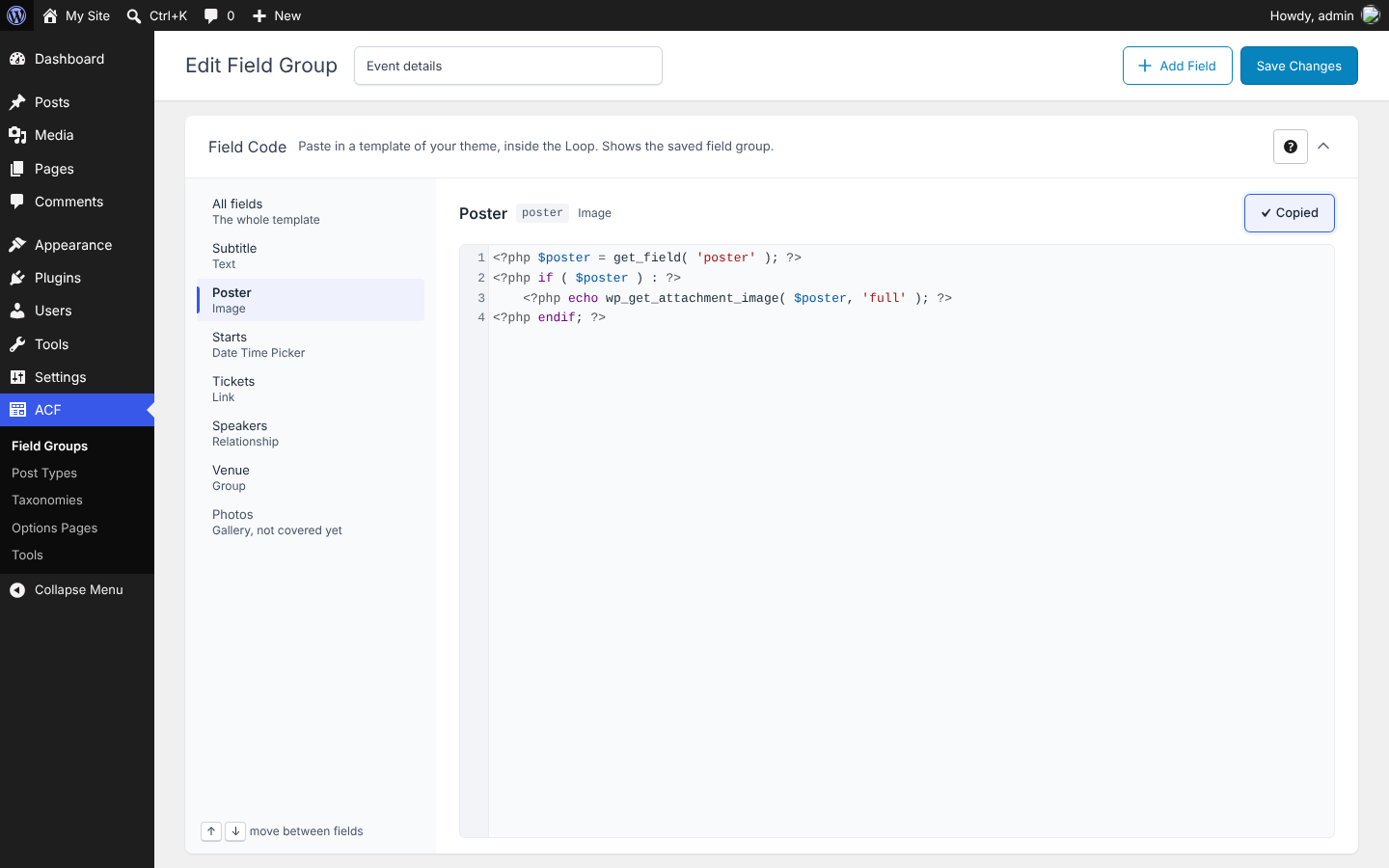
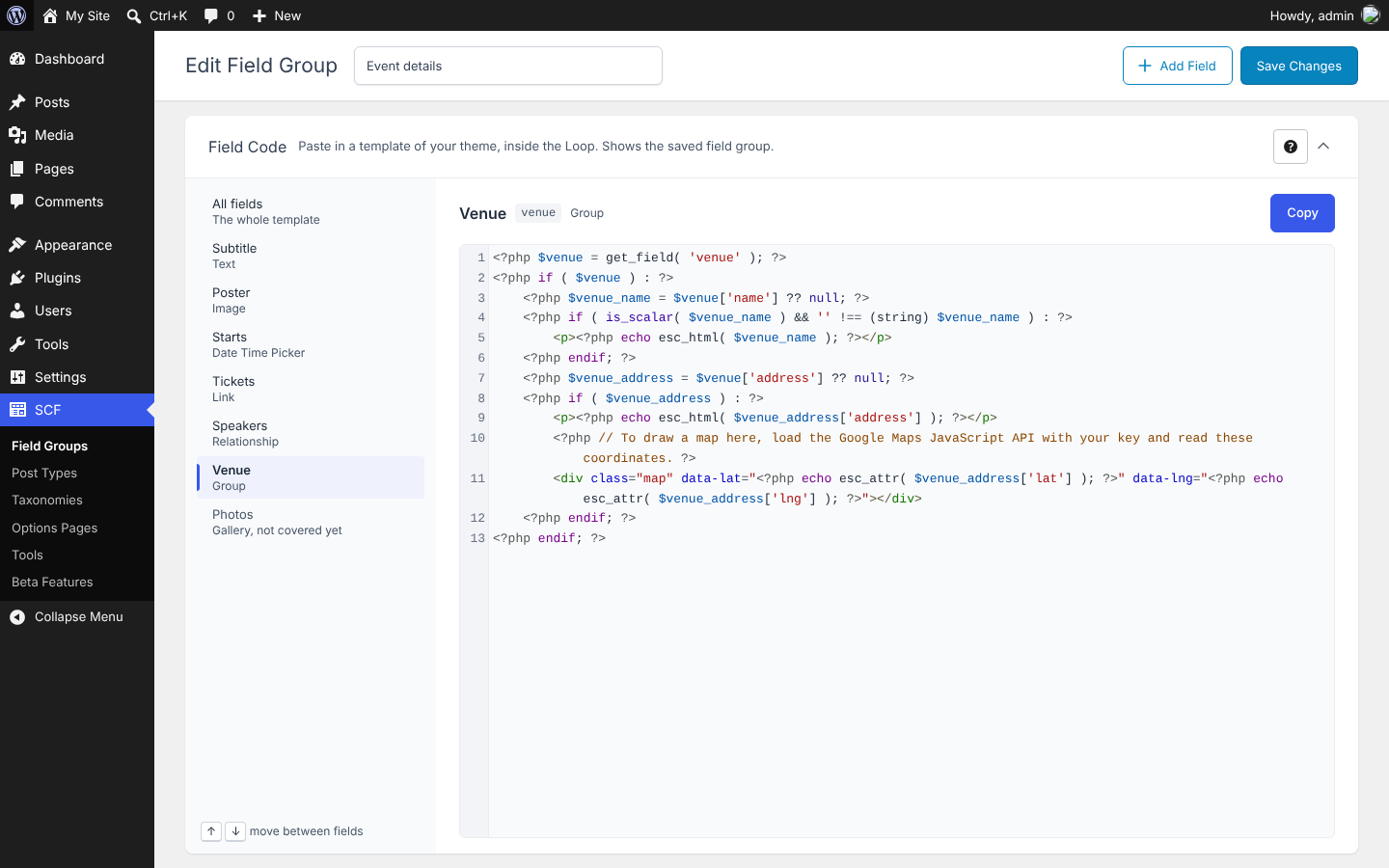
Antwork Field Code is a code generator for Advanced Custom Fields and Secure Custom Fields. It adds a “Field Code” box under the settings of each field group, with the snippets that display the fields of the saved group in a theme template: the code of each covered field, chosen in the list of fields, coloured by WordPress’s own code editor, with a Copy button.
The code follows the documentation of Advanced Custom Fields: get_field() returns values that are not escaped, so every value is escaped for where it is printed (esc_html(), esc_url(), esc_attr(), wp_kses_post(), wp_get_attachment_image() for images), and nothing is printed when a field is empty. It follows the WordPress Coding Standards, runs on PHP 7.4 to 8.4, and names its variables after your fields.
It works with Advanced Custom Fields (free or Pro, version 6) and with Secure Custom Fields.
Merkmale
- Code for each covered field: choose a field in the list, in the order of the field group, to see its code, read only. It reads your field group as it is saved, with the settings that change the code: return format (value, label or array; object or ID; URL…), one or several values, appearance of taxonomy fields, new lines of text areas, tabs of icon pickers.
- Copy: a Copy button for each field and “Copy all” for the whole group. Copying is announced to screen readers and works with the keyboard.
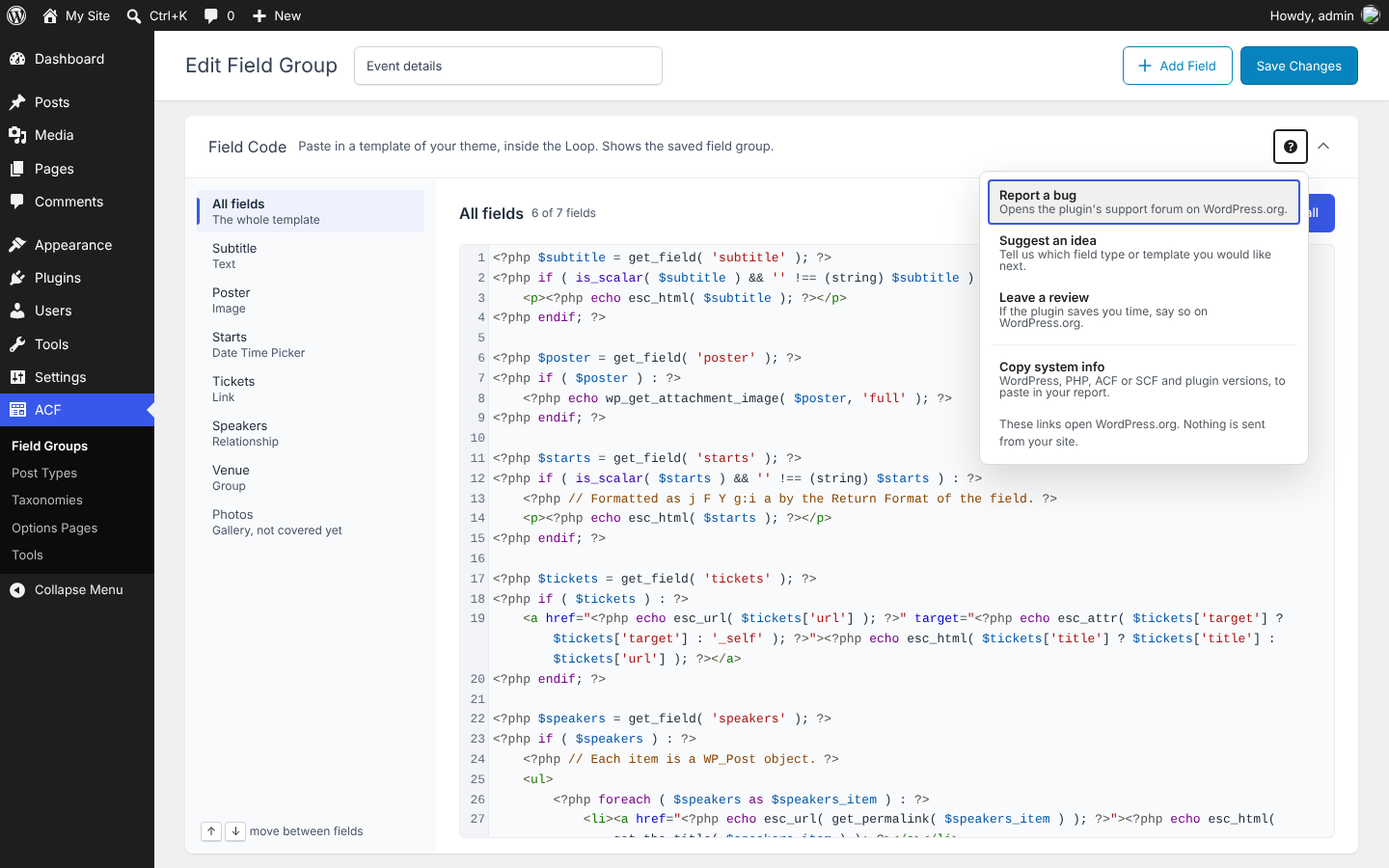
- Field list: pick a field, or All fields for the whole template; the arrow keys move between fields.
- Group fields: the sub-fields of a Group field are read from the group’s value, at any depth.
- Readable code: one variable per field, a guard on empty values, comments where a value needs explaining (formatted dates, post objects or IDs).
- Help menu: links to the support forum and to the reviews on WordPress.org, and a button that copies your WordPress, PHP, ACF or SCF and plugin versions to the clipboard (shown to users who can see Site Health). Nothing is sent from your site.
- For developers: filters let another plugin cover a field type, add a location (such as an options page), and add code before or after each snippet.
Covered field types
- Basic: Text, Text Area, Number, Range, Email, URL, Password (read, never printed).
- Content: Image (Array, URL, ID), File (Array, URL, ID), Wysiwyg Editor, oEmbed.
- Choice: Select (one or several values; Value, Label or Array), Checkbox, Radio Button and Button Group (Value, Label or Array), True / False.
- Relational: Link (Array or URL), Post Object (one or several; Post Object or Post ID), Page Link (one or several), Relationship (Post Object or Post ID), Taxonomy (Checkbox, Multi Select, Radio Buttons or Select; Term Object or Term ID), User (one or several; User Array, User Object or User ID).
- Advanced: Google Map, Date Picker, Date Time Picker, Time Picker, Color Picker (Hex string, RGBA string or RGBA array), Icon Picker (String or Array).
- Layout: Group, with its sub-fields. Message, Tab, Accordion and Separator hold no value and get no code.
Repeater, Flexible Content, Gallery, Clone and field types added by other plugins show “This field type is not covered yet.”
Where the code works
The code reads the fields of the current post, inside the Loop of a template for posts, pages or custom post types. A field group shown elsewhere (an options page, a taxonomy, a user, ACF Blocks…) still gets its code, with a line that names the location that is not covered yet.
Antwork Field Code Pro
Antwork Field Code Pro is a separate plugin, sold at antwork.fr. It adds the code of Repeater, Flexible Content, Gallery and Clone fields, and of field groups shown on options pages, taxonomy terms, users, comments, attachments and widgets. Where it would apply, the Field Code box says so in one sentence that you can dismiss.
Ideas and bugs
Have an idea for the plugin? Suggest it in the support forum, where bugs are reported too.
Privatsphäre
Privacy: this plugin makes no external request. It collects no data, adds no tracking and stores no option in the database, so there is nothing to clean up when you delete it.
Antwork Field Code is an independent plugin. It is not affiliated with or endorsed by Advanced Custom Fields or Secure Custom Fields.
If it saves you time, a review on WordPress.org helps other developers find it.
Switching from another code generator
The code appears under the settings of each field group.
- Deactivate the other code generator, if any.
- Install and activate Antwork Field Code.
- Edit a field group: the “Field Code” box shows the code of its fields.
There is nothing to set up and nothing to migrate: the plugin stores no settings.
Installation
- Install and activate Advanced Custom Fields or Secure Custom Fields.
- Install Antwork Field Code from the Plugins screen (Plugins > Add New, search for “Antwork Field Code”) and activate it.
- Edit a field group and save it: the “Field Code” box appears under its settings.
- Copy the code of a field, or “Copy all”, and paste it into a template of your theme (for example
single.php), inside the Loop.
Änderungsprotokoll
Plugin name updated so the plugin is easier to find.
1.1.1
- Plugin name updated so the plugin is easier to find.
1.1.0
- The sub-fields of a Group field tell other plugins which array they are read from (
container), and the new filterawfc_location_post_idreceives the whole location rule, such as the options page. - A field named
argsis read into$args_field, so that it never replaces the$argsof a widget. - Under a field type or a location that Antwork Field Code Pro covers, the Field Code box says so in one sentence, with a link and a Dismiss button. Dismissing is remembered in your browser: nothing is stored on your site and no request is made.
1.0.0
- First release: the code of 29 field types, with each return format and appearance, escaped as the ACF documentation recommends; Copy, Copy all and field list; help menu; hooks for field types, locations, headers and footers.
Screenshots
Für Entwickler
Ist das dein Plugin? Zeigen Sie die Zahlen.
Fügen Sie Ihrer Website, Docs oder GitHub Readme ein Live-Badge hinzu. Es wird von selbst aktualisiert - kein Konto erforderlich.
Best Antwork Field Code: PHP Code… alternatives
Alle ACF-Plugins →





Fragen und Antworten
Antwork Field Code: PHP Code Genera…: quick answers
Gerade Antworten, gezogen von Live WordPress.org Daten.
Quelle: WordPress.org
Is Antwork Field Code: PHP Code Ge… free?
Yes. Antwork Field Code: PHP Code Ge… is free to download and use from the official WordPress.org plugin directory.
Is Antwork Field Code: PHP Code Ge… safe to use in 2026?
Antwork Field Code: PHP Code Ge… is a solid plugin choice in 2026, with a few things worth checking first. Was last updated 3 days ago, and scores 64/100 on our health check.
How many websites use Antwork Field Code: PHP Code Ge…?
Antwork Field Code: PHP Code Ge… is active on <10 WordPress websites and has been downloaded 494 times since it launched in October 2026. It was downloaded 497 times in the last 30 days.
Does Antwork Field Code: PHP Code Ge… work with WordPress 7.1?
Yes. The developer has tested Antwork Field Code: PHP Code Ge… up to WordPress 7.1.5, the latest release. It requires WordPress 6.3 or newer.
What PHP version does Antwork Field Code: PHP Code Ge… need?
Antwork Field Code: PHP Code Ge… requires PHP 7.4 or higher. Most hosts run PHP 8.x today, so it works on any modern WordPress hosting.
When was Antwork Field Code: PHP Code Ge… last updated?
The latest version, 1.1.1, was released on November 18, 2026 (3 days ago).
Who makes Antwork Field Code: PHP Code Ge…?
Antwork Field Code: PHP Code Ge… is developed and maintained by Antwork.
What are the best alternatives to Antwork Field Code: PHP Code Ge…?
The most popular alternatives to Antwork Field Code: PHP Code Ge… are Advanced Custom Fields (ACF… (2M+ installs), ACF Content Analysis for Yo… (100K+ installs) and Advanced Custom Fields: Ext… (100K+ installs).
Angetrieben von PageForge
Eine Vorlage und eine Tabelle. Eine echte Seite für jede Suche.
PageForge Verwandelt jede Zeile eines CSV in eine WordPress-Seite mit eigenem Titel, URL, SEO Felder und Schema entworfen. Kostenlos auf WordPress.org.
- CSV und XLSX, plus Google Sheets auf Beruf und Unternehmen
- seinen eigenen Titel, URL, SEO Felder und Schema für jede Seite
- Arbeitet mit dem Blockeditor, Elementor, Divi und Avada
- Kostenlos auf WordPress.org, keine Kreditkarte