


AntiAdBlockCore – AdBlock Recovery
Recover lost ad revenue: detect ad blockers and show an anti-adblock message. Free plan, no payment method. Works with WP Rocket and LiteSpeed Cache.

Solide Wahl
AntiAdBlockCore is a solid plugin choice in 2026, with a few things worth checking first. Was last updated 1 day ago, and scores 64/100 on our health check.
- Aktiv entwickelt - letztes Update vor 1 Tag
- Getestet mit dem neuesten WordPress (7.1)
- Momentum — downloads up 197.2% vs the previous 30 days
- Kleine Benutzerbasis (<10 aktive Installationen)
- Bisher sehr wenige Bewertungen
Wie stapelt es sich?
Side-by-side bei Installationen, Updates, Bewertungen und Support



Tägliche Downloads
Download-Spitzen folgen normalerweise einer neuen Version - jede Website, die automatisch aktualisiert wird, gilt als Download.
Ranglisten
Where AntiAdBlockCore stands todayWordPress.org Ranglisten suchen
Live-Position in der Plugin-Suche, Top 100| Stichwort | Position |
|---|---|
| ad blocker | >100 |
| ad recovery | #63 |
| adblock | #27 |
| adblock detector | #8 |
| anti-adblock | #9 |
About AntiAdBlockCore – AdBlock Recovery
From the official readme · v1.2.11Beschreibung
Recover the ad revenue that ad blockers take from your site
A growing share of your visitors browse with an ad blocker. They read your content, but your ads never load, so every one of those page views earns you nothing. AntiAdBlockCore detects ad blockers on your WordPress site and shows those visitors a customizable anti-adblock message asking them to allow ads. Visitors who whitelist your site start seeing ads again, and you get that revenue back.
Free plan, no payment method needed. Works with any theme and with WP Rocket, LiteSpeed Cache and W3 Total Cache: the script is kept out of their JavaScript optimization and their page cache is purged for you when something changes.
It is built for publishers, bloggers and media sites that live on advertising: news, recipes, tutorials, downloads, streaming, forums or any site monetized with Google AdSense, Google Ad Manager or another ad network.
Up and running in minutes, no code to paste
- Installieren und aktivieren Sie das Plugin.
- In Settings > AntiAdBlock Core, click Click here to connect your AntiAdBlock Core account. Sign in or create your free account (no payment method needed), check the security code and approve.
- The plugin verifies your domain and the detection script goes live on every page once the CNAME record of your subdomain is active.
- Optional: turn on Maximum detection in Configuration, with one click and nothing to upload.
No snippets to copy, no theme files to edit. The plugin adds the script to every page whatever your theme, and a built-in installation check confirms it is really there.
Ad blocker detection that keeps working
- Detects the ad blockers your visitors actually use: browser extensions such as uBlock Origin, AdBlock, AdBlock Plus and AdGuard, browsers with built-in blocking such as Brave, and network-level blockers.
- Built to avoid false positives: visitors without an ad blocker are left alone.
- Always up to date: detection is maintained on the service side, so it keeps up when ad blockers change, without plugin updates.
- First-party delivery: the script is served from a subdomain of your own site with a single CNAME record, so it stays first-party. The plugin walks you through the record step by step (on Cloudflare, keep the orange cloud on) and switches over by itself when it is active.
- Maximum detection: one click adds a second way in through your own domain. When a visitor cannot reach your subdomain, the script loads through a short list of addresses on your domain that change every day, answered by the plugin itself. Nothing to upload and no file to edit; turn it off at any time.
An anti-adblock message that converts
- A clear notice that explains why ads matter to your site. By default it works as an adblock wall: visitors allow ads on your site to keep reading, with step-by-step instructions for their ad blocker and a button that checks again right away.
- The built-in text is in English or Spanish, following the visitor’s browser.
- Customize the message, colors, logo and look from your dashboard, depending on your plan, and preview it without installing an ad blocker.
- Show the message (recovery) or, on eligible plans, run in detection-only mode, and exclude any page or path, such as checkout or privacy pages.
Measure what you recover
- Ad blocker rate, detections and recoveries, per site.
- Pages, countries, browsers and ad blocker types in the dashboard (detailed analytics on the Max and Business plans).
- A monthly summary right on the plugin’s settings page.
Everything under control from WordPress
- Overview: site, account, delivery and status at a glance, with a Check button and a link to the step-by-step guide.
- Protection level: Standard or Maximum detection, with a check that confirms from outside that it works and plain-language help when something on your server needs a change.
- Your account inside WordPress: account name, plan, usage of the current cycle, a monthly chart and your latest notifications from AntiAdBlock Core.
- Protection switch: turn ad block protection on or off on this WordPress.
- Installation check: opens your home page and your latest posts and pages as an anonymous visitor and confirms the script is on each one, and off the pages you excluded.
- Logged-in users who can edit posts are skipped by default (contributors, authors, editors and administrators), so your team never sees the message and their visits stay out of the stats.
- Manual code option for headless front ends or builders that serve their own HTML.
Works with your stack
- Any theme, including themes that do not call wp_head().
- Caching and optimization plugins: WP Rocket, LiteSpeed Cache, Autoptimize, SiteGround Optimizer, Perfmatters, Flying Press and W3 Total Cache. The script is excluded from their JavaScript optimization (minification, deferral or delay). When something changes, the plugin purges the page cache of WP Rocket, LiteSpeed Cache, W3 Total Cache, WP Super Cache, SiteGround Optimizer and WP Engine.
- Cloudflare, including Rocket Loader.
- AMP pages and feeds are skipped automatically.
- Multisite: each site connects on its own.
Pläne
The free plan includes 5,000 detections per month (a detection is a page view where an ad blocker is detected; page views without one never count), no payment method required. Paid plans add more detections and sites; Max and Business also add full customization of the message and detailed analytics. Plans are managed in your AntiAdBlock Core dashboard, never inside WordPress: the plugin code is complete and the same for every plan.
Third-party service
This plugin relies on the AntiAdBlock Core service (https://antiadblockcore.com), a software-as-a-service run by the plugin authors. It is required for the plugin to work.
- When you connect: nothing is sent until you click the connect button. Then the plugin sends your site address and name, the WordPress, PHP and plugin versions, your admin language and whether the site is a multisite, a subfolder install or a non-production environment to https://antiadblockcore.com. It receives a token limited to this site, used to read the site’s status, usage and plan and to verify your domain. No user accounts, emails or content of your site are ever sent.
- In the background: while connected, the plugin reads that status once an hour so the script address, the verification state and your quota stay current. It stops when you disconnect.
- On your pages: once the domain is verified, your pages load the detection script from a subdomain of your own domain that points to the service (you create that DNS record yourself; nothing is changed for you). Sites that connected before 1.2.0 with the older third-party delivery keep loading it from antiadblockcore.com until they switch.
- Maximum detection (only if you turn it on): the plugin receives a key for this site from the service and answers a short list of daily addresses on your domain. For a visitor who cannot reach your subdomain, it forwards that request (the script, and the same reports the script sends) to the service (https://antiadblockcore.com), signed with the key, together with the visitor’s IP address and country (from Cloudflare when your site is behind it) and the same request headers a browser sends to the subdomain (user agent, language, accepted content types, origin, the page address without its query string, and the script’s own signed report headers), so the service can protect itself and count the visit as it would through the subdomain. It does not pass on cookies and does not set any. The service can also send this WordPress signed requests to check that it works. Turning it off, disconnecting or uninstalling removes the key. For each page view the script reports whether an ad blocker was detected and which kind, the page path, the browser type and the country derived from the visitor’s IP address. The IP address is used in transit to derive the country and to protect the service; it is not stored in the statistics and is deleted from the service’s server access logs after 14 days. To count recoveries correctly, the script keeps a few small first-party entries on your own domain: in the browser’s local or session storage and, when your site spans several subdomains, in a first-party cookie on your domain. They hold when an ad blocker was last seen and which kind, a few flags for the current visit (such as the page and whether the message was closed) and, for up to 24 hours, reports that could not be sent yet. They contain no identifier of the visitor, are not used for advertising, profiling or tracking across sites, and are ignored after 30 days; the cookie expires then. Describe them in your privacy or cookie policy and decide, under the rules that apply to you, whether your consent tool should cover them.
- Credit: the message shown to visitors who have an ad blocker carries a small “powered by AntiAdBlock Core” link. It appears only inside that message, only for visitors with an ad blocker, and higher plans can switch it off.
- Terms of service: https://antiadblockcore.com/terms
- Privacy policy: https://antiadblockcore.com/privacy
The detection script is loaded from the service and is not bundled in this plugin; the plugin code itself is fully readable.
Installation
- Install the plugin from the Plugins screen (search for AntiAdBlockCore) or upload it to
/wp-content/plugins/antiadblockcore. - Activate it.
- Go to Settings > AntiAdBlock Core and click Click here to connect your AntiAdBlock Core account. AntiAdBlock Core opens in a new tab.
- Sign in or create your free account, check that the security code matches and click Connect.
- Back in WordPress, create the DNS record shown in the setup steps; the plugin verifies your domain and the script goes live once the record is active.
- Optional: in Configuration > Protection level, turn on Maximum detection.
If your WordPress lives in a subfolder of the domain (for example example.com/blog), the settings page shows a one-time manual verification step. First-party delivery covers that case too: the DNS record verifies the domain without touching any file.
Änderungsprotokoll
Maximum detection: the fallback on sites with the custom tag format keeps working under a new ad blocker rule.
1.2.11
- Maximum detection: on sites with the custom tag format, the fallback that starts the script when its tag is blocked no longer depends on a single kind of timer, so an ad blocker rule that disables them does not stop it.
1.2.10
- Maximum detection: on sites with the custom tag format, an ad blocker rule that disables timers no longer stops the fallback that starts the script when its tag is blocked.
1.2.9
- Maximum detection: support for a custom tag format that AntiAdBlock Core can turn on for a specific site when an ad blocker targets its tag. Other sites keep the same tag.
1.2.8
- Maximum detection on LiteSpeed servers: the visitor’s real address and country are now read correctly. LiteSpeed trusts proxy headers from anyone by default, so the address could be wrong and, behind Cloudflare, the country was lost.
1.2.7
- Maximum detection: if an ad blocker strips the tag’s fallback before it can run, a separate check starts it once the page has loaded, so the notice still shows.
1.2.6
- Domains that cannot have a first-party subdomain can now be protected: turn on Maximum detection and the script loads through your own domain, served by this plugin, with no DNS record to create.
- On those sites the plugin explains what to do instead of asking you to contact support, and “Check pages” recognises the new tag.
Screenshots


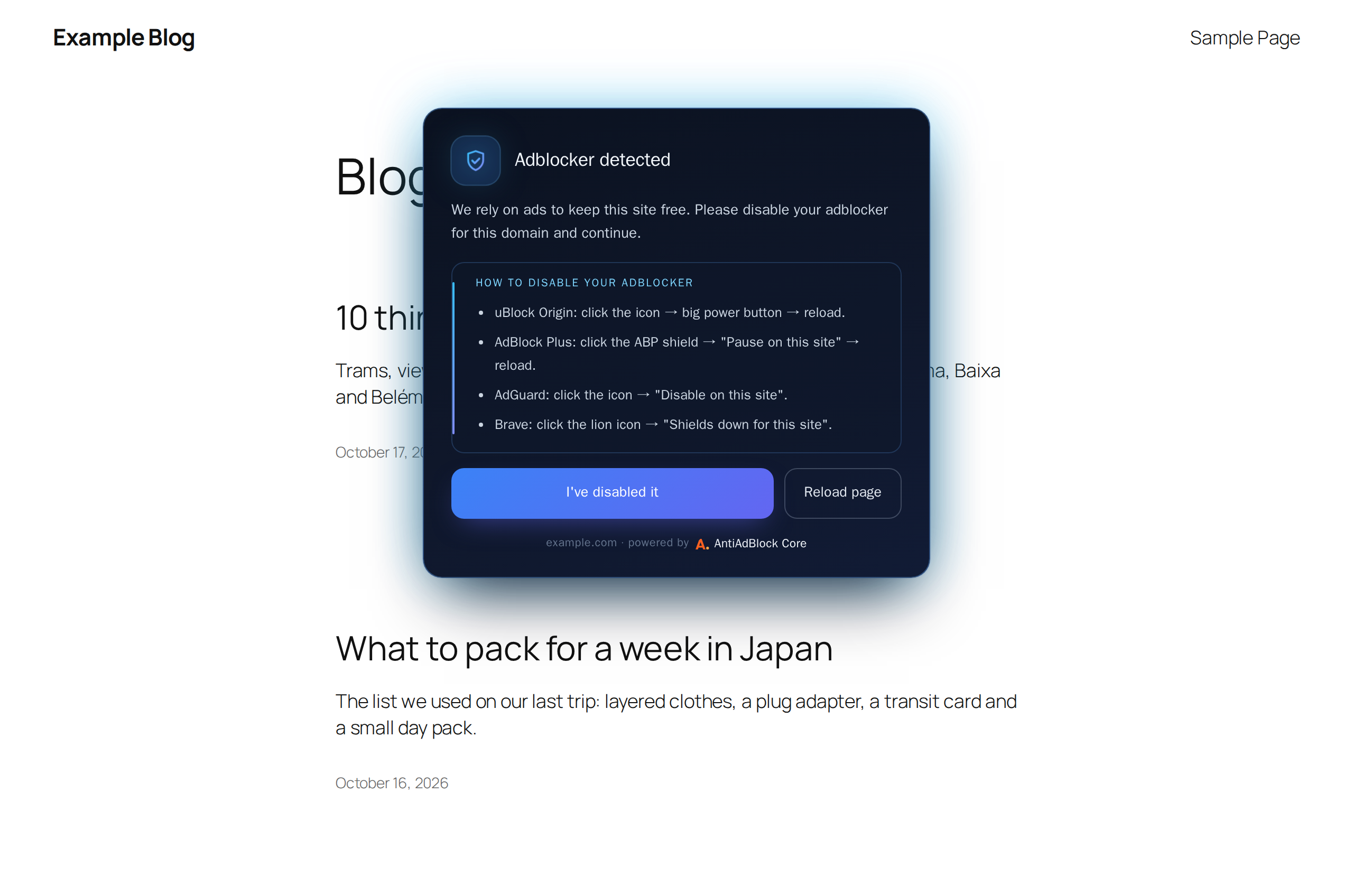


Für Entwickler
Ist das dein Plugin? Zeigen Sie die Zahlen.
Fügen Sie Ihrer Website, Docs oder GitHub Readme ein Live-Badge hinzu. Es wird von selbst aktualisiert - kein Konto erforderlich.
Best AntiAdBlockCore alternatives
All ad blocker plugins →





Fragen und Antworten
AntiAdBlockCore – AdBlock Recovery: quick answers
Gerade Antworten, gezogen von Live WordPress.org Daten.
Quelle: WordPress.org
Is AntiAdBlockCore free?
Yes. AntiAdBlockCore is free to download and use from the official WordPress.org plugin directory.
Is AntiAdBlockCore safe to use in 2026?
AntiAdBlockCore is a solid plugin choice in 2026, with a few things worth checking first. Was last updated 1 day ago, and scores 64/100 on our health check.
How many websites use AntiAdBlockCore?
AntiAdBlockCore is active on <10 WordPress websites and has been downloaded 1,290 times since it launched in September 2026. It was downloaded 862 times in the last 30 days.
Does AntiAdBlockCore work with WordPress 7.1?
Yes. The developer has tested AntiAdBlockCore up to WordPress 7.1.5, the latest release. It requires WordPress 6.3 or newer.
What PHP version does AntiAdBlockCore need?
AntiAdBlockCore requires PHP 7.4 or higher. Most hosts run PHP 8.x today, so it works on any modern WordPress hosting.
When was AntiAdBlockCore last updated?
The latest version, 1.2.11, was released on November 28, 2026 (1 day ago).
Who makes AntiAdBlockCore?
AntiAdBlockCore is developed and maintained by AntiAdBlock Core.
What are the best alternatives to AntiAdBlockCore?
The most popular alternatives to AntiAdBlockCore are Ad Unblock (100+ installs), Sorry AdBlocker (10+ installs) and Tiny Simple AdBlock Detector (10+ installs).
Angetrieben von PageForge
Eine Vorlage und eine Tabelle. Eine echte Seite für jede Suche.
PageForge Verwandelt jede Zeile eines CSV in eine WordPress-Seite mit eigenem Titel, URL, SEO Felder und Schema entworfen. Kostenlos auf WordPress.org.
- CSV und XLSX, plus Google Sheets auf Beruf und Unternehmen
- seinen eigenen Titel, URL, SEO Felder und Schema für jede Seite
- Arbeitet mit dem Blockeditor, Elementor, Divi und Avada
- Kostenlos auf WordPress.org, keine Kreditkarte