


Altify AI – Auto ALT Text Generator
Auto ALT text and AI ALT text plugin for WordPress with bulk image ALT text tools, featured image ALT text, and WooCommerce image ALT.

Mit Vorsicht verwenden
Altify AI works, but test it on a staging site before relying on it in 2026. It runs on 10+ sites, is rated 5/5 and was last updated 3 months ago, and scores 57/100 on our health check.
- Kleine Benutzerbasis (10+ aktive Installationen)
- Bisher sehr wenige Bewertungen
- Nur getestet bis WordPress 6.9 (letzt ist 7.1)
Wie stapelt es sich?
Side-by-side bei Installationen, Updates, Bewertungen und Support


Tägliche Downloads
Download-Spitzen folgen normalerweise einer neuen Version - jede Website, die automatisch aktualisiert wird, gilt als Download.
Ranglisten
Where Altify AI stands todayWordPress.org Ranglisten suchen
Live-Position in der Plugin-Suche, Top 100| Stichwort | Position |
|---|---|
| accessibility | >100 |
| AI alt text | #60 |
| Alt Text | #60 |
| image seo | >100 |
| WooCommerce | >100 |
Versionsübernahme
Anteil aktiver Sites pro Release.
Bewertungsaufschlüsselung
★★★★★★★★★★ 5 from 1 reviews
About Altify AI – Auto ALT Text Generator
Aus der offiziellen Readme · V1.2.0Beschreibung
Altify AI is an auto ALT text and AI ALT text plugin for WordPress images. It helps generate descriptive image ALT text for accessibility and image SEO.
Use bulk image ALT text tools for your Media Library, generate featured image ALT text automatically, and scale WooCommerce image ALT updates with AI or offline mode.
Key features:
- Review & Undo: preview 20 offline suggestions at a time, edit them, and apply selected images only.
- Conflict-aware undo for your latest review batch, preserving later manual ALT edits.
- Improved offline quality: descriptive captions and metadata take priority; insufficient context is left unchanged for review.
- Beginner-friendly Free Offline Mode quick start with one-click
Generate First 10 ALT Texts. - Beginner-friendly Automation tab with upload toggle, daily schedule, and one-click
Fix Missing ALT Now. - Media Library ALT Assistant with ALT status column, missing ALT filter, row actions, bulk actions, and attachment edit suggestions.
- Automatic ALT generation on new image uploads with selectable mode priority (
Offline first,AI first,Offline only,AI only). - Daily background scan for missing ALT (or all images) with mode selection, run limit, and status panel.
- Top-level
Altify AIadmin menu (before Posts) with dedicatedSettingsandGenerate Historypages. - ALT coverage report with total images, missing ALT count, completed ALT count, coverage percentage, and CSV export.
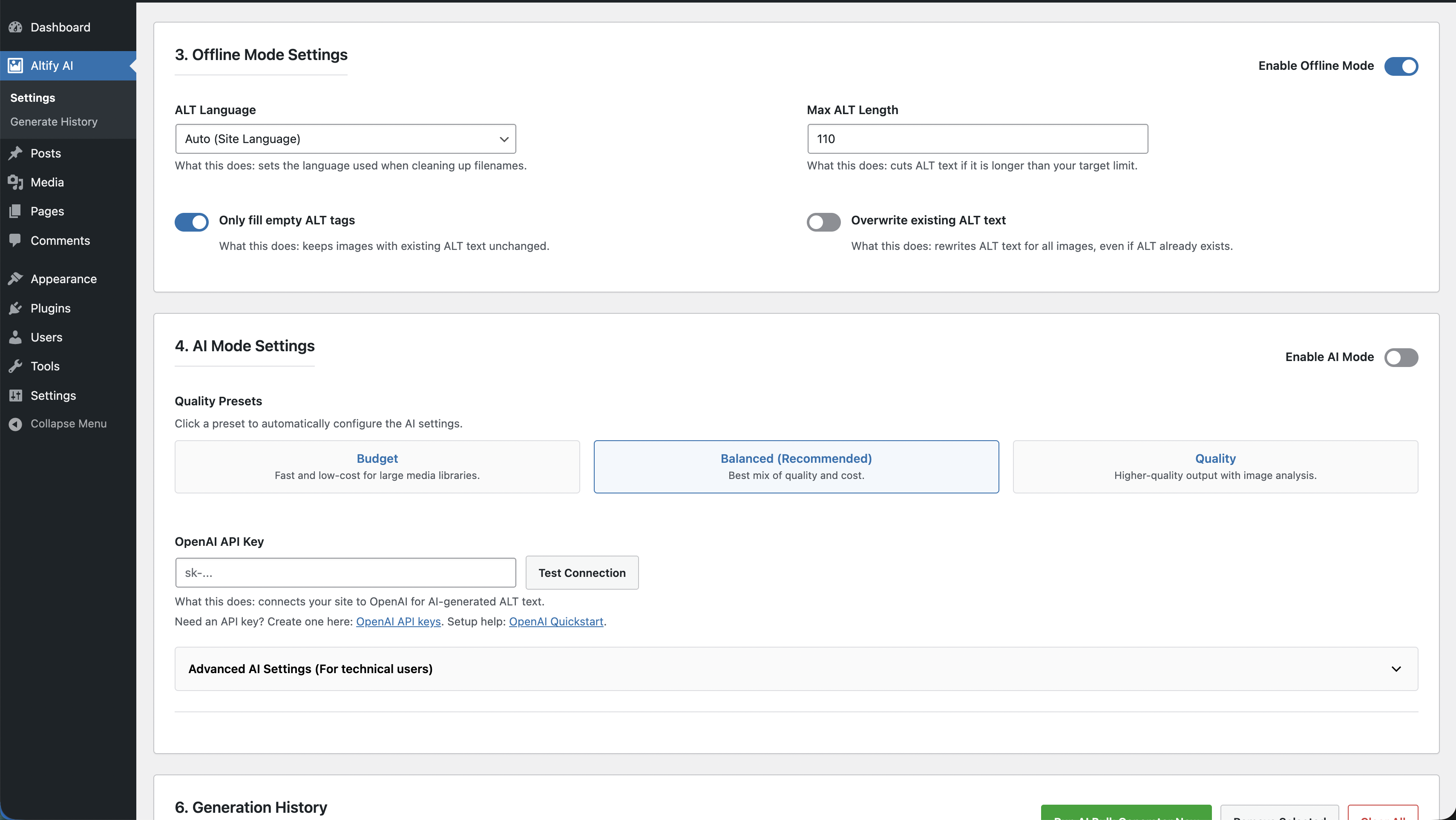
- AI mode with OpenAI model settings, rate limiting, retry/backoff, and safe fallback behavior.
- Free Offline Mode (no API) that generates ALT from title/caption/description/filename.
- Bulk Media Library processing with filters, batching, and pause/resume/stop controls.
- WooCommerce bulk generation for featured and gallery images with category/date filters.
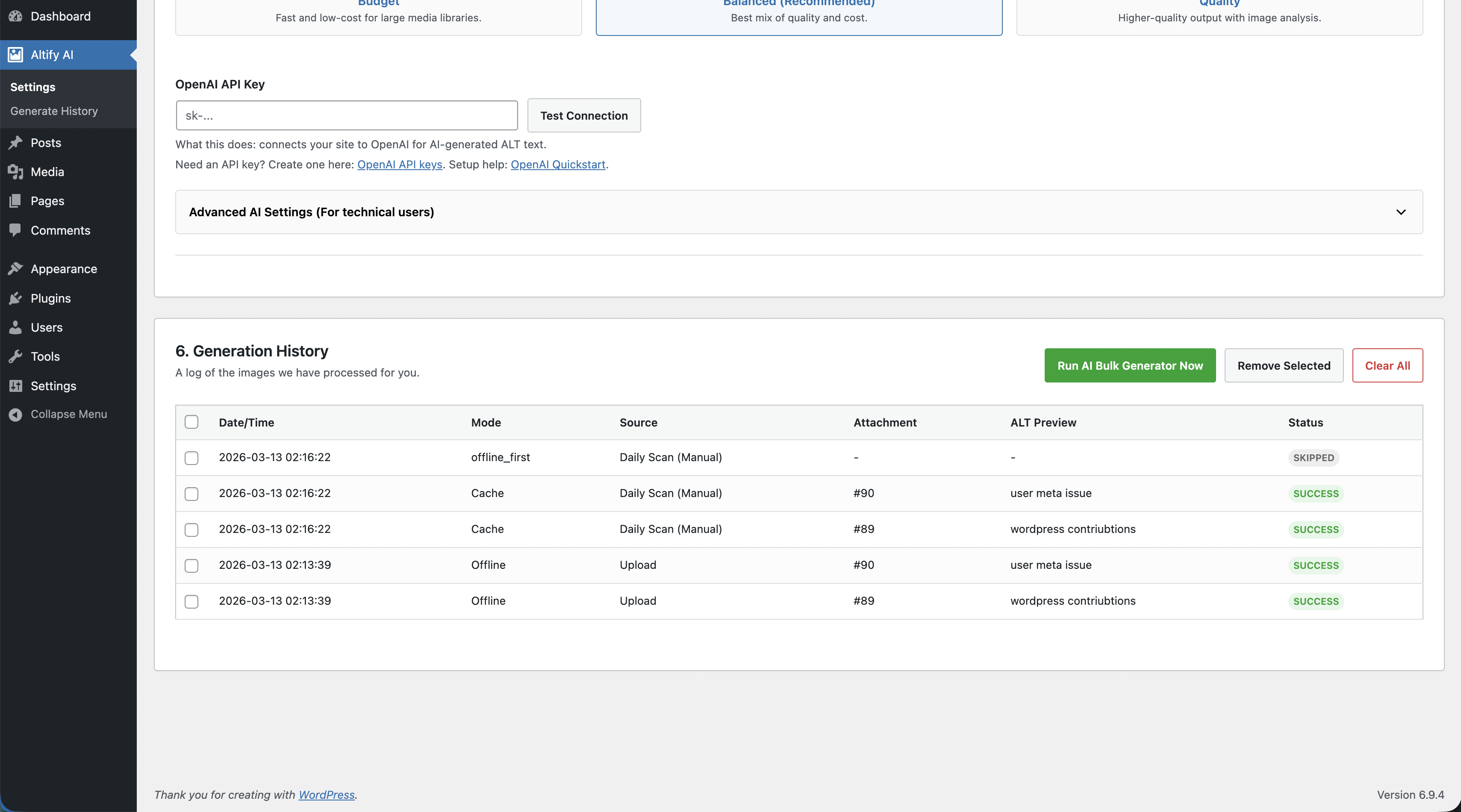
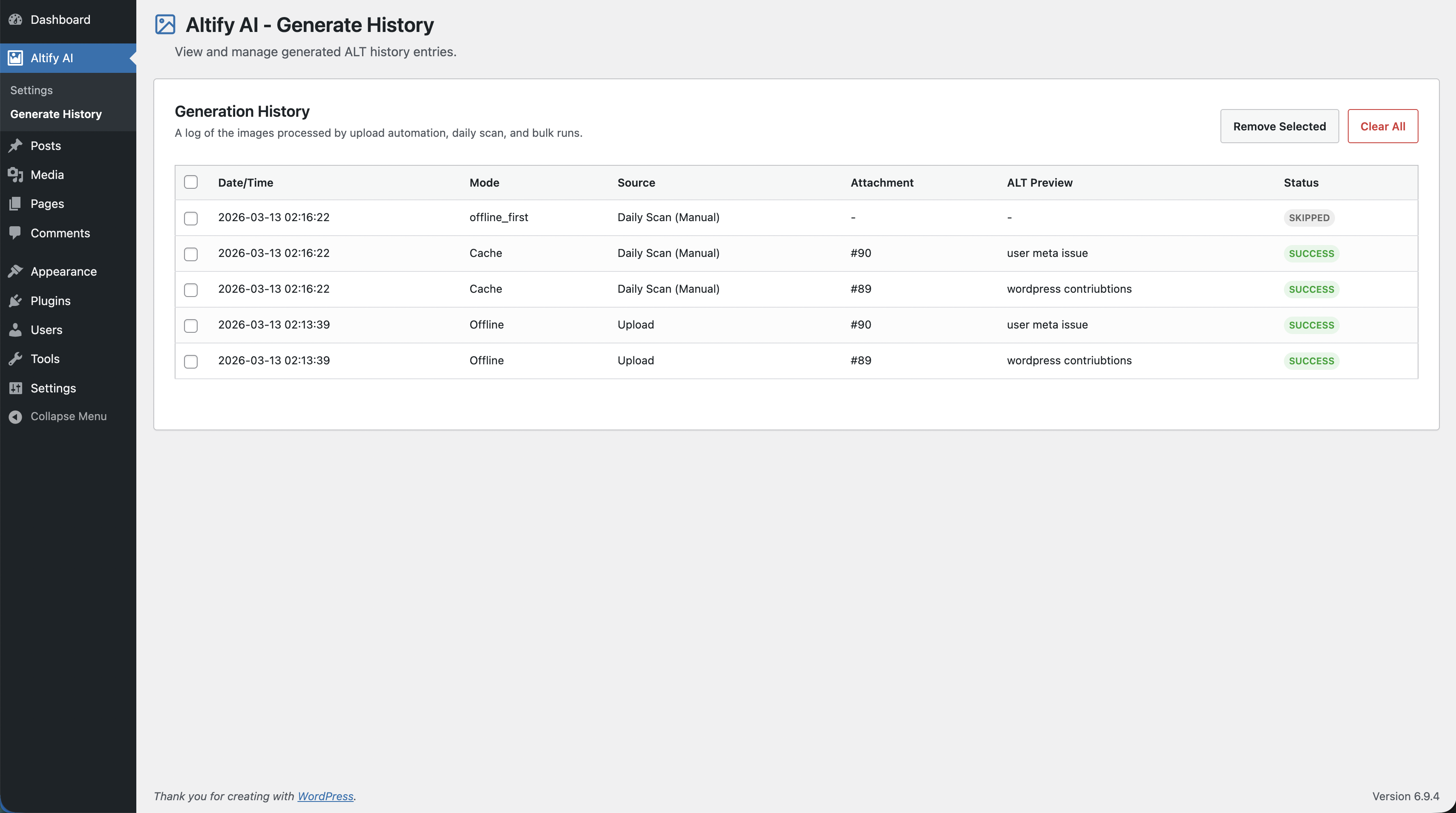
- Generation history table with source, method (AI/Offline/Cache), ALT preview, and row-level delete controls. Settings page shows the latest 10 rows for quick review.
- Multilingual support: Auto (site locale), many built-in languages, and custom language input.
- Optional vision-based analysis for image-aware ALT suggestions.
- Native WordPress ALT field updates (
_wp_attachment_image_alt) for SEO plugin compatibility. - Smart protection for existing ALT text via
Only fill empty ALTandOverwrite existing ALT.
SEO and accessibility benefits:
- Improves image context for screen readers.
- Reduces missing ALT text across large media libraries.
- Keeps ALT text in the native WordPress field (
_wp_attachment_image_alt) for compatibility with SEO plugins. - Avoids duplicate custom ALT fields and vendor lock-in.
- Supports content quality workflows with configurable length and overwrite behavior.
How it works:
- Plugin gathers safe text context from attachment metadata (filename, title, caption, description).
- Optional product context is added for WooCommerce images (product name/category).
- OpenAI returns a concise ALT suggestion.
- Result is sanitized and stored in the standard WordPress ALT field.
- If API fails (or offline mode is used), the plugin uses a descriptive metadata-based fallback when available. Otherwise ALT stays unchanged and the result is marked Needs review.
Roadmap
Planned improvements for upcoming releases:
Roadmap items are planned and may change based on user feedback and compatibility requirements.
1.0.1 (Quality + Workflow)
- Better admin insights: per-run summaries and clearer error diagnostics.
- Stronger ALT cleanup rules for edge-case filenames and punctuation.
- Improved WooCommerce bulk UX for large product catalogs.
- Dedicated Offline Mode tab and improved generation history management.
1.2.0 (Performance + Control)
- Enhanced queue reliability for high-volume media sites.
- More granular include/exclude filters for bulk processing.
- Optional CLI command for large-scale ALT generation runs.
1.3.0 (Localization + Integrations)
- Additional language options based on user demand.
- Extended compatibility checks for popular SEO/workflow plugins.
- Additional reporting filters based on user feedback.
Externe Dienste
This plugin connects to the OpenAI API to generate ALT text suggestions for image attachments.
It is required for AI-based ALT text generation features (single upload automation, media bulk generation, and WooCommerce image bulk generation), unless Offline mode is enabled.
Service used:
- OpenAI API (
https://api.openai.com/v1/chat/completions)
Data sent and when:
- Sent only when an admin-triggered or configured ALT generation request is executed.
- Sent data includes metadata/context built from WordPress attachment fields:
- Attachment filename (cleaned)
- Attachment title/caption/description
- Optional WooCommerce product name/categories when available
- Generation settings such as requested language and max length
- If
Analyze actual image (Vision)is enabled, a resized image preview may also be sent. - If
Offline modeis enabled, no OpenAI request is sent.
Service provider legal links:
- Terms of Use: https://openai.com/policies/terms-of-use/
- Privacy Policy: https://openai.com/policies/privacy-policy/
Installation
- Upload the plugin folder to
/wp-content/plugins/altify-ai-auto-alt-text-generator/. - Activate the plugin through the
Pluginsscreen in WordPress. - Go to
Altify AI > Settings. - Click
Generate First 10 ALT Textsto test Free Offline Mode without an API key. - Add an OpenAI API key later only if you want AI-generated ALT text.
Änderungsprotokoll
Adds offline bulk preview, selected apply and conflict-aware undo. Low-context offline results are now skipped for review instead of saving generic ALT. Existing settings are preserved.
1.2.0
- Added Review & Undo admin screen with 20-image previews, thumbnails, editable suggestions, and selected apply.
- Added explicit opt-in before replacing existing ALT and conflict checks against preview snapshots.
- Added per-administrator latest-batch undo with exact-value checks that preserve subsequent changes.
- Improved offline candidate priority and preserved names and descriptive wording.
- Preserved Unicode combining marks in Nepali and other languages during ALT sanitization.
- Left low-context images unchanged and marked them Needs review instead of using generic Image text.
- Invalidated older generation caches for the updated offline quality rules.
- Fixed missing-ALT bulk and daily scan pagination so skipped images do not block subsequent images.
- Added nonce checks, per-image permissions, one-use preview tokens, bounded batches, and apply/undo operation locks.
1.1.0
- Added Media Library ALT status column for image attachments.
- Added Media Library filters for Missing ALT, Has ALT, and Generated by Altify.
- Added row actions to generate Offline or AI ALT text directly from Media Library list view.
- Added Media Library bulk actions for Free Offline Mode and AI ALT generation.
- Added attachment edit screen ALT Assistant with offline suggestion preview and Apply ALT controls.
- Added admin result notices for Media Library row and bulk actions.
1.0.5
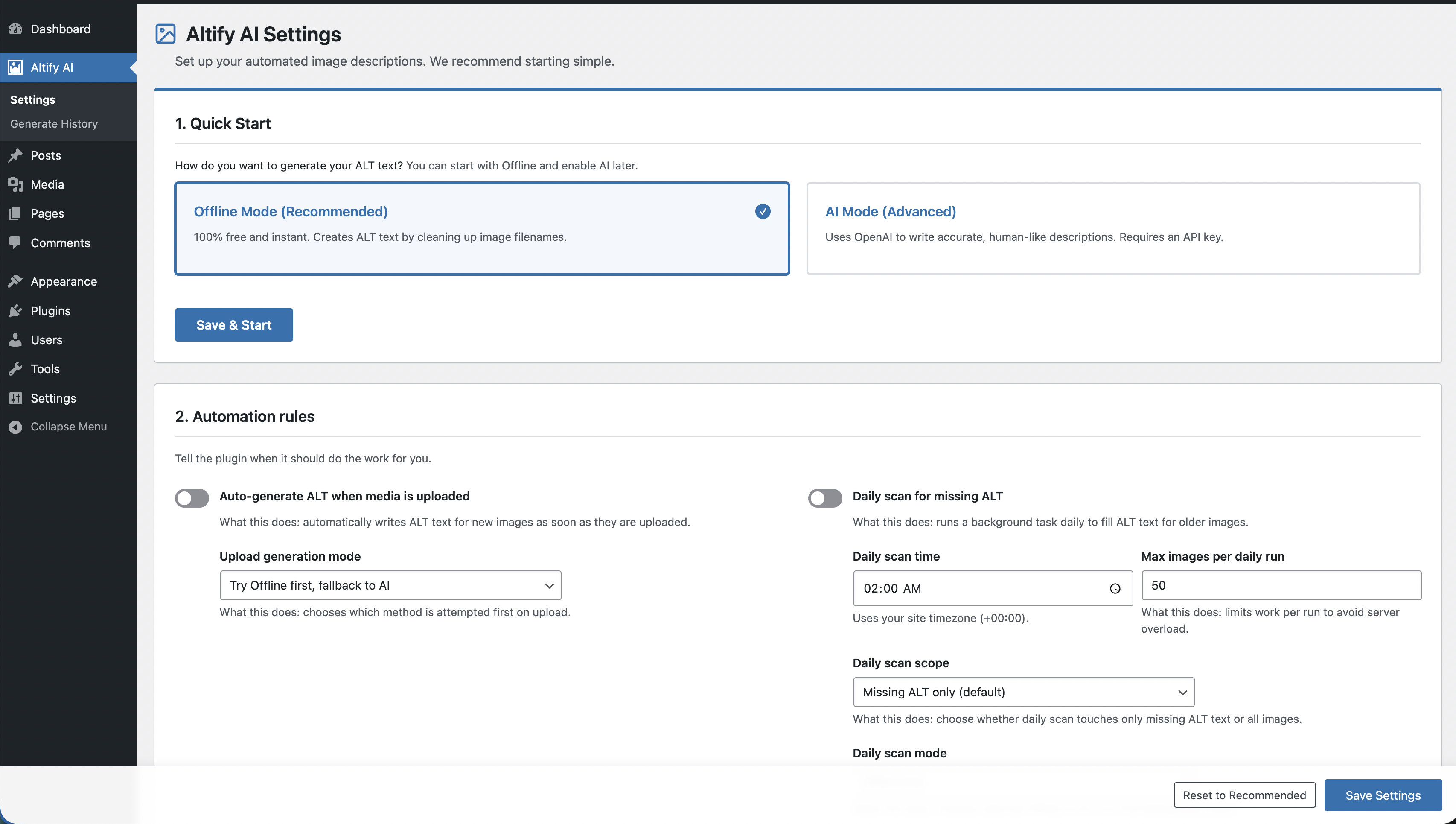
- Added Free Offline Mode Quick Start card on the Settings page.
- Added one-click
Generate First 10 ALT Textsaction for a small no-API starter run. - Added setup checklist showing Offline Mode, new upload automation, first test run, and ALT coverage status.
- Made Free Offline Mode enabled by default for new installs.
- Improved beginner-facing labels and empty history guidance so users know what to do next.
1.0.4
- Added ALT Coverage Report on the Generate History page.
- Added total images, missing ALT, with ALT, and coverage percentage counters.
- Added secure CSV export for images missing ALT text, including attachment ID, title, filename, upload date, edit URL, and current ALT.
- Kept the report read-only so existing ALT generation behavior is unchanged.
1.0.3
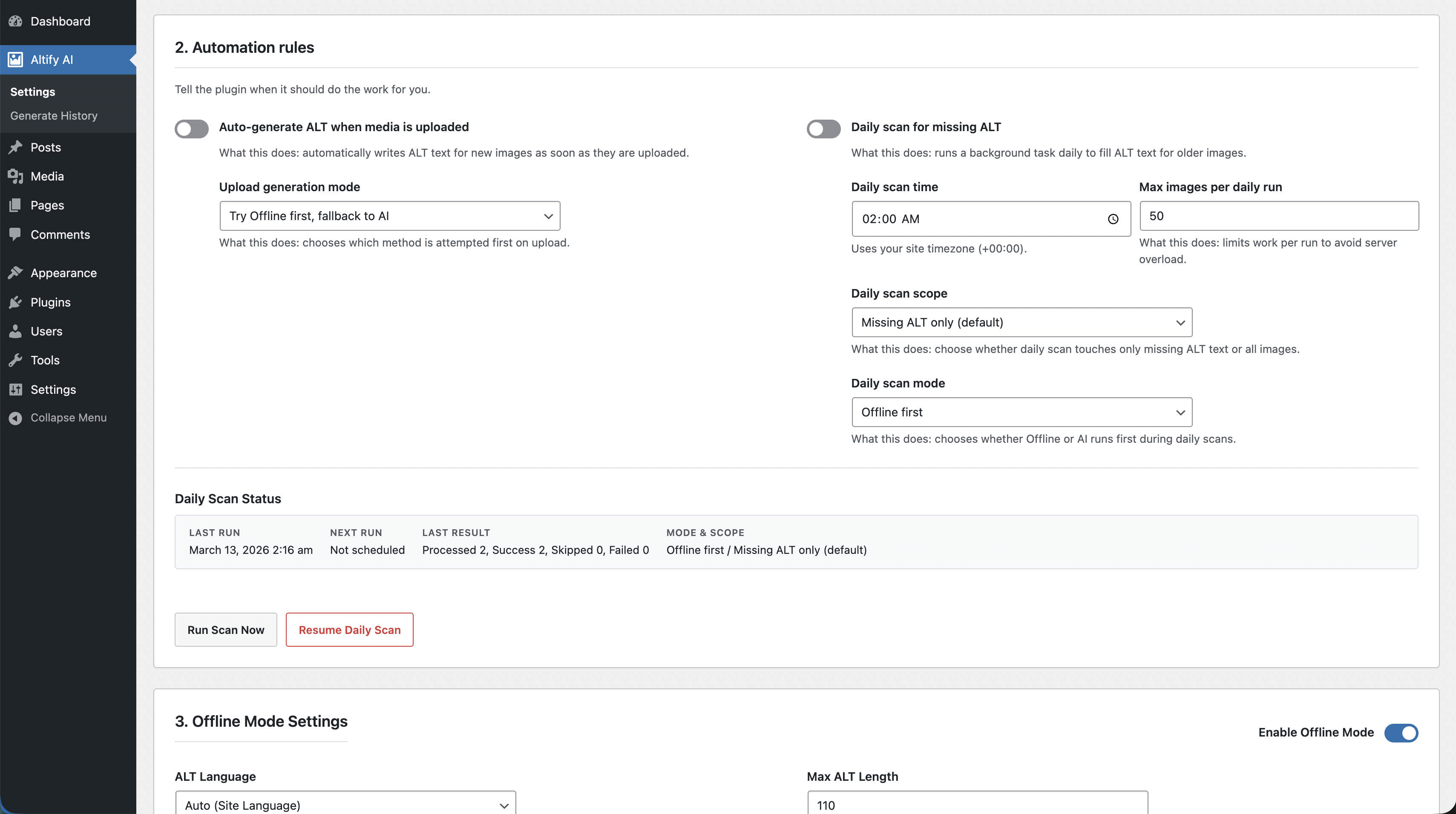
- Added new Automation tab with beginner-friendly settings and helper text.
- Added upload automation toggle and upload generation mode (
Offline first,AI first,Offline only,AI only). - Added daily scan automation with schedule time, scope, mode, and max images per run.
- Added secure
Run scan nowAJAX action with nonce and capability checks. - Added daily scan status panel (last run, next run, counters, mode/scope).
- Added daily WP-Cron scheduling/rescheduling logic and stored run summaries for UI.
- Added top-level
Altify AIadmin menu (before Posts) plus dedicatedGenerate Historysubmenu page. - Moved quick
Run AI Bulk Generator Nowaction toGeneration Historytools and removed duplicate run buttons from AI/Offline settings sections. - Added AJAX settings save flow and AJAX quick actions to prevent admin page reloads.
- Limited
6. Generation Historyin Settings to latest 10 rows for faster review on large sites. - Updated admin CSS with prefixed UI classes to avoid WordPress core style collisions.
1.0.2
- Added dedicated Offline Mode tab for no-API ALT generation runs.
- Replaced history log list with readable table format for non-technical users.
- Added history selection controls: Select all, Remove Selected, Clear All.
- Added persistent history IDs and server-side delete support for selected rows.
- Increased stored history capacity for better auditing.
- Refined readme descriptions/FAQ/screenshots for latest features.
Screenshots


Für Entwickler
Ist das dein Plugin? Zeigen Sie die Zahlen.
Fügen Sie Ihrer Website, Docs oder GitHub Readme ein Live-Badge hinzu. Es wird von selbst aktualisiert - kein Konto erforderlich.
Best Altify AI alternatives
All accessibility plugins →





Fragen und Antworten
Altify AI – Auto ALT Text Generator: quick answers
Gerade Antworten, gezogen von Live WordPress.org Daten.
Quelle: WordPress.org
Is Altify AI free?
Yes. Altify AI is free to download and use from the official WordPress.org plugin directory.
Is Altify AI safe to use in 2026?
Altify AI works, but test it on a staging site before relying on it in 2026. It runs on 10+ sites, is rated 5/5 and was last updated 3 months ago, and scores 57/100 on our health check.
How many websites use Altify AI?
Altify AI is active on 10+ WordPress websites and has been downloaded 2,353 times since it launched in March 2026. It was downloaded 306 times in the last 30 days.
Does Altify AI work with WordPress 7.1?
Altify AI is officially tested up to WordPress 6.9.12, while the latest release is 7.1.5. It may still work, but try it on a staging site first.
What PHP version does Altify AI need?
Altify AI requires PHP 7.4 or higher. Most hosts run PHP 8.x today, so it works on any modern WordPress hosting.
When was Altify AI last updated?
The latest version, 1.2.0, was released on September 3, 2026 (3 months ago).
Who makes Altify AI?
Altify AI is developed and maintained by Ravi Khadka.
What are the best alternatives to Altify AI?
The most popular alternatives to Altify AI are Web Accessibility (formally… (500K+ installs), Auto Image Attributes From… (100K+ installs) and Accessibility by UserWay (80K+ installs).
Angetrieben von PageForge
Eine Vorlage und eine Tabelle. Eine echte Seite für jede Suche.
PageForge Verwandelt jede Zeile eines CSV in eine WordPress-Seite mit eigenem Titel, URL, SEO Felder und Schema entworfen. Kostenlos auf WordPress.org.
- CSV und XLSX, plus Google Sheets auf Beruf und Unternehmen
- seinen eigenen Titel, URL, SEO Felder und Schema für jede Seite
- Arbeitet mit dem Blockeditor, Elementor, Divi und Avada
- Kostenlos auf WordPress.org, keine Kreditkarte