


Allow Multiple Accounts
Allow multiple user accounts to be created, registered, and updated having the same email address.

Mit Vorsicht verwenden
Allow Multiple Accounts works, but test it on a staging site before relying on it in 2026. It runs on 9K+ sites, is rated 5/5 and was last updated 9 years ago, and scores 46/100 on our health check.
- Loved by users — 5/5 from 22 reviews
- Momentum — downloads up 44.6% vs the previous 30 days
- Kein Update in 8 Jahren
- Nur getestet bis WordPress 4.2 (letzt ist 7.1)
Wie stapelt es sich?
Side-by-side bei Installationen, Updates, Bewertungen und Support



Tägliche Downloads
Download-Spitzen folgen normalerweise einer neuen Version - jede Website, die automatisch aktualisiert wird, gilt als Download.
Ranglisten
Where Allow Multiple Accounts stands todayWordPress.org Ranglisten suchen
Live-Position in der Plugin-Suche, Top 100| Stichwort | Position |
|---|---|
| account | >100 |
| >100 | |
| multiple accounts | >100 |
| registration | >100 |
| signup | >100 |
Versionsübernahme
Anteil aktiver Sites pro Release.
Bewertungsaufschlüsselung
★★★★★★★★★★ 5 from 22 reviews
About Allow Multiple Accounts
From the official readme · v3.0.4Beschreibung
Allow multiple user accounts to be created, registered, and updated having the same email address.
By default, WordPress only allows a specific email address to be used for a single user account. This plugin removes that restriction.
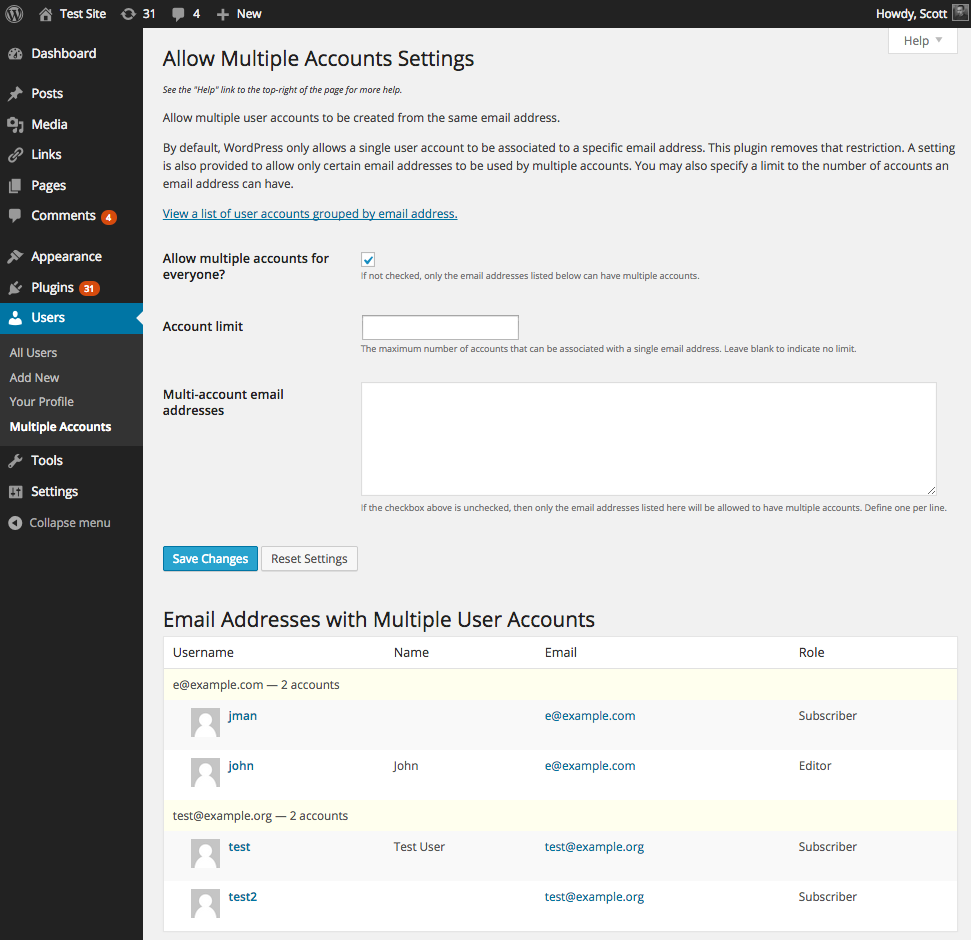
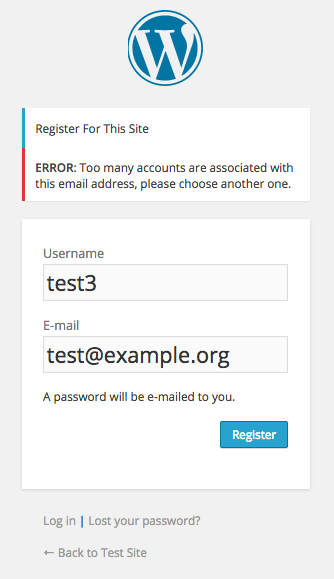
The plugin’s settings page (accessed via Users -> Multiple Accounts or via the Settings link next to the plugin on the Manage Plugins page) provides the ability to allow only certain email addresses the ability to have multiple accounts (such as if you only want admins to have that ability; by default all email addresses can be used more than once). You may also specify a limit to the number of accounts an email address can have (by default there is no limit).
The settings page also provides a table listing all user accounts that share email addresses (see screenshot).
Compatible with Multisite and BuddyPress as well.
Links: Plugin Homepage | Plugin Directory Page | Author Homepage
Vorlagen-Tags
The plugin provides three optional template tags for use in your theme templates.
Functions
<?php c2c_count_multiple_accounts( $email ); ?>
Returns a count of the number of users associated with the given email.
<?php c2c_get_users_by_email( $email ); ?>
Returns the users associated with the given email.
<?php c2c_has_multiple_accounts( $email ); ?>
Returns a boolean indicating if the given email is associated with more than one user account.
Arguments
$email(string)
An email address.
Filters
The plugin exposes three filters for hooking. Typically, customizations utilizing these hooks would be put into your active theme’s functions.php file, or used by another plugin.
c2c_count_multiple_accounts (filter)
The ‘c2c_count_multiple_accounts’ hook allows you to use an alternative approach to safely invoke c2c_count_multiple_accounts() in such a way that if the plugin were deactivated or deleted, then your calls to the function won’t cause errors in your site.
Argumente:
- same as for
c2c_count_multiple_accounts()
Beispiel:
Instead of:
<?php echo c2c_count_multiple_accounts( $email ); ?>
Do:
<?php echo apply_filters( 'c2c_count_multiple_accounts', $email ); ?>
c2c_get_users_by_email (filter)
The ‘c2c_get_users_by_email’ hook allows you to use an alternative approach to safely invoke c2c_get_users_by_email() in such a way that if the plugin were deactivated or deleted, then your calls to the function won’t cause errors in your site.
Argumente:
- same as for
c2c_get_users_by_email()
Beispiel:
Instead of:
<?php echo c2c_get_users_by_email( $email ); ?>
Do:
<?php echo apply_filters( 'c2c_get_users_by_email', $email ); ?>
c2c_has_multiple_accounts (filter)
The ‘c2c_has_multiple_accounts’ hook allows you to use an alternative approach to safely invoke c2c_has_multiple_accounts() in such a way that if the plugin were deactivated or deleted, then your calls to the function won’t cause errors in your site.
Argumente:
- same as for
c2c_has_multiple_accounts()
Beispiel:
Instead of:
<?php echo c2c_has_multiple_accounts( $email ); ?>
Do:
<?php echo apply_filters( 'c2c_has_multiple_accounts', $email ); ?>
Installation
- Whether installing or updating, whether this plugin or any other, it is always advisable to back-up your data before starting
- Unzip
allow-multiple-accounts.zipinside the/wp-content/plugins/directory for your site (or install via the built-in WordPress plugin installer) - Aktivieren Sie das Plugin über das Admin-Menü „Plugins“ in WordPress
- Go to the Users -> Multiple Accounts admin settings page (which you can also get to via the Settings link next to the plugin on the Manage Plugins page) and configure settings. On a Multisite install, go to My Sites -> Network Admin -> Users -> Multiple Accounts.
Änderungsprotokoll
Minor update: Change to prevent the plugin from doing anything for user updates when the email address doesn't change (reduces processing and potential for conflicts)
3.0.4 (2015-07-14)
- Change: Don’t attempt to remap (even if only briefly) the email address for user updates when the email address hasn’t been changed
3.0.3 (2015-07-09)
- Bugfix: Hook ‘profile_update’ and ‘user_register’ at higher priority to avoid conflicting with other plugins (e.g. MailPoet, MailPress)
- Update: Hook ‘pre_user_email’ and ‘pre_user_login’ at lower priority to avoid potentially conflicting with other plugins
- Update: Remap user email more precisely using user ID instead of email (though no problems noted with the old approach)
3.0.2 (2015-04-16)
- Bugfix: compatibility fix for versions of WP older than 4.1;
$error->remove()was introduced in 4.1 - Update: Note compatibility through WP 4.2+
3.0.1 (2015-04-10)
- Bugfix: add omitted code to
count_multiple_accounts()to account for $user_id arg potentially being an object
3.0 (2015-03-26)
- Reimplement necessary workaround to WP’s shortcoming in facilitating repeated use of email addresses
- Fix outdated error handling
- Fix
has_exceeded_limit()to account for ‘account_limit’ not being set and ‘allow_for_everyone’ being false - Fix
has_exceeded_limit()to account for ‘account_limit’ not being set and ‘allow_for_everyone’ being true - Omit listing email addresses associated with only 1 account on the settings page “Email Addresses with Multiple User Accounts” listing
- Add new hack functions:
hack_pre_user_login(),hack_pre_user_login(),hack_restore_remapped_email_address() - Remove long deprecated functions:
count_multiple_accounts(),get_users_by_email(),has_multiple_accounts() - Remove no longer needed hack functions:
get_user_by_email()get_user_by()display_activation_notice()hack_check_passwords()hack_pre_user_display_name()
- Remove no longer needed hack class variables: during_user_creation, controls_get_user_by
- Add new hack class variables: hack_user, hack_remapped_emails
- Indent user listings in table on settings page to indicate they are being listed according to email address
- Update plugin framework to 039
- Change default input type for ‘account_limit’ setting from ‘text’ to ‘int’
- Better singleton implementation:
- Add
get_instance()static method for returning/creating singleton instance - Make static variable ‘instance’ private
- Make constructor protected
- Make class final
- Additional related changes in plugin framework (protected constructor, erroring
__clone()and__wakeup())
- Add
- Add unit tests
- Explicitly declare
activation()anduninstall()static - Add checks to prevent execution of code if file is directly accessed
- Change use of “e-mail” to “email”
- Re-license as GPLv2 or later (from X11)
- Reformat plugin header
- Add ‘License’ and ‘License URI’ header tags to readme.txt and plugin file
- Use explicit path for
require_once() - Discontinue use of PHP4-style constructor
- Discontinue use of explicit pass-by-reference for objects
- Remove ending PHP close tag
- Documentation improvements (inline and readme)
- Minor code reformatting (spacing, bracing)
- Change documentation links to wp.org to be https
- Note compatibility through WP 4.1+
- Drop compatibility with version of WP older than 3.6
- Update copyright date (2015)
- Regenerate .pot
- Change donate link
- Add assets directory to plugin repository checkout
- Update screenshots
- Add third screenshot
- Move screenshots into repo’s assets directory
- Add banner
- Add icon
2.6.2
- Fix for WP 3.2.x to prevent warning notice unnecessarily appearing in admin
Screenshots

Für Entwickler
Ist das dein Plugin? Zeigen Sie die Zahlen.
Fügen Sie Ihrer Website, Docs oder GitHub Readme ein Live-Badge hinzu. Es wird von selbst aktualisiert - kein Konto erforderlich.
Best Allow Multiple Accounts alternatives
All account plugins →




Fragen und Antworten
Allow Multiple Accounts: quick answers
Gerade Antworten, gezogen von Live WordPress.org Daten.
Quelle: WordPress.org
Is Allow Multiple Accounts free?
Yes. Allow Multiple Accounts is free to download and use from the official WordPress.org plugin directory.
Is Allow Multiple Accounts safe to use in 2026?
Allow Multiple Accounts works, but test it on a staging site before relying on it in 2026. It runs on 9K+ sites, is rated 5/5 and was last updated 9 years ago, and scores 46/100 on our health check.
How many websites use Allow Multiple Accounts?
Allow Multiple Accounts is active on 9K+ WordPress websites and has been downloaded 82,769 times since it launched in June 2009. It was downloaded 710 times in the last 30 days.
Does Allow Multiple Accounts work with WordPress 7.1?
Allow Multiple Accounts is officially tested up to WordPress 4.2.39, while the latest release is 7.1.5. It may still work, but try it on a staging site first.
When was Allow Multiple Accounts last updated?
The latest version, 3.0.4, was released on November 28, 2017 (9 years ago).
Who makes Allow Multiple Accounts?
Allow Multiple Accounts is developed and maintained by Scott Reilly.
What are the best alternatives to Allow Multiple Accounts?
The most popular alternatives to Allow Multiple Accounts are Disable User Login (6K+ installs), UsersWP – ReCaptcha (3K+ installs) and Support Me (800+ installs).
Angetrieben von PageForge
Eine Vorlage und eine Tabelle. Eine echte Seite für jede Suche.
PageForge Verwandelt jede Zeile eines CSV in eine WordPress-Seite mit eigenem Titel, URL, SEO Felder und Schema entworfen. Kostenlos auf WordPress.org.
- CSV und XLSX, plus Google Sheets auf Beruf und Unternehmen
- seinen eigenen Titel, URL, SEO Felder und Schema für jede Seite
- Arbeitet mit dem Blockeditor, Elementor, Divi und Avada
- Kostenlos auf WordPress.org, keine Kreditkarte