


AJAX Loading
AJAX Loading makes moving around your site smoother. When a visitor clicks a link, the plugin loads the next page in the background and swaps in only the part that changes, usually the main content area. The header…

Solide Wahl
AJAX Loading is a solid plugin choice in 2026, with a few things worth checking first. It runs on 10+ sites, is rated 3/5 and was last updated 1 month ago, and scores 67/100 on our health check.
- Actively developed — last update 1 month ago
- Getestet mit dem neuesten WordPress (7.1)
- Kleine Benutzerbasis (10+ aktive Installationen)
- Bisher sehr wenige Bewertungen
Wie stapelt es sich?
Side-by-side bei Installationen, Updates, Bewertungen und Support



Tägliche Downloads
Download-Spitzen folgen normalerweise einer neuen Version - jede Website, die automatisch aktualisiert wird, gilt als Download.
Ranglisten
Where AJAX Loading stands todayWordPress.org Ranglisten suchen
Live-Position in der Plugin-Suche, Top 100| Stichwort | Position |
|---|---|
| ajax | >100 |
| navigation | >100 |
| page loading | #95 |
| Page transitions | >100 |
| spa | #63 |
Versionsübernahme
Anteil aktiver Sites pro Release.
Bewertungsaufschlüsselung
★★★★★★★★★★ 3 from 2 reviews
About AJAX Loading
Aus der offiziellen Readme · V2.0.0Beschreibung
AJAX Loading makes moving around your site smoother. When a visitor clicks a link, the plugin loads the next page in the background and swaps in only the part that changes, usually the main content area. The header, menus and footer stay in place, so there is no white flash between pages.
Every page is still a normal WordPress page with its own address. Visitors who open a link in a new tab, search engines and browsers without JavaScript get exactly the same server-rendered page as before. Whenever the plugin is not sure it can show a page correctly, it lets the browser load that page the normal way.
Version 2.0 is a complete rewrite. It no longer needs jQuery, it replaces only the content area instead of the whole page, and scripts on the new page now run properly. If you are upgrading from 1.x, your settings are migrated automatically (see the Upgrade Notice).
Navigation engine
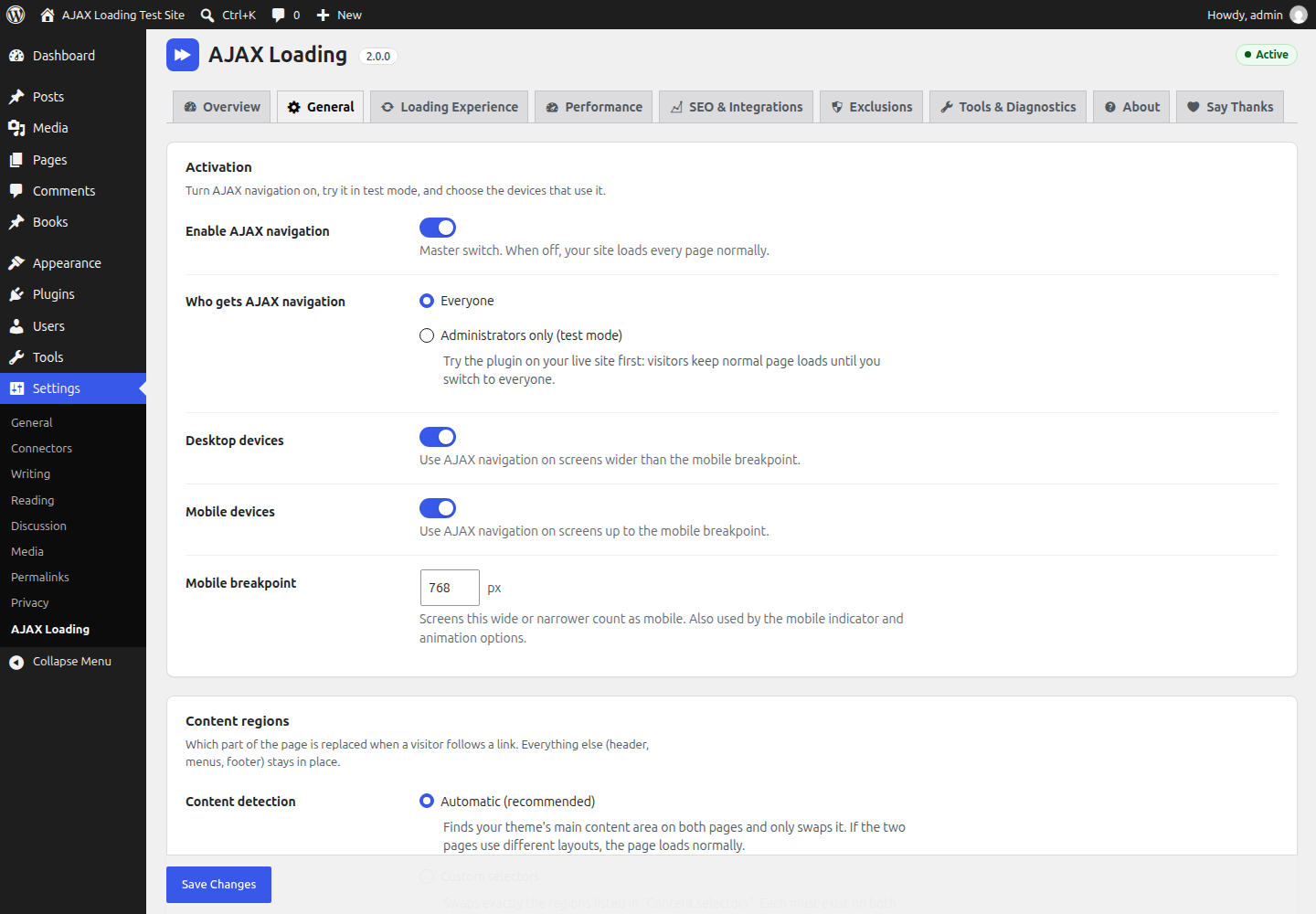
- Replaces only the content area. Automatic detection works with most themes; you can also enter your own CSS selectors or replace the whole page body.
- Keep the header and footer (default) or replace them on every navigation.
- Back and forward buttons work and return visitors to where they were on the page.
- Links to a
#sectionscroll to that section, on the same page and on other pages. - Redirects end on the right address, and “not found” (404) pages can be shown without a reload.
- WordPress search forms, and other GET forms you choose (such as product filters), are submitted without a reload. POST forms are never touched.
- Scripts inside the new content run like on a normal page load. Stylesheets and scripts that the next page needs are loaded before it is shown.
- Sites with a nonce-based Content Security Policy stay protected: a script of the loaded page only runs when that page’s own policy allows it.
- Ctrl/Cmd-click, middle-click, links that open in a new tab, download links and links to files (PDF, images, archives) keep their normal behaviour.
Loading indicators and page transitions
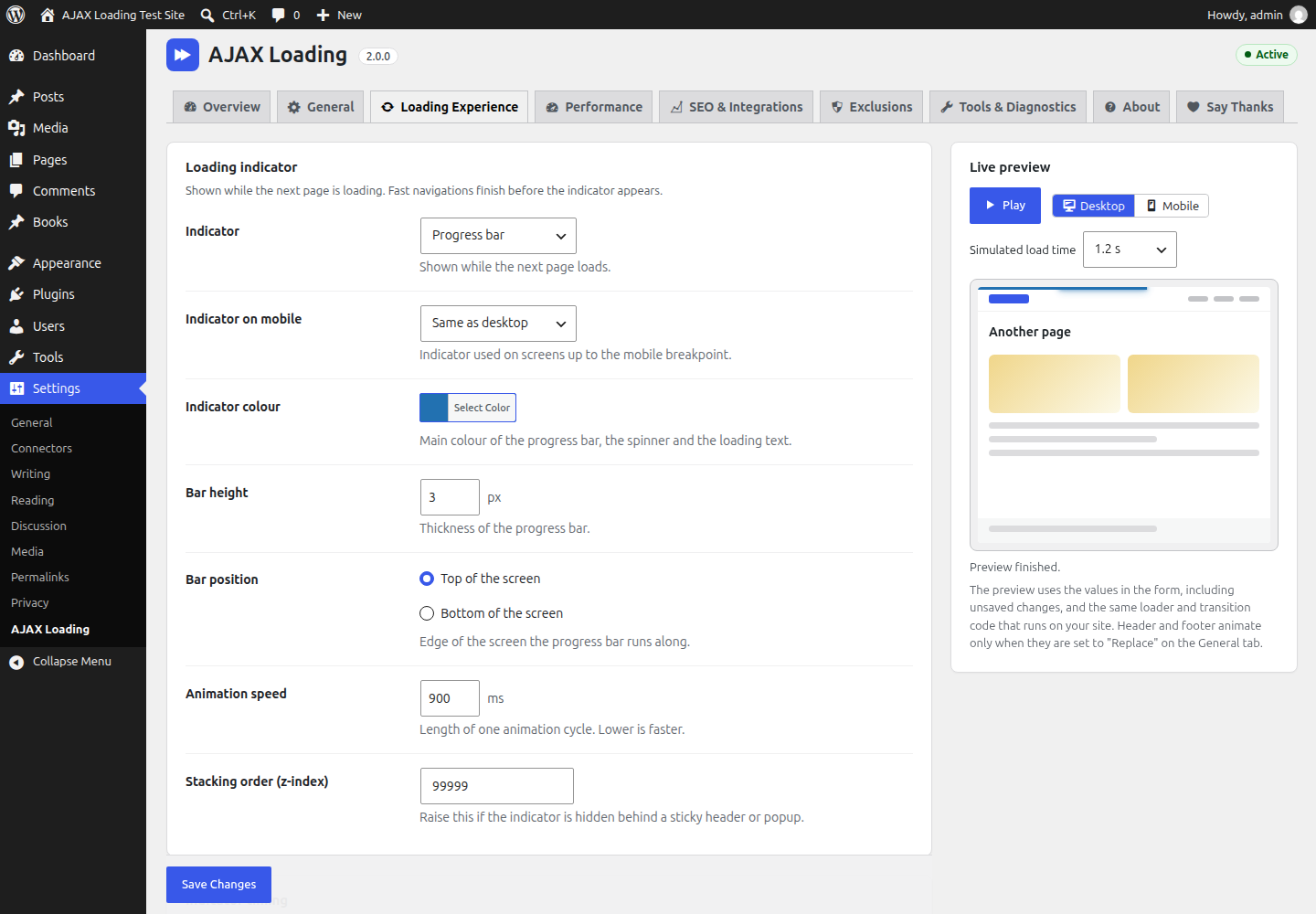
- Seven indicators: progress bar, spinner, overlay, text, your logo, skeleton placeholder, or none, with a separate choice for mobile.
- Colours, size, position, speed and stacking order. The indicator only appears when a page takes longer than a delay you choose, so fast pages do not flicker.
- Nine leave and enter animations (fade, fade through, slide left/right/up/down, scale, smooth, none) with adjustable duration and easing, and an optional simpler animation on mobile.
- A live preview in the dashboard that uses your unsaved settings and the same code that runs on your site.
- Animations are skipped for visitors who ask their device to reduce motion.
Performance (opt-in)
- Optional link prefetching when a link is hovered, focused with the keyboard, touched or scrolled into view. It respects data saver and very slow connections and is never used for logged-in visitors or personalised pages.
- Optional in-browser cache of recently visited pages, with limits for the number of pages, their lifetime and memory use.
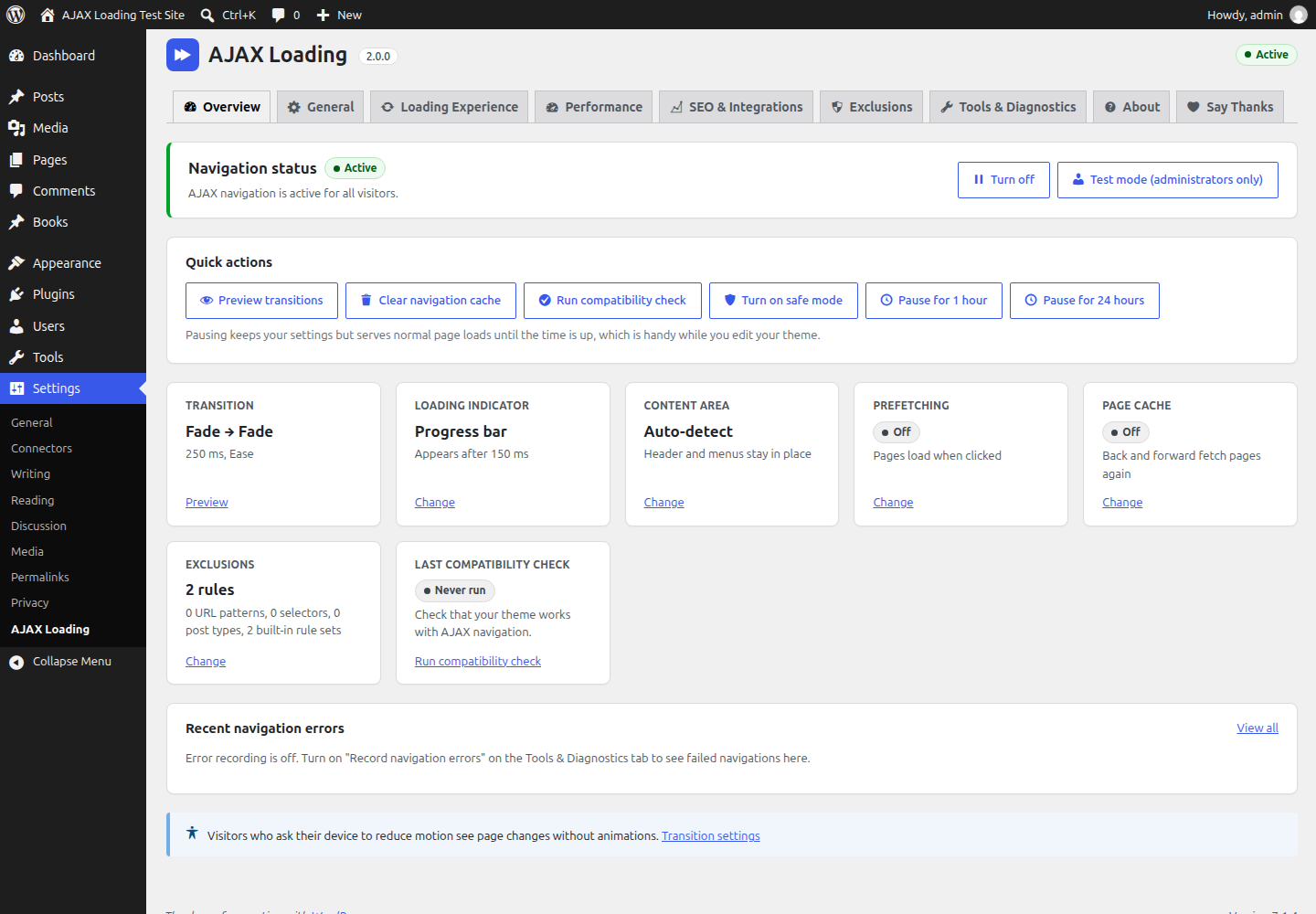
- Prefetching and the cache are both off by default.
- WordPress 6.8+ speculative loading is turned off on pages where AJAX navigation runs, so pages are not downloaded twice (you can change this).
- One script and one small stylesheet, loaded deferred in the footer and only on pages where AJAX navigation runs: about 169 KB minified (about 58 KB gzipped) plus 8 KB of CSS (2 KB gzipped). jQuery is not required.
SEO
- The page title is always updated.
- Meta description, robots, Open Graph, Twitter cards, canonical URL, previous/next links and hreflang alternates in the
<head>, and JSON-LD structured data in the<head>or printed directly in the page body (such as WooCommerce product schema), are kept in sync (each group can be switched off). - The
<html lang>attribute, body classes and the “current page” highlighting of your menus are updated too. - Search engines get the same real URLs and server-rendered pages as before. The plugin does not treat crawlers differently.
Accessibility
- After each navigation, keyboard focus moves to the main heading, to the content area, or stays where it is (your choice).
- Screen readers hear “Navigated to” followed by the new page title.
- The content area is marked busy while loading, and menu
aria-currentstates stay correct. - Reduced-motion preferences are respected by default.
Kompatibilität
Built-in integrations re-initialise popular plugins after each navigation. Each one can be set to Auto (built-in handling), Exclude (pages that contain it load normally) or Off (no special handling) on the SEO & Integrations tab.
- WooCommerce: shop, category and product pages load with AJAX; product galleries, variation forms, tabs and sorting are re-initialised and cart fragments refreshed. With the default “Protect WooCommerce pages” option, cart, checkout, My Account and order pages load normally, and add-to-cart, remove-from-cart, coupon and logout links are never intercepted.
- Page builders: Elementor (including Pro popups), Divi 4, Beaver Builder and Bricks are re-initialised. Pages built with Divi 5 load normally.
- Forms: Contact Form 7, Gravity Forms, WPForms, Fluent Forms and Formidable Forms are re-initialised. Pages with Ninja Forms or ACF front-end forms load normally, because those cannot be started again after a page has loaded.
- Multilingual (WPML, Polylang, TranslatePress and others): switching language always uses a normal page load.
- Also handled: X (Twitter), Instagram, Facebook and WordPress post embeds, lazysizes and vanilla-lazyload, threaded comment replies, and the jQuery
post-loadevent many plugins listen to. - Membership and login pages of WordPress, Paid Memberships Pro, Ultimate Member, MemberPress and BuddyPress load normally (default “Protect login and membership pages” option).
- WordPress interactive blocks (Interactivity API) make their pages load normally by default.
- Multisite: links to another site of the same network always use a normal page load.
- AJAX navigation never runs in the Customizer preview, page builder editors, AMP pages, feeds, embeds or the admin area.
Safety and troubleshooting
- Test mode: only administrators get AJAX navigation while you try it on your live site.
- Pause for 1 or 24 hours, and safe mode for conservative behaviour while you investigate a problem.
- Automatic fallback: if navigation keeps failing for a visitor, that visitor gets normal page loads for a while.
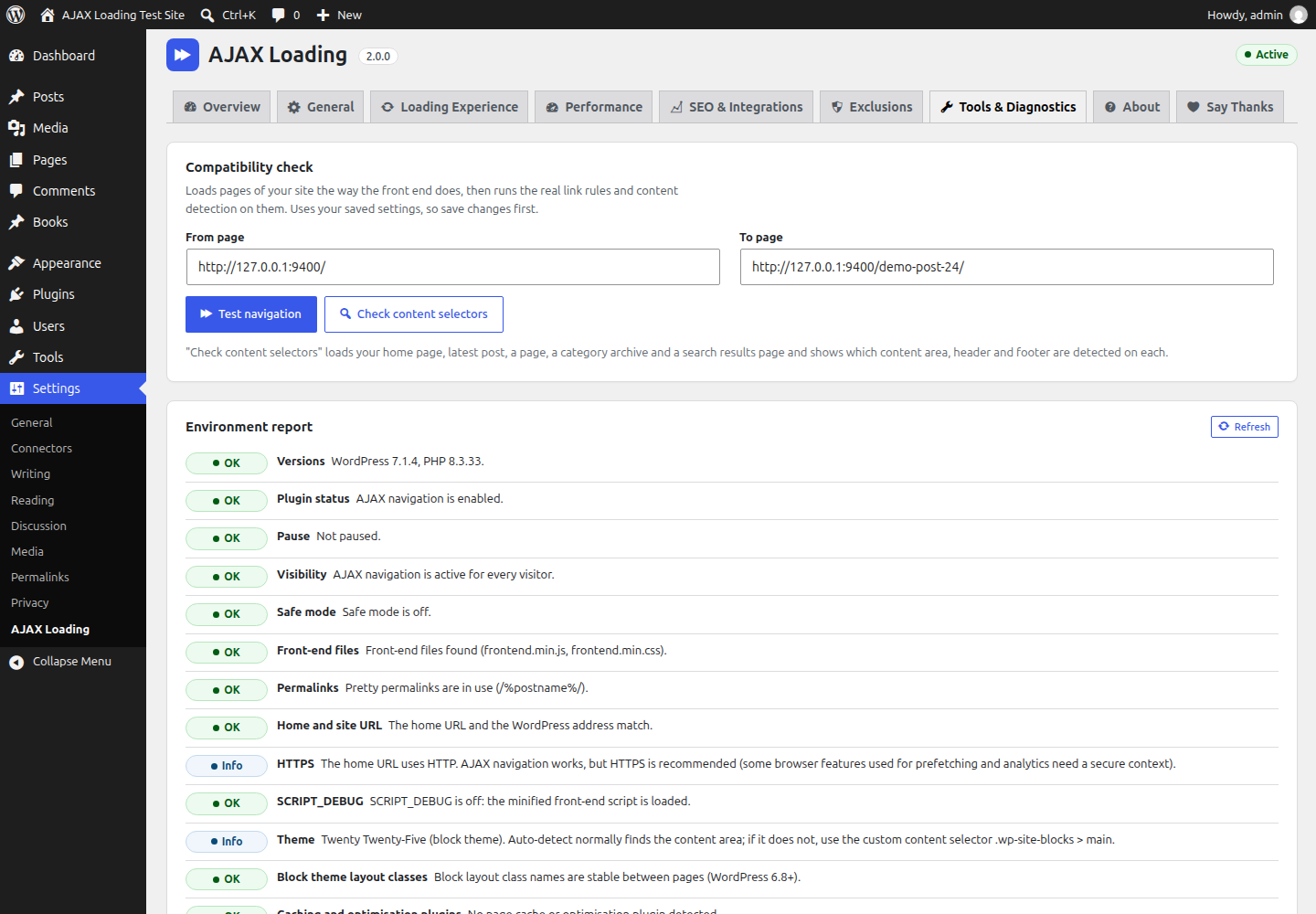
- Compatibility check: tests a navigation between two pages of your site and shows which content area, header and footer are detected on sample pages.
- Environment report, optional error log, and settings export, import and reset.
Für Entwickler
- JavaScript events on
document(mirrored to jQuery when it is loaded):wp_ajax_load_ready,wp_ajax_load_before,wp_ajax_load_start,wp_ajax_load_before_replace,wp_ajax_load_replaced,wp_ajax_load_complete,wp_ajax_load_error,wp_ajax_load_cancelandwp_ajax_load_popstate. - A small JavaScript API,
window.AjaxLoading(navigate, prefetch, reload, clear the cache, enable, disable). - PHP filters and actions to change exclusions, content selectors, head tags, integrations and the browser configuration.
- The 1.x callback
wp_ajax_load_complete = function () { … }still works.
Full documentation (user guide, troubleshooting, migration from 1.x and the developer guide) is included in the plugin’s docs folder.
Privatsphäre
- No telemetry, no tracking and no external services. Neither your server nor your visitors’ browsers contact any third-party server because of this plugin. (The About tab in your dashboard shows the author’s Gravatar and plugin icons from wordpress.org, which your browser loads when you open that tab.)
- No cookies are set. The browser tab keeps a few small values in session storage (scroll positions, the automatic-fallback counter and, only if you enable it, values typed into forms, never passwords).
- Analytics are optional and only feed tools that are already on your site (
gtag, the Google Tag ManagerdataLayer, or your own function). The plugin never loads tracking scripts and can require statistics consent through the WP Consent API. - Error recording is off by default. When you turn it on, it stores the error code, page path (without query string), HTTP status, a short message and the navigation type. No IP address, user agent or cookie is stored. The log keeps the last 50 entries and is deleted when you uninstall the plugin.
Installation
From your dashboard
- Go to Plugins → Add New Plugin and search for “AJAX Loading”.
- Klicken Sie auf Jetzt installieren und dann Aktivieren.
- Open Settings → AJAX Loading.
Manually
- Download the plugin zip from WordPress.org.
- Go to Plugins → Add New Plugin → Upload Plugin, choose the zip and click Install Now (or unzip it into
/wp-content/plugins/ajax-loading/). - Activate it on the Plugins screen and open Settings → AJAX Loading.
First steps
AJAX navigation is switched on for all visitors as soon as the plugin is activated. To be careful:
- On the Overview tab, click Test mode (administrators only) so visitors keep normal page loads.
- On Tools & Diagnostics, run Check content selectors and Test navigation.
- Browse your site as an administrator. When everything works, click Enable for everyone.
- If you use a page cache, purge it after activating the plugin and after changing its settings.
Änderungsprotokoll
Complete rewrite. Your on/off setting is kept, and jQuery loading and emoji removal stay on as in 1.x. Purge your page cache after updating. To go back, install 1.1 from the plugin's Advanced View page; it reads the same on/off setting. Needs WordPress 6.0+ and PHP 7.4+.
2.0.0
Complete rewrite of the plugin.
New:
- Vanilla JavaScript navigation engine without jQuery or History.js, loaded deferred in the footer and only on pages where it runs.
- Replaces only the content area (automatic detection, custom selectors or whole body), with keep or replace options for the header and footer.
- Runs the scripts of the new content, loads missing stylesheets and scripts before the swap and refreshes WordPress script data.
- Keeps the head in sync: title, meta description, robots, Open Graph, Twitter cards, canonical, previous/next, hreflang and JSON-LD (also JSON-LD printed in the body), plus the
<html lang>, body classes, menu highlighting and the admin bar’s edit links. - Back/forward scroll restoration, cross-page
#hashlinks, 404 pages, and AJAX search and GET filter forms. - Seven loading indicators, nine page transitions, mobile overrides, reduced-motion support and a live preview.
- Accessibility: focus moves to the new content and screen readers announce each page.
- Optional prefetching and in-browser page cache (both off by default); WordPress speculative loading is turned off where AJAX navigation runs.
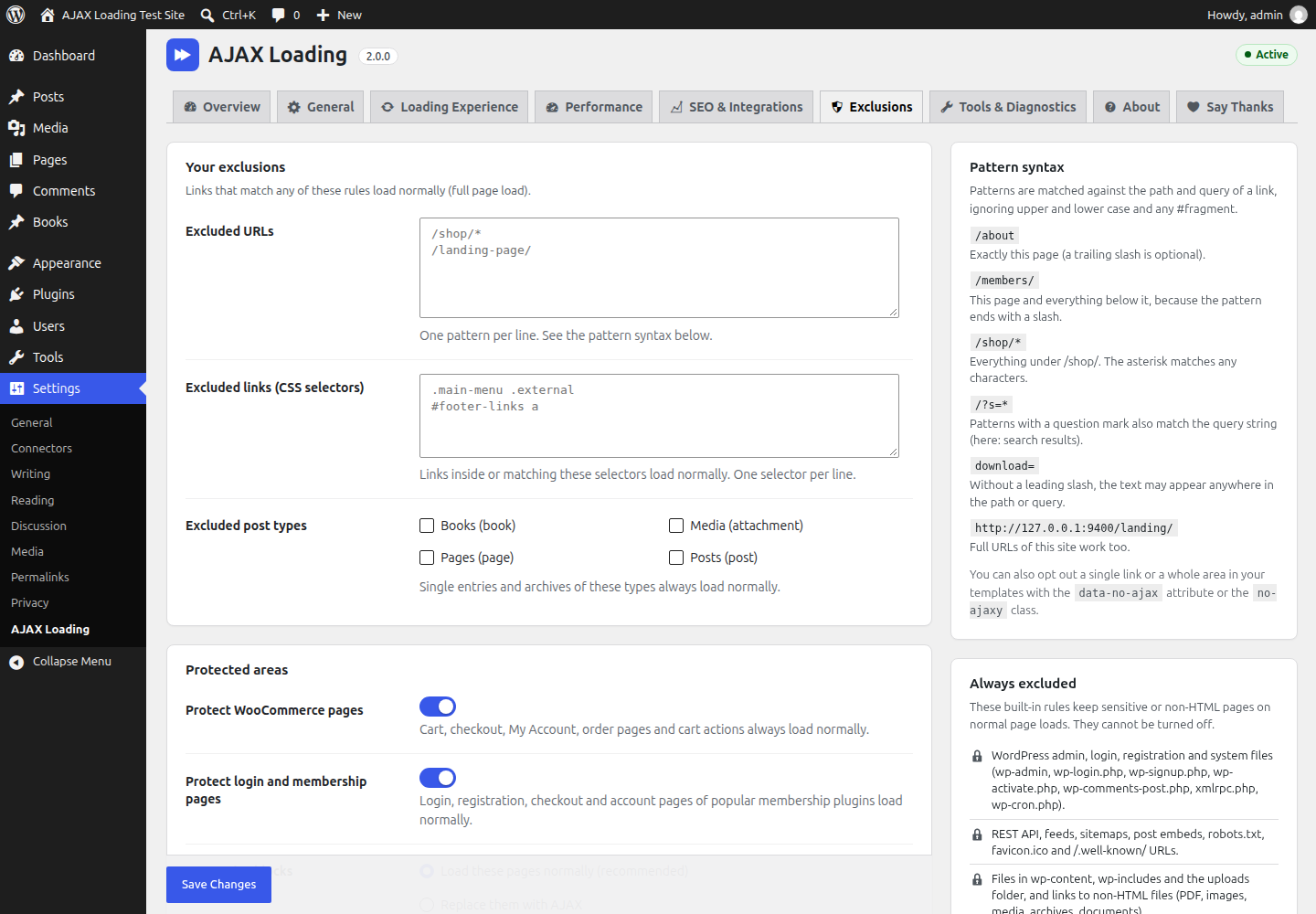
- Exclusions by URL pattern, CSS selector and post type, built-in protection for WooCommerce, login and membership pages, and an option for Interactivity API blocks.
- Integrations for WooCommerce, Elementor, Divi, Beaver Builder, Bricks, Contact Form 7, Gravity Forms, WPForms, Fluent Forms, Formidable Forms, Ninja Forms, ACF forms, BuddyPress, embeds, lazy loading, comment replies, the
post-loadevent and multilingual plugins. - Analytics: optional GA4
page_viewor Tag ManagerdataLayerevents, navigation timing, WP Consent API support and a custom callback. - Safety: any problem falls back to a normal page load; automatic per-visitor fallback after repeated failures; test mode; safe mode; pause; desktop and mobile switches.
- Content Security Policy support: scripts of a loaded page run only when that page’s own nonce-based policy allows them.
- Multisite: pages of another site of the same network always load normally.
- New tabbed settings screen with Overview, live preview, compatibility check, environment report, error log, and settings export, import and reset.
- Developer events (
wp_ajax_load_*), thewindow.AjaxLoadingAPI and PHP filters and actions. - Uninstalling now removes all plugin data.
Fixed:
- Scripts on loaded pages never ran, so sliders, forms, galleries and checkout fields stayed broken after navigation.
- The whole fetched document,
<head>included, was injected into<body>; the head was never updated. - Links to files, feeds and other non-HTML URLs froze the page.
- Links to a
#sectionon another page changed the address but loaded nothing, and some in-page#links led to a 404. - Non-ASCII (for example Hindi or Cyrillic) URLs were garbled.
return falsein the click handler blocked other scripts: mobile menu toggles and WooCommerce AJAX add-to-cart stopped working.- Ctrl/Shift/Alt-click, links with
targetordownload, and protocol-relative links to other sites were taken over. - After a redirect, the old URL stayed in the address bar; fast repeated clicks could show the wrong page.
- Sites with WordPress in a subdirectory were not handled correctly (
rootUrlnow uses the home URL). - Every
.headerelement was overwritten, inline SVG icons with a<title>broke, and the body was dimmed and forced toposition: relative. - Back and forward always jumped to the top of the page.
- Analytics only notified long-retired trackers.
- Navigation broke the Customizer preview; the plugin now stays off there and in page builder editors and AMP pages.
reload_helper.idsnow really excludes the matching links.- Security: settings could be saved without a capability check; script data from fetched pages could be turned into live HTML; the bundled polyfill containing
evalwas removed; output is escaped. - The plugin no longer switches itself back on, and never overwrites a saved “off” setting.
- The admin stylesheet is only loaded on the plugin’s own screen.
- Pages stay eligible for the browser’s back/forward cache (no unload handlers, no once-per-second storage timer).
Changed:
- Requires WordPress 6.0 and PHP 7.4.
- jQuery is no longer loaded for new installs. Upgraded sites keep it through a new setting, which you can turn off.
- Emoji script removal is now a setting: on for upgraded sites (as in 1.x), off for new installs.
- The
wp_ajax_load_completecallback now runs right after a navigation completes (1.x waited about one second) and receives the navigation details. Developers can add a delay with theajax_loading_legacy_callback_delayfilter. window.History(History.js) and itsstatechangeevent no longer exist.- Of the
reload_helperkeys, onlyidsandcontainer_idare used. - Removed old unused plugin files.
1.1
- Security Update
1.0
- Tested with WordPress 6.4.3
- Minor Fixes
0.2
- Tested with various themes and plugins.
- Bug fixes of JS and CSS animations.
- Added callback function for javascript after page loaded.
0.1
- Initial Public Release
Screenshots
Für Entwickler
Ist das dein Plugin? Zeigen Sie die Zahlen.
Fügen Sie Ihrer Website, Docs oder GitHub Readme ein Live-Badge hinzu. Es wird von selbst aktualisiert - kein Konto erforderlich.
Best AJAX Loading alternatives
All ajax plugins →





Fragen und Antworten
AJAX Loading: quick answers
Gerade Antworten, gezogen von Live WordPress.org Daten.
Quelle: WordPress.org
Is AJAX Loading free?
Yes. AJAX Loading is free to download and use from the official WordPress.org plugin directory.
Is AJAX Loading safe to use in 2026?
AJAX Loading is a solid plugin choice in 2026, with a few things worth checking first. It runs on 10+ sites, is rated 3/5 and was last updated 1 month ago, and scores 67/100 on our health check.
How many websites use AJAX Loading?
AJAX Loading is active on 10+ WordPress websites and has been downloaded 2,834 times since it launched in December 2022. It was downloaded 189 times in the last 30 days.
Does AJAX Loading work with WordPress 7.1?
Yes. The developer has tested AJAX Loading up to WordPress 7.1.5, the latest release. It requires WordPress 6.0 or newer.
What PHP version does AJAX Loading need?
AJAX Loading requires PHP 7.4 or higher. Most hosts run PHP 8.x today, so it works on any modern WordPress hosting.
When was AJAX Loading last updated?
The latest version, 2.0.0, was released on October 30, 2026 (1 month ago).
Who makes AJAX Loading?
AJAX Loading is developed and maintained by Mahesh Thorat.
What are the best alternatives to AJAX Loading?
The most popular alternatives to AJAX Loading are zipaddr-jp (50K+ installs), SearchWP Live Ajax Search (40K+ installs) and WP-Polls (30K+ installs).
Angetrieben von PageForge
Eine Vorlage und eine Tabelle. Eine echte Seite für jede Suche.
PageForge Verwandelt jede Zeile eines CSV in eine WordPress-Seite mit eigenem Titel, URL, SEO Felder und Schema entworfen. Kostenlos auf WordPress.org.
- CSV und XLSX, plus Google Sheets auf Beruf und Unternehmen
- seinen eigenen Titel, URL, SEO Felder und Schema für jede Seite
- Arbeitet mit dem Blockeditor, Elementor, Divi und Avada
- Kostenlos auf WordPress.org, keine Kreditkarte