


Advanced iFrame
Include content the way YOU like in an iframe that can hide and modify elements, does auto height, forward parameters and does many, many more

Solide Wahl
Advanced iFrame is a solid plugin choice in 2026, with a few things worth checking first. It runs on 40K+ sites, is rated 4.4/5 and was last updated 3 weeks ago, and scores 77/100 on our health check.
- Bewährt auf 40.000 aktiven Standorten
- Aktiv entwickelt – letztes Update vor 3 Wochen
- Getestet mit dem neuesten WordPress (7.1)
Wie stapelt es sich?
Side-by-side bei Installationen, Updates, Bewertungen und Support


Tägliche Downloads
Download-Spitzen folgen normalerweise einer neuen Version - jede Website, die automatisch aktualisiert wird, gilt als Download.
Ranglisten
Where Advanced iFrame stands todayWordPress.org Ranglisten suchen
Live-Position in der Plugin-Suche, Top 100| Stichwort | Position |
|---|---|
| embed | >100 |
| iframe | #2 |
| modify css | #5 |
| resize | #22 |
| Shortcode | >100 |
Versionsübernahme
Anteil aktiver Sites pro Release.
Bewertungsaufschlüsselung
★★★★★★★★★★ 4.4 from 54 reviews
About Advanced iFrame
From the official readme · v2026.5Beschreibung
Include content the way YOU like in an iframe that can hide and modify elements, does auto height, forward parameters and does many, many more…
Main features of advanced iframe
By entering the shortcode ‘[advanced_iframe]’ you can include any webpage to any page or article.
Advanced iFrame now has out of the box support for embedded 3D models using the p3d 3D viewer. Go to https://p3d.in/b/24 and download a pre-configured plugin where the model does scale already nicely on all devices. Get started for free! If you need more storage or access to the Premium features of p3d.in, you can get a 50% discount on your first payment with the coupon AIFRAME on checkout.
The following cool features compared to a normal iframe are implemented:
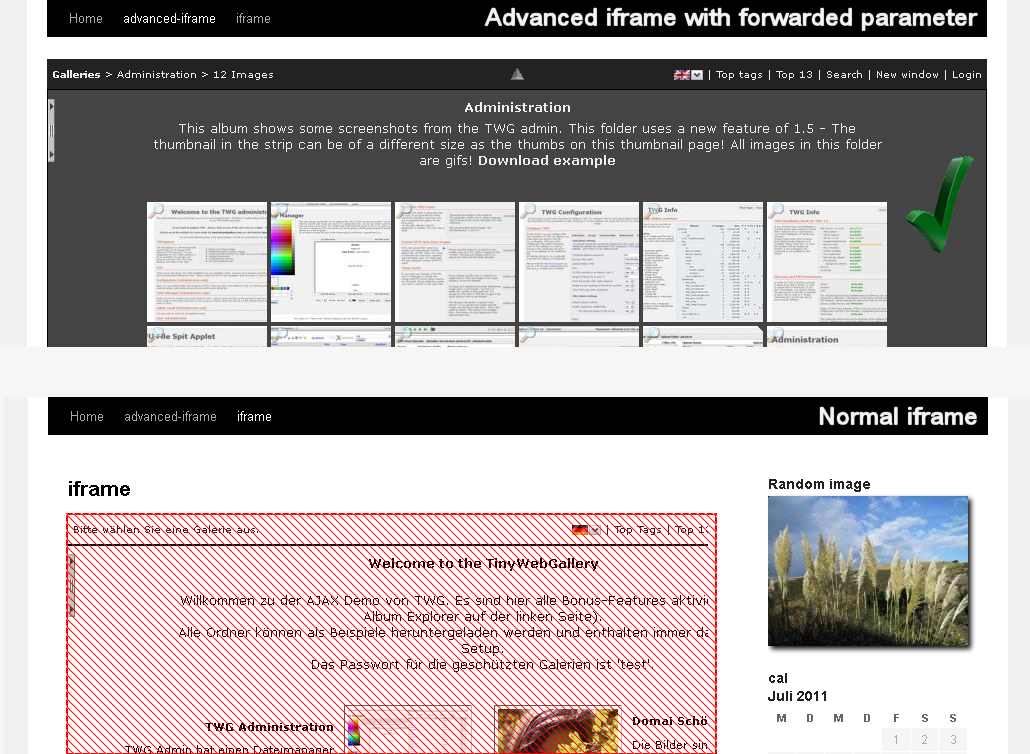
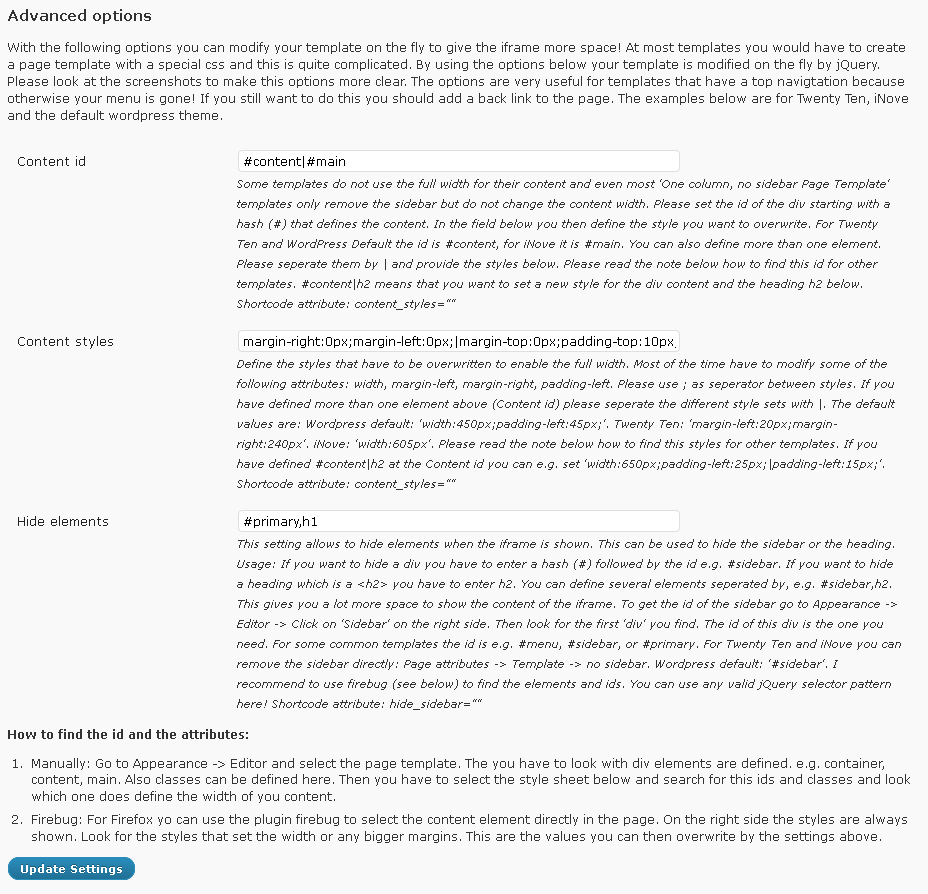
- Hide areas of the layout to give the iframe more space (see screenshot)
- Show only specific areas of the iframe when the iframe is on a same domain (The Pro version supports this on different domains) or include parts directly by jQuery
- Modify css styles in the parent and the iframe to e.g. change the width of the content area (see screen-shot)
- Forward parameters to the iframe
- Resize the iframe to the content height or width on loading, AJAX or click
- Responsive videos (moved from the pro to the the free version in v2022)
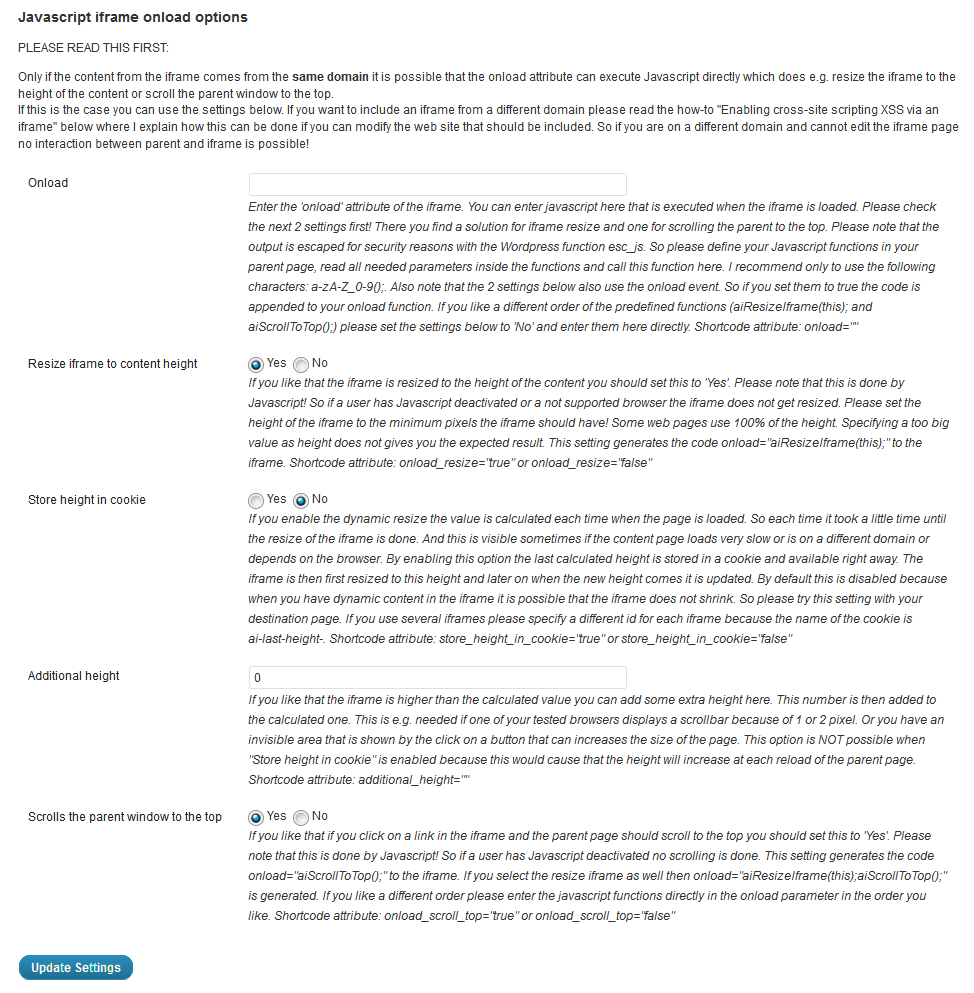
- Scroll the parent to the top when the iframe is loaded
- Hide the content until it is fully loaded
- Add a css and js file to the parent page
- Security code: You can only insert the shortcode with a valid security code from the administration.
- Many additional cool features are available the pro version – see https://www.advanced-iframe.com/advanced-iframe/advanced-iframe-comparison-chart
In the free version you can update to the pro version directly or test all features in the 30 days trial!
Please note: Modification inside the iframe are only possible if you are on the same domain or use a workaround like described in the settings.
So please check first if the iframe page and the parent page are one the same domain. www.example.com and text.example.com are different domains! Please check in the documentation if you can use the feature you like
A free iframe checker is available at
https://www.advanced-iframe.com/advanced-iframe/free-iframe-checker.
This tool does check if a page is allowed to be included!
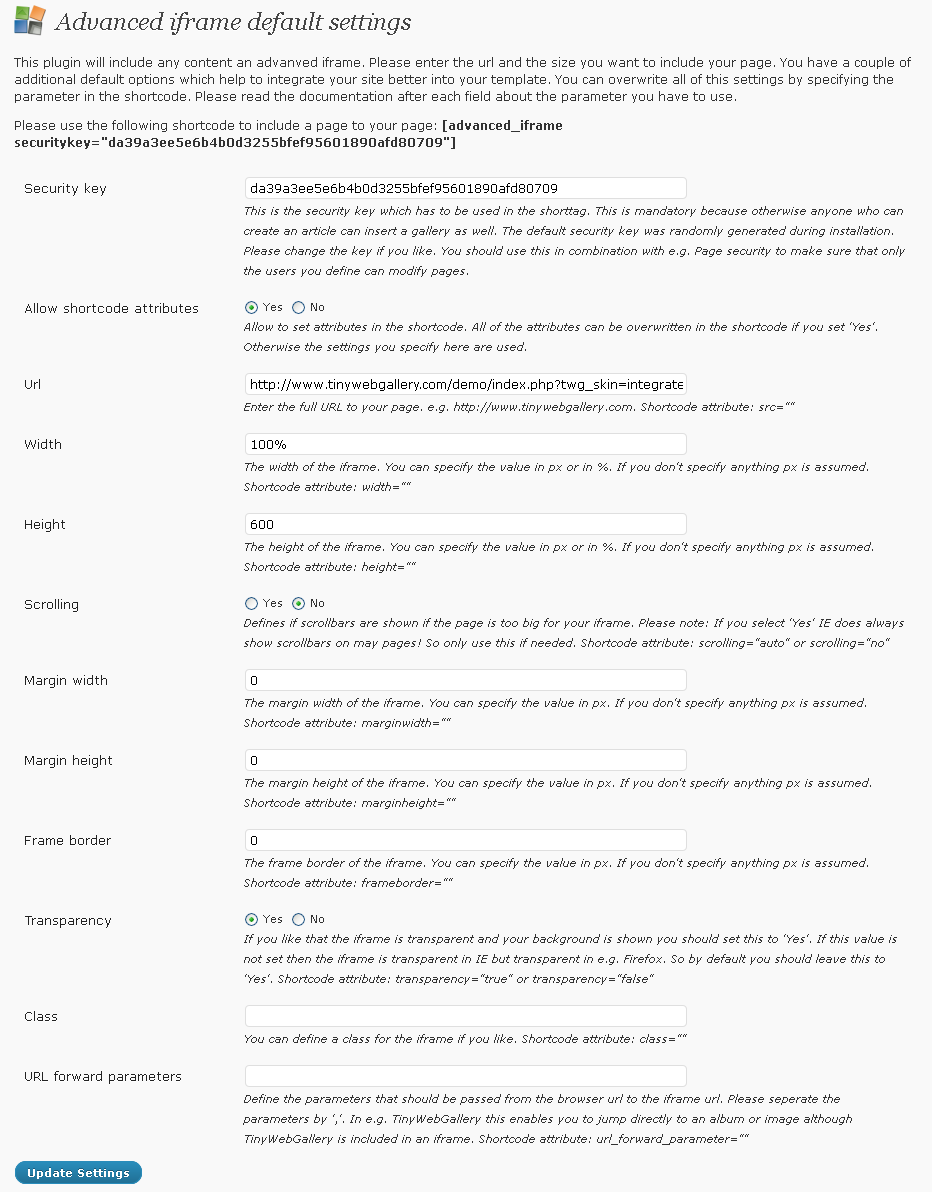
All settings can be set with shortcode attributes as well. If you only use one iframe please use the settings in the administration because there each parameter is explained in detail and also the defaults are set there.
Limitations of the free version
The free version has no functional restrictions and is for personal and small non-commercial sites. After 10.000 views/month you have to opt-in to get unlimited views. If you do not opt-in the iframe is still working 100% and at the bottom of the iframe a small notice to opt-in is shown.
Upgrading to Advanced IFrame Pro
It’s quick and painless to get Advanced iFrame Pro. Simply sign up for the 30 days trail or buy directly in the plugin. You can than use the plugin on commercial, business, and professional sites and blogs. You furthermore get:
- Show only specific areas of the iframe even when the iframe is on different domain
- Graphical content selector: https://www.mdempfle.de/demos/configurator/advanced-iframe-area-selector.html
- External workaround supports iframe modifications
- Widget support
- No view limit
- Hide areas of an iframe
- Browser detection
- Change link targets
- URL forward parameter mapping.
- Zoom iframe content
- Accordion menu
- jQuery help
- Advanced lazy load
- Standalone version – can be used in ANY php page!
- And much more…
You can find the comparison chart here: https://www.advanced-iframe.com/advanced-iframe/advanced-iframe-comparison-chart
See the pro demo here:
https://www.advanced-iframe.com/advanced-iframe/advanced-iframe-pro-demo
Verwaltung
- Go to Settings -> Advanced iFrame
Quick start guide
The quickstart guide is also available as video: https://www.advanced-iframe.com/advanced-iframe/advanced-iframe-video-tutorials
To include a webpage to your page please check the following things first:
- Check if your page page is allowed to be included https://www.advanced-iframe.com/advanced-iframe/free-iframe-checker!
- Check if the iframe page and the parent page are one the same domain. www.example.com and text.example.com are different domains!
- Can you modify the page that should be included?
Most likely you have one of the following setups:
- iframe cannot be included: You cannot include the content because the owner does not allow this.
- iframe can be included and you are on a different domain: See the feature comparison chart: https://www.advanced-iframe.com/advanced-iframe/advanced-iframe-comparison-chart and the feature overview https://www.advanced-iframe.com/advanced-iframe/advanced-iframe-features-availability-overview. To resize the content to the height/width or modify css you need to modify the remote iframe page by adding one line of Javascript to enable the provided workaround.
- iframe can be included and you are on the same domain: All features of the plugin can be used.
If you mix http and https read https://www.advanced-iframe.com/iframe-do-not-mix-http-and-https. Parent https and iframe http does not work on all mayor browsers!
Advanced iframe attributes
Below you find all possible shortcode attributes. If you only use one iframe please use the settings in the administration because there each parameter is explained in detail and also the defaults are set there.
Setting an attribute does overwrite the setting in the administration.
[advanced_iframe securitykey=”” src=””
id=”” name=””
width=”” height=””
marginwidth=”” marginheight=””
scrolling=”” frameborder=””
class=”” style=””
content_id=”” content_styles=””
hide_elements=”” url_forward_parameter=””
onload=”” onload_resize=””
onload_scroll_top=”” onload_show_element_only=””
store_height_in_cookie=”” additional_height=””
additional_js=”” additional_css=””
iframe_content_id=”” iframe_content_styles=””
iframe_hide_elements=”” hide_page_until_loaded=””
include_hide_page_until_loaded=””
include_url=”” include_content=””
include_height=”” include_fade=””
onload_resize_width=”” resize_on_ajax=””
resize_on_ajax_jquery=”” resize_on_click=””
resize_on_click_elements=”” use_shortcode_attributes_only=””
onload_resize_delay=””
]
Installation
There are 2 ways to install the Advanced iFrame
Using the WordPress Admin screen
- Click Plugins, Add New
- Search for advanced iframe
- Install and Activate it
- Place ‘[advanced_iframe]’ in the editor directly or click on the “Add advanced iframe” button above the editor
- Configure your iframe at your dashboard side menu -> “Advanced iFrame pro”. For adding several iframes please see the examples and the FAQ.
Using FTP
- Upload the ‘advanced-iframe’ folder of the download zip to the ‘/wp-content/plugins/’ directory
- Aktivieren Sie das Plugin über das „Plugins“-Menü in WordPress
- Place ‘[advanced_iframe]’ in the editor directly or click on the “Add advanced iframe” button above the editor
- Configure your iframe at your dashboard side menu -> “Advanced iFrame pro”. For adding several iframes please see the examples and the FAQ.
Änderungsprotokoll
Use the Wordpress installer to update or simply overwrite all files from your previous installation. If you have some radio elements empty after the update simply select the one you like and save again.
2026.5 – 02.11.2026
- New: Tested with WordPress 7.1.4
2026.4 – 10.10.2026
- New: A new template to include google analytics to the iframe was added for the pro version. See: js\ai_post_message_converter_google_analytics_template.js
- New: Tested with WordPress 7.1.3
- New: Updated Freemius to v2.13.5 – This release includes security patches!
2026.3
- New: Added the AI Assistant: https://www.advanced-iframe.com/advanced-iframe-ai-assistant
- New: A new template for the pro version was added to enable google analytic tracking in the iframe in js/ai_post_message_converter_google_analytics_template.js. Check the documentation in this file.
- New: The active tab is now remembered after a page reload
- New: Tested with WordPress 7.1.2
- New: Updated Freemius to v2.13.4
- Fix: Admin styles optimized for WordPress 7
2026.2
- Security fix: additional_js could be used as contributor still in the Gutenberg block. Now also there “Stored Cross-Site Scripting via Gutenberg Block ‘additional’ Attribute” is closed. See: https://www.cve.org/CVERecord?id=CVE-2026-6742
- New: Tested and optimized for WordPress 7.0
2026.1
- New: Tested with WordPress 6.9.4
- New: Updated Freemius to v2.13.1
2026.0
- Breaking change: Due to the security fix for “Add iframe URL as param” and “Prefix/id/urlrewrite for iframe URL,” the hash/hashrewrite needs to be set in both the administration AND the shortcode.
- Breaking change: The postMessage send from the iframe is only processed if the feature is enabled. This was added for: “Add iframe URL as param”, “Use the iframe title for the parent”, “Include content directly from the iframe”. Please read the updated documentation. Most users will not have to do anything, because the default way to configure this features by the administration, has not changed. If is only different if you configured them directly in the ai_external.js
- Security fix: The feature “Include content directly from the iframe” was accepting any postMessage in the correct structure and adding it to the parent page. Now the feature needs to be enabled and also the input is sanitized by removing all script tags. If you enable this feature only the configured keys are accepted. Make sure that you trust the page you include as you extract content from there!
- Security fix: Cross-Site Scripting (XSS) was reported by Patch Stack. The setting additional_height has now XSS detection. The same sanitation was also applied to iframe_zoom and onload_scroll_top. See https://www.wordfence.com/threat-intel/vulnerabilities/id/dcdcb29e-48d0-4e22-8e11-0c76b4355268 and https://patchstack.com/database/Wordpress/Plugin/advanced-iframe/vulnerability/wordpress-advanced-iframe-plugin-2025-10-cross-site-scripting-xss-vulnerability?_s_id=cve
- Security fix: Broken Access Control reported by the patch stack has been fixed. There is no official CVE number yet. The URL cache is now a first-in, first-out (FIFO) cache and cannot be fully filled anymore. The cache is now only active if “Add iframe URL as param” with hash/hashrewrite is enabled. The cache size is now shown in the administration, and additional documentation has been added.
- Security fix: At hide_part_of_iframe the URL was escaped with esc_html and not esc_url. Now settings like javascript:alert%28document.domain%29 are removed.
- New: Tested with WordPress 6.9.1
- New: Tested with PHP 8.5. The entire code was also analyzed with ChatGPT 5.2, which reported no breaking changes.
- New: The minimum PHP version has been increased to 7.4. While the plugin itself still works with lower versions, such PHP versions are insecure and should no longer be used!
- New: The minimum WordPress version was increased to 5.5. The plugin works with older versions of WordPress, but they are insecure and should not be used.
- Fix: user meta and user info data output is using esc_html to avoid that invalid data can cause any issues.
- Fix: The debug console has now removed any global background image from its div to always be displayed properly.
- Fix: id could be set to empty which leads to issues in the Javascript. Not it is mandatory and checked in the administration and in the external workaround.
- Fix: Changed the demo link from “Use the iframe title for the parent” from the general demo page to the sub demo where it is used.
- Fix: The style shortcode attribute is now always concatenated with a ;
Screenshots

Für Entwickler
Ist das dein Plugin? Zeigen Sie die Zahlen.
Fügen Sie Ihrer Website, Docs oder GitHub Readme ein Live-Badge hinzu. Es wird von selbst aktualisiert - kein Konto erforderlich.
Best Advanced iFrame alternatives
All embed plugins →



Fragen und Antworten
Advanced iFrame: quick answers
Gerade Antworten, gezogen von Live WordPress.org Daten.
Quelle: WordPress.org
Is Advanced iFrame free?
Yes. Advanced iFrame is free to download and use from the official WordPress.org plugin directory.
Is Advanced iFrame safe to use in 2026?
Advanced iFrame is a solid plugin choice in 2026, with a few things worth checking first. It runs on 40K+ sites, is rated 4.4/5 and was last updated 3 weeks ago, and scores 77/100 on our health check.
How many websites use Advanced iFrame?
Advanced iFrame is active on 40K+ WordPress websites and has been downloaded 2,536,909 times since it launched in July 2011. It was downloaded 31,913 times in the last 30 days.
Does Advanced iFrame work with WordPress 7.1?
Yes. The developer has tested Advanced iFrame up to WordPress 7.1.5, the latest release. It requires WordPress 5.5 or newer.
What PHP version does Advanced iFrame need?
Advanced iFrame requires PHP 7.4 or higher. Most hosts run PHP 8.x today, so it works on any modern WordPress hosting.
When was Advanced iFrame last updated?
The latest version, 2026.5, was released on November 2, 2026 (3 weeks ago).
Who makes Advanced iFrame?
Advanced iFrame is developed and maintained by mdempfle.
What are the best alternatives to Advanced iFrame?
The most popular alternatives to Advanced iFrame are EmbedPress (100K+ installs), iframe (60K+ installs) and Insert Pages (30K+ installs).
Angetrieben von PageForge
Eine Vorlage und eine Tabelle. Eine echte Seite für jede Suche.
PageForge Verwandelt jede Zeile eines CSV in eine WordPress-Seite mit eigenem Titel, URL, SEO Felder und Schema entworfen. Kostenlos auf WordPress.org.
- CSV und XLSX, plus Google Sheets auf Beruf und Unternehmen
- seinen eigenen Titel, URL, SEO Felder und Schema für jede Seite
- Arbeitet mit dem Blockeditor, Elementor, Divi und Avada
- Kostenlos auf WordPress.org, keine Kreditkarte