


AEH-Geschwindigkeitsoptimierung: Browser-Cache, optimierte Minify, Lazy Loading & Bildoptimierung
AEH Speed Optimization boosts site speed with caching, minification, lazy loading, and image optimization to improve performance and SEO.

Solide Wahl
AEH Speed Optimization: Browser… is a solid plugin choice in 2026, with a few things worth checking first. It runs on 2K+ sites, is rated 3.2/5 and was last updated 2 months ago, and scores 75/100 on our health check.
- Getestet mit dem neuesten WordPress (7.1)
- Mixed reviews — 3.2/5 from 20 ratings
Wie stapelt es sich?
Side-by-side bei Installationen, Updates, Bewertungen und Support



Tägliche Downloads
Download-Spitzen folgen normalerweise einer neuen Version - jede Website, die automatisch aktualisiert wird, gilt als Download.
Ranglisten
Where AEH Speed Optimization: Bro… stands todayWordPress.org Ranglisten suchen
Live-Position in der Plugin-Suche, Top 100| Stichwort | Position |
|---|---|
| Zwischenspeicher | #95 |
| core web vitals | #39 |
| Optimieren | >100 |
| Seitengeschwindigkeit | #65 |
| Performance | >100 |
Versionsübernahme
Anteil aktiver Sites pro Release.
Bewertungsaufschlüsselung
★★★★★★★★★★ 3.2 from 20 reviews
About AEH Speed Optimization: Browser Cache,…
From the official readme · v3.4.0Beschreibung
AEH Speed Optimization boosts site speed with caching, minification, lazy loading, and image optimization to improve performance and SEO.
Advantages
1) Serves static assets with an efficient cache policy helps to leverage browser caching.
2) Reduces page loading time of website.
3) Improves user experience as page loads very quickly than before.
4) Decreases total data-size of page.
5) Larger band of predefined file types are covered so it will increase bandwidth of files which can have expiry headers.
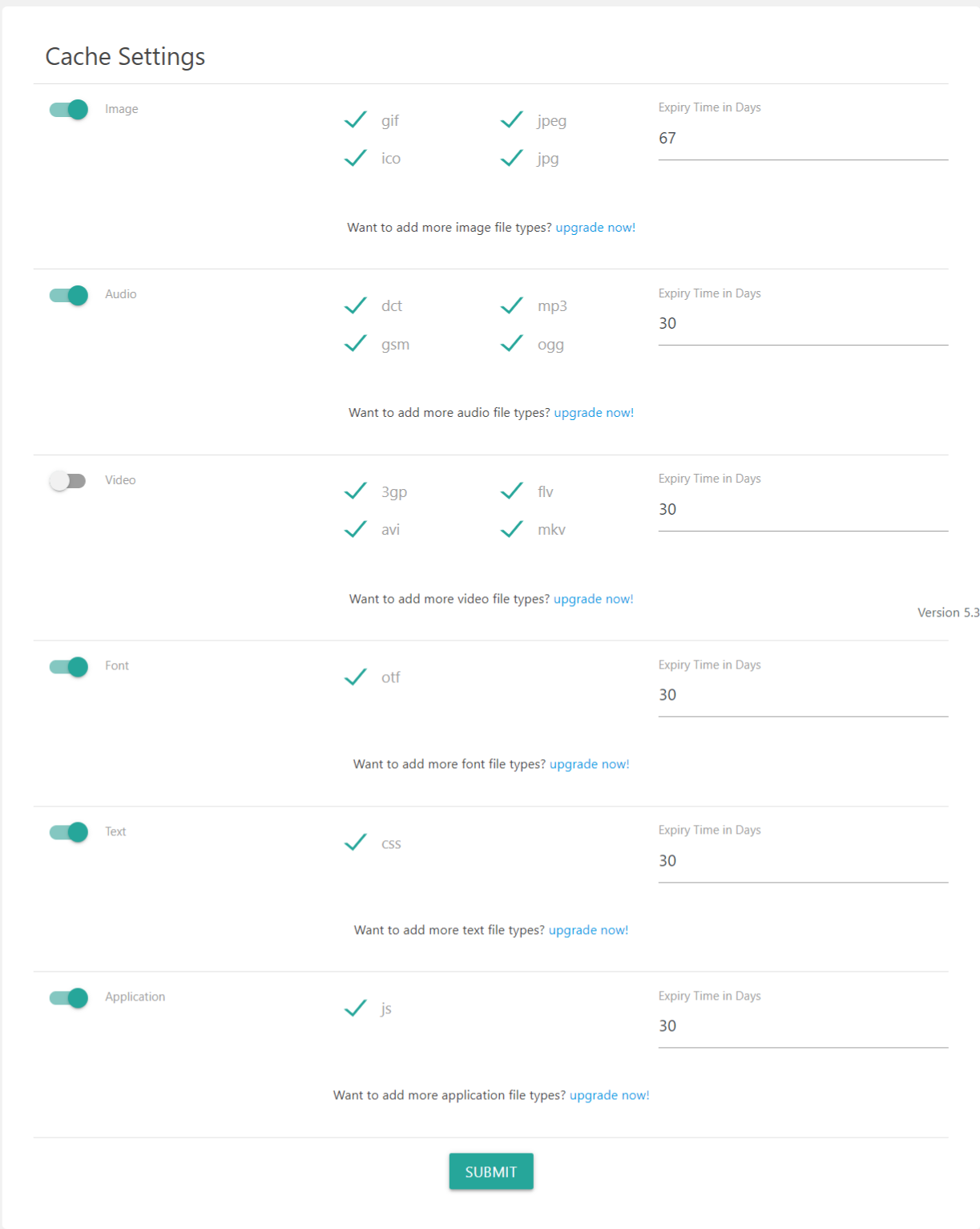
6) You can have different expire time for cache base on type of resources.
7) Merge multiple CSS files into one helps reducing http requests and improving page load speed.
8) Async loading of processed CSS files.
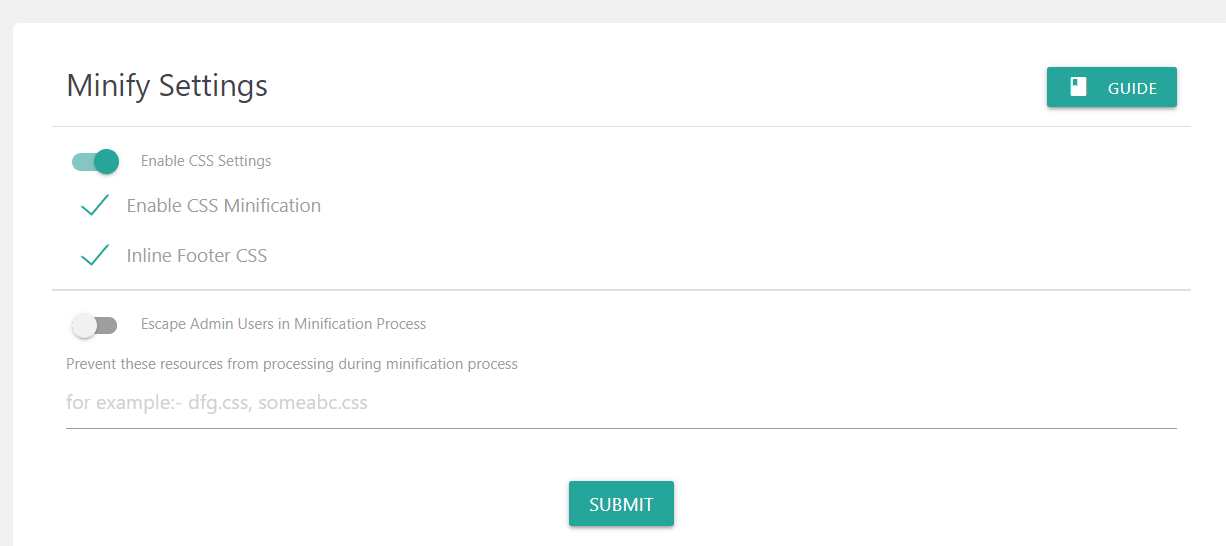
9) Minify CSS files which reduce data transfer requirement hence increase page load speed.
10) Inline small footer CSS files which helps to improve page speed.
11) Escape admin users from minification to avoid page builders related issues.
12) Lazy loading support for images, iframes, and videos.
13) Widgets and shortcodes can also be lazy loaded.
14) Lazy loading fully supports responsive images for better performance across devices.
15) Custom placeholder images can be used during lazy loading.
16) Exclude critical elements from lazy loading to ensure essential visuals load immediately.
Pro-Funktionen
1) Ability to add expires headers to External Resources
2) Adding new file types for adding expires headers
3) Refresh cache periodically
4) Unset Entity Tags
5) HTTP(Gzip) compression
6) Prevent Specific files from caching
7) Removing version info from files
8) Inline google fonts helps to load page faster and reduce external http requests.
9) Merge multiple JS files into one helps reducing http requests and improving page load speed.
10) Minify JS files which reduce data transfer requirement hence increase page load speed.
11) Plugin offers Defer scripts option to speed up rendering process.
12) HTML minification helps to reduce overall data size of page.
13) Automatically convert images to optimized formats like WebP or AVIF for faster delivery without manual effort.
14) Smartly resize and serve images based on screen size and device type to minimize bandwidth and boost speed.
15) Support next-gen formats like WebP and AVIF for superior compression, smaller files, and sharper visuals.
16) Track image optimization stats, savings, and performance improvements directly from your WordPress dashboard.
17) Automatically deliver the perfect image size for every device, ensuring crisp visuals and smooth performance.
18) Optimize images without visible loss in clarity—maintaining pixel perfection while reducing file size.
19) Works out-of-the-box with WordPress and major themes or plugins, no setup hassles or coding required.
Dokumentation
For Plugin documentation, please refer our plugin website.
Bedarf
1) Make sure that the “mod_expires” module is enabled on your website hosting server.
2) It is necessary to have read/write permission of .htaccess file to plugin. If not then update file permissions accordingly.
3) check status page of plugin for more info.
Verwendung
To use this plugin do the following:
1) Firstly activate Plugin.
2) Go to plugin settings page.
3) Check Files types you want to have expires headers and also add respective expires days for mime type using input box and make sure you enable respective mime type, for which group of files you want to add expires headers.
4) Once you hit “submit” button all options you selected in settings page saved database of website and accordingly .htaccess file will updated and add expires headers for respective selected files.
5) For Minification check respective settings at Minification Tab of plugin settings page.
6) For Lazy Loading check respective settings at Lazy Loading Tab of plugin settings page.
Installation
1) Deactivate and uninstall any other expires headers plugin you may be using.
2) Login as an administrator to your WordPress Admin account. Using the “Add New” menu option under the “Plugins” section of the navigation, you can either search for: “AEH speed Optimization” or if you’ve downloaded the plugin already, click the “Upload” link, find the .zip file you download and then click “Install Now”. Or you can unzip and FTP upload the plugin to your plugins directory (wp-content/plugins/).
3) Activate the plugin through the “Plugins” menu in the WordPress administration panel.
Änderungsprotokoll
1.0
Initial Version of Plugin
1.1
Added Activation and Deactivation hooks.
Added Settings link on plugins page.
1.2
Adding functionality to disable Etags.
2.0
Basic feature for adding expires headers for pre define file types
Ability to have Pro-Version
2.1
Adding functionality for caching and adding expires headers to External resources
Added Plugin compatibility status page
Added more file formats
2.2
Upgrading facility to serve static assets with an efficient cache policy.
Increasing default values for plugin cache life for various types of files.
Screenshots


Für Entwickler
Ist das dein Plugin? Zeigen Sie die Zahlen.
Fügen Sie Ihrer Website, Docs oder GitHub Readme ein Live-Badge hinzu. Es wird von selbst aktualisiert - kein Konto erforderlich.
Best AEH Speed Optimization: Brows… alternatives
Alle Cache-Plugins →



Fragen und Antworten
AEH Speed Optimization: Browser Cac…: quick answers
Gerade Antworten, gezogen von Live WordPress.org Daten.
Quelle: WordPress.org
Is AEH Speed Optimization: Browser… free?
Yes. AEH Speed Optimization: Browser… is free to download and use from the official WordPress.org plugin directory.
Is AEH Speed Optimization: Browser… safe to use in 2026?
AEH Speed Optimization: Browser… is a solid plugin choice in 2026, with a few things worth checking first. It runs on 2K+ sites, is rated 3.2/5 and was last updated 2 months ago, and scores 75/100 on our health check.
How many websites use AEH Speed Optimization: Browser…?
AEH Speed Optimization: Browser… is active on 2K+ WordPress websites and has been downloaded 217,327 times since it launched in July 2019. It was downloaded 1,062 times in the last 30 days.
Does AEH Speed Optimization: Browser… work with WordPress 7.1?
Yes. The developer has tested AEH Speed Optimization: Browser… up to WordPress 7.1.5, the latest release. It requires WordPress 3.5 or newer.
When was AEH Speed Optimization: Browser… last updated?
The latest version, 3.4.0, was released on October 15, 2026 (2 months ago).
Who makes AEH Speed Optimization: Browser…?
AEH Speed Optimization: Browser… is developed and maintained by Passionate Brains.
What are the best alternatives to AEH Speed Optimization: Browser…?
The most popular alternatives to AEH Speed Optimization: Browser… are WP Super Cache (1M+ installs), WP Fastest Cache (1M+ installs) and WP-Optimize (1M+ installs).
Angetrieben von PageForge
Eine Vorlage und eine Tabelle. Eine echte Seite für jede Suche.
PageForge Verwandelt jede Zeile eines CSV in eine WordPress-Seite mit eigenem Titel, URL, SEO Felder und Schema entworfen. Kostenlos auf WordPress.org.
- CSV und XLSX, plus Google Sheets auf Beruf und Unternehmen
- seinen eigenen Titel, URL, SEO Felder und Schema für jede Seite
- Arbeitet mit dem Blockeditor, Elementor, Divi und Avada
- Kostenlos auf WordPress.org, keine Kreditkarte