


ABCode Cache Warmer
Automatic cache warmer and preloader: rebuilds your page cache after every purge, in parallel, and shows exactly which URLs were cached.

Solide Wahl
ABCode Cache Warmer is a solid plugin choice in 2026, with a few things worth checking first. It runs on 100+ sites, is rated 5/5 and was last updated 3 months ago, and scores 69/100 on our health check.
- Getestet mit dem neuesten WordPress (7.1)
- Kleine Benutzerbasis (100+ aktive Installationen)
- Bisher sehr wenige Bewertungen
Wie stapelt es sich?
Side-by-side bei Installationen, Updates, Bewertungen und Support



Tägliche Downloads
Download-Spitzen folgen normalerweise einer neuen Version - jede Website, die automatisch aktualisiert wird, gilt als Download.
Ranglisten
Where ABCode Cache Warmer stands todayWordPress.org Ranglisten suchen
Live-Position in der Plugin-Suche, Top 100| Stichwort | Position |
|---|---|
| Zwischenspeicher | #47 |
| cache preload | #17 |
| cache warmer | #2 |
| Performance | >100 |
| preload | #42 |
Versionsübernahme
Anteil aktiver Sites pro Release.
Bewertungsaufschlüsselung
★★★★★★★★★★ 5 from 3 reviews
About ABCode Cache Warmer
Aus der offiziellen Readme · V1.1.1Beschreibung
ABCode Cache Warmer is a cache warmer and cache preloader for WordPress. It rebuilds your page cache automatically after every purge, so no visitor is ever the one who waits for a cold, uncached page.
Clearing your cache makes your site slow for a while. Every page has to be rebuilt from scratch, and it is your visitors who pay for it, the first person to land on each page waits for PHP and the database instead of getting a cached response. This plugin fixes that by visiting your pages for you, straight after a purge, so the cache is warm again before anyone real arrives.
It works alongside any caching plugin or host cache: WP Rocket, LiteSpeed Cache, W3 Total Cache, WP Super Cache, WP Fastest Cache, Cache Enabler, Breeze, Nginx cache, Cloudflare, Kinsta, SiteGround and 20i StackCache among them. Your cache builds and serves pages; this plugin makes sure they are built before a visitor needs them.
Built to be fast
Most cache warmers request one URL at a time with a pause in between. On a site with a few hundred pages that leaves the cold-cache window open for many minutes, which is exactly the problem you were trying to solve.
This plugin warms several URLs at once using the HTTP library already bundled with WordPress. No Composer, no vendor directory, no third-party HTTP client. Just a much shorter cold window.
It measures your server instead of guessing
There is no one-size-fits-all crawl speed. A VPS can take eight concurrent requests without noticing; cheap shared hosting cannot.
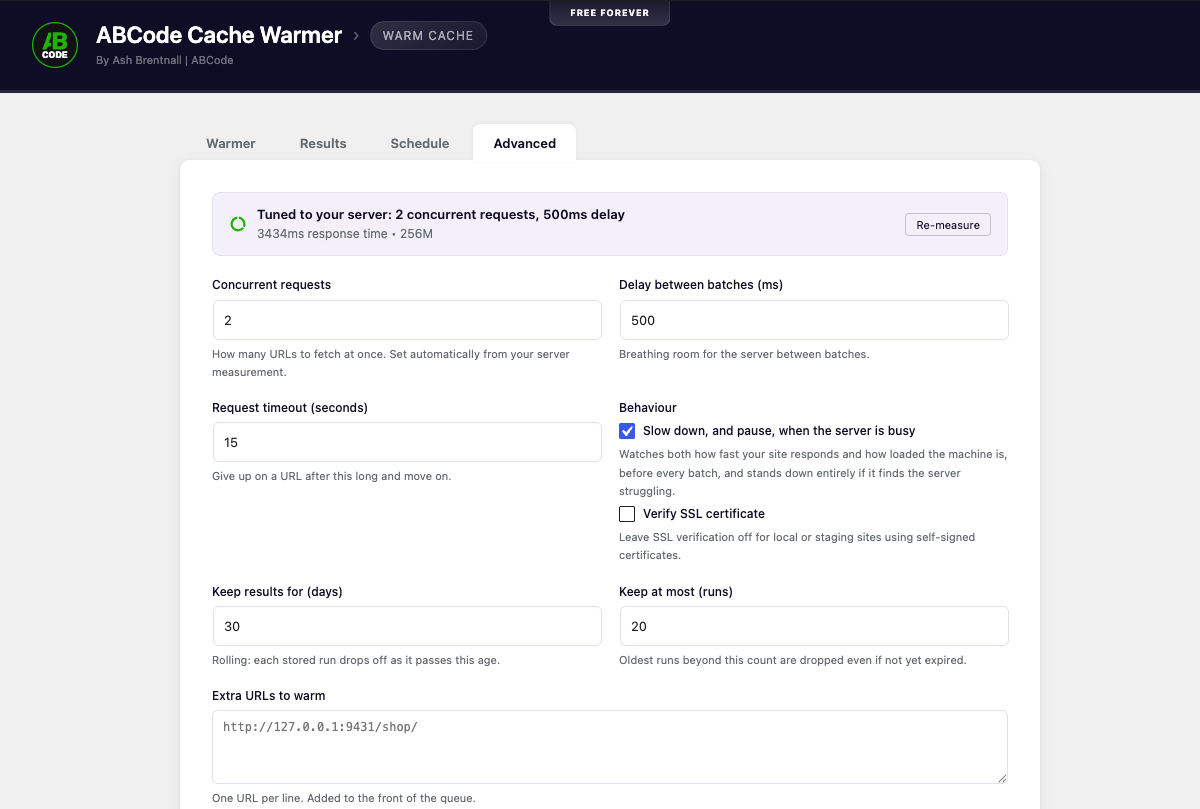
On first load the plugin measures your site’s real response time and combines it with your PHP memory limit, CPU count and current server load to pick safe settings automatically. While a run is in progress it keeps watching: if responses start slowing down it backs off on its own, and speeds back up when the server recovers. Every value stays manually adjustable.
It tells you whether it actually worked
Other warmers report HTTP 200 and call it a success. A 200 tells you the page loaded, not that it got cached.
This plugin reads the cache headers on every response and reports what really happened for each URL:
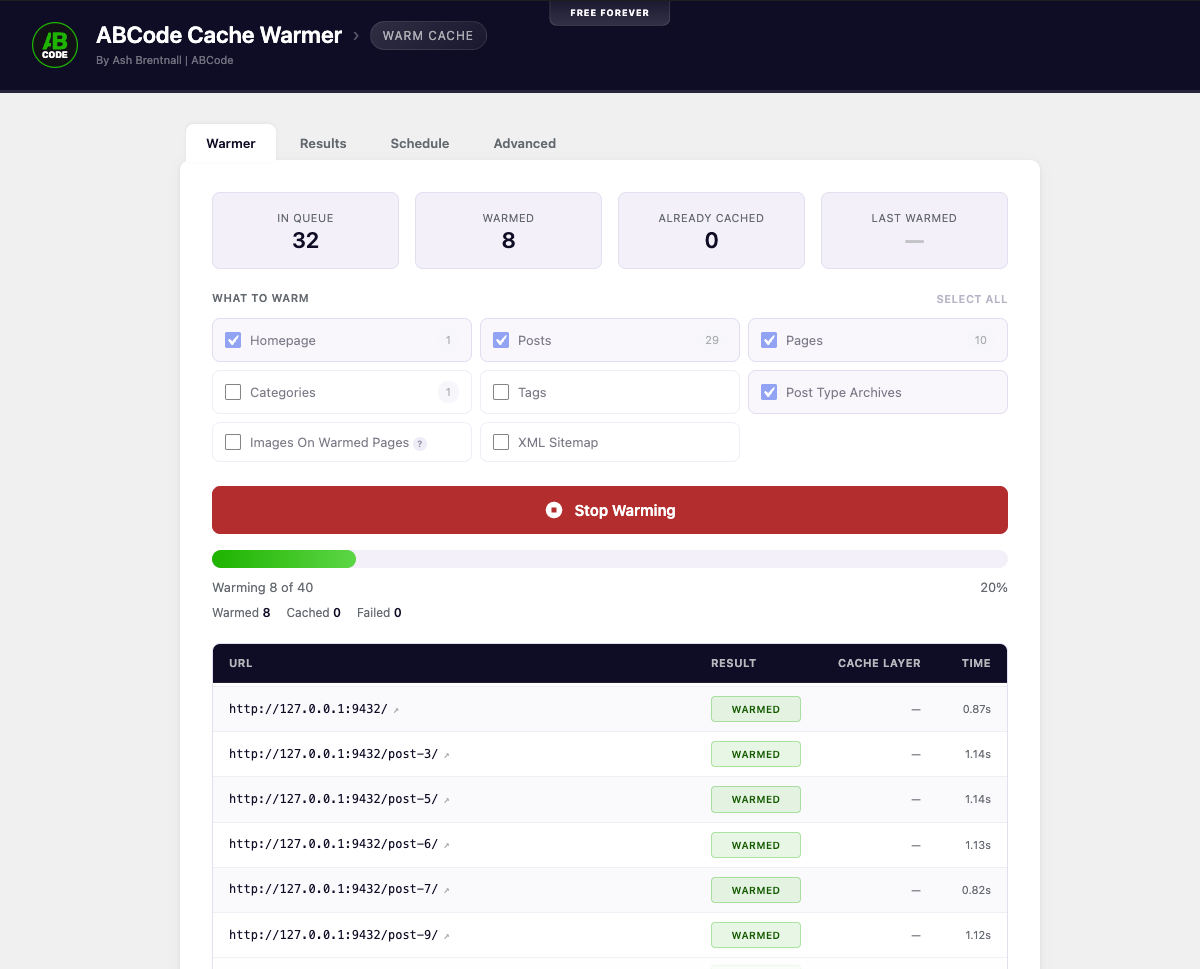
- Warmed: the page was not cached, and now it is
- Cached: it was already warm, nothing to do
- No cache: the page is deliberately uncacheable, such as a cart or checkout
- Failed: shown with the actual error
It recognises Cloudflare (including stale-while-revalidate states), LiteSpeed and QUIC.cloud, Varnish (by its transaction IDs), Fastly, CloudFront and Akamai, Sucuri, Nginx FastCGI and proxy caches, the standard Cache-Status header (RFC 9211), Kinsta, SiteGround, 20i’s StackCache and StackCDN, Batcache (WordPress.com, Pressable, VIP), and (by their page signatures) WP Rocket, WP Super Cache, W3 Total Cache, WP Fastest Cache, Breeze and WP-Optimize.
Where a host runs two layers, an origin cache on the server and a CDN edge in front of it, as 20i does, the layers are read outermost first, because a cached edge response carries frozen copies of the inner layer’s headers from the moment the entry was built. A hit is credited to the layer that really served it, and a miss only counts once every layer outside it has also missed. So on 20i you will see Cached / StackCDN for pages the edge already held, and Warmed / StackCache for pages the warmer genuinely built.
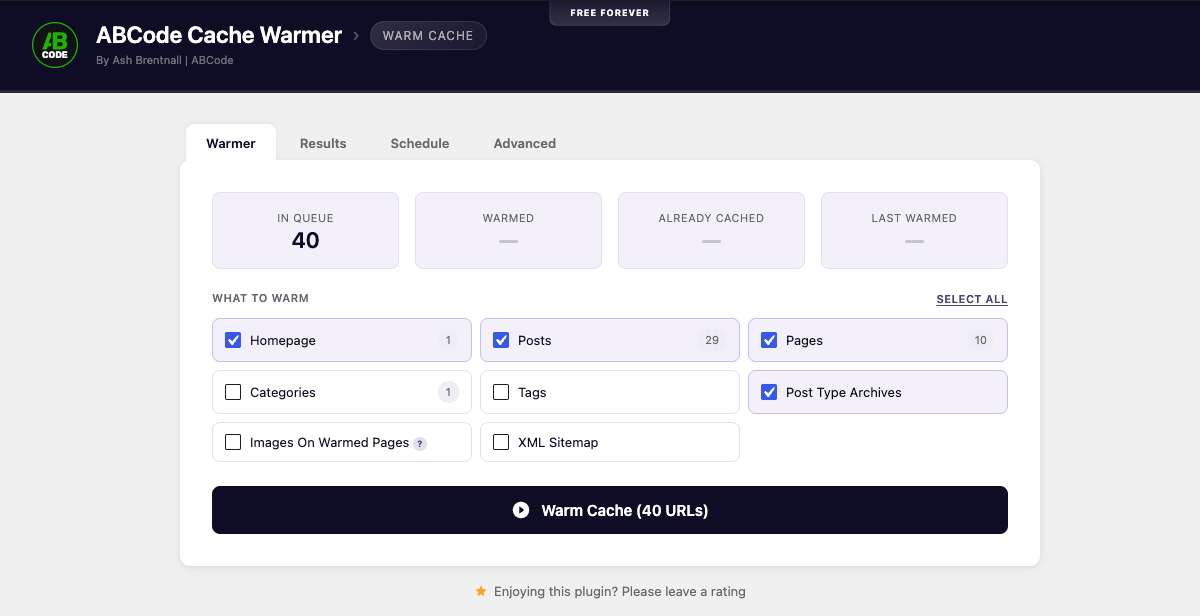
Choose what gets warmed
- Homepage
- Posts, pages and any public custom post type, all on by default
- Post type archives such as /products/ or /portfolio/, plus your blog page
- Category, tag and custom taxonomy archives
- Attachment pages
- Images referenced by the pages being warmed
- Your XML sitemap, core, Yoast or Rank Math
- Any extra URLs you add by hand
Warmed in the order that matters
URLs are not warmed in whatever order the database returns them. The homepage goes first, then archive landing pages, then content, and the whole queue is then ordered breadth-first, so shallower pages warm before deeper ones.
On a site structured as /accommodation/ → /accommodation/cottages/ → /accommodation/cottages/rose-cottage/, the parent pages get warmed first. They take the most traffic and they are usually the most expensive pages to rebuild, because they run listing queries. Within each level, the most recently updated content comes first.
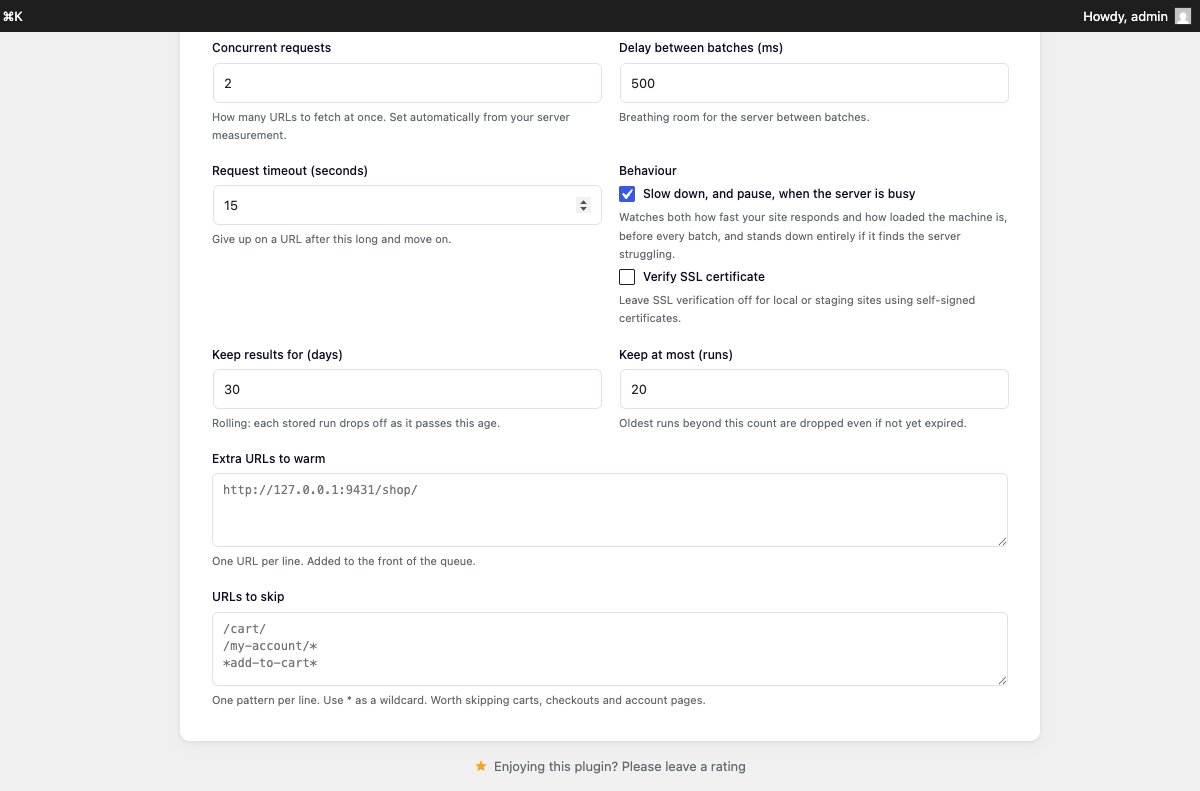
You can also skip URLs by pattern, with * as a wildcard, useful for carts, checkouts and account pages that should never be cached anyway.
About images
Warming raw image files is usually pointless, and this plugin does not push you into it. Image files are served straight off disk by your web server with no PHP involved, so there is no cold cache to prevent.
There is one case where it genuinely helps: plugins that build each image on first request, such as ShortPixel Adaptive Images, Optimole, EWWW Easy IO, Jetpack or a WebP/AVIF converter. There, the first visitor really does wait for the conversion.
For that case the plugin takes a smarter route than crawling your media library. It reads the image URLs out of the HTML it has already downloaded while warming your pages, so it warms exactly the files (and exactly the responsive sizes) your live pages reference, rather than thousands of library items no page uses. Images are always queued behind every page, and capped per run so an image-heavy site cannot drown out the page warming.
Free forever
No URL limits. No locked features. No upsells. The whole plugin does the whole job.
Who made this
ABCode builds and maintains this plugin. If your site needs more than a warm cache, we also do WordPress speed optimisation as a service. The plugin stays free and complete either way.
Installation
- Upload the plugin folder to
/wp-content/plugins/, or install it through the Plugins screen. - Activate it.
- Go to Tools → Cache Warmer.
- Pick what to warm and press the button.
Änderungsprotokoll
1.1.1
- German, Spanish, French, Italian and Brazilian Portuguese translations, plus the .pot template for anyone translating into another language.
- Added the Domain Path header, which is what tells WordPress where the bundled translations live.
- No change to warming behaviour.
1.1.0
- Automatic warming the moment your cache is cleared, with built-in support for WP Rocket, LiteSpeed Cache, W3 Total Cache, WP Super Cache, WP Fastest Cache, Cache Enabler, SiteGround Optimizer, Breeze, Nginx Helper and Autoptimize.
- StackCache (20i) support, verified against its source: the exact events it purges everything on, plus instant detection of its own Purge Cache button in both the admin bar and its settings page. Approved comments (which silently purge the commented page) re-warm that page under the publish trigger.
- A cache watchdog: every ten minutes the homepage’s cache headers are checked, and a cold result is confirmed against sentinel pages across the site before a full warm is started, catching purge buttons, server-level clears and evictions that no WordPress hook announces, without ever launching a site-wide crawl over one cold page.
- Single-page purges warm just that page instead of starting a full run.
- Publishing warms the post plus the pages that list it, rather than the whole site.
- Load-aware throttling: server load is checked before every batch, scaling concurrency down and pausing the run outright when the machine is under real pressure.
- Optional trigger for when content is published or updated.
- New Results tab: every retained run is kept in full and expands to its complete per-URL results, with a warmed-at time against every URL and each URL clickable in a new tab. Retention is rolling and yours to set, an age in days and a maximum run count, with old runs dropping off one at a time as they expire.
- Select all / Clear all for the warming sources.
- Repeat purges fold into one run, with an adjustable delay and a cooldown so a busy site cannot crawl itself back to back.
- Results now appear one URL at a time as each response lands, rather than a batch at a time.
- Scheduled runs now fire at chosen clock times in the site’s timezone, daily at a time you pick, twice daily at two independent times, weekly on a chosen day, instead of whenever the setting happened to be saved.
- The WP-Cron notice now measures instead of assumes: DISABLE_WP_CRON with a working server cron is reported as the healthy setup it is, and the warning is reserved for cron queues that are genuinely overdue.
- Rate limiting (HTTP 429/503) is now handled properly: refused URLs are retried after the server’s Retry-After window instead of being written off, the crawl drops to a gentle single request while limited, and a run can no longer burn through its queue at full speed against a server that is rejecting everything instantly.
- Broader cache detection: Varnish transaction IDs, Batcache, Sucuri, QUIC.cloud, the standard RFC 9211 Cache-Status header, Cloudflare’s stale/updating/revalidated states, and page signatures for WP Fastest Cache, Breeze and WP-Optimize. Origin-level hits are no longer masked by an edge cache reporting a miss in front of them.
- Purge listening added for Hummingbird and WP-Optimize, and the LiteSpeed purge hooks corrected to the names LiteSpeed actually uses.
- Cache layers are now detected outermost-first, so an edge hit is no longer misread as a fresh warm just because it carries the origin’s frozen MISS header from when the entry was built. Affected 20i (StackCDN over StackCache) and Cloudflare-over-LiteSpeed setups.
- StackCache and StackCDN cache headers are now read properly, so 20i sites report real hit/miss results instead of assuming every response was a fresh render.
- The adaptive throttle no longer mistakes heavy pages for a struggling server. Its response-time baseline now drifts with the site instead of being frozen at the first batch, a run that starts on light pages and reaches a heavy section backs off briefly, re-baselines, and comes back to full speed, instead of crawling the rest of the site at one URL at a time.
- A run on a busy shared server no longer stalls indefinitely: after a few attempts at waiting for the load to drop, it crawls at one URL at a time rather than never finishing.
- Page builder template post types (Elementor, Beaver Builder, Divi, Oxygen, Brizy) are no longer offered as warming sources at all: their URLs are editor machinery, and rendering one outside its context caches a junk entry. Post format archives and builder taxonomies are gone for the same reason. Anything exotic can still be warmed via the manual include list, and
abcw_internal_post_types/abcw_internal_taxonomiesfilters adjust the exclusions. - Attachment Pages only appear as a source on sites where WordPress actually serves attachment pages, since WordPress 6.4 a fresh install redirects them to the file, leaving nothing to warm.
- A run that finds no cache headers at all now says so, instead of quietly reporting every URL as warmed.
- Database writes during a run cut by around three quarters: the live row log is stored apart from the run’s counters, and the permanent record is written once per batch instead of once per chunk.
- Long runs no longer stop reporting when the page’s security token expires, each progress response carries a fresh one.
- Requires WordPress 5.6 or newer, which was already true in practice; the header now says so.
- Fixed: a schedule was silently lost when the plugin was deactivated and reactivated; the saved setting now rebuilds its cron event automatically.
- Fixed: a queued single-page warm could be lost if the server killed the request part-way; the queue now survives and is finished by the next trigger.
- Fixed: the last rows of a run could be lost, and the progress bar stop a URL short of 100%, because the run record was deleted the instant it finished.
- Fixed: rows could appear twice on a slow site, when progress requests overlapped each other.
- Fixed: URLs containing
./or doubled slashes warmed the same page twice under two different addresses. - Warming requests now carry
DNT: 1and anX-ABCode-Cache-Warmerheader, so server-side analytics can filter them out. JavaScript analytics such as Google Analytics never saw them anyway. - New
abcw_purge_hooks,abcw_purge_post_hooks,abcw_auto_cooldown,abcw_load_steps,abcw_internal_post_types,abcw_internal_taxonomiesandabcw_request_headersfilters. - Renamed the admin menu entry to Cache Warmer.
1.0.0
- Erste Freigabe.
- Parallel cache warming with no third-party dependencies.
- Automatic server measurement and adaptive throttling.
- Per-URL cache hit/miss reporting across major caching layers.
- URL sources for posts, pages, custom post types, post type archives, taxonomies, attachment pages and XML sitemaps.
- Optional image warming, discovered from the pages being crawled and capped per run.
- Breadth-first hierarchy ordering so parent pages warm before their children.
- Live results, each URL appears in the table the moment it finishes.
- Runs continue in the background via WP-Cron when you close the tab, and resume where they left off.
- Scheduled warming: hourly, twice daily, daily or weekly.
- Tabbed interface: Warmer, Results, Schedule and Advanced.
- Manual include and wildcard skip lists.
- Working stop button.
Screenshots
Für Entwickler
Ist das dein Plugin? Zeigen Sie die Zahlen.
Fügen Sie Ihrer Website, Docs oder GitHub Readme ein Live-Badge hinzu. Es wird von selbst aktualisiert - kein Konto erforderlich.
Best ABCode Cache Warmer alternatives
Alle Cache-Plugins →



Fragen und Antworten
ABCode Cache Warmer: quick answers
Gerade Antworten, gezogen von Live WordPress.org Daten.
Quelle: WordPress.org
Is ABCode Cache Warmer free?
Yes. ABCode Cache Warmer is free to download and use from the official WordPress.org plugin directory.
Is ABCode Cache Warmer safe to use in 2026?
ABCode Cache Warmer is a solid plugin choice in 2026, with a few things worth checking first. It runs on 100+ sites, is rated 5/5 and was last updated 3 months ago, and scores 69/100 on our health check.
How many websites use ABCode Cache Warmer?
ABCode Cache Warmer is active on 100+ WordPress websites and has been downloaded 857 times since it launched in August 2026. It was downloaded 285 times in the last 30 days.
Does ABCode Cache Warmer work with WordPress 7.1?
Yes. The developer has tested ABCode Cache Warmer up to WordPress 7.1.5, the latest release. It requires WordPress 5.6 or newer.
What PHP version does ABCode Cache Warmer need?
ABCode Cache Warmer requires PHP 7.4 or higher. Most hosts run PHP 8.x today, so it works on any modern WordPress hosting.
When was ABCode Cache Warmer last updated?
The latest version, 1.1.1, was released on August 18, 2026 (3 months ago).
Who makes ABCode Cache Warmer?
ABCode Cache Warmer is developed and maintained by Ash Brentnall | ABCode.
What are the best alternatives to ABCode Cache Warmer?
The most popular alternatives to ABCode Cache Warmer are WP Super Cache (1M+ installs), WP Fastest Cache (1M+ installs) and WP-Optimize (1M+ installs).
Angetrieben von PageForge
Eine Vorlage und eine Tabelle. Eine echte Seite für jede Suche.
PageForge Verwandelt jede Zeile eines CSV in eine WordPress-Seite mit eigenem Titel, URL, SEO Felder und Schema entworfen. Kostenlos auf WordPress.org.
- CSV und XLSX, plus Google Sheets auf Beruf und Unternehmen
- seinen eigenen Titel, URL, SEO Felder und Schema für jede Seite
- Arbeitet mit dem Blockeditor, Elementor, Divi und Avada
- Kostenlos auf WordPress.org, keine Kreditkarte