


YayCurrency – WooCommerce Multi-Currency Switcher
WooCommerce Multi-Currency made easy, powerful, and flexible.

Escolha segura
Yes — YayCurrency is a safe, well-maintained plugin to use in 2026. It runs on 7K+ sites, is rated 4.8/5 and was last updated 3 months ago, and scores 88/100 on our health check.
- Loved by users — 4.8/5 from 114 reviews
- Testado com as últimas WordPress (7.1)
Como ele se acumula?
Lado a lado em instalações, atualizações, avaliações e suporte


Downloads diários
Os picos de download geralmente seguem uma nova versão — cada site que atualiza automaticamente é um download.
Rankings
Where YayCurrency stands todayWordPress.org Classificações de pesquisa
Posição ao vivo na pesquisa de plugins, top 100| Palavra chave | Posição |
|---|---|
| currency | #6 |
| currency converter | #5 |
| currency switcher | #3 |
| multi currency | #2 |
| WooCommerce | >100 |
Adoção da versão
Compartilhamento de sites ativos por lançamento.
Divisão de classificação
★★★★★★★★★★ 4.8 from 114 reviews
About YayCurrency
From the official readme · v3.3.5Descrição
Selling to customers in Europe, North America, Asia, or somewhere else?
YayCurrency makes it easy to offer a localized shopping experience no matter where your buyers are.
It is a powerful yet easy-to-use WooCommerce multi-currency switcher that helps you grow your international sales by letting customers shop and pay in their local currency.
🌐 With automatic exchange rates, prices based on country, and compatibility with 50+ popular WooCommerce plugins, YayCurrency makes you ready to scale your store.
Key Features
Local Currency Payments – Showing real-time converted prices across your store and checkout.
Accurate Order Emails – Order confirmation emails are sent in the customer’s selected currency, ensuring clarity and building trust.
Compatible with Cache Plugins – Currency switching works smoothly without affecting your site speed or caching setup.
Customizable Conversion Fees & Rounding – Adding conversion margins, applying percentage-based payment fees, and rounding prices clean, customer-friendly pricing displays.
Sell Globally with Localized Pricing – No Code Needed!
Whether you’re selling in USD, EUR, GBP, or beyond, YayCurrency allows you to display product prices in local currencies and handle payments accordingly. It works out of the box with a quick and intuitive setup, helping you create a frictionless shopping experience for customers worldwide.
Used by WPMayor and trusted by store owners worldwide.
⚡️ FEATURES
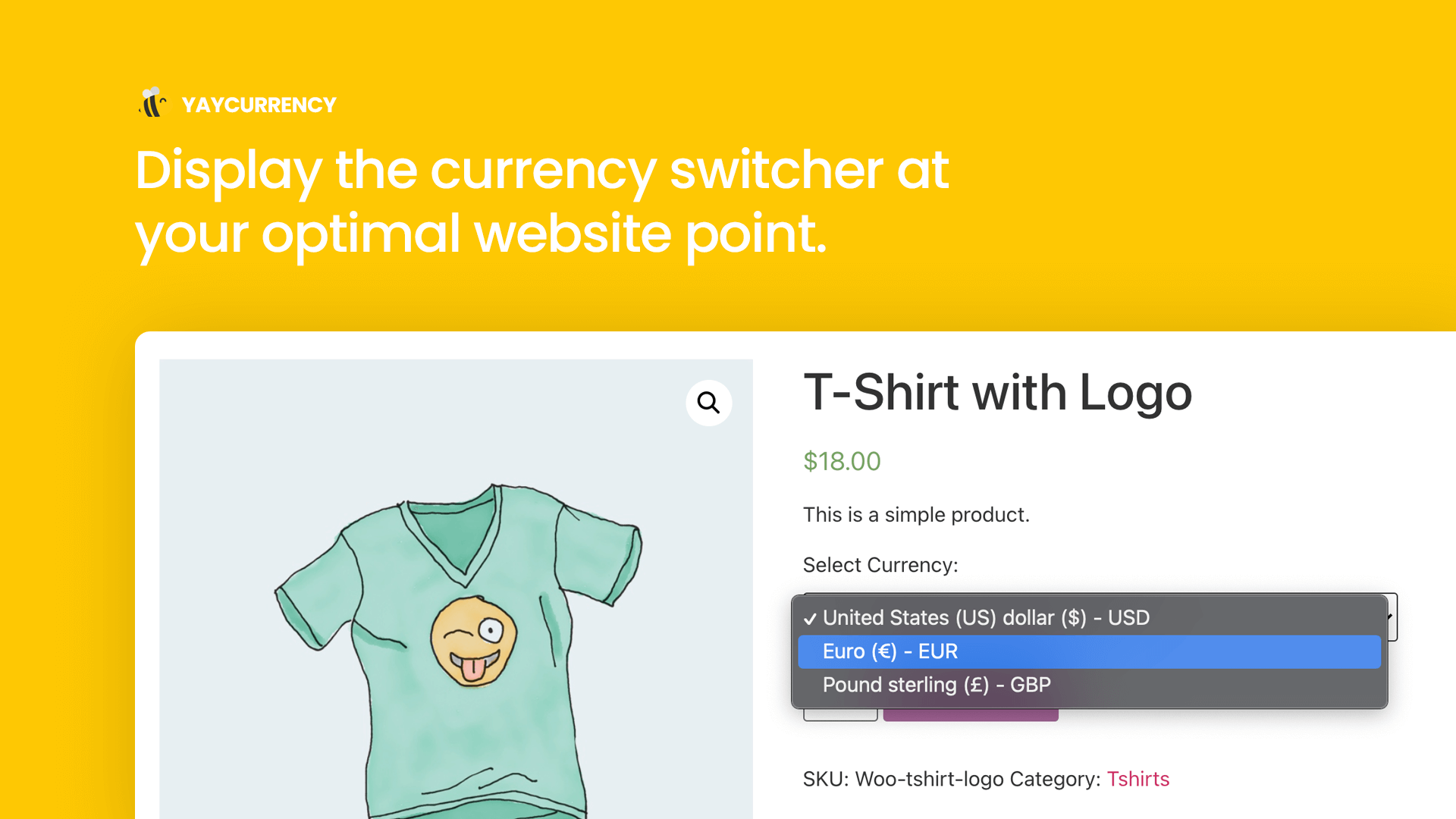
Currency Switcher on Product Page
Show the WooCommerce multi currency switcher dropdown above Add to cart button on WooCommerce product pages, and other popups where your single product appears including Quickview, filters, etc.
Customize Currency Switcher Drop-down
You can customize currency format by displaying country flags, currency symbol, currency code, or both. It’s easy to display the currency switcher anywhere using [yaycurrency-switcher] shortcode. The pricing can be customized using correct formatting for thousand separator, decimal separator, spacing, and rounding.
WooCommerce Sales Reports
Visit WooCommerce > Reports > Orders, and you can view your store performance based on currency. Once filtered, you will easily see your total sales, leaderboards, orders, and top products sold in each currency.
Pretty Price Ending
Round the converted prices to your desired threshold and make them end in target figures (such as 00, .49, .79, .99, and so on). Psychological pricing made easy with YayCurrency. You can run live test calculations to be sure you’ll have the right WooCommerce multi currency outcome.
Manage Conversion Fee
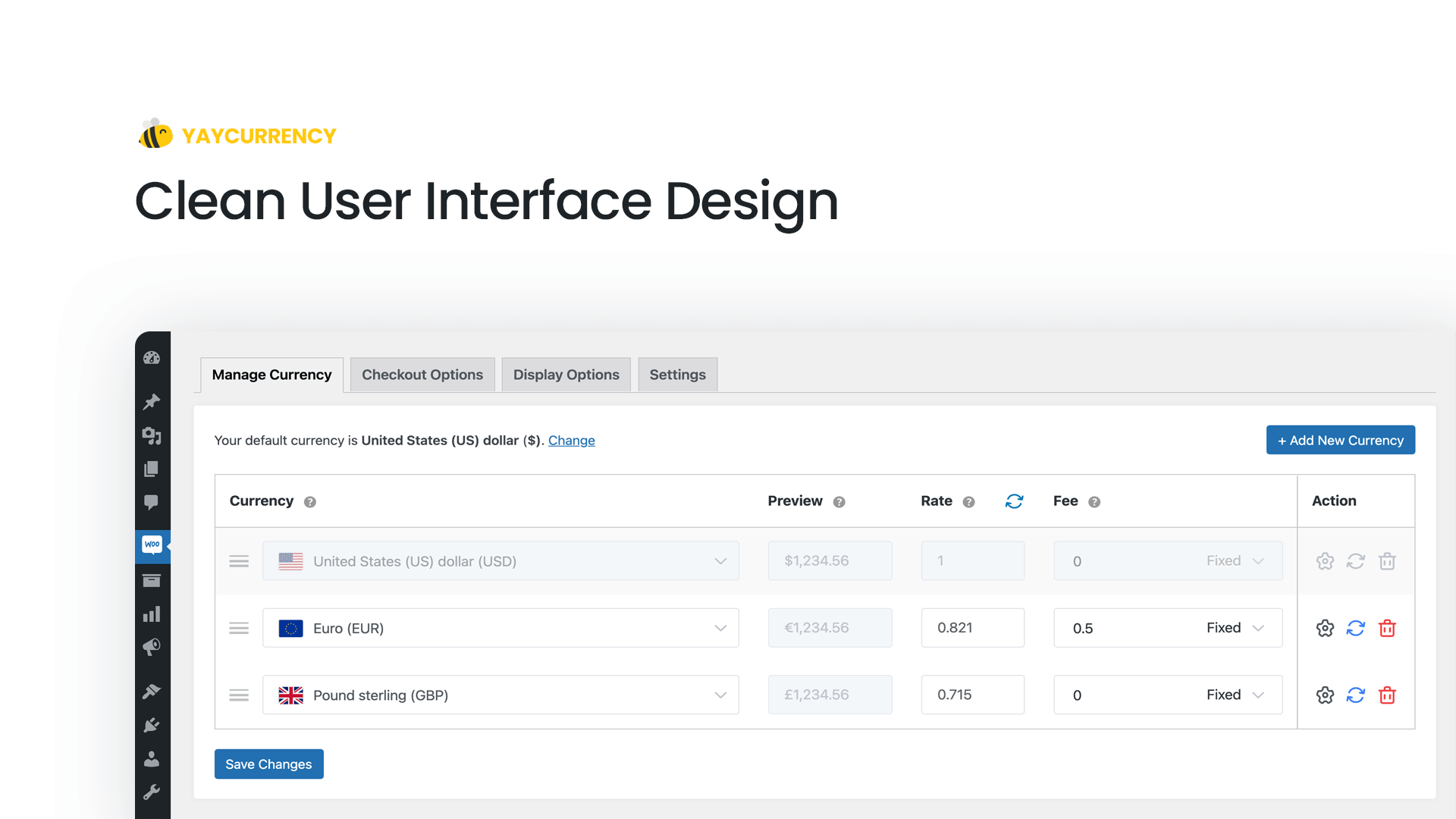
For each currency pair, your bank, payment processor, or money transfer operator may apply a currency exchange fee. To reduce cash loss, you can optionally add a conversion fee to WooCommerce multi currency settings.
Multiple Currency Switcher Widgets
Display the WooCommerce multi currency switcher at your store’s optimal point using the widget customizer and shortcode.
Even when you’re already using various widgets of chatbox, contact button, or other theme widgets, you still can find a sweet spot for the currency converter.
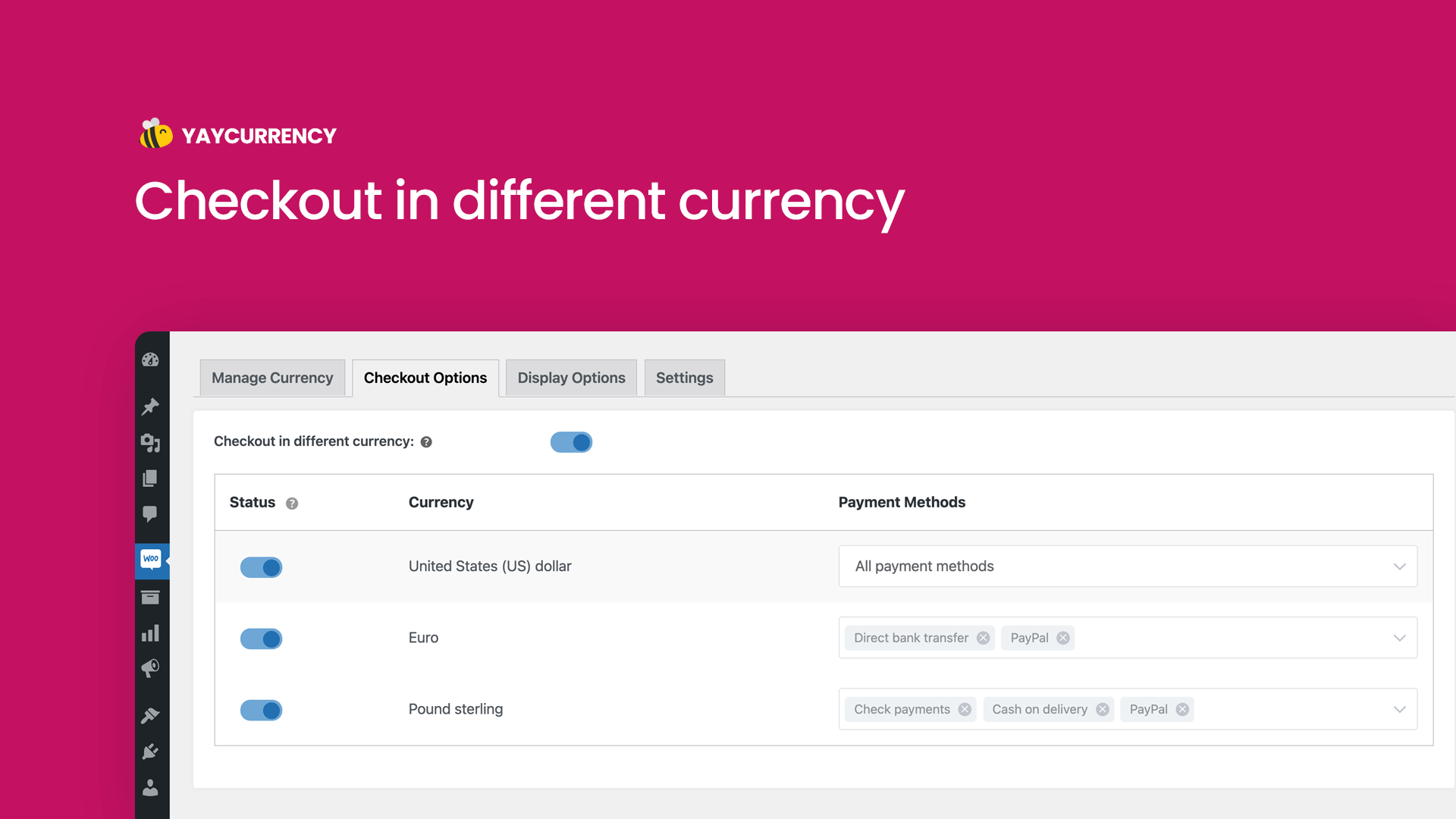
Switchable During Checkout
Allow switching currency during checkout and record purchase transactions based on the local supported payment methods. In WooCommerce Orders history, you will see order values recorded in different currencies.
Choose the Geolocation Method That Fits Your Setup (PRO)
- Auto Detect: Let YayCurrency intelligently select the best available method
- WooCommerce Geolocation: Reliable and built-in option for most stores
- MaxMind Geolocation: Advanced accuracy with WooCommerce integration
- IP2Location: Alternative database for precise IP-based targeting
🎏 COMPATIBILITY
Using a third-party plugin? No worries, this WooCommerce multi currency free plugin can work with your favorite WooCommerce extensions:
- Stripe For WooCommerce
- WooCommerce Subscriptions
- Product Add-Ons
- Dynamic Pricing & Discounts
- Name Your Price
- Table Rate Shipping plugin
- WooCommerce Per Product Shipping plugin
- PayPal Payments
- PeachPay
- Pague pelo pagamento de WooCommerce
- WP Grid Builder Caching
- CartFlows
- JetSmartFilters
- WooCommerce FedEx Shipping Plugin with Print Label
- WooCommerce Custom Product Addons
- Woo Cart Product module of Divi theme
- B2BKing for WooCommerce
- Wholesale Pro by Barn2
- WooCommerce TM Extra Product Options
- WooCommerce One Page Checkout
- Woo Discount Rules plugin
- WooCommerce Product Bundles
- Advanced Product Field plugin
- AG WooCommerce Tyl By NatWest Payment Gateway plugin
- Role Based Pricing for WooCommerce plugin
- PPOM
- LiteSpeed Cache plugin
- HivePress plugin
- Buy Once or Subscribe for WooCommerce Subscription plugin
💎 PREMIUM-ONLY FEATURES
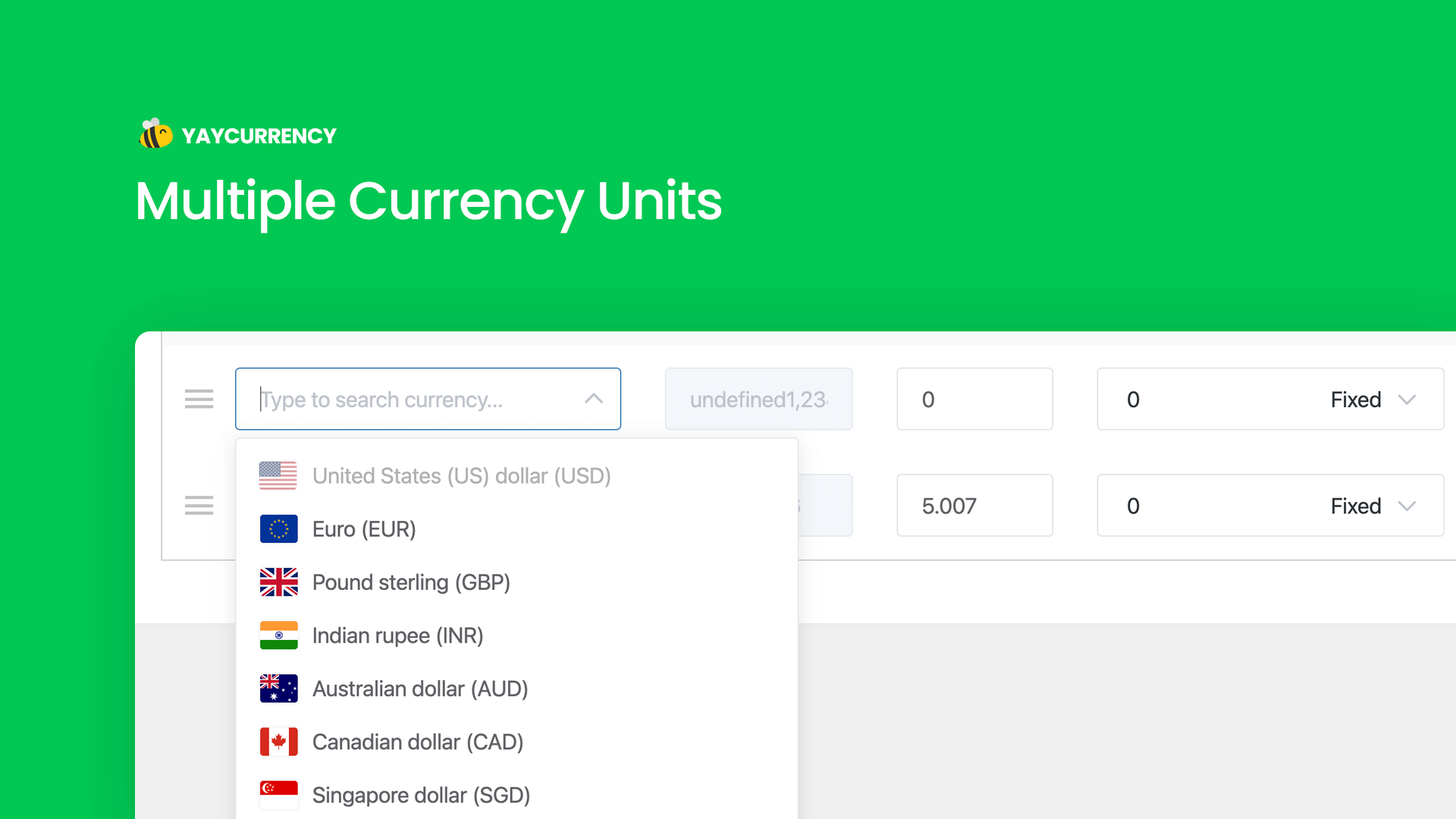
Unlimited Currencies
It supports all currency units in the world, including crypto like Bitcoin (BTC). You can add as many as you need to WooCommerce multi currency plugin.
Price Based on Country
Auto-detect the customer’s IP address and show the product prices in their local currency. You don’t have to config anything as this WooCommerce multi currency plugin is readily built with GeoIP services.
Accept Checkout Payments in Different Currencies
Based on your settings for each local currency, the order can be placed in the currency chosen by the user. And the product prices are also displayed in the selected currency in order confirmation email templates.
Auto-Update Exchange Rate
Exchange rates are automatically updated on regular intervals. You can force the update once in 30 minutes, 6 hours, 7 days, or your custom duration.
Comprehensive Analytics by Currency
You will have full access to your store’s analytics. Under Analytics menu > go to Overview, Revenue, and Orders, you will see a breakdown of sales by currency, product or service category. These provide a detailed and accurate picture of your business, allowing for better decision-making and strategic planning.
🔑 HOW IT WORKS
YayCurrency works seamlessly with all native WooCommerce payment methods.
Using Direct bank transfer, Check payments, Cash on delivery, PayPal Standard, or Stripe payment gateway? We got you covered!
- Choose your default currency in WooCommerce > Settings > Currency options.
- Then click on Configure multi-currency to start adding other currencies.
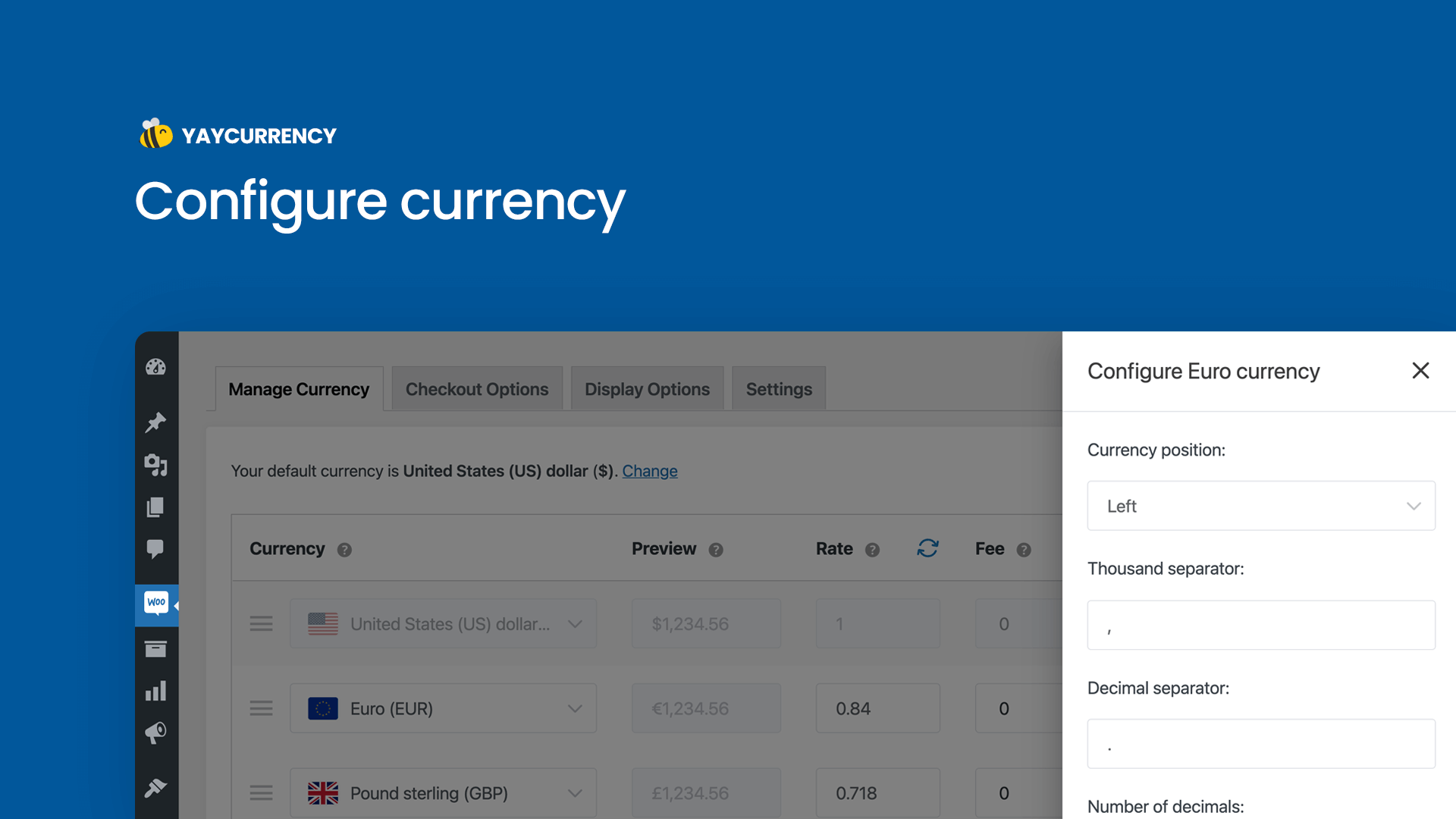
- When a new currency is added, it takes on your WooCommerce store’s default currency format, including currency symbol position, thousand separator, decimal separator, and number of decimals.
- Then, you can localize each currency by changing the formatting options in the currency’s drawer panel.
Find out more:
✅ Approved by WooCommerce: Multi-Currency Switcher on WooCommerce.com
🔍 Want to see YayCommerce in action? View all YayCommerce plugin demos and explore the full suite of features.
COMMON USE CASES
Global Brands
Want to reach out to your nation’s neighbor or sister countries? Guess what, they’ll definitely love to see your products in their national currency. Why not send them a tailored catalogue now?
Dropshipping Business
So you’re connecting the manufacturers and the end customers? Just start off by selling internationally.
Digital Products
Downloadable and bookable products have a borderless sales potential. Unleash it.
Distributors
This WooCommerce multi currency free plugin works with all major B2B, wholesale, and quote request plugins. Try it.
Just a Startup in Progress?
No worries, try out YayCurrency free version. It is the most beginner- and startup-friendly plugin in the world of WordPress.
Happy Currency-Switching! 💛
Instalação
- Download the plugin from wordpress.org
- From your WordPress admin dashboard, go to Plugins > Add New, and upload the yaycurrency.zip file
- Install and activate it
- After activating, you don’t need to fill in any license, just go to WooCommerce > YayCurrency to manage multiple currencies and currency switcher
- To see the Sales report, go to Analytics > Overview and pick a currency from the dropdown
- To show a currency switcher widget, go to Appearance > Widgets and add the YayCurrency widget to your desired position such as header, footer, main sidebar, WooCommerce sidebar, product sidebar, and so on
- To display the currency switcher on WooCommerce product pages, to go YayCurrency > Display Options > Show on single product page.
Log de Changes
Aug 11, 2026 – Version 3.3.5
- Added: Bulk Edit Fixed Prices for product variations. — PRO only
- Updated: Header Nav Menu layout with new UIKit.
- Updated: Update menu position.
- Updated: Change capability from manage_options to manage_woocommerce.
- Updated: WC tested up to 11.0
- Improved: set_cookie function.
- Improved: detect_google_crawler function.
- Fixed: Several security issues reported by Shivamani Vastrala.
- Fixed: Issue with WooCommerce Subscriptions (Fatal error: Call to a member function get_order()).
- Fixed: Max amount coupon not working.
- Fixed: Compatible with the B2BKing Pro plugin.
- Fixed: Compatible with Advanced Product Fields Extended for WooCommerce (latest version 3.1.7+).
- Fixed: Compatible with WooCommerce PayPal Payments (latest version).
- Fixed: Compatible with Advanced Product Fields (Product Options) for WooCommerce (latest version).
- Fixed: Decimal issues with fixed prices. — PRO only
- Fixed: Format exchange rates for the Cuex and FawazCurrency APIs. — PRO only
- Fixed: Google Finance API not working. — PRO only
- Fixed: Issues with fixed prices in Bookings Appointments for WooCommerce Premium. — PRO only
- Fixed: Currency conversion for full refund order stats.
Mar 30, 2026 – Version 3.3.4
- Added: Fixed shipping cost per currency feature. — Pro version only
- Added: Geo API option detects the country by IP. — Pro version only
- Added: Auto-refresh mechanism for expired REST nonces on cached sites. — Pro version only
- Fixed: Compatible with Dokan vendor subscription plugin.
- Fixed: Compatible with Wallet for WooCommerce plugin latest version.
- Fixed: Compatible with Advanced Product Fields (Product Options) for WooCommerce plugins.
- Fixed: Compatible with Modern Cart Starter for WooCommerce plugin.
- Fixed: Shipping cost does not work correctly when the shipping type is Order.
- Fixed: Compatible with CTX Feed plugin latest version.
- Fixed: Compatible with Barn2 WooCommerce Wholesale Pro plugin does not work correctly with approximate price. — Pro version only
- Fixed: XE API is not working. — Pro version only
- Updated: Tested up to WP 6.9.4
- Updated: WC tested up to: 10.6.1
- Improved: Update exchange rate automatically. — Pro version only
- Improved: Compatible with cache plugins option. — Pro version only
Jan 22, 2026 – Version 3.3.3
- Updated: Tested up to WP 6.9
- Fixed: Shipping class cost conversion issue when checkout currency option is disabled.
Jan 15, 2026 – Version 3.3.2
- Added: Permission checks for plugin activation, installation, and updates.
- Added: Cache method selection to advance settings. [Pro version only]
- Updated: Cost assignment.
- Updated: WC tested up to: 10.4.3
- Improved: Transient variable name in Helper class for consistency.
- Improved: Currency switcher logic to ensure output buffering is correctly initiated.
- Fixed: Compatible with WooCommerce Product Options plugin.
- Fixed: PHP Warning cannot modify header information – headers already sent in…
- Fixed: The issue with the decimals being empty.
- Fixed: PHP Warning: Undefined array key “aria-hidden”.
- Fixed: Shipping class cost calculation.
- Fixed: set_cookie warning PHP 8.x.
- Fixed: delete_currency REST endpoint issue reported by PatchStack.
Dec 8, 2025 – Version 3.3.1
- Fixed: delete_currency REST endpoint issue reported by PatchStack
Oct 29, 2025 – Version 3.3
- Added: Sierra Leonean Leone (SLE) currency
- Added: Filter hooks to allow custom currencies and change currency flags
- Added: The yay_currency_will_not_round_shipping_cost filter hook to disable rounding of the shipping fee
- Added: Price formatting support for WooCommerce Blocks (Pro)
- Added: A fallback method to fetch the exchange rate
- Improved: New admin settings page UI
- Improved: Flags icons folder
- Improved: Currency settings now sync between WooCommerce settings and the YayCurrency menu
- Improved: Currency switcher now features a new frontend style
- Improved: Changed the names of multiple filter and action hooks for better clarity
- Improved: Ensure the default currency position is set to ‘left’ if not specified
- Improved: Ensure the default currency code display is set to ‘not_display’ if not specified (Pro)
- Improved: Add a rest API compatible with caching options instead of using AJAX (Pro)
- Improved: Caching for geolocate_via_api method (Pro)
- Fixed: Compatible with PPOM – Product Addons & Custom Fields for WooCommerce plugin
- Fixed: Compatible with PayTR Virtual POS WooCommerce – iFrame API plugin
- Fixed: Compatible with Barn2 WooCommerce Wholesale Pro & Barn2 WooCommerce Discount Manager plugins
- Fixed: Compatible with Donation Platform for WooCommerce: Fundraising & Donation Management plugin
- Fixed: Compatible with FunnelKit Funnel Builder Pro plugin
- Fixed: Compatible with FunnelKit Payment Gateway for Stripe WooCommerce plugin
- Fixed: Compatible with Art-i Melhor Envio, Art-i Marketplace/Melhor Envio plugins
- Fixed: Compatible with WooCommerce Shipit plugin
- Fixed: Compatible with WooCommerce blocks (Cart & Checkout pages) when the fallback currency is enabled.
- Fixed: Subtotal mini cart not working in Elementor Pro plugin
- Fixed: Subtotal mini cart not working in Advanced Product Fields for WooCommerce plugin
- Fixed: in_span warning with woocommerce 10.x.x.
- WC tested up to: 10.0.4
Capturas de tela
Para desenvolvedores
Este é o seu plugin? Mostre os números.
Adicione um crachá ao vivo ao seu site, Documentos ou Readme do GitHub. Ele é atualizado por conta própria - nenhuma conta necessária.
Best YayCurrency alternatives
All currency plugins →




FAQ
YayCurrency: quick answers
Respostas diretas, extraídas de dados ao vivo WordPress.org.
Fonte: WordPress.org
Is YayCurrency free?
Yes. YayCurrency is free to download and use from the official WordPress.org plugin directory.
Is YayCurrency safe to use in 2026?
Yes — YayCurrency is a safe, well-maintained plugin to use in 2026. It runs on 7K+ sites, is rated 4.8/5 and was last updated 3 months ago, and scores 88/100 on our health check.
How many websites use YayCurrency?
YayCurrency is active on 7K+ WordPress websites and has been downloaded 151,136 times since it launched in May 2021. It was downloaded 2,194 times in the last 30 days.
Does YayCurrency work with WordPress 7.1?
Yes. The developer has tested YayCurrency up to WordPress 7.1.5, the latest release. It requires WordPress 4.7 or newer.
What PHP version does YayCurrency need?
YayCurrency requires PHP 5.4 or higher. Most hosts run PHP 8.x today, so it works on any modern WordPress hosting.
When was YayCurrency last updated?
The latest version, 3.3.5, was released on August 23, 2026 (3 months ago).
Who makes YayCurrency?
YayCurrency is developed and maintained by YayCommerce.
What are the best alternatives to YayCurrency?
The most popular alternatives to YayCurrency are FOX (50K+ installs), Currency Switcher for WooCo… (10K+ installs) and Custom Currency for WooComm… (2K+ installs).
Alimentado por PageForge
Um modelo e uma planilha. Uma página real para cada pesquisa.
PageForge Transforma cada linha de um CSV em uma página WordPress com seu próprio título, URL, SEO campos e esquema, construído no layout que você já desenhou. Gratuito em WordPress.org.
- CSV e XLSX, mais Google Sheets em Profissional e Empresarial
- Seu próprio título, URL, SEO campos e esquema para cada página
- Funciona com o editor de blocos, Elementor, Divi e Avada
- Gratuito em WordPress.org, sem cartão de crédito