


WPFrom Email
Replaces default WordPress sender FROM Name and Email Address. NEW admin email options.

Use com cautela
WPFrom Email works, but test it on a staging site before relying on it in 2026. It runs on 600+ sites, is rated 5/5 and was last updated 11 months ago, and scores 56/100 on our health check.
- Base de usuários pequenas (600+ instalações ativas)
- Muito poucos comentários até agora
Como ele se acumula?
Lado a lado em instalações, atualizações, avaliações e suporte



Downloads diários
Os picos de download geralmente seguem uma nova versão — cada site que atualiza automaticamente é um download.
Rankings
Where WPFrom Email stands todayWordPress.org Classificações de pesquisa
Posição ao vivo na pesquisa de plugins, top 100| Palavra chave | Posição |
|---|---|
| disable email | >100 |
| email customize | >100 |
| email notification | >100 |
| outgoing email | #63 |
| wordpress email | >100 |
Adoção da versão
Compartilhamento de sites ativos por lançamento.
Divisão de classificação
★★★★★ ★★★★★ 5 de 1 comentários
About WPFrom Email
From the official readme · v1.9.7Descrição
Introducing WPFrom Email, a free WordPress Plugin aimed at helping you quickly and easily update the default WordPress sender FROM Name and Email Address.
To increase brand authenticity and create name recognition among your visitors it is recommended update how WordPress sends out emails to your subscribers. Leaving the WordPress email sending settings in their default state may even result in email delivery issues. This is because the default wordpress@ emails usually trigger Internet Service Providers and end user email spam filters.
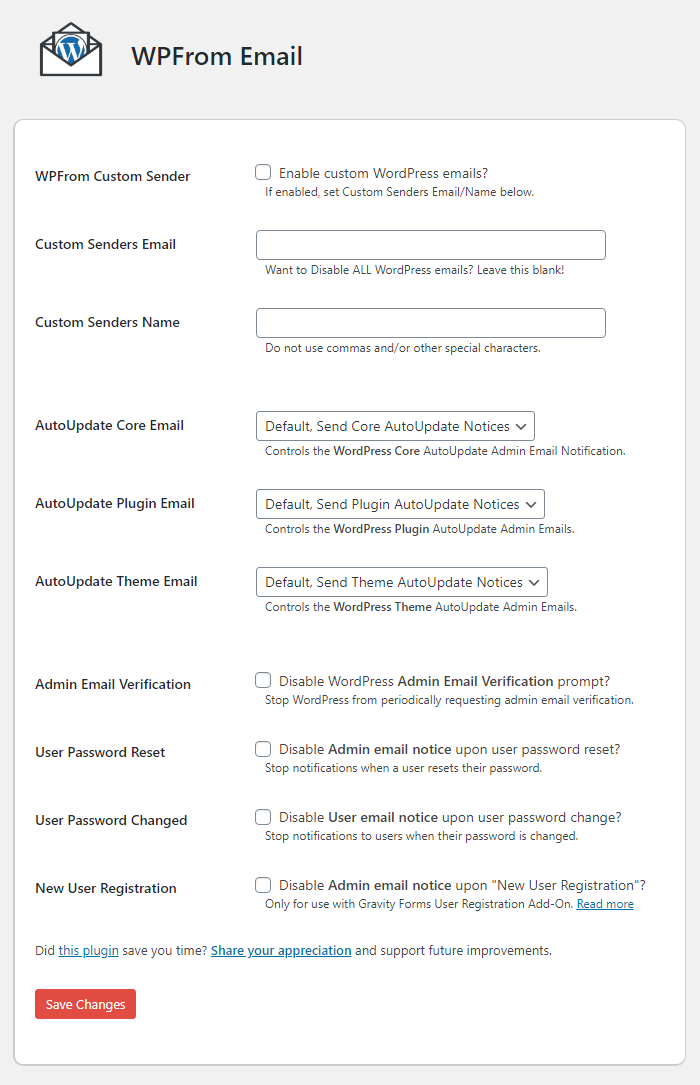
Using this plugin you can also disable the admin email notification upon New User Registration (only tested against Gravity Forms User Registration Addon). This disables two email notifications. First the user notification email which the user receives upon registration with a link to set their password. Secondly, the admin notification email which the site admin receives upon new user registration: “New User Registration”. You won’t be able to use the option to email the new user their auto-generated password since that email is now disabled. Rather, you will have to create a Gravity Forms notification within your form to send the user the password setup email.
Toggle WordPress AutoUpdate Email Notifications for the WordPress Core, Plugins or Themes. Or choose to have email notifications sent only if there was an error.
Did this plugin save you time? Share your appreciation and support future improvements.
Recursos
- Toggle to replace the default WordPress FROM Name and Email Address.
- Disable Admin email notices of WordPress Core Autoupdates or Send Only on Error.
- Disable Admin email notices of Autoupdated Plugins or Send Only on Error.
- Disable Admin email notices of Autoupdated Themes or Send Only on Error.
- Disable Admin email verification prompt.
- Disable Admin email notification upon user password reset.
- Disable User email notification upon user password change.
- Disable Admin email notification upon New User Registration (Gravity Forms only).
- Disable ALL WordPress emails by leaving the Senders Email field blank.
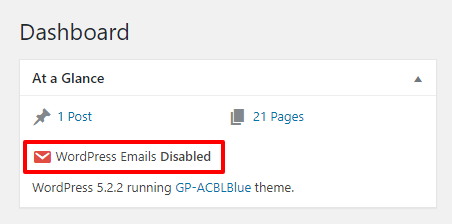
- Notice of Disabled WordPress emails within Dashboard At A Glance metabox.
- Upon deactivation, all associated database values are removed.
Instalação
- Upload the plugin folder to your ‘/wp-content/plugins/’ folder.
- Ative o plugin através do menu 'Plugins' em WordPress.
- Visit the plugin settings area and adjust as needed.
Log de Changes
There is a new version of WPFrom Email available.
= 1.9.7 (2026-01-05)
* Tested against WordPress 6.9
1.9.6 (2024-12-31)
- Tested against WordPress 6.7.2
1.9.5 (2024-04-02)
- Added WordPress Repository blueprint feature for user previews.
1.9.4 (2024-04-02)
- Tested against WordPress 6.5
1.9.3 (2024-02-08)
- Resolved PHP Warning which was triggered upon new user registration when ‘disable admin notification upon new user registers’ was toggled on.
1.9.2 (2023-11-08)
- Updated plugin author information.
1.9.1 (2023-11-08)
- Tested against WordPress 6.4
Capturas de tela
Para desenvolvedores
Este é o seu plugin? Mostre os números.
Adicione um crachá ao vivo ao seu site, Documentos ou Readme do GitHub. Ele é atualizado por conta própria - nenhuma conta necessária.
Best WPFrom Email alternatives
All disable email plugins →FAQ
WPFrom Email: quick answers
Respostas diretas, extraídas de dados ao vivo WordPress.org.
Fonte: WordPress.org
Is WPFrom Email free?
Yes. WPFrom Email is free to download and use from the official WordPress.org plugin directory.
Is WPFrom Email safe to use in 2026?
WPFrom Email works, but test it on a staging site before relying on it in 2026. It runs on 600+ sites, is rated 5/5 and was last updated 11 months ago, and scores 56/100 on our health check.
How many websites use WPFrom Email?
WPFrom Email is active on 600+ WordPress websites and has been downloaded 17,005 times since it launched in July 2019. It was downloaded 281 times in the last 30 days.
Does WPFrom Email work with WordPress 7.1?
WPFrom Email is officially tested up to WordPress 6.10, while the latest release is 7.1.5. It may still work, but try it on a staging site first.
When was WPFrom Email last updated?
The latest version, 1.9.7, was released on January 5, 2026 (11 months ago).
Who makes WPFrom Email?
WPFrom Email is developed and maintained by Manny Rodrigues.
What are the best alternatives to WPFrom Email?
The most popular alternatives to WPFrom Email are Emails Catch All (600+ installs), Disable Lost Password Email (40+ installs) and User Wise Email Disable (<10 installs).
Alimentado por PageForge
Um modelo e uma planilha. Uma página real para cada pesquisa.
PageForge Transforma cada linha de um CSV em uma página WordPress com seu próprio título, URL, SEO campos e esquema, construído no layout que você já desenhou. Gratuito em WordPress.org.
- CSV e XLSX, mais Google Sheets em Profissional e Empresarial
- Seu próprio título, URL, SEO campos e esquema para cada página
- Funciona com o editor de blocos, Elementor, Divi e Avada
- Gratuito em WordPress.org, sem cartão de crédito